
A pretty command line interface for LLM chat.

Project description
Chatline
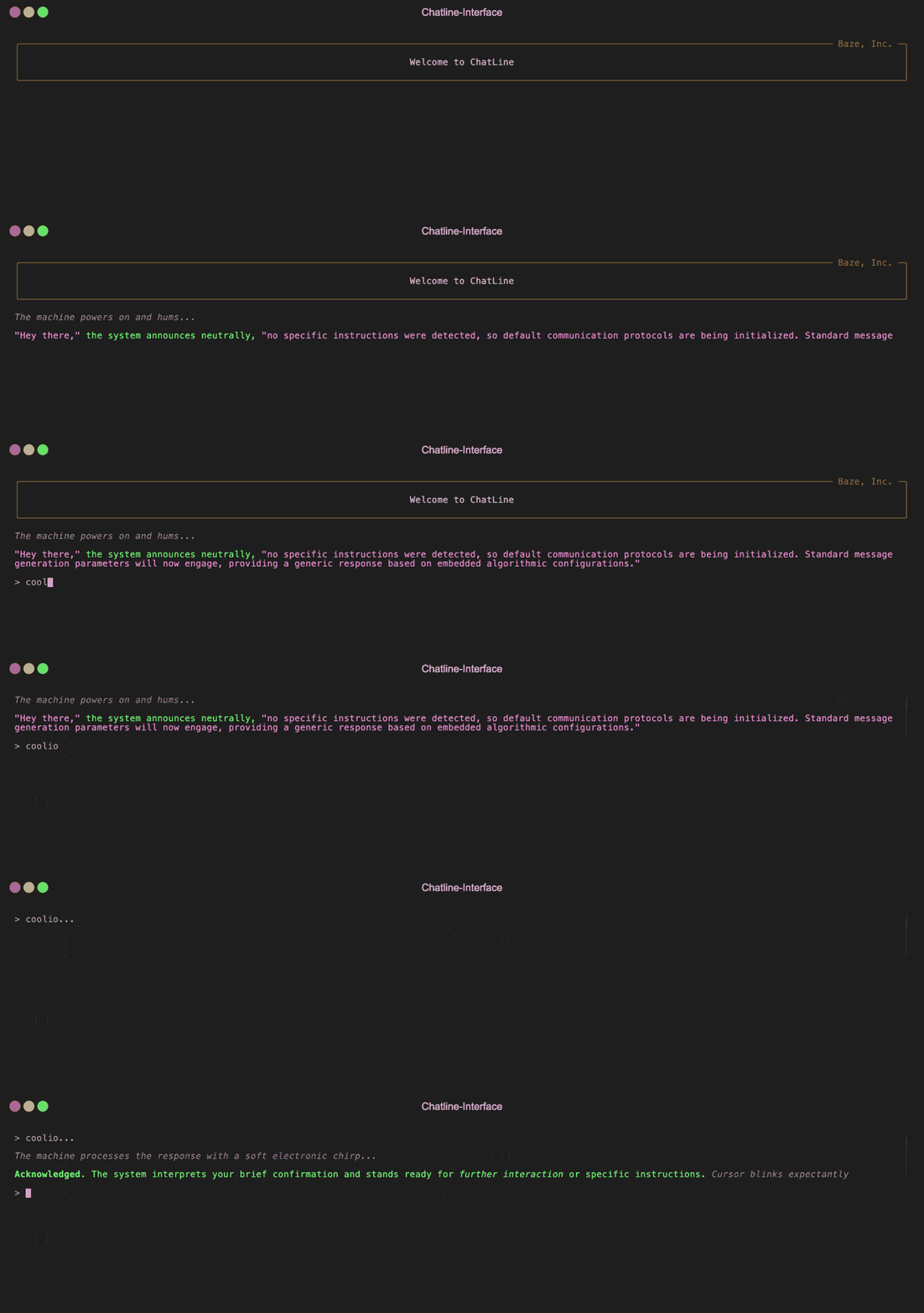
A lightweight CLI library for building terminal-based LLM chat interfaces with minimal effort. Provides rich text styling, animations, and conversation state management.
- Terminal UI: Rich text formatting with styled quotes, brackets, emphasis, and more
- Response Streaming: Real-time streamed responses with loading animations
- State Management: Conversation history with edit and retry functionality
- Multiple Providers: Run with AWS Bedrock, OpenRouter, or connect to a custom backend
- Keyboard Shortcuts: Ctrl+E to edit previous message, Ctrl+R to retry
Installation
pip install chatline
With Poetry:
poetry add chatline
Usage
There are two modes: Embedded (with built-in providers) and Remote (requires response generation endpoint).
Embedded Mode with AWS Bedrock (Default)
The easiest way to get started is to use the embedded generator with AWS Bedrock (the default provider):
from chatline import Interface

chat = Interface()

chat.start()
For more customization:
from chatline import Interface

# Initialize with AWS Bedrock (default provider)
chat = Interface(
    provider="bedrock",  # Optional: this is the default
    provider_config={
        "region": "us-west-2",
        "model_id": "anthropic.claude-3-5-haiku-20241022-v1:0",
        "profile_name": "development",
        "timeout": 120
    }
)

# Add optional welcome message
chat.preface(
    "Welcome",
    title="My App",
    border_color="green")

# Start the conversation with custom system and user messages
chat.start([
    {"role": "system", "content": "You are a friendly AI assistant that specializes in code generation."},
    {"role": "user", "content": "Can you help me with a Python project?"}
])
Embedded Mode with OpenRouter
You can also use OpenRouter as your provider: (Just make sure to set your OPENROUTER_API_KEY environment variable first)
from chatline import Interface

# Initialize with OpenRouter provider
chat = Interface(
    provider="openrouter",
    provider_config={
        "model": "deepseek/deepseek-chat-v3-0324",
        "temperature": 0.7,
        "top_p": 0.9,
        "frequency_penalty": 0.5,
        "presence_penalty": 0.5,
        "timeout": 60
    }
)

chat.start()
Remote Mode (Custom Backend)
You can also connect to a custom backend by providing the endpoint URL. Passing an empty array allows for the initial messages to be instantiated on the backend:
from chatline import Interface

# Initialize with remote mode
chat = Interface(endpoint="http://localhost:8000/chat")

# Start the conversation with custom system and user messages
chat.start([])
You can use generate_stream function (or build your own) in your backend. Here's an example in a FastAPI server:
import json
import uvicorn
from fastapi import FastAPI, Request
from fastapi.responses import StreamingResponse
from chatline import generate_stream

app = FastAPI()

CONVERSATION_STARTER = [
    {"role": "system", "content": "The Assistant is an Alien!!!"},
    {"role": "user", "content": "Introduce yourself to me!"},
]

@app.post("/chat")
async def stream_chat(request: Request):
    # Parse the request body
    body = await request.json()

    # Get conversation state
    state = body.get("conversation_state", {}) or {}

    # Get messages directly from the request body
    messages = body.get("messages", [])

    # Filter out any messages with empty content
    messages = [msg for msg in messages if msg.get("content", "").strip()]

    if not messages:
        messages = CONVERSATION_STARTER.copy()
        state["messages"] = messages

    # Return streaming response with state
    headers = {
        "Content-Type": "text/event-stream",
        "X-Conversation-State": json.dumps(state),
    }

    return StreamingResponse(
        generate_stream(messages, provider="bedrock"),
        headers=headers,
        media_type="text/event-stream",
    )

if __name__ == "__main__":
    uvicorn.run("server:app", host="127.0.0.1", port=8000)
Acknowledgements
Chatline was built with plenty of LLM assistance, particularly from Anthropic, Mistral and Continue.dev.
Release history Release notifications | RSS feed


Download files
Download the file for your platform. If you're not sure which to choose, learn more about installing packages.
Source Distribution
Built Distribution
Filter files by name, interpreter, ABI, and platform.
If you're not sure about the file name format, learn more about wheel file names.
Copy a direct link to the current filters
File details
Details for the file chatline-0.2.6.tar.gz.
File metadata
- Download URL: chatline-0.2.6.tar.gz
- Upload date:
- Size: 34.3 kB
- Tags: Source
- Uploaded using Trusted Publishing? No
- Uploaded via: twine/6.1.0 CPython/3.12.9
File hashes
| Algorithm | Hash digest | |
|---|---|---|
| SHA256 |
141337e100efd084053fdea6822203ef002aacedc41e3b36d9c7b898a4dc1da8
|
|
| MD5 |
ce522a062ed0737dda16e4e748091b39
|
|
| BLAKE2b-256 |
dcd4386fe56847cdba24edde1c368441f80c8f81551664d97c31ee6807c83c6c
|
File details
Details for the file chatline-0.2.6-py3-none-any.whl.
File metadata
- Download URL: chatline-0.2.6-py3-none-any.whl
- Upload date:
- Size: 45.9 kB
- Tags: Python 3
- Uploaded using Trusted Publishing? No
- Uploaded via: twine/6.1.0 CPython/3.12.9
File hashes
| Algorithm | Hash digest | |
|---|---|---|
| SHA256 |
0b403f77341756f12af2ba220e93e9e4296904b0ce959b6b84c3b03b918968ec
|
|
| MD5 |
abf4b29998c8accc248d2b02c8ecb9db
|
|
| BLAKE2b-256 |
91dc148db83ded9a913ecf1029d7a00ea0df1840559b3953f958532c44f64d98
|






