
No project description provided

Project description
ChatMock
Allows Codex to work in your favourite chat apps and coding tools.






Install
Homebrew
brew tap RayBytes/chatmock
brew install chatmock
pipx / pip
pipx install chatmock
GUI
Download from releases (macOS & Windows)
Docker
See DOCKER.md
Getting Started
# 1. Sign in with your ChatGPT account
chatmock login

# 2. Start the server
chatmock serve
The server runs at http://127.0.0.1:8000 by default. Use http://127.0.0.1:8000/v1 as your base URL for OpenAI-compatible apps.
Example usage
Raycast Integration
-
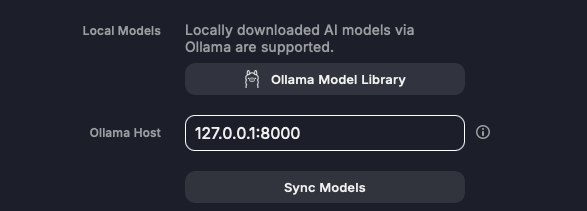
Configure the Host URL
Open your Raycast Extensions preferences, navigate to the Ollama settings section, and input the host URL (default is127.0.0.1:8000).
-
Sync Your Models
Click the Sync Models button, which will register all available models. -
Start Chatting
Open the Raycast AI Chat interface. You will now see model slugs which you can chat with.
Terax (Agentic Terminal) Integration
-
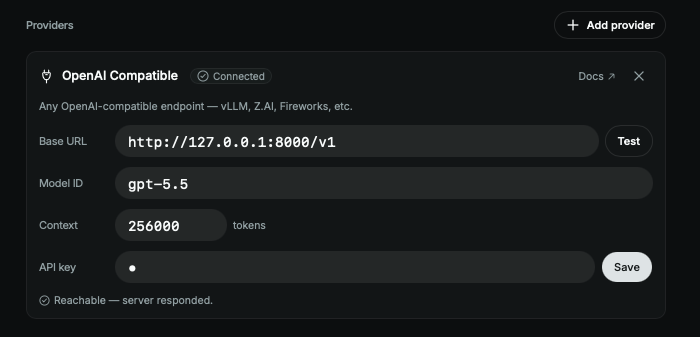
Configure the provider settings
Open your Terax settings, and switch to the Models tab, add a new provider (OpenAI Compatible), and input the host URL (default ishttp://127.0.0.1:8000/v1), along with the model IDs you wish to use (API key may be anything).
-
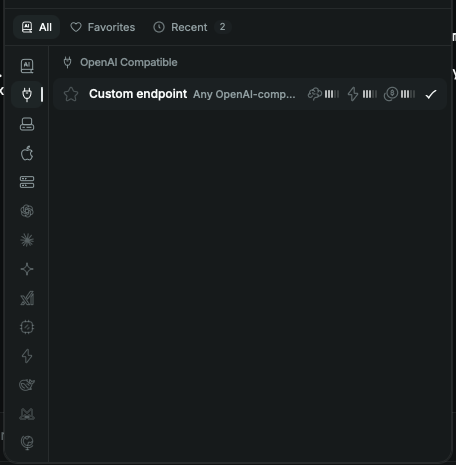
Favourite, and start using it!
Go back to your main chat window, select the model by going to the OpenAI Compatible icon, and clicking the model there (you may favourite it here to quickly select it the next time if you switch between models)
Supported Models
gpt-5.5gpt-5.4gpt-5.4-minigpt-5.3-codex-spark
Features
- Tool / function calling
- Vision / image input
- Thinking summaries (via think tags)
- Configurable thinking effort
- Fast mode for supported models
- Web search tool
- OpenAI-compatible
/v1/responses(HTTP + WebSocket) - Ollama-compatible endpoints
- Reasoning effort exposed as separate models (optional)
Configuration
All flags go after chatmock serve. These can also be set as environment variables.
| Flag | Env var | Options | Default | Description |
|---|---|---|---|---|
--reasoning-effort |
CHATGPT_LOCAL_REASONING_EFFORT |
none, minimal, low, medium, high, xhigh | medium | How hard the model thinks |
--reasoning-summary |
CHATGPT_LOCAL_REASONING_SUMMARY |
auto, concise, detailed, none | auto | Thinking summary verbosity |
--reasoning-compat |
CHATGPT_LOCAL_REASONING_COMPAT |
legacy, o3, think-tags | think-tags | How reasoning is returned to the client |
--fast-mode |
CHATGPT_LOCAL_FAST_MODE |
true/false | false | Priority processing for supported models |
--enable-web-search |
CHATGPT_LOCAL_ENABLE_WEB_SEARCH |
true/false | false | Allow the model to search the web |
--expose-reasoning-models |
CHATGPT_LOCAL_EXPOSE_REASONING_MODELS |
true/false | false | List each reasoning level as its own model |
Web search in a request
{
  "model": "gpt-5.4",
  "messages": [{"role": "user", "content": "latest news on ..."}],
  "responses_tools": [{"type": "web_search"}],
  "responses_tool_choice": "auto"
}
Fast mode in a request
{
  "model": "gpt-5.4",
  "input": "summarize this",
  "fast_mode": true
}
Important notice
Use responsibly and at your own risk. This project is not affiliated with OpenAI.
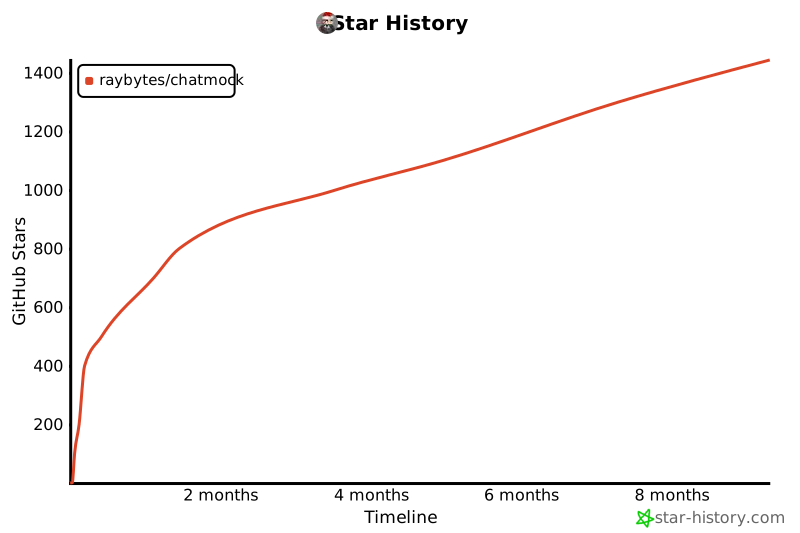
Star History
Release history Release notifications | RSS feed


Download files
Download the file for your platform. If you're not sure which to choose, learn more about installing packages.
Source Distribution
Built Distribution
Filter files by name, interpreter, ABI, and platform.
If you're not sure about the file name format, learn more about wheel file names.
Copy a direct link to the current filters
File details
Details for the file chatmock-1.38.tar.gz.
File metadata
- Download URL: chatmock-1.38.tar.gz
- Upload date:
- Size: 56.9 kB
- Tags: Source
- Uploaded using Trusted Publishing? Yes
- Uploaded via: twine/6.1.0 CPython/3.13.12
File hashes
| Algorithm | Hash digest | |
|---|---|---|
| SHA256 |
79ab10f71103dfb3f2f87c9befd27d160c0627728f6f0916a0d2a0ac661048a4
|
|
| MD5 |
0891a4fbab47cd6e058b66f0410718f6
|
|
| BLAKE2b-256 |
04f17d7fc6c9317af215d7439169cc37106835fff1b010da2ba16a6fbdfdd11c
|
Provenance
The following attestation bundles were made for chatmock-1.38.tar.gz:
Publisher:
release.yml on RayBytes/ChatMock
-
Statement:
-
Statement type:
https://in-toto.io/Statement/v1 -
Predicate type:
https://docs.pypi.org/attestations/publish/v1 -
Subject name:
chatmock-1.38.tar.gz -
Subject digest:
79ab10f71103dfb3f2f87c9befd27d160c0627728f6f0916a0d2a0ac661048a4 - Sigstore transparency entry: 1750245992
- Sigstore integration time:
-
Permalink:
RayBytes/ChatMock@0eb96f8e7a0f64ec176e9923b0c1c132f12166f1 -
Branch / Tag:
refs/tags/v1.38 - Owner: https://github.com/RayBytes
-
Access:
public
-
Token Issuer:
https://token.actions.githubusercontent.com -
Runner Environment:
github-hosted -
Publication workflow:
release.yml@0eb96f8e7a0f64ec176e9923b0c1c132f12166f1 -
Trigger Event:
push
-
Statement type:
File details
Details for the file chatmock-1.38-py3-none-any.whl.
File metadata
- Download URL: chatmock-1.38-py3-none-any.whl
- Upload date:
- Size: 63.1 kB
- Tags: Python 3
- Uploaded using Trusted Publishing? Yes
- Uploaded via: twine/6.1.0 CPython/3.13.12
File hashes
| Algorithm | Hash digest | |
|---|---|---|
| SHA256 |
03d67e73a53b94458b6994a75c0191933e02752339b35aaa98b6b49ca7ecaa59
|
|
| MD5 |
2a51d40ff77b324a773d8a9b0669bf7d
|
|
| BLAKE2b-256 |
088c249fd5fb3b973ce0649d6a95f742a5f80ab18312b304ef8d5b7c29a302c0
|
Provenance
The following attestation bundles were made for chatmock-1.38-py3-none-any.whl:
Publisher:
release.yml on RayBytes/ChatMock
-
Statement:
-
Statement type:
https://in-toto.io/Statement/v1 -
Predicate type:
https://docs.pypi.org/attestations/publish/v1 -
Subject name:
chatmock-1.38-py3-none-any.whl -
Subject digest:
03d67e73a53b94458b6994a75c0191933e02752339b35aaa98b6b49ca7ecaa59 - Sigstore transparency entry: 1750246120
- Sigstore integration time:
-
Permalink:
RayBytes/ChatMock@0eb96f8e7a0f64ec176e9923b0c1c132f12166f1 -
Branch / Tag:
refs/tags/v1.38 - Owner: https://github.com/RayBytes
-
Access:
public
-
Token Issuer:
https://token.actions.githubusercontent.com -
Runner Environment:
github-hosted -
Publication workflow:
release.yml@0eb96f8e7a0f64ec176e9923b0c1c132f12166f1 -
Trigger Event:
push
-
Statement type:






