
Terminal-based AI coding agent with typer+rich
Verified details
These details have been verified by PyPIProject links
GitHub Statistics
Maintainers

Project description
ChCode
 ███████╗  ██╗   ██╗   ███████╗   ██████╗   █████╗     ████████╗
██╔═════╝  ██║   ██║  ██╔═════╝  ██╔═══██╗  ██╔══██╗   ██╔═════╝
██║        ████████║  ██║        ██║   ██║  ██║   ██╗  ████████╗
██║        ██╔═══██║  ██║        ██║   ██║  ██║  ██╔╝  ██╔═════╝
████████╗  ██║   ██║  ████████╗  ╚██████╔╝  █████╔═╝   ████████╗
 ╚══════╝  ╚═╝   ╚═╝   ╚══════╝   ╚═════╝   ╚════╝      ╚══════╝
基于终端的 AI 编程代理,使用 LangChain + Typer + Rich 构建。
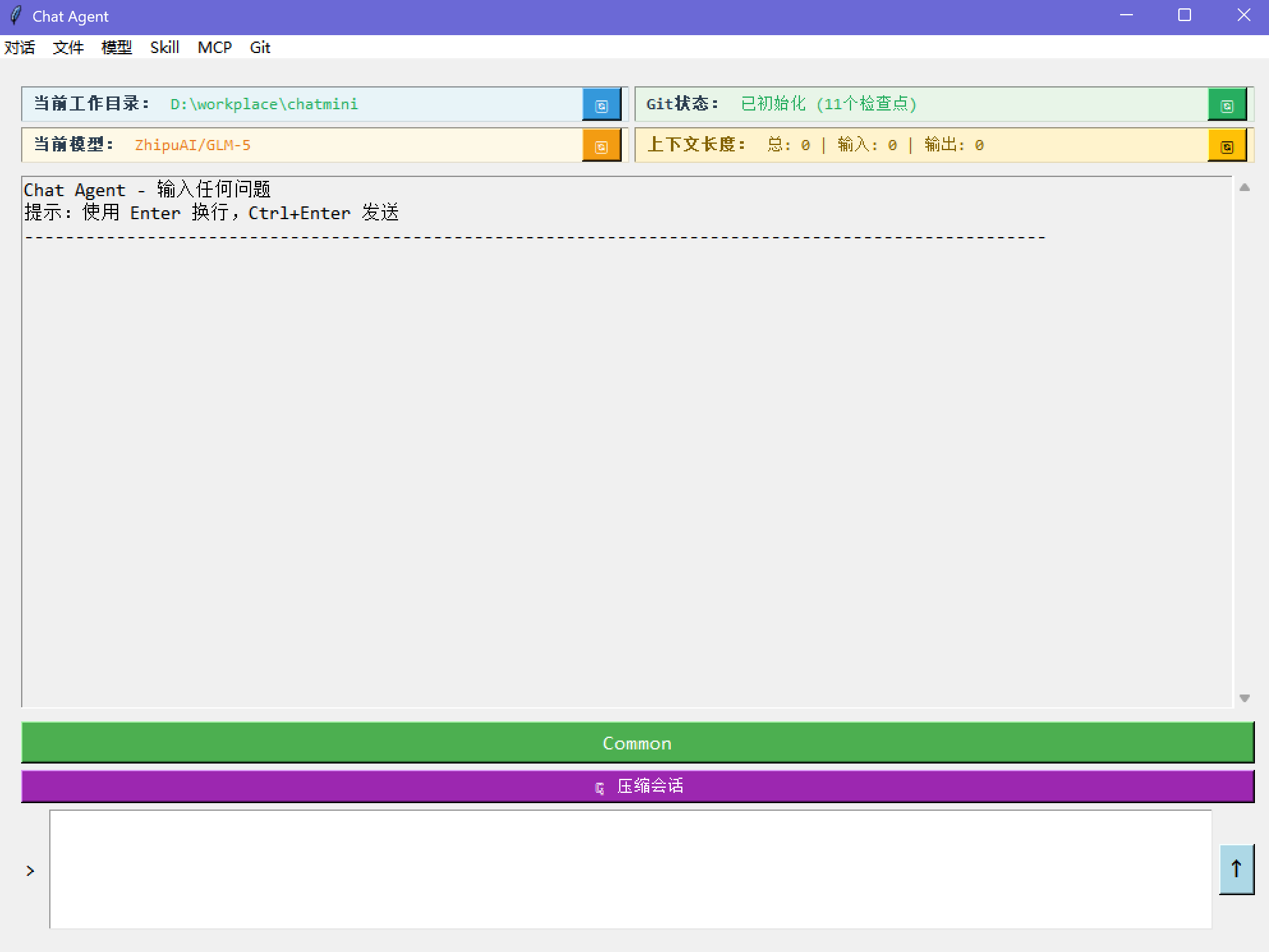
为什么叫 "ChCode"? 最初的原型是一个 tkinter + LangChain 应用,名为 chat-agent(chagent)。当它演变为 CLI 工具后,名字变成了 ChCode — chat-agent 遇上 code。
📸 chagent — 最初的 tkinter 原型
7000+ 行 Python 代码,14 个内置工具,完整会话持久化,Git 感知工作流。


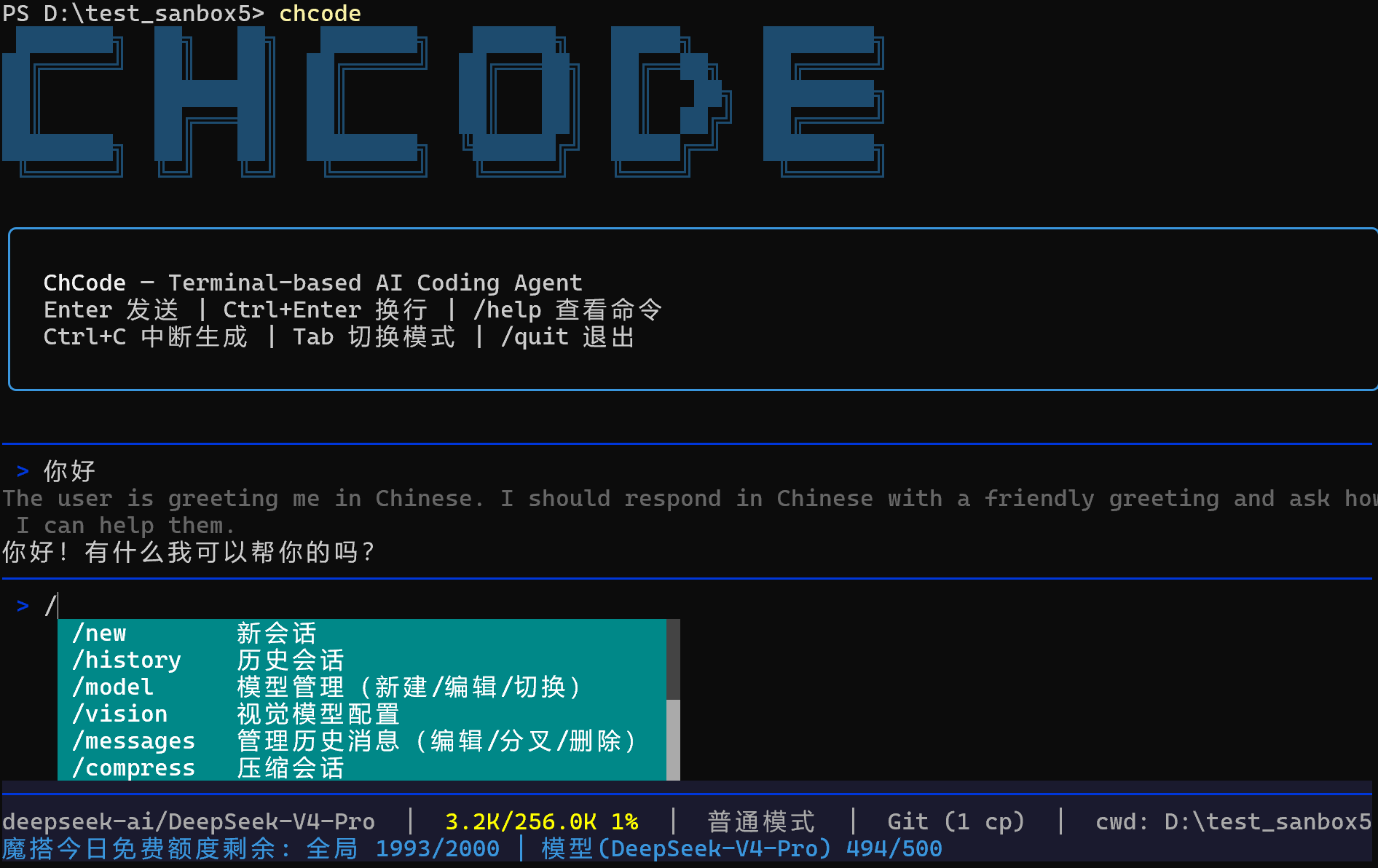
功能特性
模型管理
- 兼容所有 OpenAI 兼容 API(OpenAI、DeepSeek、Qwen、GLM、Claude 代理等)
- 内置 ModelScope、LongCat 等主流平台快捷配置
- ModelScope:每天 2000 次免费模型调用
- LongCat:每天最低 5000 万+ 免费 token
- 首次运行向导,自动检测环境变量(扫描
OPENAI_API_KEY、DEEPSEEK_API_KEY、ZHIPU_API_KEY、ModelScopeToken等) - 原生支持 reasoning/thinking 模型 — 实时显示思考过程
- 运行时创建 / 编辑 / 切换模型
- 每个模型独立调参(temperature、top_p、top_k、max_completion_tokens、stop_sequences 等)
- 指数退避自动重试(3/10/30/60s),持续失败时自动切换备用模型
视觉与多模态
- 通过
/vision命令独立配置视觉模型(与主模型分离) - 图片分析,支持自动媒体编码和 base64 嵌入
- 视频支持 — 直接将视频发送给视觉模型进行分析(MP4、MOV、AVI、MKV、WebM)
- 大尺寸图片自动缩放
- 支持的图片格式:PNG、JPG、JPEG、GIF、BMP、WebP、TIFF
会话与历史
- 持久化会话,基于 SQLite 的检查点存储(LangGraph)
- 会话列表、切换、重命名、删除
- 上下文压缩 — 接近 token 上限时自动摘要
- 状态栏实时显示上下文使用量
Git 集成
- 编辑消息时工作目录自动回滚
- 从任意消息创建分支(fork)
- 通过
/messages编辑 / fork / 删除历史消息 - 状态栏显示检查点计数
人工审核
- Common 模式 — 每次工具调用需要确认,编辑操作显示 diff 预览。仅可使用 Explore 和 Plan 子代理
- YOLO 模式 — 自动批准所有操作。所有子代理可用,包括 General-purpose
- 通过
Tab键或/mode命令切换 - 切换模式时自动更新可用子代理列表
工作环境隔离
- 每个项目独立的
.chat/目录存放会话、技能、代理 - 全局
~/.chat/存放共享技能和设置 /workdir切换项目根目录
跨平台
- Windows — 默认使用 Git Bash,回退到 PowerShell
- Linux / Mac — 原生 bash/zsh
- 持久化 Shell 会话,自动追踪 CWD
终端 UI
- 实时状态栏 — 上下文使用率、Git 检查点数、ModelScope API 配额
- 流式输出,逐 token 渲染
- 斜杠命令自动补全
- 彩色工具审核界面,文件编辑显示行内 diff 预览
可观测性
- LangSmith 追踪 — 通过
/langsmith命令开关 - 遇到 429 限流时自动禁用追踪并通知用户
子代理系统
- 三种内置代理类型:Explore(代码库搜索,只读)、Plan(架构设计,只读)、General-purpose(全能力编程)
- 模式感知可用性 — 普通模式:仅 Explore + Plan;YOLO 模式:全部三种 + 自定义代理
- 并行执行 — 同时启动多个代理处理独立任务,带实时旋转进度显示
- 子代理运行在隔离上下文中,保护主对话不被上下文污染
- 只读代理(Explore、Plan)具有 bash 命令限制,防止误修改
- 自定义代理 — 在
.chat/agents/中定义自己的代理类型,配备专属工具和指令
技能系统
- 通过
/skill安装 / 删除 / 管理技能 - 技能通过 LangChain 中间件注入系统提示
- 支持项目级和全局技能目录
ModelScope 限额监控
- 状态栏实时显示 API 配额(每日剩余额度、每模型剩余额度)
- 使用 ModelScope 模型时自动启用
内置工具(14 个)
| 工具 | 说明 |
|---|---|
read |
读取文件内容,支持行号和偏移量 |
write |
创建或覆盖文件 |
edit |
精准字符串替换编辑现有文件 |
glob |
按文件名模式查找文件 |
grep |
用正则搜索文件内容 |
list_dir |
浏览目录结构 |
bash |
执行 Shell 命令(Git Bash / PowerShell / bash) |
load_skill |
通过中间件动态加载技能指令 |
web_fetch |
抓取 URL 内容并转换为 Markdown |
web_search |
通过 Tavily 进行网络搜索 |
ask_user |
单选、多选、批量问题与用户交互 |
agent |
启动子代理(Explore、Plan、YOLO 模式下含 General-purpose、custom),支持并行执行 |
todo_write |
结构化任务追踪,适用于复杂多步骤工作 |
vision |
通过视觉模型分析图片和视频 |
快速开始
安装
# 稳定版(PyPI)— 三选一
pip install chcode        # pip
uv tool install chcode    # uv(推荐)
pipx install chcode       # pipx

# 最新版(GitHub)— 二选一
uv tool install git+https://github.com/ScarletMercy/chcode.git    # uv(推荐)
pipx install git+https://github.com/ScarletMercy/chcode.git       # pipx

# 开发测试(从源码)
git clone https://github.com/ScarletMercy/chcode.git
cd chcode
pip install -e .       # 或: uv sync && uv run chcode
运行
# 启动交互式会话
chcode

# 以 YOLO 模式启动
chcode --yolo

# 模型管理
chcode config new    # 添加新模型
chcode config edit   # 编辑当前模型
chcode config switch # 切换模型
首次运行
首次启动时,ChCode 会:
- 扫描环境变量中的已知 API Key
- 引导你完成模型配置
- 可选配置 Tavily 用于网络搜索
命令
| 命令 | 说明 |
|---|---|
/new |
新建会话 |
/history |
浏览和切换会话 |
/model |
模型管理(新建 / 编辑 / 切换) |
/vision |
视觉模型配置 |
/messages |
编辑 / fork / 删除历史消息 |
/compress |
压缩当前会话 |
/skill |
管理技能 |
/search |
配置 Tavily API Key |
/workdir |
切换工作目录 |
/mode |
切换 Common / YOLO 模式 |
/git |
显示 Git 状态 |
/langsmith |
开关 LangSmith 追踪 |
/tools |
列出内置工具 |
/quit |
退出 |
快捷键
| 按键 | 操作 |
|---|---|
Enter |
发送消息 |
Ctrl+Enter |
换行 |
Tab |
切换 Common/YOLO 模式(输入为空时) |
Ctrl+C |
中断生成 |
为什么不用 MCP?
ChCode 故意不集成 MCP(Model Context Protocol)。技能 + CLI 工具的组合覆盖了 95%+ 的真实编程代理场景。技能通过中间件注入结构化、可复用的指令 — 比 MCP 服务器更简单、更快、更轻量。
架构
chcode/
├── cli.py                  # Typer CLI 入口
├── chat.py                 # REPL 主循环、斜杠命令、人工审核
├── agent_setup.py          # 代理构建、中间件、模型重试与回退
├── config.py               # 模型配置、Tavily、环境变量检测
├── display.py              # Rich 渲染、流式输出、状态栏
├── prompts.py              # 交互式提示(选择/确认/文本)
├── vision_config.py        # 视觉模型配置管理
├── agents/
│   ├── definitions.py      # 代理类型(explore、plan、general)
│   ├── loader.py           # 从 .chat/agents/ 加载自定义代理
│   └── runner.py           # 子代理执行(含中间件)
└── utils/
    ├── tools.py            # 内置工具
    ├── enhanced_chat_openai.py  # 扩展 ChatOpenAI,支持 reasoning
    ├── frontmatter.py      # YAML Frontmatter 解析
    ├── git_checker.py      # Git 可用性检查
    ├── git_manager.py      # Git 检查点管理
    ├── json_utils.py       # JSON 原子读写 + mtime 缓存
    ├── modelscope_ratelimit.py  # ModelScope API 限额监控
    ├── multimodal.py       # 多模态模型检测与媒体编码
    ├── session.py          # 会话管理器(SQLite)
    ├── skill_loader.py     # 技能发现与加载
    ├── skill_manager.py    # 技能安装/删除 UI
    ├── text_utils.py       # 消息内容文本提取
    ├── tool_result_pipeline.py  # 输出截断与预算控制
    └── shell/
        ├── provider.py     # Shell 提供者抽象(Bash/PowerShell)
        ├── session.py      # 交互式 Shell 会话
        ├── output.py       # 输出捕获与临时文件
        ├── result.py       # 执行结果数据类
        └── semantics.py    # 输出语义分析(错误检测等)
许可证
MIT
Project details
Verified details
These details have been verified by PyPIProject links
GitHub Statistics
Maintainers


Download files
Download the file for your platform. If you're not sure which to choose, learn more about installing packages.
Source Distribution
Built Distribution
Filter files by name, interpreter, ABI, and platform.
If you're not sure about the file name format, learn more about wheel file names.
Copy a direct link to the current filters
File details
Details for the file chcode-0.1.2.tar.gz.
File metadata
- Download URL: chcode-0.1.2.tar.gz
- Upload date:
- Size: 9.0 MB
- Tags: Source
- Uploaded using Trusted Publishing? Yes
- Uploaded via: twine/6.1.0 CPython/3.13.12
File hashes
| Algorithm | Hash digest | |
|---|---|---|
| SHA256 |
5108528274bb745b70e5fb92b73dc6f1278dc64d21835246be00646f39814d04
|
|
| MD5 |
0b5255c2a2e4de8a41e7c3461afc0990
|
|
| BLAKE2b-256 |
e0d4548671b744e306e8c4e45e37f2052f1524835d21c9a79254d28367a64d1c
|
Provenance
The following attestation bundles were made for chcode-0.1.2.tar.gz:
Publisher:
publish.yml on ScarletMercy/chcode
-
Statement:
-
Statement type:
https://in-toto.io/Statement/v1 -
Predicate type:
https://docs.pypi.org/attestations/publish/v1 -
Subject name:
chcode-0.1.2.tar.gz -
Subject digest:
5108528274bb745b70e5fb92b73dc6f1278dc64d21835246be00646f39814d04 - Sigstore transparency entry: 1879345338
- Sigstore integration time:
-
Permalink:
ScarletMercy/chcode@e7990e746d8c98c353c35bd98bb648afd9de42eb -
Branch / Tag:
refs/tags/v0.1.2 - Owner: https://github.com/ScarletMercy
-
Access:
public
-
Token Issuer:
https://token.actions.githubusercontent.com -
Runner Environment:
github-hosted -
Publication workflow:
publish.yml@e7990e746d8c98c353c35bd98bb648afd9de42eb -
Trigger Event:
push
-
Statement type:
File details
Details for the file chcode-0.1.2-py3-none-any.whl.
File metadata
- Download URL: chcode-0.1.2-py3-none-any.whl
- Upload date:
- Size: 105.1 kB
- Tags: Python 3
- Uploaded using Trusted Publishing? Yes
- Uploaded via: twine/6.1.0 CPython/3.13.12
File hashes
| Algorithm | Hash digest | |
|---|---|---|
| SHA256 |
dc89b3b0a5bbd2aa9edfc52da670c45cb1adf71152dbc30e1cbe811aaf984a9f
|
|
| MD5 |
a6fac4a80ef3106416fa744435043b58
|
|
| BLAKE2b-256 |
06b7e4b8ed12a6cf82be7ed98b544d5cb71906df1e5e8e5d981ecf4b94c2e6e3
|
Provenance
The following attestation bundles were made for chcode-0.1.2-py3-none-any.whl:
Publisher:
publish.yml on ScarletMercy/chcode
-
Statement:
-
Statement type:
https://in-toto.io/Statement/v1 -
Predicate type:
https://docs.pypi.org/attestations/publish/v1 -
Subject name:
chcode-0.1.2-py3-none-any.whl -
Subject digest:
dc89b3b0a5bbd2aa9edfc52da670c45cb1adf71152dbc30e1cbe811aaf984a9f - Sigstore transparency entry: 1879345462
- Sigstore integration time:
-
Permalink:
ScarletMercy/chcode@e7990e746d8c98c353c35bd98bb648afd9de42eb -
Branch / Tag:
refs/tags/v0.1.2 - Owner: https://github.com/ScarletMercy
-
Access:
public
-
Token Issuer:
https://token.actions.githubusercontent.com -
Runner Environment:
github-hosted -
Publication workflow:
publish.yml@e7990e746d8c98c353c35bd98bb648afd9de42eb -
Trigger Event:
push
-
Statement type:






