
chDB is an in-process OLAP SQL Engine powered by ClickHouse


Project description






chdb-core
chdb-core is the foundational engine of the chDB ecosystem — an in-process SQL OLAP Engine powered by ClickHouse [^1]
Table of Contents
- chDB Ecosystem
- Features
- Architecture
- Installation
- Quick Start
- API Reference
- Demos and Examples
- Benchmark
- Documentation
- Contributing
chDB Ecosystem
The chDB project is split into two packages:
| Package | Role | Install |
|---|---|---|
| chdb-core (this repo) | C++ engine + Session / Connection / DB-API interfaces | pip install chdb-core |
| chDB | Pandas-compatible DataStore API built on top of chdb-core | pip install chdb |
┌───────────────────────────────────────────┐
│          chDB (pip install chdb)          │
│  ┌─────────────────────────────────────┐  │
│  │  DataStore: pandas-like lazy API    │  │
│  │  QueryPlanner / dual-engine exec    │  │
│  └──────────────────┬──────────────────┘  │
│                     │                     │
│  ┌──────────────────▼──────────────────┐  │
│  │  chdb-core (pip install chdb-core)  │  │
│  │  C++ ClickHouse Engine              │  │
│  │  Session / Connection / DB-API      │  │
│  │  query() / UDF / Stream             │  │
│  └─────────────────────────────────────┘  │
└───────────────────────────────────────────┘
chdb-core provides everything you need to run SQL queries with ClickHouse performance — no server required. If you want a higher-level pandas-compatible DataFrame API, install chDB instead.
Features
- In-process SQL OLAP Engine, powered by ClickHouse
- No need to install ClickHouse
- Minimized data copy from C++ to Python with python memoryview
- Input & Output support Parquet, CSV, JSON, Arrow, ORC and 60+ more formats
- Session and Connection management with stateful queries
- Streaming query support for constant-memory processing
- Python DB-API 2.0 compliance
- User Defined Functions (UDF) support
- AI-assisted SQL generation
Architecture
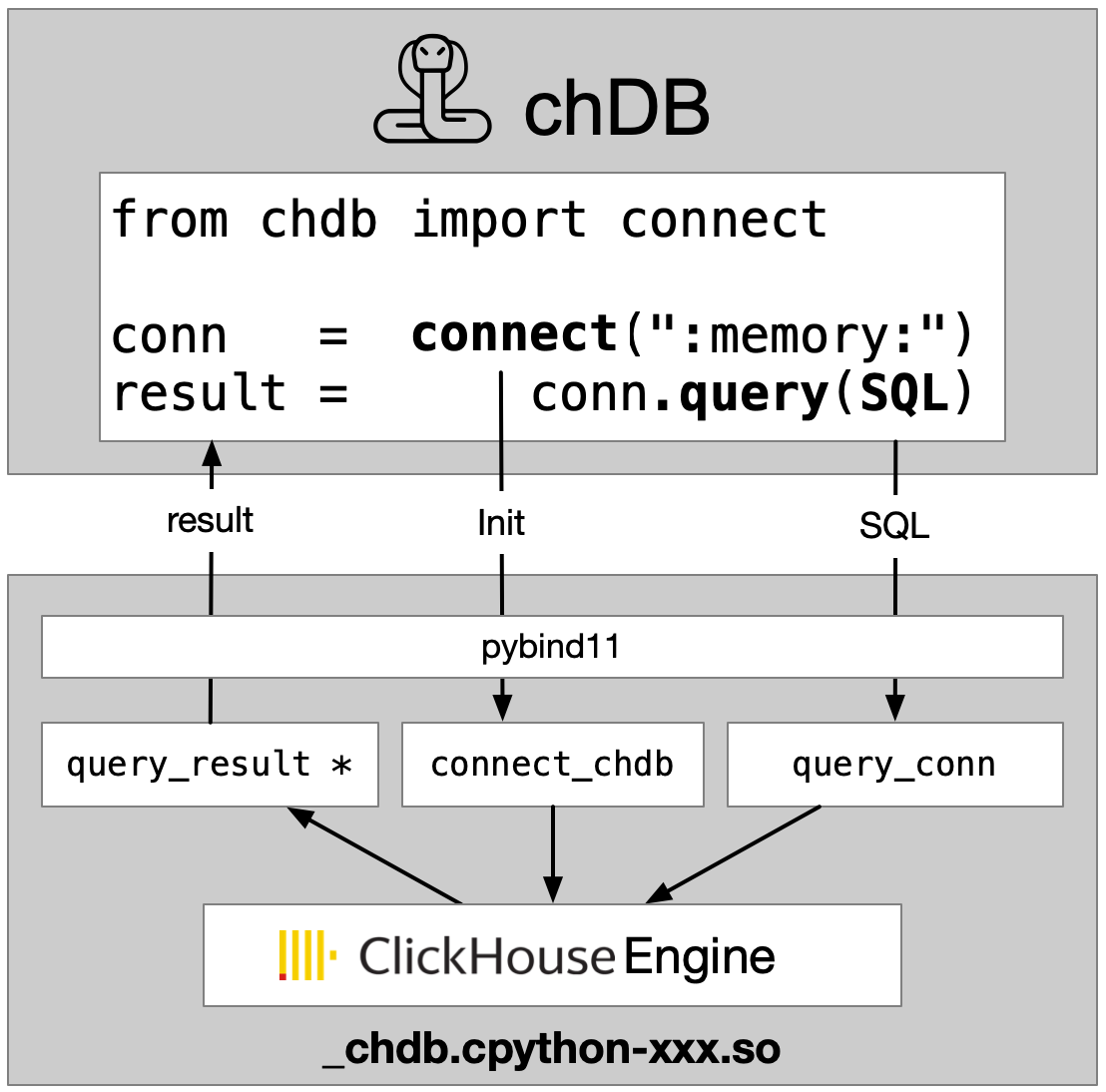
Installation
Currently, chdb-core supports Python 3.9+ on macOS and Linux (x86_64 and ARM64).
pip install chdb-core
Quick Start
import chdb

result = chdb.query("SELECT version()", "Pretty")
print(result)
API Reference
One-shot Query
The simplest way to run SQL — no session or connection needed:
import chdb

# Basic query with CSV output (default)
result = chdb.query("SELECT 1, 'hello'")
print(result)

# Pandas DataFrame output
df = chdb.query("SELECT number, number * 2 AS double FROM numbers(10)", "DataFrame")
print(df)

# Parameterized queries
df = chdb.query(
    "SELECT toDate({base_date:String}) + number AS date "
    "FROM numbers({total_days:UInt64}) "
    "LIMIT {items_per_page:UInt64}",
    "DataFrame",
    params={"base_date": "2025-01-01", "total_days": 10, "items_per_page": 5},
)
print(df)
Query on Files (Parquet, CSV, JSON, Arrow, ORC and 60+)
import chdb

res = chdb.query('SELECT * FROM file("data.parquet", Parquet)', "JSON")
print(res)

res = chdb.query('SELECT * FROM file("data.csv", CSV)', "CSV")
print(res)

# Query result statistics
print(f"SQL read {res.rows_read()} rows, {res.bytes_read()} bytes, "
      f"storage read {res.storage_rows_read()} rows, {res.storage_bytes_read()} bytes, "
      f"elapsed {res.elapsed()} seconds")

# Pandas DataFrame output
chdb.query('SELECT * FROM file("data.parquet", Parquet)', "Dataframe")
Connection API
Connection-based API for cursor-style interaction, supporting both in-memory and file-based databases:
import chdb

conn = chdb.connect(":memory:")
cur = conn.cursor()

cur.execute("CREATE TABLE test (id UInt32, name String) ENGINE = Memory")
cur.execute("INSERT INTO test VALUES (1, 'Alice'), (2, 'Bob'), (3, 'Charlie')")
cur.execute("SELECT * FROM test ORDER BY id")

print(cur.fetchone())      # (1, 'Alice')
print(cur.fetchmany(2))    # ((2, 'Bob'), (3, 'Charlie'))
print(cur.column_names())  # ['id', 'name']
print(cur.column_types())  # ['UInt32', 'String']

# Use the cursor as an iterator
cur.execute("SELECT number FROM system.numbers LIMIT 3")
for row in cur:
    print(row)

# Always close resources when done
cur.close()
conn.close()
For more details, see examples/connect.py.
# File-based persistent database
conn = chdb.connect("mydata.db")
conn.query("CREATE TABLE IF NOT EXISTS logs (ts DateTime, msg String) ENGINE = MergeTree ORDER BY ts")
conn.query("INSERT INTO logs VALUES (now(), 'started')")
result = conn.query("SELECT * FROM logs", "Pretty")
print(result)
conn.close()
Stateful Session
Sessions provide a higher-level API with automatic resource management:
from chdb import session as chs

sess = chs.Session()
sess.query("CREATE DATABASE IF NOT EXISTS db_xxx ENGINE = Atomic")
sess.query("CREATE TABLE IF NOT EXISTS db_xxx.log_table (x String, y Int) ENGINE = Log")
sess.query("INSERT INTO db_xxx.log_table VALUES ('a', 1), ('b', 3), ('c', 2), ('d', 5)")
sess.query("CREATE VIEW db_xxx.view_xxx AS SELECT * FROM db_xxx.log_table LIMIT 4")

print(sess.query("SELECT * FROM db_xxx.view_xxx", "Pretty"))
see also: test_stateful.py.
Streaming Query
Process large datasets with constant memory usage through chunked streaming:
from chdb import session as chs

sess = chs.Session()

rows_cnt = 0
with sess.send_query("SELECT * FROM numbers(200000)", "CSV") as stream_result:
    for chunk in stream_result:
        rows_cnt += chunk.rows_read()

print(rows_cnt) # 200000

# Example 2: Manual iteration with fetch()
rows_cnt = 0
stream_result = sess.send_query("SELECT * FROM numbers(200000)", "CSV")
while True:
    chunk = stream_result.fetch()
    if chunk is None:
        break
    rows_cnt += chunk.rows_read()

print(rows_cnt) # 200000
For more details, see test_streaming_query.py.
Python DB-API 2.0
import chdb.dbapi as dbapi
print("chdb driver version: {0}".format(dbapi.get_client_info()))

conn1 = dbapi.connect()
cur1 = conn1.cursor()
cur1.execute('select version()')
print("description: ", cur1.description)
print("data: ", cur1.fetchone())
cur1.close()
conn1.close()
Query on Table (Pandas DataFrame, Parquet file/bytes, Arrow bytes)
import chdb.dataframe as cdf
import pandas as pd
# Join 2 DataFrames
df1 = pd.DataFrame({'a': [1, 2, 3], 'b': ["one", "two", "three"]})
df2 = pd.DataFrame({'c': [1, 2, 3], 'd': ["①", "②", "③"]})
ret_tbl = cdf.query(sql="select * from __tbl1__ t1 join __tbl2__ t2 on t1.a = t2.c",
                  tbl1=df1, tbl2=df2)
print(ret_tbl)
# Query on the DataFrame Table
print(ret_tbl.query('select b, sum(a) from __table__ group by b'))
# Pandas DataFrames are automatically registered as temporary tables in ClickHouse
chdb.query("SELECT * FROM Python(df1) t1 JOIN Python(df2) t2 ON t1.a = t2.c").show()
Python Table Engine
Query on Pandas DataFrame
import chdb
import pandas as pd
df = pd.DataFrame(
    {
        "a": [1, 2, 3, 4, 5, 6],
        "b": ["tom", "jerry", "auxten", "tom", "jerry", "auxten"],
    }
)

chdb.query("SELECT b, sum(a) FROM Python(df) GROUP BY b ORDER BY b").show()
Query on Arrow Table
import chdb
import pyarrow as pa
arrow_table = pa.table(
    {
        "a": [1, 2, 3, 4, 5, 6],
        "b": ["tom", "jerry", "auxten", "tom", "jerry", "auxten"],
    }
)

chdb.query("SELECT b, sum(a) FROM Python(arrow_table) GROUP BY b ORDER BY b").show()
see also: test_query_py.py.
User Defined Functions (UDF)
from chdb.udf import chdb_udf
from chdb import query

@chdb_udf()
def sum_udf(lhs, rhs):
    return int(lhs) + int(rhs)

print(query("SELECT sum_udf(12, 22)"))
Some notes on chDB Python UDF(User Defined Function) decorator.
- The function should be stateless. So, only UDFs are supported, not UDAFs(User Defined Aggregation Function).
- Default return type is String. If you want to change the return type, you can pass in the return type as an argument. The return type should be one of the following: https://clickhouse.com/docs/en/sql-reference/data-types
- The function should take in arguments of type String. As the input is TabSeparated, all arguments are strings.
- The function will be called for each line of input. Something like this:
def sum_udf(lhs, rhs): return int(lhs) + int(rhs) for line in sys.stdin: args = line.strip().split('\t') lhs = args[0] rhs = args[1] print(sum_udf(lhs, rhs)) sys.stdout.flush() - The function should be pure python function. You SHOULD import all python modules used IN THE FUNCTION.
def func_use_json(arg): import json ... - Python interpertor used is the same as the one used to run the script. Get from
sys.executable
see also: test_udf.py.
Query Progress
import chdb

# Auto-detect: TTY progress in terminal, progress bar in notebook
conn = chdb.connect(":memory:?progress=auto")
conn.query("SELECT sum(number) FROM numbers_mt(1e10) GROUP BY number % 10 SETTINGS max_threads=4")
Progress options: progress=auto | progress=tty | progress=err | progress=off
AI-assisted SQL Generation
import chdb

conn = chdb.connect("file::memory:?ai_provider=openai&ai_model=gpt-4o-mini")
conn.query("CREATE TABLE nums (n UInt32) ENGINE = Memory")
conn.query("INSERT INTO nums VALUES (1), (2), (3)")

sql = conn.generate_sql("Select all rows from nums ordered by n desc")
print(sql)  # SELECT * FROM nums ORDER BY n DESC

print(conn.ask("List the numbers table", format="Pretty"))
Command Line
python3 -m chdb SQL [OutputFormat]
python3 -m chdb "SELECT 1,'abc'" Pretty
Demos and Examples
- Project Documentation and Usage Examples
- Colab Notebooks and other Script Examples
Benchmark
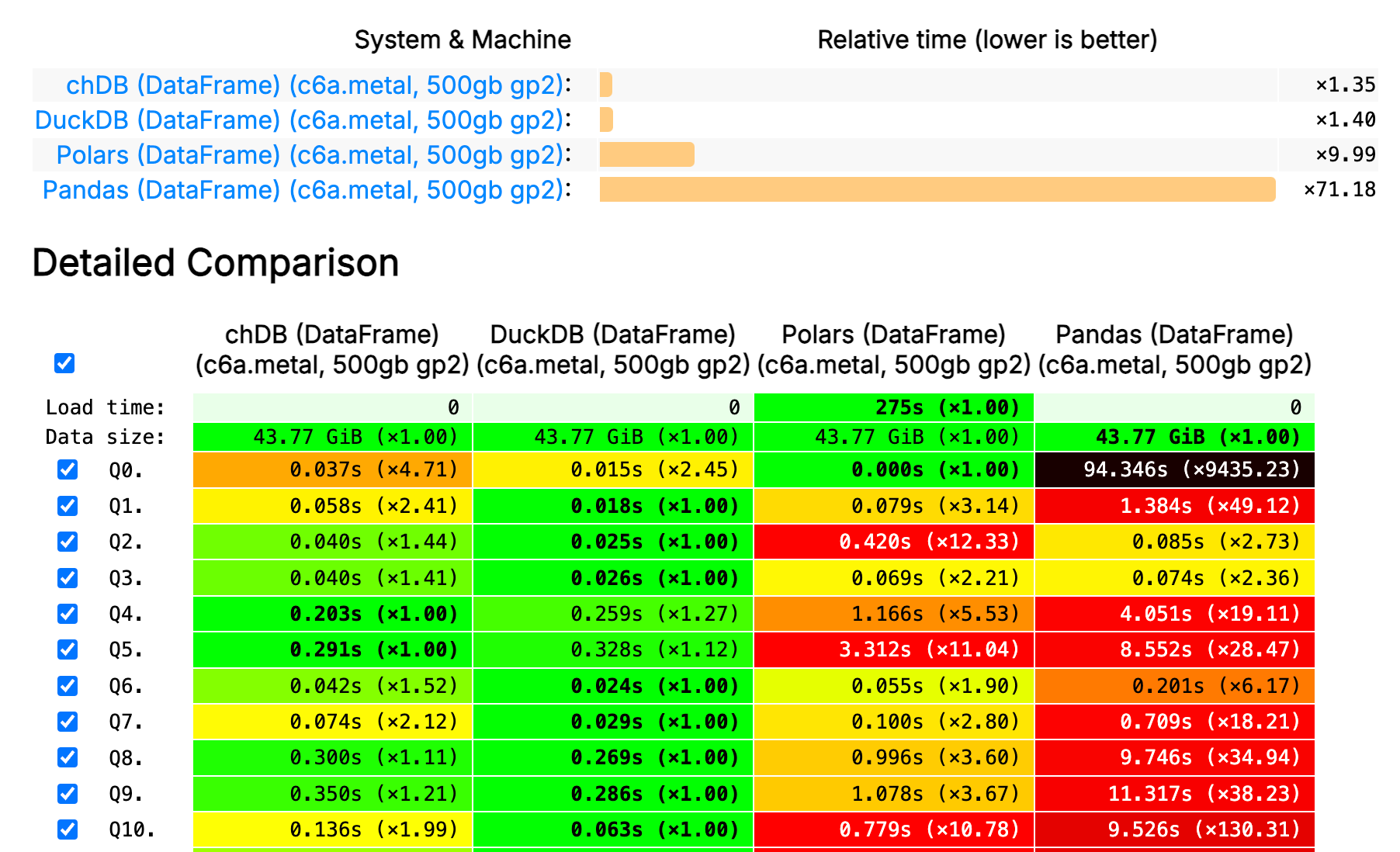
Documentation
- For chDB specific examples and documentation refer to chDB docs
- For SQL syntax, please refer to ClickHouse SQL Reference
- For pandas-like DataStore API, see chDB
AI Coding Agent Skill
chDB provides an AI Skill that teaches AI coding agents (Cursor, Claude Code, etc.) chDB's multi-source data analytics API. Install it so your AI assistant can write correct chDB code out of the box:
curl -sL https://raw.githubusercontent.com/chdb-io/chdb/main/install_skill.sh | bash
Events
- Demo chDB at ClickHouse v23.7 livehouse! and Slides
Contributing
Contributions are what make the open source community such an amazing place to learn, inspire, and create. Any contributions you make are greatly appreciated.
- Help test and report bugs
- Help improve documentation
- Help improve code quality and performance
Bindings
We welcome bindings for other languages, please refer to bindings for more details.
Version Guide
Please refer to VERSION-GUIDE.md for more details.
Paper
License
Apache 2.0, see LICENSE for more information.
Acknowledgments
chDB is mainly based on ClickHouse [^1] for trade mark and other reasons, I named it chDB.
Contact
- Discord: https://discord.gg/D2Daa2fM5K
- Email: auxten@clickhouse.com
- Twitter: @chdb
[^1]: ClickHouse® is a trademark of ClickHouse Inc. All trademarks, service marks, and logos mentioned or depicted are the property of their respective owners. The use of any third-party trademarks, brand names, product names, and company names does not imply endorsement, affiliation, or association with the respective owners.
Release history Release notifications | RSS feed


Download files
Download the file for your platform. If you're not sure which to choose, learn more about installing packages.
Source Distributions
Built Distributions
Filter files by name, interpreter, ABI, and platform.
If you're not sure about the file name format, learn more about wheel file names.
Copy a direct link to the current filters
File details
Details for the file chdb_core-26.3.0-cp39-abi3-manylinux2014_x86_64.manylinux_2_17_x86_64.whl.
File metadata
- Download URL: chdb_core-26.3.0-cp39-abi3-manylinux2014_x86_64.manylinux_2_17_x86_64.whl
- Upload date:
- Size: 159.0 MB
- Tags: CPython 3.9+, manylinux: glibc 2.17+ x86-64
- Uploaded using Trusted Publishing? No
- Uploaded via: twine/6.2.0 CPython/3.9.25
File hashes
| Algorithm | Hash digest | |
|---|---|---|
| SHA256 |
2b91a47a69db1185908f51aebdb32d1258cf7c0646e7dc6be3d2922cb694e3ad
|
|
| MD5 |
6dd1fb46325676556b9a124006234929
|
|
| BLAKE2b-256 |
8aefde277cc1b1e452eda2669581c2be1899daf523af3125141183548817e00c
|
File details
Details for the file chdb_core-26.3.0-cp39-abi3-manylinux2014_aarch64.manylinux_2_17_aarch64.whl.
File metadata
- Download URL: chdb_core-26.3.0-cp39-abi3-manylinux2014_aarch64.manylinux_2_17_aarch64.whl
- Upload date:
- Size: 120.8 MB
- Tags: CPython 3.9+, manylinux: glibc 2.17+ ARM64
- Uploaded using Trusted Publishing? No
- Uploaded via: twine/6.2.0 CPython/3.9.25
File hashes
| Algorithm | Hash digest | |
|---|---|---|
| SHA256 |
dcbec93852abaa94937242da65644c563bde389ae5d0d67caae6d46067af95c5
|
|
| MD5 |
be25463a57726928fa89ac1192cad1b2
|
|
| BLAKE2b-256 |
03b1ef4add0ffcf903d094a7974f8d41f7af92f1937e4b852e61fe908c4cd97c
|
File details
Details for the file chdb_core-26.3.0-cp39-abi3-macosx_11_0_arm64.whl.
File metadata
- Download URL: chdb_core-26.3.0-cp39-abi3-macosx_11_0_arm64.whl
- Upload date:
- Size: 92.0 MB
- Tags: CPython 3.9+, macOS 11.0+ ARM64
- Uploaded using Trusted Publishing? No
- Uploaded via: twine/6.2.0 CPython/3.9.25
File hashes
| Algorithm | Hash digest | |
|---|---|---|
| SHA256 |
bc2d889ed2f9273c44a89cba7383f2b4d8f0bdfeed38af09f49160484a625d42
|
|
| MD5 |
3f8774bcbb84b8317a85e5f89c1d6e3e
|
|
| BLAKE2b-256 |
4969dc1b788581b7544c21db42fe02bc27ade24477c2baef004c4e95024af665
|
File details
Details for the file chdb_core-26.3.0-cp39-abi3-macosx_10_15_x86_64.whl.
File metadata
- Download URL: chdb_core-26.3.0-cp39-abi3-macosx_10_15_x86_64.whl
- Upload date:
- Size: 108.5 MB
- Tags: CPython 3.9+, macOS 10.15+ x86-64
- Uploaded using Trusted Publishing? No
- Uploaded via: twine/6.2.0 CPython/3.9.25
File hashes
| Algorithm | Hash digest | |
|---|---|---|
| SHA256 |
83b76bd4bb026a74b5a3134582fc552fde10451969f3a20722f664b3b712d913
|
|
| MD5 |
95eb4b4d3add6b674ad18c30f6375d21
|
|
| BLAKE2b-256 |
d5777cd81c89c2bf3d6ad592474fbd01926206cd5be1dfbb80c8423eeea21103
|






