
Linuxfabrik ChecklistFabrik
Python tool that generates interactive HTML checklists from YAML templates. Jinja conditionals, reusable includes, pluggable modules, built-in web server. Ideal for SOPs, deployments & recurring ops. • made by Linuxfabrik








ChecklistFabrik - Open Source Checklist Maker Tool
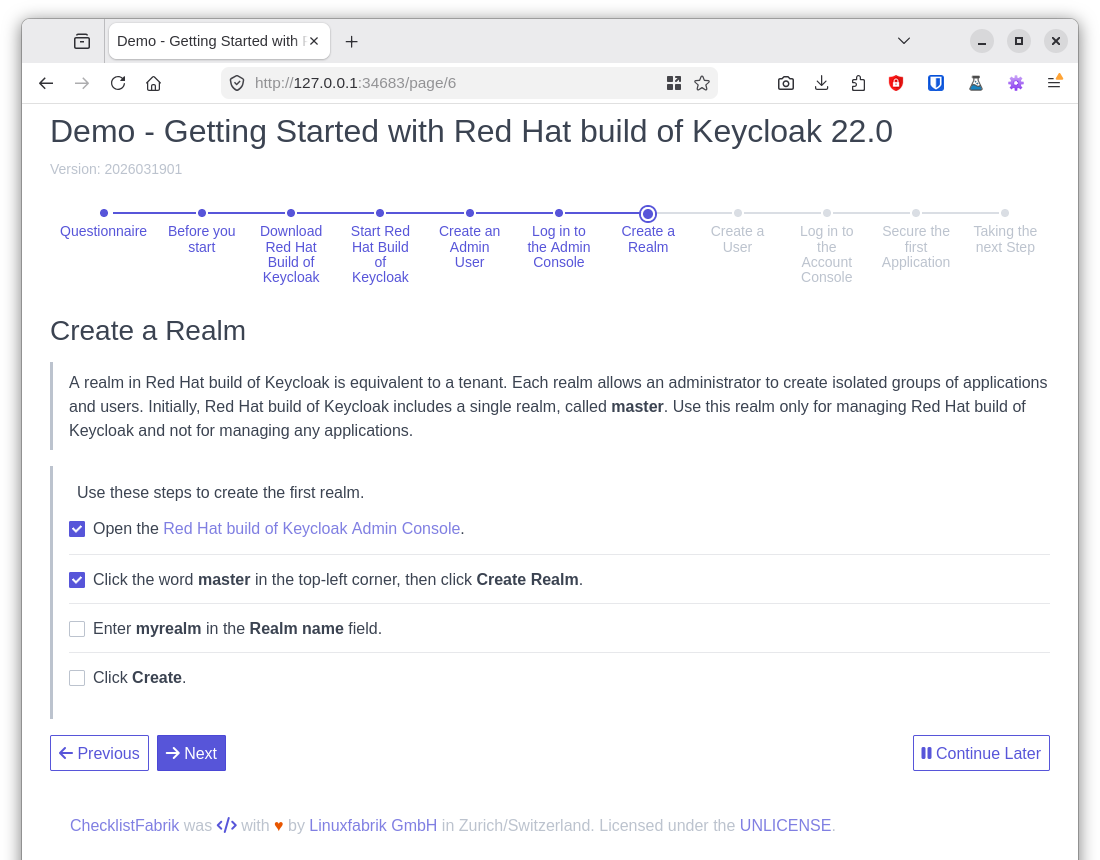
ChecklistFabrik (clf-play) is a Python 3 tool designed to manage your team's recurring checklists, processes, and procedures. It leverages simple yet powerful YAML templates to create interactive HTML forms for an enhanced user experience. Utilize variables and logic through the Jinja templating language to define adaptive procedures, and enjoy seamless progress tracking.
If ChecklistFabrik helps you running your team's SOPs, deployments and recurring procedures, please give it a star.
Documentation
Full documentation is available at linuxfabrik.github.io/checklistfabrik. It is automatically built and deployed on every push to main.
Features
-
Auto-Save on Every Submit: Progress is written to the report file on every page change, not only on a clean shutdown. Closing the browser tab mid-run no longer loses already-submitted answers — re-open the report later to continue.
-
Dashboard: Run
clf-playwithout arguments to open a web dashboard that lists all your templates and reports. Start new checklists or re-open previous ones with a single click. -
Dynamic Item Exclusion: Automatically mark pages or tasks as inapplicable using conditional
whenexpressions. (See the User Guide for details.) -
HTML Interface with Built-In Web Server: View and complete checklists via a user-friendly HTML interface powered by a built-in local web server.
-
Jinja Templating Support: Create dynamic checklists using variables and Boolean expressions enabled by the Jinja templating language.
-
Simple YAML Checklists: Define templates and generate reports with plain YAML, making version control with systems such as Git straightforward.
-
Static Report Export: Convert a completed report into AsciiDoc, HTML, Markdown, PDF or reStructuredText with
clf-export, or straight from the dashboard. Commit the result next to the YAML source, review it in a pull request or publish it in your documentation, without installing or starting ChecklistFabrik. (See the User Guide for details.) -
Sub-Checklists with a "Run" Button: Embed another checklist template as a card on a page. Clicking the Run button launches the referenced template in a new browser tab as an independent checklist with its own report file — useful for splitting long procedures into reusable, self-contained sub-checklists.
-
Template Includes for Rapid Checklist Generation: Reuse checklist templates to quickly generate multiple checklists from a single file, eliminating the need to start from scratch each time.
Definitions and Terms
-
Checklist: A series of tasks outlining a procedure, organized into pages.
-
Page: A collection of tasks displayed simultaneously to the user.
-
Report: The output of a checklist run—a YAML file generated from a template.
-
Task: A description of work to be performed. Tasks can appear in various forms, such as text fields, checkboxes, radio buttons, or non-interactive text blocks (see the User Guide for details).
-
Checklist Template: A YAML file used to create checklists, intended for reuse rather than direct execution.
-
Task Module: To support an extensible architecture, ChecklistFabrik delegates task rendering to separate, pluggable Python modules. A valid task module is any Python module within the
checklistfabrik.modulesnamespace that provides amainmethod returning a dictionary that includes anhtmlkey with the rendered HTML as its value. A module may additionally provide anexportmethod that describes the task independently of any output format, which makes it part of static report exports.
Installation
Using uv (recommended)
The recommended way to install ChecklistFabrik. You can run it without a permanent install:
uvx checklistfabrik
Or install it as a tool:
uv tool install checklistfabrik
For other installation methods (pipx, pip, development setup), see the PyPI page.
From Git (For Development)
git clone https://github.com/Linuxfabrik/checklistfabrik.git
cd checklistfabrik
pip install --editable .
Quick Start
A checklist template is a simple YAML file:
title: 'Server Maintenance'
description: 'Monthly maintenance procedure for production servers.'
version: '2025031901'

pages:
  - title: 'Preparation'
    tasks:
      - linuxfabrik.clf.text_input:
          label: 'Ticket number'
          required: true
        fact_name: 'ticket'

      - linuxfabrik.clf.checkbox_input:
          values:
            - label: 'Notify users about the maintenance window'
            - label: 'Create a full backup'
          required: true

  - title: 'Maintenance'
    tasks:
      - linuxfabrik.clf.markdown:
          content: 'Working on ticket **{{ ticket }}**.'

      - linuxfabrik.clf.checkbox_input:
          label: 'Apply updates and reboot'
          required: true
Run it:
# Open the dashboard (auto-detects templates/ and reports/ subdirectories):
clf-play

# Or run a template directly:
clf-play --template server-maintenance.yml
To explore the bundled examples in a dashboard, run:
cd examples/
clf-play
For the full guide on creating checklists—including conditional pages, imports, and all task modules—see the User Guide.
Usage
Open the Dashboard
clf-play
The dashboard scans for *.yml files and lists them as templates and reports:
- If
templates/and/orreports/subdirectories exist in the current working directory, they are used automatically. - If only one of them exists, the other falls back to the current directory.
- If both point to the same directory, all files are shown in both sections — use "Run" to start a new checklist or "View" to re-open an existing one.
You can override this with explicit paths:
clf-play --templates-dir ./my-templates --reports-dir ./my-reports
Create a New Checklist From a Template
clf-play --template path/to/template.yml path/to/report.yml
The destination file may be omitted; in that case:
- If the template specifies a
report_path, then that field is used to generate a new filename. - Otherwise, a generic, timestamped filename is generated.
Re-Open an Existing Checklist
clf-play path/to/existing_checklist.yml
Export a Report as a Static Document
clf-export path/to/report.yml --format rst
Supported formats are asciidoc, html, markdown, pdf and rst. The document is written next to the report unless --output or --output-dir says otherwise, and the YAML report itself is left untouched. Pass a directory to export all reports in it, and --output - to write to stdout.
PDF export needs an optional dependency:
pip install 'checklistfabrik[pdf]'
Credits, License
- Authors: Linuxfabrik GmbH, Zurich
- License: The Unlicense, see LICENSE file
2 maintainers


Metadata
2 maintainers
Release files for checklistfabrik 1.12.1
For a detailed explanation of source distributions (sdists) and built distributions (wheels), please see the package formats documentation.
Source distribution (sdist)
| File | Size | Uploaded | |
|---|---|---|---|
| checklistfabrik-1.12.1.tar.gz | 454.2 kB | Details |
Built distribution (wheel)
| File | Interpreter | ABI | Platform | Reset |
|---|---|---|---|---|
| checklistfabrik-1.12.1-py3-none-any.whl | Python 3 | none | any | Details |
Total release size: 916.1 kB
Release files / checklistfabrik-1.12.1.tar.gz
| Download URL | checklistfabrik-1.12.1.tar.gz |
|---|---|
| Size | 454.2 kB |
| Tags | Source |
|
SHA-256 checksum How to use checksums |
03dcfb4be2cf7399a8f64d756fb0cc438a92229859be61d370361ea65c34e9f4
|
|
BLAKE2b-256 checksum How to use checksums |
32af13502acb70dd4513a74c857354ce37aa1473ff042c4222969615c95231dd
|
| Upload date | |
|
Uploaded using Trusted Publishing? What is trusted publishing? |
Yes |
| Uploaded via |
twine/7.0.0 CPython/3.13.14
|
Provenance
Provenance describes where a file came from. On PyPI, provenance is shared via attestations, which provide a verifiable record of the build or publishing details. View details, limitations and caveats.


PyPI Publish Attestation
PyPI verified that this artifact, at this checksum, originated from the publisher listed below.
Signed by GitHub Actions, verified by PyPI on Sep 22, 2026.
Transparency logRelease files / checklistfabrik-1.12.1-py3-none-any.whl
| Download URL | checklistfabrik-1.12.1-py3-none-any.whl |
|---|---|
| Size | 461.9 kB |
| Tags | Python 3 |
|
SHA-256 checksum How to use checksums |
bed4fc7ce4e9764d93dfd61baa99fae66b2d408fa56e2c03dd263d8339977369
|
|
BLAKE2b-256 checksum How to use checksums |
ed2933ffac3789cef2b3ad929c710680d639705362effaf63bade85971263efa
|
| Upload date | |
|
Uploaded using Trusted Publishing? What is trusted publishing? |
Yes |
| Uploaded via |
twine/7.0.0 CPython/3.13.14
|
Provenance
Provenance describes where a file came from. On PyPI, provenance is shared via attestations, which provide a verifiable record of the build or publishing details. View details, limitations and caveats.
PyPI Publish Attestation
PyPI verified that this artifact, at this checksum, originated from the publisher listed below.
Signed by GitHub Actions, verified by PyPI on Sep 22, 2026.
Transparency log













