
chemdraw-mcp




Claude draws the chemistry it talks about: structures, reactions, mechanisms and lab graphics, right in the chat.
Interactive molecule panels in the chat and PNG/SVG files on disk, rendered locally with RDKit. Free and open source (Apache-2.0). No API key, no sign-up, no ChemDraw licence.
Quick start
- Download the Claude Desktop extension
(
chemdraw-mcp-<version>.mcpb), double-click it and confirm in Claude Desktop. - Open a new chat and say "Use the ChemDraw MCP: draw thalidomide".
- Try one of the prompts below or the tool table.
Other ways in (PyPI, cloning the repository, editing the config by hand) are under Installation.

What you get
A structure you can work with
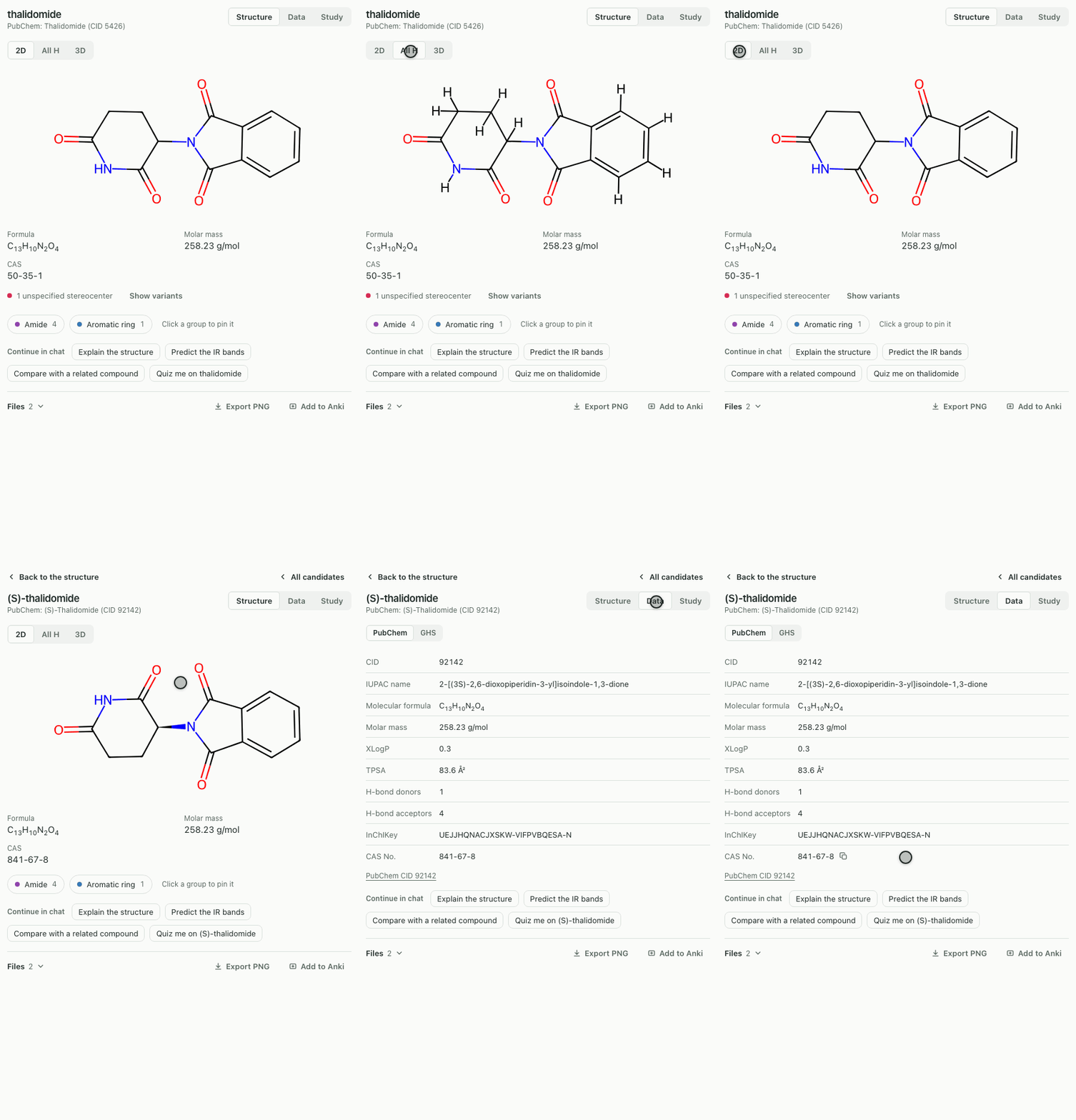
Ask for thalidomide and the panel shows the skeletal formula, molecular formula, molar mass and CAS number, plus the PubChem record those numbers belong to.
All Hredraws the molecule with every hydrogen atom. Sugars also getFischerandHaworthchips where the projection applies.- Open stereochemistry is flagged, not guessed. Thalidomide's stereocentre shows up as "1 unspecified stereocenter".
Show variantsdraws every stereoisomer (up to three open stereo elements). Pick (S) and it is redrawn with wedges.- A name found under another spelling says so under the title ("Found as").
3D in one click
Every structure has a 3D chip. For morphine, the five fused rings that lie
flat on paper become a rigid cage you can turn.
- The server computes a conformer (RDKit ETKDG plus a force field) and swaps the drawing for a ball-and-stick model with explicit hydrogens.
- Drag to rotate. A second click returns to the drawing.
- The conformer is cached, and the SDF file lands in
~/ChemDraw-Output/3d/.
Data, flashcards and files
- Hover a functional group of capsaicin (amide, phenol, ether) and its atoms light up in the structure, with name and short formula below.
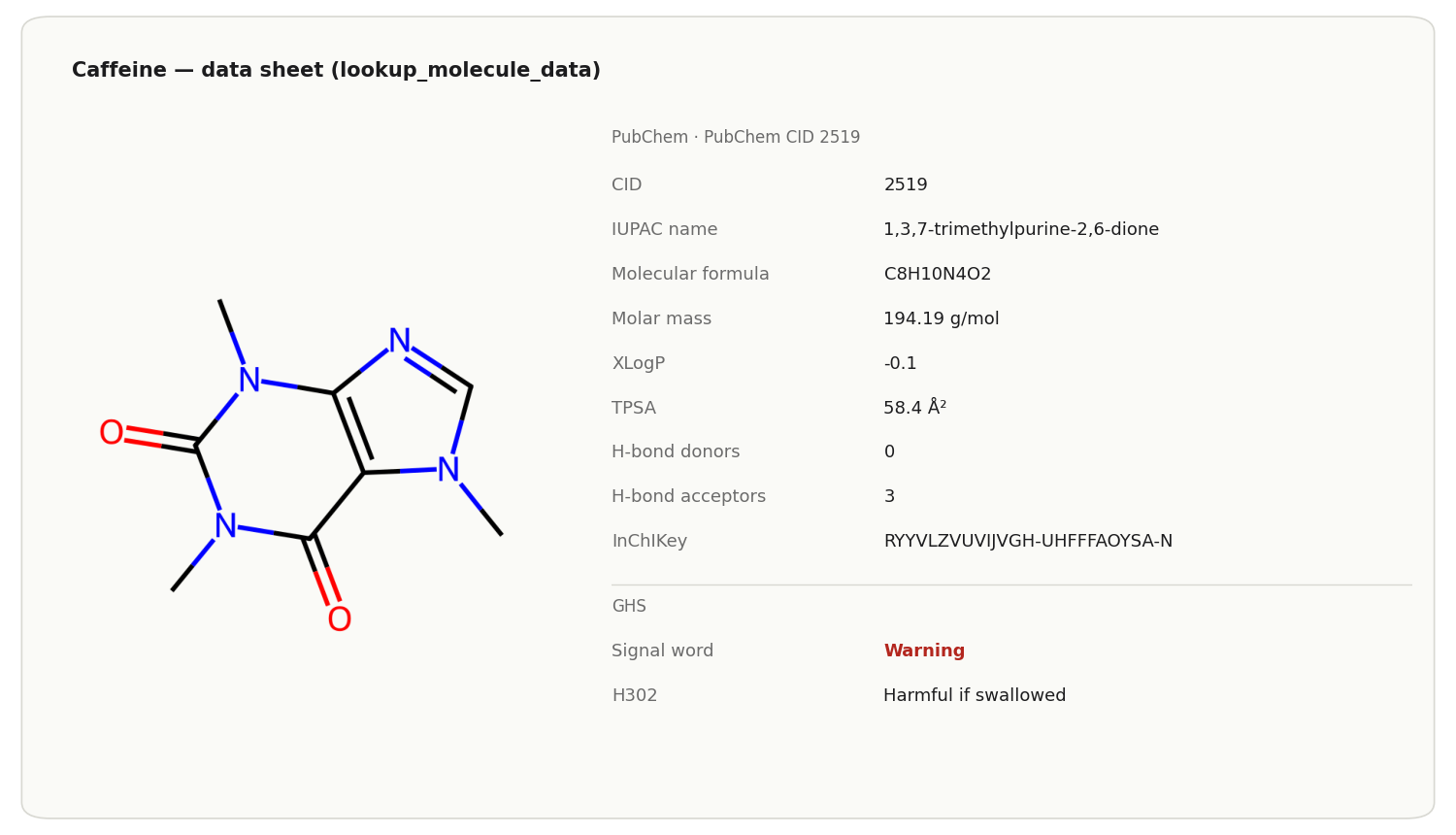
Dataturns the panel into the PubChem data sheet with properties and GHS hazards. It loads on the first click and then stays cached. This part needs the internet.Export PNGsaves the drawing to~/ChemDraw-Output/png/; where the host allows it, the image also goes to the clipboard.Add to Ankiadds a structure card to the deck "ChemDraw", or saves the deck file if Anki cannot take it.- Every drawing tool also writes PNG and SVG files to
~/ChemDraw-Output/. ChemDraw CDXML on request.

Prompts to try
- "Draw thalidomide", then click Show variants and pick (S).
- "Show morphine as a rotatable 3D model", or draw it and click 3D.
- "Draw capsaicin", then hover a functional group or click Data.
More prompts: reactions, mechanisms and lab graphics
| Prompt | What you get |
|---|---|
| "Draw thalidomide" | the structure, then Show variants for (R) and (S) |
| "Show morphine as a rotatable 3D model" | a ball-and-stick model (generate_3d) |
| "Draw capsaicin and explain why it is poorly soluble in water" | the structure beside the answer, groups to hover |
| "Draw adrenaline with all hydrogen atoms" | the structure opened in the All H view |
| "Give me a data sheet for lysergic acid diethylamide" | PubChem properties and GHS hazards (lookup_molecule_data) |
| "What is the difference between testosterone and estradiol?" | both structures side by side, differences highlighted (compare_molecules) |
| "Draw the nitration of benzene with nitric and sulfuric acid as a reaction scheme" | reactants, products and conditions on the arrow (generate_reaction) |
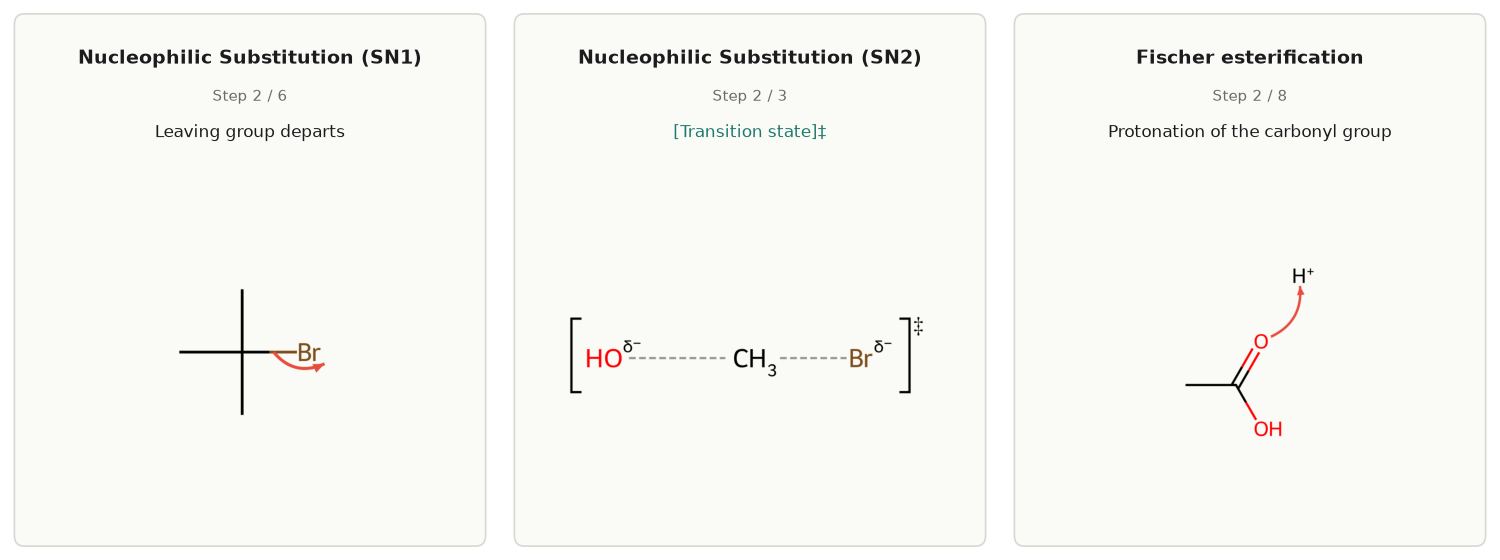
| "Show the SN1 mechanism of tert-butyl bromide with water step by step" | each step with curved electron-flow arrows (generate_mechanism) |
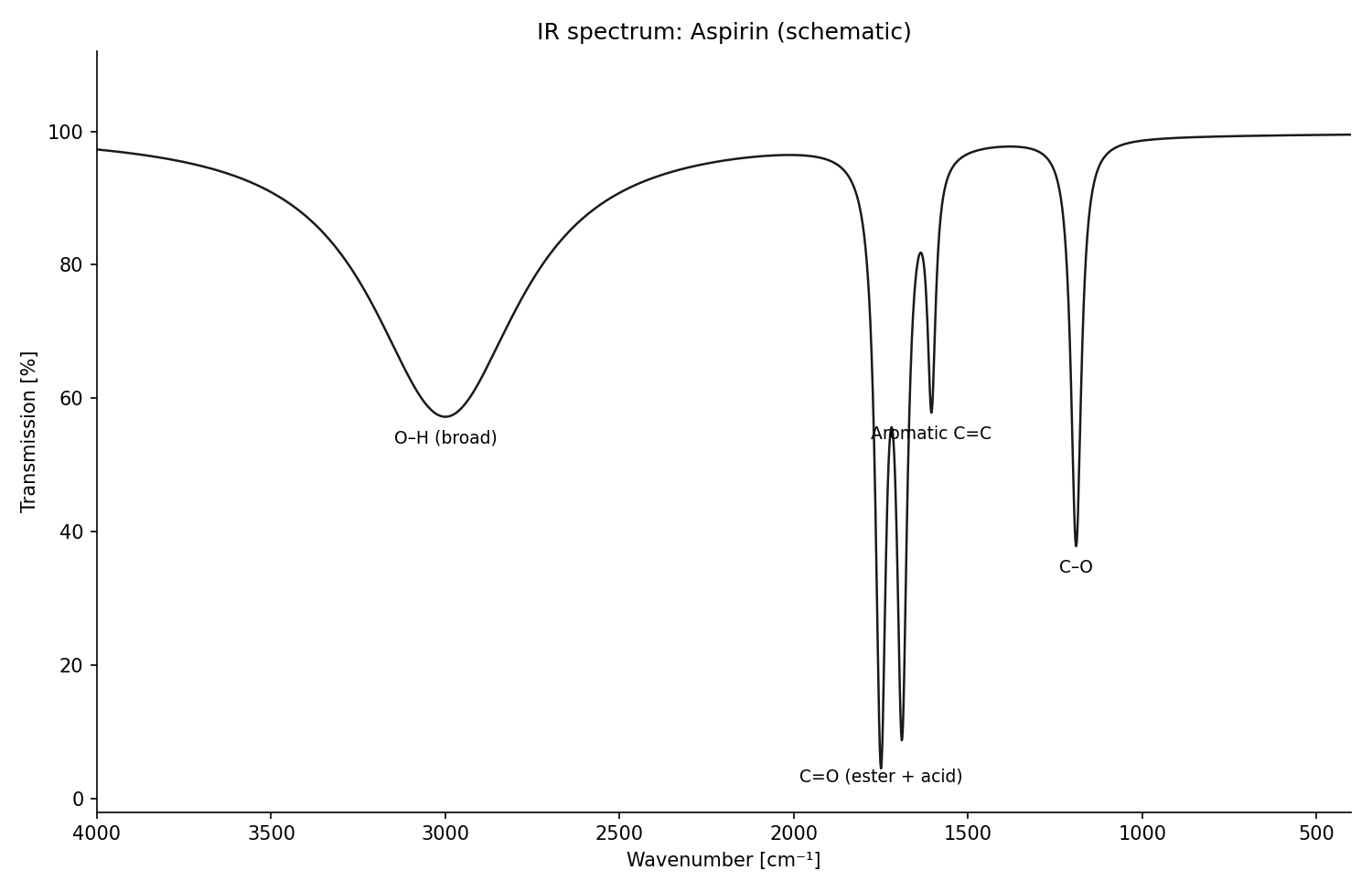
| "Draw a schematic IR spectrum of capsaicin" | a spectrum from typical literature bands (generate_spectrum) |
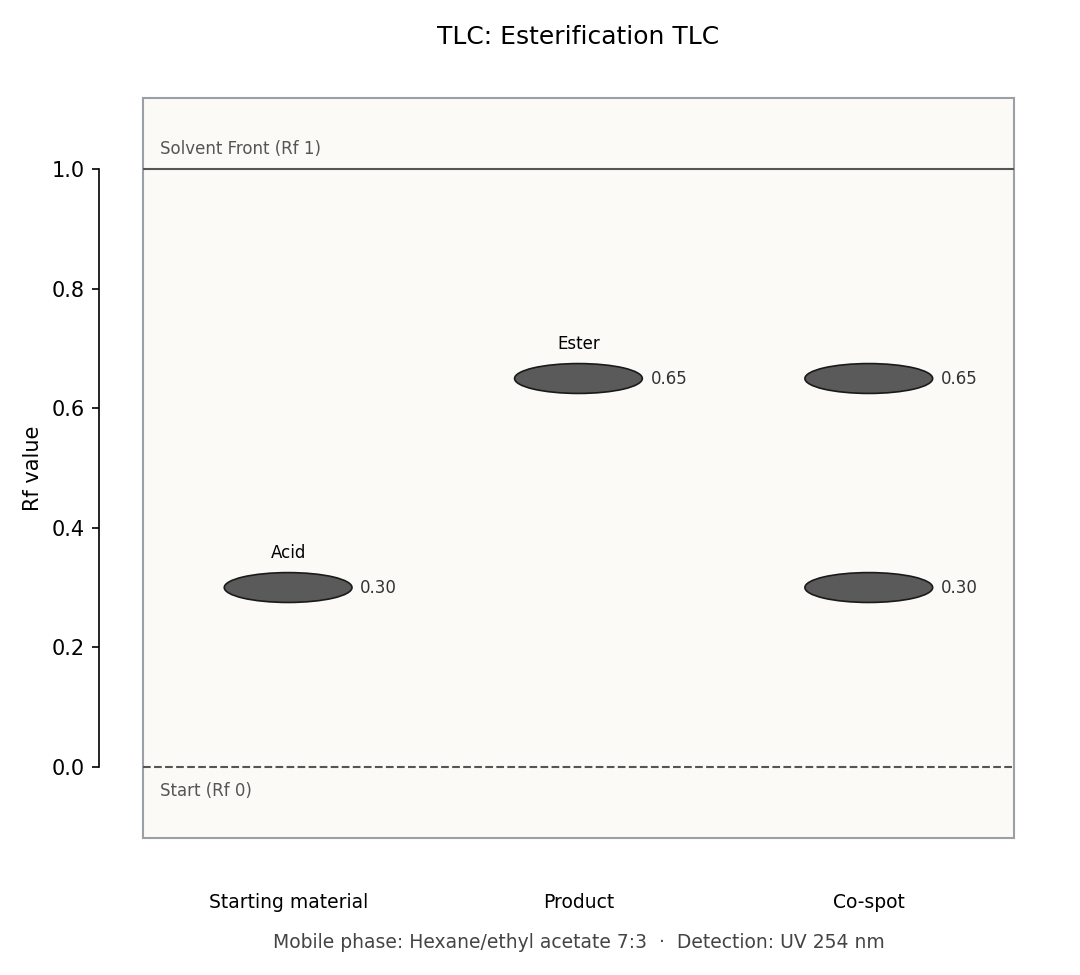
| "TLC of my esterification: educt at Rf 0.3, product at 0.65, co-spot shows both" | a TLC plate sketch (generate_tlc) |
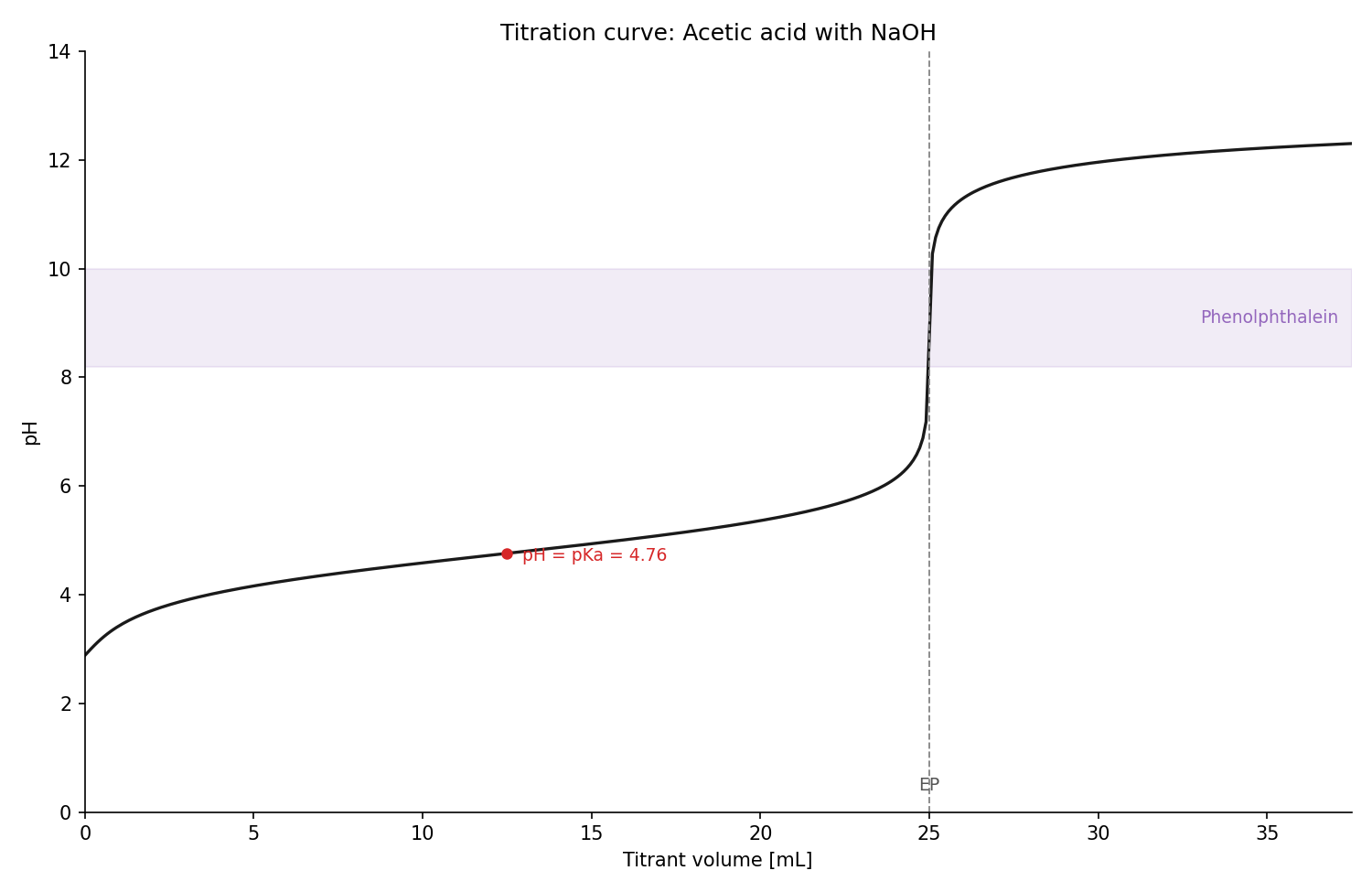
| "Titrate 0.1 M acetic acid with 0.1 M NaOH and show the curve with phenolphthalein" | equivalence point, buffer point and indicator band (generate_titration_curve) |
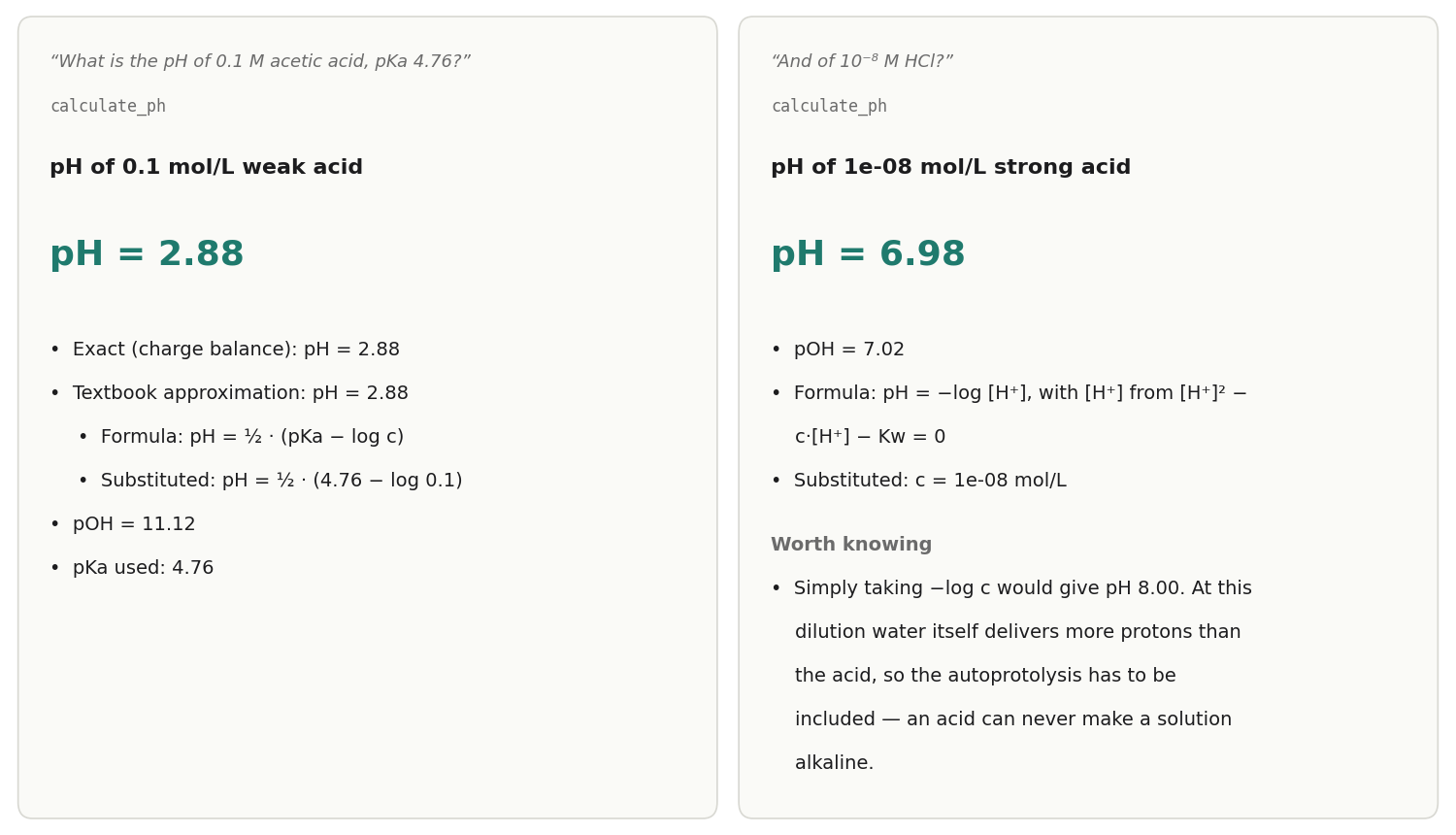
| "What is the pH of a buffer of 0.1 M acetic acid and 0.05 M sodium acetate?" | the exact pH with the textbook approximation beside it (calculate_ph) |
Curved-arrow mechanisms cover SN1, SN2 and Fischer esterification. For any other reaction, Claude draws the net scheme and says that the arrow mechanism is not drawn.
Tools
The default profile registers 16 tools, 12 of them with an interactive panel.
Files go to ~/ChemDraw-Output/. How the model picks the right tool is
explained under Development.
| Area | Tool | Example prompt | Panel |
|---|---|---|---|
| Draw | generate_molecule |
"Draw caffeine" | yes |
batch_generate |
"Draw adrenaline, noradrenaline and dopamine, each as its own file" | yes | |
compare_molecules |
"What is the difference between morphine and codeine?" | yes | |
generate_reaction |
"Draw the esterification of acetic acid with ethanol as a reaction equation" | yes | |
generate_mechanism |
"Show me the SN2 mechanism step by step" | yes | |
generate_3d |
"Show methane as a rotatable 3D model" | yes | |
| Lab graphics | generate_spectrum |
"Draw the IR spectrum of aspirin" | yes |
generate_tlc |
"TLC of my esterification: educt at Rf 0.3, product at 0.65, co-spot shows both" | yes | |
generate_titration_curve |
"Which indicator fits the titration of phosphoric acid with NaOH? Show me the curve." | yes | |
generate_species_distribution |
"Draw the species distribution of phosphoric acid over the whole pH range" | yes | |
| Look up | lookup |
"What is the CAS number of paracetamol?" | text |
lookup_molecule_data |
"Give me a data sheet for capsaicin" | yes | |
predict_spectrum |
"Which IR bands should capsaicin show?" | text | |
| Calculate | calculate_ph |
"What is the pH of 0.1 M acetic acid, pKa 4.76?" | text |
| Anki | export_anki_deck |
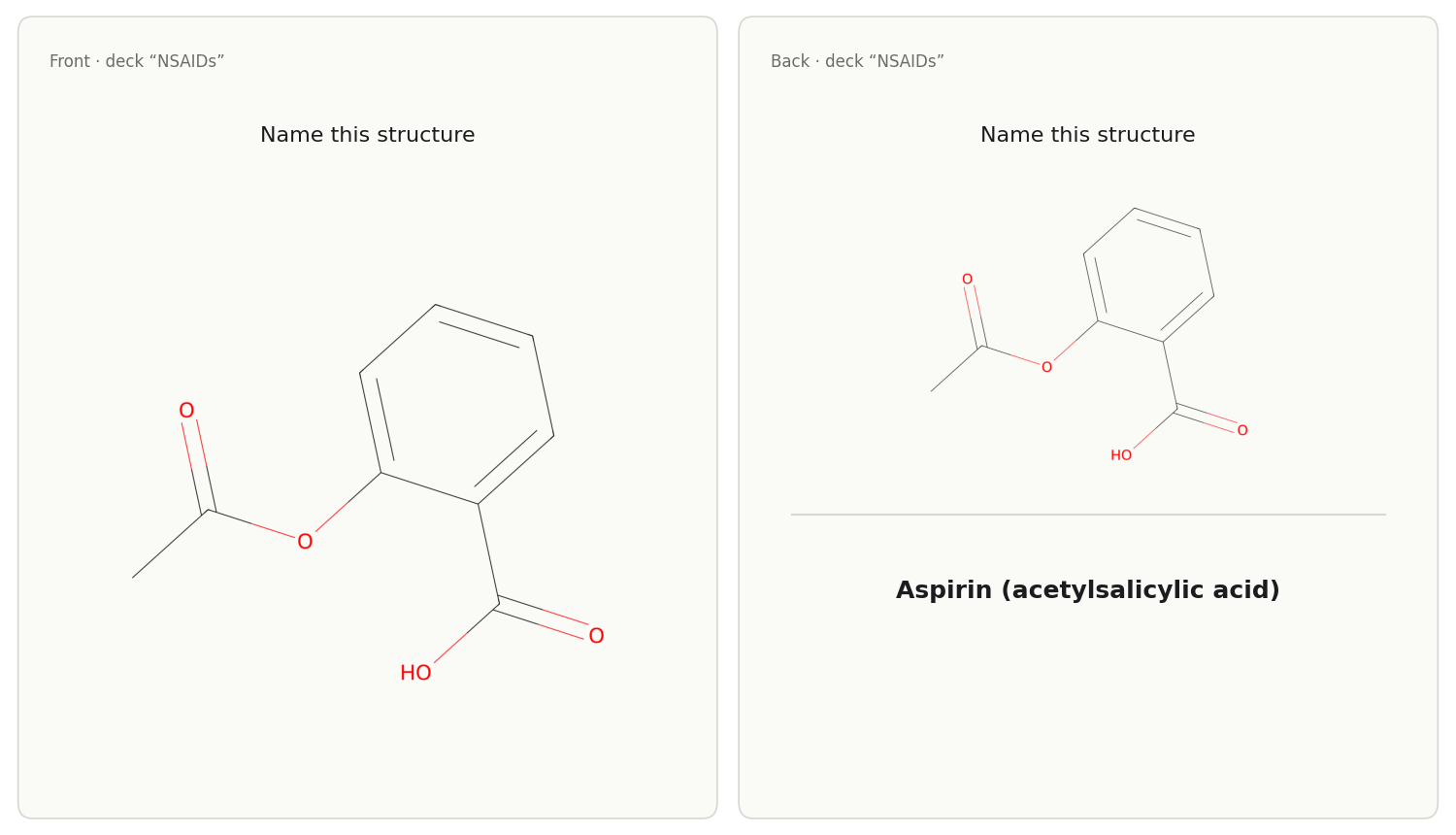
"I have an exam on NSAIDs on Friday and need to know the structures" | file |
The 16th tool, save_png, is the server half of the panel's export button. It
runs when you click that button and is never called by the model on its own.
What each tool does in detail, the options on the drawing tools (formats,
render_style, abbreviate_groups, annotate_stereo) and the known limits:
docs/tools.md.
Gallery
Every picture below is the tool's own output, generated by
scripts/readme_bilder.py.
Show the gallery
 generate_spectrum |
 generate_titration_curve |
 lookup_molecule_data |
 calculate_ph |
 export_anki_deck |
 generate_mechanism |
 generate_tlc |
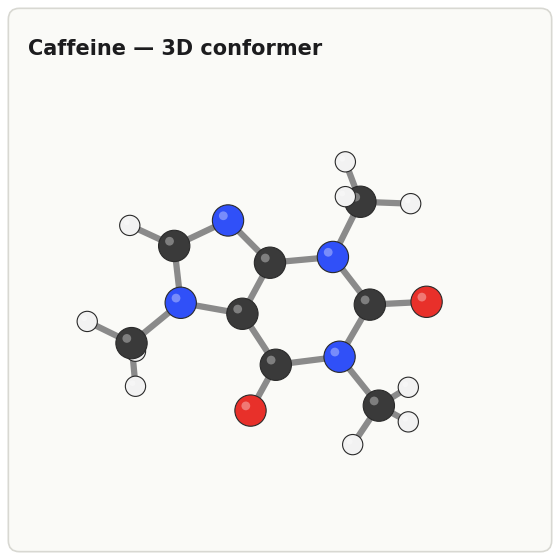 generate_3d |
Installation
Pick one route. The extension and chemdraw-install register the same
connectors, and installing both makes the model see every tool twice.
Afterwards restart Claude Desktop and ask "draw caffeine".
-
Claude Desktop extension (macOS, Linux): download
chemdraw-mcp-<version>.mcpbfrom the latest release, double-click it, confirm, restart Claude Desktop once. The first start fetches about 40 MB from PyPI, checked against pinned hashes; later starts are offline.chemdraw-mcp-pharma-<version>.mcpbfrom the same release adds the second connector (see Profiles); it shares the installation. -
From PyPI (needs uv):
uv tool install chemdraw-mcp
chemdraw-install
Cloning the repository, editing the config by hand and optional extras (Java for offline IUPAC names, AnkiConnect): docs/installation.md.
Something not working? uvx --from chemdraw-mcp chemdraw-doctor checks the
installation and prints the fix for each problem.
Profiles
Either route registers two connectors from one installation. They differ only in the profile the server starts with:
| Connector | Profile | Tools | Adds |
|---|---|---|---|
chemdraw |
mvp (default) |
16, 12 with a panel | the five areas in the tool table |
chemdraw-pharma |
full |
23, 16 with a panel | substrate-scope figure, calibration curve, pharmacology curves, and calculators for solutions, content determination and pharmacokinetics |
The extension route ships them as two bundles (chemdraw-mcp-<version>.mcpb,
chemdraw-mcp-pharma-<version>.mcpb); chemdraw-install writes both entries
into claude_desktop_config.json (and replaces the single chemdraw-tool
entry of earlier versions). In a chat, enable one connector at a time in
the connector menu: with both on, the model sees the default tools twice.
Switching between them needs no restart. What the full profile adds in
detail: docs/tools.md#profiles.
Development
Architecture, setup and the test gate: docs/development.md.
Feedback, bugs and wishes
- Something broke? Open a bug report.
The form asks for the output of
chemdraw-doctor. - Missing something in your course? Tell us what you would draw or calculate. The subject and the exam question help more than a feature name.
- Wrong chemistry? Use the bug form and name the compound and the figure.
- A question, or something you made with it? Discussions.
- It worked for you? A star on the repository helps other students find it.
License
Apache-2.0, see LICENSE. Copyright 2026 jurimaxam-dotcom.
Disclaimer: This is an unofficial, independent project, not affiliated with or endorsed by Revvity. ChemDraw is a trademark of Revvity Signals Software, Inc. This tool does not include or require ChemDraw; it can optionally export files in the open CDXML format.
1 maintainer

Metadata
1 maintainer
Release files for chemdraw-mcp 0.9.0
For a detailed explanation of source distributions (sdists) and built distributions (wheels), please see the package formats documentation.
Source distribution (sdist)
| File | Size | Uploaded | Provenance | Actions |
|---|---|---|---|---|
| chemdraw_mcp-0.9.0.tar.gz | 603.6 kB | With provenance | Details for chemdraw_mcp-0.9.0.tar.gz |
Built distribution (wheel)
| File | Interpreter | ABI | Platform | Actions Reset |
|---|---|---|---|---|
| chemdraw_mcp-0.9.0-py3-none-any.whl | Python 3 | none | any | Details for chemdraw_mcp-0.9.0-py3-none-any.whl |
Total release size: 1.0 MB
Release files / chemdraw_mcp-0.9.0.tar.gz
| Download URL | chemdraw_mcp-0.9.0.tar.gz |
|---|---|
| Size | 603.6 kB |
| Tags | Source |
|
SHA-256 checksum How to use checksums |
4bf2aa8f37e47f87abd3d89d5c9bfa9ba1e0b6b4223b20d9b36ef850f15407b6
|
|
BLAKE2b-256 checksum How to use checksums |
12311135ef2d22c02b56e7be41e66d1ac4ca4cbb947eaef48923274d2f49aea6
|
| Upload date | |
|
Uploaded using Trusted Publishing? What is trusted publishing? |
Yes |
| Uploaded via |
twine/7.0.0 CPython/3.13.16
|
Provenance
Provenance describes where a file came from. On PyPI, provenance is shared via attestations, which provide a verifiable record of the build or publishing details. View details, limitations and caveats.


PyPI Publish Attestation
PyPI verified that this artifact, at this checksum, originated from the publisher listed below.
Signed by GitHub Actions, verified by PyPI on Nov 7, 2026.
Transparency logRelease files / chemdraw_mcp-0.9.0-py3-none-any.whl
| Download URL | chemdraw_mcp-0.9.0-py3-none-any.whl |
|---|---|
| Size | 397.6 kB |
| Tags | Python 3 |
|
SHA-256 checksum How to use checksums |
45641a7bed2c8b0d4075111e8488730efcad6fc834c1e9851d598721fc9042a1
|
|
BLAKE2b-256 checksum How to use checksums |
6c025be4ae7f016716beea6736c077997c7ba2a432ff9abdd5f4d311f3c33c27
|
| Upload date | |
|
Uploaded using Trusted Publishing? What is trusted publishing? |
Yes |
| Uploaded via |
twine/7.0.0 CPython/3.13.16
|
Provenance
Provenance describes where a file came from. On PyPI, provenance is shared via attestations, which provide a verifiable record of the build or publishing details. View details, limitations and caveats.
PyPI Publish Attestation
PyPI verified that this artifact, at this checksum, originated from the publisher listed below.
Signed by GitHub Actions, verified by PyPI on Nov 7, 2026.
Transparency logSecurity for chemdraw-mcp 0.9.0
Provenance
Provenance describes where a file came from. On PyPI, provenance is shared via attestations, which provide a verifiable record of the build or publishing details. View details, limitations and caveats.
Full provenance
Both files in this release have been uploaded with provenance metadata.
Attestation for chemdraw_mcp-0.9.0.tar.gz
PyPI Publish Attestation
PyPI verified that this artifact, at this checksum, originated from the publisher listed below.
Signed by GitHub Actions, verified by PyPI on Nov 7, 2026.
Transparency logA note on package security
PyPI is a repository for distributing packages, not a service for auditing them. While third-party security researchers and our staff do their best to detect and remove malicious packages, PyPI cannot guarantee the quality, security or suitability of any given package.
To learn more about protecting yourself from malicious actors, visit our package security documentation.














