
ChessAI
The AI that kills chess.





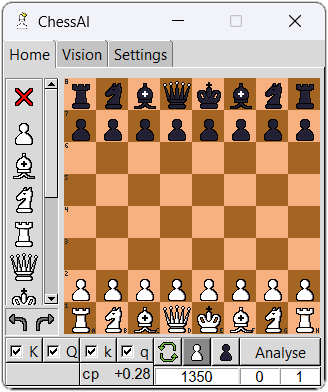
This application will help you analyse chess position as a sub-window.
Features
New feature (v1.0.0):
-
Project is uploaded to PyPI. Now you can pip install it!
-
Hovering on cropping canvas now show your mouse's location.
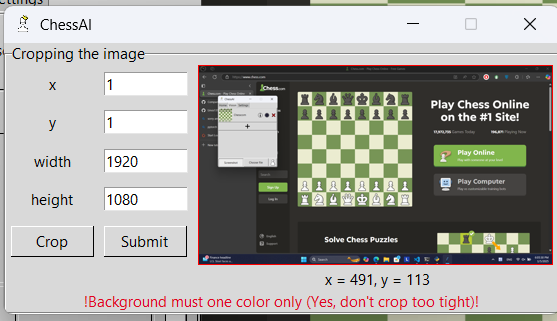
- Sorry O.P & I.P points, I'm not even angry over you right now. I bear no grudge against anyone. It's just that the world feels so, so wonderful right now. Throughout Heaven and Earth, I choose to learn PyTorch myself.
For old features, visit Change Log.
Installing
I've grown up and made a PyPI for you guys!
pip3 install chessai-stockfish
But above is default edition, which mean training features are not allowed yet. If you want the full edition, visit TRAINING.md.
Set up Stockfish
Go to download page and install Stockfish that support your device.
After that, let's start our ChessAI.
chessai
Because of first use, it will ask for Stockfish's path.
Cannot find setting.json file. Start create new one.
Please paste in path to stockfish:
>> (your path goes here)
But you use Venv/Conda/Docker/...?
Go to your ChessAI directory (where chessai.cmd is stored).
cd ...
Then find your OS below.
For Unix
chmod a+x chessai.cmd
echo 'export chessai_path=$PWD
export PATH=$chessai_path:$PATH' >> ~/.bash_profile
source ~/.bash_profile
For Window
powershell $old_path = [Environment]::GetEnvironmentVariable('path', 'user'); $new_path = $old_path + ';' + $PWD; [Environment]::SetEnvironmentVariable('path', $new_path,'User');
Notice: Don't forget to configurate chessai.cmd file to fit your needs.
Running
Use chessai.
chessai
If you are using Unix and currently not in the environment where ChessAI is stored, use chessai.cmd.
License
Disclaimer
This application was initially designed for analysing Chess World Cup livestreams and educational purposes. Please don't use this for any unethical reasons. Any damages from abusing this application will not be the responsibility of the author.
1 maintainer

Metadata
1 maintainer
Release files for chessai-stockfish 1.0.3
For a detailed explanation of source distributions (sdists) and built distributions (wheels), please see the package formats documentation.
Source distribution (sdist)
| File | Size | Uploaded | |
|---|---|---|---|
| chessai_stockfish-1.0.3.tar.gz | 6.2 MB | Details |
Built distribution (wheel)
| File | Interpreter | ABI | Platform | Reset |
|---|---|---|---|---|
| chessai_stockfish-1.0.3-py3-none-any.whl | Python 3 | none | any | Details |
Total release size: 12.3 MB
Release files / chessai_stockfish-1.0.3.tar.gz
| Download URL | chessai_stockfish-1.0.3.tar.gz |
|---|---|
| Size | 6.2 MB |
| Tags | Source |
|
SHA-256 checksum How to use checksums |
26310ad3e947607de3c676f3ca9a1adf6dbc97fda1e04e69658ba6a674b95789
|
|
BLAKE2b-256 checksum How to use checksums |
8a9a9d53c6d4d95bf781292e9db6f734004ea281d1486b78ad9a2292260011af
|
| Upload date | |
|
Uploaded using Trusted Publishing? What is trusted publishing? |
Yes |
| Uploaded via |
twine/6.0.1 CPython/3.12.8
|
Provenance
Provenance describes where a file came from. On PyPI, provenance is shared via attestations, which provide a verifiable record of the build or publishing details. View details, limitations and caveats.


PyPI Publish Attestation
PyPI verified that this artifact, at this checksum, originated from the publisher listed below.
Signed by GitHub Actions, verified by PyPI on Jan 7, 2025.
Transparency logRelease files / chessai_stockfish-1.0.3-py3-none-any.whl
| Download URL | chessai_stockfish-1.0.3-py3-none-any.whl |
|---|---|
| Size | 6.2 MB |
| Tags | Python 3 |
|
SHA-256 checksum How to use checksums |
adeeee45bcbc0bd62ef471c6ae6bbd2f65b302bd0bd91518af6a77c47c726b08
|
|
BLAKE2b-256 checksum How to use checksums |
67e1805908830eb5f8f93b80c7a8d99c06e80ffa1fbc47bd3439ad071a70aa5b
|
| Upload date | |
|
Uploaded using Trusted Publishing? What is trusted publishing? |
Yes |
| Uploaded via |
twine/6.0.1 CPython/3.12.8
|
Provenance
Provenance describes where a file came from. On PyPI, provenance is shared via attestations, which provide a verifiable record of the build or publishing details. View details, limitations and caveats.
PyPI Publish Attestation
PyPI verified that this artifact, at this checksum, originated from the publisher listed below.
Signed by GitHub Actions, verified by PyPI on Jan 7, 2025.
Transparency log













