
This is a sub-window GUI for Stockfish.
Verified details
These details have been verified by PyPIProject links
GitHub Statistics
Maintainers

Project description
ChessAI
The AI that kills chess.





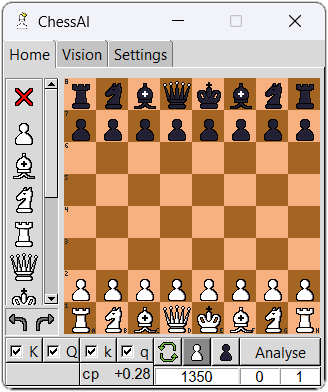
This application will help you analyse chess position as a sub-window.
Features
New feature (v1.0.0):
-
Project is uploaded to PyPI. Now you can pip install it!
-
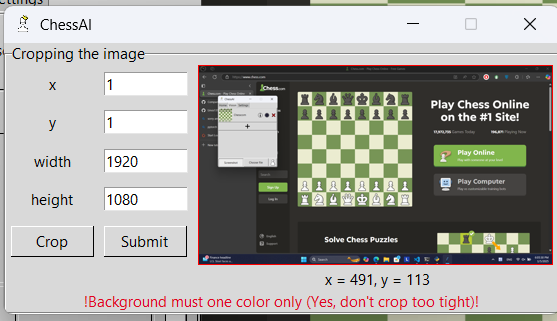
Hovering on cropping canvas now show your mouse's location.
- Sorry O.P & I.P points, I'm not even angry over you right now. I bear no grudge against anyone. It's just that the world feels so, so wonderful right now. Throughout Heaven and Earth, I choose to learn PyTorch myself.
For old features, visit Change Log.
Installing
I've grown up and made a PyPI for you guys!
pip3 install chessai-stockfish
But above is default edition, which mean training features are not allowed yet. If you want the full edition, visit TRAINING.md.
Set up Stockfish
Go to download page and install Stockfish that support your device.
After that, let's start our ChessAI.
chessai
Because of first use, it will ask for Stockfish's path.
Cannot find setting.json file. Start create new one.
Please paste in path to stockfish:
>> (your path goes here)
I use Venv/Conda/Docker/...
Go to your ChessAI directory (where chessai.cmd is stored).
cd ...
Then find your OS below.
For Unix
chmod a+x locas.cmd
echo 'export chessai_path=$PWD
export PATH=$chessai_path:$PATH' >> ~/.bash_profile
source ~/.bash_profile
For Window
powershell $old_path = [Environment]::GetEnvironmentVariable('path', 'user'); $new_path = $old_path + ';' + $PWD; [Environment]::SetEnvironmentVariable('path', $new_path,'User');
Running
Use chessai.
chessai
If you are using Unix and currently not in the environment where ChessAI is stored, use chessai.cmd.
License
Disclaimer
This application was initially designed for analysing Chess World Cup livestreams and educational purposes. Please don't use this for any unethical reasons. Any damages from abusing this application will not be the responsibility of the author.
Project details
Verified details
These details have been verified by PyPIProject links
GitHub Statistics
Maintainers
Release history Release notifications | RSS feed


Download files
Download the file for your platform. If you're not sure which to choose, learn more about installing packages.
Source Distribution
Built Distribution
Filter files by name, interpreter, ABI, and platform.
If you're not sure about the file name format, learn more about wheel file names.
Copy a direct link to the current filters
File details
Details for the file chessai_stockfish-1.0.1.tar.gz.
File metadata
- Download URL: chessai_stockfish-1.0.1.tar.gz
- Upload date:
- Size: 6.2 MB
- Tags: Source
- Uploaded using Trusted Publishing? Yes
- Uploaded via: twine/6.0.1 CPython/3.12.8
File hashes
| Algorithm | Hash digest | |
|---|---|---|
| SHA256 |
5a2d9401eec05d18c38629ada1fe4ed959970f4082f003e705319db391250ecb
|
|
| MD5 |
655da0c61696584b89fe4bdb197a4181
|
|
| BLAKE2b-256 |
3ad46d23ed6abe95fd3153110b7d1798062449742da46deb480af6832ca90516
|
Provenance
The following attestation bundles were made for chessai_stockfish-1.0.1.tar.gz:
Publisher:
python-publish.yml on Linos1391/ChessAI-StockfishGUI
-
Statement:
-
Statement type:
https://in-toto.io/Statement/v1 -
Predicate type:
https://docs.pypi.org/attestations/publish/v1 -
Subject name:
chessai_stockfish-1.0.1.tar.gz -
Subject digest:
5a2d9401eec05d18c38629ada1fe4ed959970f4082f003e705319db391250ecb - Sigstore transparency entry: 160186346
- Sigstore integration time:
-
Permalink:
Linos1391/ChessAI-StockfishGUI@88c0e7e442a146ebf6ca33a99c269161e149c54d -
Branch / Tag:
refs/tags/v1.0.1 - Owner: https://github.com/Linos1391
-
Access:
public
-
Token Issuer:
https://token.actions.githubusercontent.com -
Runner Environment:
github-hosted -
Publication workflow:
python-publish.yml@88c0e7e442a146ebf6ca33a99c269161e149c54d -
Trigger Event:
release
-
Statement type:
File details
Details for the file chessai_stockfish-1.0.1-py3-none-any.whl.
File metadata
- Download URL: chessai_stockfish-1.0.1-py3-none-any.whl
- Upload date:
- Size: 6.2 MB
- Tags: Python 3
- Uploaded using Trusted Publishing? Yes
- Uploaded via: twine/6.0.1 CPython/3.12.8
File hashes
| Algorithm | Hash digest | |
|---|---|---|
| SHA256 |
6483ccdb095c40c4f7c54ef1a42efadffb484ad55739489bacfa9a56e2470ba7
|
|
| MD5 |
ecfd61beb37b5bf4b8454653612868af
|
|
| BLAKE2b-256 |
1514e213251459062d0da37fc90b4088344f9919c495278144a84049fc396df1
|
Provenance
The following attestation bundles were made for chessai_stockfish-1.0.1-py3-none-any.whl:
Publisher:
python-publish.yml on Linos1391/ChessAI-StockfishGUI
-
Statement:
-
Statement type:
https://in-toto.io/Statement/v1 -
Predicate type:
https://docs.pypi.org/attestations/publish/v1 -
Subject name:
chessai_stockfish-1.0.1-py3-none-any.whl -
Subject digest:
6483ccdb095c40c4f7c54ef1a42efadffb484ad55739489bacfa9a56e2470ba7 - Sigstore transparency entry: 160186347
- Sigstore integration time:
-
Permalink:
Linos1391/ChessAI-StockfishGUI@88c0e7e442a146ebf6ca33a99c269161e149c54d -
Branch / Tag:
refs/tags/v1.0.1 - Owner: https://github.com/Linos1391
-
Access:
public
-
Token Issuer:
https://token.actions.githubusercontent.com -
Runner Environment:
github-hosted -
Publication workflow:
python-publish.yml@88c0e7e442a146ebf6ca33a99c269161e149c54d -
Trigger Event:
release
-
Statement type:






