
chessformer_lens
A toolkit and app for mechanistic interpretability of transformer based chess models.
pip install chessformer_lens
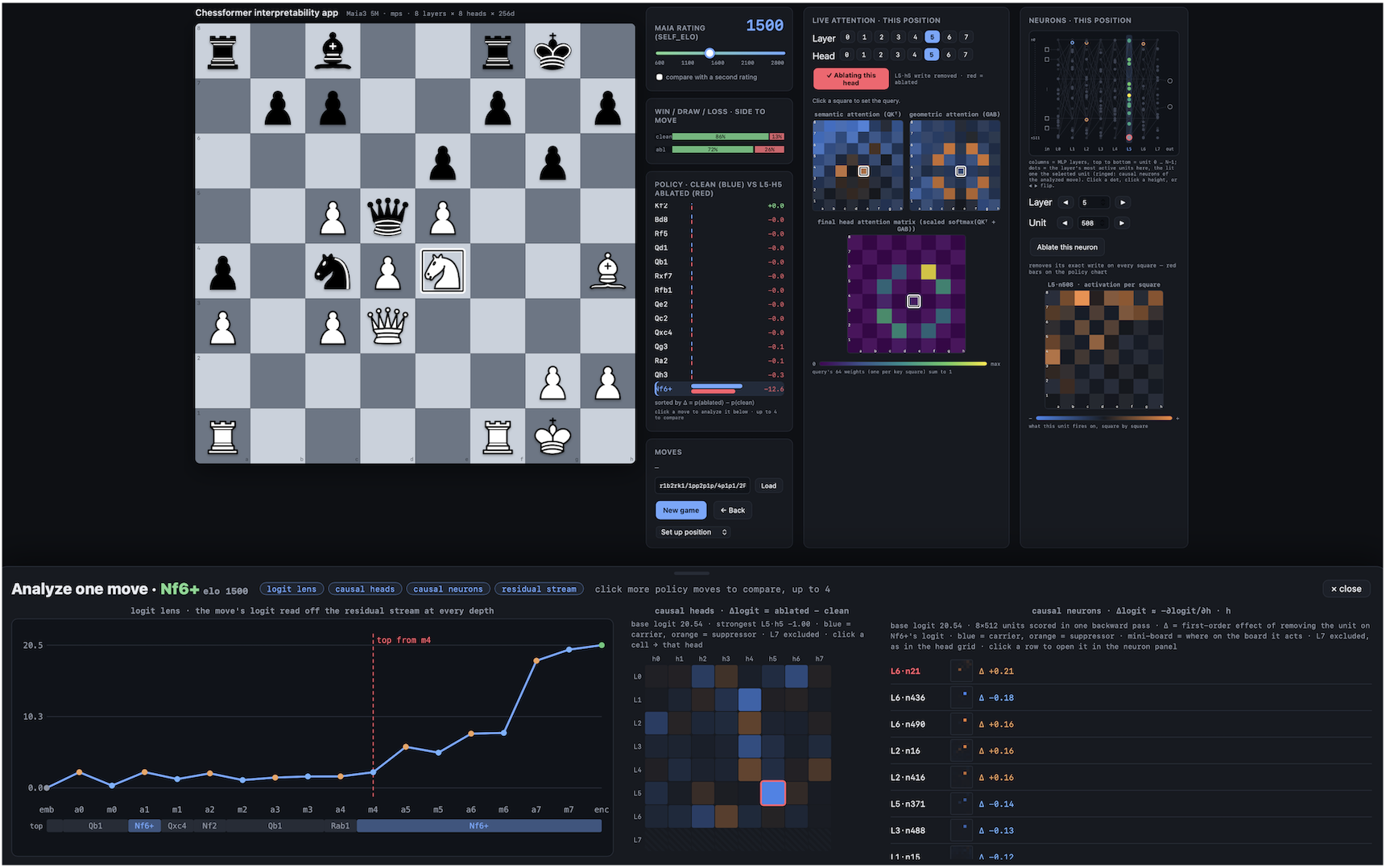
Try the app in your browser, no install needed:

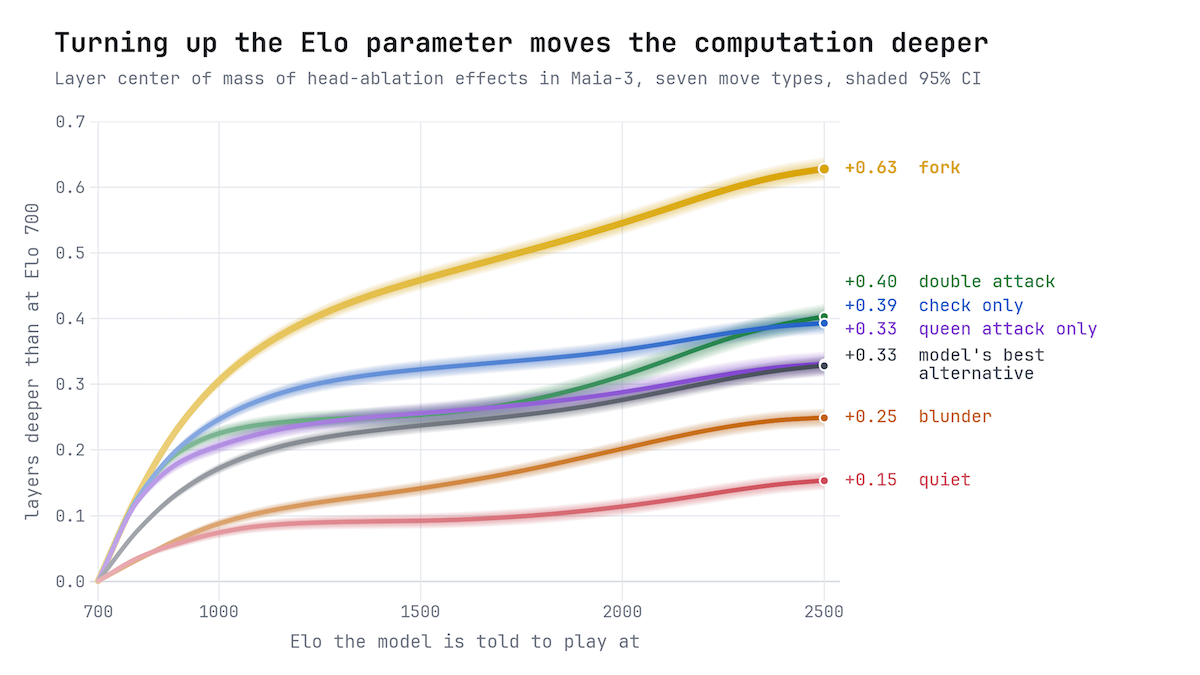
Paper: Increasing Skill Level Recruits Deeper Attention Layers in a Frozen Chess Transformer (Litman, 2026). Every figure and most of the analysis in this paper was made with this library.
Pip install:
python3 -m venv .venv && source .venv/bin/activate
pip install chessformer_lens
# for Maia-3 models, first: pip install https://github.com/CSSLab/maia3/archive/1e13597c42d4858b7cfd7cfdae01e297263364b2.zip
# Leela's BT4 net downloads itself on first use
or Clone if you want to edit the code:
git clone https://github.com/chessformer-lens/chessformer_lens
cd chessformer_lens
pip install -r requirements.txt
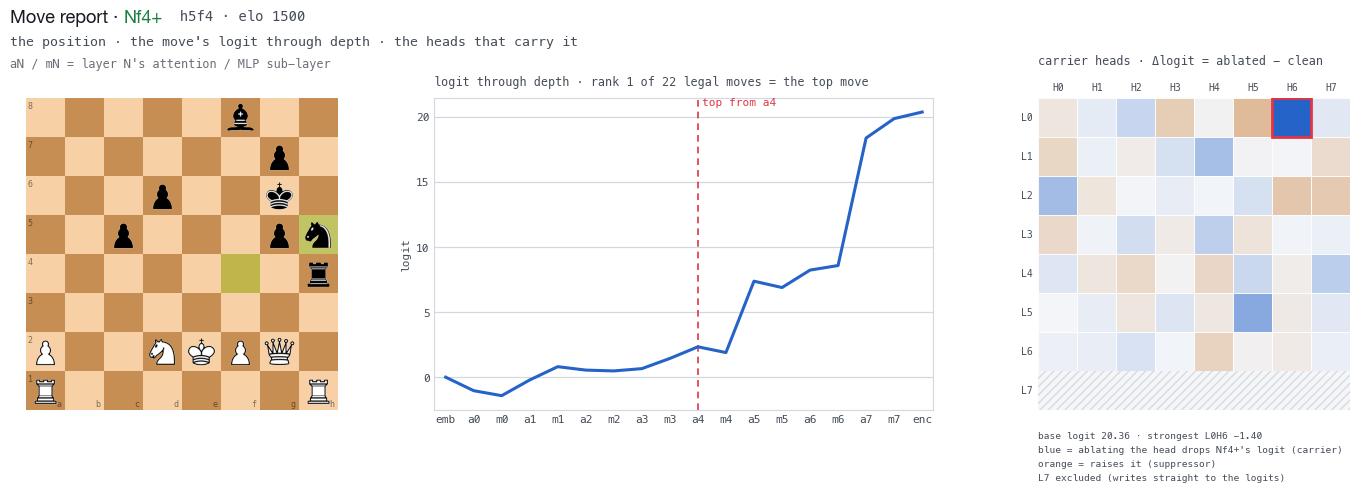
Demo Notebook: 
There is wonderful prior chess-interp work, for instance: McGrath et al. on AlphaZero concepts, Jenner et al. on lookahead in Leela, Karvonen on chess-GPT, but there is no general infrastructure for rigorous interpretability work or interactive visualization for these models.
Chessformer_lens is built to do both, especially inspired by Neel Nanda's transformer_lens library.
Chess is unusually suited for AI interpretability because it requires complex and structured reasoning in a compact domain, and it has a hierarchy of human concepts (squares -> threats -> tactics -> strategy) which can provide deep insight into how AI carves features.
Transformer based chess models ("chessformer") are a good lens for studying LLMs because outputs have a clear ground source for the evaluation of a move and so avoid the vagueness of language, because attention functions with clearly interpretable roles on a chess board, and because informative chessformer results are straightforward to scale and investigate in LLMs.
This repo's core is one engine with three frontends:
engine.py is the interp core (model + hooks + logit lens + head ablation + list of values through depth). It does all of the analysis for:
app.pyinterp_plot.pyinterp_widget.py
Users are encouraged to read the user guides for each of these modules which can be found at the top of the respective scripts.
Leela Chess Zero
This is an extremely strong engine that has many many more layers and parameters but the same square-token design as others like Maia-3.
Weights: bt4 (the base BT4 net) or bt4-332 (its policytune-332 fine-tune) download from lczero.org on first use into ~/.cache/chessformer_lens. A path to any lc0 .pb.gz works too.
Load. One alias table covers both families; neither is a default.
from chessformer_lens import LeelaEngine, load_engine
eng = LeelaEngine("bt4")
Search. With the lc0 program installed (brew install lc0), eng.search(board, nodes=400) runs Leela's search on the same net and returns every move's visits and Q beside the raw policy, the PV and the best move; interp_plot.plot_search draws it, and the app shows it as a Search card.
Many positions at once
eng.top_neurons(positions) ranks every layer's MLP neurons by how strongly they fire over a list of positions (FENs, boards or a PGN file; ordinary_positions() gives 1,000 bundled Lichess positions), eng.top_positions(layer, neuron) finds the positions where one neuron fires most, and eng.neuron_effects measures what it does there by exact ablation. interp_plot.plot_top_neurons / plot_top_positions draw them; the app has them as its "Analyze many positions" tab, which also takes a file of FENs.
Quickstart in notebook:
Recall that FEN is the modern notation for a chess position
!pip install -q https://github.com/CSSLab/maia3/archive/1e13597c42d4858b7cfd7cfdae01e297263364b2.zip
!pip install -q "chessformer_lens>=3.0"

import chess
from chessformer_lens import MaiaEngine
import chessformer_lens.interp_widget as iw

eng = MaiaEngine()
# Opera Game FEN right at legendary queen sacrifice
fen = "4kb1r/p2n1ppp/4q3/4p1B1/4P3/1Q6/PPP2PPP/2KR4 w k - 0 16"
# [or insert another FEN string]

try:
    board = chess.Board(fen)
except ValueError as e:
    print(f"Invalid FEN: {e}")

#Interact with the attention widget
#click between different layers and heads in the widget
iw.attention_widget(eng, board, 1500,layer=4,head=3)
The app
To me, the app is the pièce de résistance and usage should be rather intuitive, nonetheless, a detailed guide can be found in app_guide.md.
Play a transformer-based chess bot ("chessformer") and watch its move policy, its attention (both semantic QKᵀ and unique geometric GAB), and — for any move you click — its logit through depth, the heads that carry it, and the neurons that carry it. The model loads on a background thread so the window opens instantly.
#Various ways to launch, note that higher parameter models have 16 and 32 heads per layer, and 512 and 1024 dim of the model (d_model):
chessformer_lens                    # no model named: opens a model picker
chessformer_lens --list             # print every engine and its aliases
chessformer_lens 23m
chessformer_lens --model maia3-79m
CHESSFORMER_MODEL=5m chessformer_lens
chessformer_lens bt4                # Leela Chess Zero BT4 — see above
chessformer_lens --web              # the same app in your web browser
Code layout: all found within the chessformer_lens package
__init__.py— the package surface:MaiaEngine,LeelaEngine,load_engine,build_cfg,pick_device,Conditioning,ModelAdapter,register_adapter,available_models,attention_widget,gab_widget,__version__.engine.py— the interp core (model + hooks + logit lens + head ablation + list of values through depth):ChessformerEngineholds every method and works on any model aModelAdapterdescribes;MaiaEngineandLeelaEngineare thin wrappers. No UI deps; imports cleanly in a notebook.core.py— the model-agnostic layer:ModelAdapter, the adapter registry, and the types the engine speaks in (Conditioning,TokenLayout,ValueEstimate, …).adapters/— one adapter per model family:lc0.py(Leela BT4, no maia3 needed),maia3.py(Maia-3),smolgen.py(the smolgen/GAB attention both use).interp_plot.py— matplotlib figures that the app usesinterp_widget.py— the app's two interactive panels as a self-contained notebook cell or standalone HTML pagepiece_art.py— the cburnett pieces as PNGs, for the matplotlib figuresbridge.py— the game state + the JSON API the UI calls (LensApi).ui.py— the whole interface (HTML/CSS/JS) as one string including guide to change template.app.py— app launcher (native window via pywebview); thechessformer_lenscommand is itsmain().web.py— the same app served to a web browser (chessformer_lens --web, orweb.serve()in a notebook).
These come with concise but detailed docstrings.
General color guide
Blue and orange is used for diverging signed values; negative is blue, positive is orange. Viridis is used for magnitudes like attention weights. Green has to do with a specific chess move. Red has to do with undesirable things. The black and white halo lens denotes a query square.
Notes
Created by David Litman
Maia-3 comes from: Chessformer / Maia-3 (Monroe et al., ICLR 2026).
BT4 comes from the Leela Chess Zero project (lczero.org); the smolgen / attention-body design it uses is described in the Chessformer paper and in lc0's own writeups.
Both Maia-3 and Leela BT4 are supported. Both treat each square as a token—which allows for beautiful board readable attention patterns. The core now works through model adapters, so other models can plug in; for models whose tokens aren't squares, the board views show a "not available yet" notice for now.
Please don't hesitate to give me feedback or thoughts by email or at my personal website. I hope for this to be a useful and intuitive tool for the community.
Citing
If chessformer_lens contributes to published work, a citation is very appreciated and helps others find it! Use GitHub's "Cite this repository" button, or DOI 10.5281/zenodo.21877655.
1 maintainer

Metadata
1 maintainer
Release files for chessformer-lens 3.0
For a detailed explanation of source distributions (sdists) and built distributions (wheels), please see the package formats documentation.
Source distribution (sdist)
| File | Size | Uploaded | |
|---|---|---|---|
| chessformer_lens-3.0.tar.gz | 293.0 kB | Details |
Built distribution (wheel)
| File | Interpreter | ABI | Platform | Reset |
|---|---|---|---|---|
| chessformer_lens-3.0-py3-none-any.whl | Python 3 | none | any | Details |
Total release size: 572.2 kB
Release files / chessformer_lens-3.0.tar.gz
| Download URL | chessformer_lens-3.0.tar.gz |
|---|---|
| Size | 293.0 kB |
| Tags | Source |
|
SHA-256 checksum How to use checksums |
64e3a1c9e2cd58c98bd8c048279274df51e27638fb3793453f028d27b614a5c7
|
|
BLAKE2b-256 checksum How to use checksums |
3e34ea8c874ba14875f6bcdc9fbc9ddb733accbe2fdb5bf1df399af25fbb2f5e
|
| Upload date | |
|
Uploaded using Trusted Publishing? What is trusted publishing? |
No |
| Uploaded via |
twine/7.0.0 CPython/3.10.6
|
Release files / chessformer_lens-3.0-py3-none-any.whl
| Download URL | chessformer_lens-3.0-py3-none-any.whl |
|---|---|
| Size | 279.2 kB |
| Tags | Python 3 |
|
SHA-256 checksum How to use checksums |
7fc1b19e13e63612b39f72f326489fd8394ec41656e065f9c97213a3eab89d09
|
|
BLAKE2b-256 checksum How to use checksums |
20320502ee05ec79c8f1379071fe8c8671e1005cc3ed8e37b3527c048c648a31
|
| Upload date | |
|
Uploaded using Trusted Publishing? What is trusted publishing? |
No |
| Uploaded via |
twine/7.0.0 CPython/3.10.6
|














