
chordotomy



Dissect a song's harmony. Give it a recording and it finds the chords on the beat, labels them with Roman numerals, and points out the moves worth noticing (the secondary dominant, the borrowed chord). In Claude Code, a skill adds a short note on why each one works.
It analyzes; it doesn't transcribe. There is no staff notation, on purpose.
Yes, chordotomy is also a spinal surgery. This one cuts chords.
Everything runs locally. Your audio never leaves your machine.
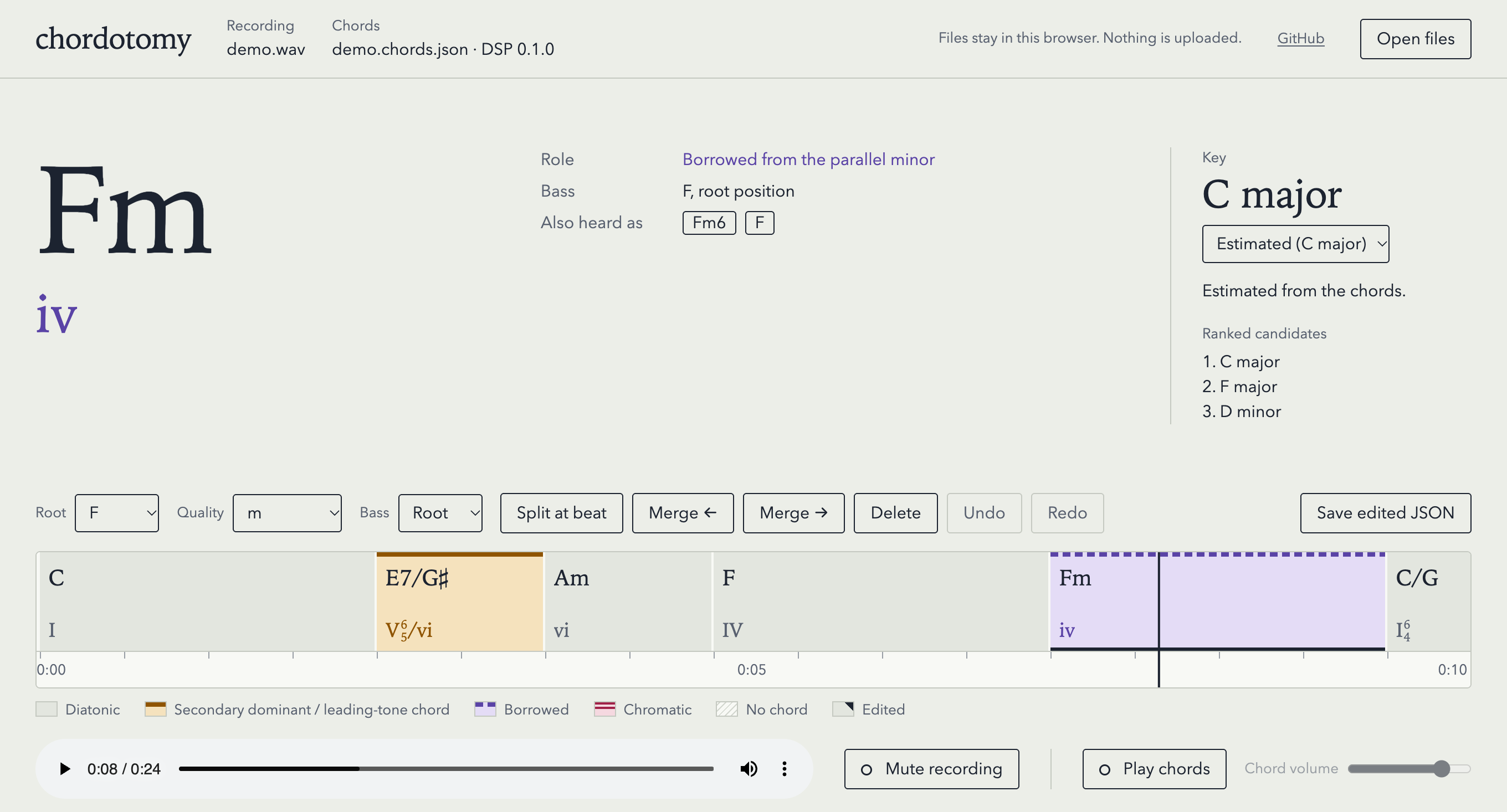
The viewer on a synthesized progression in C major, analyzed with --engine dsp. The current chord is a borrowed Fm (iv); earlier, E7/G♯ is the secondary dominant of Am (V⁶₅/vi).
What it does
- Chords on the beat. Major, minor, dominant 7th, major 7th, minor 7th, half-diminished 7th, diminished 7th, sus4, 7sus4, augmented, diminished triad, sus2 and minor 6th, with
Nfor no chord. The model calls all of them but minor 6th; the DSP all but sus2 and 7sus4. Corrections can also enter add9 and minor add9, which neither engine calls. - Two engines. The lv-chordia model (Jiang, Chen, Li and Xia, ISMIR 2019) when its optional extra is installed, chordotomy's DSP front end otherwise. The model engine's beats come from Beat This!, the DSP's from librosa, and both share the same harmonic analysis.
- Key and Roman numerals. Key changes are found from the chords, and each passage is analyzed in its own key. Secondary dominants, secondary leading-tone chords and borrowed chords are labeled and highlighted; the viewer adds figured bass for inversions.
- The bass note and inversion of every chord, so slash chords (C/E, D/F♯) come out as such. A weak bass outside the chord is shown at root position instead of as a doubtful slash chord.
- A viewer that plays the recording with its chords, plays the chords themselves to check them by ear, and lets you correct and enter chords.
- Explanations in Claude Code of the highlighted moves, through the
explain-harmonyskill.
Quick start
uv tool install "chordotomy[model]"   # with the lv-chordia model (recommended), about 600 MB
chordotomy analyze song.mp3           # writes song.chords.json
uv tool install chordotomy, pipx install chordotomy or pip install chordotomy without [model] installs the DSP engine only. With the model engine, the first analyze downloads Beat This!'s weights, 81 MB, once; chordotomy fetch-weights does it ahead of time. The model engine has its size, speed and training data. Then open the viewer and drop song.mp3 and song.chords.json on the page.
Usage
chordotomy analyze song.mp3                 # writes song.chords.json
chordotomy analyze song.mp3 -o out.json
chordotomy analyze song.mp3 --key A:min     # analyze the whole song in A minor, with no key changes
chordotomy analyze song.mp3 --engine dsp    # the DSP front end, even with the model installed
chordotomy analyze song.mp3 --source-url https://www.youtube.com/watch?v=…   # record where the recording came from
chordotomy fetch-weights                    # model extra: download and verify Beat This!'s weights once
--key takes <root>:maj or <root>:min, flats accepted, and fixes that one key over the whole song; the JSON still lists the estimator's ranked candidates. --source-url records an http(s) page the recording came from in the JSON; nothing is downloaded.
--engine picks the chord recognizer: auto, the default, takes the lv-chordia model when it is installed and the DSP front end otherwise; model and dsp force one. The model engine's beats come from Beat This! and the DSP's from librosa, so the two engines' beats can differ for the same file. A missing or broken model install is an error that names the fix; it never falls back to the DSP silently. The JSON records which engine heard the chords.
analyze refuses to overwrite an existing output unless you pass --force. An input with no detectable beats is reported as an error, not written as an empty timeline.
The output
song.chords.json (schema 11) lists every beat, the estimated key, the key regions and the chord segments, each analyzed in its region's key. One segment of the screenshot's timeline:
{
  "start_beat": 4,
  "end_beat": 6,
  "start_time": 2.438,
  "end_time": 3.646,
  "chord": "E:7",
  "candidates": ["E:7", "G#:dim", "E:maj"],
  "bass": "G#",
  "inversion": "first",
  "numeral": "V7/vi",
  "role": "secondary_dominant",
  "function": null,
  "target": "vi",
  "edited": false
}
Chords are Harte labels. candidates is the written chord first, then the recognizer's next-best labels, never a percentage. numeral is always root position; the viewer combines it with inversion, so this segment shows as V⁶₅/vi. The full format is in docs/timeline-json.md.
The model engine (optional)
uv tool install "chordotomy[model]" # or pip install "chordotomy[model]"; in a checkout, uv sync --extra model
This adds lv-chordia, Beat This! and torch. On macOS the environment grows by about 600 MB, 526 MB of it torch; beat-this and the packages it brings add a few MB. On an Apple M4 the model engine takes 4.4 to 4.6 s per minute of audio and peaks at 2.59 GB of RAM on a 3-minute song and 3.37 GB on a 6-minute one, against the DSP's 2.2 to 2.3 s per minute and 1.02 and 1.77 GB, measured in one session. Both models run on the CPU even when torch sees a GPU, and both read the audio chordotomy has already decoded.
lv-chordia's weights, five files of about 5.7 MB each, come inside its wheel. Beat This! (Foscarin, Schlüter and Widmer, ISMIR 2024) tracks the model engine's beats. Its final0 weights, 81 MB and MIT, are downloaded on the first run from the authors' server to ~/.cache/chordotomy ($XDG_CACHE_HOME/chordotomy when set) and kept there. They are checked against a pinned SHA-256 on every load, and a file that fails the check is replaced. chordotomy fetch-weights downloads them ahead of time. Without network and without the file, analyze stops with an error that names the URL, the cache path, chordotomy fetch-weights and --engine dsp; it never falls back to librosa's beats. The download is a plain request for a fixed URL and carries nothing about your audio, which stays on your machine.
On Linux, PyPI's torch is the build with CUDA. For the CPU build, add --index https://download.pytorch.org/whl/cpu to uv tool install, or --extra-index-url https://download.pytorch.org/whl/cpu to pip install; in a checkout, uv sync already takes it from there, as pyproject.toml sets it up. Python 3.13 dropped the audioop module that pydub, one of lv-chordia's dependencies, needs; the extra includes audioop-lts in its place.
lv-chordia on PyPI is Open MIR Lab's packaging of the authors' original code and weights, which it ships unchanged. The weights are MIT, like the code. lv-chordia's authors trained them on 1217 songs from Isophonics, Billboard, RWC-Pop and USPOP, public chord annotations over commercial recordings. Beat This!'s authors trained final0 on 15 beat-annotated datasets, all of theirs but GTZAN, which they kept for testing: ASAP, Ballroom, Beatles, Candombe, Filosax, Groove MIDI, GuitarSet, Hainsworth, Harmonix, HJDB, JAAH, RWC, SIMAC, SMC and TapCorrect. GuitarSet's accompaniment takes, which chordotomy is scored on, are among them; Accuracy accounts for that. Their README notes that some of the training files are fully copyrighted or under limited Creative Commons licenses, and leaves it to the user to judge whether that matters for their use. If you would rather not use models trained that way, leave the extra out: the DSP front end recognizes the chords, and librosa tracks the beats.
Accuracy
chordotomy evaluate scores both engines on two public datasets with mir_eval, weighted by duration. root asks for the right root, majmin for the right major or minor triad, and sevenths for the right seventh chord too. For comparison, other open-source chord recognizers on the same audio and the same scoring, each run with its own inference code:
| Tiny AAM root | majmin | sevenths | GuitarSet root | majmin | sevenths | |
|---|---|---|---|---|---|---|
| chordotomy, model engine | 0.955 | 0.950 | 0.914 | 0.854 | 0.900 | 0.847 |
| lv-chordia, its own output | 0.951 | 0.947 | 0.911 | 0.846 | 0.893 | 0.839 |
| BTC (Park et al., 2019) | 0.931 | 0.920 | 0.880 | 0.809 | 0.864 | 0.775 |
| ChordMini BTC (Phan et al., 2026) | 0.921 | 0.908 | 0.844 | 0.818 | 0.869 | 0.798 |
| ChordMini 2E1D (Phan et al., 2026) | 0.924 | 0.913 | 0.836 | 0.742 | 0.801 | 0.746 |
| crema (McFee and Bello, 2017) | 0.898 | 0.893 | 0.794 | 0.816 | 0.873 | 0.785 |
| chordotomy, DSP front end | 0.842 | 0.803 | 0.768 | 0.722 | 0.696 | 0.583 |
Tiny AAM is 20 mixed tracks annotated in major and minor; GuitarSet is 180 solo-guitar accompaniment takes. Neither is in the published training data of lv-chordia, BTC or crema; ChordMini's labeled training data is not published. GuitarSet is in Beat This!'s: its authors trained on these takes. So chordotomy's GuitarSet row comes from Beat This!'s fold checkpoints, each take scored by the checkpoint that did not train on it; that checkpoint has still heard other takes of the same tune. chordotomy evaluate runs the shipped final0, which scores 0.1 to 0.2 points higher there; its row is in docs/evaluation.md. Beat This! never trained on Tiny AAM.
chordotomy's model engine is lv-chordia's chords snapped to Beat This!'s beats, where its harmony and its viewer work. On those beats it scores above lv-chordia's own output on both datasets. The beat tracker still costs a little: scored without the bass, the same snap onto the datasets' annotated beats gains another 1.1 points of majmin on Tiny AAM and 0.6 on GuitarSet. Each metric scores only the reference chords it can compare (majmin leaves out sus, augmented and diminished chords), which is how GuitarSet's majmin can sit above its root. A bass outside the chord is scored as an added tone, so it can cost majmin and sevenths too. These are numbers for development, not a benchmark claim; docs/evaluation.md has the versions and settings, and every column.
Viewer
The viewer plays a recording along with its chord timeline. It shows the current chord, its Roman numeral with figured bass, its role and bass note, and the other chords the analyzer heard, ranked. The key shown is the one at the playhead, and when the song changes key, the key panel lists each key with the time it starts. Chords are colored by role, so secondary dominants and borrowed chords stand out. Every beat gets the same width, so a chord's width is its length in beats; where the beats come faster or slower, the seconds on the ruler bunch up or spread out instead. The header names the engine that heard the chords (lv-chordia or the DSP).
Open it at https://zeikar.dev/chordotomy/, or open viewer/index.html from a checkout. Drop the recording and its .chords.json on the page, or pick them with Open files. The files stay in your browser. The page reads them locally and makes no network requests. Opened without its recording, a timeline still plays, with only the chords sounding. One analyzed with --source-url also shows a link to that page, so someone who received only the JSON can find the recording; following the link is a click, not a request the page makes.
To check the chords by ear, turn on Play chords. The page plays each detected chord on every beat, with its bass note, under the recording. Mute recording leaves the chords on their own. The sound is synthesized in the browser.
Space plays and pauses. → goes to the next chord. ← goes back to the start of the current chord, or to the chord before when it is already within a second of the start, so pressing it twice steps back. C turns the chords on and off, M mutes the recording, and clicking a chord jumps to it.
Editing
The editor acts on the current chord. While you pick, it stays on that chord, even if playback moves on. Root, Quality and Bass set the chord and its bass note, and a pick applies at once. The chords the analyzer also heard are buttons: one click makes one of them the chord. Split at beat cuts the chord at the beat under the playhead. Merge ← and Merge → join it with the chord before or after, keeping its own chord and bass. Delete removes it, and a neighbour takes its beats. Undo and Redo step through the edits. The select under Key fixes one key for the whole song, and Estimated goes back to the estimate and its key changes. After every edit the page works out the key regions, numerals and roles again, as chordotomy analyze does, and marks the chords you changed.
Chords start and end on the analyzer's beats. To enter a chord it missed, split where the chord starts and pick it; over silence, one pick enters a chord. There is no entering a progression from scratch: the beat grid comes from chordotomy analyze, so a timeline needs a recording's analysis first.
Save edited JSON downloads the timeline with your edits, named after the recording it came from: song.mp3's song.chords.json saves as song.edited.chords.json, wherever your browser puts downloads. The opened file is never changed. Put the saved file next to the recording, and the explain-harmony skill reads it in place of the analyzer's. Until you save, the page shows Unsaved edits and asks before it closes or opens another timeline.
S splits at the beat under the playhead, and Shift+← and Shift+→ step back or forward a beat to get there. Delete or Backspace deletes the chord. Ctrl+Z (⌘Z on a Mac) undoes, and Ctrl+Shift+Z (⌘⇧Z) or Ctrl+Y redoes. Held down, these keys act once. While a select has focus, keys go to it, not to the shortcuts.
Explanations in Claude Code
The repo is also a Claude Code plugin with one skill, explain-harmony. Install it once:
/plugin marketplace add zeikar/chordotomy
/plugin install chordotomy@chordotomy
Then ask something like "explain the harmony of song.mp3". The skill runs chordotomy analyze locally with the plugin's own copy (it needs uv), reads the JSON, and explains the secondary dominants, borrowed chords, and bass lines. A YouTube link works too: the skill downloads the audio with yt-dlp, run through uvx so that it and the deno runtime it needs stay in uv's cache instead of being installed, analyzes the file, and records the video's page URL in the timeline. The download needs ffmpeg. The audio stays on your machine; Claude reads only the chord timeline.
Working in this repo, .claude/settings.json registers the checkout itself as a directory marketplace and enables the plugin, so the skill runs from the working tree. The first session asks you to trust it; claude plugin marketplace add . does the same by hand.
What it won't do
- Staff notation. It doesn't produce MusicXML and doesn't work out note-level rhythm.
- Melody transcription. It doesn't produce melody → MIDI.
- Song sections. It doesn't label intro, verse, or chorus. Key changes are marked from the chords, without section names.
It stops at the chords and what they're doing. docs/decisions.md explains why.
Roadmap
Everything on the original roadmap works: chords on the beat, the optional model engine, Roman-numeral analysis with highlights, slash chords and inversions, the Claude Code skill, and the viewer with playback and editing, including entering chords the analyzer missed. Known gaps, none scheduled:
- Some slash chords still come out in root position: in one chart check, a C♯7/E♯ read as C♯7 under both engines.
- The DSP engine does not call sus2 or 7sus4; they come from the model engine or a manual edit. Neither engine calls add9 or minor add9, which only a manual edit enters.
- A chart may name a different chord over the same bass (D/A where the analyzer hears Bm/A); the bass is right, the chord is the recognizer's call.
Development
Requires uv.
git clone https://github.com/zeikar/chordotomy && cd chordotomy
uv sync --extra dev
uv run chordotomy --version
uv run pytest
uv run ruff check . && uv run ruff format --check .
node --test viewer/tests/
The model tests need the extra and skip without it; those that run Beat This! also need its weights, verified in the cache (uv run chordotomy fetch-weights), and skip without them. The suite never downloads, and the rest of it runs the DSP either way. uv sync installs exactly the extras it is given, so name every one you want, as in uv sync --extra dev --extra model.
The viewer is plain HTML, CSS, and JavaScript with no build step. Its tests need Node and no packages.
The viewer re-analyzes edited chords with a JavaScript port of the Python harmonic analysis, and tests/harmony_vectors.json pins the port to it. After changing the analysis in Python, regenerate that file; pytest fails until you do:
uv run python tests/harmony_vectors.py
docs/ARCHITECTURE.md has the pipeline and links the rest of docs/, among them the JSON format and the design decisions with their reasons.
Real-audio evaluation (opt-in)
uv sync --extra dev --extra eval adds mir_eval and pooch, which also enables the evaluation tests (skipped without it). Then:
uv run chordotomy evaluate tiny-aam [--limit N] [--cache]
uv run chordotomy evaluate guitarset [--limit N] [--cache]
uv run chordotomy evaluate local work/ [--cache]   # your recordings, each with <name>.chart.txt
Tiny AAM downloads 168 MB. GuitarSet downloads 39 MB of annotations plus 657 MB of audio, of which only the accompaniment takes being scored are extracted. --engine works as for analyze, so with the model installed the scores are the model's unless you pass --engine dsp. The model engine's GuitarSet beats then come from final0, which Beat This! trained on these takes; docs/evaluation-history.md has the held-out recipe behind the Accuracy row. Both datasets are CC BY 4.0. In a checkout they land in datasets/, which is gitignored; delete it to re-download. --cache keeps the slow stages of each analysis in datasets/stages/ (479 MB for both datasets on the model engine) and reuses them while the recording and the code they run are unchanged, so a change to the bass, the segments, the harmony or the scoring rescores both datasets in seconds; the scores are the same with or without it. local scores your own recordings against chord charts you type in beside them, aligned to the analysis and checked by ear in the viewer where they differ; docs/evaluation.md has the format and what the score measures. The default test run never touches the network. Besides the chord scores, the table scores the beat grid against the annotated beats, and the N calls against the reference's N, and the bass with four more columns (bass_ref, inv_prec, inv_rec and nonchord); docs/evaluation.md explains each column. The scores are numbers for development only.
Acknowledgements
- The model engine is the work of Junyan Jiang, Ke Chen, Wei Li and Gus Xia, "Large-Vocabulary Chord Transcription via Chord Structure Decomposition", ISMIR 2019, with its original code and weights (MIT), as packaged for PyPI by Open MIR Lab (
lv-chordia, MIT). - The model engine's beats come from Beat This!, the work of Francesco Foscarin, Jan Schlüter and Gerhard Widmer, "Beat this! Accurate beat tracking without DBN postprocessing", ISMIR 2024, with its code and weights (MIT).
- librosa for the audio front end and beat tracking (the DSP engine's beats, and the one-tempo dynamic programming that places the model engine's on Beat This!'s activation), and mir_eval for scoring.
- The DSP front end's chroma whitening follows Matthias Mauch and Simon Dixon's 2010 chord recognition paper, implemented from the paper.
- Evaluation data: Tiny AAM and GuitarSet, both CC BY 4.0.
License
1 maintainer

Metadata
1 maintainer
Release files for chordotomy 0.3.0
For a detailed explanation of source distributions (sdists) and built distributions (wheels), please see the package formats documentation.
Source distribution (sdist)
| File | Size | Uploaded | |
|---|---|---|---|
| chordotomy-0.3.0.tar.gz | 400.6 kB | Details |
Built distribution (wheel)
| File | Interpreter | ABI | Platform | Reset |
|---|---|---|---|---|
| chordotomy-0.3.0-py3-none-any.whl | Python 3 | none | any | Details |
Total release size: 469.3 kB
Release files / chordotomy-0.3.0.tar.gz
| Download URL | chordotomy-0.3.0.tar.gz |
|---|---|
| Size | 400.6 kB |
| Tags | Source |
|
SHA-256 checksum How to use checksums |
f08a4674292ef487f1edc10fbc4885f22721ed2507d03155f82feefe8b60360d
|
|
BLAKE2b-256 checksum How to use checksums |
4daf93f9c47ca3760f45034bb7617632a4a4c27a94fb75c47deba6ae07076d81
|
| Upload date | |
|
Uploaded using Trusted Publishing? What is trusted publishing? |
Yes |
| Uploaded via |
uv/0.12.23 {"installer":{"name":"uv","version":"0.12.23","subcommand":["publish"]},"python":null,"implementation":{"name":null,"version":null},"distro":{"name":"Ubuntu","version":"24.04","id":"noble","libc":null},"system":{"name":null,"release":null},"cpu":null,"openssl_version":null,"setuptools_version":null,"rustc_version":null,"ci":true}
|
Release files / chordotomy-0.3.0-py3-none-any.whl
| Download URL | chordotomy-0.3.0-py3-none-any.whl |
|---|---|
| Size | 68.7 kB |
| Tags | Python 3 |
|
SHA-256 checksum How to use checksums |
a68968815c85e92f8ff87f776479beb36899826ee1b4e95d1e4ee420cb7dcaab
|
|
BLAKE2b-256 checksum How to use checksums |
eb6f803a28d2fa50ca55b80878cb56367b64e11ef0d10d9f2dcf2993e28e90e5
|
| Upload date | |
|
Uploaded using Trusted Publishing? What is trusted publishing? |
Yes |
| Uploaded via |
uv/0.12.23 {"installer":{"name":"uv","version":"0.12.23","subcommand":["publish"]},"python":null,"implementation":{"name":null,"version":null},"distro":{"name":"Ubuntu","version":"24.04","id":"noble","libc":null},"system":{"name":null,"release":null},"cpu":null,"openssl_version":null,"setuptools_version":null,"rustc_version":null,"ci":true}
|














