
An Elixir module search MCP server

Project description

CICADA
Code Intelligence: Contextual Analysis, Discovery, and Attribution
Coding Agents search blindly. Be their guide.







🎉 Version 0.2.0 Released! Enhanced AI-powered semantic keyword search across the entire codebase. What's New →

Installation • Quick Start • Configuration • MCP Tools • Contributing
Overview
CICADA is a Model Context Protocol (MCP) server that provides AI coding assistants with deep code intelligence. Currently supports Elixir projects, with Python and TypeScript support planned for future releases. It indexes your codebase using tree-sitter AST parsing and provides instant access to modules, functions, call sites, and PR attribution.
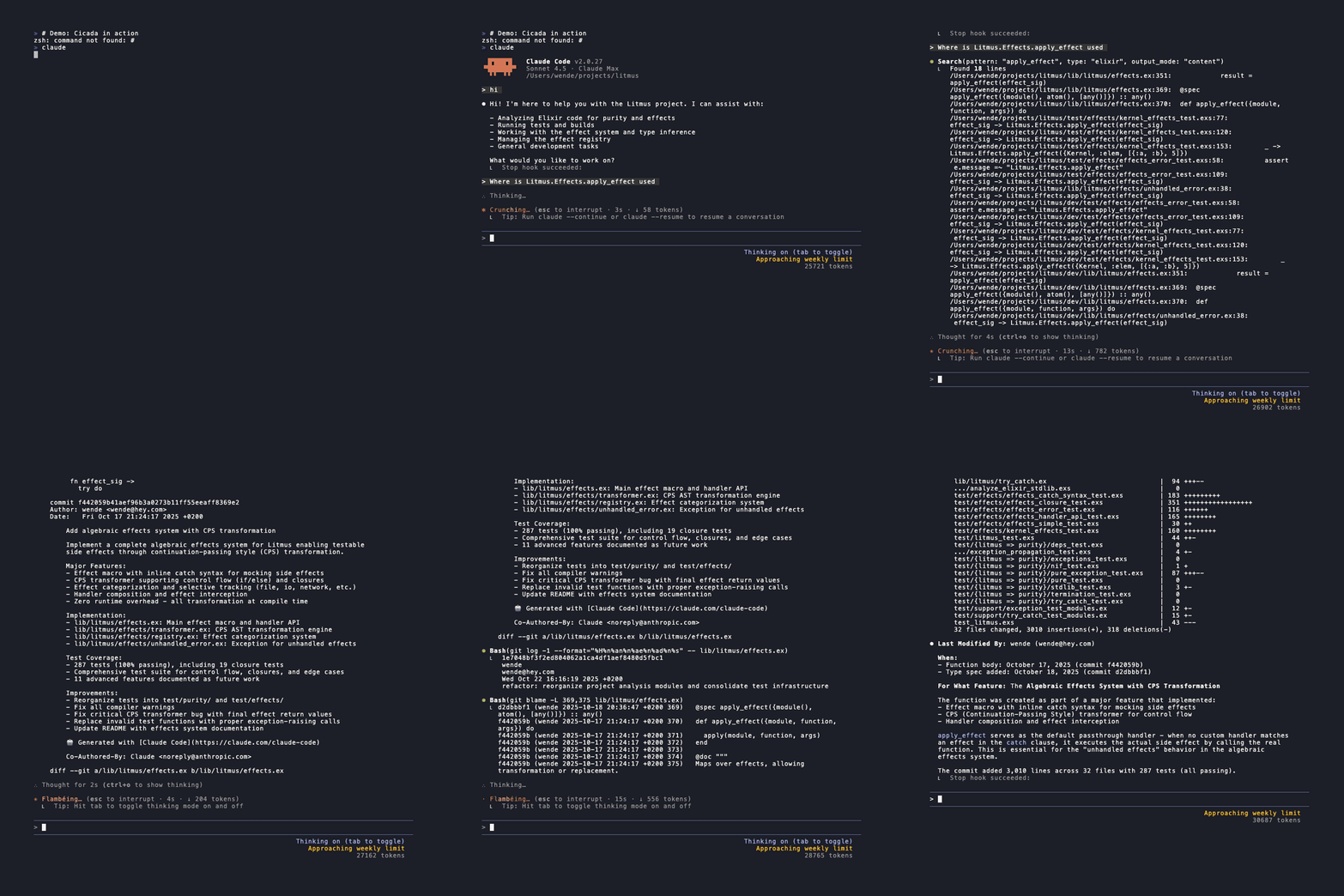
| Without CICADA | With CICADA |
 |
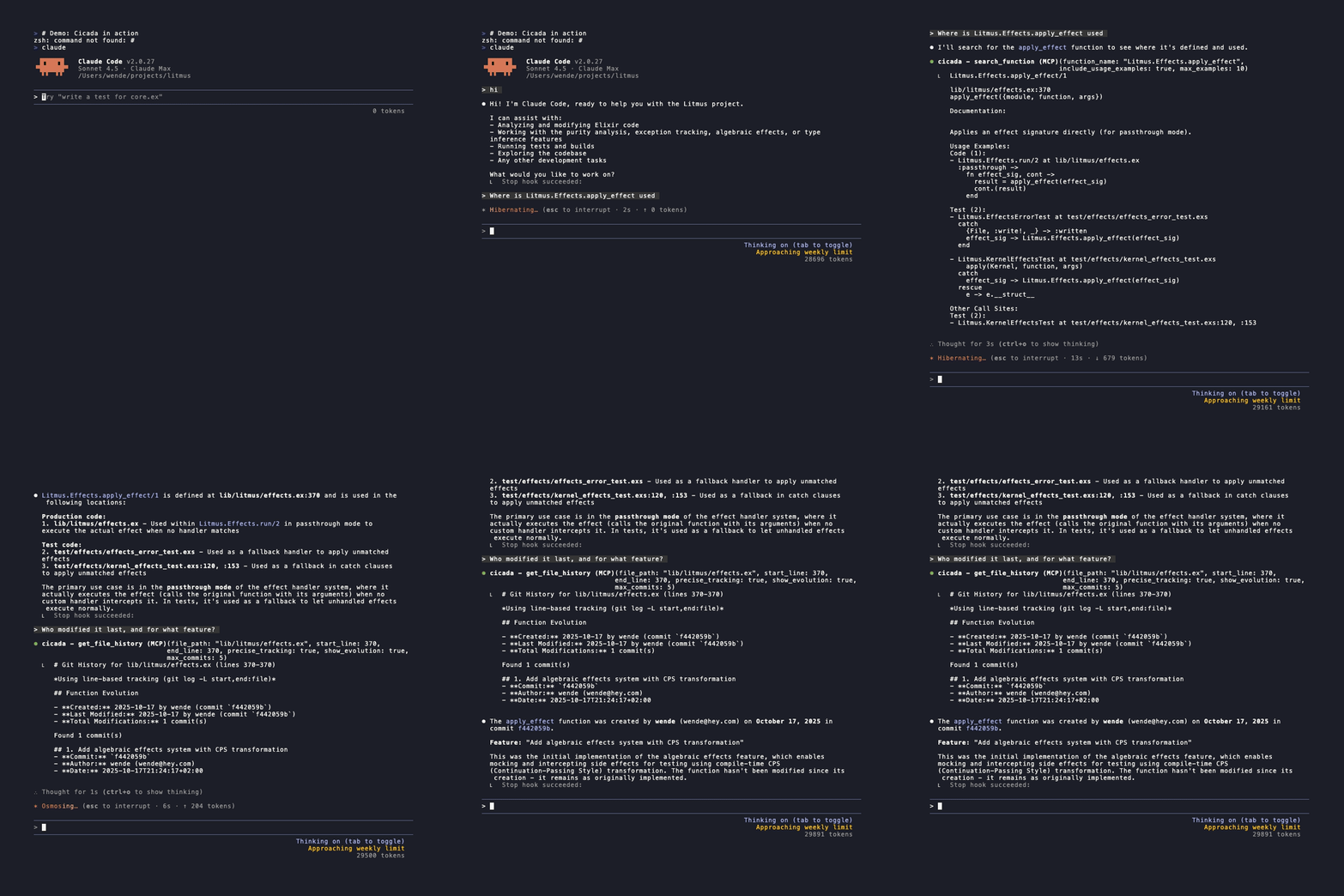 |
| 3,127 tokens • 52.84s | 550 tokens • 35.04s |
| 82.4% fewer tokens • 33.7% faster | |
What's New in v0.2.0
🤖 Enhanced AI Keyword Extraction and Expansion
AI-powered semantic search capabilities:
- BERT Extraction: KeyBERT-based keyword extraction for superior semantic understanding
- GloVE Expansion: GloVe-based keyword expansion into terms of similar meaning and domain
- Configurable Model Tiers: Choose between
fast,regular, orlargemodels to balance speed and accuracy - Smart Wildcard Search: Use patterns like
create*or*_userto find related concepts - Improved Relevance Scoring: Better ranking of search results by semantic relevance and TF scoring
Keyword Expansion Example
Input: "Authenticates user's credentials"
| Fast (NLP) | Standard (AI) | Max (AI) |
|---|---|---|
| auth_user (11.0) | auth_user (8.92) | auth_user (8.92) |
| user (4.0) | user (1.98) | user (1.98) |
| auth (3.0) | interface (1.41) | users (1.39) |
| users (2.8) | users (1.39) | user2 (1.32) |
| authenticates (1.0) | software (1.30) | user1 (1.30) |
| credentials (1.0) | application (1.30) | userlist (1.29) |
| allows (1.30) | non-user (1.29) | |
| interfaced (0.99) | non-users (0.90) | |
| interfaces (0.99) | auth (0.90) | |
| interfacing (0.99) | authenticates (0.72) | |
| softwares (0.91) | credentials (0.68) | |
| applications (0.91) | xauth (0.58) | |
| auth (0.90) | authentication (0.53) | |
| authenticates (0.72) | authentications (0.52) | |
| credentials (0.68) | authentification (0.52) | |
| login (0.52) | ||
| authenticate (0.51) | ||
| authenticators (0.50) | ||
| authenticator (0.50) |
⚡ Incremental Indexing
🛡️ QoL
- Graceful Interruption: Press Ctrl-C to cleanly save progress mid-indexing
- Resume Capability: Interrupted? Just run the same command again to continue
- Smart Merging: Automatically merges incremental changes with existing index
Key Features
- AST-aware code search - Find function definitions with full signatures, types, and documentation—no implementation bloat
- Intelligent call site tracking - Resolve aliases and track where functions are actually invoked across the codebase
- PR attribution & review context - Discover which pull request introduced any line and view historical code review discussions inline
- Function evolution tracking - See when functions were created, how often they’re modified, and their complete git history
- Semantic module analysis - Understand module dependencies, imports, and relationships beyond text matching
- MCP integration - Provide AI coding assistants with structured code intelligence, not raw text
Installation
Recommended: Permanent Installation
Installing UV:
curl -LsSf https://astral.sh/uv/install.sh | sh
# or: brew install uv
Install Cicada permanently for best experience:
# Step 1: Install once
uv tool install cicada-mcp

# Step 2: Setup in each project (one command per project)
cd /path/to/your/elixir/project
cicada claude  # or: cicada cursor, cicada vs
That's it! The setup command:
- Indexes your codebase with keyword extraction
- Stores all files in
~/.cicada/projects/<hash>/(outside your repo) - Creates only an MCP config file in your repo (
.mcp.jsonfor Claude Code) - Configures the MCP server automatically
After setup:
- Restart your editor
- Start coding with AI-powered Elixir intelligence!
Available commands after installation:
cicada [claude|cursor|vs]- One-command setup per projectcicada-mcp- MCP server (auto-started by editor)cicada index- Re-index code with custom options (--fast, --regular, or --max)cicada index-pr- Index pull requests for PR attributioncicada find-dead-code- Find potentially unused functions
Try Before Installing
Want to test Cicada first? Use uvx for a quick trial:
cd /path/to/your/elixir/project

# For Claude Code
uvx --from cicada-mcp cicada claude

# For Cursor
uvx --from cicada-mcp cicada cursor

# For VS Code
uvx --from cicada-mcp cicada vs
Note: uvx is perfect for trying Cicada, but permanent installation is recommended because:
- ✅ Faster MCP server startup (no temporary environment creation)
- ✅ Access to all CLI commands (
cicada index,cicada index-pr) - ✅ Fine-tuned keyword extraction with lemminflect or BERT models
- ✅ PR indexing features
- ✅ Custom re-indexing options
Once you're convinced, install permanently with uv tool install above!
Quick Setup for Cursor and Claude Code
For Cursor:
Click the install button at the top of this README or visit:
For Claude Code:
# Option 1: Using claude mcp add command
claude mcp add cicada -- uvx cicada-mcp ./path/to/your/codebase

# Option 2: Using setup script
uvx --from cicada-mcp cicada claude
Then for both editors, run these commands in your codebase to generate keyword lookup and GitHub PR lookup databases:
# Generate keyword lookup database
uvx --from cicada-mcp cicada-index .

# Generate GitHub PR lookup database
uvx --from cicada-mcp cicada-index-pr .
Quick Start
After installation, ask your AI coding assistant:
"What functions are in the MyApp.User module?"
"Show me where authenticate/2 is called"
"Which PR introduced line 42 of user.ex?"
"Show me all PRs that modified the User module with their review comments"
"Find all usages of Repo.insert/2"
"What's the git history of the authenticate function?"
For PR features, first run:
cicada index-pr .
Configuration
Automatic Configuration
The new simplified workflow stores all generated files outside your repository:
Storage Structure:
~/.cicada/
  projects/
    <repo-hash>/
      config.yaml    # MCP server configuration
      index.json     # Code index with keywords
      pr_index.json  # PR attribution data (optional)
      hashes.json    # For incremental indexing
Your Repository (Clean!):
your-project/
  .mcp.json        # Only this file is added (for Claude Code)
  # or .cursor/mcp.json for Cursor
  # or .vscode/settings.json for VS Code
Generated MCP Config (Claude Code example):
{
  "mcpServers": {
    "cicada": {
      "command": "cicada-mcp",
      "env": {
        "CICADA_REPO_PATH": "/path/to/project",
        "CICADA_CONFIG_DIR": "/home/user/.cicada/projects/<hash>"
      }
    }
  }
}
✅ Fast startup, no paths, portable!
Migration tip from v0.1.x: If you have the old Python-based config, run:
uv tool install git+https://github.com/wende/cicada.git@v0.2.0 --force
cicada claude  # Re-run to get optimized config
Re-indexing
After code changes, re-run the setup command:
# Re-index for Claude Code
uvx --from cicada-mcp cicada claude

# Or if permanently installed
cicada claude
This will:
- Detect changed files (incremental indexing)
- Update the index with new/modified code
- Keep your existing MCP configuration
Optional: PR Attribution
Index pull requests for PR-related features:
# After permanent installation
cicada index-pr .

# Or with uvx
uvx --from cicada-mcp cicada-index-pr .
Clean rebuild (re-index everything from scratch)
cicada index-pr . --clean
**See also:** [PR Indexing Documentation](docs/PR_INDEXING.md)

---

## MCP Tools

CICADA provides 9 specialized tools for AI assistants to understand and navigate your codebase. For complete technical documentation including parameters and return formats, see [MCP Tools Reference](docs/MCP-Tools-Reference.md).

### Core Search Tools

**`search_module`** - Find modules and view all their functions
- Search by exact module name or file path
- View function signatures with type specs
- Filter public/private functions
- Output in Markdown or JSON

**`search_function`** - Locate function definitions and track usage
- Search by function name, arity, or full module path
- See where functions are called with line numbers
- View actual code usage examples
- Filter for test files only

**`search_module_usage`** - Track module dependencies
- Find all aliases and imports
- See all function calls to a module
- Understand module relationships
- Map dependencies across codebase

### Git History & Attribution Tools

**`find_pr_for_line`** - Identify which PR introduced any line of code
- Line-level PR attribution via git blame
- Author and commit information
- Direct links to GitHub PRs
- Requires: GitHub CLI + PR index

**`get_file_pr_history`** - View complete PR history for a file
- All PRs that modified the file
- PR descriptions and metadata
- Code review comments with line numbers
- Requires: GitHub CLI + PR index

**`get_commit_history`** - Track file and function evolution over time
- Complete commit history for files
- Function-level tracking (follows refactors)
- Creation and modification timeline
- Requires: `.gitattributes` configuration

**`get_blame`** - Show line-by-line code ownership
- Grouped authorship display
- Commit details for each author
- Code snippets with context

### Advanced Features

**`search_by_keywords`** (EXPERIMENTAL) - Semantic documentation search
- Find code by concepts, not just names
- Wildcard pattern matching (`create*`, `*_user`)
- Filter results by type: modules only, functions only, or all
- AI-extracted keywords from docs
- Relevance scoring
- Requires: Index built with keyword extraction (--fast, --regular, or --max)

**`find_dead_code`** - Identify potentially unused functions
- Three confidence levels (high, medium, low)
- Smart detection of callbacks and behaviors
- Recognition of dynamic call patterns
- Module-level grouping with line numbers
- Excludes test files and `@impl` functions

---

**See also:** [Complete MCP Tools Reference](docs/MCP-Tools-Reference.md) for detailed specifications

---

## CLI Tools

CICADA provides several command-line tools for setup, indexing, and analysis:

### Setup & Configuration

**`cicada`** - Initialize CICADA in your project
```bash
cicada                           # Setup in current directory
cicada /path/to/other/project   # Setup in different directory
- Generates
.mcp.jsonconfiguration - Creates
.cicada/directory - Installs Elixir dependencies
- Configures git attributes for function tracking
Indexing Tools
cicada index - Index Elixir codebase
cicada index                         # Index current directory
cicada index --fast                  # Fast tier: Regular extraction + lemminflect (no downloads)
cicada index --regular               # Regular tier: KeyBERT small + GloVe (128MB, default)
cicada index --max                   # Max tier: KeyBERT large + FastText (958MB+)
- Parses all Elixir files using tree-sitter
- Extracts modules, functions, and call sites
- Resolves aliases for accurate tracking
- Optional keyword extraction for semantic search
cicada index-pr - Index GitHub pull requests
cicada index-pr .              # Index PRs for current repo
cicada index-pr . --clean      # Full rebuild from scratch
- Requires GitHub CLI (
gh) authenticated - Indexes PR metadata and review comments
- Incremental updates by default
- Enables PR attribution features
Analysis Tools
cicada find-dead-code - Find unused functions (CLI version)
cicada find-dead-code                      # Show high confidence only
cicada find-dead-code --min-confidence low # Show all candidates
cicada find-dead-code --format json        # JSON output
cicada find-dead-code --index path/to/index.json
- Analyzes function usage across codebase
- Categorizes by confidence level
- Available as both CLI tool and MCP tool
Roadmap
v0.2.0 (Released - October 2025) ✅
- Enhanced AI Keyword Extraction - Production-ready semantic search
- BERT integration with KeyBERT for superior keyword extraction
- Configurable model tiers (fast, regular, large)
- Wildcard pattern support (
create*,*_user) - Improved relevance scoring
- Incremental Indexing - 15-25x faster reindexing
- MD5-based change detection
- Processes only modified files
- Interrupt-safe with graceful Ctrl-C handling
- Resume capability for interrupted indexes
- Production Hardening
- Signal handlers (SIGINT, SIGTERM)
- Partial progress saving
- Automatic hash storage and management
v0.1.1 (Released - October 2025) ✅
- Module and function search
- Call site tracking with alias resolution
- PR attribution via git blame + GitHub
- PR review comments with line mapping
- File PR history with descriptions
- GraphQL-based PR indexing (30x faster)
- Function usage examples with code snippets
- Git commit history tracking with precise function tracking
- Function evolution metadata (creation, modifications, frequency)
- Git blame integration with line-by-line authorship
- Test file filtering
- Multiple output formats (markdown, JSON)
- Intelligent .mcp.json auto-configuration
uv tool installsupport- Automatic version update checking - Notifies users when newer versions are available
- NLP Keyword search (EXPERIMENTAL) - Basic semantic search across documentation
v0.3 (Potential Future Enhancements)
- Enhanced keyword search with BM25 ranking
- Directory tree hashing for faster change detection
- Caching optimizations for large codebases
Long Term (Stretch Goals)
- Multi-language support (Python, TypeScript)
- Semantic code search
- Real-time incremental indexing
- Web UI for exploration
Out of Scope (Non-Goals)
These features are explicitly not planned:
- Fuzzy search / "did you mean" suggestions (grep is sufficient)
- Function similarity algorithms or recommendations
- Confidence scoring systems
- Multi-repository support (single repo focus)
- Alternative function suggestions (bang/non-bang variants)
Design Decisions
CICADA prioritizes simplicity and reliability over complexity:
Intentional Constraints
- Exact name matching only - Use grep/ripgrep for fuzzy searches; keeping CICADA focused
- Direct call tracking - Tracks explicit function calls; comprehensive call graphs add complexity without enough value
- Manual documentation search - Documentation indexing planned for v0.1
- No AI/ML features - No similarity algorithms, confidence scoring, or recommendations; deterministic results only
These are deliberate design choices to keep CICADA fast, predictable, and maintainable.
Contributing
Development Setup
# Clone your fork
git clone https://github.com/wende/cicada.git
cd cicada

# Using uv (recommended)
uv sync

# Or traditional venv (legacy)
python -m venv venv
source venv/bin/activate  # On Windows: venv\Scripts\activate
pip install -e ".[dev]"

# Run tests
pytest
Testing
# Run all tests
pytest

# Run specific test files
pytest tests/test_parser.py
pytest tests/test_search_function.py

# Run with coverage (terminal report)
pytest --cov=cicada --cov-report=term-missing

# Generate HTML coverage report
pytest --cov=cicada --cov-report=html
# Open htmlcov/index.html in your browser

# Run with coverage and see which lines need tests
pytest --cov=cicada --cov-report=term-missing --cov-report=html

# Check coverage and fail if below threshold (e.g., 80%)
pytest --cov=cicada --cov-fail-under=80
Code Style
This project uses:
- black for code formatting
- pytest for testing
- type hints where appropriate
Before submitting a PR:
# Format code
black cicada tests

# Run tests
pytest

# Check types (if using mypy)
mypy cicada
Reporting Issues
When reporting bugs or requesting features:
- Check existing Issues
- If not found, create a new issue with:
- Clear description
- Steps to reproduce (for bugs)
- Expected vs actual behavior
- Your environment (OS, Python version, Elixir version)
Troubleshooting
"Index file not found"
Run the indexer first:
cicada index /path/to/project
"Module not found"
Use the exact module name as it appears in code (e.g., MyApp.User, not User).
MCP Server Won't Connect
- Verify
.mcp.jsonexists in your project root - Check that all paths in
.mcp.jsonare absolute - Ensure
index.jsonwas created successfully - Restart your MCP client (Claude Code, Cline, etc.)
- Check your MCP client logs for errors
PR Features Not Working
PR features require the GitHub CLI and a PR index:
# Install GitHub CLI
brew install gh  # macOS
# or visit https://cli.github.com/

# Authenticate
gh auth login

# Index PRs (first time or after new PRs)
cicada index-pr .

# Clean rebuild (re-index everything from scratch)
cicada index-pr . --clean
Common issues:
- "No PR index found" → Run
cicada index-pr . - "Not a GitHub repository" → Ensure repo has GitHub remote
- Slow indexing → Incremental updates are used by default
Uninstall
Remove CICADA from a project:
rm -rf .cicada/ .mcp.json
# Restart your MCP client
Credits
Built With
- Tree-sitter - Incremental parsing system
- tree-sitter-elixir - Elixir grammar
- MCP - Model Context Protocol
- GitHub CLI - PR attribution
License
This project is licensed under the MIT License - see the LICENSE file for details.
Acknowledgments
- The Anthropic team for Claude Code and MCP
- The Elixir community for tree-sitter-elixir
- All contributors who help improve CICADA
Release history Release notifications | RSS feed


Download files
Download the file for your platform. If you're not sure which to choose, learn more about installing packages.
Source Distribution
Built Distribution
Filter files by name, interpreter, ABI, and platform.
If you're not sure about the file name format, learn more about wheel file names.
Copy a direct link to the current filters
File details
Details for the file cicada_mcp-0.2.3.tar.gz.
File metadata
- Download URL: cicada_mcp-0.2.3.tar.gz
- Upload date:
- Size: 231.7 kB
- Tags: Source
- Uploaded using Trusted Publishing? No
- Uploaded via: uv/0.9.7
File hashes
| Algorithm | Hash digest | |
|---|---|---|
| SHA256 |
8e46847c9071c2d24409508c2626ff59c2c86f11043543848b83d899ecd7baa0
|
|
| MD5 |
d9ce46505d0398a140ad758dcb4ff7a1
|
|
| BLAKE2b-256 |
15a15a4e9d35efc867e27f783a678fe9772c197be6bef5d43559c8f00354932d
|
File details
Details for the file cicada_mcp-0.2.3-py3-none-any.whl.
File metadata
- Download URL: cicada_mcp-0.2.3-py3-none-any.whl
- Upload date:
- Size: 139.0 kB
- Tags: Python 3
- Uploaded using Trusted Publishing? No
- Uploaded via: uv/0.9.7
File hashes
| Algorithm | Hash digest | |
|---|---|---|
| SHA256 |
994a496fcda3e9b5a1eb714fcc310126023071415313ab3b50815e7df75e3f6b
|
|
| MD5 |
c030061596beb26250106b01892c4185
|
|
| BLAKE2b-256 |
49d09115c6d0762fff75509e8c123fd2392fc01de0e8e3e4819daad528743daa
|






