
cielab-gamut-tools
Calculate and visualize CIELab colour gamuts of displays.
Implements the gamut volume algorithm from the gamut-volume-m MATLAB library. Results are normative under IDMS v1.3, IEC 62977-3-5, and IEC 62906-6-1.
Installation
Pick the section for your operating system. Each path installs Python automatically if you don't already have it.
Windows
1 — Open PowerShell
Press Win+R, type powershell, press Enter.
2 — Install Scoop
Scoop is a command-line package manager for Windows. Paste these two lines one at a time:
Set-ExecutionPolicy -ExecutionPolicy RemoteSigned -Scope CurrentUser
Invoke-RestMethod -Uri https://get.scoop.sh | Invoke-Expression
No administrator rights are needed. If you already have Scoop, skip this step.
3 — Install pipx
scoop install pipx
Scoop will install Python automatically if not already present.
4 — Install cielab-gamut-tools
pipx install cielab-gamut-tools
5 — Verify
cgt about
If you see the version and standards information, installation is complete.
If cgt is not found, close PowerShell and reopen it, then try again.
macOS
1 — Open Terminal
Press Cmd+Space, type Terminal, press Enter.
2 — Install Homebrew
Homebrew is a package manager for macOS. Paste this line (or get it from brew.sh):
/bin/bash -c "$(curl -fsSL https://raw.githubusercontent.com/Homebrew/install/HEAD/install.sh)"
Follow the on-screen prompts. If you already have Homebrew, skip this step.
3 — Install pipx
brew install pipx
pipx ensurepath
Close and reopen Terminal after running pipx ensurepath.
4 — Install cielab-gamut-tools
pipx install cielab-gamut-tools
5 — Verify
cgt about
Linux (Ubuntu / Debian)
Ubuntu 23.04+ and Debian 12+ include pipx in their package repositories:
sudo apt install pipx
pipx ensurepath
pipx install cielab-gamut-tools
On older releases, replace the first line with sudo apt install python3-pip python3-venv && pip install --user pipx.
After running pipx ensurepath, reopen the terminal before running cgt about to verify.
Updating
pipx upgrade cielab-gamut-tools
cgt about will tell you if a newer version is available.
Install from source (developers)
git clone https://github.com/CIELab-gamut-tools/cielab-gamut-tools-py.git
cd cielab-gamut-tools-py
pip install -e ".[dev]"
Command-line usage
After installation, three equivalent commands are available:
cielab-gamut-tools   # canonical name used in standards citations
cielab-tools         # short alias
cgt                  # shortest alias for everyday use
Standards and citation information
cgt about
Calculate gamut volume
# From a CGATS measurement file
cgt calculate volume display.txt

# Named reference gamut
cgt calculate volume srgb

# Multiple gamuts — tabulated output
cgt calculate volume display1.txt display2.txt srgb bt.2020

# Machine-readable output
cgt calculate volume display.txt -f json
cgt calculate volume display.txt -f csv

# Standards-traceable output (appends algorithm metadata)
cgt calculate volume display.txt -s IDMS -f json

# Value only, for scripting
cgt calculate volume srgb -q
Named gamuts: srgb, bt.2020, dci-p3, display-p3, adobe-rgb.
Calculate gamut coverage
# Coverage against a single reference
cgt calculate coverage display.txt -r srgb

# Multiple references in one pass
cgt calculate coverage display.txt -r srgb,bt.2020,dci-p3

# CSV for spreadsheet import
cgt calculate coverage display.txt -r srgb,bt.2020 -f csv
Compare multiple gamuts
# Volume comparison — delta vs first gamut
cgt calculate compare display1.txt display2.txt display3.txt

# Coverage of each against a single reference
cgt calculate compare display1.txt display2.txt -r srgb

# Full pairwise intersection matrix (entry (i,j) = % of gamut j covered by gamut i)
cgt calculate compare srgb bt.2020 dci-p3 display-p3 -m
cgt calculate compare srgb bt.2020 dci-p3 -m -f csv
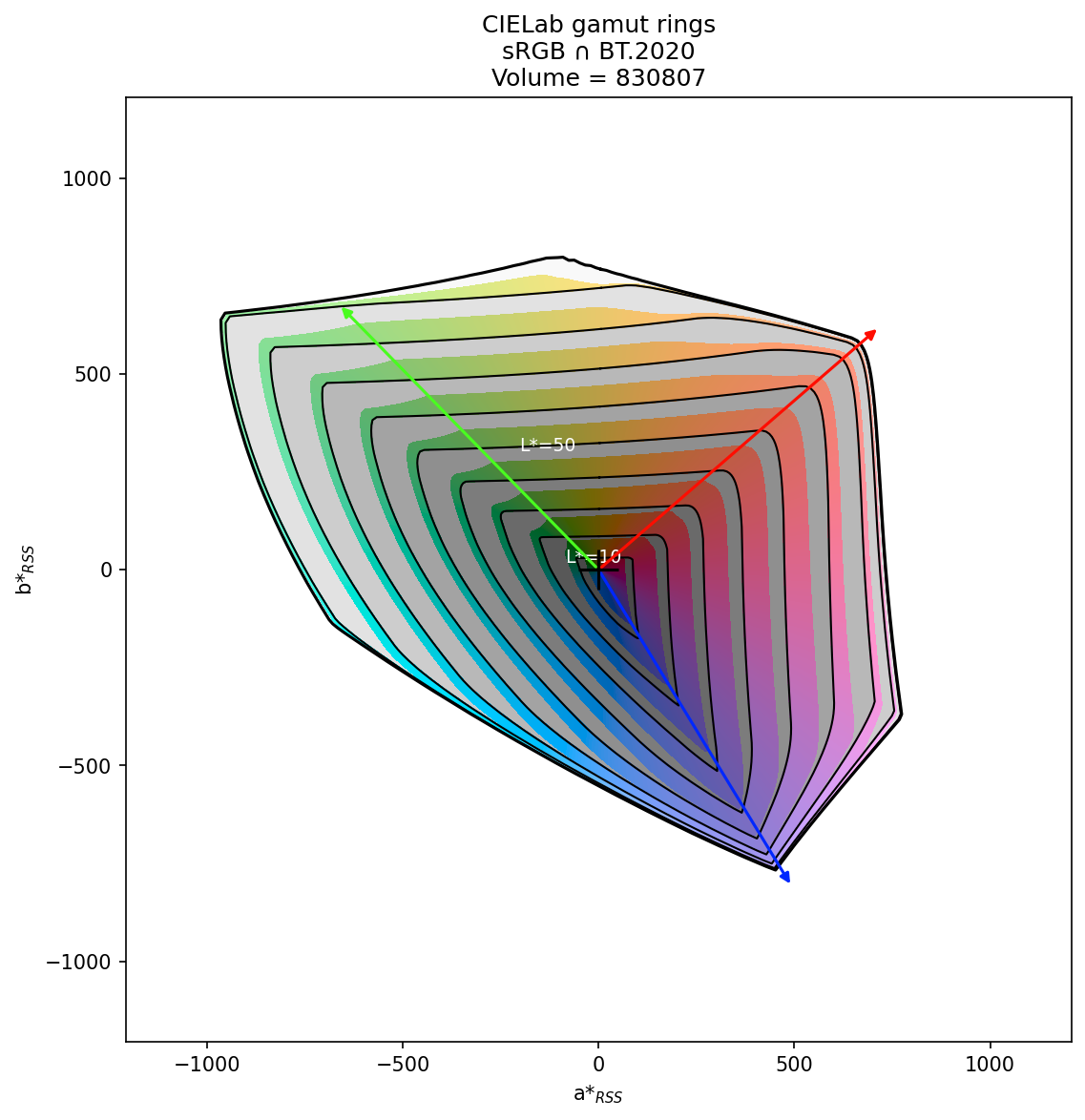
Visualise gamut diagrams
| Rings diagram | 3D surface |
|---|---|
 |
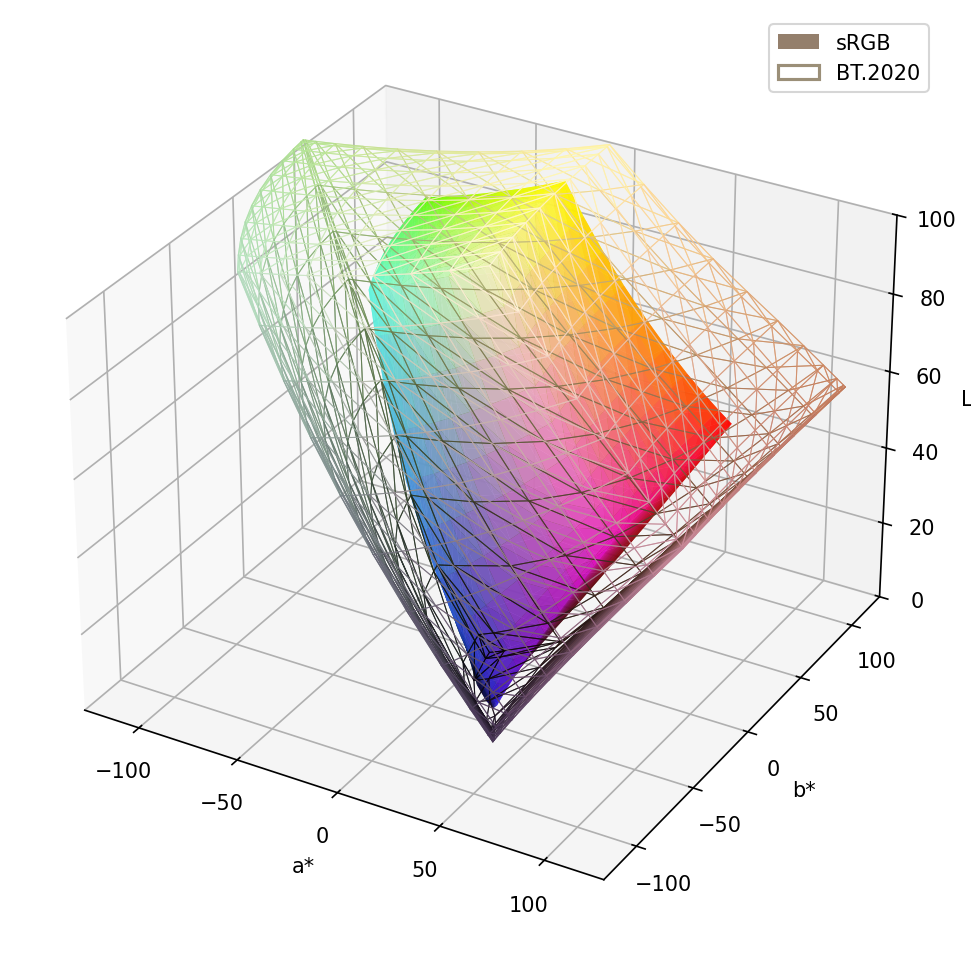 |
| sRGB ∩ BT.2020 | sRGB solid + BT.2020 wireframe |
# 2D ring diagram (a*-b* plane, L* encoded as ring radii)
cgt plot rings display.txt
cgt plot rings display.txt -r srgb          # with reference overlay
cgt plot rings display.txt -r srgb -i       # intersection view
cgt plot rings display.txt -r srgb -o rings.png --dpi 200

# 3D surface in CIELab space
cgt plot surface display.txt
cgt plot surface srgb bt.2020 --alpha 0.4   # overlay, see-through
cgt plot surface srgb bt.2020 --style ",wireframe+grey+lw:0.5"  # mixed solid/wireframe
cgt plot surface display.txt srgb -o comparison.png
Both commands have many more options — see the detailed references: Rings diagram options · Surface plot options
Generate reference files
# RGB test signal list for measurement (normative 602-point set, m=11)
cgt generate rgb-signals                     # CGATS to stdout
cgt generate rgb-signals -o signals.txt
cgt generate rgb-signals -g 9 -b 10         # reduced grid, 10-bit

# Synthetic reference gamut as CGATS file
cgt generate synthetic srgb -o srgb_envelope.txt
cgt generate synthetic bt.2020 -m measurement -o bt2020_meas.txt

# Custom primaries
cgt generate synthetic \
    --primaries 0.64,0.33,0.21,0.71,0.15,0.06 \
    --white 0.3127,0.3290 --gamma 2.2 -o custom.txt
Numerical precision
All three computation paths give the same volume result:
| Path | sRGB example |
|---|---|
calculate volume srgb |
830,807 |
| CGATS measurement file | 830,807 |
| CGATS envelope file | 830,807 |
The MATLAB reference value for sRGB is 830,766 (~0.005% difference). The standards specify a tolerance of ±1%.
Using as a Python library
The CLI covers most workflows. If you need to integrate gamut calculations into a Python script or pipeline:
from cielab_gamut_tools import Gamut, SyntheticGamut

# Load measured display gamut
display = Gamut.from_cgats("measurements.txt")

# Reference gamuts
srgb   = SyntheticGamut.srgb()
bt2020 = SyntheticGamut.bt2020()

# Volume and coverage
print(f"Display volume: {display.volume():.0f}")
intersection = display.intersect(srgb)
print(f"sRGB coverage: {intersection.volume() / srgb.volume() * 100:.1f}%")

# Visualize (returns a matplotlib Figure)
fig = display.plot_rings(reference=srgb)
fig.savefig("rings.png", dpi=150)
Available reference gamuts: srgb(), bt2020(), dci_p3(), display_p3(), adobe_rgb(), or construct a custom gamut from CIE xy primaries and white point:
custom = SyntheticGamut(
    primaries_xy=[[0.68, 0.32], [0.265, 0.69], [0.15, 0.06]],
    white_xy=[0.3127, 0.329],
    gamma=2.2,
)
Test signal generation and CGATS export are also available via the API — see the module docstrings for details.
Troubleshooting
CLI command not found after installation
Close the terminal and reopen it — PATH changes from pipx and Scoop take effect in new sessions. If still missing, run pipx ensurepath (macOS/Linux) or check that Scoop completed without errors (Windows).
File not found errors
Pass an absolute path to your measurement file. On Windows you can Shift+right-click the file and choose "Copy as path"; on macOS hold Option when right-clicking and choose "Copy … as Pathname".
Plot window doesn't appear when using the Python API
Call import matplotlib.pyplot as plt; plt.show() after plotting, or use --output via the CLI to save directly to a file.
Interactive UI
cgt ui launches a local web application for interactive gamut exploration.
cgt ui              # opens browser at http://localhost:8000
cgt ui --port 8080  # custom port
cgt ui --no-browser # server only
Features: drag-and-drop CGATS file loading, rings diagram and 3D surface views, pairwise coverage matrix, PNG/PDF export.
Development
git clone https://github.com/CIELab-gamut-tools/cielab-gamut-tools-py.git
cd cielab-gamut-tools-py
pip install -e ".[dev]"
pytest
To work on the UI frontend (requires Node.js):
# Build the frontend once (output goes to ui/dist/, served by cgt ui)
make ui

# Run frontend dev server with hot-reload (proxies /api to the Python server)
cd src/cielab_gamut_tools/ui/frontend
npm install
npm run dev   # Vite on :5173, Python API on :8000
Citations
If you use this software in academic work, please cite:
Gamut volume calculation:
E. Smith, R. L. Heckaman, K. Lang, J. Penczek, J. Bergquist (2020). "Measuring the color capability of modern display systems." Journal of the Society for Information Display, 28(6), 548–556. https://doi.org/10.1002/jsid.918
Gamut rings concept:
K. Masaoka, F. Jiang, M. D. Fairchild, R. L. Heckaman (2020). "Analysis of color volume of multi-chromatic displays using gamut rings." Journal of the Society for Information Display, 28(3), 273–286. https://doi.org/10.1002/jsid.852
Gamut ring intersection:
K. Masaoka, E. Smith, K. Lang, B. Berkeley, J. Bergquist, J. Penczek (2025). "Visualization of reproducible object colors in standard color spaces using the gamut ring intersection." Journal of the Society for Information Display, 33(4), 231–245. https://doi.org/10.1002/jsid.2031
License
MIT — see LICENSE for details.
1 maintainer

Metadata
1 maintainer
Release files for cielab-gamut-tools 0.5.4
For a detailed explanation of source distributions (sdists) and built distributions (wheels), please see the package formats documentation.
Source distribution (sdist)
| File | Size | Uploaded | Provenance | Actions |
|---|---|---|---|---|
| cielab_gamut_tools-0.5.4.tar.gz | 1.0 MB | With provenance | Details for cielab_gamut_tools-0.5.4.tar.gz |
Built distribution (wheel)
| File | Interpreter | ABI | Platform | Actions Reset |
|---|---|---|---|---|
| cielab_gamut_tools-0.5.4-py3-none-any.whl | Python 3 | none | any | Details for cielab_gamut_tools-0.5.4-py3-none-any.whl |
Total release size: 1.7 MB
Release files / cielab_gamut_tools-0.5.4.tar.gz
| Download URL | cielab_gamut_tools-0.5.4.tar.gz |
|---|---|
| Size | 1.0 MB |
| Tags | Source |
|
SHA-256 checksum How to use checksums |
3aa6a42ab80bb61907eb08640326ea0a08b79ac430c5e543501facb30c91ce64
|
|
BLAKE2b-256 checksum How to use checksums |
67827ad3af04a67f15661a85720d4b0301f27114a1763dcb8649d76045275f73
|
| Upload date | |
|
Uploaded using Trusted Publishing? What is trusted publishing? |
Yes |
| Uploaded via |
twine/6.1.0 CPython/3.13.12
|
Provenance
Provenance describes where a file came from. On PyPI, provenance is shared via attestations, which provide a verifiable record of the build or publishing details. View details, limitations and caveats.


PyPI Publish Attestation
PyPI verified that this artifact, at this checksum, originated from the publisher listed below.
Signed by GitHub Actions, verified by PyPI on Jun 9, 2026.
Transparency logRelease files / cielab_gamut_tools-0.5.4-py3-none-any.whl
| Download URL | cielab_gamut_tools-0.5.4-py3-none-any.whl |
|---|---|
| Size | 685.7 kB |
| Tags | Python 3 |
|
SHA-256 checksum How to use checksums |
7dfe5532f171d35b8fff2db6d7d467ea52e1b6a6f713ddd2c6ca75eeb47e5e89
|
|
BLAKE2b-256 checksum How to use checksums |
16658a5c4473a3587b2a9a61d86ef71c21f1261023023690d52dd21c928c24b4
|
| Upload date | |
|
Uploaded using Trusted Publishing? What is trusted publishing? |
Yes |
| Uploaded via |
twine/6.1.0 CPython/3.13.12
|
Provenance
Provenance describes where a file came from. On PyPI, provenance is shared via attestations, which provide a verifiable record of the build or publishing details. View details, limitations and caveats.
PyPI Publish Attestation
PyPI verified that this artifact, at this checksum, originated from the publisher listed below.
Signed by GitHub Actions, verified by PyPI on Jun 9, 2026.
Transparency logSecurity for cielab-gamut-tools 0.5.4
Provenance
Provenance describes where a file came from. On PyPI, provenance is shared via attestations, which provide a verifiable record of the build or publishing details. View details, limitations and caveats.
Full provenance
Both files in this release have been uploaded with provenance metadata.
Attestation for cielab_gamut_tools-0.5.4.tar.gz
PyPI Publish Attestation
PyPI verified that this artifact, at this checksum, originated from the publisher listed below.
Signed by GitHub Actions, verified by PyPI on Jun 9, 2026.
Transparency logA note on package security
PyPI is a repository for distributing packages, not a service for auditing them. While third-party security researchers and our staff do their best to detect and remove malicious packages, PyPI cannot guarantee the quality, security or suitability of any given package.
To learn more about protecting yourself from malicious actors, visit our package security documentation.














