
Calculate and visualize CIELab colour gamuts of displays

Project description
cielab-gamut-tools
Calculate and visualize CIELab colour gamuts of displays.
Implements the gamut volume algorithm from the gamut-volume-m MATLAB library. Results are normative under IDMS v1.3, IEC 62977-3-5, and IEC 62906-6-1.
Installation
Requires Python 3.10 or later.
pip install cielab-gamut-tools
On Ubuntu 24.04+ / Debian 12+ you may need a virtual environment or pipx due to PEP 668:
# virtual environment
python3 -m venv gamut_env && source gamut_env/bin/activate
pip install cielab-gamut-tools

# or pipx (CLI only)
pipx install cielab-gamut-tools
Install from source
git clone https://github.com/CIELab-gamut-tools/cielab-gamut-tools-py.git
cd cielab-gamut-tools-py
pip install -e .
Updating
pipx upgrade cielab-gamut-tools   # if installed with pipx
pip install --upgrade cielab-gamut-tools  # if installed with pip
If --version still shows the old version after upgrading, force-reinstall:
pipx install cielab-gamut-tools --force
pip install --force-reinstall cielab-gamut-tools
cielab-tools about will tell you if a newer version is available.
Command-line usage
After installation, three equivalent commands are available:
cielab-gamut-tools   # canonical name used in standards citations
cielab-tools         # short alias
cgt                  # shortest alias for everyday use
Standards and citation information
cgt about
Calculate gamut volume
# From a CGATS measurement file
cgt calculate volume display.txt

# Named reference gamut
cgt calculate volume srgb

# Multiple gamuts — tabulated output
cgt calculate volume display1.txt display2.txt srgb bt.2020

# Machine-readable output
cgt calculate volume display.txt -f json
cgt calculate volume display.txt -f csv

# Standards-traceable output (appends algorithm metadata)
cgt calculate volume display.txt -s IDMS -f json

# Value only, for scripting
cgt calculate volume srgb -q
Named gamuts: srgb, bt.2020, dci-p3, display-p3, adobe-rgb.
Calculate gamut coverage
# Coverage against a single reference
cgt calculate coverage display.txt -r srgb

# Multiple references in one pass
cgt calculate coverage display.txt -r srgb,bt.2020,dci-p3

# CSV for spreadsheet import
cgt calculate coverage display.txt -r srgb,bt.2020 -f csv
Compare multiple gamuts
# Volume comparison — delta vs first gamut
cgt calculate compare display1.txt display2.txt display3.txt

# Coverage of each against a single reference
cgt calculate compare display1.txt display2.txt -r srgb

# Full pairwise intersection matrix (entry (i,j) = % of gamut j covered by gamut i)
cgt calculate compare srgb bt.2020 dci-p3 display-p3 -m
cgt calculate compare srgb bt.2020 dci-p3 -m -f csv
Visualise gamut diagrams
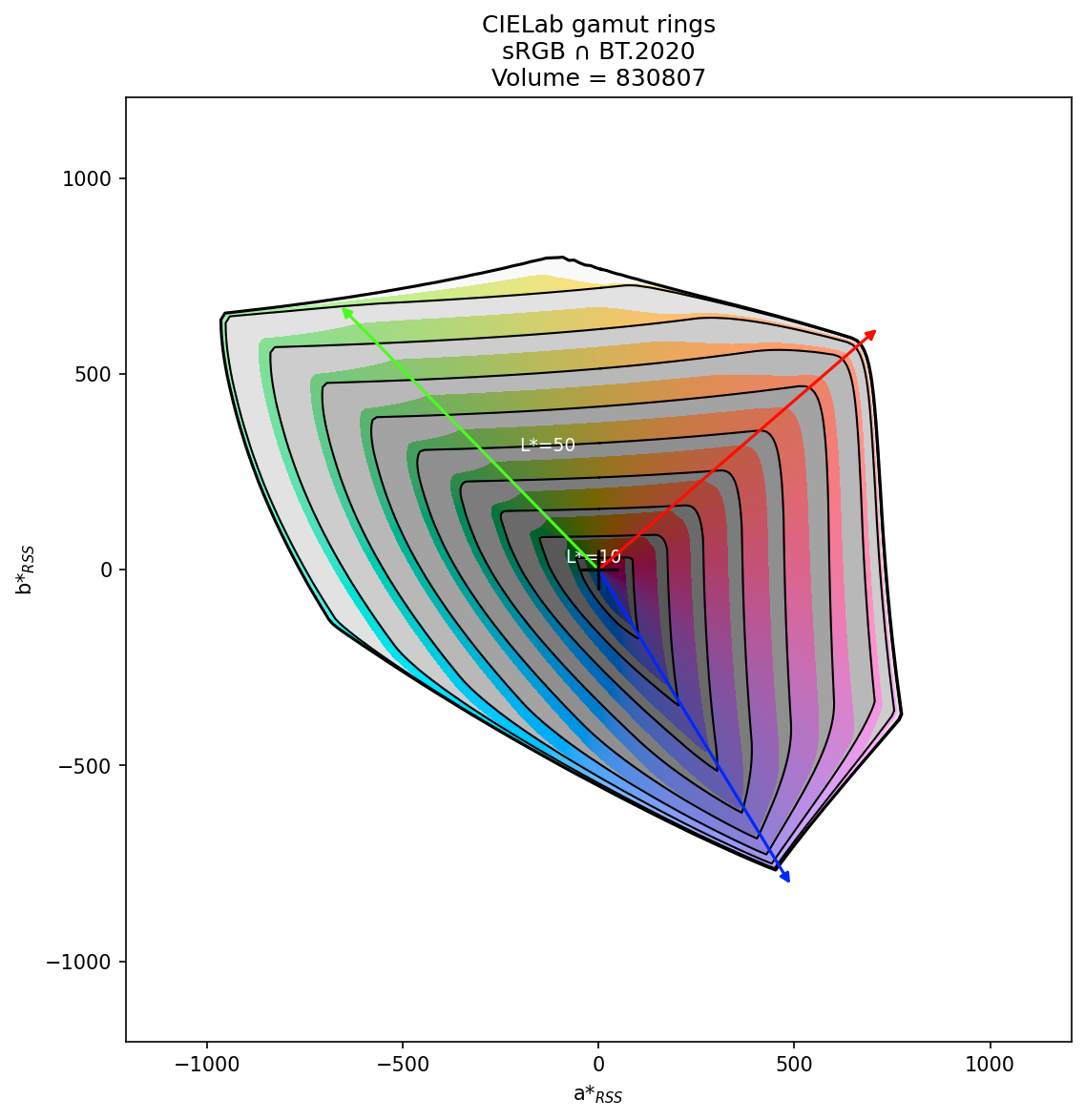
| Rings diagram | 3D surface |
|---|---|
 |
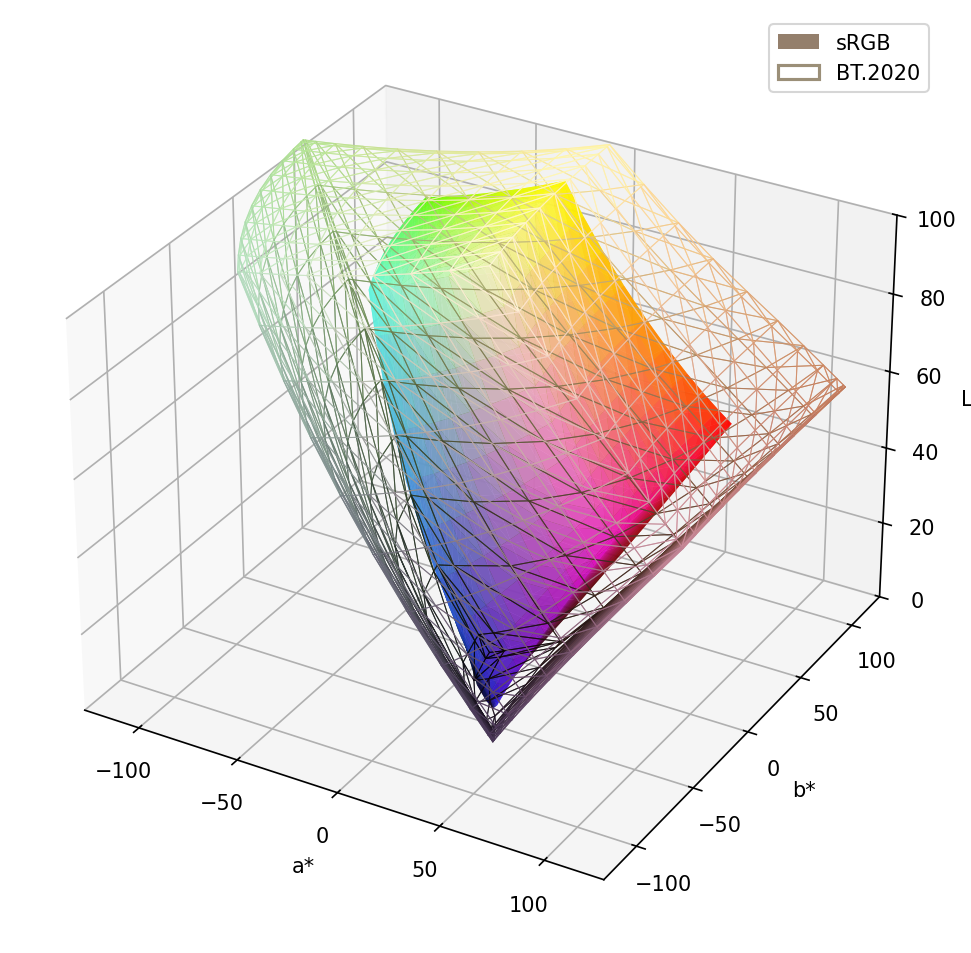 |
| sRGB ∩ BT.2020 | sRGB solid + BT.2020 wireframe |
# 2D ring diagram (a*-b* plane, L* encoded as ring radii)
cgt plot rings display.txt
cgt plot rings display.txt -r srgb          # with reference overlay
cgt plot rings display.txt -r srgb -i       # intersection view
cgt plot rings display.txt -r srgb -o rings.png --dpi 200

# 3D surface in CIELab space
cgt plot surface display.txt
cgt plot surface srgb bt.2020 --alpha 0.4   # overlay, see-through
cgt plot surface srgb bt.2020 --style ",wireframe+grey+lw:0.5"  # mixed solid/wireframe
cgt plot surface display.txt srgb -o comparison.png
Both commands have many more options — see the detailed references: Rings diagram options · Surface plot options
Generate reference files
# RGB test signal list for measurement (normative 602-point set, m=11)
cgt generate rgb-signals                     # CGATS to stdout
cgt generate rgb-signals -o signals.txt
cgt generate rgb-signals -g 9 -b 10         # reduced grid, 10-bit

# Synthetic reference gamut as CGATS file
cgt generate synthetic srgb -o srgb_envelope.txt
cgt generate synthetic bt.2020 -m measurement -o bt2020_meas.txt

# Custom primaries
cgt generate synthetic \
    --primaries 0.64,0.33,0.21,0.71,0.15,0.06 \
    --white 0.3127,0.3290 --gamma 2.2 -o custom.txt
Numerical precision
All three computation paths give the same volume result:
| Path | sRGB example |
|---|---|
calculate volume srgb |
830,807 |
| CGATS measurement file | 830,807 |
| CGATS envelope file | 830,807 |
The MATLAB reference value for sRGB is 830,766 (~0.005% difference). The standards specify a tolerance of ±1%.
Using as a Python library
The CLI covers most workflows. If you need to integrate gamut calculations into a Python script or pipeline:
from cielab_gamut_tools import Gamut, SyntheticGamut

# Load measured display gamut
display = Gamut.from_cgats("measurements.txt")

# Reference gamuts
srgb   = SyntheticGamut.srgb()
bt2020 = SyntheticGamut.bt2020()

# Volume and coverage
print(f"Display volume: {display.volume():.0f}")
intersection = display.intersect(srgb)
print(f"sRGB coverage: {intersection.volume() / srgb.volume() * 100:.1f}%")

# Visualize (returns a matplotlib Figure)
fig = display.plot_rings(reference=srgb)
fig.savefig("rings.png", dpi=150)
Available reference gamuts: srgb(), bt2020(), dci_p3(), display_p3(), adobe_rgb(), or construct a custom gamut from CIE xy primaries and white point:
custom = SyntheticGamut(
    primaries_xy=[[0.68, 0.32], [0.265, 0.69], [0.15, 0.06]],
    white_xy=[0.3127, 0.329],
    gamma=2.2,
)
Test signal generation and CGATS export are also available via the API — see the module docstrings for details.
Troubleshooting
"error: externally-managed-environment" (Ubuntu 24.04+, Debian 12+)
Use a virtual environment or pipx — see Installation above.
CLI command not found after installation
The Scripts (Windows) or bin (macOS/Linux) directory may not be on your PATH. Either add it, or run via python -m cielab_gamut_tools.
File not found errors
Pass an absolute path to your measurement file. On Windows you can Shift+right-click the file and choose "Copy as path"; on macOS hold Option when right-clicking and choose "Copy … as Pathname".
Plot window doesn't appear when using the Python API
Call import matplotlib.pyplot as plt; plt.show() after plotting, or use --output via the CLI to save directly to a file.
Interactive UI
cgt ui launches a local web application for interactive gamut exploration.
cgt ui              # opens browser at http://localhost:8000
cgt ui --port 8080  # custom port
cgt ui --no-browser # server only
Features: drag-and-drop CGATS file loading, rings diagram and 3D surface views, pairwise coverage matrix, PNG/PDF export.
Development
git clone https://github.com/CIELab-gamut-tools/cielab-gamut-tools-py.git
cd cielab-gamut-tools-py
pip install -e ".[dev]"
pytest
To work on the UI frontend (requires Node.js):
# Build the frontend once (output goes to ui/dist/, served by cgt ui)
make ui

# Run frontend dev server with hot-reload (proxies /api to the Python server)
cd src/cielab_gamut_tools/ui/frontend
npm install
npm run dev   # Vite on :5173, Python API on :8000
Citations
If you use this software in academic work, please cite:
Gamut volume calculation:
E. Smith, R. L. Heckaman, K. Lang, J. Penczek, J. Bergquist (2020). "Measuring the color capability of modern display systems." Journal of the Society for Information Display, 28(6), 548–556. https://doi.org/10.1002/jsid.918
Gamut rings concept:
K. Masaoka, F. Jiang, M. D. Fairchild, R. L. Heckaman (2020). "Analysis of color volume of multi-chromatic displays using gamut rings." Journal of the Society for Information Display, 28(3), 273–286. https://doi.org/10.1002/jsid.852
Gamut ring intersection:
K. Masaoka, E. Smith, K. Lang, B. Berkeley, J. Bergquist, J. Penczek (2025). "Visualization of reproducible object colors in standard color spaces using the gamut ring intersection." Journal of the Society for Information Display, 33(4), 231–245. https://doi.org/10.1002/jsid.2031
License
MIT — see LICENSE for details.
Release history Release notifications | RSS feed


Download files
Download the file for your platform. If you're not sure which to choose, learn more about installing packages.
Source Distribution
Built Distribution
Filter files by name, interpreter, ABI, and platform.
If you're not sure about the file name format, learn more about wheel file names.
Copy a direct link to the current filters
File details
Details for the file cielab_gamut_tools-0.5.0.tar.gz.
File metadata
- Download URL: cielab_gamut_tools-0.5.0.tar.gz
- Upload date:
- Size: 1.0 MB
- Tags: Source
- Uploaded using Trusted Publishing? No
- Uploaded via: Hatch/1.16.5 cpython/3.13.5 HTTPX/0.28.1
File hashes
| Algorithm | Hash digest | |
|---|---|---|
| SHA256 |
1f8b93c4cdb1b582d7e041a32d01bbe94a137712428f9ae2ce2eef52d995c1f2
|
|
| MD5 |
caec1b87c3aae36cb49c6f52037c6baf
|
|
| BLAKE2b-256 |
9cd2be12e76919d2bd87b002692fa2642b6b9321d70ad48ea3dfddc1ee41e518
|
File details
Details for the file cielab_gamut_tools-0.5.0-py3-none-any.whl.
File metadata
- Download URL: cielab_gamut_tools-0.5.0-py3-none-any.whl
- Upload date:
- Size: 683.9 kB
- Tags: Python 3
- Uploaded using Trusted Publishing? No
- Uploaded via: Hatch/1.16.5 cpython/3.13.5 HTTPX/0.28.1
File hashes
| Algorithm | Hash digest | |
|---|---|---|
| SHA256 |
0a793132450ebb82cc78f2638c95eb5a61dd957029c6df0eccf1f298f56d842d
|
|
| MD5 |
6a5552340e9891ba2fd341e1e47e6a4b
|
|
| BLAKE2b-256 |
531f75feca65b2384b3b15748803ce95110d08fa42610c70ca563c8675dc6864
|






