
Parse, Audit, Query, Build, and Modify Cisco IOS-style and JunOS-style configs

Project description
ciscoconfparse2










Introduction: What is ciscoconfparse2?
Summary
ciscoconfparse2 is the next generation of ciscoconfparse, which has been the primary development package from 2007 until 2023.
In late 2023, I started a rewrite because ciscoconfparse is too large and has some defaults that I wish it didn't have. I froze ciscoconfparse PYPI releases at version 1.9.41; there will be no more ciscoconfparse PYPI releases.
What do you do? Upgrade to ciscoconfparse2!
Here's why, it:
- Streamlines the API towards a simpler user interface.
- Removes legacy and flawed methods from the original (this could be a breaking change for old scripts).
- Adds string methods to
BaseCfgLine()objects - Defaults
ignore_blank_lines=False(this could be a breaking change for old scripts). - Is better at handling multiple-child-level configurations (such as IOS XR and JunOS)
- Can search for parents and children using an arbitrary list of ancestors
- Adds the concept of change commits; this is a config-modification safety feature that ciscoconfparse lacks
- Adds an
auto_commitkeyword, which defaults True - Documents much more of the API
- Intentionally requires a different import statement to minimize confusion between the original and ciscoconfparse2
- Vasly improves Cisco IOS diffs
Simple Example
The following code will parse a configuration stored in
tests/fixtures/configs/sample_02.ios and select interfaces that are shutdown.
In this case, the parent is a line containing interface and
the child is a line containing the word shutdown.
from ciscoconfparse2 import CiscoConfParse

parse = CiscoConfParse('tests/fixtures/configs/sample_02.ios', syntax='ios')

for intf_obj in parse.find_parent_objects(['interface', 'shutdown']):
    intf_name = " ".join(intf_obj.split()[1:])
    print(f"Shutdown: {intf_name}")
That will print:
$ python example.py
Shutdown: FastEthernet0/7
Shutdown: FastEthernet0/8
Shutdown: FastEthernet0/9
Shutdown: FastEthernet0/11
Shutdown: FastEthernet0/13
Shutdown: FastEthernet0/15
Shutdown: FastEthernet0/17
Shutdown: FastEthernet0/19
Shutdown: FastEthernet0/20
Shutdown: FastEthernet0/22
Shutdown: VLAN1
Complex Example
The following code will parse a configuration stored in
tests/fixtures/configs/sample_08.ios and will find the
IP address / switchport parameters assigned to interfaces.
from ciscoconfparse2 import CiscoConfParse
from ciscoconfparse2 import IPv4Obj

def intf_csv(intf_obj: str) -> str:
    """
    :return: CSV for each interface object.
    :rtype: str
    """
    intf_name = " ".join(intf_obj.split()[1:])    # Use a string split() method from the BaseCfgLine()
    admin_status = intf_obj.re_match_iter_typed("^\s+(shutdown)", default="not_shutdown", result_type=str)
    # Search children of all interfaces for a regex match and return
    # the value matched in regex match group 1.  If there is no match,
    # return a default value: 0.0.0.1/32
    addr_netmask = intf_obj.re_match_iter_typed(
        r"^\s+ip\saddress\s(\d+\.\d+\.\d+\.\d+\s\S+)", result_type=IPv4Obj,
        group=1, default=IPv4Obj("0.0.0.1/32"))
    # Find the description and replace all commas in it
    description = intf_obj.re_match_iter_typed("description\s+(\S.*)").replace(",", "_")

    switchport_status = intf_obj.re_match_iter_typed("(switchport)", default="not_switched")

    # Return a csv based on whether this is a switchport
    if switchport_status == "not_switched":
        return f"{intf_name},{admin_status},{addr_netmask.as_cidr_addr},{switchport_status},,,{description}"

    else:
        # Only calculate switchport values if this is a switchport
        trunk_access = intf_obj.re_match_iter_typed("switchport mode (trunk)", default="access", result_type=str)
        access_vlan = intf_obj.re_match_iter_typed("switchport access vlan (\d+)", default=1, result_type=int)

        return f"{intf_name},{admin_status},,{switchport_status},{trunk_access},{access_vlan},{description}"

parse = CiscoConfParse('tests/fixtures/configs/sample_08.ios', syntax='ios')

# Find interface BaseCfgLine() instances...
for intf_obj in parse.find_objects('^interface'):
    print(intf_csv(intf_obj))
That will print:
$ python example.py
Loopback0,not_shutdown,172.16.0.1/32,not_switched,,,SEE http://www.cymru.com/Documents/secure-ios-template.html
Null0,not_shutdown,0.0.0.1/32,not_switched,,,
ATM0/0,not_shutdown,0.0.0.1/32,not_switched,,,
ATM0/0.32 point-to-point,not_shutdown,0.0.0.1/32,not_switched,,,
FastEthernet0/0,not_shutdown,172.16.2.1/24,not_switched,,,[IPv4 and IPv6 desktop / laptop hosts on 2nd-floor North LAN]
FastEthernet0/1,not_shutdown,172.16.3.1/30,not_switched,,,[IPv4 and IPv6 OSPF Transit via West side of building]
FastEthernet1/0,not_shutdown,172.16.4.1/30,not_switched,,,[IPv4 and IPv6 OSPF Transit via North side of building]
FastEtheret1/1,not_shutdown,,switchport,access,12,[switchport to the comptroller cube]
FastEtheret1/2,not_shutdown,,switchport,access,12,[switchport to the IDF media converter]
Virtual-Template1,not_shutdown,0.0.0.1/32,not_switched,,,
Dialer1,not_shutdown,0.0.0.1/32,not_switched,,,[IPv4 and IPv6 OSPF Transit via WAN Dialer: NAT_ CBWFQ interface]
Cisco IOS Factory Usage
CiscoConfParse has a special feature that abstracts common IOS / NXOS / ASA / IOS XR fields; at this time, it is only supported on those configuration types. You will see factory parsing in CiscoConfParse code as parsing the configuration with factory=True.
Why
ciscoconfparse2 is a Python library that helps you quickly answer questions like these about your Cisco configurations:
- What interfaces are shutdown?
- Which interfaces are in trunk mode?
- What address and subnet mask is assigned to each interface?
- Which interfaces are missing a critical command?
- Is this configuration missing a standard config line?
It can help you:
- Audit existing router / switch / firewall / wlc configurations
- Modify existing configurations
- Build new configurations
Speaking generally, the library examines an IOS-style config and breaks it into a set of linked parent / child relationships. You can perform complex queries about these relationships.
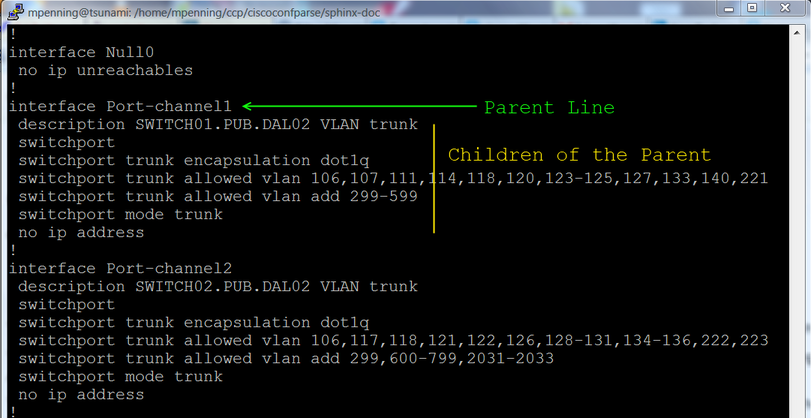
What if we don't use Cisco IOS?
Don't let that stop you.
You can parse brace-delimited configurations into a Cisco IOS style (see original ciscoconfparse Github Issue #17), which means that CiscoConfParse can parse these configurations:
- Juniper Networks Junos
- Palo Alto Networks Firewall configurations
- F5 Networks configurations
CiscoConfParse also handles anything that has a Cisco IOS style of configuration, which includes:
- Cisco IOS, Cisco Nexus, Cisco IOS-XR, Cisco IOS-XE, Aironet OS, Cisco ASA, Cisco CatOS
- Arista EOS
- Brocade
- HP Switches
- Force 10 Switches
- Dell PowerConnect Switches
- Extreme Networks
- Enterasys
- Screenos
Docs
- The latest copy of the docs are archived on the web
Installation and Downloads
-
Use
poetryfor Python3.x... :python -m pip install ciscoconfparse2
What is the pythonic way of handling script credentials?
- Never hard-code credentials
- Use python-dotenv
Is this a tool, or is it artwork?
That depends on who you ask. Many companies use CiscoConfParse as part of their network engineering toolbox; others regard it as a form of artwork.
Pre-requisites
The ciscoconfparse2 python package requires Python versions 3.7+ (note: Python version 3.7.0 has a bug - ref Github issue #117, but version 3.7.1 works); the OS should not matter.
Other Resources
- Dive into Python3 is a good way to learn Python
- Team CYMRU has a Secure IOS Template, which is especially useful for external-facing routers / switches
- Cisco's Guide to hardening IOS devices
- Center for Internet Security Benchmarks (An email address, cookies, and javascript are required)
Are you releasing licensing besides GPLv3?
I will not. however, if it's truly a problem for your company, there are commercial solutions available (to include purchasing the project, or hiring me).
Bug Tracker and Support
- Please report any suggestions, bug reports, or annoyances with a github bug report.
- If you're having problems with general python issues, consider searching for a solution on Stack Overflow. If you can't find a solution for your problem or need more help, you can ask on Stack Overflow or reddit/r/Python.
- If you're having problems with your Cisco devices, you can contact:
Dependencies
Unit-Tests and Development
- We are manually disabling some SonarCloud alerts with:
#pragma warning disable S1313#pragma warning restore S1313- Where
S1313is a False-positive that SonarCloud flags - Those
#pragma warninglines should be carefully-fenced to ensure that we don't disable a SonarCloud alert that is useful.
Semantic Versioning and Conventional Commits
- At this point, ciscoconfparse2 does NOT adhere to Semantic Versioning
- Although we added commitizen as a dev dependency, we are NOT enforcing commit rules (such as Conventional Commits) yet.
Execute Unit tests
The project's test workflow checks ciscoconfparse2 on Python versions 3.7 and higher, as well as a pypy JIT executable.
If you already git cloned the repo and want to manually run tests either run with make test from the base directory, or manually run with pytest in a unix-like system...
$ cd tests
$ pytest ./test*py
...
Execute Test Coverage Line-Miss Report
If you already have have pytest and pytest-cov installed, run a test line miss report as shown below.
$ # Install the latest ciscoconfparse2
$ # (assuming the latest code is on pypi)
$ pip install -U ciscoconfparse2
$ pip install -U pytest-cov
$ cd tests
$ pytest --cov-report=term-missing --cov=ciscoconfparse2 ./
...
Editing the Package
This uses the example of editing the package on a git branch called develop...
git clone https://github.com/mpenning/ciscoconfparse2cd ciscoconfparse2git branch developgit checkout develop- Add / modify / delete on the
developbranch make test- If tests run clean,
git commitall the pending changes on thedevelopbranch - If you plan to publish this as an official version rev, edit the version number in pyproject.toml. In the future, we want to integrate
commitizento manage versioning. git checkout maingit merge developmake testgit push origin mainmake pypi
Sphinx Documentation
Building the ciscoconfparse2 documentation tarball comes down to this one wierd trick:
cd sphinx-doc/pip install -r ./requirements.txt; # install Sphinx dependenciespip install -r ../requirements.txt; # install ccp dependenciesmake html
License and Copyright
ciscoconfparse2 is licensed GPLv3
- Copyright (C) 2023 David Michael Pennington
The word "Cisco" is a registered trademark of Cisco Systems.
Author
ciscoconfparse2 was written by David Michael Pennington.
Release history Release notifications | RSS feed


Download files
Download the file for your platform. If you're not sure which to choose, learn more about installing packages.
Source Distribution
Built Distribution
Filter files by name, interpreter, ABI, and platform.
If you're not sure about the file name format, learn more about wheel file names.
Copy a direct link to the current filters
File details
Details for the file ciscoconfparse2-0.3.0.tar.gz.
File metadata
- Download URL: ciscoconfparse2-0.3.0.tar.gz
- Upload date:
- Size: 405.6 kB
- Tags: Source
- Uploaded using Trusted Publishing? No
- Uploaded via: twine/4.0.2 CPython/3.11.2
File hashes
| Algorithm | Hash digest | |
|---|---|---|
| SHA256 |
7d6caea4d89266fdf0c062865f2ed6f314052fe400a57e5859d45d185ee96425
|
|
| MD5 |
bfb0c335cea5f03752e575c4ac937472
|
|
| BLAKE2b-256 |
3276c609b56db0b60a26b1cc93e46dab4faa81b0c37029e261e06666b3708c0f
|
File details
Details for the file ciscoconfparse2-0.3.0-py3-none-any.whl.
File metadata
- Download URL: ciscoconfparse2-0.3.0-py3-none-any.whl
- Upload date:
- Size: 256.6 kB
- Tags: Python 3
- Uploaded using Trusted Publishing? No
- Uploaded via: twine/4.0.2 CPython/3.11.2
File hashes
| Algorithm | Hash digest | |
|---|---|---|
| SHA256 |
5b058852fa517811c15728743c5c8e7a7f88f4a85a9250e4df93227c51784be2
|
|
| MD5 |
29bc766bd27ea40cf2791213cbebea1e
|
|
| BLAKE2b-256 |
f06d3eb73b4473eb9f26e54befd544267e0be8babe4a438ff47f581b6b05b3d6
|






