

Citry - Refreshingly simple UI






Citry is a fast, simple, and smart frontend framework for Python that brings the best of Vue, React, Django, Jinja, and LiveWire.
Compatible with FastAPI, Django, and other web servers.
Using VS Code? Install the Citry extension for template highlighting, completion, navigation, diagnostics, and safe formatting inside Python components.
from citry import Component

# Define
class Welcome(Component):
    class Kwargs:
        title: str
        messages: list[str]

    # HTML
    def template_data(self, kwargs, slots):
        return {
            "title": kwargs.title,
            "count": len(kwargs.messages),
        }

    template = """
      <div
        class="card"
        x-bind:title="count + ' new messages'"
      >
        <h1>{{ title }}</h1>
        <p>You have {{ count }} new messages.</p>
      </div>
    """

    # Browser data. Top-level keys are Alpine variables.
    def js_data(self, kwargs, slots):
        return {"count": len(kwargs.messages)}

    # CSS
    def css_data(self, kwargs, slots):
        return {"accent": "tomato"}

    css = """
      .card {
        border-top: 3px solid var(--accent);
      }
    """

# Compose
component = Welcome(
    title="Welcome back",
    messages=["a", "b", "c"],
)

# Render
html = str(component)
Why Citry?
Use Citry to build UI, HTML, XML, SVG, or anything that serializes to text.
Citry is:
- Familiar - if you know HTML and Vue/React, you are ready
- Simple - just 2 rules and 15 built-in tags
- Fast - Rust-powered parsing
- Safe - expressions are sandboxed to block dangerous operations
- Smart - manages JS and CSS scripts for you
- Reliable - typos and missing props fail at compile time, not in production
- Universal - one template language for your entire stack
Quickstart
pip install citry
Define a component by subclassing Component and giving it a template. Use
template_data to prepare the values the template reads. Render it by turning
the component into a string:
from citry import Component

class Welcome(Component):
    template = """
      <div class="card">
        <h1>{{ title }}</h1>
        <p>You have {{ count }} new messages.</p>
      </div>
    """

    # template_data prepares the values your template can read.
    # Run any computation here, in plain Python.
    def template_data(self, kwargs, slots):
        return {
            "title": kwargs["title"],
            "count": len(kwargs["messages"]),
        }

component = Welcome(
    title="Welcome back",
    messages=["a", "b", "c"],
)
html = str(component)
html is now:
<div class="card">
  <h1>Welcome back</h1>
  <p>You have 3 new messages.</p>
</div>
Components compose by name. A <c-Welcome> tag renders the Welcome class.
Pass dynamic props with the c- prefix and static ones without:
class Page(Component):
    template = """
      <main>
        <c-Welcome c-title="user.name" c-messages="user.inbox" />
      </main>
    """

    def template_data(self, kwargs, slots):
        return {"user": kwargs["user"]}
Two simple rules
Citry extends HTML with two rules:
1. <c-*> tags are components
Any tag starting with c- is a component or a built-in tag.
<c-Card> -> Card component.
<!-- Static HTML -->
<div class="container">
  <!-- A component -->
  <c-card title="Hello"></c-card>
</div>
2. c-* attributes are dynamic
Any attribute starting with c- is evaluated as an expression.
The c- prefix is stripped from the output:
<div c-title="data.title"> -> <div title="...">
<!-- Static HTML attribute -->
<div class="container">
<!-- Dynamic attribute (evaluated as an expression) -->
<div c-title="data.title">
<!-- Component with dynamic attribute -->
<c-card c-title="data.title">
If you know HTML, you already know most of Citry.
Built-in tags
Beyond your own components, Citry provides 15 built-in tags. With these, Citry is as expressive as Vue or React.
| Tag | Purpose |
|---|---|
<c-if> |
Conditional branch |
<c-elif> |
Else-if branch |
<c-else> |
Else branch |
<c-for> |
Loop over an iterable |
<c-empty> |
Empty state for a <c-for> loop |
<c-slot> |
Define a content insertion point |
<c-fill> |
Fill a slot when using a component |
<c-component> |
Render a component chosen at render time |
<c-element> |
Render an HTML element whose tag name is chosen at render time |
<c-provide> |
Provide a value to descendant components |
<c-cache> |
Cache and replay a named transparent template region |
<c-error-fallback> |
Render fallback content when its body raises |
<c-css> |
Render the collected component CSS here |
<c-js> |
Render the collected component JS here |
<c-raw> |
Treat the contents as literal text |
How templates look
A short tour. The template syntax reference covers every feature in depth.
Expressions
With {{ }}, written in Python:
<p>{{ user.name }}</p>
<p>{{ 'Member' if user.is_active else 'Guest' }}</p>
Dynamic attributes
With the c- prefix. A True value renders the
attribute bare, False or None omits it:
<button
  c-disabled="is_loading"
  c-class="['btn', { 'active': is_open }]"
>
  Submit
</button>
Control flow
Write if branches and for loops directly in templates.
Long form:
<c-if cond="is_admin">
  <p>Admin</p>
</c-if>
<c-else>
  <p>Guest</p>
</c-else>

<ul>
  <c-for each="item in items">
    <li>{{ item.name }}</li>
  </c-for>
  <c-empty>
    <li>No items found</li>
  </c-empty>
</ul>
Short form:
<p c-if="is_admin">Admin</p>
<p c-else>Guest</p>

<ul>
  <li c-for="item in items">{{ item.name }}</li>
  <li c-empty>No items found</li>
</ul>
Slots
Let a component accept content from its caller. Define insertion
points with <c-slot>, and fill them with <c-fill>:
<!-- Modal.html -->
<div class="modal">
  <header>{{ title }}</header>
  <main>
    <c-slot /> <!-- Insertion point -->
  </main>
</div>

<!-- Using the component -->
<c-Modal title="Confirm">
  <p>Are you sure?</p>
</c-Modal>
Beyond templates
Citry components are more than templates. A few of the things you can do:
Build a component once, then compose and reuse it
Component(...) returns a value you can render on its own or pass into another component, and the same instance works in more than one place:
class Layout(Component):
    template = """
      <main>
        {{ body }}
      </main>
    """

    def template_data(self, kwargs, slots):
        return {"body": kwargs["body"]}

card = Card(title="Welcome")

standalone = str(card)        # render the card to HTML on its own
page = Layout(body=card)      # or pass the same card into another component
Ship JS and CSS with your components
As a page renders, Citry collects every rendered component's CSS and JS scripts, and injects them where you place
<c-css /> and <c-js /> (typically <head> and the end of <body>). No
bundler, no hand-managed <link> or <script> tags:
class Page(Component):
    template = """
      <html>
        <head>
          <c-css />
        </head>
        <body>
          <c-Chart c-points="[1, 2, 3]" />
          <c-js />
        </body>
      </html>
    """
Pass Python data to browser behavior and CSS
js_data() seeds values from Python directly into that component's Alpine
scope. css_data() exposes values to its CSS as custom properties. Both are
scoped to one rendered instance, with no manual data wiring:
class Chart(Component):
    template = """
      <div class="chart">
        <span x-text="'Points: ' + points.length"></span>
      </div>
    """
    css = """
      .chart {
        height: var(--h);
      }
    """

    def js_data(self, kwargs, slots):
        # Available directly in Alpine expressions as `points`.
        return {"points": kwargs["points"]}

    def css_data(self, kwargs, slots):
        # Available to CSS as `var(--h)`.
        return {"h": "240px"}
Use $component when you need advanced setup such as calling an imperative
JavaScript library, declaring reactive client props, installing effects, or
registering cleanup. When a callback exists, Citry seeds the scope first and
passes the same instance-local snapshot as data. Identical JSON is
transported once, but sibling components receive separate nested arrays and
objects.
Provide data to a whole subtree
Set a value with <c-provide> and read it anywhere below with inject(), so you do not thread props through every layer:
class Page(Component):
    # <c-Greeting /> renders <p>Dark mode</p>
    template = """
      <c-provide key="theme" label="Dark mode">
        <c-Greeting />
      </c-provide>
    """

class Greeting(Component):
    template = """
      <p>{{ label }}</p>
    """

    def template_data(self, kwargs, slots):
        # Read a value an ancestor provided, with no prop drilling.
        return {"label": self.inject("theme").label}
Handle render errors with grace
500s due to an error in the template is poor UX. Instead of breaking the whole page, wrap a section in <c-error-fallback> to
render a fallback when error occurs. Boundaries nest, and the nearest one wins:
class Page(Component):
    # If <c-Widget /> raises while rendering, the page shows the fallback
    # text instead of letting the error break the page.
    template = """
      <c-error-fallback fallback="Could not load widget">
        <c-Widget />
      </c-error-fallback>
    """
A fallback slot can receive the error itself if you want a custom message.
Catch errors early with input types
Declare a component's inputs with plain annotated classes. A wrong prop or slot name then fails when the template compiles:
from citry import Component, SlotInput

class Card(Component):
    class Kwargs:
        title: str          # required
        size: int = 10      # optional

    class Slots:
        header: SlotInput

    template = """
      <div>
        {{ title }}
        <c-slot name="header" />
      </div>
    """
<c-Card title="Hi" bogus="1" />      <!-- error: unknown prop -->
<c-Card />                           <!-- error: missing required `title` -->
<c-Card title="Hi">
  <c-fill name="headr">...</c-fill>  <!-- error: typo'd slot name -->
</c-Card>
Support for HTML fragments (HTMX-style)
Fragments are rendered components that can be inserted into a page.
In the browser, Citry adopts a client-active fragment's ownership graph and loads its JS/CSS assets. Alpine directives, component props and boundary handlers, slots, and Events therefore keep the same ownership rules as a full document. See Client interactivity.
Render a component specifically as a fragment with .serialize():
card = Card(title="Welcome")
card.render().serialize(deps_strategy="fragment")
To use fragments, you must mount a web framework.
Performance - Render the constant parts once
If you have inputs that don't change between renders, wrap them in Const(...).
Citry pre-renders and caches the parts of the template that depend only on the constant inputs.
from citry import Const

class Row(Component):
    template = """
      <tr>
        <td>{{ label }}</td>
        <td>{{ value }}</td>
      </tr>
    """

    def template_data(self, kwargs, slots):
        return {
            "label": kwargs["label"],
            "value": kwargs["value"],
        }

# The <td>{{ label }}</td> part is computed once and reused down the loop;
# only `value`, which varies per row, is recomputed.
rows = [
    Row(label=Const("Name"), value=v)
    for v in values
]
If an entire component body is deterministic and side-effect-free, declare
pure = True on that component class. Equal instances within one root render
can then reuse the body work while still receiving fresh component IDs. This
is most useful for a small component rendered many times; subclasses must make
their own explicit purity declaration.
And more
- Templates support infinite depth;
- Extension system;
- Dynamic components/HTML tags with
<c-component>/<c-element>
See the changelog for the full list.
Use with web framework
Some Citry features need a web server to work.
Citry can be easily integrated with popular Python web frameworks:
from citry import citry  # the default instance
from citry.contrib.fastapi import mount

# `app` is your web framework's application object
mount(app, citry)

# Run this from the framework's startup lifecycle before request threads start.
citry.initialize()
initialize() imports configured component Python modules, registers built-ins,
and builds parse-time tag rules. Template, JavaScript, and CSS asset files stay
lazy. See the web-framework guide for the
right startup hook in each supported host.
Supported hosts:
| Host | Entry point |
|---|---|
| FastAPI / Starlette | citry.contrib.fastapi.mount(app, citry) |
| Flask | citry.contrib.flask.mount(app, citry) |
| Django | citry.contrib.django.urlpatterns(citry), added to your urls.py |
| Any ASGI server | citry.contrib.asgi.asgi_app(citry) |
| Any WSGI server | citry.contrib.wsgi.wsgi_app(citry) |
Cache backends plug in the same way, through Citry(cache=...):
citry.contrib.caches.RedisCache, citry.contrib.caches.DiskCache, and
citry.contrib.django.DjangoCache.
Command line
Installing Citry puts a citry command on your PATH.
Scaffold a new component (no project setup needed):
citry create MyButton # writes my_button.py, ready to edit
You get a ready-to-edit starting point:
# my_button.py
"""A Citry component."""

from citry import Component


class MyButton(Component):
    class Kwargs:
        title: str

    class Slots:
        pass

    template = """
      <div>
        <h1>{{ title }}</h1>
      </div>
    """
Run the limited static check over literal component templates under the current directory without importing project code:
citry check --static
The other commands act on a Citry engine. Point them at the one you configured
with --app, given as module:attribute:
citry --app myproject.app:engine list        # components registered on that engine
citry --app myproject.app:engine check       # templates plus registered component contracts
citry --app myproject.app:engine ext list    # extensions installed on it
The explicit engine lets check validate registered component names, inputs,
slots, and free template variables. Unknown roots are errors by default;
configure the shared checker/editor policy with LintSettings on the engine.
Runtime template_globals are recognized automatically. Warnings are reported
without failing the command. If the engine cannot import or finish discovery,
the command reports that failure, continues with syntax-only checking, and
returns a nonzero status. Checking always requires one of these explicit modes;
bare citry check is a usage error.
Extensions can ship their own commands; run one with citry --app ... ext run <extension> <command> [args]. Run citry --help to see everything, and citry --version to print the installed version.
Documentation
- Template syntax reference - every template feature in depth.
- Codebase and development setup - how to build, test, and contribute.
Performance
Rendering a large page (about 350 Citry component markers and 986 KB of Citry output, including its browser runtimes and ownership graph):
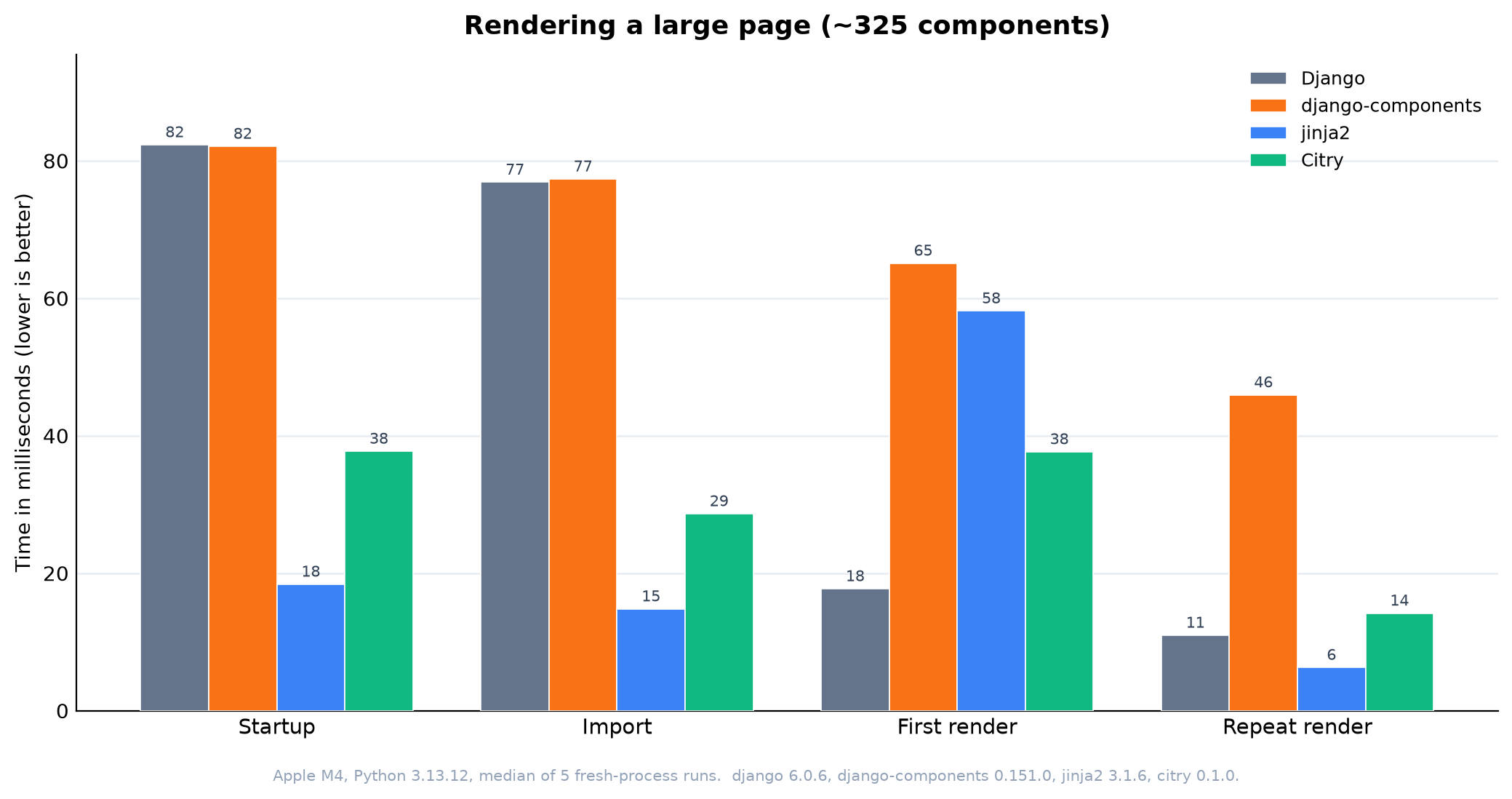
- Versus django-components (the fair component-to-component comparison), Citry is currently about 12% slower on the first render but 24% faster once warm, with startup about 1.4x slower and import about 1.3x slower.
- Versus bare template engines, Citry's repeat render is about 3.5x a Django template. Django and Jinja2 skip Citry's component ownership, lifecycle, extension, dependency, and security work.
- Jinja2 is the fast no-component baseline: fastest to start and once warm, because each component is represented by a precompiled macro. Its first render compiles the whole macro library and lands near django-components.
These are relative numbers from a single machine. See
benchmarks/ for the methodology and how to reproduce
them, and the performance notes for where the
remaining time goes.
Help bring Citry to your language
Today Citry ships as a Python package, but designed to work with any language.
The code inside {{ }} and c-* attributes is the only host-language-specific logic.
If you want Citry in your stack, this is a great place to contribute. Star the repo to follow along, and open an issue if you would like to help port it.
| Language | Status | Binding |
|---|---|---|
| Python | Ready | PyO3/maturin |
| JS/TS | Planned | wasm-bindgen |
| PHP | Planned | FFI |
| Go | Planned | cgo |
| Rust | Planned | Native |
License
MIT License - see LICENSE for details.
Acknowledgments
This project is the continuation of work originally done in django-components and django-components/djc-core.
1 maintainer

Metadata
1 maintainer
Release files for citry 0.4.2
For a detailed explanation of source distributions (sdists) and built distributions (wheels), please see the package formats documentation.
Source distribution (sdist)
| File | Size | Uploaded | |
|---|---|---|---|
| citry-0.4.2.tar.gz | 1.6 MB | Details |
Built distribution (wheel)
| File | Interpreter | ABI | Platform | Reset |
|---|---|---|---|---|
| citry-0.4.2-py3-none-any.whl | Python 3 | none | any | Details |
Total release size: 2.6 MB
Release files / citry-0.4.2.tar.gz
| Download URL | citry-0.4.2.tar.gz |
|---|---|
| Size | 1.6 MB |
| Tags | Source |
|
SHA-256 checksum How to use checksums |
f12c22fa66d716b7821a2e4fb5403780ed40986be0e66c47f486ecdd8bd23223
|
|
BLAKE2b-256 checksum How to use checksums |
77fda4f1d0f809c9a13f60af4caa1eb67598ddce2a659f3745b5edbdf75b837e
|
| Upload date | |
|
Uploaded using Trusted Publishing? What is trusted publishing? |
Yes |
| Uploaded via |
twine/7.0.0 CPython/3.13.14
|
Provenance
Provenance describes where a file came from. On PyPI, provenance is shared via attestations, which provide a verifiable record of the build or publishing details. View details, limitations and caveats.


PyPI Publish Attestation
PyPI verified that this artifact, at this checksum, originated from the publisher listed below.
Signed by GitHub Actions, verified by PyPI on Aug 21, 2026.
Transparency logRelease files / citry-0.4.2-py3-none-any.whl
| Download URL | citry-0.4.2-py3-none-any.whl |
|---|---|
| Size | 1.0 MB |
| Tags | Python 3 |
|
SHA-256 checksum How to use checksums |
b5bdceaac5d6db5bb2f4f2d7af76de8c7285d61a78c0f5e7a65679509b2418b2
|
|
BLAKE2b-256 checksum How to use checksums |
9fe4ede947f8b917b3b68fa0b7f8da014f8039ead18335c55491f61076d3802f
|
| Upload date | |
|
Uploaded using Trusted Publishing? What is trusted publishing? |
Yes |
| Uploaded via |
twine/7.0.0 CPython/3.13.14
|
Provenance
Provenance describes where a file came from. On PyPI, provenance is shared via attestations, which provide a verifiable record of the build or publishing details. View details, limitations and caveats.
PyPI Publish Attestation
PyPI verified that this artifact, at this checksum, originated from the publisher listed below.
Signed by GitHub Actions, verified by PyPI on Aug 21, 2026.
Transparency log













