
linux命令行轻松使用代理:clash-cli





🚀 快速安装
两种安装方式仅安装方法和卸载方法不同,安装完成后的使用方式完全相同!
📊 安装方式对比
| 方面 | Python 包安装(推荐) | Shell 脚本安装 |
|---|---|---|
| 安装命令 | pip install clash-cli + sudo clash-cli install |
git clone + sudo bash install.sh |
| 依赖管理 | pip 自动处理 | 脚本手动处理 |
| 更新方式 | pip install -U clash-cli |
重新 git clone |
| 卸载方式 | sudo clash-cli uninstall + pip uninstall clash-cli |
sudo bash uninstall.sh |
| 使用命令 | ✅ 完全相同 | ✅ 完全相同 |
方式一:Python 包安装(推荐)
# 1. 安装 clash-cli 工具
pip install clash-cli

# 2. 初始化clash-cli(可选,解决sudo问题,不需要sudo权限)
clash-cli init

# 3. 安装 Clash 服务(需要 sudo 权限)
sudo clash-cli install

# 4. 开始使用
clash-cli on
方式二:Shell 脚本安装(传统方式)
git clone --branch main --depth 1 https://github.com/whillhill/clash-cli.git \
  && cd clash-cli \
  && sudo bash install.sh
📖 使用教程
重要:无论使用哪种方式安装,以下所有命令都完全相同!
📋 基本命令
安装完成后,两种安装方式都使用相同的 clash-cli 命令:
$ clash-cli
Usage:
    clash-cli COMMAND [OPTION]

Commands:
    install              安装 Clash 服务(仅 Python 包)
    uninstall            卸载 Clash 服务(仅 Python 包)
    init                 提取脚本到目录(仅 Python 包)
    on                   开启代理
    off                  关闭代理
    ui                   面板地址
    status               内核状况
    proxy    [on|off]    系统代理
    tun      [on|off]    Tun 模式
    mixin    [-e|-r]     Mixin 配置
    secret   [SECRET]    Web 密钥
    update   [auto|log]  更新订阅
    lang     [zh|en]     切换语言
启动和停止代理
# 启动代理服务
$ clash-cli on
😼 已开启代理环境

# 停止代理服务
$ clash-cli off
😼 已关闭代理环境

# 查看服务状态
$ clash-cli status
● mihomo.service - mihomo Daemon, A[nother] Clash Kernel.
   Loaded: loaded (/etc/systemd/system/mihomo.service; enabled; vendor preset: enabled)
   Active: active (running) since Mon 2025-01-27 10:30:15 CST; 2h 15min ago
说明:
clash-cli on会同时启动内核服务和设置系统代理环境变量clash-cli off会停止服务并清除代理环境变量- 服务支持开机自启,重启后自动恢复代理状态
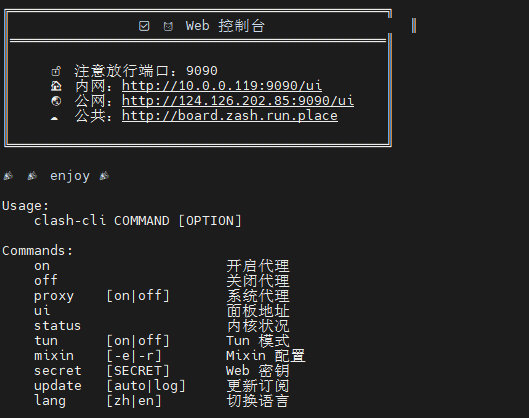
🌐 Web 控制台
访问控制台
$ clash-cli ui
╔═══════════════════════════════════════════════╗
║                😼 Web 控制台                  ║
║═══════════════════════════════════════════════║
║                                               ║
║     🔓 注意放行端口:9090                      ║
║     🌍 面板地址:http://127.0.0.1:9090/ui     ║
║                                               ║
╚═══════════════════════════════════════════════╝
安全设置
# 设置访问密钥
$ clash-cli secret mypassword123
😼 密钥更新成功,已重启生效

# 查看当前密钥
$ clash-cli secret
😼 当前密钥:mypassword123

# 清除密钥(设为空)
$ clash-cli secret ""
😼 密钥更新成功,已重启生效
📡 订阅管理
手动更新订阅
# 使用新的订阅链接更新
$ clash-cli update https://your-subscription-url.com
👌 正在下载:原配置已备份...
🍃 下载成功:内核验证配置...
🍃 订阅更新成功

# 使用上次的订阅链接更新
$ clash-cli update
🍃 订阅更新成功

# 查看更新日志
$ clash-cli update log
✅ [2025-01-27 10:30:15] 订阅更新成功:https://your-subscription-url.com
✅ [2025-01-27 08:15:22] 订阅更新成功:https://your-subscription-url.com
自动更新设置
# 设置自动更新(每2天凌晨更新)
$ clash-cli update auto
😼 已设置定时更新订阅

# 设置自动更新并指定新的订阅链接
$ clash-cli update auto https://new-subscription-url.com
😼 已设置定时更新订阅

# 查看定时任务
$ crontab -l | grep clash-cli
0 0 */2 * * /bin/bash -i -c 'clash-cli update https://your-subscription-url.com'
🔧 高级功能
Tun 模式
# 查看 Tun 状态
$ clash-cli tun
😾 Tun 状态:关闭

# 开启 Tun 模式
$ clash-cli tun on
😼 Tun 模式已开启

# 关闭 Tun 模式
$ clash-cli tun off
😼 Tun 模式已关闭
Mixin 配置管理
# 查看 mixin 配置
$ clash-cli mixin
😼 less 查看 mixin 配置

# 编辑 mixin 配置
$ clash-cli mixin -e
😼 vim 编辑 mixin 配置

# 查看运行时配置(合并后的最终配置)
$ clash-cli mixin -r
😼 less 查看 运行时 配置
🌍 语言切换
# 查看当前语言
$ clash-cli lang
当前语言:中文 (zh)

# 切换到英文
$ clash-cli lang en
Language switched to English

# 切换到中文
$ clash-cli lang zh
语言已切换为中文
🗑️ 卸载
卸载方式对比
| 安装方式 | 卸载命令 | 说明 |
|---|---|---|
| Python 包 | sudo clash-cli uninstall + pip uninstall clash-cli |
先卸载服务,再卸载工具 |
| Shell 脚本 | sudo bash uninstall.sh |
运行卸载脚本 |
完整卸载步骤
Python 包方式
# 1. 卸载 Clash 服务和配置
sudo clash-cli uninstall

# 2. 卸载 clash-cli 工具(可选)
pip uninstall clash-cli
Shell 脚本方式
# 进入项目目录并运行卸载脚本
cd clash-cli
sudo bash uninstall.sh
注意:卸载后 Clash 服务配置和数据会被完全清除
🤝 贡献
欢迎提交 Issue 和 Pull Request!
📄 许可证
本项目采用 MIT 许可证。
⭐ Star History
⚠️ 免责声明
本工具仅供学习和研究使用,请遵守当地法律法规。使用本工具所产生的任何后果由用户自行承担。
1 maintainer

Metadata
1 maintainer
Release files for clash-cli 1.2.12
For a detailed explanation of source distributions (sdists) and built distributions (wheels), please see the package formats documentation.
Source distribution (sdist)
| File | Size | Uploaded | Provenance | Actions |
|---|---|---|---|---|
| clash_cli-1.2.12.tar.gz | 22.1 MB | Without provenance | Details for clash_cli-1.2.12.tar.gz |
Built distribution (wheel)
| File | Interpreter | ABI | Platform | Actions Reset |
|---|---|---|---|---|
| clash_cli-1.2.12-py3-none-any.whl | Python 3 | none | any | Details for clash_cli-1.2.12-py3-none-any.whl |
Total release size: 44.3 MB
Release files / clash_cli-1.2.12.tar.gz
| Download URL | clash_cli-1.2.12.tar.gz |
|---|---|
| Size | 22.1 MB |
| Tags | Source |
|
SHA-256 checksum How to use checksums |
f187e0c4b521ec8578f87919688e9cc72cb8c20b214b16028476920d097986ca
|
|
BLAKE2b-256 checksum How to use checksums |
0d28c27423e4f91127d77ad432e3299e6804b84dab4219a81e63df7dc737f601
|
| Upload date | |
|
Uploaded using Trusted Publishing? What is trusted publishing? |
No |
| Uploaded via |
twine/6.1.0 CPython/3.11.13
|
Release files / clash_cli-1.2.12-py3-none-any.whl
| Download URL | clash_cli-1.2.12-py3-none-any.whl |
|---|---|
| Size | 22.2 MB |
| Tags | Python 3 |
|
SHA-256 checksum How to use checksums |
e80632c95650cb11c423967ab02de9dc8974b9891ba961e06c3c6d78b93b22cf
|
|
BLAKE2b-256 checksum How to use checksums |
c71332ca728c312a04ae1a5b3c49c2d481a4db73470b722dc8e1a13657dbe705
|
| Upload date | |
|
Uploaded using Trusted Publishing? What is trusted publishing? |
No |
| Uploaded via |
twine/6.1.0 CPython/3.11.13
|
Security for clash-cli 1.2.12
Provenance
Provenance describes where a file came from. On PyPI, provenance is shared via attestations, which provide a verifiable record of the build or publishing details. View details, limitations and caveats.
No provenance found
None of the files in this release were uploaded with provenance metadata.
A note on package security
PyPI is a repository for distributing packages, not a service for auditing them. While third-party security researchers and our staff do their best to detect and remove malicious packages, PyPI cannot guarantee the quality, security or suitability of any given package.
To learn more about protecting yourself from malicious actors, visit our package security documentation.














