
Linux命令行使用Clash代理

Project description
linux命令行轻松使用代理:clash-cli





🚀 快速安装
两种安装方式仅安装方法和卸载方法不同,安装完成后的使用方式完全相同!
📊 安装方式对比
| 方面 | Python 包安装(推荐) | Shell 脚本安装 |
|---|---|---|
| 安装命令 | pip install clash-cli + sudo clash-cli install |
git clone + sudo bash install.sh |
| 依赖管理 | pip 自动处理 | 脚本手动处理 |
| 更新方式 | pip install -U clash-cli |
重新 git clone |
| 卸载方式 | sudo clash-cli uninstall + pip uninstall clash-cli |
sudo bash uninstall.sh |
| 使用命令 | ✅ 完全相同 | ✅ 完全相同 |
方式一:Python 包安装(推荐)
# 1. 安装 clash-cli 工具
pip install clash-cli

# 2. 初始化clash-cli(可选,解决sudo问题,不需要sudo权限)
clash-cli init

# 3. 安装 Clash 服务(需要 sudo 权限)
sudo clash-cli install

# 4. 开始使用
clash-cli on
方式二:Shell 脚本安装(传统方式)
git clone --branch main --depth 1 https://github.com/whillhill/clash-cli.git \
  && cd clash-cli \
  && sudo bash install.sh
📖 使用教程
重要:无论使用哪种方式安装,以下所有命令都完全相同!
📋 基本命令
安装完成后,两种安装方式都使用相同的 clash-cli 命令:
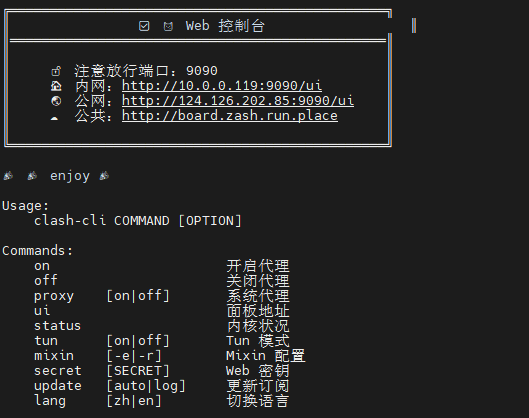
$ clash-cli
Usage:
    clash-cli COMMAND [OPTION]

Commands:
    install              安装 Clash 服务(仅 Python 包)
    uninstall            卸载 Clash 服务(仅 Python 包)
    init                 提取脚本到目录(仅 Python 包)
    on                   开启代理
    off                  关闭代理
    ui                   面板地址
    status               内核状况
    proxy    [on|off]    系统代理
    tun      [on|off]    Tun 模式
    mixin    [-e|-r]     Mixin 配置
    secret   [SECRET]    Web 密钥
    update   [auto|log]  更新订阅
    lang     [zh|en]     切换语言
启动和停止代理
# 启动代理服务
$ clash-cli on
😼 已开启代理环境

# 停止代理服务
$ clash-cli off
😼 已关闭代理环境

# 查看服务状态
$ clash-cli status
● mihomo.service - mihomo Daemon, A[nother] Clash Kernel.
   Loaded: loaded (/etc/systemd/system/mihomo.service; enabled; vendor preset: enabled)
   Active: active (running) since Mon 2025-01-27 10:30:15 CST; 2h 15min ago
说明:
clash-cli on会同时启动内核服务和设置系统代理环境变量clash-cli off会停止服务并清除代理环境变量- 服务支持开机自启,重启后自动恢复代理状态
🌐 Web 控制台
访问控制台
$ clash-cli ui
╔═══════════════════════════════════════════════╗
║                😼 Web 控制台                  ║
║═══════════════════════════════════════════════║
║                                               ║
║     🔓 注意放行端口:9090                      ║
║     🌍 面板地址:http://127.0.0.1:9090/ui     ║
║                                               ║
╚═══════════════════════════════════════════════╝
安全设置
# 设置访问密钥
$ clash-cli secret mypassword123
😼 密钥更新成功,已重启生效

# 查看当前密钥
$ clash-cli secret
😼 当前密钥:mypassword123

# 清除密钥(设为空)
$ clash-cli secret ""
😼 密钥更新成功,已重启生效
📡 订阅管理
手动更新订阅
# 使用新的订阅链接更新
$ clash-cli update https://your-subscription-url.com
👌 正在下载:原配置已备份...
🍃 下载成功:内核验证配置...
🍃 订阅更新成功

# 使用上次的订阅链接更新
$ clash-cli update
🍃 订阅更新成功

# 查看更新日志
$ clash-cli update log
✅ [2025-01-27 10:30:15] 订阅更新成功:https://your-subscription-url.com
✅ [2025-01-27 08:15:22] 订阅更新成功:https://your-subscription-url.com
自动更新设置
# 设置自动更新(每2天凌晨更新)
$ clash-cli update auto
😼 已设置定时更新订阅

# 设置自动更新并指定新的订阅链接
$ clash-cli update auto https://new-subscription-url.com
😼 已设置定时更新订阅

# 查看定时任务
$ crontab -l | grep clash-cli
0 0 */2 * * /bin/bash -i -c 'clash-cli update https://your-subscription-url.com'
🔧 高级功能
Tun 模式
# 查看 Tun 状态
$ clash-cli tun
😾 Tun 状态:关闭

# 开启 Tun 模式
$ clash-cli tun on
😼 Tun 模式已开启

# 关闭 Tun 模式
$ clash-cli tun off
😼 Tun 模式已关闭
Mixin 配置管理
# 查看 mixin 配置
$ clash-cli mixin
😼 less 查看 mixin 配置

# 编辑 mixin 配置
$ clash-cli mixin -e
😼 vim 编辑 mixin 配置

# 查看运行时配置(合并后的最终配置)
$ clash-cli mixin -r
😼 less 查看 运行时 配置
🌍 语言切换
# 查看当前语言
$ clash-cli lang
当前语言:中文 (zh)

# 切换到英文
$ clash-cli lang en
Language switched to English

# 切换到中文
$ clash-cli lang zh
语言已切换为中文
🗑️ 卸载
卸载方式对比
| 安装方式 | 卸载命令 | 说明 |
|---|---|---|
| Python 包 | sudo clash-cli uninstall + pip uninstall clash-cli |
先卸载服务,再卸载工具 |
| Shell 脚本 | sudo bash uninstall.sh |
运行卸载脚本 |
完整卸载步骤
Python 包方式
# 1. 卸载 Clash 服务和配置
sudo clash-cli uninstall

# 2. 卸载 clash-cli 工具(可选)
pip uninstall clash-cli
Shell 脚本方式
# 进入项目目录并运行卸载脚本
cd clash-cli
sudo bash uninstall.sh
注意:卸载后 Clash 服务配置和数据会被完全清除
🤝 贡献
欢迎提交 Issue 和 Pull Request!
📄 许可证
本项目采用 MIT 许可证。
⭐ Star History
⚠️ 免责声明
本工具仅供学习和研究使用,请遵守当地法律法规。使用本工具所产生的任何后果由用户自行承担。
Release history Release notifications | RSS feed


Download files
Download the file for your platform. If you're not sure which to choose, learn more about installing packages.
Source Distribution
clash_cli-1.2.11.tar.gz
(37.3 MB
view details)
Built Distribution
Filter files by name, interpreter, ABI, and platform.
If you're not sure about the file name format, learn more about wheel file names.
Copy a direct link to the current filters
File details
Details for the file clash_cli-1.2.11.tar.gz.
File metadata
- Download URL: clash_cli-1.2.11.tar.gz
- Upload date:
- Size: 37.3 MB
- Tags: Source
- Uploaded using Trusted Publishing? No
- Uploaded via: twine/6.1.0 CPython/3.11.13
File hashes
| Algorithm | Hash digest | |
|---|---|---|
| SHA256 |
2460f6eefa92036f419ba168aff654876034ac1b750365b8c8fb14e036a4a75b
|
|
| MD5 |
580e66872c77df537ccc20d9e8414e91
|
|
| BLAKE2b-256 |
df72fe83cd88a486dd85b03f4e8fffe956184c3b98178fdf5f494670f4f80430
|
File details
Details for the file clash_cli-1.2.11-py3-none-any.whl.
File metadata
- Download URL: clash_cli-1.2.11-py3-none-any.whl
- Upload date:
- Size: 37.3 MB
- Tags: Python 3
- Uploaded using Trusted Publishing? No
- Uploaded via: twine/6.1.0 CPython/3.11.13
File hashes
| Algorithm | Hash digest | |
|---|---|---|
| SHA256 |
9e409b8fb314a95b2d1608bc0efa8e6de687c49d1092c1adeac9d0c71d0e4c2f
|
|
| MD5 |
2d886e075dd119d744cb22cce5d0a429
|
|
| BLAKE2b-256 |
ad3c03275b05e6f183a1ae9f4212e7449f9c73b137d9741512e2fb746c38247f
|






