




ClassCounter
Fast class counting for NumPy arrays, PyTorch tensors, and GeoTIFFs.
Installation
pip install classcounter
Optional backends:
pip install classcounter[torch]   # PyTorch support
pip install classcounter[geo]     # GeoTIFF support via rasterio
pip install classcounter[numba]   # Numba-accelerated backend
pip install classcounter[all]     # Everything
Requires Python 3.10+.
Usage
import numpy as np
from classcounter import count_classes

arr = np.random.default_rng(0).integers(0, 5, size=(100, 100), dtype=np.int32)

count_classes(arr)
# {0: 2017, 1: 1960, 2: 2050, 3: 1932, 4: 2041}

# Map class IDs to names
count_classes(arr, names={0: "water", 1: "forest", 2: "urban", 3: "crop", 4: "bare"})
# {'water': 2017, 'forest': 1960, 'urban': 2050, 'crop': 1932, 'bare': 2041}

# Get percentages instead of counts
count_classes(arr, percent=True)
# {0: 20.17, 1: 19.6, 2: 20.5, 3: 19.32, 4: 20.41}
Input arrays can be any shape — they are flattened internally. Negative integers and floats are supported via a np.unique fallback path.
Counting only some elements
Pass a boolean mask to count only the elements where it is True, e.g. only valid (non-nodata) pixels:
count_classes(pred, mask=valid)
count_classes(pred, mask=valid, percent=True)  # percentages of the valid pixels
The mask must have the same shape as the data or be broadcastable to it. A (rows, cols) mask covers every band of a (bands, rows, cols) raster. This gives the same result as count_classes(pred[valid]) without copying the selected elements. On GPU tensors it also avoids the host sync that boolean indexing forces.
GeoTIFF files
count_classes("land_cover.tif")
Requires the geo extra.
Saving results to GeoTIFF metadata
Write class counts back into the raster's GDAL metadata tags:
# One-liner: count and save in one step
count_classes("land_cover.tif", save_metadata=True)
# Writes tags: CLASS_COUNT_0=2017, CLASS_COUNT_1=1960, ...

# With percentages — automatically uses CLASS_PERCENT_ prefix
count_classes("land_cover.tif", percent=True, save_metadata=True)
# Writes tags: CLASS_PERCENT_0=20.17, CLASS_PERCENT_1=19.6, ...

# Custom prefix
count_classes("land_cover.tif", save_metadata=True, metadata_prefix="LAND_")
# Writes tags: LAND_0=2017, LAND_1=1960, ...
Or use the standalone function for more control:
from classcounter import save_counts_to_raster

counts = count_classes("land_cover.tif", names={0: "water", 1: "forest"})
save_counts_to_raster("land_cover.tif", counts)
# Writes tags: CLASS_COUNT_water=2017, CLASS_COUNT_forest=1960
Stale tags from previous runs are automatically cleared before writing.
PyTorch tensors
import torch

tensor = torch.randint(0, 5, (100, 100))
count_classes(tensor)

tensor = tensor.to("cuda")  # GPU — counting happens on-device
count_classes(tensor)
Backend selection
By default (backend="auto") the backend is chosen based on the input type:
- NumPy arrays → Numba (if installed), otherwise NumPy
- PyTorch tensors → PyTorch (runs on-device, including CUDA)
- File paths → loaded via rasterio, then counted with Numba/NumPy
Pass backend="numpy", "numba" or "torch" to force one, so behaviour doesn't depend on what else is installed. An error is raised if that backend isn't installed or doesn't accept the input ("torch" takes tensors; "numpy" and "numba" take arrays and file paths).
Numba compiles its kernels on first use and caches them on disk (in __pycache__ next to the package, or in NUMBA_CACHE_DIR if set), so only the first process pays the compile cost. If the package directory isn't writable, set NUMBA_CACHE_DIR to a writable location.
API
count_classes(data, names=None, percent=False, save_metadata=False, metadata_prefix=None, mask=None, backend="auto")
| Parameter | Type | Description |
|---|---|---|
data |
ndarray, Tensor, str, or Path |
Input array, tensor, or path to a raster file |
names |
dict[int, str] or None |
Optional mapping of class IDs to human-readable names |
percent |
bool |
Return percentages (0–100) instead of raw counts. Default False |
save_metadata |
bool |
Write results as GDAL tags in the source GeoTIFF. Only valid when data is a file path. Default False |
metadata_prefix |
str or None |
Custom tag prefix. Defaults to CLASS_COUNT_ or CLASS_PERCENT_ (when percent=True) |
mask |
bool ndarray, bool Tensor, or None |
Count only elements where the mask is True. Same shape as the data, or broadcastable to it. Default None (count everything) |
backend |
str |
"auto", "numpy", "numba" or "torch". Default "auto" |
Returns: dict[int | str, int] mapping class values (or names) to counts, or dict[int | str, float] when percent=True.
When names is provided, classes present in the data but missing from the mapping use their integer key (with a warning). Classes in the mapping but absent from the data receive a count of 0.
save_counts_to_raster(path, counts, *, prefix=None)
| Parameter | Type | Description |
|---|---|---|
path |
str or Path |
Path to an existing GeoTIFF file |
counts |
dict |
Dict of class counts as returned by count_classes |
prefix |
str or None |
Tag name prefix. Defaults to CLASS_COUNT_ |
Writes each entry as a GDAL metadata tag (e.g. CLASS_COUNT_0=1234). Existing tags matching the prefix are cleared before writing.
Performance
Benchmarks on a Ryzen 9 5950X with RTX 4090, 100M-element uint8 arrays:
| Backend | Time (ms) |
|---|---|
| NumPy (CPU) | 174 |
| Numba (CPU) | 2.8 |
| PyTorch CPU | 34 |
| PyTorch GPU (CUDA) | 1.5 |
The Numba backend runs on the CPU only. For GPU counting, pass a CUDA tensor to use the PyTorch backend.
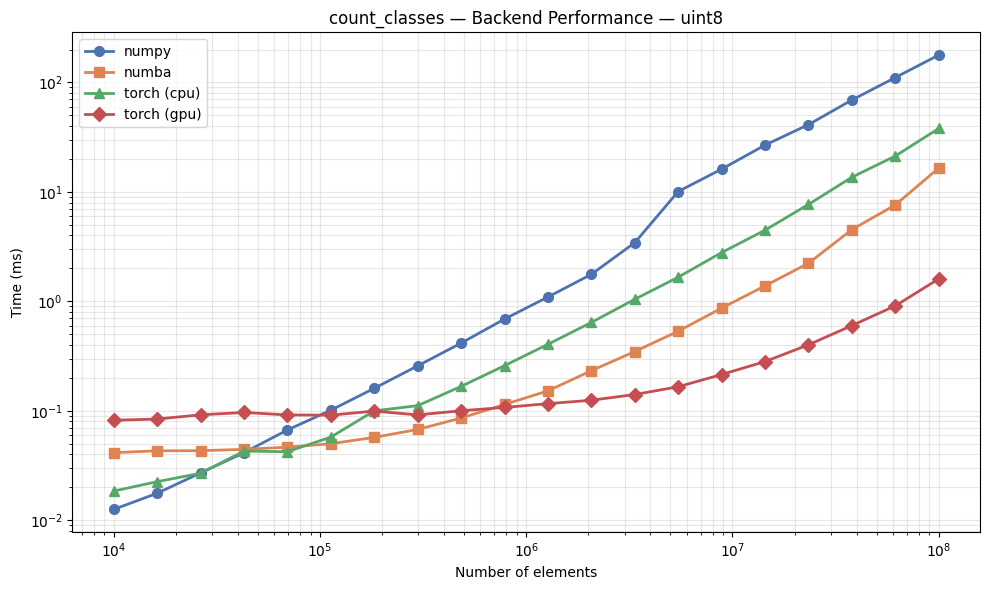
The step in the Numba line at about 1M elements is deliberate. Below 1M elements Numba counts on a single thread: on an idle machine that is slightly slower than using every core, but on a busy one a multithreaded call can stall for 20–100 ms waiting for its threads to get CPU time, while a single thread finishes in under a millisecond.
Run the included benchmark notebook to compare backends on your hardware.
See Examples.ipynb for a walkthrough of all features including name mapping, percentages, PyTorch tensors, and GPU acceleration.
Contributing
Contributions are welcome! Please:
- Fork the repository
- Create a feature branch (
git checkout -b feature/my-feature) - Install the git hooks:
uv run pre-commit install --hook-type pre-commit --hook-type pre-push(ruff and mypy on commit, tests on push) - Run tests:
uv run pytest - Submit a pull request
See RELEASING.md for how releases are published.
License
MIT
1 maintainer

Metadata
1 maintainer
Release files for classcounter 0.2.0
For a detailed explanation of source distributions (sdists) and built distributions (wheels), please see the package formats documentation.
Source distribution (sdist)
| File | Size | Uploaded | Provenance | Actions |
|---|---|---|---|---|
| classcounter-0.2.0.tar.gz | 200.9 kB | With provenance | Details for classcounter-0.2.0.tar.gz |
Built distribution (wheel)
| File | Interpreter | ABI | Platform | Actions Reset |
|---|---|---|---|---|
| classcounter-0.2.0-py3-none-any.whl | Python 3 | none | any | Details for classcounter-0.2.0-py3-none-any.whl |
Total release size: 214.9 kB
Release files / classcounter-0.2.0.tar.gz
| Download URL | classcounter-0.2.0.tar.gz |
|---|---|
| Size | 200.9 kB |
| Tags | Source |
|
SHA-256 checksum How to use checksums |
0583acf0a5308da224ebb5e4b6ca86c460125aaf1ccd4cf0234a7de811b0ab9a
|
|
BLAKE2b-256 checksum How to use checksums |
cbb6ba307f4e7159a15b424189237457fdaf53b8be93d9546f306012b08a4322
|
| Upload date | |
|
Uploaded using Trusted Publishing? What is trusted publishing? |
Yes |
| Uploaded via |
twine/7.0.0 CPython/3.13.14
|
Provenance
Provenance describes where a file came from. On PyPI, provenance is shared via attestations, which provide a verifiable record of the build or publishing details. View details, limitations and caveats.


PyPI Publish Attestation
PyPI verified that this artifact, at this checksum, originated from the publisher listed below.
Signed by GitHub Actions, verified by PyPI on Oct 19, 2026.
Transparency logRelease files / classcounter-0.2.0-py3-none-any.whl
| Download URL | classcounter-0.2.0-py3-none-any.whl |
|---|---|
| Size | 14.0 kB |
| Tags | Python 3 |
|
SHA-256 checksum How to use checksums |
7f5238664496dbdca5b8cd7b575ecac3242369ec47f11835d5db2b6847c48e4a
|
|
BLAKE2b-256 checksum How to use checksums |
2283597800059f832a2cd1dd29a642f25ac29d23fec6bb42845b1bef26775f82
|
| Upload date | |
|
Uploaded using Trusted Publishing? What is trusted publishing? |
Yes |
| Uploaded via |
twine/7.0.0 CPython/3.13.14
|
Provenance
Provenance describes where a file came from. On PyPI, provenance is shared via attestations, which provide a verifiable record of the build or publishing details. View details, limitations and caveats.
PyPI Publish Attestation
PyPI verified that this artifact, at this checksum, originated from the publisher listed below.
Signed by GitHub Actions, verified by PyPI on Oct 19, 2026.
Transparency logSecurity for classcounter 0.2.0
Provenance
Provenance describes where a file came from. On PyPI, provenance is shared via attestations, which provide a verifiable record of the build or publishing details. View details, limitations and caveats.
Full provenance
All 2 files in this release have been uploaded with provenance metadata.
Attestation for classcounter-0.2.0.tar.gz
PyPI Publish Attestation
PyPI verified that this artifact, at this checksum, originated from the publisher listed below.
Signed by GitHub Actions, verified by PyPI on Oct 19, 2026.
Transparency logA note on package security
PyPI is a repository for distributing packages, not a service for auditing them. While third-party security researchers and our staff do their best to detect and remove malicious packages, PyPI cannot guarantee the quality, security or suitability of any given package.
To learn more about protecting yourself from malicious actors, visit our package security documentation.














