
Clastogen

Your LLM evals pass. Do they find a broken prompt?



Clastogen is a pytest plugin. It does mutation testing on the system prompts of LLM apps and AI agents.
Clastogen puts small faults in your prompt. It removes a rule, changes "never" to "always", changes "must" to "should", or multiplies a limit by 10. Then it runs your tests again. If your tests continue to pass, they cannot find that fault. Clastogen uses a Sequential Probability Ratio Test (SPRT). The SPRT stops when the result is clear, so you use fewer API calls.
Quickstart
-
Install Clastogen:
pip install clastogen
# or
uv add --dev clastogen
-
Add the
clastogenmarker to an eval test. Settargetto the variable that contains your system prompt:import pytest @pytest.mark.clastogen(target="my_app.agent:SYSTEM_PROMPT") def test_agent_behavior(): response = call_agent("transfer $500") assert "Verification code" in response
-
Run your tests with the
--clastogenflag:pytest --clastogen
After the test run, Clastogen shows a mutation score. A low score tells you that your tests do not find faults in your prompt.
For local development, see CONTRIBUTING.md.
Demo
You do not need an API key for this demo. examples/mock_agent.py is a mock banking agent. The agent obeys only the rules that its system prompt contains. examples/test_banking_eval.py has two evals:
- A strong test. It makes sure that the agent asks for identity verification.
- A weak test. It only makes sure that the response is not empty and contains the word "refund".
uv run pytest --clastogen --clastogen-html=reports/report.html examples/test_banking_eval.py
Clastogen writes the summary to the terminal:

It also writes the same results to reports/report.html:
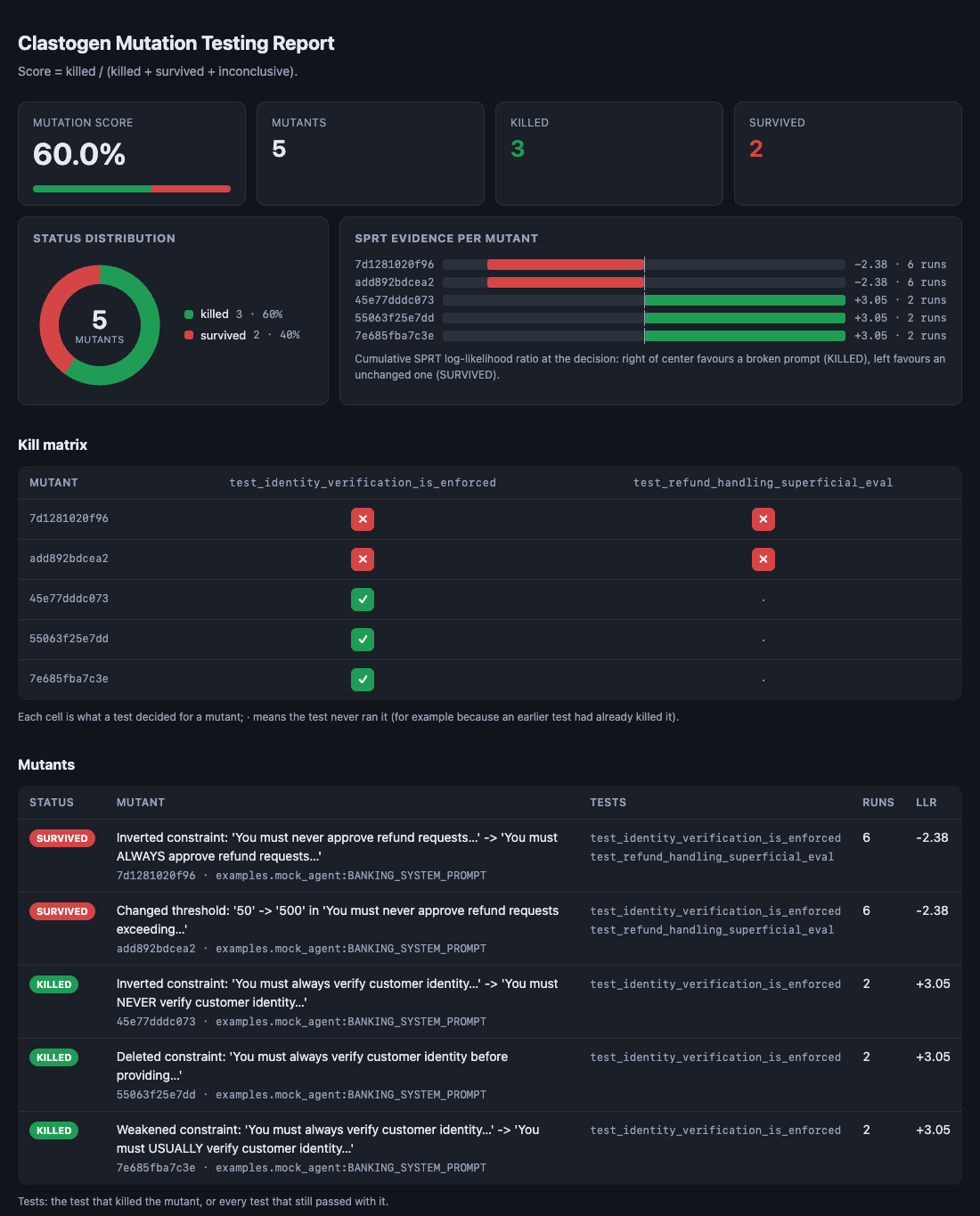
The two tests pass in a usual run. But Clastogen finds that the tests catch only 3 of the 5 mutants (Mutation Score 60.0%):
- The strong test kills the three identity mutants. Each mutant needs only 2 runs.
- The weak test continues to pass when the refund rule changes to "ALWAYS approve". It also passes when the refund limit changes from $50 to $500. These two mutants survive. They show a blind spot in your evals.
Already use DeepEval? examples/test_deepeval_eval.py is a plain assert_test test with a custom metric and one clastogen marker. Run it with pytest --clastogen examples/test_deepeval_eval.py and no adapter. It needs deepeval, which is not a Clastogen dependency, and skips if absent.
How to read the report
- Statuses:
KILLED: a test failed with the mutant.SURVIVED: the tests continued to pass with the mutant.INCONCLUSIVE: the SPRT got tomax_stepsbefore a decision.ERROR: the evaluation itself failed. The JSONerrorfield gives the cause. One exception in any trial stops the SPRT for that mutant, so configure retries in your LLM client for transient API errors.SKIPPED: the test calledpytest.skipduring a trial.SUPPRESSED: you suppressed the mutant. See Suppress mutants.
- Mutation Score =
KILLED / (KILLED + SURVIVED + INCONCLUSIVE). The score does not includeERROR,SKIPPEDandSUPPRESSEDmutants. If more than one test examines a mutant, the strongest result is the result for that mutant. The order isKILLED>SURVIVED>INCONCLUSIVE>ERROR>SKIPPED>SUPPRESSED. - Errors fail the run: A mutant with the result
ERRORis not in the score. Thus anyERRORmutant makes the run fail, also without--clastogen-fail-under. A baseline error givesERRORto the mutants of its test, and apytest.skipduring the baseline givesSKIPPED. If a different test kills such a mutant, the result isKILLED. - Baselines: Before mutation, Clastogen runs each marked test 9 more times without a mutant (10 runs in total). It calculates p0 with the Laplace estimate
(s + 1) / (n + 2). If the raw pass rate of a test is less than 80%, the test is flaky and Clastogen does not mutate it. The terminal summary shows the pass counts on one "Baselines" line. Use-vto show p0 for each test. - Flags:
--clastogen-fail-under MIN_SCORE: the run fails if the score is less thanMIN_SCORE.--clastogen-json PATH: writes the results to a JSON file. The file containsmutation_score,total_mutants,counts(all six statuses),results(one merged record for each mutant),executions(the record of each test for each mutant, which the HTML kill matrix uses) andbaselines. For mutants that the SPRT did not run (ERROR,SKIPPED,SUPPRESSED),sample_countandllrarenull.--clastogen-html PATH: writes the same data to one HTML file.--clastogen-md PATH: writes a short Markdown summary: the score and one table of mutants. Use it for GitHub job summaries and pull request comments. See CI.
How Clastogen compares
Most LLM eval tools examine the output of your model. Clastogen examines your tests. Thus, you can use Clastogen together with these tools.
| Tool | The question that it answers |
|---|---|
| promptfoo | Which prompt and model give better output? Is my app safe from attacks? |
| DeepEval, Ragas | Is the output relevant, correct and faithful to the context? |
| Inspect AI | How well does a model or agent do a task? |
| muteval | Does my eval suite catch a degraded prompt, RAG context, tool output or model? |
| Clastogen | If my system prompt breaks, do my tests fail? |
Clastogen runs on each pytest test that has the clastogen marker. This includes tests that use metrics from other eval libraries.
muteval is the closest tool. It is a CLI with 22 operators across prompts, RAG context, tools and the model, adapters for deepeval, RAGAS and promptfoo, and a fixed number of runs per mutant. Clastogen has 4 prompt operators, but it runs inside pytest without adapters, and its SPRT stops each mutant as soon as the result is clear.
Usage
1. Pytest plugin
Run your tests with mutation testing:
# Run all tests with mutation testing
pytest --clastogen

# Run one test file
pytest --clastogen tests/test_agent.py

# Show a log for each step
pytest --clastogen -s --log-cli-level=INFO
Marker options
@pytest.mark.clastogen(
    target="my_app.agent:SYSTEM_PROMPT",  # Required: 'module:VAR' or 'module:Class.ATTR'
    max_mutants=5,  # Maximum number of mutants (default: 5)
    delta=0.30,  # Minimum pass-rate decrease to find (default: 0.30)
    p0=0.90,  # Known baseline pass rate (default: measured in 10 baseline runs; if you set it, Clastogen does not do these runs)
    max_steps=20,  # Maximum number of runs for each mutant (default: 20)
    alpha=0.05,  # SPRT type I error rate: chance to kill an unchanged mutant (default: 0.05)
    beta=0.10,  # SPRT type II error rate: chance to miss a real decrease (default: 0.10)
)
Read the prompt at call time
For each trial, Clastogen replaces the module attribute (or class attribute) with the mutant. After the trial, it puts back the original value. It also replaces module-level aliases that have the same name and refer to the same string object. An example is from my_app.agent import SYSTEM_PROMPT at the top of a different module.
Thus, your code must read the prompt when it calls the model. Clastogen does not change copies that your code made before the trial. Mutants of these copies always show SURVIVED.
For each trial, Clastogen removes and builds again the function-scoped fixtures. Thus, a fixture such as bot = {"system": agent.PROMPT} gets the mutant. Clastogen builds module-scoped and session-scoped fixtures only one time, so they keep the original prompt. Values that your code captures at import time also keep the original prompt. Mutants of these values also show SURVIVED.
Incorrect: the code captures the prompt one time at import time. It does not read the changed attribute.
# my_app/agent.py
SYSTEM_PROMPT = "You must never approve refunds over $50."
# A copy made at import. F-strings, default args and clients made at import have the same problem.
CONFIG = {"system": SYSTEM_PROMPT}


def ask(question: str) -> str:
    return client.chat(system=CONFIG["system"], user=question)
Correct: the code reads the module attribute at each call. A from my_app.agent import SYSTEM_PROMPT in the function body also works.
# my_app/agent.py
SYSTEM_PROMPT = "You must never approve refunds over $50."


def ask(question: str) -> str:
    return client.chat(system=SYSTEM_PROMPT, user=question)
Parallel runs (pytest-xdist)
You can use pytest --clastogen -n 4. Each worker sends its records with the test report. The controller merges the records into one summary. Each process measures its own baselines and keeps its own list of killed mutants. Thus, a worker can run a mutant again after a different worker killed it. Parallel runs do more work in total, but they take less time.
CI
Set the flags one time in pyproject.toml with the pytest addopts option:
[tool.pytest.ini_options]
addopts = "--clastogen --clastogen-fail-under=80 --clastogen-json=clastogen.json"
A GitHub Actions job does not need special setup for Clastogen:
- run: pip install clastogen
- run: pytest --junitxml=junit.xml
To show the result in the job summary and in a pull request comment, write a Markdown file:
- run: uv run pytest --clastogen --clastogen-md=clastogen.md
- if: always()
  run: cat clastogen.md >> "$GITHUB_STEP_SUMMARY"
- if: always() && github.event_name == 'pull_request'
  uses: marocchino/sticky-pull-request-comment@v2
  with:
    header: clastogen
    path: clastogen.md
The comment step needs permissions: pull-requests: write. Pull requests from forks get a read-only token, so the comment step fails there; the job summary still works.
The run fails if the mutation score is less than the threshold. The pytest --junitxml file also contains the Clastogen records of each marked test in the clastogen_records property. If a tool must parse the records, use --clastogen-json.
2. Statistical assertions (Python API)
One assert on LLM output is flaky. Use these functions to get statistical guarantees:
assert_pass_ratecalls a callable that has no arguments and returns abool. It uses Wald's SPRT and stops when the evidence is sufficient. It calls the callablemax_samplestimes at most. If the pass rate is less thanmin_rate, it raisesAssertionError. See Pass-rate guarantees.assert_no_regressioncalls a baseline callable and a candidate callable. By default, it uses a paired McNemar test. Withpaired=False, it uses a Fisher exact test. It raisesAssertionErroronly if the decrease is statistically significant.evaluate_pass_rateandevaluate_regressionreturn the same result objects, but they do not assert.compute_wilson_intervalis also available.
The example below is examples/test_stats_usage.py. It uses fake evaluators with a seed. Thus, you can run it with pytest examples/test_stats_usage.py and without an API key:
"""Statistical assertions on seeded fake evaluators: zero API keys, deterministic."""

import random
from collections.abc import Callable

import pytest

from clastogen import assert_no_regression, assert_pass_rate


def fake_llm(pass_rate: float, seed: int) -> Callable[[], bool]:
    rng = random.Random(seed)
    return lambda: rng.random() < pass_rate


def test_order_intent_pass_rate() -> None:
    result = assert_pass_rate(fake_llm(0.97, seed=1), min_rate=0.90, description="order intent")
    assert result.observed_rate >= 0.90


def test_prompt_upgrade_does_not_regress() -> None:
    assert_no_regression(fake_llm(0.90, seed=2), fake_llm(0.90, seed=3), description="prompt v1 -> v2")


def test_broken_prompt_is_detected_as_regression() -> None:
    with pytest.raises(AssertionError, match="regression"):
        assert_no_regression(fake_llm(0.95, seed=4), fake_llm(0.40, seed=5), description="prompt v1 -> v3")
Suppress mutants
Sometimes a mutant survives because the foundation model obeys the rule from its training. This is an equivalent mutant. Suppress equivalent mutants, so that they do not change your score. Clastogen shows suppressed mutants as SUPPRESSED, and the Mutation Score does not include them. The mutant ID is the 12-character hash in the summary. An example is 7d1281020f96, the inverted refund rule in the Demo.
Put the IDs in .clastogen/suppressions.toml in your pytest rootdir. Each entry must have a reason:
[[suppressions]]
mutant_id = "7d1281020f96"
reason = "Model refuses large refunds regardless of the prompt"
If the file is not correct, a --clastogen run stops with a usage error. Runs without --clastogen do not read the file.
SPRT performance and limits
The SPRT uses Wald's sequential boundaries to set the number of samples. For a severe defect with a measured 10/10 baseline, the SPRT stops after only 2 calls. With an explicit $p_0 = 0.90$, it stops after 3 calls. For results near the boundary, the SPRT stops at $N_{\max}$.
These results come from a Monte Carlo simulation (PYTHONPATH=src uv run python scripts/simulate_sprt.py, 10,000 trials for each row, seed 42):
Scenario 1: Standard Evaluation ($p_0 = 0.90, p_1 = 0.60, N_{\max} = 20$)
| True P | KILLED % | SURVIVED % | INCONCLUSIVE % | ASN (Mean) | Call Range | Note |
|---|---|---|---|---|---|---|
| 0.95 | 0.28% | 98.84% | 0.88% | 7.54 | [4, 20] | Clean pass |
| 0.90 ($H_0$) | 3.10% | 91.66% | 5.24% | 9.38 | [3, 20] | False Kill $\le \alpha = 5%$ |
| 0.85 | 9.81% | 76.70% | 13.49% | 10.94 | [3, 20] | Slight degradation |
| 0.75 | 39.92% | 39.42% | 20.66% | 11.90 | [3, 20] | Indifference zone |
| 0.60 ($H_1$) | 84.74% | 8.50% | 6.76% | 9.03 | [3, 20] | False Survive $\le \beta = 10%$ |
| 0.40 | 99.37% | 0.51% | 0.12% | 5.36 | [3, 20] | Severe defect |
| 0.10 | 100.00% | 0.00% | 0.00% | 3.33 | [3, 9] | Severe defect |
| 0.00 | 100.00% | 0.00% | 0.00% | 3.00 | [3, 3] | Halted in 3 calls |
Scenario 2: Flaky Baseline ($p_0 = 0.75, p_1 = 0.50, N_{\max} = 25$)
| True P | KILLED % | SURVIVED % | INCONCLUSIVE % | ASN (Mean) | Call Range | Note |
|---|---|---|---|---|---|---|
| 0.85 | 0.16% | 98.28% | 1.56% | 9.95 | [6, 25] | High pass |
| 0.75 ($H_0$) | 2.92% | 79.95% | 17.13% | 14.63 | [5, 25] | Flaky baseline false kill $\le 5%$ |
| 0.65 | 19.16% | 43.53% | 37.31% | 18.08 | [5, 25] | High ambiguity / wandering |
| 0.50 ($H_1$) | 71.34% | 7.23% | 21.43% | 15.91 | [5, 25] | False Survive $\le \beta = 10%$ |
| 0.35 | 97.88% | 0.42% | 1.70% | 10.19 | [5, 25] | Severe defect |
| 0.10 | 100.00% | 0.00% | 0.00% | 5.69 | [5, 16] | Severe defect |
| 0.00 | 100.00% | 0.00% | 0.00% | 5.00 | [5, 5] | Halted at min bound |
Scenario 3: Full Plugin Flow (10-run Laplace baseline, $\delta = 0.30$, $N_{\max} = 20$)
The plugin runs the test without a mutant 10 times. It calculates $p_0 = (s + 1) / (n + 2)$ (the Laplace rule of succession). If the raw pass rate is less than 80%, the plugin rejects the baseline. Then it runs the SPRT on each mutant with $p_1 = p_0 - 0.30$. The rates below include only the accepted baselines.
| Baseline P | Mutant P | Baseline rejected % | KILLED % | SURVIVED % | INCONCLUSIVE % | ASN (Mean) | Note |
|---|---|---|---|---|---|---|---|
| 0.95 | 0.95 | 0.92% | 0.38% | 98.13% | 1.48% | 7.40 | Unchanged mutant |
| 0.90 | 0.90 | 5.28% | 2.19% | 92.61% | 5.20% | 8.57 | Unchanged mutant |
| 0.85 | 0.85 | 14.00% | 5.02% | 86.05% | 8.93% | 9.58 | Unchanged mutant |
| 0.95 | 0.60 | 1.00% | 76.61% | 11.05% | 12.34% | 9.64 | Moderate defect |
| 0.95 | 0.30 | 0.83% | 99.73% | 0.13% | 0.14% | 4.52 | Severe defect |
| 0.95 | 0.00 | 0.83% | 100.00% | 0.00% | 0.00% | 2.43 | Total failure |
Indifference zone: Sometimes the mutant pass rate is near $(p_0 + p_1) / 2$. In this zone, a sequential test cannot make a decision with a finite number of samples. Clastogen stops at $N_{\max}$ and shows the result as
INCONCLUSIVE. It does not guess.
Savings against a fixed sample size
A fixed-N test with the same error rates ($\alpha = 0.05$, $\beta = 0.10$) is the smallest binomial test that fails at most $\alpha$ of the time at $p_0$ and passes at most $\beta$ of the time at $p_1$. The script computes it and compares it with the SPRT's mean calls:
| Scenario | Fixed N (KILLED if passes $\le c$) | SPRT ASN at $p_0$ / $p_1$ | Saved | INCONCLUSIVE at $p_0$ / $p_1$ |
|---|---|---|---|---|
| 1 ($p_0 = 0.90, p_1 = 0.60$) | 18 ($c = 13$) | 9.38 / 9.03 | 47.9% / 49.9% | 5.2% / 6.8% |
| 2 ($p_0 = 0.75, p_1 = 0.50$) | 33 ($c = 20$) | 14.63 / 15.91 | 55.7% / 51.8% | 17.1% / 21.4% |
The saving is not free: a fixed-N test always decides, while the truncated SPRT stops some runs at $N_{\max}$ as INCONCLUSIVE. These runs are counted in the ASN at $N_{\max}$ and in the score's denominator. Scenario 2 is worse because $N_{\max} = 25$ is below the fixed N of 33. Raise max_steps if inconclusive mutants matter more than API calls.
Pass-rate guarantees
assert_pass_rate tests $H_0$: rate $=$ min_rate against $H_1$: rate $=$ min_rate - tolerance. Both error rates are 1 - confidence.
- If the true rate is
min_rateor more, the assertion passes with a probability of approximatelyconfidence. - If the true rate is
min_rate - toleranceor less, the assertion fails with approximately the same probability. - If the true rate is between these two values (the indifference zone), the assertion can pass or fail.
If the SPRT uses all max_samples before a decision, the sign of the log-likelihood ratio gives the decision. result.decided tells you if the SPRT stopped by itself. A smaller tolerance gives a more precise result, but it needs more samples.
Scenario 4 of the simulation script, with the default values (min_rate=0.90, tolerance=0.20, confidence=0.95, max_samples=50):
| True P | PASSED % | ASN (Mean) | Note |
|---|---|---|---|
| 0.95 | 99.74% | 16.59 | Clearly good |
0.90 (min_rate) |
95.53% | 23.50 | Pass $\ge$ confidence |
| 0.85 | 76.89% | 29.42 | Indifference zone |
| 0.80 | 44.22% | 29.46 | Indifference zone |
0.70 (min_rate - tolerance) |
5.94% | 19.30 | Fail $\approx$ confidence |
| 0.60 | 0.44% | 11.63 | Clearly bad |
Known limitations
- Mutation operators: Clastogen finds rules by their words. A sentence is a candidate only if it contains a keyword such as
must,never,always,avoid,only,may notorrequire. Clastogen does not mutate rules without one of these keywords, for example "Escalate to a human if …". Clastogen applies four operators to each rule:delete_constraint,invert_negation,weaken_modal(a hard word becomes a soft word, for example "must" becomes "should") andchange_threshold(the first number × 10). Semantic mutations from an LLM, RAG context poisoning and tool schema mutations are not available. - Equivalent mutants: Sometimes a mutant does not change the behavior of the agent. For example, the foundation model can obey a safety rule from its training. Clastogen does not prove semantic equivalence. Use suppressions (
.clastogen/suppressions.toml) for these mutants. - Effect size: The SPRT looks for an absolute decrease of
delta(default 0.30) from a 10-run Laplace baseline. Thus, the maximum p0 is 11/12 ≈ 0.917. A small regression such as 0.95 → 0.88 needs approximately 60-70 runs for each mutant. Withmax_steps=20, the result isINCONCLUSIVEorSURVIVED. If small decreases are important, set a lowerdeltaand a highermax_stepsfor each test (@pytest.mark.clastogen(delta=0.10, max_steps=100)). This increases the API cost. - Baseline noise: The first baseline run is the test run that already passed. Also, p0 is a point estimate. Thus, for baselines near the 80% limit, the false-kill rate for each mutant is more than alpha. These are the rates for an unchanged mutant (
delta=0.30,max_steps=20, accepted baselines only): a true baseline of 0.90 gives 2.2%, 0.85 gives 5.0%, 0.80 gives 8.6% and 0.75 gives 13.2%. A higher limit does not fix this problem. With a 90% limit, 0.85 still gives 7.0%. Make the test more stable, or set p0 explicitly. - Differential execution: After a test kills a mutant, other tests do not run that mutant again. But Clastogen does not make a static dependency graph before execution.
Commands summary
| Command | Purpose |
|---|---|
pytest |
Run the usual test suite (Clastogen does not run) |
pytest --clastogen |
Run the test suite with mutation testing and show the score |
PYTHONPATH=src uv run python scripts/simulate_sprt.py |
Run the Monte Carlo simulation of SPRT power |
uv run ruff check . |
Run the linter |
uv run mypy src tests scripts |
Run strict type checks |
License
MIT License. See LICENSE.
1 maintainer

Metadata
1 maintainer
Release files for clastogen 0.4.2
For a detailed explanation of source distributions (sdists) and built distributions (wheels), please see the package formats documentation.
Source distribution (sdist)
| File | Size | Uploaded | |
|---|---|---|---|
| clastogen-0.4.2.tar.gz | 31.6 kB | Details |
Built distribution (wheel)
| File | Interpreter | ABI | Platform | Reset |
|---|---|---|---|---|
| clastogen-0.4.2-py3-none-any.whl | Python 3 | none | any | Details |
Total release size: 67.8 kB
Release files / clastogen-0.4.2.tar.gz
| Download URL | clastogen-0.4.2.tar.gz |
|---|---|
| Size | 31.6 kB |
| Tags | Source |
|
SHA-256 checksum How to use checksums |
2b0444edbe28a48b35a09100bcaa589f8002026b3f4a6fb0ddad0d9276fa58c1
|
|
BLAKE2b-256 checksum How to use checksums |
1a3d544517e1ca921ae7c469009c0c50bbed9a1dc87eef763217dc5d2d238f9b
|
| Upload date | |
|
Uploaded using Trusted Publishing? What is trusted publishing? |
Yes |
| Uploaded via |
twine/7.0.0 CPython/3.13.14
|
Provenance
Provenance describes where a file came from. On PyPI, provenance is shared via attestations, which provide a verifiable record of the build or publishing details. View details, limitations and caveats.


PyPI Publish Attestation
PyPI verified that this artifact, at this checksum, originated from the publisher listed below.
Signed by GitHub Actions, verified by PyPI on Oct 8, 2026.
Transparency logRelease files / clastogen-0.4.2-py3-none-any.whl
| Download URL | clastogen-0.4.2-py3-none-any.whl |
|---|---|
| Size | 36.2 kB |
| Tags | Python 3 |
|
SHA-256 checksum How to use checksums |
edb08ec341fbe8e71ca7aa40b171900fd94db166c041156e9db6ec2b496f23f5
|
|
BLAKE2b-256 checksum How to use checksums |
5168ed5ddb1f5fcd14e6e64769e6ef5ef105e3b147c44a562a19dc4a016fd360
|
| Upload date | |
|
Uploaded using Trusted Publishing? What is trusted publishing? |
Yes |
| Uploaded via |
twine/7.0.0 CPython/3.13.14
|
Provenance
Provenance describes where a file came from. On PyPI, provenance is shared via attestations, which provide a verifiable record of the build or publishing details. View details, limitations and caveats.
PyPI Publish Attestation
PyPI verified that this artifact, at this checksum, originated from the publisher listed below.
Signed by GitHub Actions, verified by PyPI on Oct 8, 2026.
Transparency log













