
claude-busy-monitor


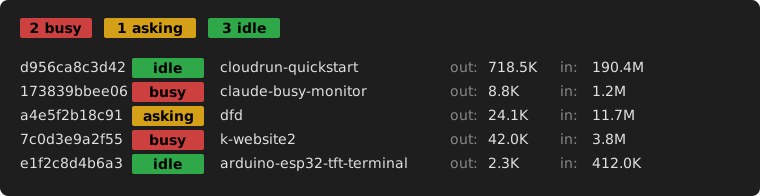
Live view of your Claude Code sessions on your machine: which one is busy, which one is asking for your input, which one is idle (with cumulative token totals).
Ships as a claude-busy-monitor command and a Python library (get_sessions(), get_state_counts()).
1. Why
When you run many Claude Code sessions in parallel, keeping an overview of their states is a job in itself. You want every session working; every minute it isn't is time you don't get back:
- A busy session is the productive one; Claude is doing the work you asked for.
- An idle session is waiting for your next prompt; feed it.
- An asking session is fully stalled on a menu (most often a permission prompt); answer it to unstuck Claude.
claude-busy-monitor surfaces the asking sessions instantly so they don't sit there burning your wall-clock.
2. Scope
What it sees and does:
- Local Claude Code sessions of the running user.
- Their live state (
busy/asking/idle) and cumulative token totals.
What it deliberately does not do:
- No API calls: works entirely from local files; no quota burn, no auth needed.
- No web or desktop sessions: those don't write the local probe files this tool reads.
- No mutation, no daemon, no IPC: read-only, ephemeral, nothing to start or supervise.
3. Features
| Feature | What it gives you |
|---|---|
| Authoritative state | status comes straight from Claude Code's own probe files; no race-prone proxies. |
| Cache-aware token totals | Sums all four usage categories (fresh, cache-create, cache-read, output). Naïvely counting only input_tokens underreports by ~10× on cached prompts. |
| Summary at a glance | Coloured pill counts on the first line; scannable from across the room. |
watch-friendly |
Stable, line-oriented output; no spinners, no cursor-move escapes. |
| Zero configuration | Nothing to set up; reads only files Claude Code already writes. |
4. Install
Python 3.11+ is the only prerequisite.
4.1. As a command (most users)
pipx install claude-busy-monitor
# or, with uv:
uv tool install claude-busy-monitor
Both put claude-busy-monitor in ~/.local/bin/ inside an isolated per-tool venv; no risk to system Python, clean uninstall. If you have neither: apt install pipx (Debian/Ubuntu).
Avoid pip install claude-busy-monitor system-wide on modern distros (PEP 668 marks system Python as managed; you'd hit externally-managed-environment and --break-system-packages is a last-resort override, not a recommendation).
4.2. As a library
In your project's virtualenv:
pip install claude-busy-monitor
# or, with uv:
uv add claude-busy-monitor
Then from claude_busy_monitor import get_sessions, get_state_counts, ClaudeState (full API in README-LIBRARY.md).
4.3. From source (contributors)
git clone https://github.com/pbauermeister/claude-busy-monitor.git
cd claude-busy-monitor
make require        # installs uv if missing (idempotent)
make venv-activate  # creates .venv, syncs dev deps, opens an activated shell
# or, to install the local source globally for end-to-end use:
make install        # = uv tool install .
For the full list of make targets, see README-LIBRARY.md.
5. Usage
5.1. Command
claude-busy-monitor               # one-shot listing
watch claude-busy-monitor         # live refresh
The output is one summary line followed by one line per session. Each session line reads:
| Column | Meaning |
|---|---|
| 1 | session id (first 12 hex chars) |
| 2 | state pill: busy (red) / asking (yellow) / idle (green) |
| 3 | working directory (basename) |
| 4 | output tokens, cumulative (out:) |
| 5 | input tokens, cumulative (in:, fresh + cached, summed) |
5.2. Library
The same data is exposed as a Python library; build your own tmux notifier, status-bar widget, or custom dashboard.
from claude_busy_monitor import get_sessions, ClaudeState

asking = [s for s in get_sessions() if s.state == ClaudeState.ASKING]
for s in asking:
    print(f"waiting: {s.path} ({s.id[:12]})")
Full API and make reference: README-LIBRARY.md.
6. How it works
claude-busy-monitor reads two on-disk sources that Claude Code itself writes:
~/.claude/sessions/<pid>.json: one probe file per live session, with the authoritative rawstatusfield (busy/shell/idle/waiting).~/.claude/projects/<encoded-cwd>/<sid>.jsonl: the per-session transcript, used only to total token usage.
State classification is a fixed lookup that synthesises those raw statuses into the three user-facing states (busy / asking / idle); the mapping is many-to-one — several raw statuses may collapse into one state (e.g. shell → busy). No inference, no heuristics.
Token usage sums the four usage categories per assistant entry.
For the full design (assumptions the classifier depends on, diagnostic recipes for when something looks wrong, and the repair playbook), see README-STATE-DETECTION.md.
7. Compatibility
- Operating system: Linux only (relies on
/proc/<pid>/command/proc/<pid>/exe); macOS is not supported yet. Help welcome: please open a Discussion before any issue or PR. - Claude Code: v2.1.119 introduced the
statusfield this tool relies on; older versions are silently dropped./exitandclaude --resume <sessionId>will migrate them.
8. License
MIT; see CHANGES.md for the version history.
1 maintainer

Metadata
1 maintainer
Release files for claude-busy-monitor 1.0.6
For a detailed explanation of source distributions (sdists) and built distributions (wheels), please see the package formats documentation.
Source distribution (sdist)
| File | Size | Uploaded | |
|---|---|---|---|
| claude_busy_monitor-1.0.6.tar.gz | 116.3 kB | Details |
Built distribution (wheel)
| File | Interpreter | ABI | Platform | Reset |
|---|---|---|---|---|
| claude_busy_monitor-1.0.6-py3-none-any.whl | Python 3 | none | any | Details |
Total release size: 127.7 kB
Release files / claude_busy_monitor-1.0.6.tar.gz
| Download URL | claude_busy_monitor-1.0.6.tar.gz |
|---|---|
| Size | 116.3 kB |
| Tags | Source |
|
SHA-256 checksum How to use checksums |
873367b7be0dff81777f5485c34972bb28f47a6e14ad990892be834eaa99db6b
|
|
BLAKE2b-256 checksum How to use checksums |
7a017140ed05104be1245f17fdb4c48e015f685f2431ff74be4525ec86233146
|
| Upload date | |
|
Uploaded using Trusted Publishing? What is trusted publishing? |
No |
| Uploaded via |
uv/0.11.7 {"installer":{"name":"uv","version":"0.11.7","subcommand":["publish"]},"python":null,"implementation":{"name":null,"version":null},"distro":{"name":"Linux Mint","version":"22.2","id":"zara","libc":null},"system":{"name":null,"release":null},"cpu":null,"openssl_version":null,"setuptools_version":null,"rustc_version":null,"ci":null}
|
Release files / claude_busy_monitor-1.0.6-py3-none-any.whl
| Download URL | claude_busy_monitor-1.0.6-py3-none-any.whl |
|---|---|
| Size | 11.4 kB |
| Tags | Python 3 |
|
SHA-256 checksum How to use checksums |
b796b03d8b6bc3a3ce7bc6a6a39faf0ddff8cbe6b1dca6dded9d91a284accf6e
|
|
BLAKE2b-256 checksum How to use checksums |
777597c950f5bd74e7961334a756d5dc663e353a21569819f07893c45c89007c
|
| Upload date | |
|
Uploaded using Trusted Publishing? What is trusted publishing? |
No |
| Uploaded via |
uv/0.11.7 {"installer":{"name":"uv","version":"0.11.7","subcommand":["publish"]},"python":null,"implementation":{"name":null,"version":null},"distro":{"name":"Linux Mint","version":"22.2","id":"zara","libc":null},"system":{"name":null,"release":null},"cpu":null,"openssl_version":null,"setuptools_version":null,"rustc_version":null,"ci":null}
|














