
Claude Code Statusline Script







Overview
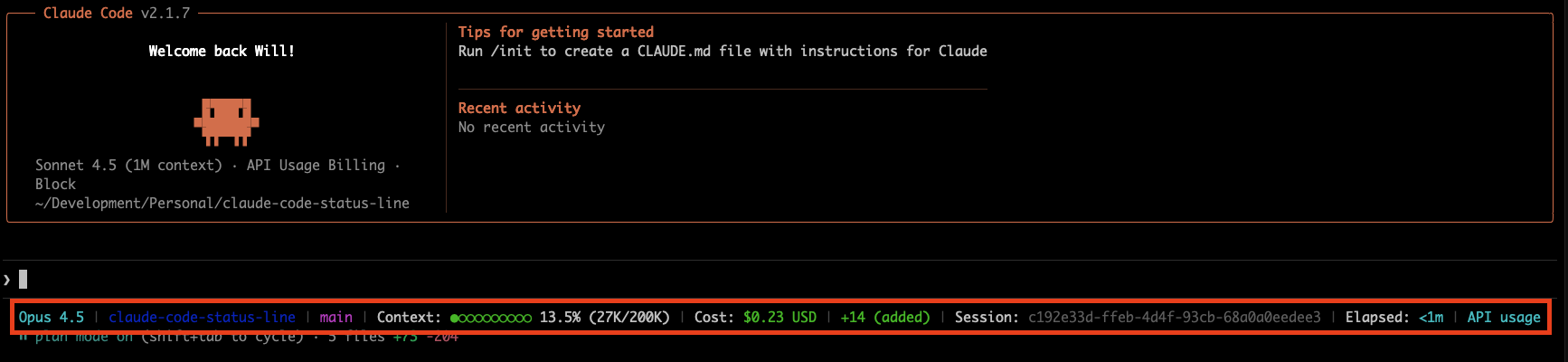
A Python script that generates a formatted status line for Claude Code, displaying the current model, working directory, and context usage information. The script provides real-time feedback on token consumption relative to the model's context window limit.
Project Structure
claude-code-status-line/
├── src/
│   └── claude_code_statusline/
│       ├── __init__.py          # Package initialization
│       ├── statusline.py        # Main statusline command
│       ├── config/              # Configuration system
│       │   ├── defaults.py      # Default widget configuration
│       │   ├── loader.py        # Config file loading
│       │   └── schema.py        # Pydantic schemas
│       ├── widgets/             # Widget system
│       │   ├── base.py          # Base widget class
│       │   ├── registry.py      # Widget registration
│       │   └── builtin/         # Built-in widgets
│       ├── parsers/             # Transcript parsing
│       │   ├── jsonl.py         # JSONL parser
│       │   └── tokens.py        # Real token counting
│       ├── cli/                 # CLI commands
│       │   └── commands.py      # install/uninstall/doctor
│       └── utils/               # Shared utilities
├── scripts/
│   ├── install.sh               # One-liner installation
│   └── uninstall.sh             # Clean removal
└── tests/                       # Test suite
Installation
Quick Install (Recommended)
Install with a single command:
curl -fsSL https://raw.githubusercontent.com/wpfleger96/claude-code-status-line/main/scripts/install.sh | bash
This will:
- Install
claude-code-statuslineusinguvorpipx - Configure Claude Code automatically
- Create a backup of existing configuration
Requirements: Either uv or pipx
Or, if you have uv, install and configure in a single command:
uvx claude-code-statusline install
This installs the tool persistently (via uv tool) and then writes the statusLine config to ~/.claude/settings.json.
Manual Installation
Option 1: Using uv tool
uv tool install claude-code-statusline
claude-code-statusline install
Option 2: Using pipx
pipx install claude-code-statusline
claude-code-statusline install
Upgrading
To upgrade to the latest version:
# If installed with uv
uv tool upgrade claude-code-statusline

# If installed with pipx
pipx upgrade claude-code-statusline
Upgrading from a version that used the
claude-statuslinecommand? The command was renamed toclaude-code-statusline. After upgrading, re-runclaude-code-statusline installto update~/.claude/settings.json— your~/.configwidget config is migrated automatically. If a staleclaude-statuslinecommand lingers on yourPATH, runuv tool uninstall claude-code-statusline(orpipx uninstall claude-code-statusline) and reinstall.
Uninstalling
To uninstall:
# Quick uninstall
curl -fsSL https://raw.githubusercontent.com/wpfleger96/claude-code-status-line/main/scripts/uninstall.sh | bash

# Or manually
claude-code-statusline uninstall
uv tool uninstall claude-code-statusline  # or: pipx uninstall claude-code-statusline
CLI Commands
claude-code-statusline              # Output statusline (reads JSON from stdin)
claude-code-statusline install      # Configure Claude Code integration
claude-code-statusline uninstall    # Remove Claude Code configuration
claude-code-statusline doctor       # Verify installation health
claude-code-statusline --version    # Show version
Health Check
Verify your installation is working correctly:
claude-code-statusline doctor
This checks:
- settings.json configuration
- Config file validity
- Statusline execution
- Claude Code directory
Configuration
Widget Customization
Customize your status line by creating ~/.config/claude-code-statusline/config.yaml:
version: 2
widgets:
  model:
    color: cyan
  directory:
    color: blue
  git-branch:
    color: magenta
  context-percentage:
    color: auto  # auto-colors based on usage
  cost:
    color: auto  # auto-colors based on amount
  session-clock:
    color: white
Widget Options:
type(required): Widget identifier (see Available Widgets list below)color(optional): Color name or "auto" for dynamic coloringbold(optional): Make text bold (default: false)metadata(optional): Widget-specific configuration
Color Options: white, black, red, green, yellow, blue, magenta, cyan, dim, auto, none
Default Config:
If no config file exists, all default widgets are shown with built-in defaults. Create ~/.config/claude-code-statusline/config.yaml to customize colors, ordering, or disable specific widgets.
Features
Customizable Widget System
- Configurable Layout: Customize which widgets appear and in what order via
~/.config/claude-code-statusline/config.yaml - Built-in Widgets: 14 widgets including model, directory, git status, context, cost, session info
- Flexible Styling: Per-widget color customization and bold formatting
- Automatic Fallback: Missing config uses sensible defaults with all widgets enabled
Available Widgets:
model- Claude model name (e.g., "Sonnet 4.5")directory- Current working directorygit-branch- Active git branch namegit-changes- Staged/unstaged changes countgit-worktree- Git worktree name (if applicable)context-percentage- Context usage with progress barcontext-tokens- Token count (current/limit)cost- Session cost in USDlines-added- Lines added in sessionlines-removed- Lines removed in sessionlines-changed- Combined added/removedsession-id- Claude Code session UUIDsession-clock- Elapsed session timeseparator- Visual separator (default: "|")
Real Token Counting
- Primary Source: Uses Claude Code's
context_windowfield from status payload for authoritative token counts - Fallback Support: Falls back to transcript parsing for older Claude Code versions or when
context_windowis unavailable - Actual Token Values: Reads real token counts instead of estimating (from
context_window.current_usageor transcriptmessage.usagefields) - Compact-Aware: Correctly handles
/compactboundaries, counting only active context - Accurate Context Limit: Uses
context_window.context_window_sizedirectly from Claude Code instead of model lookups
Smart Context Tracking
- Priority-Based Sources: Prefers
context_windowpayload data → transcript parsing → model lookups - Session Metrics: Continues parsing transcripts for session duration and compact boundary detection
- Backwards Compatible: Gracefully handles missing or null
context_windowdata from older Claude Code versions
Token Calculation
How It Works
Primary Method (Claude Code 2.0.70+):
- Uses
context_window.current_usagefrom Claude Code's status payload - Calculates current context:
input_tokens + cache_creation_input_tokens + cache_read_input_tokens - Uses
context_window.context_window_sizefor accurate model limit - No estimation or overhead calculation needed - values are authoritative from Claude Code
Fallback Method (Older Versions):
- Reads actual token counts from transcript
message.usagefields (input_tokens + output_tokens) - Falls back to estimation (character count ÷ 3.31) only when usage data is unavailable
- Retrieves model-specific context limits from cached API data, live fetches, or hardcoded fallbacks
Configuration
Token counting now uses Claude Code's authoritative context_window data when available. For older Claude Code versions using the fallback method, system overhead is automatically managed.
API Cache System
With context_window (Claude Code 2.0.70+):
- Context limits come directly from
context_window.context_window_size - No cache or API lookups needed - authoritative value from Claude Code
Without context_window (Older Versions):
Context limits are retrieved from:
- Local Cache:
/tmp/claude_code_model_data_cache.json(1-week TTL) - Live API: LiteLLM Model Database
- Fallback: Hardcoded model limits
Cache benefits: Faster rendering, reduced network dependency, automatic refresh.
Display Features
Progress Bar: 10-segment bar using filled (●) and empty (○) circles
Context Usage Colors:
| Color | Usage | Condition |
|---|---|---|
| Grey | 0% | No active transcript |
| Green | <50% | Low usage |
| Yellow | 50-79% | Medium usage |
| Red | 80%+ | High usage |
Cost Tracking Colors:
| Color | Cost Range |
|---|---|
| Grey | $0.00 (exactly zero) |
| Green | $0.01 - $4.99 |
| Yellow | $5.00 - $9.99 |
| Red | $10.00+ |
Line Change Colors:
| Metric | Zero (Grey) | Non-Zero |
|---|---|---|
| Lines Added | 0 lines | Green (>0) |
| Lines Removed | 0 lines | Red (>0) |
Git Integration:
git-branch: Shows current branch with fallback text when not in a repogit-changes: Displays staged/unstaged changes (e.g., "+5 ~3 -2")git-worktree: Shows worktree name if working in a linked worktree
Session Tracking:
session-id: Complete Claude Code session UUID for file matchingsession-clock: Elapsed session time (e.g., "Elapsed: 2hr 15m")
Widget rendering is intelligent - widgets with no data hide automatically, and orphaned separators are removed.
Example Outputs
Default configuration with git integration:
Sonnet 4.5 | claude-code-status-line | main | ●●●●●●○○○○ 60% (120K/200K tokens) | Cost: $2.50 USD | +150 ~25 -10 | Session: 852d18cc | Elapsed: 2hr 15m
High context usage:
Sonnet 4.5 | my-project | feature/auth | ●●●●●●●●●○ 90% (180K/200K tokens) | Cost: $8.75 USD | +500 ~50 -100 | Session: a3f7b2cd | Elapsed: 45m
Low usage (widgets hide when zero):
Sonnet 4.5 | my-project | main | ○○○○○○○○○○ 0% (783/200K tokens) | Cost: $0.00 USD | Session: d6994160 | Elapsed: 5m
No active transcript:
Sonnet 4.5 | my-project | develop | No active transcript | Cost: $0.00 USD | Session: 7b89c123 | Elapsed: 1m
Debug Logging
For debugging and understanding how the script processes Claude Code sessions, you can enable detailed logging:
Enable Debug Mode
export CLAUDE_CODE_STATUSLINE_DEBUG=1
Log Files Location
Debug logs are written to per-session files in the logs/ directory:
- Session-specific logs:
logs/statusline_debug_<session_id>.log - Examples:
logs/statusline_debug_d6994160-5c39-4ecf-8922-65a36b984ec5.log(UUID-based sessions)logs/statusline_debug_unknown.log(fallback for edge cases)
Debug Features
- Session metadata: Model ID, version, working directory logging
- Token analysis: Per-message-type breakdown with percentages and field contributions
- Compact detection: Precise
/compactboundary locations with token reduction stats - Per-session logs: Isolated debug files (
logs/statusline_debug_<session_id>.log) - Error handling: Comprehensive parsing error logging and fallback behavior
Example Debug Output
[2025-09-26 15:03:09] === SESSION METADATA ===
[2025-09-26 15:03:09] Model: claude-opus-4-1-20250805 (Opus 4.1) | Version: 0.8.5
[2025-09-26 15:03:09] Found compact boundary at line 148, using content from line 149 onwards
[2025-09-26 15:03:09] Token Breakdown: assistant: 17,816 tokens (57%) | user: 13,275 tokens (42%)
[2025-09-26 15:03:09] Total: Conversation=31,092, System=15,400, Reserved=45,000 → 91,492 tokens
[2025-09-26 15:03:09] Token reduction from compaction: 146,759 tokens saved
Note: Debug logs are automatically excluded from git via .gitignore to prevent accidental commits of session data.
Development
Setup
-
Clone and install dependencies:
git clone https://github.com/wpfleger96/claude-code-status-line.git
cd claude-code-status-line
uv sync
-
Configure Claude Code to use local version:
uv run claude-code-statusline install
Testing Changes
# Test statusline output
echo '{"workspace": {"current_dir": "/test"}, "transcript_path": "", "model": {"id": "test", "display_name": "Test"}, "cost": {}, "version": "test"}' | uv run claude-code-statusline

# Run test suite
uv run pytest

# Enable debug logging
export CLAUDE_CODE_STATUSLINE_DEBUG=1
Releases
This project uses semantic-release for automated versioning and releases.
Commit Message Format:
<type>(<scope>): <description>

[optional body]

[optional footer]
Types:
feat:New feature (minor version bump)fix:Bug fix (patch version bump)docs:Documentation changes (patch version bump)chore:Maintenance tasks (patch version bump)refactor:Code refactoring (patch version bump)BREAKING CHANGE:in footer (major version bump)
Example:
git commit -m "feat: add support for new Claude models"
git commit -m "fix: correct token calculation for edge cases"
Release Process:
- Push commits to
mainbranch - GitHub Actions automatically:
- Analyzes commit messages
- Determines version bump
- Updates version in files
- Generates CHANGELOG.md
- Creates GitHub release and tag
- Commits changes back to repository
Contributing
Contributions are welcome! Please:
- Fork the repository
- Create a feature branch (
git checkout -b feature/amazing-feature) - Use conventional commit messages
- Push to your branch
- Open a Pull Request
For bug reports or feature requests, please open an issue.
1 maintainer

Metadata
1 maintainer
Release files for claude-code-statusline 0.14.0
For a detailed explanation of source distributions (sdists) and built distributions (wheels), please see the package formats documentation.
Source distribution (sdist)
| File | Size | Uploaded | |
|---|---|---|---|
| claude_code_statusline-0.14.0.tar.gz | 37.4 kB | Details |
Built distribution (wheel)
| File | Interpreter | ABI | Platform | Reset |
|---|---|---|---|---|
| claude_code_statusline-0.14.0-py3-none-any.whl | Python 3 | none | any | Details |
Total release size: 79.6 kB
Release files / claude_code_statusline-0.14.0.tar.gz
| Download URL | claude_code_statusline-0.14.0.tar.gz |
|---|---|
| Size | 37.4 kB |
| Tags | Source |
|
SHA-256 checksum How to use checksums |
3b7cae07e5313bd70fec191c6b503d7cae9e0db5dd31a290a3e0ef2c082f8e13
|
|
BLAKE2b-256 checksum How to use checksums |
ec554619a7944bcc3e3e179ade2c31bf51f9deac2b086f303057a9564815e2fe
|
| Upload date | |
|
Uploaded using Trusted Publishing? What is trusted publishing? |
Yes |
| Uploaded via |
twine/6.1.0 CPython/3.13.12
|
Provenance
Provenance describes where a file came from. On PyPI, provenance is shared via attestations, which provide a verifiable record of the build or publishing details. View details, limitations and caveats.


PyPI Publish Attestation
PyPI verified that this artifact, at this checksum, originated from the publisher listed below.
Signed by GitHub Actions, verified by PyPI on Jul 2, 2026.
Transparency logRelease files / claude_code_statusline-0.14.0-py3-none-any.whl
| Download URL | claude_code_statusline-0.14.0-py3-none-any.whl |
|---|---|
| Size | 42.2 kB |
| Tags | Python 3 |
|
SHA-256 checksum How to use checksums |
51b3585011921ab01da254951c788bcaa585562184e3173ae4770a24ebf834ec
|
|
BLAKE2b-256 checksum How to use checksums |
9945c812c2f553bfe7d75776309bc3e9e1121da3c729d52714471cd18c914df0
|
| Upload date | |
|
Uploaded using Trusted Publishing? What is trusted publishing? |
Yes |
| Uploaded via |
twine/6.1.0 CPython/3.13.12
|
Provenance
Provenance describes where a file came from. On PyPI, provenance is shared via attestations, which provide a verifiable record of the build or publishing details. View details, limitations and caveats.
PyPI Publish Attestation
PyPI verified that this artifact, at this checksum, originated from the publisher listed below.
Signed by GitHub Actions, verified by PyPI on Jul 2, 2026.
Transparency log













