
A Python script for Claude Code statusline with context usage tracking

Project description
Claude Code Statusline Script







Overview
A Python script that generates a formatted status line for Claude Code, displaying the current model, working directory, and context usage information. The script provides real-time feedback on token consumption relative to the model's context window limit.
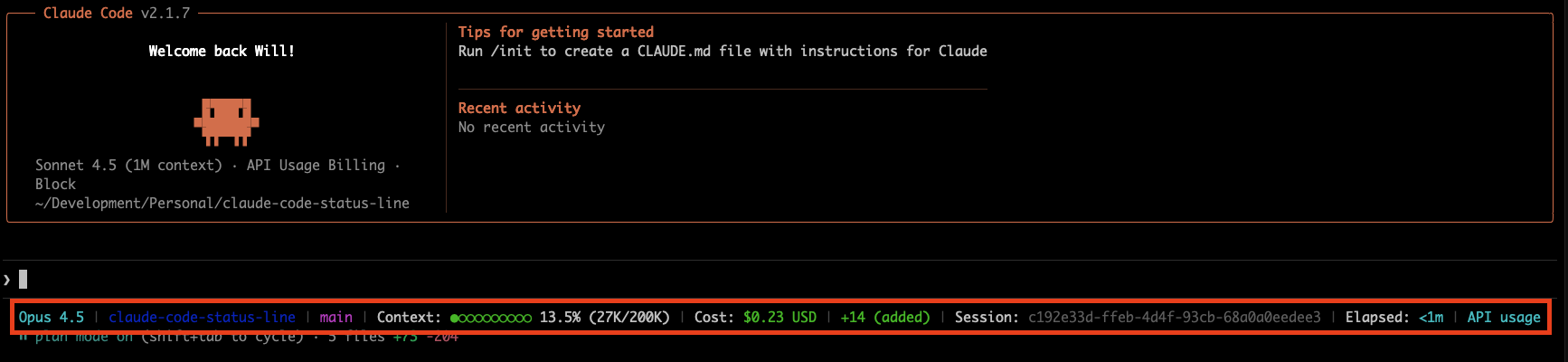
Project Structure
claude-code-status-line/
├── src/
│   └── claude_code_statusline/
│       ├── __init__.py          # Package initialization
│       ├── statusline.py        # Main statusline command
│       ├── config/              # Configuration system
│       │   ├── defaults.py      # Default widget configuration
│       │   ├── loader.py        # Config file loading
│       │   └── schema.py        # Pydantic schemas
│       ├── widgets/             # Widget system
│       │   ├── base.py          # Base widget class
│       │   ├── registry.py      # Widget registration
│       │   └── builtin/         # Built-in widgets
│       ├── parsers/             # Transcript parsing
│       │   ├── jsonl.py         # JSONL parser
│       │   └── tokens.py        # Real token counting
│       ├── cli/                 # CLI commands
│       │   └── commands.py      # install/uninstall/doctor
│       └── utils/               # Shared utilities
├── scripts/
│   ├── install.sh               # One-liner installation
│   └── uninstall.sh             # Clean removal
└── tests/                       # Test suite
Installation
Quick Install (Recommended)
Install with a single command:
curl -fsSL https://raw.githubusercontent.com/wpfleger96/claude-code-status-line/main/scripts/install.sh | bash
This will:
- Install
claude-code-statuslineusinguvorpipx - Configure Claude Code automatically
- Create a backup of existing configuration
Requirements: Either uv or pipx
Manual Installation
Option 1: Using uv tool
uv tool install claude-code-statusline
claude-statusline install
Option 2: Using pipx
pipx install claude-code-statusline
claude-statusline install
Upgrading
To upgrade to the latest version:
# If installed with uv
uv tool upgrade claude-code-statusline

# If installed with pipx
pipx upgrade claude-code-statusline
Uninstalling
To uninstall:
# Quick uninstall
curl -fsSL https://raw.githubusercontent.com/wpfleger96/claude-code-status-line/main/scripts/uninstall.sh | bash

# Or manually
claude-statusline uninstall
uv tool uninstall claude-code-statusline  # or: pipx uninstall claude-code-statusline
CLI Commands
claude-statusline              # Output statusline (reads JSON from stdin)
claude-statusline install      # Configure Claude Code integration
claude-statusline uninstall    # Remove Claude Code configuration
claude-statusline doctor       # Verify installation health
claude-statusline --version    # Show version
Health Check
Verify your installation is working correctly:
claude-statusline doctor
This checks:
- settings.json configuration
- Config file validity
- Statusline execution
- Claude Code directory
Configuration
Widget Customization
Customize your status line by creating ~/.config/claude-statusline/config.yaml:
version: 1
lines:
  - - type: model
      color: cyan
    - type: separator
    - type: directory
      color: blue
    - type: separator
    - type: git-branch
      color: magenta
    - type: separator
    - type: context-percentage
      color: auto  # auto-colors based on usage
    - type: separator
    - type: cost
      color: auto  # auto-colors based on amount
    - type: separator
    - type: session-clock
      color: white
Widget Options:
type(required): Widget identifier (see Available Widgets list below)color(optional): Color name or "auto" for dynamic coloringbold(optional): Make text bold (default: false)metadata(optional): Widget-specific configuration
Color Options: white, black, red, green, yellow, blue, magenta, cyan, dim, auto, none
Auto-Generated Config:
If no config file exists, one is automatically created with all widgets enabled. Delete ~/.config/claude-statusline/config.yaml to regenerate defaults.
Stale Config Warning: When new widgets are added, the script warns you:
Warning: Config is missing widgets from defaults: session-clock.
Delete ~/.config/claude-statusline/config.yaml to regenerate with new defaults.
Features
Customizable Widget System
- Configurable Layout: Customize which widgets appear and in what order via
~/.config/claude-statusline/config.yaml - Built-in Widgets: 14 widgets including model, directory, git status, context, cost, session info
- Flexible Styling: Per-widget color customization and bold formatting
- Automatic Fallback: Missing config uses sensible defaults with all widgets enabled
- Stale Config Detection: Warns when config is missing newly-added widgets
Available Widgets:
model- Claude model name (e.g., "Sonnet 4.5")subscription- Subscription type (Pro/Max) or API usage indicatordirectory- Current working directorygit-branch- Active git branch namegit-changes- Staged/unstaged changes countgit-worktree- Git worktree name (if applicable)context-percentage- Context usage with progress barcontext-tokens- Token count (current/limit)cost- Session cost in USDlines-added- Lines added in sessionlines-removed- Lines removed in sessionlines-changed- Combined added/removedsession-id- Claude Code session UUIDsession-clock- Elapsed session timeseparator- Visual separator (default: "|")
Real Token Counting
- Primary Source: Uses Claude Code's
context_windowfield from status payload for authoritative token counts - Fallback Support: Falls back to transcript parsing for older Claude Code versions or when
context_windowis unavailable - Actual Token Values: Reads real token counts instead of estimating (from
context_window.current_usageor transcriptmessage.usagefields) - Compact-Aware: Correctly handles
/compactboundaries, counting only active context - Accurate Context Limit: Uses
context_window.context_window_sizedirectly from Claude Code instead of model lookups
Smart Context Tracking
- Priority-Based Sources: Prefers
context_windowpayload data → transcript parsing → model lookups - Session Metrics: Continues parsing transcripts for session duration and compact boundary detection
- Backwards Compatible: Gracefully handles missing or null
context_windowdata from older Claude Code versions - Calibration Tool: Includes
calibrate_token_counting.pyto validate and improve accuracy
Token Calculation
How It Works
Primary Method (Claude Code 2.0.70+):
- Uses
context_window.current_usagefrom Claude Code's status payload - Calculates current context:
input_tokens + cache_creation_input_tokens + cache_read_input_tokens - Uses
context_window.context_window_sizefor accurate model limit - No estimation or overhead calculation needed - values are authoritative from Claude Code
Fallback Method (Older Versions):
- Reads actual token counts from transcript
message.usagefields (input_tokens + output_tokens) - Falls back to estimation (character count ÷ 3.31) only when usage data is unavailable
- Retrieves model-specific context limits from cached API data, live fetches, or hardcoded fallbacks
Configuration
Token counting now uses Claude Code's authoritative context_window data when available. For older Claude Code versions using the fallback method, system overhead is automatically managed.
API Cache System
With context_window (Claude Code 2.0.70+):
- Context limits come directly from
context_window.context_window_size - No cache or API lookups needed - authoritative value from Claude Code
Without context_window (Older Versions):
Context limits are retrieved from:
- Local Cache:
/tmp/claude_code_model_data_cache.json(1-week TTL) - Live API: LiteLLM Model Database
- Fallback: Hardcoded model limits
Cache benefits: Faster rendering, reduced network dependency, automatic refresh.
Display Features
Progress Bar: 10-segment bar using filled (●) and empty (○) circles
Context Usage Colors:
| Color | Usage | Condition |
|---|---|---|
| Grey | 0% | No active transcript |
| Green | <50% | Low usage |
| Yellow | 50-79% | Medium usage |
| Red | 80%+ | High usage |
Cost Tracking Colors:
| Color | Cost Range |
|---|---|
| Grey | $0.00 (exactly zero) |
| Green | $0.01 - $4.99 |
| Yellow | $5.00 - $9.99 |
| Red | $10.00+ |
Line Change Colors:
| Metric | Zero (Grey) | Non-Zero |
|---|---|---|
| Lines Added | 0 lines | Green (>0) |
| Lines Removed | 0 lines | Red (>0) |
Git Integration:
git-branch: Shows current branch with fallback text when not in a repogit-changes: Displays staged/unstaged changes (e.g., "+5 ~3 -2")git-worktree: Shows worktree name if working in a linked worktree
Session Tracking:
session-id: Complete Claude Code session UUID for file matchingsession-clock: Elapsed session time (e.g., "Elapsed: 2hr 15m")
Widget rendering is intelligent - widgets with no data hide automatically, and orphaned separators are removed.
Example Outputs
Default configuration with git integration:
Sonnet 4.5 | claude-code-status-line | main | ●●●●●●○○○○ 60% (120K/200K tokens) | Cost: $2.50 USD | +150 ~25 -10 | Session: 852d18cc | Elapsed: 2hr 15m
High context usage:
Sonnet 4.5 | my-project | feature/auth | ●●●●●●●●●○ 90% (180K/200K tokens) | Cost: $8.75 USD | +500 ~50 -100 | Session: a3f7b2cd | Elapsed: 45m
Low usage (widgets hide when zero):
Sonnet 4.5 | my-project | main | ○○○○○○○○○○ 0% (783/200K tokens) | Cost: $0.00 USD | Session: d6994160 | Elapsed: 5m
No active transcript:
Sonnet 4.5 | my-project | develop | No active transcript | Cost: $0.00 USD | Session: 7b89c123 | Elapsed: 1m
Debug Logging
For debugging and understanding how the script processes Claude Code sessions, you can enable detailed logging:
Enable Debug Mode
export CLAUDE_CODE_STATUSLINE_DEBUG=1
Log Files Location
Debug logs are written to per-session files in the logs/ directory:
- Session-specific logs:
logs/statusline_debug_<session_id>.log - Examples:
logs/statusline_debug_d6994160-5c39-4ecf-8922-65a36b984ec5.log(UUID-based sessions)logs/statusline_debug_unknown.log(fallback for edge cases)
Debug Features
- Session metadata: Model ID, version, working directory logging
- Token analysis: Per-message-type breakdown with percentages and field contributions
- Compact detection: Precise
/compactboundary locations with token reduction stats - Per-session logs: Isolated debug files (
logs/statusline_debug_<session_id>.log) - Error handling: Comprehensive parsing error logging and fallback behavior
Example Debug Output
[2025-09-26 15:03:09] === SESSION METADATA ===
[2025-09-26 15:03:09] Model: claude-opus-4-1-20250805 (Opus 4.1) | Version: 0.8.5
[2025-09-26 15:03:09] Found compact boundary at line 148, using content from line 149 onwards
[2025-09-26 15:03:09] Token Breakdown: assistant: 17,816 tokens (57%) | user: 13,275 tokens (42%)
[2025-09-26 15:03:09] Total: Conversation=31,092, System=15,400, Reserved=45,000 → 91,492 tokens
[2025-09-26 15:03:09] Token reduction from compaction: 146,759 tokens saved
Note: Debug logs are automatically excluded from git via .gitignore to prevent accidental commits of session data.
Token Counting Calibration Tool
The project includes claude-calibrate, a command-line tool to verify and improve token counting accuracy against Claude's official measurements.
Purpose
- Compare script calculations against Claude's official
/contextcommand output - Identify discrepancies and suggest calibration factors
- Validate token counting accuracy when new Claude Code versions are released
Usage
Semi-Automated Mode (Default)
uv run --no-config claude-calibrate session1.jsonl session2.jsonl --verbose
The tool provides precise instructions for resuming each session and prompts you to enter the official token counts.
Manual Override Mode
uv run --no-config claude-calibrate session1.jsonl session2.jsonl \
  --known-tokens 17.5k 68k --verbose
Provide known token counts to skip automatic session resumption (useful for sessions that can't be resumed).
Auto-Discovery Mode
uv run --no-config claude-calibrate --max-sessions 3 --verbose
Automatically finds recent session files from all Claude Code project directories and provides instructions for manual calibration.
Example Calibration Report
📊 Successfully calibrated 2 session(s)

INDIVIDUAL RESULTS:
❌ session1.jsonl: Script 46,520 vs Claude 68,000 tokens (+31.6% difference)
✅ session2.jsonl: Script 17,470 vs Claude 17,500 tokens (+0.2% difference)

SUMMARY:
Average discrepancy: +15.9% | Suggested calibration factor: 1.231
⚠️  Token counting has moderate accuracy - consider adjusting CHARS_PER_TOKEN ratio
Features
- Auto-discovery: Finds recent sessions from all Claude Code project directories
- Semi-automated: Provides precise resumption instructions for manual token collection
- Directory decoding: Handles hyphenated paths (
-Users-name-Project→/Users/name/Project) - Flexible input: Accepts raw numbers, K-suffixed values, or full
/contextoutput - Accuracy validation: Compares against Claude's official measurements
- Calibration recommendations: Suggests specific improvements and correction factors
- uv compatibility: Uses
uv runfor portable execution across Python environments
Development
Setup
-
Clone and install dependencies:
git clone https://github.com/wpfleger96/claude-code-status-line.git
cd claude-code-status-line
uv sync --no-config
-
Configure Claude Code to use local version:
uv run --no-config claude-statusline install
Testing Changes
# Test statusline output
echo '{"workspace": {"current_dir": "/test"}, "transcript_path": "", "model": {"id": "test", "display_name": "Test"}, "cost": {}, "version": "test"}' | uv run --no-config claude-statusline

# Run test suite
uv run pytest

# Enable debug logging
export CLAUDE_CODE_STATUSLINE_DEBUG=1
Releases
This project uses semantic-release for automated versioning and releases.
Commit Message Format:
<type>(<scope>): <description>

[optional body]

[optional footer]
Types:
feat:New feature (minor version bump)fix:Bug fix (patch version bump)docs:Documentation changes (patch version bump)chore:Maintenance tasks (patch version bump)refactor:Code refactoring (patch version bump)BREAKING CHANGE:in footer (major version bump)
Example:
git commit -m "feat: add support for new Claude models"
git commit -m "fix: correct token calculation for edge cases"
Release Process:
- Push commits to
mainbranch - GitHub Actions automatically:
- Analyzes commit messages
- Determines version bump
- Updates version in files
- Generates CHANGELOG.md
- Creates GitHub release and tag
- Commits changes back to repository
Contributing
Contributions are welcome! Please:
- Fork the repository
- Create a feature branch (
git checkout -b feature/amazing-feature) - Use conventional commit messages
- Push to your branch
- Open a Pull Request
For bug reports or feature requests, please open an issue.
Release history Release notifications | RSS feed


Download files
Download the file for your platform. If you're not sure which to choose, learn more about installing packages.
Source Distribution
Built Distribution
Filter files by name, interpreter, ABI, and platform.
If you're not sure about the file name format, learn more about wheel file names.
Copy a direct link to the current filters
File details
Details for the file claude_code_statusline-0.13.1.tar.gz.
File metadata
- Download URL: claude_code_statusline-0.13.1.tar.gz
- Upload date:
- Size: 39.9 kB
- Tags: Source
- Uploaded using Trusted Publishing? No
- Uploaded via: twine/6.1.0 CPython/3.13.12
File hashes
| Algorithm | Hash digest | |
|---|---|---|
| SHA256 |
42dad077636f179ddbcb77bc70aa2cd0ae7394eb012284eecacb1928c482163f
|
|
| MD5 |
805adfbb45a15fbb9418f41ed84c9247
|
|
| BLAKE2b-256 |
90ede4584f53c6562a06cdc8c49cf9b3d359694645a478a8a072703c8674a6e2
|
File details
Details for the file claude_code_statusline-0.13.1-py3-none-any.whl.
File metadata
- Download URL: claude_code_statusline-0.13.1-py3-none-any.whl
- Upload date:
- Size: 43.6 kB
- Tags: Python 3
- Uploaded using Trusted Publishing? No
- Uploaded via: twine/6.1.0 CPython/3.13.12
File hashes
| Algorithm | Hash digest | |
|---|---|---|
| SHA256 |
0462f6b8d36b047eb0e7fae561f56f6205eddada718ec30147c33240a9849dca
|
|
| MD5 |
c271d8ff8ad6db7574e3cc0f6e0959a9
|
|
| BLAKE2b-256 |
8943d620d028beca08aaeaf23fa19fff73bbb1c1729d7ca82ffb6b0345c192b9
|






