
claude-code-workspaces


Search your Claude Code conversations, keep the ones that matter, group them into named workspaces, and reopen a whole set as Windows Terminal tabs and split panes.
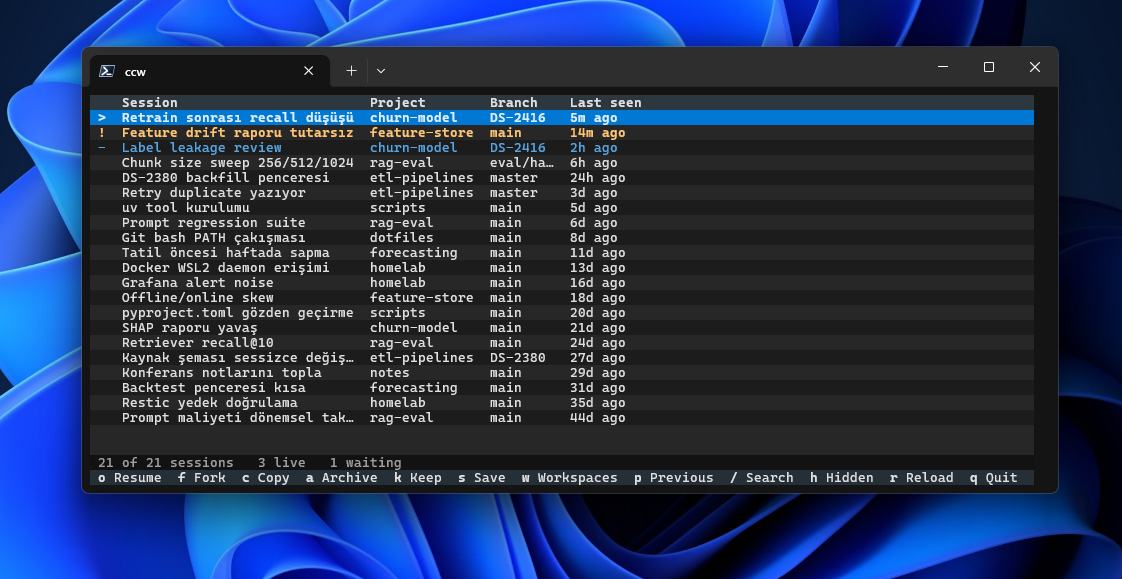
ccw reads every conversation Claude Code has saved on disk, including ones that finished months ago, started on another machine, or never ran under a session manager. Each one reopens in its own directory, resuming the right conversation.
ccw            # the TUI: search, keep, and open a set
ccw list       # your named workspaces
ccw restore    # reopen what was running before a crash or a reboot
Requirements
Everything except opening panes works on Windows, macOS and Linux:
- Python 3.13 or later.
- Claude Code 2.1.145 or later, for
claude agents --json. If restored sessions never appear inclaude agentsand write no transcript, your build predatesCLAUDE_CODE_FORCE_SESSION_PERSISTENCE: update Claude Code.
Opening panes needs one supported terminal:
- Windows Terminal on Windows 10 or 11, with PowerShell 7 or the Windows PowerShell 5.1 that ships with Windows. Nothing extra to install: panes use
pwshwhen it is there andpowershellotherwise.
Install
From PyPI, with either:
uv tool install claude-code-workspaces
pip install claude-code-workspaces
Or run it once without installing: uvx --from claude-code-workspaces ccw.
Usage
ccw opens a table of your conversations. Nothing is written and no terminal opens until you ask.
| Key | Does |
|---|---|
/ |
search |
o / f |
resume / fork the conversation |
k |
keep it at the top of the list |
a |
archive it out of the way |
s |
save the running sessions as a named workspace |
w |
your workspaces, where a whole set reopens |
q |
quit |
Every key is listed along the bottom of the screen.
What it does
- Every conversation, not just the live ones: the list comes from
~/.claude/projects, not from a session manager. - Workspaces: a named set of sessions across projects ("api-refactor"), reopened into one tab layout.
- Live status: busy, idle or waiting on you, from Claude Code's own
claude agents --json. - Crash recovery:
ccw restorerebuilds what was open from the last snapshot and file modification times, behind a checklist. No daemon, no background service. - Native panes: real Windows Terminal tabs and split panes, no WSL or multiplexer in between.
When to use something else
Claude Code now handles a single session well: claude agents browses them, /resume picks one and resumes it, /fork copies one. ccw is for a set: four conversations in three directories, reopened as panes in the terminal you are sitting in.
The wider field
Several good tools read the same transcript store:
| Project | What it is |
|---|---|
| ccmanager | A TUI that manages sessions across eight agent CLIs, without needing tmux |
| claude-squad | Multiple agents in tmux, each in its own git worktree |
| claude-history | Fuzzy search across your transcripts, then resume or fork the hit |
| claude-code-log | Turns transcripts into readable HTML |
| wt-restore-claude-tabs | Rebuilds Windows Terminal tabs from the same transcripts after a crash, from one bash file under WSL. Tabs, not panes, chosen by a time window |
| herdr | An agent runtime: a background server holds the PTYs, so panes and the agents inside them outlive the client |
herdr answers the crash case better than any restore tool, because it makes the loss rare instead of cheap. If losing panes to a crash is your whole problem, install a runtime; this README will not pretend otherwise.
When to use something else
- One conversation back:
/resume, orclaude --resume <id>. - To search inside conversations:
ccwfilters only on title, path, branch and first message. Use claude-history, or--grepin wt-restore-claude-tabs. - Panes that never die: herdr. It knows only the panes it started, while
ccwreads every transcript on disk. - Worktrees, cost dashboards, or several agent CLIs in one view: claude-squad and ccmanager.
- Panes on macOS or Linux: not yet, see below.
Platform support
The core builds on claude agents --json and ~/.claude/projects, which are the same everywhere. Only opening panes is platform specific, and it lives behind the Launcher interface: on macOS and Linux everything else works, and the open key says it needs Windows Terminal.
Windows Terminal came first because it is the one launcher the author can test. A tmux launcher is planned, and other terminals are welcome: see CONTRIBUTING.md.
Development
git clone https://github.com/volkanncicek/claude-code-workspaces
uv tool install --editable ./claude-code-workspaces
ccw then runs the working tree from any shell. After adding a dependency, run the install again with --force.
CONTRIBUTING.md covers setup, checks and conventions, SECURITY.md what the tool reads and writes, and CHANGELOG.md each release.
Not affiliated with Anthropic
This is an independent project. It is not affiliated with, endorsed by, or sponsored by Anthropic. "Claude" and "Claude Code" are Anthropic's.
License
MIT. See LICENSE.
1 maintainer

Metadata
1 maintainer
Release files for claude-code-workspaces 0.1.2
For a detailed explanation of source distributions (sdists) and built distributions (wheels), please see the package formats documentation.
Source distribution (sdist)
| File | Size | Uploaded | Provenance | |
|---|---|---|---|---|
| claude_code_workspaces-0.1.2.tar.gz | 122.4 kB | With provenance | Details |
Built distribution (wheel)
| File | Interpreter | ABI | Platform | Reset |
|---|---|---|---|---|
| claude_code_workspaces-0.1.2-py3-none-any.whl | Python 3 | none | any | Details |
Total release size: 180.4 kB
Release files / claude_code_workspaces-0.1.2.tar.gz
| Download URL | claude_code_workspaces-0.1.2.tar.gz |
|---|---|
| Size | 122.4 kB |
| Tags | Source |
|
SHA-256 checksum How to use checksums |
848d90d921c9eb14d42903070769dd697f9b383c3a284b40553c7f479f9d1f69
|
|
BLAKE2b-256 checksum How to use checksums |
05973bf92e00e0dc5e0e71dfae24c528f4bb74d382c5fbc52da66e467d4ed560
|
| Upload date | |
|
Uploaded using Trusted Publishing? What is trusted publishing? |
Yes |
| Uploaded via |
twine/7.0.0 CPython/3.13.16
|
Provenance
Provenance describes where a file came from. On PyPI, provenance is shared via attestations, which provide a verifiable record of the build or publishing details. View details, limitations and caveats.


PyPI Publish Attestation
PyPI verified that this artifact, at this checksum, originated from the publisher listed below.
Signed by GitHub Actions, verified by PyPI on Oct 23, 2026.
Transparency logRelease files / claude_code_workspaces-0.1.2-py3-none-any.whl
| Download URL | claude_code_workspaces-0.1.2-py3-none-any.whl |
|---|---|
| Size | 58.0 kB |
| Tags | Python 3 |
|
SHA-256 checksum How to use checksums |
e6346a8ad3c0707adfaf3093d1dcff61547a33106377aefab61ff722bc15b7a4
|
|
BLAKE2b-256 checksum How to use checksums |
6086c9fc4ce808b8959350af37a2b8834b9719a444de174e57fb60083fd9ee55
|
| Upload date | |
|
Uploaded using Trusted Publishing? What is trusted publishing? |
Yes |
| Uploaded via |
twine/7.0.0 CPython/3.13.16
|
Provenance
Provenance describes where a file came from. On PyPI, provenance is shared via attestations, which provide a verifiable record of the build or publishing details. View details, limitations and caveats.
PyPI Publish Attestation
PyPI verified that this artifact, at this checksum, originated from the publisher listed below.
Signed by GitHub Actions, verified by PyPI on Oct 23, 2026.
Transparency logSecurity for claude-code-workspaces 0.1.2
Provenance
Provenance describes where a file came from. On PyPI, provenance is shared via attestations, which provide a verifiable record of the build or publishing details. View details, limitations and caveats.
Full provenance
All 2 files in this release have been uploaded with provenance metadata.
Attestation for claude_code_workspaces-0.1.2.tar.gz
PyPI Publish Attestation
PyPI verified that this artifact, at this checksum, originated from the publisher listed below.
Signed by GitHub Actions, verified by PyPI on Oct 23, 2026.
Transparency logA note on package security
PyPI is a repository for distributing packages, not a service for auditing them. While third-party security researchers and our staff do their best to detect and remove malicious packages, PyPI cannot guarantee the quality, security or suitability of any given package.
To learn more about protecting yourself from malicious actors, visit our package security documentation.














