
Claude Code Compaction Viewer
A TUI and CLI tool for inspecting Claude Code conversation history and compaction events.


What is compaction?
When a Claude Code session runs long, the context window fills up. Rather than crashing or losing everything, Claude Code performs compaction: it inserts a boundary marker in the conversation, generates a structured summary of everything before it, and continues with the summary replacing the full history in the active context.
The full conversation is preserved on disk in JSONL files at ~/.claude/projects/. This tool lets you see exactly what happened:
- Where compaction boundaries were inserted
- What the compressed summary contains (the "outcome" of compaction)
- How many tokens were in context before each compaction triggered
- Whether compaction was auto-triggered or manual (
/compact)
Inspired by Tal Raviv's article on doing "brain surgery" on Claude Code.
Install
# With uv (recommended)
uv tool install claude-compaction-viewer

# With pip
pip install claude-compaction-viewer

# Or run directly without installing
uvx claude-compaction-viewer --scan
Usage
Scan all conversations for compactions
ccv --scan
Prints a table of every Claude Code conversation across all your projects, highlighting which ones have compaction events:
Project                                  Session     Lines Compactions  Tokens In Tokens Out   Duration
─────────────────────────────────────────────────────────────────────────────────────────────────────────
~/Work/my-project                        a272d8b9…    3086           3       1.8k     262.4k       4.1h
~/Work/other-project                     f359f046…      79           0         36       3.8k       1min
View compaction summaries
ccv --summary ~/.claude/projects/<project>/<session>.jsonl
Prints full details for each compaction event — the trigger, token count, and the complete summary text that Claude sees after compaction.
Interactive TUI
ccv
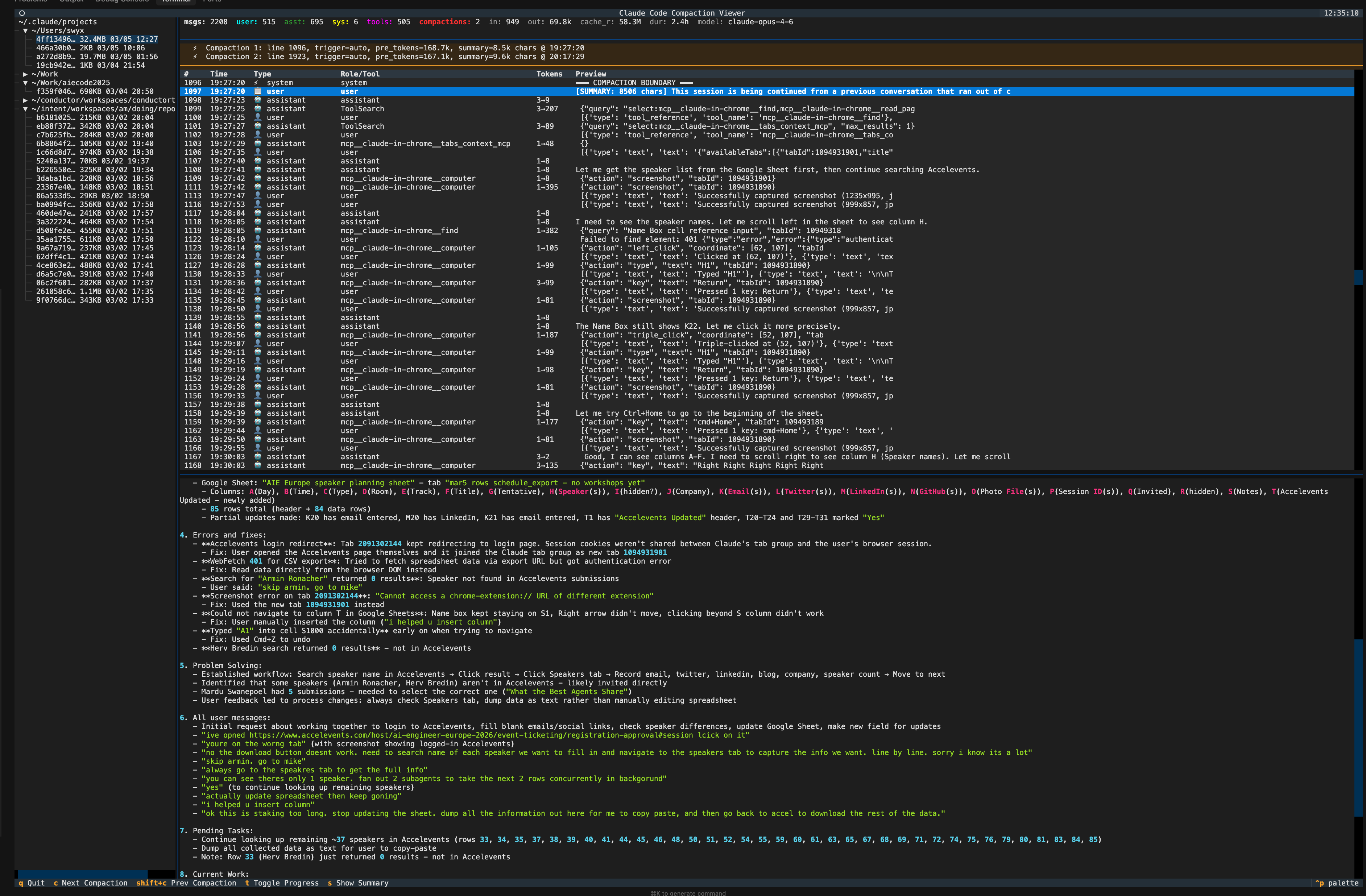
Launches a full terminal UI:
- Left sidebar: tree of all Claude Code projects and conversation files
- Stats bar: message counts, token usage, model, duration
- Compaction bar: highlighted summary of all compaction events
- Message table: scrollable list of every message (user, assistant, tool calls, system)
- Detail panel: full content of selected message with metadata
TUI Keybindings
| Key | Action |
|---|---|
c |
Jump to next compaction boundary |
Shift+C |
Jump to previous compaction boundary |
s |
Show all compaction summaries in detail panel |
t |
Toggle progress messages (hidden by default) |
j / k |
Scroll down / up |
q |
Quit |
You can also open a specific file directly:
ccv ~/.claude/projects/<project>/<session>.jsonl
How Claude Code stores conversations
Claude Code saves every conversation as a JSONL file at:
~/.claude/projects/<project-path>/<session-uuid>.jsonl
Each line is a JSON object with a type field:
| Type | Description |
|---|---|
user |
User messages and tool results |
assistant |
Claude's responses, thinking, and tool calls |
system |
System messages including compaction boundaries (subtype: "compact_boundary") |
progress |
Progress updates for long-running tool calls |
file-history-snapshot |
File state snapshots for undo |
Compaction creates two adjacent lines:
- A
systemmessage withsubtype: "compact_boundary"andcompactMetadata(trigger type, pre-compaction token count) - A
usermessage withisCompactSummary: truecontaining the structured summary
The conversation continues after the summary. The full history stays in the file — the summary just becomes what's loaded into the active context window going forward.
Development
git clone https://github.com/swyxio/claude-compaction-viewer
cd claude-compaction-viewer
uv sync
uv run ccv --scan
License
MIT
1 maintainer

Release files for claude-compaction-viewer 0.1.0
For a detailed explanation of source distributions (sdists) and built distributions (wheels), please see the package formats documentation.
Source distribution (sdist)
| File | Size | Uploaded | |
|---|---|---|---|
| claude_compaction_viewer-0.1.0.tar.gz | 10.4 kB | Details |
Built distribution (wheel)
| File | Interpreter | ABI | Platform | Reset |
|---|---|---|---|---|
| claude_compaction_viewer-0.1.0-py3-none-any.whl | Python 3 | none | any | Details |
Total release size: 23.6 kB
Release files / claude_compaction_viewer-0.1.0.tar.gz
| Download URL | claude_compaction_viewer-0.1.0.tar.gz |
|---|---|
| Size | 10.4 kB |
| Tags | Source |
|
SHA-256 checksum How to use checksums |
1623f1e0b109bc98bd4705c7f7312a2c4a22713b60dff242734e74f7abbae5b1
|
|
BLAKE2b-256 checksum How to use checksums |
ab669ffff5522d22c3a7fabc3d1a80d84f3c78f9670a27edd5ade9edafa8434c
|
| Upload date | |
|
Uploaded using Trusted Publishing? What is trusted publishing? |
No |
| Uploaded via |
uv/0.8.5
|
Release files / claude_compaction_viewer-0.1.0-py3-none-any.whl
| Download URL | claude_compaction_viewer-0.1.0-py3-none-any.whl |
|---|---|
| Size | 13.2 kB |
| Tags | Python 3 |
|
SHA-256 checksum How to use checksums |
69ea5ed59f19a8ab9ebdfba828ce8eca675861f1f134fbf26080164922058375
|
|
BLAKE2b-256 checksum How to use checksums |
cb2451818925dd4d45dc95ea16bbb48433e954b29d997d989da688201a50c335
|
| Upload date | |
|
Uploaded using Trusted Publishing? What is trusted publishing? |
No |
| Uploaded via |
uv/0.8.5
|













