
TUI and CLI for inspecting Claude Code conversation history and compaction events

Project description
Claude Code Compaction Viewer
A TUI and CLI tool for inspecting Claude Code conversation history and compaction events.


What is compaction?
When a Claude Code session runs long, the context window fills up. Rather than crashing or losing everything, Claude Code performs compaction: it inserts a boundary marker in the conversation, generates a structured summary of everything before it, and continues with the summary replacing the full history in the active context.
The full conversation is preserved on disk in JSONL files at ~/.claude/projects/. This tool lets you see exactly what happened:
- Where compaction boundaries were inserted
- What the compressed summary contains (the "outcome" of compaction)
- How many tokens were in context before each compaction triggered
- Whether compaction was auto-triggered or manual (
/compact)
Inspired by Tal Raviv's article on doing "brain surgery" on Claude Code.
Install
# With uv (recommended)
uv tool install claude-compaction-viewer

# With pip
pip install claude-compaction-viewer

# Or run directly without installing
uvx claude-compaction-viewer --scan
Usage
Scan all conversations for compactions
ccv --scan
Prints a table of every Claude Code conversation across all your projects, highlighting which ones have compaction events:
Project                                  Session     Lines Compactions  Tokens In Tokens Out   Duration
─────────────────────────────────────────────────────────────────────────────────────────────────────────
~/Work/my-project                        a272d8b9…    3086           3       1.8k     262.4k       4.1h
~/Work/other-project                     f359f046…      79           0         36       3.8k       1min
View compaction summaries
ccv --summary ~/.claude/projects/<project>/<session>.jsonl
Prints full details for each compaction event — the trigger, token count, and the complete summary text that Claude sees after compaction.
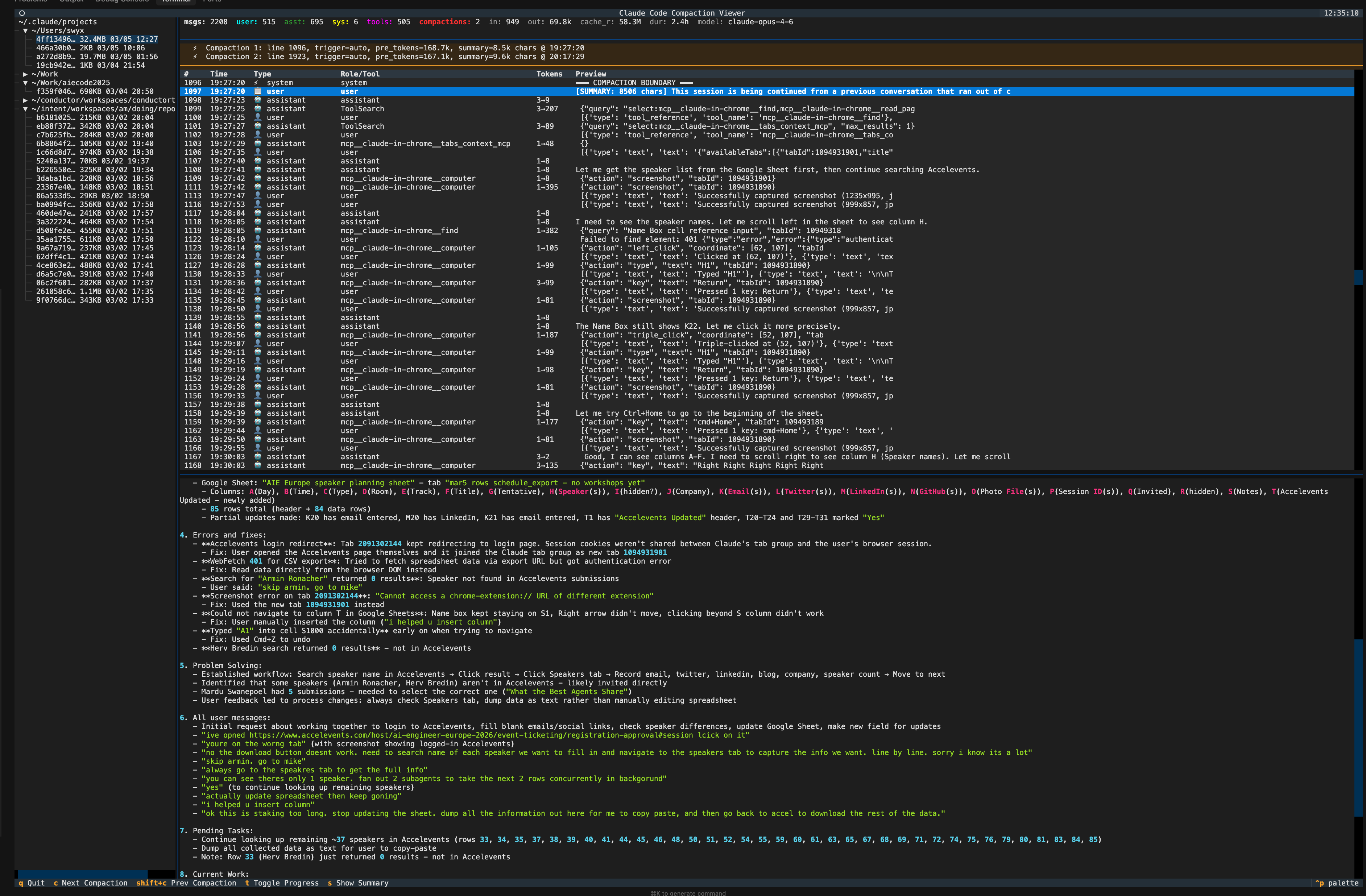
Interactive TUI
ccv
Launches a full terminal UI:
- Left sidebar: tree of all Claude Code projects and conversation files
- Stats bar: message counts, token usage, model, duration
- Compaction bar: highlighted summary of all compaction events
- Message table: scrollable list of every message (user, assistant, tool calls, system)
- Detail panel: full content of selected message with metadata
TUI Keybindings
| Key | Action |
|---|---|
c |
Jump to next compaction boundary |
Shift+C |
Jump to previous compaction boundary |
s |
Show all compaction summaries in detail panel |
t |
Toggle progress messages (hidden by default) |
j / k |
Scroll down / up |
q |
Quit |
You can also open a specific file directly:
ccv ~/.claude/projects/<project>/<session>.jsonl
How Claude Code stores conversations
Claude Code saves every conversation as a JSONL file at:
~/.claude/projects/<project-path>/<session-uuid>.jsonl
Each line is a JSON object with a type field:
| Type | Description |
|---|---|
user |
User messages and tool results |
assistant |
Claude's responses, thinking, and tool calls |
system |
System messages including compaction boundaries (subtype: "compact_boundary") |
progress |
Progress updates for long-running tool calls |
file-history-snapshot |
File state snapshots for undo |
Compaction creates two adjacent lines:
- A
systemmessage withsubtype: "compact_boundary"andcompactMetadata(trigger type, pre-compaction token count) - A
usermessage withisCompactSummary: truecontaining the structured summary
The conversation continues after the summary. The full history stays in the file — the summary just becomes what's loaded into the active context window going forward.
Development
git clone https://github.com/swyxio/claude-compaction-viewer
cd claude-compaction-viewer
uv sync
uv run ccv --scan
License
MIT
Release history Release notifications | RSS feed

Download files
Download the file for your platform. If you're not sure which to choose, learn more about installing packages.
Source Distribution
Built Distribution
Filter files by name, interpreter, ABI, and platform.
If you're not sure about the file name format, learn more about wheel file names.
Copy a direct link to the current filters
File details
Details for the file claude_compaction_viewer-0.1.0.tar.gz.
File metadata
- Download URL: claude_compaction_viewer-0.1.0.tar.gz
- Upload date:
- Size: 10.4 kB
- Tags: Source
- Uploaded using Trusted Publishing? No
- Uploaded via: uv/0.8.5
File hashes
| Algorithm | Hash digest | |
|---|---|---|
| SHA256 |
1623f1e0b109bc98bd4705c7f7312a2c4a22713b60dff242734e74f7abbae5b1
|
|
| MD5 |
e1fa7ec6258e7fe2396579795df790e7
|
|
| BLAKE2b-256 |
ab669ffff5522d22c3a7fabc3d1a80d84f3c78f9670a27edd5ade9edafa8434c
|
File details
Details for the file claude_compaction_viewer-0.1.0-py3-none-any.whl.
File metadata
- Download URL: claude_compaction_viewer-0.1.0-py3-none-any.whl
- Upload date:
- Size: 13.2 kB
- Tags: Python 3
- Uploaded using Trusted Publishing? No
- Uploaded via: uv/0.8.5
File hashes
| Algorithm | Hash digest | |
|---|---|---|
| SHA256 |
69ea5ed59f19a8ab9ebdfba828ce8eca675861f1f134fbf26080164922058375
|
|
| MD5 |
edf3bc75b98b75f07020943b79489dc1
|
|
| BLAKE2b-256 |
cb2451818925dd4d45dc95ea16bbb48433e954b29d997d989da688201a50c335
|






