
claude-ns-hub






Drop a task. Walk away. Come back to results.
pip install claude-ns-hub — 60-second install, no required config files, AGPL open source.
I built this because I kept babysitting Claude Code sessions — checking every 10 minutes whether they'd finished. NS Hub fixes that: drop a Stone, go make coffee, get a push notification when Claude's done. I've been using it daily for 6 months.
What it does
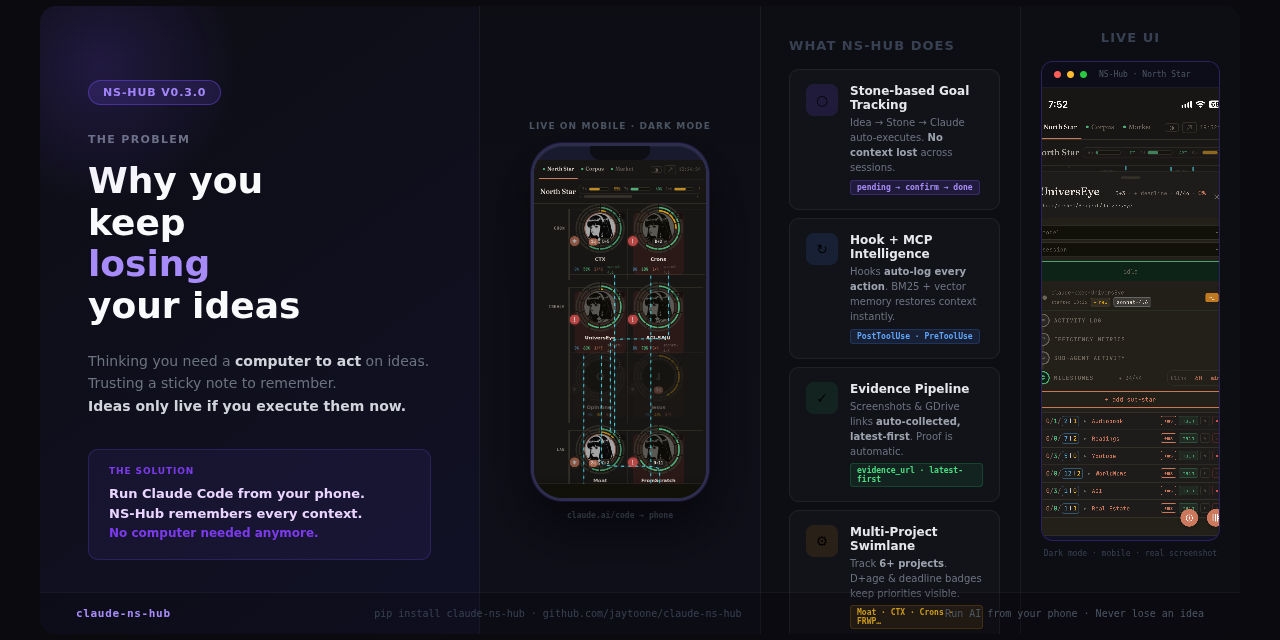
NS Hub is a local Claude Code session orchestrator with a Stone queue and multi-session dispatch.
Instead of babysitting one Claude session, you drop tasks ("Stones") into a local SQLite queue. NS Hub dispatches them to idle Claude sessions automatically — or spins up child sessions in parallel. You monitor everything from your phone and get a push notification when work is done.
Architecture choices:
- SQLite (not a cloud service) — your data stays local, no vendor lock-in, works offline
- tmux + pexpect for PTY control — NS Hub injects input and reads Claude's output without a custom API wrapper
- Mother/child session dispatch — a mother session manages the queue; children are forked with truncated context (transcript sliced at the exact point before the forked task was claimed, so child sessions start clean)
- 190+ skills/agents/docs indexed locally for inline search across your corpus
| Without NS Hub | With NS Hub |
|---|---|
| Babysit one session, check every 10 min | Drop Stones, walk away, get notified |
| Claude runs blind — no visibility | Live session monitoring from your phone |
| Must open laptop to check progress | Mobile terminal — type directly from phone |
| Ideas lost before you open a laptop | Stone persistence — local SQLite, never lost |
Why this exists
When Claude Code runs autonomously, you are blind — you cannot tell which sessions are alive, stalled, or finished.
The deeper problem is idea loss. Thoughts on the go, insights during commute, 3am realizations — most of them scatter without context.
NS Hub solves both at once:
- Second Brain: Capture ideas instantly as Stones → preserved with full context in local SQLite
- Agent execution hub: Stone → Claude runs autonomously → completion notification — entire loop closes on your phone
Core loop
Idea surfaces
    ↓
Create a Stone (5 seconds from your phone)
    ↓
Claude Code picks it up from the queue
    ↓
Running — live session monitoring from phone
    ↓
Completion notification → review results
    ↓
Next Stone dispatched automatically
The entire loop runs without touching a computer.
Screenshots
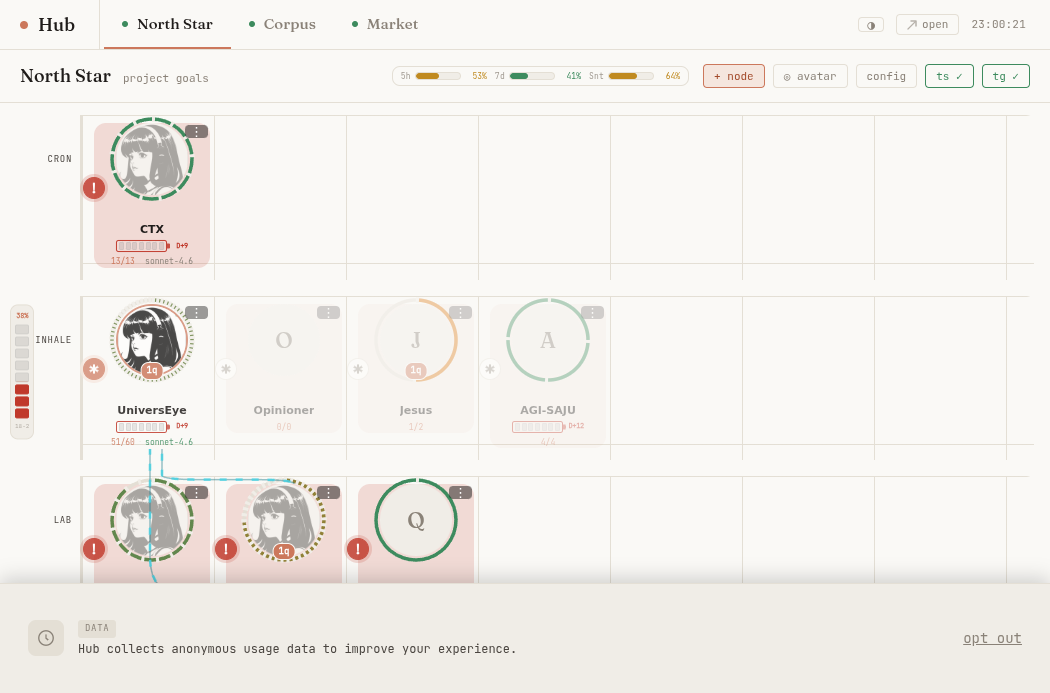
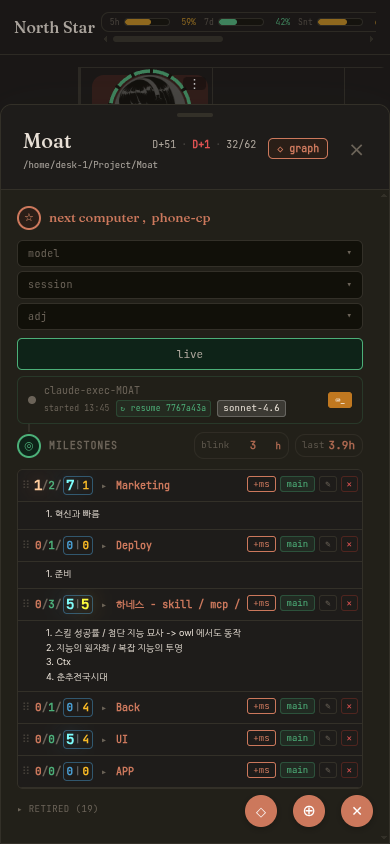
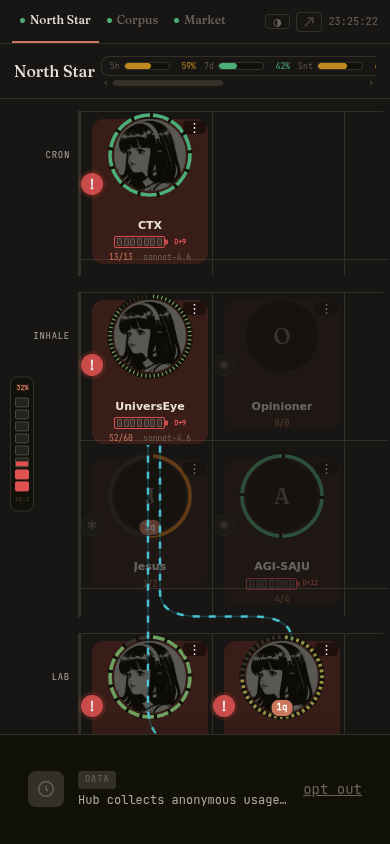
North Star swimlane — all projects, all lanes, live execution indicators:
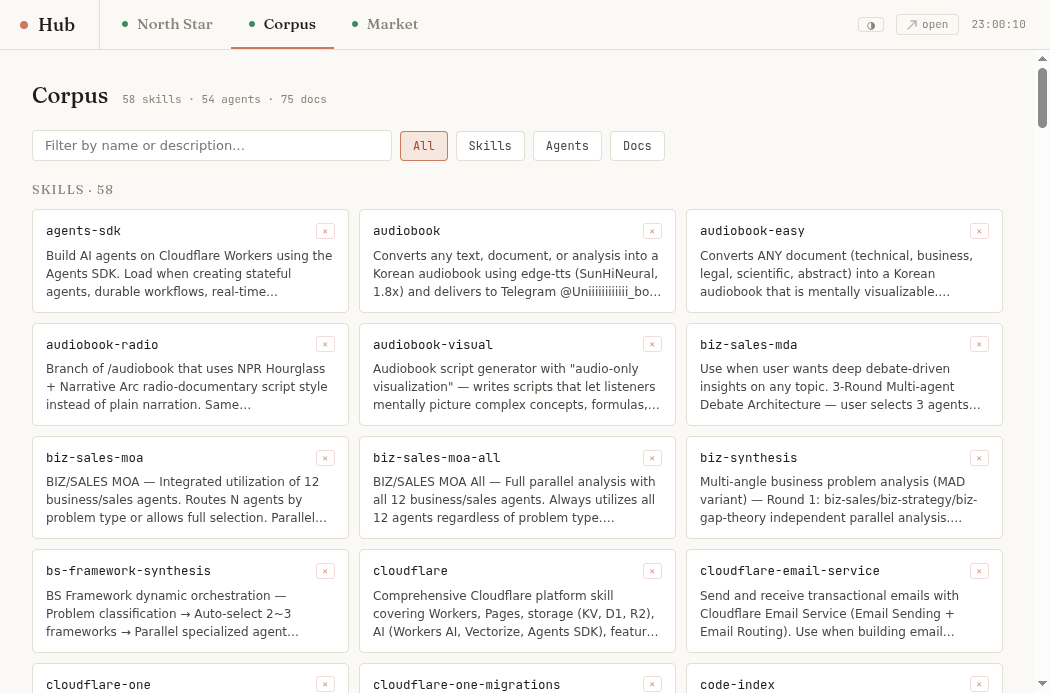
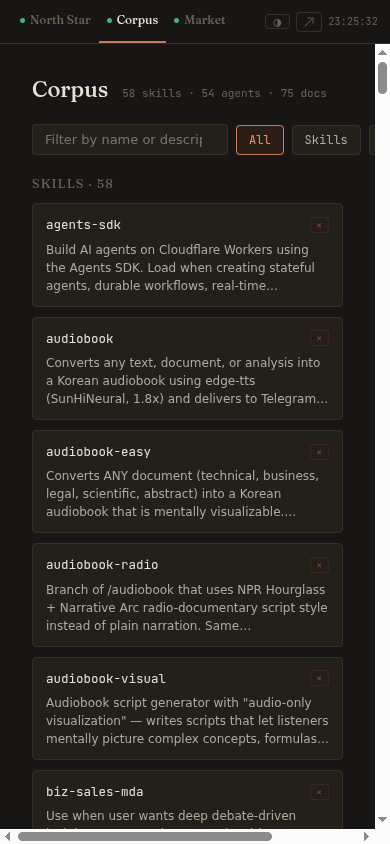
Corpus browser — 61 skills · 54 agents · 75 docs, all searchable inline:
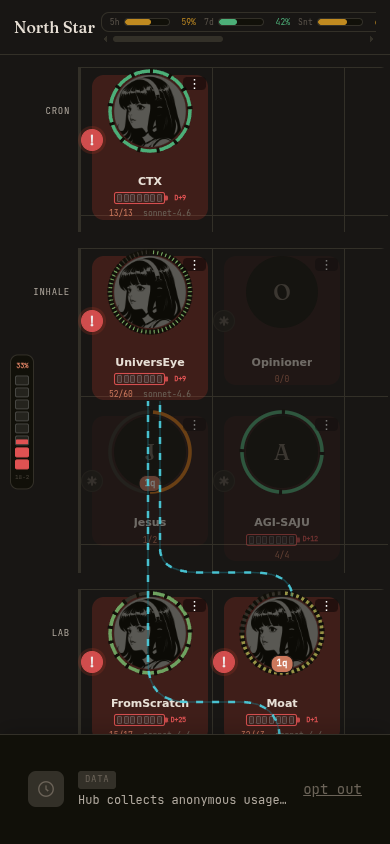
Mobile dark mode
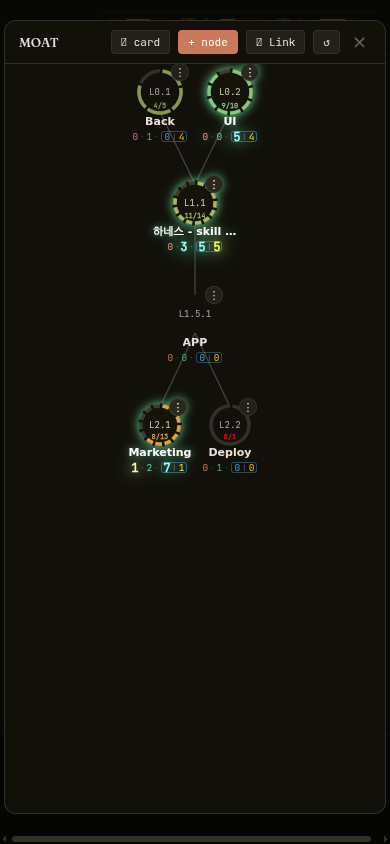
| North Star swimlane | Detail card | CG panel |
|---|---|---|
 |
 |
 |
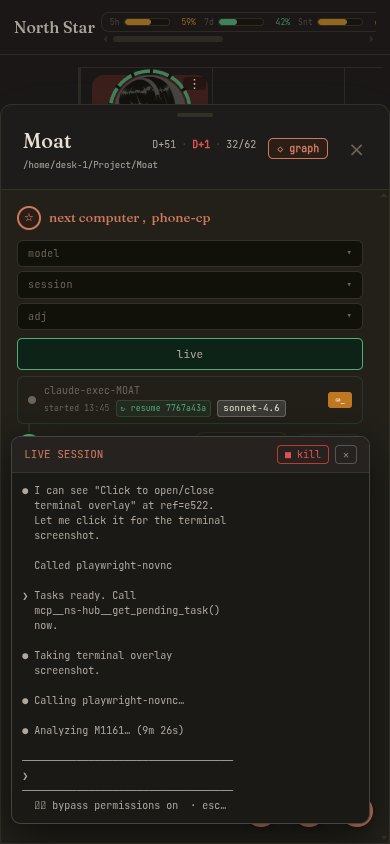
| Corpus browser | Live terminal overlay | Hub index |
|---|---|---|
 |
 |
 |
Install (60 seconds)
pip install claude-ns-hub
hub                          # starts at http://localhost:9001
Python 3.10+ required. On systems where
pip/pip3points to Python 3.8 (common on Ubuntu/Jetson/Raspberry Pi), usepython3.10 -m pip install claude-ns-hubinstead.
No required config files. No environment variables. No separate daemon. Open the printed URL in your phone browser and you're done. (Optional: ~/.hub/config.yaml for push notifications via ntfy.)
Prerequisites
- Python 3.10+
- Claude Code CLI (
claude --version) tmux(brew install tmux/apt install tmux)- Tailscale (optional — for remote mobile access)
litellm(optional — only if you want to route sessions through OpenRouter instead of Claude directly; see below)
Using OpenRouter instead of (or alongside) Claude? Hub can auto-start a local LiteLLM proxy that routes openrouter-tagged sessions to OpenRouter's API. It's off by default and requires two manual setup steps hub does not create for you:
- Install
litellm(pip install litellm) and create~/.rsk-litellm.yamlwith your model routing config. - Put your
OPENROUTER_API_KEY(and any other provider keys) in~/.claude/env/shared.env.
Without both of these, OpenRouter sessions silently stay unavailable — hub does not error, it just never starts the proxy.
Running on WSL2? Hub works out of the box, with two things worth knowing:
- Port exposure to your Windows host/Tailscale is automatic on startup (
wsl-expose, if installed) — no manualssh -Lforwarding needed. - Hub binds to
0.0.0.0(all interfaces), so bothlocalhost:9001and your Tailscale IP respond immediately — no wait fortailscaledon startup.
Quick start
First Stone running in 3 minutes:
# Step 1 — Install
pip install claude-ns-hub

# Step 2 — Start hub (keep this terminal open)
hub
# → Hub started at http://localhost:9001
# → Open that URL on your phone — you'll see your live dashboard

# Step 3 — Register hooks + MCP into Claude Code (run once per machine)
hub install-global
# → Registers mcp__ns-hub server + 5 hooks in ~/.claude/settings.json
# → Does NOT modify any CLAUDE.md — hub is fully MCP-driven

# Step 4 — Verify everything is wired up
hub doctor
# → Checks: Python / tmux / claude CLI / env / MCP / hooks / server
# Expected output: all green ✓

# Step 5 — Register your project (registers in hub DB; no CLAUDE.md changes)
hub init MyProject --dir ~/Projects/MyProject

# Step 6 — Restart Claude Code so hooks + MCP are loaded
# (close and reopen Claude Code, or run: claude --resume)

# Step 7 — Drop your first Stone
# In the hub UI: click your project card → "+ milestone" → type a task → click "live"
# In Claude Code: you'll see the task injected automatically on next idle turn
# Claude completes it → you get a push notification (if ntfy is configured)
What you'll see in Claude Code when a Stone arrives:
[hub] Stone M1 claimed: "Write a hello world in Python"
→ Claude runs the task autonomously
→ Stone status: pending_confirmation → done
Note:
hub install-globalwrites to~/.claude/— restart Claude Code after running it.
What you get
| Feature | What it does |
|---|---|
| Stone capture | Drop any idea as a Stone — Claude picks it up on next idle |
| Live exec sessions | Real-time visibility: busy/idle state, session ID, last tool used |
| Mobile terminal | Type directly into the running Claude session from your phone |
| Session resume | ↻ resumes exact prior context — no re-explaining, no lost work |
| Context persistence | Stone history, evidence URLs, conversation summaries — all local SQLite, fully portable |
| North Star swimlane | All projects + milestones on one screen, any device |
| Corpus browser | Browse all local skills/agents/docs; inline search across 190+ entries |
| Per-stone session assignment | Pin any Stone to a specific exec session — override auto-dispatch from the UI |
| Zero-config install | pip install claude-ns-hub && hub — that's the entire setup |
Directory structure
~/.hub/
├── server.py              — main FastAPI server
├── ns-events.db           — SQLite: stones (milestones), exec sessions, action log
├── config.yaml            — optional overrides (port, tailscale IP, etc.)
├── static/
│   ├── northstar.html     — web UI
│   └── hooks/             — Claude Code hooks (PreToolUse / Stop / PostToolUse / PreCompact / SubagentStart+Stop)
├── corpora/               — local corpus collections (skills, agents, docs)
├── ee/                    — enterprise extensions (source-available)
└── relay/                 — optional Cloudflare Workers relay for remote access
Telemetry & privacy
If data collection is enabled (default: on — see opt-out below), hub sends:
- On startup: one
hub_startevent —ts,event,install_id=sha256(hostname)[:16],version,os. No PII, no code, no Stone text. - Every 30 minutes (if there's new activity): batches of tool-call summaries, action-log entries, and Stone text (truncated to 1000 chars) — used to build an agent-training dataset. These batches pass through a PII scrubber (masks emails, phone numbers, IP addresses, API keys/tokens) before upload, but the scrubber is regex-based and cannot detect free-text personal content (e.g. health or financial details written into a Stone's task description). If you write sensitive information directly into a Stone's text, it may be included in this upload even with data collection consent left at its default. Opt out below if this matters to you, or avoid putting sensitive free text in Stone descriptions.
Opt out anytime:
curl -X POST http://localhost:9001/api/hub/consent \
  -H 'Content-Type: application/json' \
  -d '{"data_collection": false}'
Push Notifications (optional)
Get a phone notification when Claude finishes a Stone.
Setup (2 minutes):
- Install the ntfy app on your phone (free, open-source)
- Pick a unique topic name (e.g.
my-hub-abc123) - Edit
~/.hub/config.yaml:ntfy_url: https://ntfy.sh/my-hub-abc123
- Subscribe to the same topic in the ntfy app
Hub sends a notification whenever a Stone transitions to pending_confirmation or done.
Self-hosted: replace
https://ntfy.sh/with your own ntfy server URL. Local only (no internet): setntfy_url: http://127.0.0.1:9001/ntfy(built-in relay, Tailscale required for phone access).
Troubleshooting
tmux not found
sudo apt install tmux   # Ubuntu/WSL
brew install tmux        # macOS
tmux -V                  # verify
Claude Code not authenticated
claude --version
npm install -g @anthropic-ai/claude-code   # if missing
claude login
Hub can't find my project
hub init <PROJECT_ID> --dir /path/to/your/project
# or: North Star → "+ node" → set repo_path manually
Hooks not firing
hub install-global
cat ~/.claude/settings.json | grep hub
Data schema & portability
All data lives in local SQLite (~/.hub/ns-events.db). No vendor lock-in.
-- milestones_store (Stones) — stone fields (text, status, evidence_url, etc.)
-- live inside the data_json blob, not as flat columns
CREATE TABLE milestones_store (
  proj_id TEXT NOT NULL,
  stone_id TEXT NOT NULL,        -- e.g. "M1301"
  data_json TEXT NOT NULL,       -- {"text", "status", "evidence_url", "conversation", ...}
  status TEXT,                   -- queued | pending_confirmation | done
  done INTEGER DEFAULT 0,
  held INTEGER DEFAULT 0,
  updated_at TEXT NOT NULL,
  model_used TEXT,
  exec_start TEXT,
  exec_end TEXT,
  cost_usd REAL,
  PRIMARY KEY (proj_id, stone_id)
);
Export/import:
sqlite3 ~/.hub/ns-events.db .dump > backup.sql
Metrics endpoint
curl http://localhost:9001/api/metrics?proj_id=MOAT
# → stones_completed, stones_queued, total_tokens per day
pip install claude-ns-hub — stop babysitting Claude sessions.
Current limitations (honest)
- Linux/WSL2 only — macOS support is on the roadmap; Windows-native is not planned
- Requires tmux in your PATH
- Web UI is functional but unpolished — PRs welcome
Changelog
v0.3.16 (2026-07-21)
Market tab — owner-only visibility
- Market tab hidden by default for all users
- To show it: run
localStorage.setItem('hub_market_visible','1')in browser devtools once — persists across reloads - Tab ID
tab-market-signalsadded for scripting
v0.3.15 (2026-07-21)
Mascot fallback + Market tab hidden
- Default mascot GIF bundled as
static/mascot-default.gif— new installs no longer show a broken image; custom mascot at/uploads/MOAT/...takes priority viaonerrorfallback - Market tab hidden from the hub index UI (
display:none) — accessible via direct URL/market-signalsbut not shown in nav
v0.3.14 (2026-07-21)
Bind fix — 0.0.0.0 (all interfaces)
- Hub now binds to
0.0.0.0instead of a specific Tailscale IP —localhost:9001and Tailscale IP both respond simultaneously - Fixes smoke test false-negative on Tailscale-only machines (e.g. Jetson/Xavier):
hub doctorhealth check now passes without Tailscale running - Startup banner now shows both
localhostURL and Tailscale mobile URL separately - README: updated WSL2 note — no longer waits for
tailscaledon boot
v0.3.13 (2026-07-21)
hub init rewrite — CLAUDE.md removed (M1925)
hub initno longer writes a NS Hub block to the projectCLAUDE.md— MCP tool descriptions carry all protocol context that the old raw-REST block providedhub initnow registers the project directly in the hub SQLite DB (idempotent)- If a legacy NS Hub block (
<!-- NS_HUB_PROJECT_START -->) exists in a projectCLAUDE.md,hub initautomatically removes it hub install-globalhas never modified anyCLAUDE.md; README comment corrected
v0.3.12 (2026-07-21)
Onboarding fix (E6)
- README: install section now shows a Python 3.10+ warning for systems where
pip/pip3defaults to Python 3.8 (Ubuntu, Jetson, Raspberry Pi) — usepython3.10 -m pip install claude-ns-hub
v0.3.11 (2026-07-20)
Onboarding fixes (E0–E5)
PORTdefault corrected from 9000 → 9001 (fixes ERR_CONNECTION_REFUSED on first run)hub install-globalnow prints a restart-Claude-Code reminder after completinghub doctor/ smoke test now checks all 5 hooks includingnorthstar-precompact-busy.pyandnorthstar-subagent-busy.py- macOS:
hub install-globalnow prints a clear message instead of silently writing a systemd unit that can't be activated - README: corrected "No config files" to "No required config files" — clarified that
~/.hub/config.yamlis optional for push notifications - Dashboard: shows onboarding banner with
hub initcommand when no projects exist
v0.3.10 (2026-07-20)
Bug fixes
hub --helpno longer starts the server — prints usage and exitshub --versionno longer starts the server — prints version and exitsGET /landingnow redirects to/northstar(was 404)POST /api/northstarwith a single-dict body now returns 400 with a hint to use/api/northstar/create(was silently a no-op returning{ok:true})POST /milestoneswithlayer:"root"orlayer:"substar"now auto-converts to integer (was 500); unknown strings return 422 with an explicit error message
v0.3.9 (2026-07-19)
New hooks (M1951)
northstar-precompact-busy.py— keeps session busy during context compaction (PreCompactevent)northstar-subagent-busy.py— tracks subagent busy state (SubagentStart/SubagentStopevents)hub doctornow checks all 5 hooks (was 3)
License
This project is licensed under the GNU Affero General Public License v3.0 (AGPL-3.0-or-later).
If you run a modified version of this software as a network service, you must make the complete corresponding source code available to users of that service. See LICENSE for full terms.
Personal use, self-hosting, and community contributions are always free. © 2026 pluto2060 — be2jay67@gmail.com
1 maintainer

Metadata
1 maintainer
Release files for claude-ns-hub 0.3.45
For a detailed explanation of source distributions (sdists) and built distributions (wheels), please see the package formats documentation.
Source distribution (sdist)
| File | Size | Uploaded | |
|---|---|---|---|
| claude_ns_hub-0.3.45.tar.gz | 924.5 kB | Details |
Built distribution (wheel)
| File | Interpreter | ABI | Platform | Reset |
|---|---|---|---|---|
| claude_ns_hub-0.3.45-py3-none-any.whl | Python 3 | none | any | Details |
Total release size: 1.8 MB
Release files / claude_ns_hub-0.3.45.tar.gz
| Download URL | claude_ns_hub-0.3.45.tar.gz |
|---|---|
| Size | 924.5 kB |
| Tags | Source |
|
SHA-256 checksum How to use checksums |
ee1a5d1b24447548573298f520691178bd8087f4f46cfa6e04039bdf646f6cee
|
|
BLAKE2b-256 checksum How to use checksums |
40df5f6b528226fc57d2994de730ec23e26f38e4113dc0e8fd79be7d1a2b5fda
|
| Upload date | |
|
Uploaded using Trusted Publishing? What is trusted publishing? |
No |
| Uploaded via |
twine/6.2.0 CPython/3.10.12
|
Release files / claude_ns_hub-0.3.45-py3-none-any.whl
| Download URL | claude_ns_hub-0.3.45-py3-none-any.whl |
|---|---|
| Size | 911.6 kB |
| Tags | Python 3 |
|
SHA-256 checksum How to use checksums |
1367ce707d6d559f4d8b90a559c33491b72e4e966e9f576fe16bb458f9aaafe0
|
|
BLAKE2b-256 checksum How to use checksums |
3ba41b1ab35c58d2147e486dbccf8d8d59472248f0aa531a6eb4e8415bbbbc1d
|
| Upload date | |
|
Uploaded using Trusted Publishing? What is trusted publishing? |
No |
| Uploaded via |
twine/6.2.0 CPython/3.10.12
|














