
Claude OpenRouter
Use OpenRouter models in Claude Code without giving up your native login or connectors.



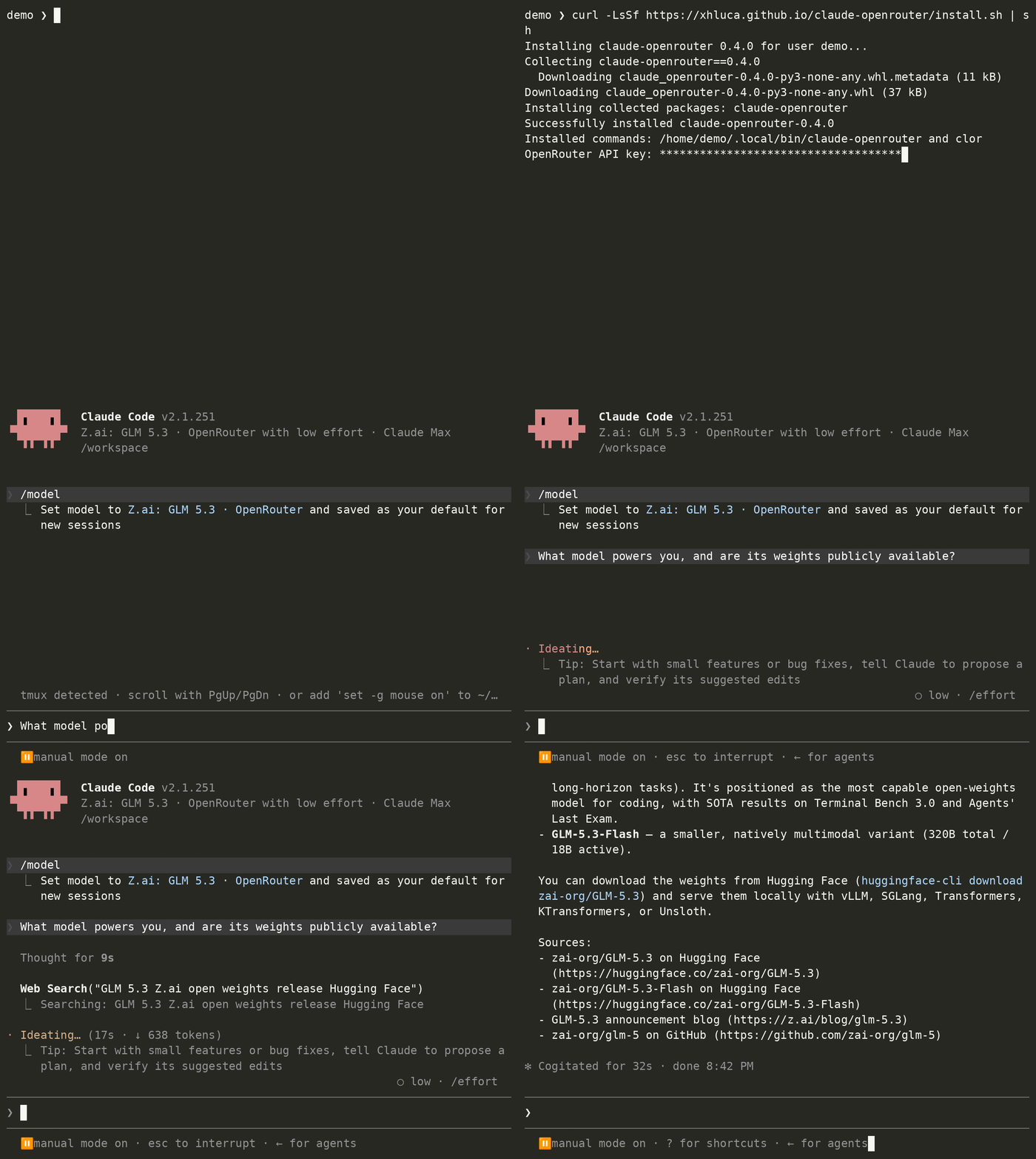
Claude OpenRouter is a small, dependency-free CLI and loopback router. It
indexes OpenRouter's live catalog, gives you a searchable multi-select picker,
and places those favorites beside Claude's built-in models in /model. Native
Claude requests keep using Anthropic; explicitly labeled OpenRouter favorites
use your OpenRouter key. After setup, run the normal claude command.
Install
curl -LsSf https://xhluca.github.io/claude-openrouter/install.sh | sh
The installer prompts for your OpenRouter key without echoing it, fetches the
current catalog, and opens the model picker immediately. It installs for the
current user on Linux or macOS. If a credential already exists, setup shows its
path and asks whether to reuse it before offering a masked replacement prompt.
Max routing requires an existing Claude.ai login; run claude auth login first
if Claude Code is newly installed.
Or use uv:
uv tool install claude-openrouter
clor setup
For a one-off setup without installing the package first:
uvx claude-openrouter setup
pipx install claude-openrouter works too. The full command is
claude-openrouter; clor is the shorthand. Claude Code 2.1.242 or newer is
required for the multi-model picker.
Upgrade the installation in place at any time:
clor update
The updater uses the manager that owns the current installation, reports the
installed version before and after, and restarts an existing hybrid service.
clor upgrade is an alias. When moving from an older direct-routing release to
0.4.x, run clor setup once to activate hybrid routing.
Quick start
Refresh the local catalog:
clor index
fetch is an alias for index. index is the canonical name because the
result is a persistent local catalog used by selection and search.
Search refreshes the index first. Plain terms are case-insensitive substring
globs; *, ?, and bracket expressions use shell-style matching:
clor search claude
clor search glm --tools
clor search 'anthropic/*' '*coder*'
clor search --regex '^(anthropic|google)/.*(sonnet|gemini)'
--tools keeps only models whose live OpenRouter metadata advertises function
calling. The table and interactive picker show tools ✓, tools ✗, or
tools ? so the compatibility signal is visible without a separate query.
Because catalog metadata cannot prove that a model follows Claude Code's
particular tool protocol reliably, run one real compatibility check before
depending on a new model for agent work:
clor check z-ai/glm-5.3-flash
clor check does not require favoriting the model. It starts an isolated local
route, asks the real Claude Code CLI to perform one Glob call, verifies that
the tool completed and that the model continued from its result, then exits.
Before sending the billable request, it shows a model-specific planning range
from the current OpenRouter input/output rates and asks:
Continue? [y] Yes / [N] No / [a] Always allow:
No is the default. Always allow disables future prompts while retaining the
estimate in command output; restore them with clor config --check-confirmation ask. Scripts and CI can consent to one run explicitly with clor check MODEL --yes. The exact charge cannot be known in advance because Claude Code's
injected context and provider usage vary; the successful result also shows the
cost reported by Claude Code when available.
Select one exact model, several exact models, or open the interactive picker:
clor select anthropic/claude-sonnet-4.6
clor select --model openai/gpt-5.4
clor select --models anthropic/claude-opus-4.6 google/gemini-3.1-pro-preview
clor select
The positional value is shorthand for --model. Each non-interactive call
replaces the saved favorite set. In the picker, type a search and press Down or
Enter to browse its results. Press Enter or Space to select and deselect; press
Up past the first result or Esc to focus the search again. Press s while
browsing results, or Shift-S/Ctrl-S while typing a search, to save.
Selecting a model that does not advertise tools is allowed, but clor warns that
Claude Code agent actions may fail and gives the exact clor check command.
An existing Claude session does not need a full restart after clor select.
Run /agents once to load the updated generated subagent definitions
immediately, then reopen /model. Claude Code normally hot-reloads the managed
hook setting as well; /hooks shows whether it is active. Restart only if the
session's settings watcher missed the change.
Launch Claude Code normally, then switch models normally:
claude
> /model
The selected rows are Claude Code's native picker rows, and model requests use
the provider shown in the row. Every local Claude Code entry point reads the
same settings, including claude --continue, claude --agent NAME, background
agents, and the claude agents view.
Each OpenRouter favorite is also installed as a user-level Claude Code
subagent. This matters because Claude Code's per-invocation Agent.model field
only accepts the native sonnet, opus, and haiku aliases, while custom
subagent definitions accept a full model ID. Ask the parent to delegate to the
named OpenRouter favorite (or select the generated clor-* agent in Claude
Code), and the child uses that exact favorite. A scoped PreToolUse hook strips
an accidental native alias override only for clor-managed subagents; ordinary
Claude subagents and inherit behavior are untouched.
/model choice |
Upstream | Billing credential |
|---|---|---|
| Built-in Opus, Sonnet, or Haiku | Anthropic | Claude Max OAuth by default |
A row labeled · OpenRouter |
OpenRouter | Stored OpenRouter key |
The router never infers a provider from a bare third-party ID. OpenRouter rows
use a private clor/openrouter/ namespace, and an unknown or unfavorited model
fails closed. Selecting Opus cannot silently send it to OpenRouter.
Claude Code keeps its native Claude.ai authentication, so connectors remain available and the external-auth warning is absent. If you prefer direct Anthropic API billing for built-in Claude models, configure it separately:
clor setup --anthropic-auth api
# or, after setup:
clor config --anthropic-auth api

# Return native Claude models to Max subscription billing:
clor config --anthropic-auth max
The Anthropic API key is stored inside the router and is not exported as
ANTHROPIC_API_KEY, preserving Claude's native login and connectors. clor config --anthropic-key-stdin is available for non-interactive secret input.
Deferred tool loading is disabled because non-Anthropic OpenRouter models
reject that Anthropic-specific protocol; connector tools remain available and
are loaded eagerly instead. This is required for GLM in claude agents.
Image support follows the live OpenRouter catalog rather than assumptions about
model names. When architecture.input_modalities marks a favorite as text-only,
the router tells the agent that it cannot inspect images before it chooses a
tool. If Claude Code still returns image content from Read, the router removes
the image bytes and substitutes a categorized
ToolError[unsupported_input_modality] result. The agent can then explain the
actual limitation and suggest a vision-capable /model favorite instead of
showing Claude Code's generic model-access error. Image inputs pass through
unchanged for models whose catalog metadata includes image.
Commands
| Command | Purpose |
|---|---|
clor index |
Fetch and cache the current OpenRouter model catalog |
clor fetch |
Alias for index |
clor search QUERY... |
Refresh, then search names, IDs, and descriptions |
clor search QUERY... --tools |
Show only models advertising tool calling |
clor check MODEL [--yes] |
Confirm and run one billable Claude Code tool round-trip |
clor setup |
Run the install-time key and model setup again |
clor select [MODEL] |
Replace /model favorites exactly |
clor config |
Replace and validate the stored OpenRouter key |
clor config --check-confirmation ask|never |
Configure future check prompts |
clor doctor |
Check the service, favorites, and native Claude login |
clor claude [ARGS...] |
Compatibility alias for claude [ARGS...] |
clor update |
Install the latest release and report the version change |
clor reset |
Restore the original Claude settings and delete tool data |
clor uninstall |
Reset the integration and remove a curl/uv installation |
Every catalog command also accepts --json where useful. API keys are never
accepted as command-line arguments; automation can pipe one to setup --key-stdin or config --key-stdin.
What it changes
                                    ┌─ Claude model ─────► Anthropic
Claude Code ─► 127.0.0.1 router ────┤
                                    └─ clor/openrouter/* ► OpenRouter
- Stores the key at
~/.config/claude-openrouter/credentialwith mode0600. - Runs a loopback-only router on
127.0.0.1:9417, supervised by a systemd user service on Linux or a LaunchAgent on macOS. Minimal containers without a service manager use a detached process for the container lifetime. - Adds the local endpoint, a random local-service token, and OpenRouter picker
rows to
~/.claude/settings.json. Provider API keys never appear there. - Creates one marked
~/.claude/agents/clor-*.mddefinition per favorite and a scoped Agent hook so GLM can delegate to DeepSeek, DeepSeek can delegate to GLM, and other selected OpenRouter combinations keep their exact child model. - Does not set
ANTHROPIC_API_KEYorapiKeyHelperwhen a native login exists. - Strips OAuth and Anthropic keys before OpenRouter requests, strips the OpenRouter key before Anthropic requests, and allows only selected OpenRouter model IDs.
- Saves the fields it replaces in a private, versioned backup and restores them
exactly with
clor resetorclor uninstall; generated subagent files and the scoped hook are removed at the same time. - Migrates settings created by older claude-openrouter releases automatically the next time setup or selection runs.
Claude Code itself applies one endpoint and authentication context to an entire process. The local router supplies the missing per-model boundary while keeping Claude Code unmodified. If the router is unavailable or cannot classify a model, the request errors instead of falling back to another paid provider.
Claude Code is optimized for Anthropic models. OpenRouter can accept other model
IDs through its Anthropic-compatible endpoint, but models differ in tool use,
thinking blocks, context handling, and Claude Code compatibility. Prefer models
that advertise tools, and use clor check MODEL to verify an actual Claude Code
tool round-trip rather than assuming that metadata alone guarantees behavior.
Reset and uninstall
Stop the router, restore the pre-install Claude settings, and keep the command:
clor reset
Restore settings, remove the credential and index, and uninstall a curl/uv tool installation:
clor uninstall
Reset and uninstall only reverse fields managed by Claude OpenRouter in
~/.claude/settings.json. They intentionally leave project-owned settings such
as .claude/settings.local.json unchanged. If Claude Code reports an unsafe
project permission after uninstalling, open /permissions, select the named
local allow rule, and remove it. Do not replace it with a broader wildcard.
Demo
The animation above and the
interactive replay come from an
end-to-end Docker capture: the regular public curl installer, progressively
masked key entry, interactive search and selection of z-ai/glm-5.3, Claude
Code's native /model picker launched through plain claude, and the model's
live answer about its identity and open weights.
The terminal is recorded at 75×24 and rendered at 32 px into a 1480×1110 4:3
video. The 25-second installation and setup lead-in is compressed to 12 seconds;
subsequent user and UI actions stay at 1×, while Claude's active fetch/thinking
interval is accelerated 4× for pacing. /model is submitted as one command so
partial autocomplete redraws do not flash in the video, and capture sanitization
removes transient expanded-thinking frames without changing the final answer.
The scripts verify the exact saved favorite and assistant turn, then reject any
cast containing the OpenRouter key or mounted Claude OAuth tokens before
publishing it. Sanitization also replaces the randomized temporary path with
~; release-only command, settings-path, and version labels may be rebased
without altering the captured Claude interaction or response.
Watch the MP4, download the asciicast, or reproduce the capture.
Development
git clone https://github.com/xhluca/claude-openrouter.git
cd claude-openrouter
uv run --with pytest pytest
uv run --with ruff ruff check .
scripts/live-docker-check.sh /path/to/openrouter-key ~/.claude
The Docker check mounts temporary copies of Claude OAuth state and the key only
at runtime. It makes live, billable Max and OpenRouter calls, dispatches a GLM
5.3 Flash background agent, verifies GLM-to-DeepSeek and DeepSeek-to-GLM child
dispatches, and launches the real claude agents terminal UI.
License
Acknowledgements
Claude Code Router (CCR)
helped establish the broader Claude Code routing space. CCR is a full,
self-contained routing and UI-based management system spanning providers,
profiles, routing rules, and more. Claude OpenRouter is intentionally narrower:
it is a simple connection from Claude Code to OpenRouter, installs with one
small Bash command (or uv/uvx), and does not aim to cover CCR's full
management spectrum.
1 maintainer

Metadata
1 maintainer
Release files for claude-openrouter 0.4.4
For a detailed explanation of source distributions (sdists) and built distributions (wheels), please see the package formats documentation.
Source distribution (sdist)
| File | Size | Uploaded | |
|---|---|---|---|
| claude_openrouter-0.4.4.tar.gz | 9.7 MB | Details |
Built distribution (wheel)
| File | Interpreter | ABI | Platform | Reset |
|---|---|---|---|---|
| claude_openrouter-0.4.4-py3-none-any.whl | Python 3 | none | any | Details |
Total release size: 9.8 MB
Release files / claude_openrouter-0.4.4.tar.gz
| Download URL | claude_openrouter-0.4.4.tar.gz |
|---|---|
| Size | 9.7 MB |
| Tags | Source |
|
SHA-256 checksum How to use checksums |
05692104e59760531dc198d53e35e2a1d3eab3e4ab583ff60424bacdfd8b6451
|
|
BLAKE2b-256 checksum How to use checksums |
d94981176f33fc200ff4e18bc41bc4e26965cdaa197131bd13fe8d0710788079
|
| Upload date | |
|
Uploaded using Trusted Publishing? What is trusted publishing? |
No |
| Uploaded via |
twine/7.0.0 CPython/3.13.14
|
Release files / claude_openrouter-0.4.4-py3-none-any.whl
| Download URL | claude_openrouter-0.4.4-py3-none-any.whl |
|---|---|
| Size | 49.7 kB |
| Tags | Python 3 |
|
SHA-256 checksum How to use checksums |
f2caed8a071bd01b597c48cedc7822d3d62f62e3841098507712fdd56310258a
|
|
BLAKE2b-256 checksum How to use checksums |
22a932d2253c6bbfccd408ef2ecff8f5098bd921068169bb5b6e18358a0e3b80
|
| Upload date | |
|
Uploaded using Trusted Publishing? What is trusted publishing? |
No |
| Uploaded via |
twine/7.0.0 CPython/3.13.14
|














