
Clauster
Run Claude Code on your own server — and drive it from your phone.
Clauster is a self-hosted web dashboard that starts Claude Code sessions in any
project directory on your homelab, NAS, or VPS. You attach from
claude.ai/code or the Claude mobile app. No SSH session required.




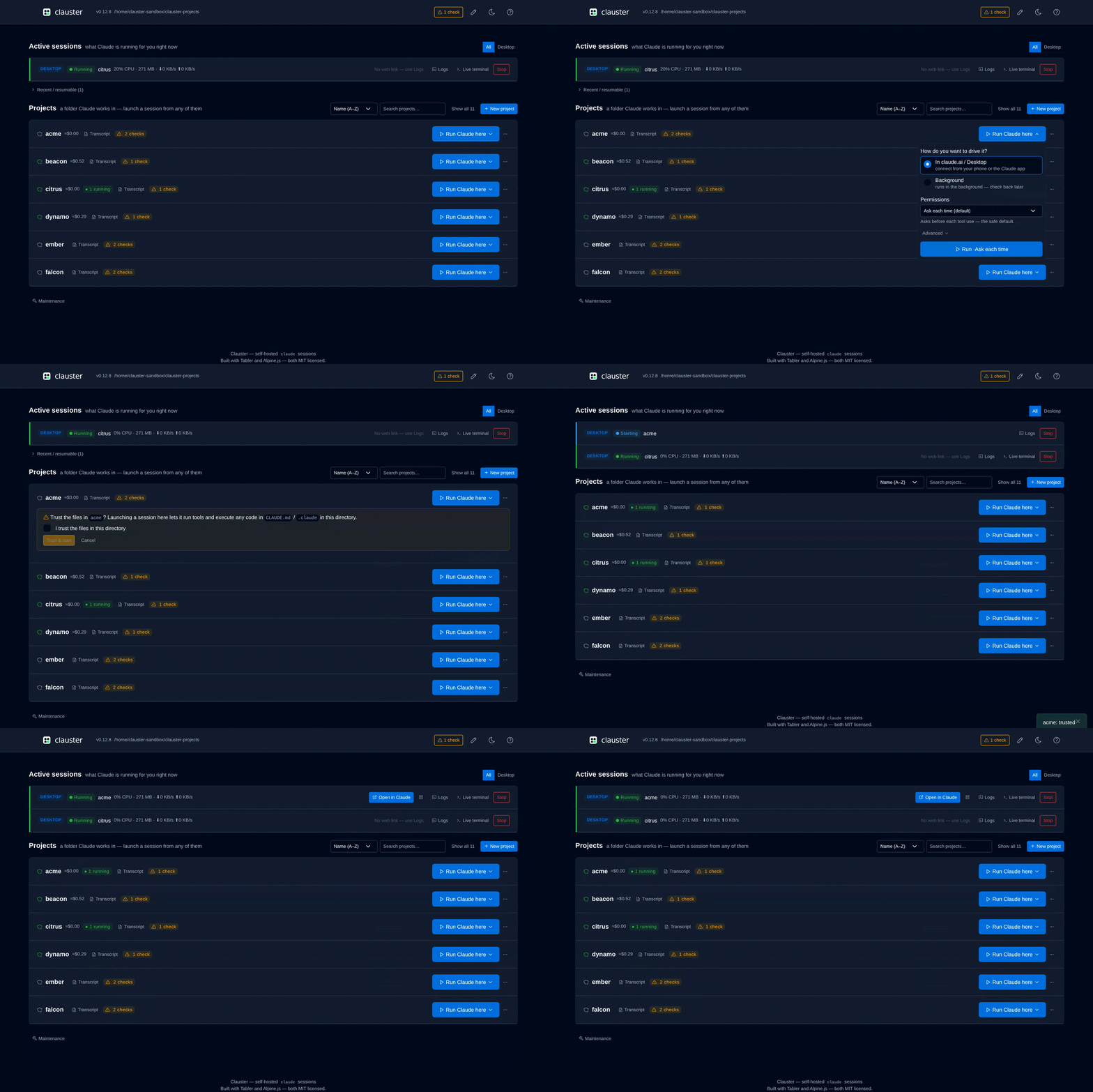
Why not just SSH in and run claude?
| SSH + terminal | Clauster | |
|---|---|---|
| From a phone | Type into a mobile SSH client | Tap a project in a browser, then use the Claude app |
| When you close the laptop | Session dies with the shell | Session keeps running on the host; reattach later |
| Starting a session | cd to the project, remember the flags |
One click per project, spawn + permission modes preset |
If you already live in a terminal on the same machine as your code, you don't need this. Clauster is for when your code lives on a box you don't want to SSH into every time.
Quick start
curl -fsSL https://raw.githubusercontent.com/schubydoo/clauster/main/install.sh | bash
clauster run
Open http://127.0.0.1:7621 — run with no config and Clauster serves a
loopback-only first-run setup wizard that asks for your projects folder and a
dashboard password, writes a clauster.yml, and starts on it. Then click
Run Claude here on a project. Full recipes (uv / pip, Docker, systemd, reverse proxy) →
Installation guide.
Status: 1.0 — stable and actively developed. Requires an Anthropic account with Claude Code access. Loopback-only by default; password and reverse-proxy auth are available for networked deployments (see Auth & networking). No telemetry, ever — see Privacy & data at rest for what Clauster keeps locally. Upgrading from 0.12? 1.0 has five breaking changes — see UPGRADING.md.
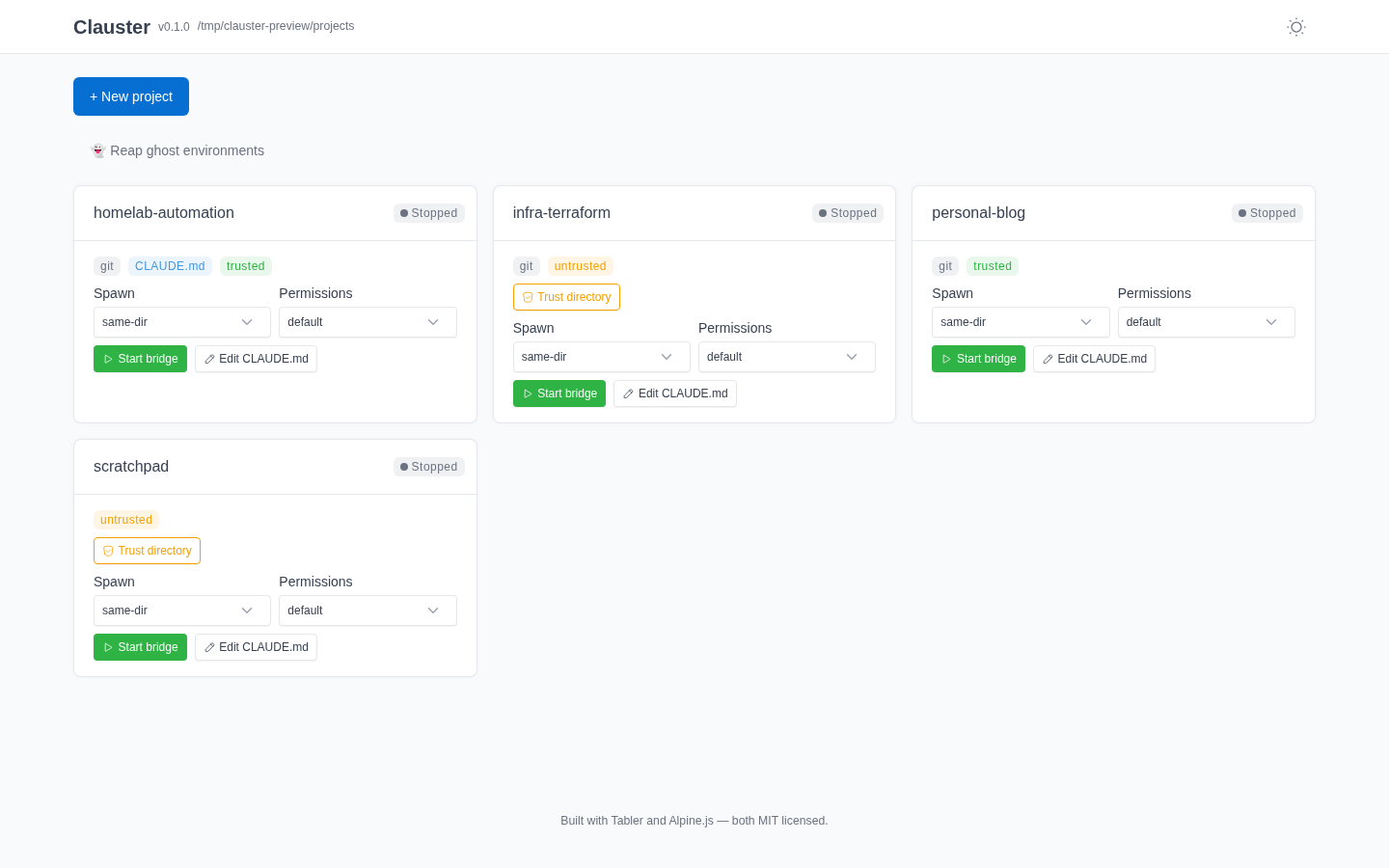 Light theme — running sessions on top, projects below |
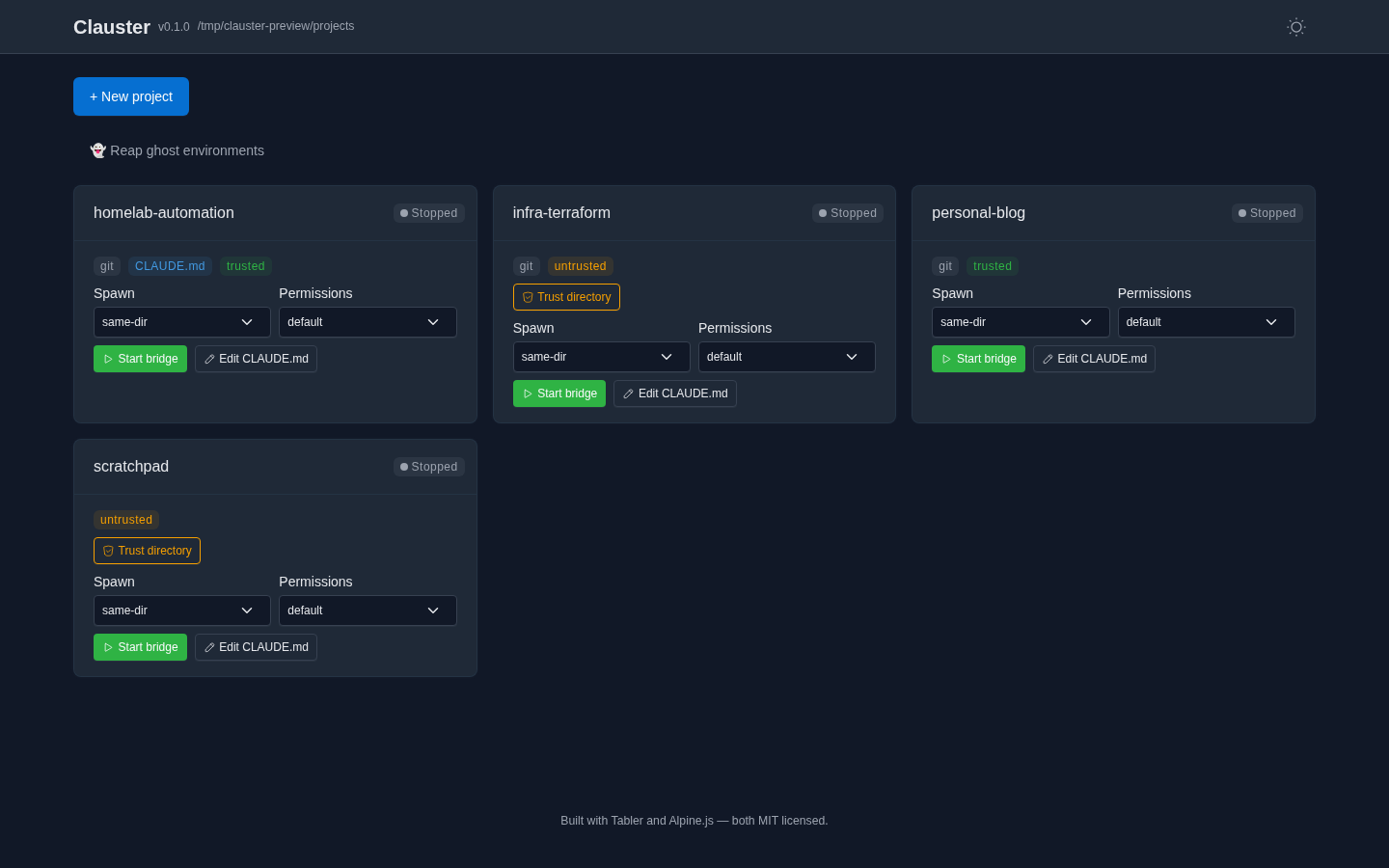 Dark theme — the toggle persists across reloads |
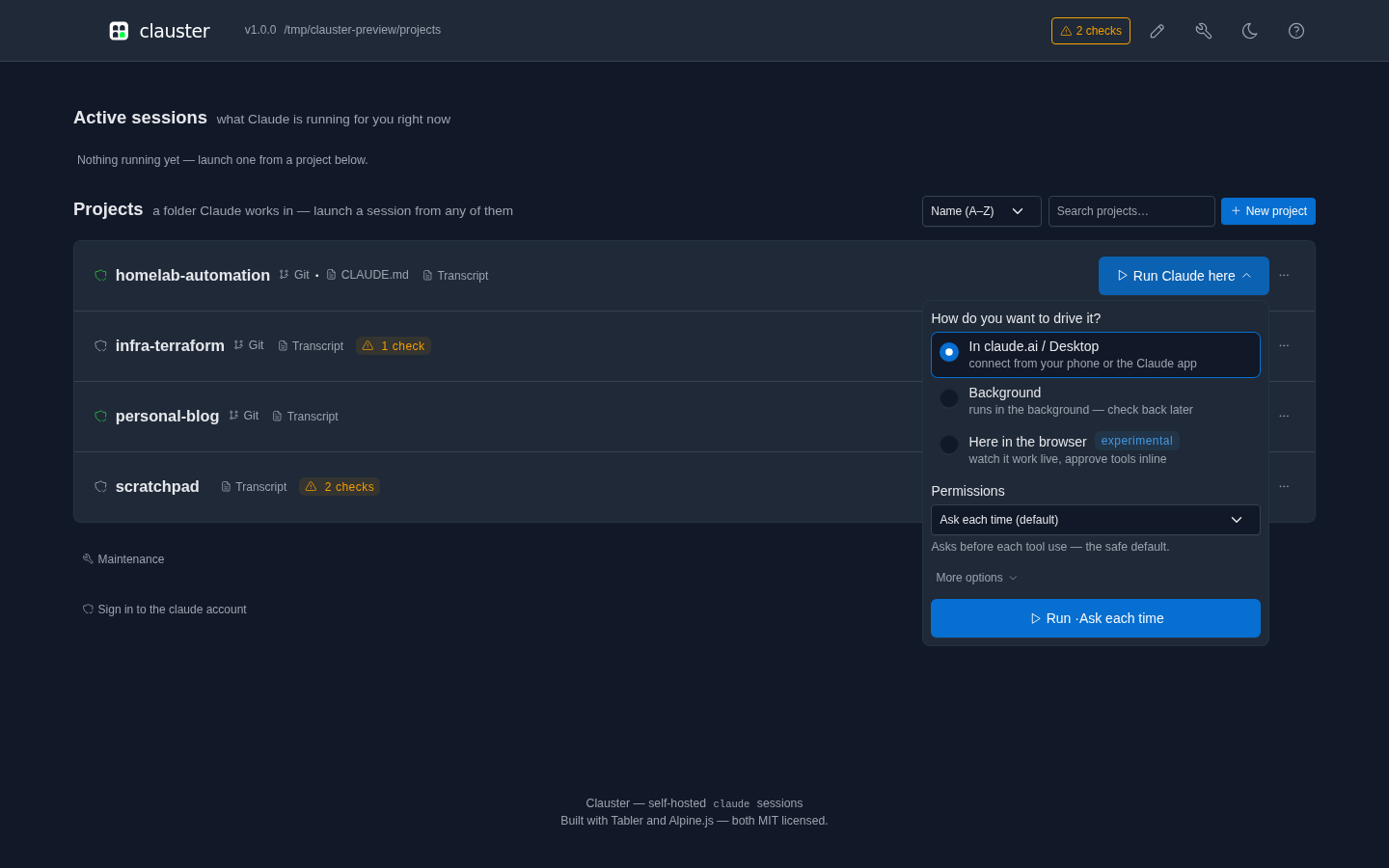 Launch menu — pick how to drive it, and the permission mode |
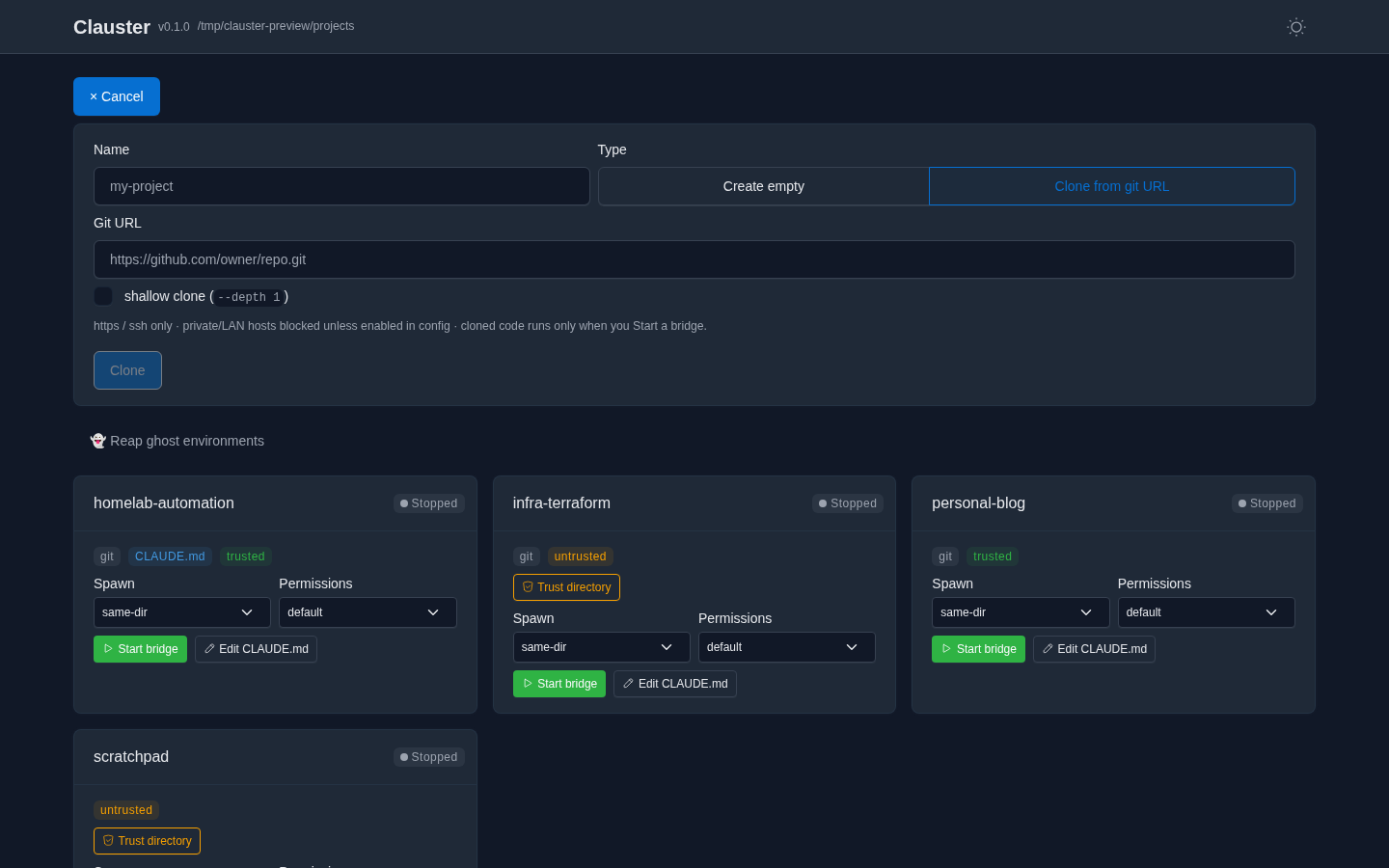 Create or clone — https/ssh only; cloning fetches files, runs nothing |
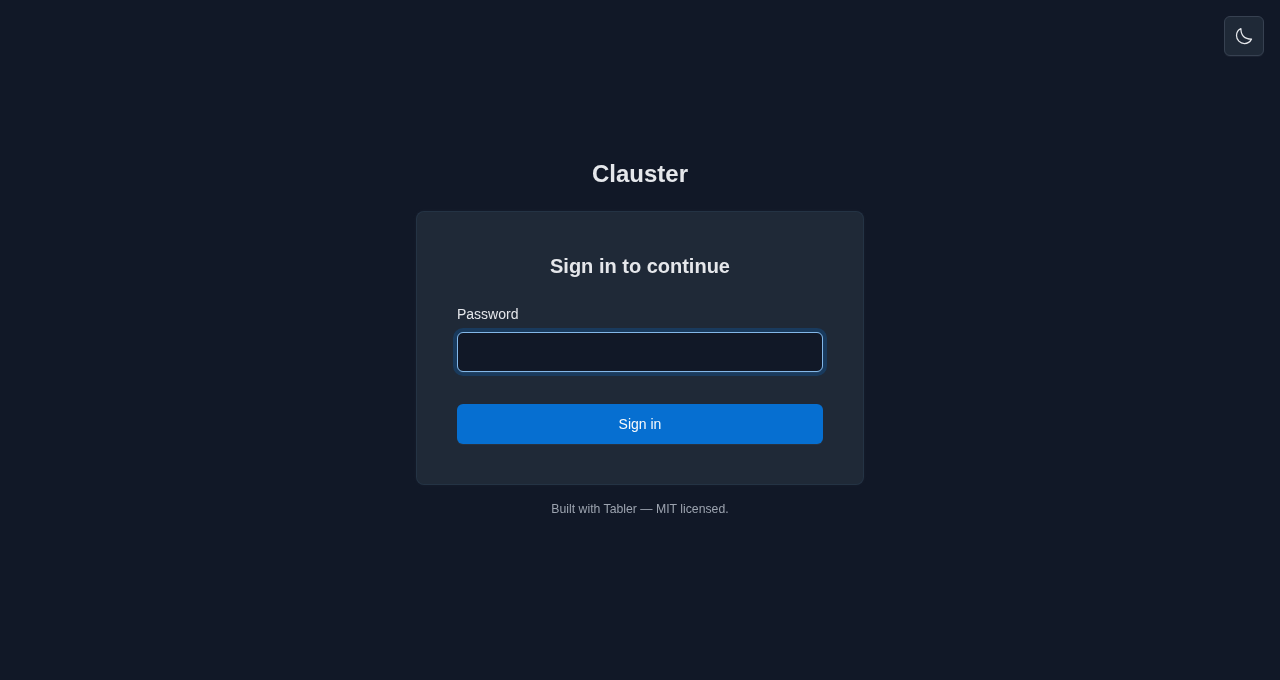 Password login — for non-loopback / networked deploys |
Every action is reactive — rows insert, badges flip, and clone progress streams without a full-page reload. Self-hosted assets; no CDN, no trackers. |
Features
A self-hosted dashboard for the claude sessions running on your own machine —
start them, watch them, and pick them up from your phone.
- Projects & bridges — a card per directory under
projects_root; start, stop and resume bridges, choose the spawn and permission mode (including No forced mode, which passes no--permission-modeflag so the session starts in its own default), and open any session in Claude by deep link or QR code. - Visibility — live bridge-log tail over a WebSocket, a read-only transcript viewer, and per-project cost and token totals.
- In-app editing — edit a project's Claude Code config surfaces and an allowlist
of operational
clauster.ymlsettings, without reaching for SSH. - Safety — workspace-trust prompts before a first spawn, session URLs redacted
out of the streamed log (the on-disk bridge log stays verbatim unless you set
logs.redact_session_url), and an auth model that fails closed on a network bind. - Interactive Sessions — an opt-in pty mode with true resume and a read-only live terminal view.
- Extras — outbound notifications and webhooks, a Prometheus endpoint, a ghost-environment reaper, experimental background agents, and an MCP server (read-only until you opt into its write tools). Each is off, or read-only, by default.
That is the short list, not the whole of it — every feature is documented in full on the documentation site; start at the Quickstart or How it works.
Install
No Python needed — the install script grabs the signed standalone binary for your
OS, verifies its checksum, and installs it to ~/.local/bin (Linux & macOS),
printing a PATH hint if that directory isn't already on your PATH:
curl -fsSL https://raw.githubusercontent.com/schubydoo/clauster/main/install.sh | bash
On Windows, the PowerShell equivalent installs clauster.exe the same way:
irm https://raw.githubusercontent.com/schubydoo/clauster/main/install.ps1 | iex
Or pick another path — uv tool install clauster (recommended for a Python host),
pip/pipx, Scoop on Windows (scoop bucket add clauster https://github.com/schubydoo/clauster && scoop install clauster), or
Docker. Full recipes — including supply-chain verification — are in the
Installation guide. To hack
on Clauster itself, see Contributing below.
Uninstall
- Install script / standalone binary: remove
~/.local/bin/clausteron Linux or macOS; on Windows, delete%LOCALAPPDATA%\Programs\clauster\clauster.exeunless you set a custom install directory. - Python tools: run
uv tool uninstall clauster,pipx uninstall clauster, orpip uninstall clauster, matching how you installed it. - Scoop: run
scoop uninstall clauster. - Docker: stop and remove the container with
docker rm -f clauster, then remove the image withdocker rmi ghcr.io/schubydoo/clauster:latest(substitute the pinned tag you pulled, e.g.:X.Y.Z, if you used a specific release) if you no longer need it. Docker Compose users: rundocker compose downfrom the directory containingcompose.yaml(add-vto also delete named volumes). - Full purge: stop Clauster first, then remove your
state_dirif you want local state/config gone too. See Privacy & data at rest and the Installation guide.
Contributing
Working on Clauster itself? CONTRIBUTING.md has the
from-source dev setup (uv sync --extra dev), the local test/lint gates, and
the branching + review workflow.
First bridge in 60 seconds
Start Clauster (run clauster; it serves http://127.0.0.1:7621 by default). With
an authenticated claude on your PATH, spawning your first bridge is a handful
of clicks — no terminal needed once it's started. Clauster spawns claude — it doesn't vendor it — and a spawned bridge
inherits the host user's claude authentication, so claude must be logged in
(interactive claude login or ANTHROPIC_API_KEY in the environment — either
satisfies the check) before any bridge can connect. clauster doctor (step 2)
confirms it; see the Quickstart prerequisites for the full
list.
- Point Clauster at your code. Set
projects_rootinclauster.ymlto a directory whose subfolders are projects (e.g.~/code); each child directory becomes a card. - Sanity-check the host (optional).
clauster doctorconfirmsclaudeis found, new enough, and logged in (the bridge inherits this login), and thatprojects_root/ the state dir are usable — fix any ✗ before spawning. - Open the dashboard at http://127.0.0.1:7621. You'll see one card per project to start — a project running several sessions later shows a card for each.
- Launch a bridge. On a project's card, click Run Claude here ▾, choose
In claude.ai / Desktop, pick a permission mode, then Run. Clauster
launches
claude remote-controlin that directory and the card flips to Running with a live status badge. (The spawn-mode and permission defaults are safe out of the box.) - Attach from anywhere. Use the card's Open in Claude link — or scan its
QR code — to pick the bridge up in
claude.ai/codeor the Claude mobile app. No SSH session. - Stop or resume. Stop signals the bridge; Resume relaunches it (with
claude.resume_recaporclaude.launch_mode: ptyit can carry the prior conversation forward — see the configuration guide). For a deliberate fresh start, Forget the stopped session and launch again with Run Claude here.
Exposing this beyond loopback (e.g. on your LAN)? Read Auth & networking first — a non-loopback bind requires authentication.
Docker
Multi-arch images (linux/amd64, linux/arm64) are published to GHCR on each
release, cosign-signed with provenance + SBOM attestations. Two things to know
before docker run:
- The image binds
0.0.0.0, so it refuses to start without enforced auth — setCLAUSTER_AUTH_ENABLED=true,CLAUSTER_AUTH_PASSWORD_REQUIRED=true, and aCLAUSTER_AUTH_PASSWORD_HASH(generate one withdocker run --rm -it ghcr.io/schubydoo/clauster:latest clauster hash-password). claudeis not baked into the image — mount the CLI onto the containerPATH(or setCLAUSTER_CLAUDE_BINARY) along with the runtime user's~/.claudecredentials.
Full run + compose.yaml recipes, volumes, and PUID/PGID
mapping: Installation → Docker.
Auth & networking
Loopback (127.0.0.1) needs no auth. Binding to a non-loopback address is refused
unless authentication is actually enforced — set auth.enabled: true (the master
switch) together with either password login (auth.password_required + a hash from
clauster hash-password) or reverse-proxy trust (peer-IP allowlist + HMAC header) —
or, to opt out on a trusted LAN, auth.allow_unauthenticated_network. Sessions
are signed cookies with server-side revocation ("log out everywhere"); WebSocket
connections are authenticated before accept and origin-checked. The origin
allowlist is a cross-site defence rather than an authentication method, so it is
enforced even with auth.enabled: false; a non-loopback bind auto-trusts no
origin and must set auth.allowed_origins.
Configuration
All settings live in clauster.yml —
clauster.yml.example is a lean starter, and
docs/reference/config.md is the exhaustive per-key reference. Any
scalar or list key is overridable by an environment variable of the form
CLAUSTER_<UPPER_SNAKE_PATH> (lists take a comma-separated value). The schema is
additive-only — old configs always validate against newer versions.
| Common flag | Default | What it does |
|---|---|---|
host / port |
127.0.0.1 / 7621 |
bind address (non-loopback needs auth) |
projects_root |
— | directory whose children become project cards |
auth.enabled |
false |
master auth switch — must be on for password / proxy auth to apply |
auth.password_required |
false |
require login (clauster hash-password for the hash) |
claude.resume_recap |
false |
recap the prior transcript into a restarted bridge |
claude.launch_mode |
standard |
pty = native true-resume on Resume (POSIX pty, or Windows ConPTY with the pty extra); default for new bridges only — a bridge keeps the mode it launched with |
reaper.ui_enabled |
false |
expose the ghost-environment reaper in the dashboard |
claustrum.enabled |
false |
enable the hosted live-view channel (connect-or-spawn the claustrum daemon) |
usage.mode |
cost |
per-project badge contents: cost (≈USD + tokens) · tokens (count only) · off (hide + skip the usage fetch). usage.show_cost: false is a deprecated alias for off |
logs.redact_session_url |
false |
redact the session URL on disk too, not just over WS |
CLI
clauster run                  # start the server (default)
clauster hash-password        # generate an argon2id hash for auth.password_hash
clauster hash-token           # mint an API token + hash for auth.api_token_hash
clauster hash-metrics-token   # mint a /metrics scrape token + hash for observability.metrics_token_hash
clauster api-token issue|list|rotate|revoke   # manage named public-API bearer tokens
clauster mcp                  # read-only MCP server over stdio (list + status)
clauster doctor               # diagnose config / environment
clauster backup | restore | migrate
clauster install-service {systemd|launchd|windows}
clauster reap-environments    # reap ghost bridge environments (dry-run by default)
clauster keepers              # list or stop orphaned pty keepers
clauster usage <transcript>   # token + approximate cost for a session transcript
clauster config reconcile     # remove deprecated config keys, writing their replacements
clauster deps list|install|uninstall          # manage optional extras beside the standalone binary
clauster projects | status | sessions         # headless reads (--json), no server needed
clauster logs <instance> | open <instance>    # tail a bridge's redacted log / print its connect URL
clauster start <project> | stop <instance>    # headless spawn/stop through the same engine as the UI
#   <instance> = full id, a unique prefix of one (as printed by `status`), or a project name
Full per-command reference: docs/reference/cli.md.
Roadmap
Planned work, roughly in priority order — the public-facing companion to the in-repo
scratch/TODO.md.
- Friendlier default session names — Server-Mode bridges already accept a custom launch name (#780) and the dashboard lists active/resumable sessions per project; the remaining work is a more predictable default than the random adjective-noun one, and extending custom names to Interactive Sessions.
Not planned: clauster is a single-operator tool — multi-user accounts, OIDC login, and per-user GDPR tooling were considered and declined (one deployment serves one operator; isolate with separate instances instead). The UI is English-only and not localized — there is no i18n string extraction on the roadmap (re-scope only if a real translation contributor appears).
Shipped:
- Public API — a documented, versioned
/api/v1surface with named Bearer tokens (distinct from the session cookie), managed viaclauster api-token issue|list|rotate|revoke; an opt-in OpenAPI schema (api.openapi_enabled) is available for third-party dashboards. - The in-repo
docs/pages (setup, networking, config reference, security model) are published as a live docs site at schubydoo.github.io/clauster.
Stack
Python 3.11+ · FastAPI · Alpine.js + Jinja2 + Tabler · uv · pydantic. Developed
and CI-gated on Linux; macOS / Windows are in the test matrix. Apache-2.0 licensed.
Project health









Support
Questions, bugs, and feature requests all go through
GitHub Issues — Discussions are
intentionally not enabled. See SUPPORT.md for how to get help, and
SECURITY.md to report a vulnerability privately.
License
1 maintainer

Release files for clauster 1.2.1
For a detailed explanation of source distributions (sdists) and built distributions (wheels), please see the package formats documentation.
Source distribution (sdist)
| File | Size | Uploaded | |
|---|---|---|---|
| clauster-1.2.1.tar.gz | 4.2 MB | Details |
Built distribution (wheel)
| File | Interpreter | ABI | Platform | Reset |
|---|---|---|---|---|
| clauster-1.2.1-py3-none-any.whl | Python 3 | none | any | Details |
Total release size: 5.5 MB
Release files / clauster-1.2.1.tar.gz
| Download URL | clauster-1.2.1.tar.gz |
|---|---|
| Size | 4.2 MB |
| Tags | Source |
|
SHA-256 checksum How to use checksums |
4b7a3310f7a7af98e327c3450cc3475a81e6162148730e646088ef9bc4ef2c36
|
|
BLAKE2b-256 checksum How to use checksums |
c5d9024c92e8a1b94dd254f3328dd2e30806e00a99aa96ca4f68fc59a739b7d5
|
| Upload date | |
|
Uploaded using Trusted Publishing? What is trusted publishing? |
Yes |
| Uploaded via |
twine/7.0.0 CPython/3.13.14
|
Provenance
Provenance describes where a file came from. On PyPI, provenance is shared via attestations, which provide a verifiable record of the build or publishing details. View details, limitations and caveats.


PyPI Publish Attestation
PyPI verified that this artifact, at this checksum, originated from the publisher listed below.
Signed by GitHub Actions, verified by PyPI on Sep 22, 2026.
Transparency logRelease files / clauster-1.2.1-py3-none-any.whl
| Download URL | clauster-1.2.1-py3-none-any.whl |
|---|---|
| Size | 1.3 MB |
| Tags | Python 3 |
|
SHA-256 checksum How to use checksums |
ef2c56f798cf272ab06f243e9f580b78985d05766babc6940a04627328955eb3
|
|
BLAKE2b-256 checksum How to use checksums |
56163cccb669542e8067cfbb244385d35b9c927e3576be470b78a11a6685be46
|
| Upload date | |
|
Uploaded using Trusted Publishing? What is trusted publishing? |
Yes |
| Uploaded via |
twine/7.0.0 CPython/3.13.14
|
Provenance
Provenance describes where a file came from. On PyPI, provenance is shared via attestations, which provide a verifiable record of the build or publishing details. View details, limitations and caveats.
PyPI Publish Attestation
PyPI verified that this artifact, at this checksum, originated from the publisher listed below.
Signed by GitHub Actions, verified by PyPI on Sep 22, 2026.
Transparency log













