






What is Click Extra?
It should be easy to write a good CLI in Python. Click makes it so. But there are still hundreds of tweaks to implement by yourself to have a user-friendly CLI.
Click Extra is a ready-to-use wrapper around Click to make your CLI look good and behave well. It is a drop-in replacement with good defaults that saves lots of boilerplate code and frustration by making all parts working together.
It also comes with workarounds and patches that have not reached upstream yet (or are unlikely to).
Who is this for?
Anyone building a CLI who doesn't have time to assemble the pieces from scratch:
- You use Click and want professional defaults without the boilerplate.
- You're a security researcher turning a proof-of-concept into a presentable tool to hand off, demo, or attach to an advisory.
- You're a DevOps engineer or sysadmin whose one-off script grew into a team tool and needs
--help,--verbose,--config, and colored output.
Click Extra's defaults-first design means one decorator gets you there. See the 30-second quick start.
Demo
You can try Click Extra right now in your terminal, without installing any dependency or virtual env thanks to uvx:
$ uvx click-extra
This is a great way to play with Click Extra and check that it runs fine on your system, and renders properly in your terminal.
Example
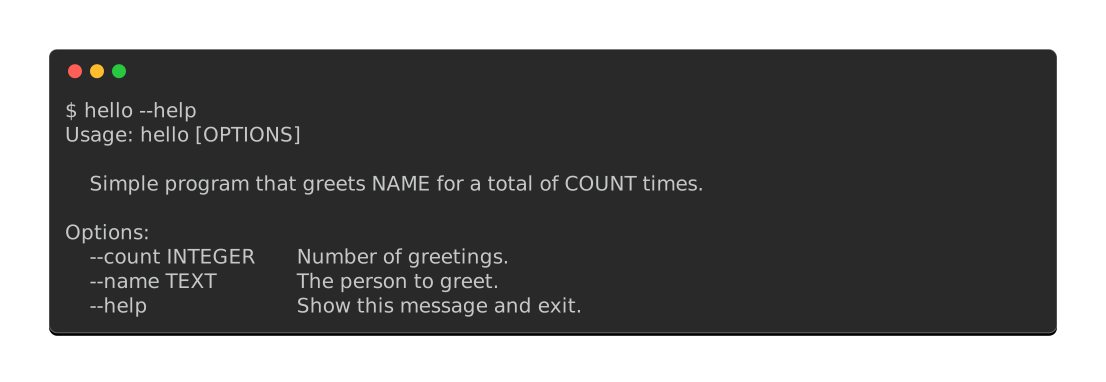
It transforms this vanilla click CLI:
Into this:
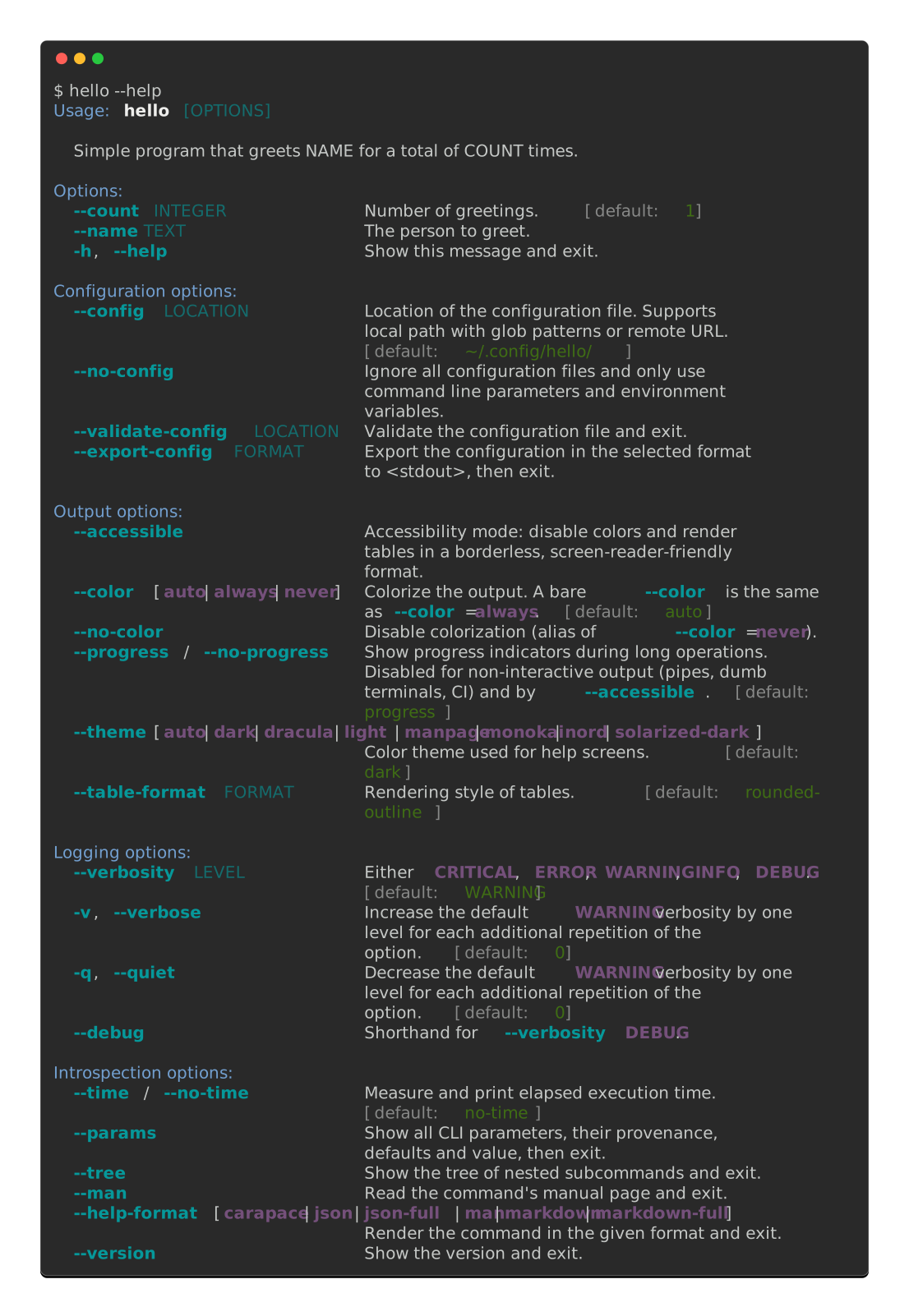
And here is the entire diff between the two. Click Extra proxies the whole click namespace, so aliasing it back leaves every decorator and call untouched:
-import click
+import click_extra as click
The colors, and every option below --name, come from that one line. Both screens above are captured from the tutorial's own live examples.
Features
Help screens and theming
- Colorized help screens: options, choices, metavars, arguments, defaults, ranges, required labels, environment variables, subcommands and aliases all get distinct styles. Option names referenced in descriptions and docstrings are highlighted automatically
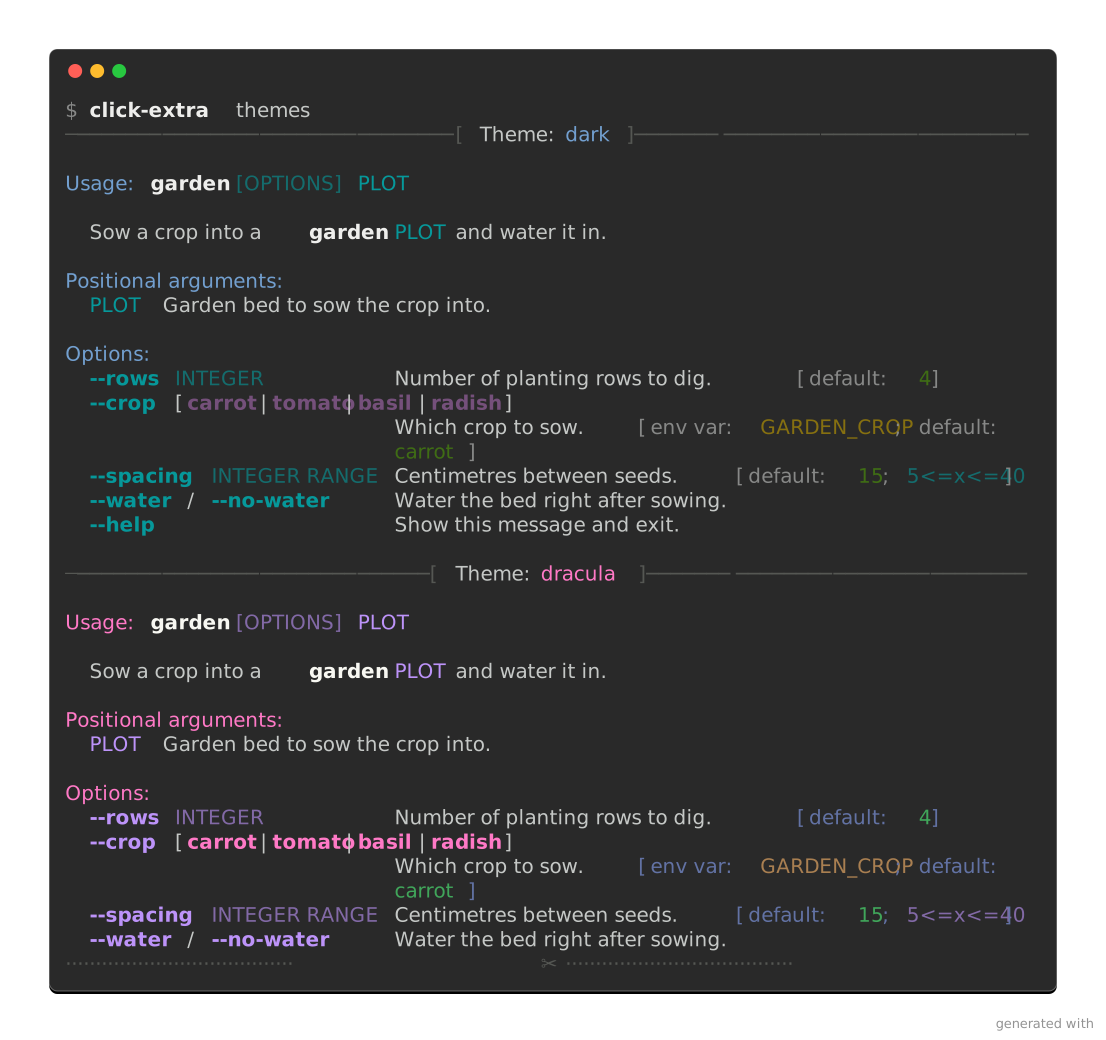
- Theme system with seven built-in themes (
dark,light,dracula,monokai,nord,solarized-dark, and a monochromemanpage), here recoloring the same help screen: - User-defined themes and partial overrides loaded from the CLI's
--configfile ([tool.<cli>.themes.<name>]), scoped per invocation so concurrent runs don't bleed into each other --themeflag on every command, with case-insensitive validation against the live registryCLICK_EXTRA_THEMEexported once from a shell profile themes every Click Extra CLI on the machine, with a per-CLI<CLI>_THEMEtaking precedence over it--theme=autoreads the terminal's own background to pick between the dark and light palettes, fromCLITHEME,COLORFGBG, or an opt-in OSC 11 query-h/--helpoption names (see rant on other inconsistencies)- Built-in
helpsubcommand with a--searchmode for groups - Usage examples declared as
examples=[("description", "command")]on any command, rendered in the help screen, the man page and every machine-readable format
Standard options on every CLI
Listed in the order they show up in a --help screen:
--time/--no-timeto measure command execution duration--color[=WHEN]tri-state flag (auto/always/never) with a hidden--no-coloralias, recognizingNO_COLOR(no-color.org),FORCE_COLOR,CLICOLOR, andLLMenvironment variables--paramsto debug parameter defaults, values, environment variables and provenance--table-formatto switch between fifty table-rendering styles, from terminal grids to machine-readablejson,yaml,toml,csvandxml(usesprint_table()andserialize_data())- Colored
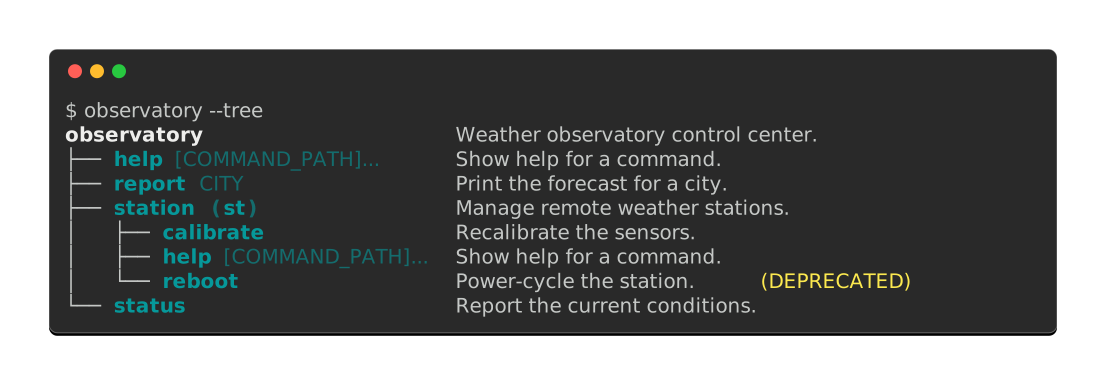
--verbosityLEVEL and logs, plus-v/--verboserepetition for incremental bumping --treeto print the whole hierarchy of nested subcommands with their descriptions, aliases and deprecations:--manto typeset the command's manual and page it, the waymandoes, for a CLI that ships no man page at all--help-formatto render the command as JSON, Markdown, a man page or a Carapace spec, for the readers that are programs rather than people: one option carrying a format, not one flag per format- Colored
--versionwith template variables for git metadata (branch, hash, date, tag) and pre-baking for compiled binaries (Nuitka, PyInstaller)
Two more options are one decorator away, for a CLI that wants them:
--jobsfor parallel-execution worker counts--telemetry/--no-telemetryflag to opt-in/out of tracking code, recognizingDO_NOT_TRACKfrom consoledonottrack.com
And every CLI gets these on top:
- Global
show_envvaroption to display all environment variables in help screens - Global
show_choicesto activate selection of choices on user input prompts - Auto-generation and normalization of environment variables for all options
CLI wrapper
- CLI wrapper (
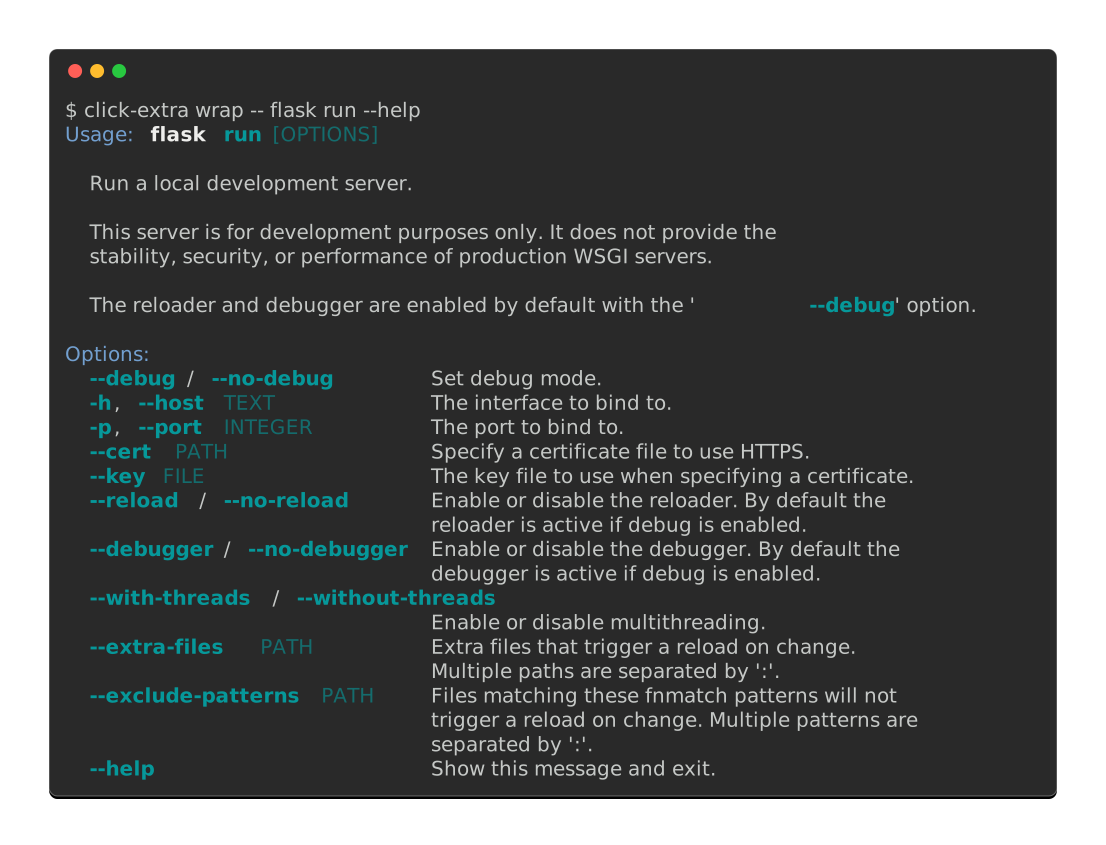
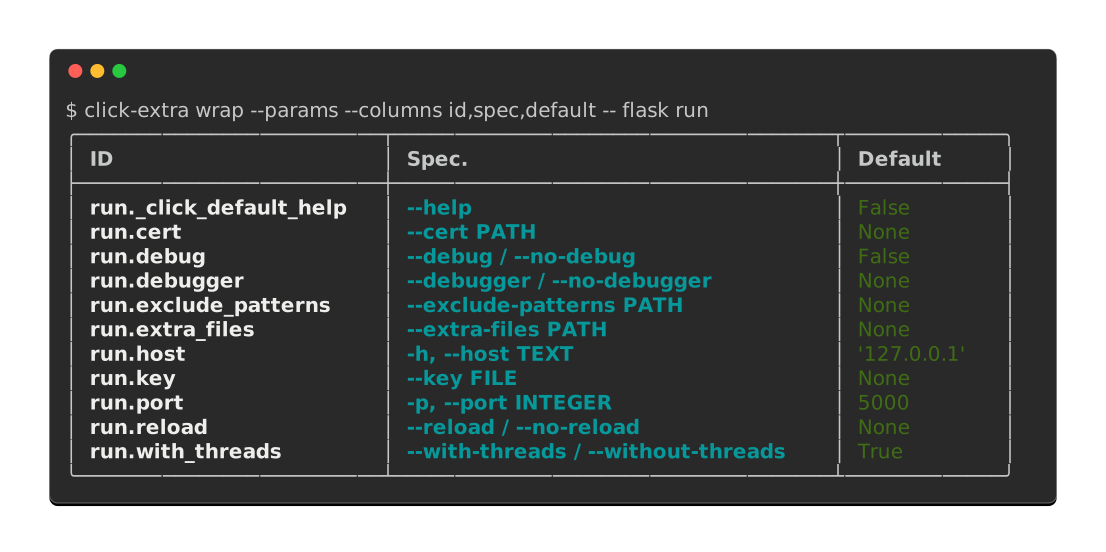
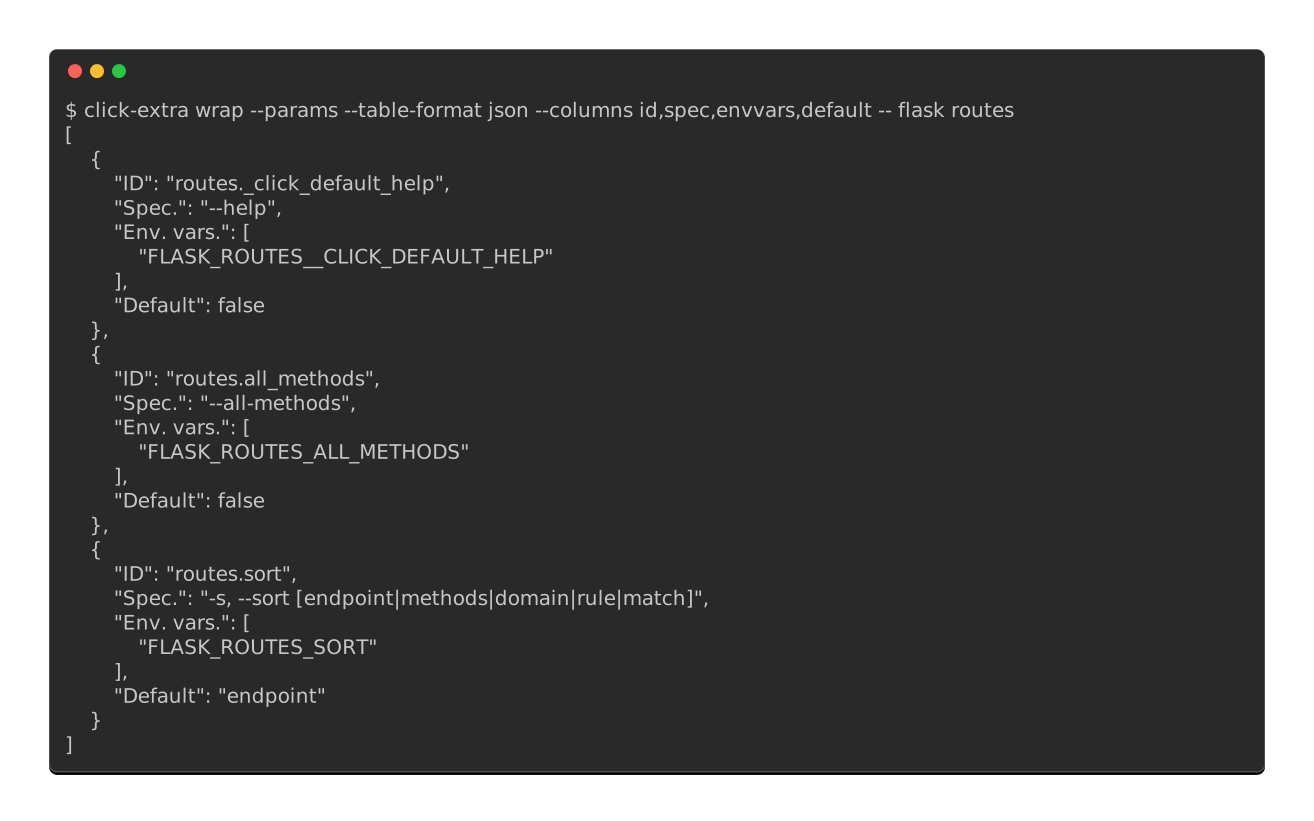
click-extra wrap) applies help colorization, themes, and config loading to any Click CLI without modifying its source code: --paramsmode to introspect any external Click CLI's parameters, restricted to the columns you care about:- That same inventory in any machine-readable format, for a script that has to consume another CLI's interface:
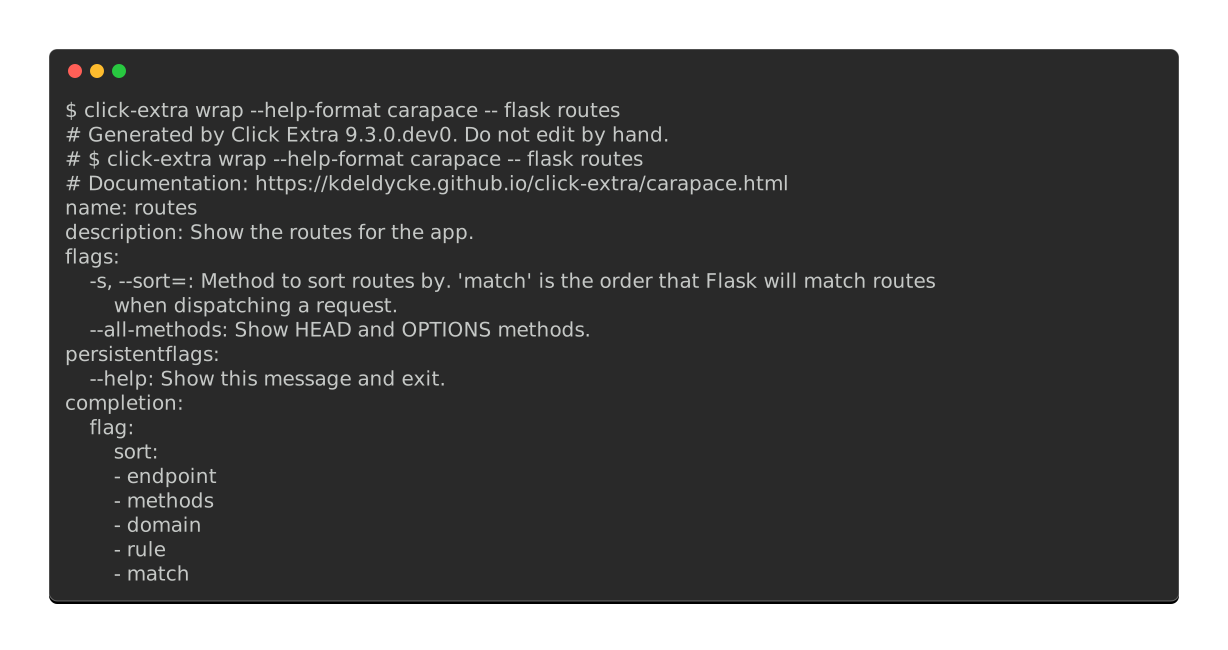
--help-format carapaceto export any Click CLI's Carapace completion spec, for identical completions in Bash, Zsh, Fish, Nushell, PowerShell, Elvish and Xonsh, with--installputting it where Carapace looks (and--help-format man --installdoing the same for a man page):--manmode to read the manual of a CLI that never wrote one--help-formatmode to describe any Click CLI as JSON, Markdown, a man page or a Carapace spec: usage line, option groups, subcommands and all, with no cooperation from the target--treemode to print any external Click CLI's subcommand hierarchy without running it- User-defined themes via
--configwork transparently through the wrapper, so users can theme third-party CLIs from their ownpyproject.toml
Configuration
- Multi-format configuration file loader for:
TOMLYAMLJSON,JSON5,JSONCandHJSONINI, with extended interpolation, multi-level sections and non-native types (list,set, …)XMLplist, in both its XML and binary variants
- Automatic
pyproject.tomlintegration: the CLI reads its[tool.<cli>]section from the user's project file, including a CWD-aware walk that skips unrelatedpyproject.tomlfiles - Inference of the configuration file structure from your CLI's options, with optional dataclass schema typing so values arrive parsed and validated
- Remote loading of configuration from URLs
- Optional strict validation of configuration with
--validate-config - Extension hook (
ConfigValidator) for user-defined sub-trees whose keys are data rather than CLI flags (per-plugin overrides, matrix axes, user-defined IDs), with rootedValidationErrorreporting - Respect the default application path on each platform (XDG spec. on Linux)
- Glob search patterns for configuration files
- A
--no-configoption to disable configuration file loading - Respect of
Prompt>CLI>Environment>Config>Defaultsprecedence
Types and parameters
EnumChoice—click.Choicesubclass with properEnumrendering, case-insensitive matching, alias support, and pluggable choice sources- Click parameter introspection and a shared parameter structure used by both
--paramsand the config loader
Performance and structure
- Lazy-loading of subcommands from module paths to speed up CLI startup time
- Composition with third-party Click CLIs (
wrap_other_commands)
Documentation tooling
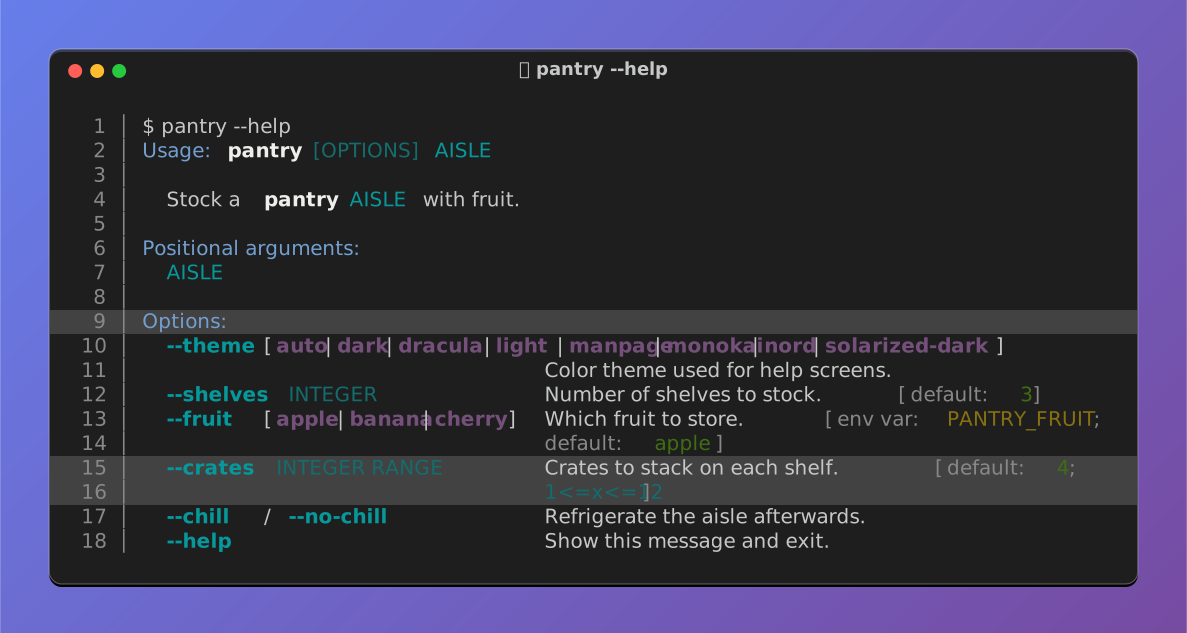
click-extra screenshotcaptures any CLI's colored output as an SVG image or a self-contained HTML block, and the window it is drawn in is yours to set: terminal preset, light or dark chrome, gradient backdrop, caption, line numbers, transparency, credit line, border, shadow, corner radius and margins. Every capture in this readme is one, rewritten on each documentation build, and a pair of them can be switched on the reader's own color scheme:click:sourceandclick:runSphinx directives in MyST Markdown and reStructuredText to document CLI source code and their executionpython:source,python:run,python:render,python:render-myst,python:render-rst— the same machinery for arbitrary Python, with arender*family that parses the captured output as live document content (replaces thedocs_update.py+ marker-region pattern)- Inline testing of CLI examples in documentation: every
click:runblock runs at build time and assertions fail the build - Render GitHub alerts into MyST admonitions in both Sphinx and MkDocs
- ANSI-capable Pygments lexers for shell session and console output, with 24-bit true-color rendering on by default
AnsiHtmlFormatterfor HTML output of ANSI-colored text- MkDocs plugin for ANSI color rendering in code blocks
Testing
CliRunner—click.testing.CliRunnersubclass that capturesstdoutandstderrseparately and preserves ANSI codes for assertion against colored output- pytest fixtures (
invoke,runner,create_config) and ready-made regex helpers (default_options_uncolored_help,default_debug_*) for click-extra-aware test suites
Upstream
- Fixes 100+ bugs and addresses missing features across Click, Cloup, Pygments, tabulate, MyST-Parser, Furo, and unmaintained
click-contribpackages - Drop-in replacement for Click and Cloup: every
from click_extra import …and@click_extra.commandworks as a transparent superset. Cloup provides option groups, constraints, subcommand sections, aliases, andDid you mean <subcommand>?suggestions; click-extra adds everything above on top.
Used in
Check these projects to get real-life examples of click-extra usage.
CLIs:
Meta Package Manager - A unifying CLI for multiple package managers.
Mail Deduplicate - A CLI to deduplicate similar emails.
repomatic - Automate repository maintenance, releases and CI/CD workflows.
agent-catalog - Couchbase agent catalog.
octo-logo - Simple logos for complex projects.
besta-tools - Tools for Besta devices and Besta RTOS proprietary formats.
Documentation (depends on click-extra[sphinx] or click-extra[mkdocs]):
Anki - A smart spaced repetition flashcard program.
pip-tools - A set of tools to keep your pinned Python dependencies fresh.
bump-my-version - A CLI updating every version string in a project.
SQLSpec - A query mapper for Python.
Extra Platforms - Detect architectures, platforms, shells, terminals and CI systems, grouped by family.
Feel free to send a PR to add your project in either list if you are relying on Click Extra in any way.
1 maintainer

Release files for click-extra 9.3.0
For a detailed explanation of source distributions (sdists) and built distributions (wheels), please see the package formats documentation.
Source distribution (sdist)
| File | Size | Uploaded | |
|---|---|---|---|
| click_extra-9.3.0.tar.gz | 1.7 MB | Details |
Built distribution (wheel)
| File | Interpreter | ABI | Platform | Reset |
|---|---|---|---|---|
| click_extra-9.3.0-py3-none-any.whl | Python 3 | none | any | Details |
Total release size: 2.3 MB
Release files / click_extra-9.3.0.tar.gz
| Download URL | click_extra-9.3.0.tar.gz |
|---|---|
| Size | 1.7 MB |
| Tags | Source |
|
SHA-256 checksum How to use checksums |
5ae6823cb38c4b4de961ea59f69ea69b79d7eac3b1c3f4f30bb110503f22a81e
|
|
BLAKE2b-256 checksum How to use checksums |
a6c5f4334da93584e1ff8b5857569f99ec83b1886d4842f0aad0509d32b1ba9e
|
| Upload date | |
|
Uploaded using Trusted Publishing? What is trusted publishing? |
Yes |
| Uploaded via |
uv/0.12.4 {"installer":{"name":"uv","version":"0.12.4","subcommand":["publish"]},"python":null,"implementation":{"name":null,"version":null},"distro":{"name":"Ubuntu","version":"26.04","id":"resolute","libc":null},"system":{"name":null,"release":null},"cpu":null,"openssl_version":null,"setuptools_version":null,"rustc_version":null,"ci":true}
|
Provenance
Provenance describes where a file came from. On PyPI, provenance is shared via attestations, which provide a verifiable record of the build or publishing details. View details, limitations and caveats.


PyPI Publish Attestation
PyPI verified that this artifact, at this checksum, originated from the publisher listed below.
Signed by GitHub Actions, verified by PyPI on Sep 18, 2026.
Transparency logRelease files / click_extra-9.3.0-py3-none-any.whl
| Download URL | click_extra-9.3.0-py3-none-any.whl |
|---|---|
| Size | 642.1 kB |
| Tags | Python 3 |
|
SHA-256 checksum How to use checksums |
0070a214473cc30af37e9a31995f891752763e9c52f8e5a5344aa425429b122c
|
|
BLAKE2b-256 checksum How to use checksums |
733fbf364b6942ba543f80a8b96d415e5f70c02f4ffdeb343188c9ba266cfbc7
|
| Upload date | |
|
Uploaded using Trusted Publishing? What is trusted publishing? |
Yes |
| Uploaded via |
uv/0.12.4 {"installer":{"name":"uv","version":"0.12.4","subcommand":["publish"]},"python":null,"implementation":{"name":null,"version":null},"distro":{"name":"Ubuntu","version":"26.04","id":"resolute","libc":null},"system":{"name":null,"release":null},"cpu":null,"openssl_version":null,"setuptools_version":null,"rustc_version":null,"ci":true}
|
Provenance
Provenance describes where a file came from. On PyPI, provenance is shared via attestations, which provide a verifiable record of the build or publishing details. View details, limitations and caveats.
PyPI Publish Attestation
PyPI verified that this artifact, at this checksum, originated from the publisher listed below.
Signed by GitHub Actions, verified by PyPI on Sep 18, 2026.
Transparency log













