
clipassgen (Console Smart Password Generator CLI) - Terminal-based smart password generator with deterministic password generation. Generate passwords from secret phrases - same secret always produces the same password, no storage required.

Project description
CliPassGen (Console Smart Password Generator) v3.0.2
Terminal-based smart password generator with deterministic password generation. Generate passwords from secret phrases - same secret always produces the same password, no storage required.
Decentralized by Design: Unlike traditional password managers that store encrypted vaults on central servers, Smart Password Generator stores nothing. Your secrets never leave your device. Passwords are regenerated on-demand — no cloud, no database, no trust required.









⚠️ Disclaimer
By using this software, you agree to the full disclaimer terms.
Summary: Software provided "AS IS" without warranty. You assume all risks.
Full legal disclaimer: See DISCLAIMER.md
🔄 Breaking Change (v3.x.x)
⚠️ This release uses smartpasslib v3.x.x, which is NOT backward compatible with v2.x.x
Smart passwords created with v2.x.x or earlier will be different when generated with v3.x.x.
📖 Full migration instructions → see MIGRATION.md
Core Principles
- Zero-Storage Security: No passwords or secret phrases are ever stored or transmitted
- Decentralized Architecture: No central servers, no cloud dependency, no third-party trust required
- Deterministic Generation: Same secret + same length = same password, every time
- Memory-Based Security: Your brain is the only password database
- Terminal-First: Optimized for CLI workflows and scripting
- Multi-Mode Generation: Smart passwords, strong random, base passwords, and auth codes
What You Can Do:
- Generate Smart Passwords: Deterministic passwords from secret phrases
- Create Public Keys: Verification keys for secret proof without exposure
- Generate Random Passwords: Cryptographically secure random generation
- Create Authentication Codes: Secure codes with character diversity
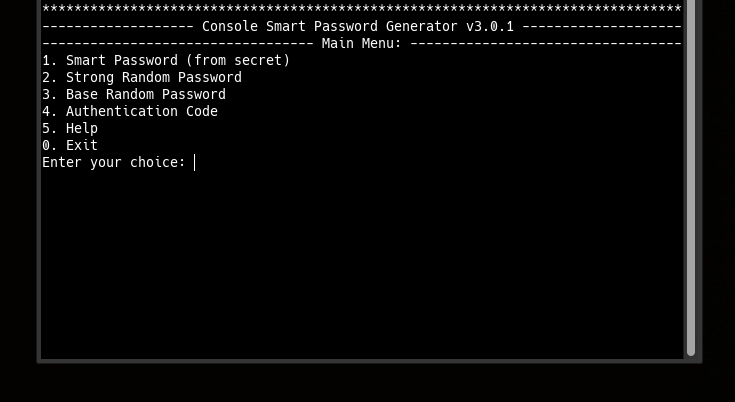
- Interactive Terminal Mode: Menu-driven interface for easy use
- Command Line Mode: Scriptable generation for automation
- Cross-Platform Operation: Works on any system with Python
- No Dependencies: Pure Python with smartpasslib core
Key Features
- Decentralized & Serverless: No central database, no cloud lock-in, complete user sovereignty
- Deterministic Security: Identical input → identical output, always
- Four Generation Modes: Smart, Strong, Base, and Code
- Public Key Verification: Generate keys to prove secret knowledge
- Interactive & CLI Modes: Both menu-driven and command-line interfaces
- Hidden Input: Secret phrase entry via getpass (hidden typing)
- SmartPrinter Output: Beautiful centered and framed terminal text
- Length Flexibility: 12-1000 characters for passwords, 4-20 for codes
- No Internet Required: All cryptographic operations local
Security Model
- Proof of Knowledge: Public keys verify secrets without exposing them
- Decentralized Trust: No third party needed — you control your secrets completely
- Deterministic Certainty: Mathematical certainty in password regeneration
- Ephemeral Passwords: Passwords exist only in memory during generation
- Local Computation: No data leaves your terminal
- No Recovery Backdoors: Lost secret = permanently lost passwords (by design)
Research Paradigms & Publications
- Pointer-Based Security Paradigm - Architectural Shift from Data Protection to Data Non-Existence
- Local Data Regeneration Paradigm - Ontological Shift from Data Transmission to Synchronous State Discovery
Technical Foundation
Powered by smartpasslib v3.x.x+ — The core library for deterministic password generation.
Key derivation (same as Python/JS/Kotlin/Go/C# versions):
| Key Type | Iterations | Purpose |
|---|---|---|
| Private Key | 30 | Password generation (never stored, never transmitted) |
| Public Key | 60 | Verification (stored locally) |
Character Set: abcdefghijklmnopqrstuvwxyzABCDEFGHIJKLMNOPQRSTUVWXYZ0123456789!@#$&*-_
Decentralized Architecture:
- No central authority required
- Metadata can be synced via any channel
- Your security depends only on your secret phrase
- Works offline — no internet connection required
Generation Modes:
- Smart Password: Deterministic from secret phrase (BREAKING CHANGE in v3.x.x)
- Strong Password: Cryptographically secure random generation (unchanged)
- Base Password: Simple random password generation (unchanged)
- Authentication Code: Secure code generation for 2FA/MFA (unchanged)
Installation
pip install clipassgen==3.0.2
Quick Usage
Interactive Mode
clipassgen
Command-Line Mode
# Smart password (deterministic, CROSS-PLATFORM!)
clipassgen --smart -s "MyStrongSecretPhrase2026!" -l 16

# Strong random password
clipassgen --strong -l 20

# Authentication code (2FA)
clipassgen --code -l 8

# Generate public key
clipassgen --public -s "MyStrongSecretPhrase2026!"

# Verify secret against public key
clipassgen --verify -s "MyStrongSecretPhrase2026!" -k "public_key_here"
Security Requirements
Secret Phrase
- Minimum 12 characters (enforced)
- Case-sensitive
- Use mix of: uppercase, lowercase, numbers, symbols, emoji, or Cyrillic
- Never store digitally
- NEVER use your password description as secret phrase
Strong Secret Examples
✅ "MyStrongSecretPhrase2026!"   — mixed case + numbers + symbols
✅ "P@ssw0rd!LongSecret"         — special chars + numbers + length
✅ "КотБегемот2026НаДиете"       — Cyrillic + numbers
Weak Secret Examples (avoid)
❌ "password"                    — dictionary word, too short
❌ "1234567890"                  — only digits, too short
❌ "qwerty123"                   — keyboard pattern
Decentralized Nature
There is no "forgot password" button. This is by design:
- No central server can reset your passwords
- No support team can recover your access
- Your secret phrase is the ONLY key
This is the price of true decentralization — you are completely in control.
Cross-Platform Compatibility
CliPassGen produces identical passwords to:
| Platform | Application |
|---|---|
| Python CLI Manager | CLI PassMan |
| Desktop Python | Desktop Manager |
| Desktop C# | Desktop C# Manager |
| CLI C# Manager | CLI Manager (C#) |
| CLI C# Generator | CLI Generator (C#) |
| Web | Web Manager |
| Android | Android Manager |
| Core Libraries | smartpasslib, smartpasslib-csharp, etc. |
Ecosystem
Core Libraries:
- smartpasslib - Python
- smartpasslib-js - JavaScript
- smartpasslib-kotlin - Kotlin
- smartpasslib-go - Go
- smartpasslib-csharp - C#
CLI Applications:
- CLI Smart Password Manager (Python)
- CLI Smart Password Generator (Python) (this)
- CLI Smart Password Manager (C#)
- CLI Smart Password Generator (C#)
Desktop Applications:
Other:
Version History
| Version | smartpasslib | Status | Migration Required |
|---|---|---|---|
| v2.1.6 and below | v2.x.x | ❌ Deprecated/Unsupported | Must migrate to v3.x.x |
| v3.x.x+ | v3.x.x | ✅ Current | N/A |
License
Copyright (©) 2026, Alexander Suvorov
Support
- Generator Issues: GitHub Issues
- Core Library Issues: smartpasslib Issues
- Documentation: Interactive help and this README
Note: Always test password generation with non-essential accounts first. Implementation security depends on proper usage.
Main Interface
Release history Release notifications | RSS feed


Download files
Download the file for your platform. If you're not sure which to choose, learn more about installing packages.
Source Distribution
Built Distribution
Filter files by name, interpreter, ABI, and platform.
If you're not sure about the file name format, learn more about wheel file names.
Copy a direct link to the current filters
File details
Details for the file clipassgen-3.0.2.tar.gz.
File metadata
- Download URL: clipassgen-3.0.2.tar.gz
- Upload date:
- Size: 19.1 kB
- Tags: Source
- Uploaded using Trusted Publishing? No
- Uploaded via: twine/6.2.0 CPython/3.14.4
File hashes
| Algorithm | Hash digest | |
|---|---|---|
| SHA256 |
82a2c50ac27e66f461e27c6169a82f99dd27c4bc137c10a95ab62eb7b72ae90e
|
|
| MD5 |
08a693d6c7e462c78fc9e7b28dcd45e3
|
|
| BLAKE2b-256 |
04347c9361ebe498162556b29dfc6841e1d5a9c4529e32c2d66cd2a63515f3ab
|
File details
Details for the file clipassgen-3.0.2-py3-none-any.whl.
File metadata
- Download URL: clipassgen-3.0.2-py3-none-any.whl
- Upload date:
- Size: 23.6 kB
- Tags: Python 3
- Uploaded using Trusted Publishing? No
- Uploaded via: twine/6.2.0 CPython/3.14.4
File hashes
| Algorithm | Hash digest | |
|---|---|---|
| SHA256 |
d99d17d9cf347ff13cff9921f946f90ed717aff5671627be9a848b1d2c2f37a1
|
|
| MD5 |
3fa7b1f5b5a576edeb79a1f16af86c7d
|
|
| BLAKE2b-256 |
b65147649c66354b1ef625b8ef327b8d02d482f579b5e2250a64aac1745d724c
|






