
Program that collects text from the clipboard and improves text writing

Project description
clipboard-text-correction
Enhance Your Scientific Writing with Ease.

Writing academic, scientific, and formal texts can be challenging, especially when striving for clarity, coherence, and precision. To simplify this process, we have created a lightweight and intuitive tool that integrates into your system's taskbar and enhances your texts quickly and efficiently.
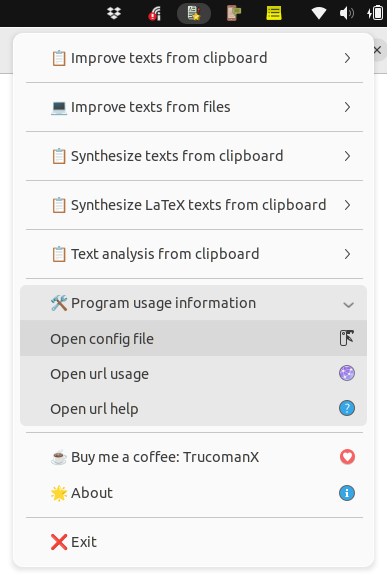
What does the program do?
Our software automatically reads the text copied to your clipboard, sends it to a large language model (LLM), and returns an improved version. You can easily compare the changes with the original text using Meld, giving you full control over the suggested edits.
How does it make your life easier?
- Automatic text enhancement: Adjusts tone, fluency, and structure.
- Focus on scientific writing: Helps create clearer, more concise, and objective texts following academic standards.
- Seamless integration: Simply copy a piece of text to receive instant suggestions.
- Efficient comparison: View all changes side by side before deciding which to apply.
If you write scientific papers, reports, or any other type of formal text, this tool will be your ally in improving the quality of your work with minimal effort.
Try it now and transform your writing!
Installing and using
The procedure for installing and using the program clipboard-text-correction-indicator can be seen in the following links.
- Gnu/Linux: doc/INSTALL.lin.md
- Windows: doc/INSTALL.win.md
Buy me a coffee
If you find this tool useful and would like to support its development, you can buy me a coffee! Your donations help keep the project running and improve future updates.
License
This project is licensed under the GPLv3 License.
More information
More information can be found in doc directory.
Release history Release notifications | RSS feed


Download files
Download the file for your platform. If you're not sure which to choose, learn more about installing packages.
Source Distribution
Built Distribution
Filter files by name, interpreter, ABI, and platform.
If you're not sure about the file name format, learn more about wheel file names.
Copy a direct link to the current filters
File details
Details for the file clipboard_text_correction-0.2.23.tar.gz.
File metadata
- Download URL: clipboard_text_correction-0.2.23.tar.gz
- Upload date:
- Size: 64.9 kB
- Tags: Source
- Uploaded using Trusted Publishing? No
- Uploaded via: twine/6.2.0 CPython/3.10.12
File hashes
| Algorithm | Hash digest | |
|---|---|---|
| SHA256 |
9f8861b0e32f0d8adc438fcdfd5d7b75b55cee90470466084eca99c4a8246db5
|
|
| MD5 |
063be2e3aef698f26edb0c5da7485618
|
|
| BLAKE2b-256 |
7a23567156d347c26e58ed5ebef4c5918592beeff67ad3d13859a4c5d8d40dc3
|
File details
Details for the file clipboard_text_correction-0.2.23-py3-none-any.whl.
File metadata
- Download URL: clipboard_text_correction-0.2.23-py3-none-any.whl
- Upload date:
- Size: 65.7 kB
- Tags: Python 3
- Uploaded using Trusted Publishing? No
- Uploaded via: twine/6.2.0 CPython/3.10.12
File hashes
| Algorithm | Hash digest | |
|---|---|---|
| SHA256 |
b93ba76cc42696264405a4062b5a36102bd110f85fce94a4347e973f9f5f4933
|
|
| MD5 |
5a70f504cdbf6451d36b9971d21f3773
|
|
| BLAKE2b-256 |
be355d200af040c870a5c9acf4cc8bef05f3f7ab857f7b84f2b9b233e061247c
|






