

Terminal-native typed clipboard.




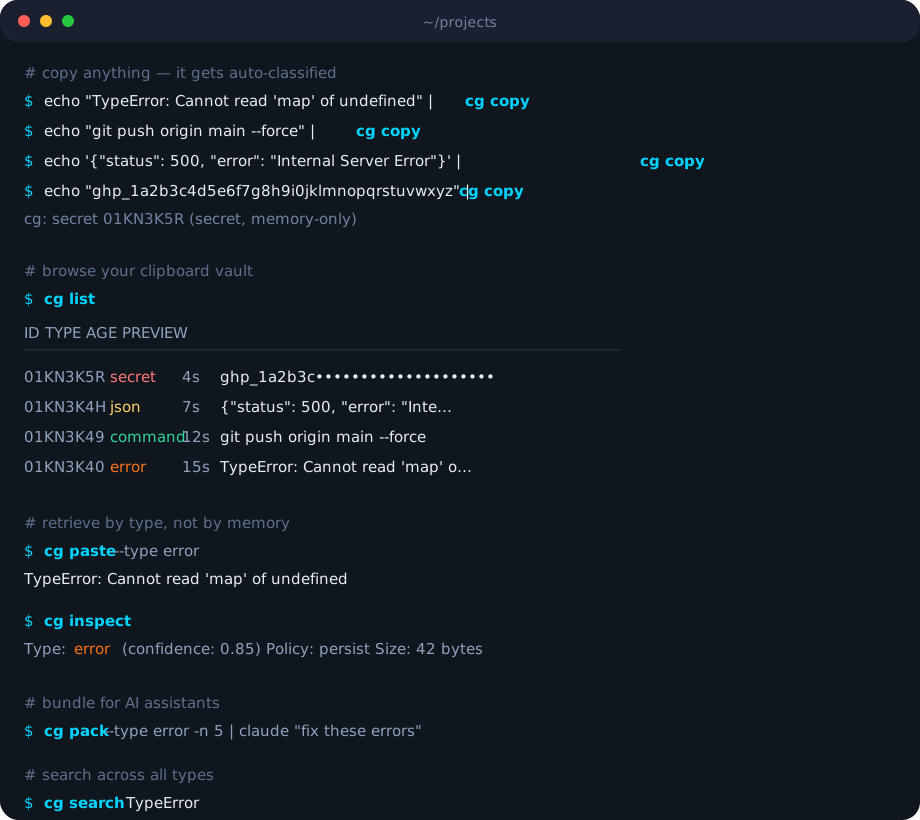
Copy. Classify. Retrieve.
echo "TypeError: x is undefined" | cg copy         # auto-classified as 'error'
echo "git push origin main" | cg copy -v            # cg: command 01KN3K4Q (confidence: 0.80)
echo "sk_live_abc123secret" | cg copy               # cg: secret 01KN3K5R (secret, memory-only)
cg list                                              # see your typed clipboard history
cg paste -t error                                    # get exactly what you need
cg pack -t error -n 5 | claude "fix these"           # bundle errors for AI
No more losing that error trace you copied 5 minutes ago. No more scrolling through clipboard history hoping to find the right thing. Clip Gate auto-classifies everything you copy into developer-meaningful types and lets you retrieve by type, not by order.
Why?
Your clipboard holds one thing. You copy dozens per session — errors get overwritten by paths, commands vanish, that stack trace from 3 minutes ago is gone forever.
Clipboard history tools exist, but they show you a flat list sorted by time. You need clipboard intelligence — knowing what each item is and retrieving by type. And when you're working with AI assistants, instead of copy-pasting errors one by one, cg pack bundles them with metadata and pipes directly to Claude, ChatGPT, or Cursor.
Install
Quick install (macOS & Linux)
curl -fsSL https://clipgate.github.io/install.sh | sh
PyPI (any platform with Python)
pip install clipgate
No Rust toolchain needed. Installs the cg binary on your PATH. Works on macOS, Linux, and Windows.
Homebrew (macOS & Linux)
brew install clipgate/tap/cg
Manual download
Use the official Release Notes page for versioned binaries and checksums.
Development build (internal)
This repo is private. For internal development or packaging work:
cargo build --release
# Binary at target/release/cg
Content Types
Clip Gate detects 13 types automatically, ordered by classification priority:
| Type | Example | Detection |
|---|---|---|
secret |
sk_live_1234567890abcdefghij |
15 exact patterns (AWS, GitHub, Stripe, etc.) + Shannon entropy ≥ 4.5 |
error |
TypeError: Cannot read property 'x' |
Stack traces, error prefixes, traceback keywords |
sha |
a1b2c3d4e5f6... (40+ hex chars) |
Git SHAs, SHA-256/512 checksums |
diff |
diff --git a/main.rs b/main.rs |
Git diffs, unified diff format, hunk headers (@@) |
path |
/home/user/project/src/main.rs |
Absolute paths, relative (./), home (~/) |
json |
{"status": "ok", "count": 42} |
Valid JSON objects and arrays |
url |
https://github.com/clip-gate |
HTTP/HTTPS URLs, localhost:port, www.* domains |
sql |
SELECT id FROM users WHERE active = true |
SQL keywords (SELECT, INSERT, UPDATE, DELETE, JOIN, etc.) |
ip |
192.168.1.1:8080 |
IPv4/IPv6 addresses with optional port and CIDR notation |
env |
DATABASE_URL=postgres://localhost/db |
KEY=VALUE pairs in UPPER_SNAKE_CASE, export statements |
docker |
FROM rust:1.75-slim |
Dockerfile instructions (FROM, RUN, COPY, etc.) and docker CLI commands |
command |
cargo build --release |
Shell syntax: pipes, flags, &&, sudo, common CLIs |
text |
everything else | Default fallback |
When multiple patterns match, the highest-priority type wins. Each classification includes a confidence score from 0.0 to 1.0.
Secrets are automatically detected, stored in memory only (never written to SQLite), and expire after 5 minutes.
Commands
cg copy
Store text and auto-classify it.
echo "some text" | cg copy                  # pipe from stdin
cg copy "literal text here"                  # pass as argument
cg copy --from-clipboard                     # read from system clipboard
cg copy -t command -l "deploy"               # override type, add label
cg copy --ttl 60                             # auto-expire after 60 seconds
cg copy --no-persist                         # memory-only (like secrets)
cg copy --policy memory                      # explicit storage policy
cg copy -q                                   # suppress stderr output
| Flag | Description |
|---|---|
-t, --type |
Override auto-classification |
-l, --label |
Attach a human-readable label |
--from-clipboard |
Read from system clipboard instead of stdin/arg |
--ttl |
Time-to-live in seconds |
--no-persist |
Store in memory only, skip SQLite |
--policy |
Storage policy: persist, memory, or expire |
By default, cg copy prints a one-line confirmation to stderr (e.g., cg: error 01KN3K4Q). Use --quiet for silence, --verbose for full detail.
cg paste
Retrieve an item by type, label, or ID.
cg paste                                     # most recent item (any type)
cg paste -t error                            # most recent error
cg paste -t sha -n 3                         # third most recent SHA
cg paste -i 01KN3K4Q                         # by exact ULID
cg paste -l "deploy"                         # by label
cg paste --secret                            # include secrets in results
cg paste --to-clipboard                      # send to system clipboard
cg paste --with-metadata                     # include type, confidence, timestamp
cg paste --confirm                           # prompt before pasting secrets
| Flag | Description |
|---|---|
-t, --type |
Filter by content type |
-l, --label |
Filter by label |
-i, --id |
Retrieve by exact ULID |
-n, --nth |
Nth most recent match (default: 1) |
--secret |
Include secret-type items |
--confirm |
Interactive confirmation for secrets |
--to-clipboard |
Write result to system clipboard |
--with-metadata |
Output type, confidence, timestamps |
Piping: cg paste outputs to stdout, so pipe to commands that read stdin — cat, pbcopy, grep, wc, xargs, etc. Note: echo does not read stdin, so cg paste | echo won't work — use cg paste | cat instead.
cg list
Show clipboard history as a table.
cg list                                      # recent items, default limit
cg list -t error                             # only errors
cg list -l 50                                # last 50 items
cg list --all                                # everything, no limit
cg list --plain                              # no box-drawing, plain text
cg list -f json                              # JSON output
| Flag | Description |
|---|---|
-t, --type |
Filter by content type |
-l, --limit |
Max items to show |
--all |
Show all items (no limit) |
--plain |
Plain text output (no table borders) |
-f, --format |
Output format: table, json, plain |
cg search
Full-text search across clipboard history.
cg search "TypeError"                        # search by keyword
cg search "deploy" -t command                # search within type
cg search "main.rs" -l 5                     # limit results
| Flag | Description |
|---|---|
-t, --type |
Restrict search to a content type |
-l, --limit |
Max results to return |
cg pack
Bundle clipboard items into AI-ready context. The -t flag is repeatable.
cg pack -t error -n 3                        # last 3 errors, text format
cg pack -t error -n 5 | claude "fix"         # pipe to Claude
cg pack -t error -t command -n 10            # errors + commands together
cg pack -f json | jq .                       # structured JSON output
cg pack -f markdown >> issue.md              # for GitHub issues
cg pack --no-header                          # skip the metadata header
cg pack --reverse                            # oldest first
| Flag | Description |
|---|---|
-t, --type |
Content type(s) to include (repeatable) |
-n, --count |
Number of items to pack |
-f, --format |
Output format: text, json, markdown |
--header / --no-header |
Include/exclude metadata header |
--reverse |
Reverse chronological order |
cg inspect
Show how an item was classified — the full breakdown of candidates and scores.
cg inspect -i 01KN3K4Q                       # inspect by ID
cg inspect -t error                          # inspect most recent error
| Flag | Description |
|---|---|
-i, --id |
Item ULID to inspect |
-t, --type |
Inspect most recent item of this type |
cg get
Interactive fuzzy picker powered by fzf.
cg get                                       # pick from all items
cg get -t error                              # pick from errors only
cg get -l 20                                 # show last 20 items
| Flag | Description |
|---|---|
-t, --type |
Filter by content type |
-l, --limit |
Max items to show in picker |
Requires fzf to be installed. Run cg doctor to check.
cg clear
Delete items from history.
cg clear -n 2                                # delete 2nd most recent item
cg clear -n 1 -t error                       # delete the latest error
cg clear -t error                            # delete all errors
cg clear --older-than 7d                     # delete items older than 7 days
cg clear -i 01KN3K4Q                         # delete specific item
cg clear --confirm                           # prompt before deleting
| Flag | Description |
|---|---|
-n, --nth |
Delete the Nth most recent item (1 = latest) |
-t, --type |
Delete all items of this type |
--older-than |
Delete items older than duration (e.g., 7d, 24h) |
-i, --id |
Delete specific item by ULID |
--confirm |
Require confirmation before deleting |
cg watch
Start the background clipboard watcher. Polls the system clipboard and auto-classifies new content.
cg watch                                     # foreground mode (Ctrl+C to stop)
cg watch --daemon                            # background daemon
cg watch --status                            # check if watcher is running
cg watch --stop                              # stop the daemon
| Flag | Description |
|---|---|
--daemon |
Run in background |
--status |
Check daemon status via PID file |
--stop |
Stop running daemon (SIGTERM) |
The watcher polls every 500ms (configurable), deduplicates via SHA-256 hashing, debounces at 150ms, and stores items through the full classify → guard → store pipeline.
cg config
View or modify configuration.
cg config show                               # print full config
cg config get display.verbose                # get a specific value
cg config set display.verbose true           # always show verbose output
cg config set display.quiet true             # suppress output by default
cg config set display.color false            # disable colors
cg config set history.max_items 10000        # keep more history
cg config set secrets.ttl_seconds 600        # secrets expire in 10 min
| Setting | Values | Description |
|---|---|---|
display.verbose |
true/false | Default verbose mode (overridden by -v/-q flags) |
display.quiet |
true/false | Default quiet mode (overridden by -v/-q flags) |
display.color |
true/false | Enable/disable colored output |
history.max_items |
100–50000 | Maximum items in history |
secrets.ttl_seconds |
number | Secret auto-expire time in seconds |
cg mcp
Start the MCP (Model Context Protocol) server for AI tool integration.
cg mcp # starts on stdio
Exposes 6 tools over JSON-RPC 2.0 via stdio: clipboard_get_latest, clipboard_get_by_type, clipboard_list, clipboard_list_types, clipboard_search, clipboard_pack. Compatible with Claude Code, Cursor, and any MCP-aware client.
cg shell-init
Generate shell aliases and helper functions.
eval "$(cg shell-init)"                      # auto-detect shell
eval "$(cg shell-init zsh)"                  # explicit shell
Add to your .zshrc, .bashrc, or config.fish for persistent aliases.
cg completions
Generate shell completion scripts for tab-completion of commands, flags, and arguments.
cg completions bash > ~/.bash_completion.d/cg        # Bash
cg completions zsh  > ~/.zfunc/_cg                    # Zsh
cg completions fish > ~/.config/fish/completions/cg.fish  # Fish
cg completions powershell > _cg.ps1                   # PowerShell
After generating, reload your shell or source the file. For Zsh, ensure ~/.zfunc is in your fpath:
# Add to .zshrc before compinit
fpath=(~/.zfunc $fpath)
autoload -Uz compinit && compinit
cg doctor
Run 7 system health checks.
cg doctor
Checks: clipboard adapter availability, SQLite database connectivity, config file validity, fzf installation, shell environment, secret pattern count, and watcher daemon status. Each check reports [ok], [warn], or [FAIL].
cg push
Push a clipboard item onto a named stack (LIFO). Save context before switching tasks.
cg push                                      # push latest item → default stack
cg push -s deploy                            # push onto named stack
cg push -t error                             # push latest error
cg push -i 01KN3K4Q                          # push specific item by ID
| Flag | Description |
|---|---|
-s, --stack |
Stack name (default: default) |
-t, --type |
Push latest item of this type |
-i, --id |
Push specific item by ULID |
cg pop
Pop an item from a named stack. Restores saved context.
cg pop                                       # pop from default stack
cg pop -s deploy                             # pop from named stack
cg pop --peek                                # view top item without removing
cg pop --all                                 # pop all items from stack
cg pop --to-clipboard                        # write popped item to system clipboard
| Flag | Description |
|---|---|
-s, --stack |
Stack name (default: default) |
--peek |
View top item without removing it |
--all |
Pop all items |
--to-clipboard |
Write result to system clipboard |
cg stack
Manage named stacks.
cg stack list                                # show all stacks with item counts
cg stack clear deploy                        # clear a named stack
cg version
Print version with logo.
cg version
Global Flags
These flags apply to every command:
| Flag | Description |
|---|---|
--config |
Path to config file (overrides default) |
--db |
Path to SQLite database (overrides default) |
-q, --quiet |
Suppress all non-essential output |
-v, --verbose |
Show detailed output with confidence scores |
--no-color |
Disable colored output |
Configuration
Zero-config by default. Optional config at ~/.config/clip-gate/config.yml (respects XDG_CONFIG_HOME):
version: 1

history:
  max_items: 5000           # 100–50,000
  max_age_days: 30          # 1–365
  max_size_mb: 50           # 10–500
  db_path: null             # override SQLite location
  dedup_window_sec: 300     # deduplication window

watch:
  enabled: false
  debounce_ms: 150
  poll_interval_ms: 500

secrets:
  auto_detect: true
  store: false              # if true, secrets persist to disk (dangerous)
  ttl_seconds: 300          # auto-expire after 5 minutes
  warn_on_paste: true
  patterns: []              # user-defined secret patterns

classifier:
  fallback_threshold: 0.3   # below this → 'text'
  secret_threshold: 0.7     # above this → 'secret'
  custom_types: {}          # reserved for extensibility

display:
  color: true
  preview_chars: 80
  time_format: "relative"
  verbose: false            # default verbose mode
  quiet: false              # default quiet mode

fzf:
  enabled: true
  preview: true
  height: "40%"

mcp:
  enabled: false
  socket_path: null
Shell Integration
eval "$(cg shell-init)" # add to .zshrc / .bashrc / config.fish
Aliases:
| Alias | Command | What it does |
|---|---|---|
cgc |
cg copy |
Quick copy |
cgp |
cg paste |
Quick paste |
cge |
cg paste -t error |
Paste latest error |
cgf |
cg paste -t path |
Paste latest path |
cgs |
cg paste -t sha |
Paste latest SHA |
cgl |
cg list |
List history |
cgg |
cg get |
Interactive fzf picker |
Helper functions:
# Run a command and auto-capture its output to clipboard
cgr cargo test              # runs cargo test, pipes output to cg copy

# Pack items and copy the bundle to system clipboard
cgpack -t error -n 3        # packs 3 errors, sends to pbcopy/xclip
AI Integration
Context Packing
Bundle clipboard items into AI-ready context — pipe directly to Claude, ChatGPT, or Aider:
cg pack -t error -n 3                                # last 3 errors, text format
cg pack -t error -n 5 | claude "fix these"           # pipe to Claude Code
cg pack -t error -f json | jq .                      # structured output
cg pack -t error -f markdown >> issue.md             # for GitHub issues
cg pack -t error -t command -n 10                    # multiple types
MCP Server
For AI tools that support Model Context Protocol (Claude Code, Cursor):
cg mcp # starts MCP server on stdio
Your AI assistant gets direct access to 6 tools:
| MCP Tool | Description |
|---|---|
clipboard_get_latest |
Most recent item of any type |
clipboard_get_by_type |
Most recent item of a specific type |
clipboard_list |
List items with optional type filter and limit |
clipboard_list_types |
Statistics per type (count, age) |
clipboard_search |
Full-text search with optional type filter |
clipboard_pack |
Bundle items for export |
1 maintainer

Metadata
1 maintainer
Release files for clipgate 0.1.4
For a detailed explanation of source distributions (sdists) and built distributions (wheels), please see the package formats documentation.
Source distribution (sdist)
| File | Size | Uploaded | |
|---|---|---|---|
| clipgate-0.1.4.tar.gz | 90.7 kB | Details |
Built distributions (wheels)
| File | Reset | |||
|---|---|---|---|---|
| clipgate-0.1.4-py3-none-win_amd64.whl | Python 3 | none | Windows x86-64 | Details |
| clipgate-0.1.4-py3-none-manylinux_2_17_x86_64.manylinux2014_x86_64.whl | Python 3 | none | Linux glibc 2.17+ x86-64 | Details |
| clipgate-0.1.4-py3-none-manylinux_2_17_aarch64.manylinux2014_aarch64.whl | Python 3 | none | Linux glibc 2.17+ ARM64 | Details |
| clipgate-0.1.4-py3-none-macosx_11_0_arm64.whl | Python 3 | none | macOS 11.0+ ARM64 | Details |
| clipgate-0.1.4-py3-none-macosx_10_12_x86_64.whl | Python 3 | none | macOS 10.12+ x86-64 | Details |
Total release size: 13.1 MB
Release files / clipgate-0.1.4.tar.gz
| Download URL | clipgate-0.1.4.tar.gz |
|---|---|
| Size | 90.7 kB |
| Tags | Source |
|
SHA-256 checksum How to use checksums |
1bc6a324408d9abe34544d097fa2cae51aa20eee5a49a3d25f9782e28c690da0
|
|
BLAKE2b-256 checksum How to use checksums |
91f765fbed628d92e801e2cbe7ceedc190930e9a3f1d807a431a532f6dd1a670
|
| Upload date | |
|
Uploaded using Trusted Publishing? What is trusted publishing? |
No |
| Uploaded via |
maturin/1.12.6
|
Release files / clipgate-0.1.4-py3-none-win_amd64.whl
| Download URL | clipgate-0.1.4-py3-none-win_amd64.whl |
|---|---|
| Size | 2.6 MB |
| Tags | Python 3 Windows x86-64 |
|
SHA-256 checksum How to use checksums |
72026ce8f0b042b9ecc90c99588ee7adfb009a763d57eaeb84137ddc0173ed87
|
|
BLAKE2b-256 checksum How to use checksums |
6a49664b32a7944ab787496e2cdb63b4295ae2fc30d8a34436a2bd86d626fd8f
|
| Upload date | |
|
Uploaded using Trusted Publishing? What is trusted publishing? |
No |
| Uploaded via |
maturin/1.12.6
|
Release files / clipgate-0.1.4-py3-none-manylinux_2_17_x86_64.manylinux2014_x86_64.whl
| Download URL | clipgate-0.1.4-py3-none-manylinux_2_17_x86_64.manylinux2014_x86_64.whl |
|---|---|
| Size | 2.7 MB |
| Tags | Linux glibc 2.17+ x86-64 Python 3 |
|
SHA-256 checksum How to use checksums |
d914b6eb13079ea1239051f5986f3867c3803a69ebb9a4603c18119cab11b892
|
|
BLAKE2b-256 checksum How to use checksums |
9249846013e0811ee04b1e472382bfbbae39b8a7a2bc0b5936587727cb3ea0af
|
| Upload date | |
|
Uploaded using Trusted Publishing? What is trusted publishing? |
No |
| Uploaded via |
maturin/1.12.6
|
Release files / clipgate-0.1.4-py3-none-manylinux_2_17_aarch64.manylinux2014_aarch64.whl
| Download URL | clipgate-0.1.4-py3-none-manylinux_2_17_aarch64.manylinux2014_aarch64.whl |
|---|---|
| Size | 2.5 MB |
| Tags | Linux glibc 2.17+ ARM64 Python 3 |
|
SHA-256 checksum How to use checksums |
dd6b8068d91503382d5e0c599a877e20f2a3e843cc082c96dd10fae52db78114
|
|
BLAKE2b-256 checksum How to use checksums |
ad981e26dc0ea59c9beae294379a4348b0bb6fd7cbb516c2306b8cd5fe742406
|
| Upload date | |
|
Uploaded using Trusted Publishing? What is trusted publishing? |
No |
| Uploaded via |
maturin/1.12.6
|
Release files / clipgate-0.1.4-py3-none-macosx_11_0_arm64.whl
| Download URL | clipgate-0.1.4-py3-none-macosx_11_0_arm64.whl |
|---|---|
| Size | 2.5 MB |
| Tags | Python 3 macOS 11.0+ ARM64 |
|
SHA-256 checksum How to use checksums |
810e3e9547077c4a710182b5a3b923cb727e5d75131f09c92d9b0c07d31d3877
|
|
BLAKE2b-256 checksum How to use checksums |
212da8dffff23058883ec9634636105ef97ea726208d473b6170470e5a43497a
|
| Upload date | |
|
Uploaded using Trusted Publishing? What is trusted publishing? |
No |
| Uploaded via |
maturin/1.12.6
|
Release files / clipgate-0.1.4-py3-none-macosx_10_12_x86_64.whl
| Download URL | clipgate-0.1.4-py3-none-macosx_10_12_x86_64.whl |
|---|---|
| Size | 2.7 MB |
| Tags | Python 3 macOS 10.12+ x86-64 |
|
SHA-256 checksum How to use checksums |
22050bc063f12c451c21bba3d2b3a32dc7d614c866f62f4ae8e8378db0330557
|
|
BLAKE2b-256 checksum How to use checksums |
75f204e8600922d41786df3dc457867a52658958707270b06090be40a2ea626d
|
| Upload date | |
|
Uploaded using Trusted Publishing? What is trusted publishing? |
No |
| Uploaded via |
maturin/1.12.6
|













