
Terminal-native typed clipboard

Project description

Terminal-native typed clipboard.




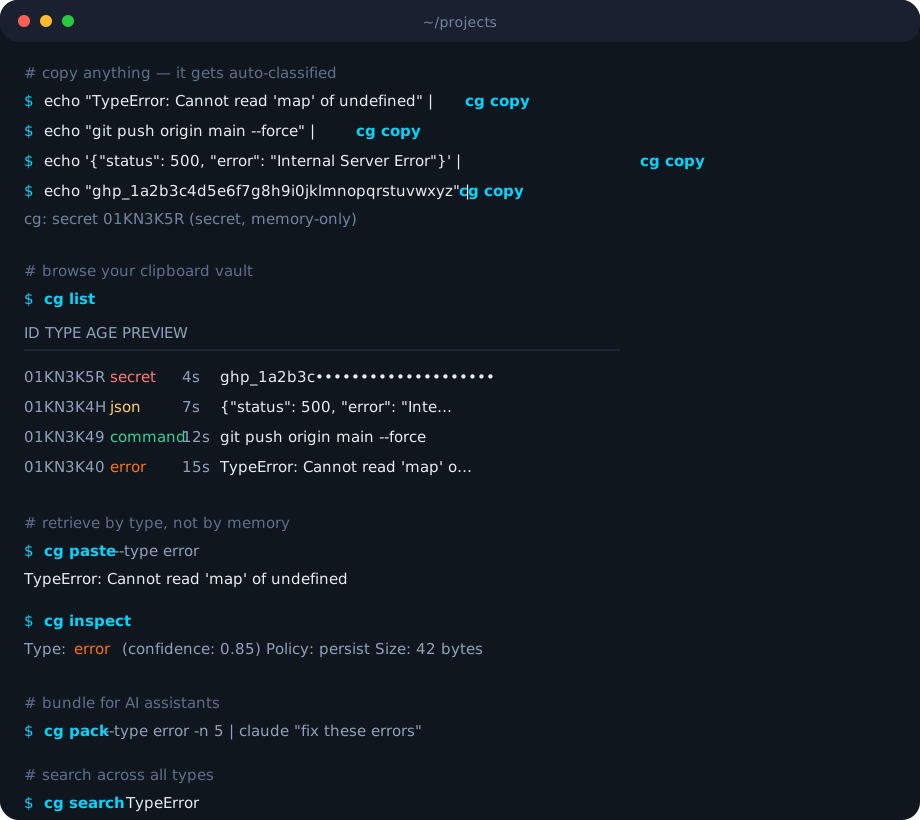
Copy. Classify. Retrieve.
echo "TypeError: x is undefined" | cg copy         # auto-classified as 'error'
echo "git push origin main" | cg copy -v            # cg: command 01KN3K4Q (confidence: 0.80)
echo "sk_live_abc123secret" | cg copy               # cg: secret 01KN3K5R (secret, memory-only)
cg list                                              # see your typed clipboard history
cg paste -t error                                    # get exactly what you need
cg pack -t error -n 5 | claude "fix these"           # bundle errors for AI
No more losing that error trace you copied 5 minutes ago. No more scrolling through clipboard history hoping to find the right thing. Clip Gate auto-classifies everything you copy into developer-meaningful types and lets you retrieve by type, not by order.
Why?
Your clipboard holds one thing. You copy dozens per session — errors get overwritten by paths, commands vanish, that stack trace from 3 minutes ago is gone forever.
Clipboard history tools exist, but they show you a flat list sorted by time. You need clipboard intelligence — knowing what each item is and retrieving by type. And when you're working with AI assistants, instead of copy-pasting errors one by one, cg pack bundles them with metadata and pipes directly to Claude, ChatGPT, or Cursor.
Install
Quick install (macOS & Linux)
curl -fsSL https://clipgate.github.io/install.sh | sh
PyPI (any platform with Python)
pip install clipgate
No Rust toolchain needed. Installs the cg binary on your PATH. Works on macOS, Linux, and Windows.
Homebrew (macOS & Linux)
brew install clipgate/tap/cg
Manual download
Use the official Release Notes page for versioned binaries and checksums.
Development build (internal)
This repo is private. For internal development or packaging work:
cargo build --release
# Binary at target/release/cg
Content Types
Clip Gate detects 13 types automatically, ordered by classification priority:
| Type | Example | Detection |
|---|---|---|
secret |
sk_live_1234567890abcdefghij |
15 exact patterns (AWS, GitHub, Stripe, etc.) + Shannon entropy ≥ 4.5 |
error |
TypeError: Cannot read property 'x' |
Stack traces, error prefixes, traceback keywords |
sha |
a1b2c3d4e5f6... (40+ hex chars) |
Git SHAs, SHA-256/512 checksums |
diff |
diff --git a/main.rs b/main.rs |
Git diffs, unified diff format, hunk headers (@@) |
path |
/home/user/project/src/main.rs |
Absolute paths, relative (./), home (~/) |
json |
{"status": "ok", "count": 42} |
Valid JSON objects and arrays |
url |
https://github.com/clip-gate |
HTTP/HTTPS URLs, localhost:port, www.* domains |
sql |
SELECT id FROM users WHERE active = true |
SQL keywords (SELECT, INSERT, UPDATE, DELETE, JOIN, etc.) |
ip |
192.168.1.1:8080 |
IPv4/IPv6 addresses with optional port and CIDR notation |
env |
DATABASE_URL=postgres://localhost/db |
KEY=VALUE pairs in UPPER_SNAKE_CASE, export statements |
docker |
FROM rust:1.75-slim |
Dockerfile instructions (FROM, RUN, COPY, etc.) and docker CLI commands |
command |
cargo build --release |
Shell syntax: pipes, flags, &&, sudo, common CLIs |
text |
everything else | Default fallback |
When multiple patterns match, the highest-priority type wins. Each classification includes a confidence score from 0.0 to 1.0.
Secrets are automatically detected, stored in memory only (never written to SQLite), and expire after 5 minutes.
Commands
cg copy
Store text and auto-classify it.
echo "some text" | cg copy                  # pipe from stdin
cg copy "literal text here"                  # pass as argument
cg copy --from-clipboard                     # read from system clipboard
cg copy -t command -l "deploy"               # override type, add label
cg copy --ttl 60                             # auto-expire after 60 seconds
cg copy --no-persist                         # memory-only (like secrets)
cg copy --policy memory                      # explicit storage policy
cg copy -q                                   # suppress stderr output
| Flag | Description |
|---|---|
-t, --type |
Override auto-classification |
-l, --label |
Attach a human-readable label |
--from-clipboard |
Read from system clipboard instead of stdin/arg |
--ttl |
Time-to-live in seconds |
--no-persist |
Store in memory only, skip SQLite |
--policy |
Storage policy: persist, memory, or expire |
By default, cg copy prints a one-line confirmation to stderr (e.g., cg: error 01KN3K4Q). Use --quiet for silence, --verbose for full detail.
cg paste
Retrieve an item by type, label, or ID.
cg paste                                     # most recent item (any type)
cg paste -t error                            # most recent error
cg paste -t sha -n 3                         # third most recent SHA
cg paste -i 01KN3K4Q                         # by exact ULID
cg paste -l "deploy"                         # by label
cg paste --secret                            # include secrets in results
cg paste --to-clipboard                      # send to system clipboard
cg paste --with-metadata                     # include type, confidence, timestamp
cg paste --confirm                           # prompt before pasting secrets
| Flag | Description |
|---|---|
-t, --type |
Filter by content type |
-l, --label |
Filter by label |
-i, --id |
Retrieve by exact ULID |
-n, --nth |
Nth most recent match (default: 1) |
--secret |
Include secret-type items |
--confirm |
Interactive confirmation for secrets |
--to-clipboard |
Write result to system clipboard |
--with-metadata |
Output type, confidence, timestamps |
Piping: cg paste outputs to stdout, so pipe to commands that read stdin — cat, pbcopy, grep, wc, xargs, etc. Note: echo does not read stdin, so cg paste | echo won't work — use cg paste | cat instead.
cg list
Show clipboard history as a table.
cg list                                      # recent items, default limit
cg list -t error                             # only errors
cg list -l 50                                # last 50 items
cg list --all                                # everything, no limit
cg list --plain                              # no box-drawing, plain text
cg list -f json                              # JSON output
| Flag | Description |
|---|---|
-t, --type |
Filter by content type |
-l, --limit |
Max items to show |
--all |
Show all items (no limit) |
--plain |
Plain text output (no table borders) |
-f, --format |
Output format: table, json, plain |
cg search
Full-text search across clipboard history.
cg search "TypeError"                        # search by keyword
cg search "deploy" -t command                # search within type
cg search "main.rs" -l 5                     # limit results
| Flag | Description |
|---|---|
-t, --type |
Restrict search to a content type |
-l, --limit |
Max results to return |
cg pack
Bundle clipboard items into AI-ready context. The -t flag is repeatable.
cg pack -t error -n 3                        # last 3 errors, text format
cg pack -t error -n 5 | claude "fix"         # pipe to Claude
cg pack -t error -t command -n 10            # errors + commands together
cg pack -f json | jq .                       # structured JSON output
cg pack -f markdown >> issue.md              # for GitHub issues
cg pack --no-header                          # skip the metadata header
cg pack --reverse                            # oldest first
| Flag | Description |
|---|---|
-t, --type |
Content type(s) to include (repeatable) |
-n, --count |
Number of items to pack |
-f, --format |
Output format: text, json, markdown |
--header / --no-header |
Include/exclude metadata header |
--reverse |
Reverse chronological order |
cg inspect
Show how an item was classified — the full breakdown of candidates and scores.
cg inspect -i 01KN3K4Q                       # inspect by ID
cg inspect -t error                          # inspect most recent error
| Flag | Description |
|---|---|
-i, --id |
Item ULID to inspect |
-t, --type |
Inspect most recent item of this type |
cg get
Interactive fuzzy picker powered by fzf.
cg get                                       # pick from all items
cg get -t error                              # pick from errors only
cg get -l 20                                 # show last 20 items
| Flag | Description |
|---|---|
-t, --type |
Filter by content type |
-l, --limit |
Max items to show in picker |
Requires fzf to be installed. Run cg doctor to check.
cg clear
Delete items from history.
cg clear -n 2                                # delete 2nd most recent item
cg clear -n 1 -t error                       # delete the latest error
cg clear -t error                            # delete all errors
cg clear --older-than 7d                     # delete items older than 7 days
cg clear -i 01KN3K4Q                         # delete specific item
cg clear --confirm                           # prompt before deleting
| Flag | Description |
|---|---|
-n, --nth |
Delete the Nth most recent item (1 = latest) |
-t, --type |
Delete all items of this type |
--older-than |
Delete items older than duration (e.g., 7d, 24h) |
-i, --id |
Delete specific item by ULID |
--confirm |
Require confirmation before deleting |
cg watch
Start the background clipboard watcher. Polls the system clipboard and auto-classifies new content.
cg watch                                     # foreground mode (Ctrl+C to stop)
cg watch --daemon                            # background daemon
cg watch --status                            # check if watcher is running
cg watch --stop                              # stop the daemon
| Flag | Description |
|---|---|
--daemon |
Run in background |
--status |
Check daemon status via PID file |
--stop |
Stop running daemon (SIGTERM) |
The watcher polls every 500ms (configurable), deduplicates via SHA-256 hashing, debounces at 150ms, and stores items through the full classify → guard → store pipeline.
cg config
View or modify configuration.
cg config show                               # print full config
cg config get display.verbose                # get a specific value
cg config set display.verbose true           # always show verbose output
cg config set display.quiet true             # suppress output by default
cg config set display.color false            # disable colors
cg config set history.max_items 10000        # keep more history
cg config set secrets.ttl_seconds 600        # secrets expire in 10 min
| Setting | Values | Description |
|---|---|---|
display.verbose |
true/false | Default verbose mode (overridden by -v/-q flags) |
display.quiet |
true/false | Default quiet mode (overridden by -v/-q flags) |
display.color |
true/false | Enable/disable colored output |
history.max_items |
100–50000 | Maximum items in history |
secrets.ttl_seconds |
number | Secret auto-expire time in seconds |
cg mcp
Start the MCP (Model Context Protocol) server for AI tool integration.
cg mcp # starts on stdio
Exposes 6 tools over JSON-RPC 2.0 via stdio: clipboard_get_latest, clipboard_get_by_type, clipboard_list, clipboard_list_types, clipboard_search, clipboard_pack. Compatible with Claude Code, Cursor, and any MCP-aware client.
cg shell-init
Generate shell aliases and helper functions.
eval "$(cg shell-init)"                      # auto-detect shell
eval "$(cg shell-init zsh)"                  # explicit shell
Add to your .zshrc, .bashrc, or config.fish for persistent aliases.
cg completions
Generate shell completion scripts for tab-completion of commands, flags, and arguments.
cg completions bash > ~/.bash_completion.d/cg        # Bash
cg completions zsh  > ~/.zfunc/_cg                    # Zsh
cg completions fish > ~/.config/fish/completions/cg.fish  # Fish
cg completions powershell > _cg.ps1                   # PowerShell
After generating, reload your shell or source the file. For Zsh, ensure ~/.zfunc is in your fpath:
# Add to .zshrc before compinit
fpath=(~/.zfunc $fpath)
autoload -Uz compinit && compinit
cg doctor
Run 7 system health checks.
cg doctor
Checks: clipboard adapter availability, SQLite database connectivity, config file validity, fzf installation, shell environment, secret pattern count, and watcher daemon status. Each check reports [ok], [warn], or [FAIL].
cg push
Push a clipboard item onto a named stack (LIFO). Save context before switching tasks.
cg push                                      # push latest item → default stack
cg push -s deploy                            # push onto named stack
cg push -t error                             # push latest error
cg push -i 01KN3K4Q                          # push specific item by ID
| Flag | Description |
|---|---|
-s, --stack |
Stack name (default: default) |
-t, --type |
Push latest item of this type |
-i, --id |
Push specific item by ULID |
cg pop
Pop an item from a named stack. Restores saved context.
cg pop                                       # pop from default stack
cg pop -s deploy                             # pop from named stack
cg pop --peek                                # view top item without removing
cg pop --all                                 # pop all items from stack
cg pop --to-clipboard                        # write popped item to system clipboard
| Flag | Description |
|---|---|
-s, --stack |
Stack name (default: default) |
--peek |
View top item without removing it |
--all |
Pop all items |
--to-clipboard |
Write result to system clipboard |
cg stack
Manage named stacks.
cg stack list                                # show all stacks with item counts
cg stack clear deploy                        # clear a named stack
cg version
Print version with logo.
cg version
Global Flags
These flags apply to every command:
| Flag | Description |
|---|---|
--config |
Path to config file (overrides default) |
--db |
Path to SQLite database (overrides default) |
-q, --quiet |
Suppress all non-essential output |
-v, --verbose |
Show detailed output with confidence scores |
--no-color |
Disable colored output |
Configuration
Zero-config by default. Optional config at ~/.config/clip-gate/config.yml (respects XDG_CONFIG_HOME):
version: 1

history:
  max_items: 5000           # 100–50,000
  max_age_days: 30          # 1–365
  max_size_mb: 50           # 10–500
  db_path: null             # override SQLite location
  dedup_window_sec: 300     # deduplication window

watch:
  enabled: false
  debounce_ms: 150
  poll_interval_ms: 500

secrets:
  auto_detect: true
  store: false              # if true, secrets persist to disk (dangerous)
  ttl_seconds: 300          # auto-expire after 5 minutes
  warn_on_paste: true
  patterns: []              # user-defined secret patterns

classifier:
  fallback_threshold: 0.3   # below this → 'text'
  secret_threshold: 0.7     # above this → 'secret'
  custom_types: {}          # reserved for extensibility

display:
  color: true
  preview_chars: 80
  time_format: "relative"
  verbose: false            # default verbose mode
  quiet: false              # default quiet mode

fzf:
  enabled: true
  preview: true
  height: "40%"

mcp:
  enabled: false
  socket_path: null
Shell Integration
eval "$(cg shell-init)" # add to .zshrc / .bashrc / config.fish
Aliases:
| Alias | Command | What it does |
|---|---|---|
cgc |
cg copy |
Quick copy |
cgp |
cg paste |
Quick paste |
cge |
cg paste -t error |
Paste latest error |
cgf |
cg paste -t path |
Paste latest path |
cgs |
cg paste -t sha |
Paste latest SHA |
cgl |
cg list |
List history |
cgg |
cg get |
Interactive fzf picker |
Helper functions:
# Run a command and auto-capture its output to clipboard
cgr cargo test              # runs cargo test, pipes output to cg copy

# Pack items and copy the bundle to system clipboard
cgpack -t error -n 3        # packs 3 errors, sends to pbcopy/xclip
AI Integration
Context Packing
Bundle clipboard items into AI-ready context — pipe directly to Claude, ChatGPT, or Aider:
cg pack -t error -n 3                                # last 3 errors, text format
cg pack -t error -n 5 | claude "fix these"           # pipe to Claude Code
cg pack -t error -f json | jq .                      # structured output
cg pack -t error -f markdown >> issue.md             # for GitHub issues
cg pack -t error -t command -n 10                    # multiple types
MCP Server
For AI tools that support Model Context Protocol (Claude Code, Cursor):
cg mcp # starts MCP server on stdio
Your AI assistant gets direct access to 6 tools:
| MCP Tool | Description |
|---|---|
clipboard_get_latest |
Most recent item of any type |
clipboard_get_by_type |
Most recent item of a specific type |
clipboard_list |
List items with optional type filter and limit |
clipboard_list_types |
Statistics per type (count, age) |
clipboard_search |
Full-text search with optional type filter |
clipboard_pack |
Bundle items for export |
Release history Release notifications | RSS feed

Download files
Download the file for your platform. If you're not sure which to choose, learn more about installing packages.
Source Distribution
Built Distributions
Filter files by name, interpreter, ABI, and platform.
If you're not sure about the file name format, learn more about wheel file names.
Copy a direct link to the current filters
File details
Details for the file clipgate-0.1.4.tar.gz.
File metadata
- Download URL: clipgate-0.1.4.tar.gz
- Upload date:
- Size: 90.7 kB
- Tags: Source
- Uploaded using Trusted Publishing? No
- Uploaded via: maturin/1.12.6
File hashes
| Algorithm | Hash digest | |
|---|---|---|
| SHA256 |
1bc6a324408d9abe34544d097fa2cae51aa20eee5a49a3d25f9782e28c690da0
|
|
| MD5 |
c4d50ad9706853955ddb9f5bb9e28ced
|
|
| BLAKE2b-256 |
91f765fbed628d92e801e2cbe7ceedc190930e9a3f1d807a431a532f6dd1a670
|
File details
Details for the file clipgate-0.1.4-py3-none-win_amd64.whl.
File metadata
- Download URL: clipgate-0.1.4-py3-none-win_amd64.whl
- Upload date:
- Size: 2.6 MB
- Tags: Python 3, Windows x86-64
- Uploaded using Trusted Publishing? No
- Uploaded via: maturin/1.12.6
File hashes
| Algorithm | Hash digest | |
|---|---|---|
| SHA256 |
72026ce8f0b042b9ecc90c99588ee7adfb009a763d57eaeb84137ddc0173ed87
|
|
| MD5 |
a9684ffc9de9395d2a9526c28dccfada
|
|
| BLAKE2b-256 |
6a49664b32a7944ab787496e2cdb63b4295ae2fc30d8a34436a2bd86d626fd8f
|
File details
Details for the file clipgate-0.1.4-py3-none-manylinux_2_17_x86_64.manylinux2014_x86_64.whl.
File metadata
- Download URL: clipgate-0.1.4-py3-none-manylinux_2_17_x86_64.manylinux2014_x86_64.whl
- Upload date:
- Size: 2.7 MB
- Tags: Python 3, manylinux: glibc 2.17+ x86-64
- Uploaded using Trusted Publishing? No
- Uploaded via: maturin/1.12.6
File hashes
| Algorithm | Hash digest | |
|---|---|---|
| SHA256 |
d914b6eb13079ea1239051f5986f3867c3803a69ebb9a4603c18119cab11b892
|
|
| MD5 |
b1f0b9a745e09e9f12ca0897375fdb4c
|
|
| BLAKE2b-256 |
9249846013e0811ee04b1e472382bfbbae39b8a7a2bc0b5936587727cb3ea0af
|
File details
Details for the file clipgate-0.1.4-py3-none-manylinux_2_17_aarch64.manylinux2014_aarch64.whl.
File metadata
- Download URL: clipgate-0.1.4-py3-none-manylinux_2_17_aarch64.manylinux2014_aarch64.whl
- Upload date:
- Size: 2.5 MB
- Tags: Python 3, manylinux: glibc 2.17+ ARM64
- Uploaded using Trusted Publishing? No
- Uploaded via: maturin/1.12.6
File hashes
| Algorithm | Hash digest | |
|---|---|---|
| SHA256 |
dd6b8068d91503382d5e0c599a877e20f2a3e843cc082c96dd10fae52db78114
|
|
| MD5 |
f3a66f27c95d0d00b0f89275d3218b44
|
|
| BLAKE2b-256 |
ad981e26dc0ea59c9beae294379a4348b0bb6fd7cbb516c2306b8cd5fe742406
|
File details
Details for the file clipgate-0.1.4-py3-none-macosx_11_0_arm64.whl.
File metadata
- Download URL: clipgate-0.1.4-py3-none-macosx_11_0_arm64.whl
- Upload date:
- Size: 2.5 MB
- Tags: Python 3, macOS 11.0+ ARM64
- Uploaded using Trusted Publishing? No
- Uploaded via: maturin/1.12.6
File hashes
| Algorithm | Hash digest | |
|---|---|---|
| SHA256 |
810e3e9547077c4a710182b5a3b923cb727e5d75131f09c92d9b0c07d31d3877
|
|
| MD5 |
d5a03721eefa0ca1c00918a4307e341b
|
|
| BLAKE2b-256 |
212da8dffff23058883ec9634636105ef97ea726208d473b6170470e5a43497a
|
File details
Details for the file clipgate-0.1.4-py3-none-macosx_10_12_x86_64.whl.
File metadata
- Download URL: clipgate-0.1.4-py3-none-macosx_10_12_x86_64.whl
- Upload date:
- Size: 2.7 MB
- Tags: Python 3, macOS 10.12+ x86-64
- Uploaded using Trusted Publishing? No
- Uploaded via: maturin/1.12.6
File hashes
| Algorithm | Hash digest | |
|---|---|---|
| SHA256 |
22050bc063f12c451c21bba3d2b3a32dc7d614c866f62f4ae8e8378db0330557
|
|
| MD5 |
cdd84aa038f8750ed3f21ba70fc80f64
|
|
| BLAKE2b-256 |
75f204e8600922d41786df3dc457867a52658958707270b06090be40a2ea626d
|






