
cliptunnel-mcp
Operate locked-down remote machines through their clipboard, an HTTPS repeater, a WebSocket repeater, or Firebase — with multi-remote support, autonomous agents, clipboard preservation, agent heartbeat, and optional AES-256-GCM encryption.
What it does
cliptunnel-mcp turns a shared clipboard into a reliable control channel between machines. When a remote machine sits behind a Citrix session, a locked-down VDI, or any environment that blocks SSH, file transfer, and networking but still exposes a clipboard, ClipTunnel tunnels commands through that single slot and exposes them as Model Context Protocol tools.
v1.0.2 ships the CT3 wire protocol v3 with prefixed endpoint IDs (C/R + 7 hex), announce-based discovery, multi-controller awareness, an agent heartbeat that keeps the remote roster self-healing, clipboard preservation that restores the user's clipboard after every exchange, four transport options — clipboard (default), HTTPS repeater, WebSocket repeater, and Firebase Realtime Database — optional AES-256-GCM encryption that works with any transport, sanitized transport endpoint reporting in sysinfo, PowerShell shell execution on Windows, error responses that surface the agent's actual error output, and zombie job detection for commands whose clipboard response was lost.
The package ships four layers:
- Protocol — CT3 wire format with prefixed endpoint IDs (
C/R+ 7 hex), broadcast routing, heartbeat-based keepalive, announce-based discovery, and typed messages (command, response, error, ack, ping, announce). Optional AES-256-GCM encryption at the protocol level (CT3E|prefix) encrypts the payload while keeping the header plaintext for routing. - Endpoints —
Controller(operator side) with a remote + controller registry, and multipleAgentinstances (remote side), each with a unique prefixed ID. Both run background threads with ARQ retransmission, sequence-bound deduplication, and generation-safe lifecycle. - MCP server — a FastMCP application with 27 tools including shell, filesystem, binary transfer, sysinfo, remote agent management, connection listing, announce-based discovery, and remote install instructions.
- Transport layer — clipboard (default, backed by clipboard-event with user-clipboard preservation), HTTPS repeater (optional, with bearer auth), WebSocket repeater (optional, local or remote relay), or Firebase Realtime Database (optional, hosted slot with server timestamps). All implement the same
TransportandRevisionMonitorprotocols — the Controller and Agent are fully transport-agnostic. Encryption is handled at the protocol level, not the transport level.
Architecture
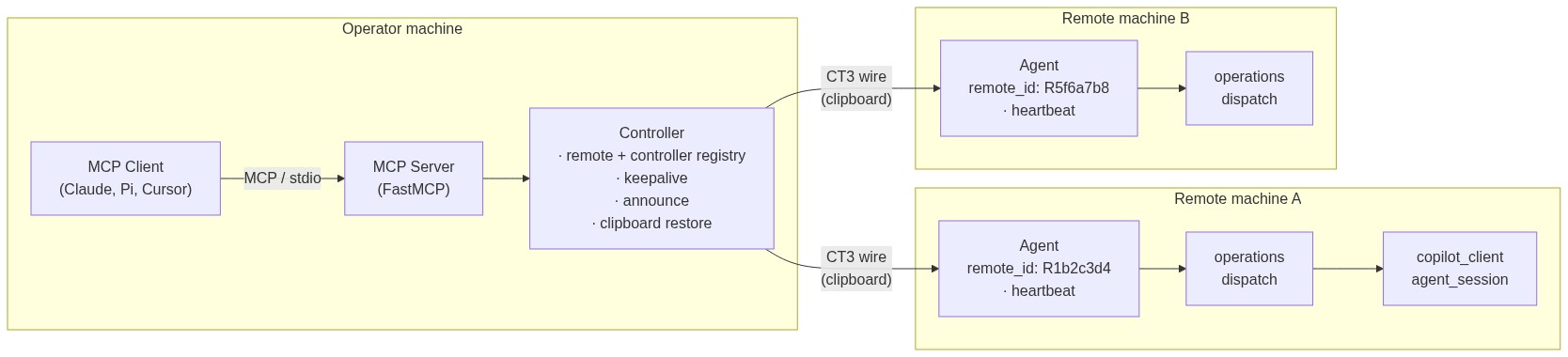
On startup each Agent generates a random prefixed ID (R + 7 hex), waits a random delay (0.1–4.0s), and sends its sysinfo as a registration response to the broadcast address — no Controller announce needed. The Controller announces later when the MCP server starts (or when discover() is called), which triggers agents to re-register. The Controller maintains a registry of all connected remotes and any other controllers it discovers. A keepalive thread marks remotes dead if no heartbeat is received within ~420s (3.5× the default heartbeat interval) — no pings are sent. Each Agent additionally runs a heartbeat thread that periodically re-sends its registration, so a lost announce response never leaves an agent invisible. After every exchange the Controller restores the user's clipboard content that was present before the protocol traffic (clipboard transport only — network transports do not touch the user's clipboard). The Agent also restores the user's clipboard after each registration, since registrations are fire-and-forget.
Wire format
CT3|<from>|<to>|<seq>|<type>|<payload>        (plaintext)
CT3E|<from>|<to>|<seq>|<type>|<payload>      (encrypted payload)
| Field | Value |
|---|---|
CT3/CT3E |
Protocol signature + version. CT3E indicates the payload is AES-256-GCM encrypted (header stays plaintext). |
from |
C + 7 hex (Controller) or R + 7 hex (remote ID, e.g. R1b2c3d4) |
to |
C + 7 hex (Controller), * (broadcast), or R + 7 hex (specific remote) |
seq |
Positive integer, monotonic per session (0 = registration/heartbeat) |
type |
C (command), R (response), E (error), A (ack), P (ping), N (announce) |
payload |
Base64-encoded UTF-8 (plaintext mode) or base64-encoded AES-256-GCM ciphertext (encrypted mode) |
Registration and announce flow
The Agent registers on startup without waiting for a Controller announce, and re-registers whenever it receives an ANNOUNCE from any Controller. The Controller announces when the MCP server starts (or when discover() is called manually).
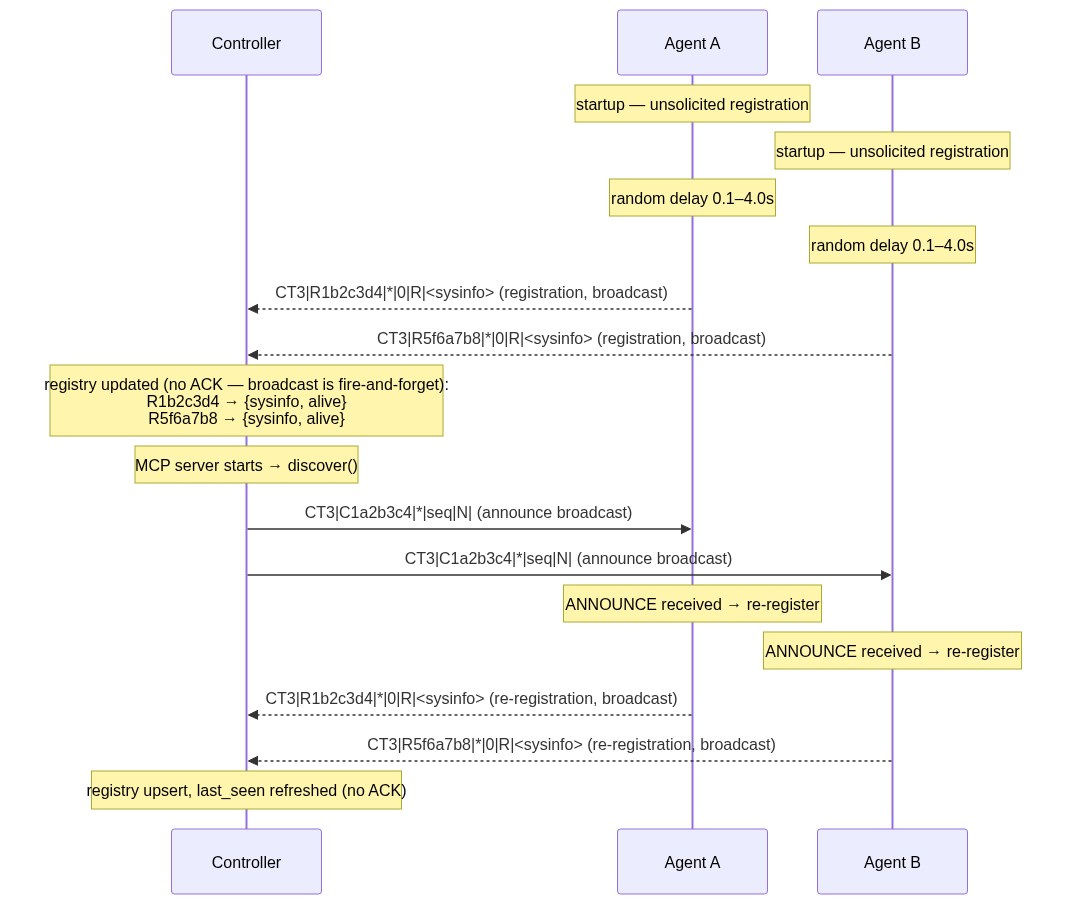
The initial registration is directed to the broadcast address (*) so all controllers on the shared channel receive it. When a Controller's ANNOUNCE arrives later, the Agent re-registers to ensure visibility. Because the clipboard is a single last-writer-wins slot, simultaneous registrations can collide and one agent's registration may be lost. The heartbeat below makes this self-healing: the missing agent re-registers on the next cycle.
Heartbeat
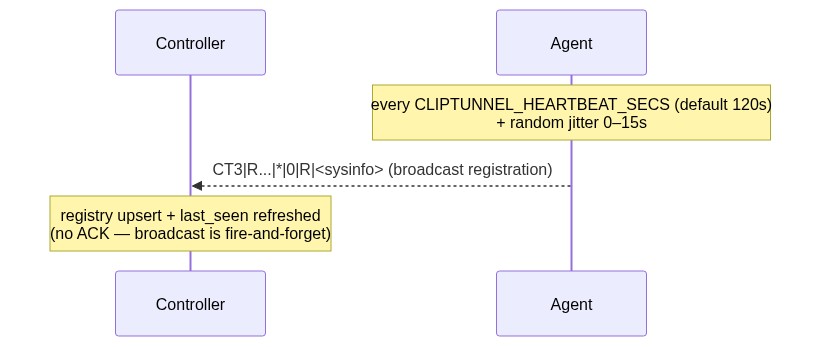
Each Agent runs a daemon thread that re-sends its registration (a RESPONSE with seq=0 carrying sysinfo) as a single broadcast to * on a configurable interval plus jitter, so every known controller on the shared channel receives it. The jitter prevents multiple agents sharing a channel from synchronizing their writes. A lost heartbeat is harmless — the next one arrives. The controller's existing registration upsert path consumes it with no protocol or controller changes, and no ACK is sent for broadcast registrations.
| Setting | Default | Effect |
|---|---|---|
CLIPTUNNEL_HEARTBEAT_SECS env var |
120 |
Interval in seconds. <= 0 disables the heartbeat. |
Agent(heartbeat_secs=...) |
None (resolves env var, then config file [heartbeat] interval_secs, then default) |
Programmatic override of the env var. |
Keepalive
The keepalive loop monitors the heartbeat-driven last_seen timestamp. It does not send pings — instead, it marks a remote dead if no heartbeat has been received within a dead threshold (3.5× the heartbeat interval, ~420s by default). Channel-level keepalive (WebSocket ping/pong, SSE) is handled by each transport independently.
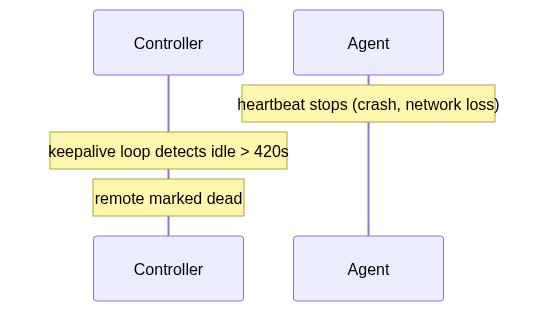
With the heartbeat active, the keepalive loop rarely fires — it only marks remotes that have stopped heartbeating for over 7 minutes. A remote that resumes heartbeating is picked up by the registration upsert path and returns to alive status.
Installation
pip install cliptunnel-mcp          # core + cliptunnel-agent binary
pip install cliptunnel-mcp[server]  # adds MCP server binary (mcp>=1.2,<2)
Dependencies: clipboard-event>=0.2.0 (cross-platform clipboard change notifications), cryptography>=42 (AES-256-GCM encryption), websockets>=12.0 (WebSocket transport), plus tomli on Python 3.10 only (TOML config file parsing; stdlib from 3.11).
| Binary | Extra needed | Purpose |
|---|---|---|
cliptunnel-agent |
(none) | Runs the Agent (clipboard, HTTPS, WebSocket, or Firebase transport). |
cliptunnel-mcp |
[server] |
Runs the MCP server over stdio. |
Quick start
Agent (remote machine)
cliptunnel-agent
Antivirus / EDR workaround (Windows): unsigned
.exeentry points may be quarantined. Usepython -minstead:python -m cliptunnel_mcp.agent # instead of cliptunnel-agent python -m cliptunnel_mcp.server # instead of cliptunnel-mcp
The Agent generates a random prefixed ID, registers with the Controller by sending its sysinfo, then watches the clipboard (or connects to the repeater / WebSocket repeater / Firebase RTDB if CLIPTUNNEL_TRANSPORT is https, websocket, or firebase) for commands. It uses clipboard-event for clipboard change detection (event-driven on Windows and Wayland, polling on macOS and X11). A heartbeat thread re-registers every CLIPTUNNEL_HEARTBEAT_SECS (default 120s) so the Controller never loses it; set the variable to 0 or a negative value to disable it.
Controller + MCP server (operator machine)
Configure your MCP client (Claude Desktop, Cursor, Pi, etc.):
{
  "mcpServers": {
    "cliptunnel": {
      "command": "cliptunnel-mcp",
      "args": []
    }
  }
}
The server broadcasts an announce on startup, discovers connected remotes and any other controllers, and maintains a live registry with heartbeat-based keepalive. When using the clipboard transport, it restores the user's clipboard content after every exchange.
Controller only (no MCP)
from cliptunnel_mcp.transport_factory import build_transport
from cliptunnel_mcp import Controller
import json

controller = Controller(transport=build_transport())

# Send to a specific remote
future = controller.send_command(json.dumps({"op": "shell", "cmd": "whoami"}), remote_id="R1b2c3d4")
result = future.result(timeout=30)

# List connected remotes
connections = controller.get_connections()
# {"remotes": {"R1b2c3d4": {"os": "Windows", "status": "alive", "last_seen": 1692634123.4, "last_seen_ago": 0.3, ...}}, "controllers": {...}}
Programmatic Agent
from cliptunnel_mcp.transport_factory import build_transport
from cliptunnel_mcp import Agent
from cliptunnel_mcp.operations import dispatch

agent = Agent(transport=build_transport(), handler=dispatch)
# Agent generates its own remote_id, registers automatically, and heartbeats every 120s.
# Disable the heartbeat with heartbeat_secs=0 (or CLIPTUNNEL_HEARTBEAT_SECS=0).
# Set CLIPTUNNEL_TRANSPORT=https (repeater), =websocket (WS repeater), or =firebase (Firebase RTDB)
# to use a network transport instead of the clipboard.
# Set CLIPTUNNEL_AES_KEY to enable AES-256-GCM encryption on any transport.
MCP tools
The server exposes 27 tools over stdio. Most tools accept an optional remote_id parameter to target a specific remote; if omitted, the Controller picks the first alive remote. The exceptions are remote_shell_result (targets a job by job_id), remote_connections, remote_discovery, and remote_install_instructions, which are global or job-scoped and do not take remote_id.
Shell & filesystem
| Tool | Description |
|---|---|
remote_shell |
Execute a shell command; auto-sync (10s) then async with job_id polling. |
remote_shell_result |
Poll for the result of an async shell command. |
remote_fs_read |
Read a file. |
remote_fs_write |
Create or overwrite a file (creates parent dirs). |
remote_fs_list |
List directory entries. |
remote_fs_delete |
Delete a file. |
remote_fs_replace |
Search-and-replace in a file (exact-once match). |
remote_fs_search |
Regex search in a file. |
remote_fs_find |
Glob-find files under a directory. |
remote_fs_bin_read |
Read a binary file as base64. |
remote_fs_bin_write |
Write base64 content to a binary file. |
Binary transfer
| Tool | Description |
|---|---|
remote_upload |
Upload a local file to a remote machine. |
remote_download |
Download a remote file to the local machine. |
System info
| Tool | Description |
|---|---|
remote_sysinfo |
Return system info: OS, Python, CPU, memory, disk, user, shell, agent auth, clipboard backend, transport backend, and sanitized transport endpoint. |
Remote agent (Copilot)
| Tool | Description |
|---|---|
remote_agent_login |
Start GitHub OAuth device flow for Copilot authentication. |
remote_agent_login_status |
Poll login state (idle/polling/done/error). |
remote_agent_models |
List available Copilot models on the remote. |
remote_agent_start |
Create an autonomous agent session (async). |
remote_agent_continue |
Send a message to an existing session. |
remote_agent_result |
Poll for the async result. |
remote_agent_status |
Query session status. |
remote_agent_list |
List active agent sessions. |
remote_agent_clear |
Clear session message history. |
remote_agent_end |
Destroy a session. |
Connections & discovery
| Tool | Description |
|---|---|
remote_connections |
List all connected remotes and controllers with sysinfo, transport_backend, transport_endpoint, last_seen (epoch), last_seen_ago (seconds), and status (alive/dead). |
remote_discovery |
Broadcast an ANNOUNCE to discover remotes and other controllers on the shared clipboard, repeater, WebSocket repeater, or Firebase RTDB. |
remote_install_instructions |
Return installation instructions for the remote agent based on the controller's active transport (clipboard, HTTPS, WebSocket, or Firebase). Includes env vars, repeater URL, bearer token, WebSocket URL, Firebase URL, and AES key (if configured). |
Operations
The dispatch handler supports these operations:
| Operation | Parameters | Returns |
|---|---|---|
shell |
cmd |
JSON: {stdout, stderr, returncode}. On Windows, prefers PowerShell (pwsh/powershell) and falls back to cmd.exe. |
fs.write |
path, content |
wrote N bytes to PATH |
fs.list |
path |
JSON: [{name, size, is_dir}] |
fs.delete |
path |
deleted PATH |
fs.replace |
path, old, new |
replaced 1 occurrence in {path} (exact-once) |
fs.search |
path, pattern |
JSON: [{line, content}] (regex) |
fs.find |
path, pattern |
JSON: [PATH, ...] (glob) |
fs.bin_read |
path |
JSON: {path, size, b64} |
fs.bin_write |
path, b64 |
wrote N bytes to PATH |
sysinfo |
— | JSON: full system info |
register |
— | JSON: sysinfo (alias for agent registration) |
agent |
action, ... |
JSON: session management (start, continue, result, status, clear, end, list, login, login_status) |
Remote agent
The Agent can run autonomous Copilot-powered agents on the remote machine. Each agent session:
- Uses the GitHub Copilot API with function calling (shell, fs_read, fs_write, fs_replace, fs_search, fs_list, fs_find)
- Runs asynchronously in a background thread
- Supports multi-turn conversations with
remote_agent_continue - Default model:
mai-code-1.1-flash
Authentication
# Via MCP tools:
remote_agent_login()          # Returns user_code + verification_uri
# Open https://github.com/login/device, enter the code
remote_agent_login_status()   # Returns {status: "done", token_saved: true}
Token resolution order: the [copilot].oauth_token key in the config file (see Configuration) takes precedence; the legacy .copilot_agent_token file on the remote machine is still supported as a fallback. The token lookup for the legacy file is relative to the agent process working directory, so launch the agent from a directory that contains (or can access) the token file.
API surface
Controller
The operator-side endpoint with remote + controller registry, keepalive, and clipboard restore.
| Method | Description |
|---|---|
send_command(command, remote_id=None) -> Future |
Queue a command to a specific remote (or first alive). |
send_command_sync(command, remote_id=None) -> str | None |
Send and block until response or timeout. |
get_connections() -> dict |
Return {"remotes": {...}, "controllers": {...}} with sysinfo, last_seen, last_seen_ago, and status. |
close() |
Stop background threads. Idempotent. |
Agent
The remote-side endpoint with auto-registration, heartbeat, and ping handling.
| Method | Description |
|---|---|
close() |
Stop this agent (heartbeat, reader, dispatcher, pool). Idempotent. |
send_registration(controller_id=None) |
Send sysinfo to a controller (or all known controllers). Also used by the heartbeat. |
Constructor parameters: transport (required), handler (required), poll_interval, max_workers, response_ack_timeout, heartbeat_secs (default None → resolves CLIPTUNNEL_HEARTBEAT_SECS, then 120; <= 0 disables).
ClipboardTransport
| Method | Description |
|---|---|
read() -> str |
Return the current clipboard value (cached, never None — empty string when the clipboard is empty). |
write(text: str) |
Write to the clipboard as a self-write. |
restore_user_clipboard() -> bool |
Guarded restore of the backed-up user content; True on success, False if the slot was touched by another writer or no backup exists. |
HttpsTransport
| Method | Description |
|---|---|
read() -> str |
Return the current cached value (never blocks, never raises). |
write(value: str) |
POST to repeater, bump revision, notify waiters. Raises TransportAuthError on 401, TransportError on other failures. |
revision property |
Current revision counter. |
wait_for_change(after, timeout) -> int |
Block until revision > after or timeout. Never raises on timeout. |
close() |
Stop the SSE daemon thread. Idempotent. |
backend_name property |
Returns "https". |
endpoint property |
Returns the repeater URL (sanitized, no bearer token). |
Constructor parameters: repeater_url (required), bearer_token (required), http_client (optional, injectable for tests), sse_reconnect_delay, poll_timeout, request_timeout.
WebSocketTransport
Transport + RevisionMonitor backed by a WebSocket repeater using a JSON frame protocol.
| Method | Description |
|---|---|
read() -> str |
Return the locally cached slot value. Never blocks. |
write(value: str) |
Send a write frame and wait for write_ack. Raises TransportAuthError on auth failure, TransportError on timeout or network error. |
revision property |
Current revision counter. |
wait_for_change(after, timeout) -> int |
Block until revision > after or timeout. Never raises on timeout. |
close() |
Stop the background loop and close the WS connection. Idempotent. |
backend_name property |
Returns "websocket". |
endpoint property |
Returns the WebSocket URL (sanitized, no bearer token). |
Constructor parameters: ws_url (required), bearer_token (required), poll_timeout, reconnect_delay, reconnect_max_delay, request_timeout, ws_client (optional, injectable for tests).
FirebaseTransport
| Method | Description |
|---|---|
read() -> str |
Return the current cached value (never blocks, never raises). |
write(value: str) |
PUT the node to Firebase RTDB, adopt the server timestamp as revision, notify waiters. Raises TransportAuthError on 401/403, TransportError on other failures. |
revision property |
Current revision (the node's server timestamp in ms). |
wait_for_change(after, timeout) -> int |
Block until revision > after or timeout. Never raises on timeout. |
backend_name property |
Returns "firebase". |
endpoint property |
Returns the database URL (sanitized, no auth token). |
Constructor parameters: database_url (required), auth_token (required), node_path (default "cliptunnel"), http_client (optional, injectable for tests), sse_reconnect_delay, request_timeout.
build_transport() factory
| Function | Description |
| build_transport() -> Transport | Resolve CLIPTUNNEL_TRANSPORT (env var, or config file [transport] type) and return a ClipboardTransport (default), HttpsTransport, WebSocketTransport, or FirebaseTransport. Raises ValueError on missing required settings or unknown transport. Precedence: env var > config file > default. Encryption is handled at the protocol level when CLIPTUNNEL_AES_KEY is set — build_transport() does not wrap the transport. |
crypto module
| Function | Description |
|---|---|
encrypt(plaintext: str, key: bytes) -> str |
AES-256-GCM encrypt. Returns base64(nonce[12] ‖ ciphertext+tag). |
decrypt(blob: str, key: bytes) -> str |
AES-256-GCM decrypt. Raises on tampered tag or wrong key. |
parse_key(raw: str) -> bytes |
Parse a base64-encoded 32-byte key from CLIPTUNNEL_AES_KEY. Raises ValueError on invalid input. |
Protocol primitives
| Symbol | Description |
|---|---|
pack(msg) -> str |
Serialize a Message into wire format. |
unpack(raw) -> Message | None |
Parse a wire string; None on malformed. |
validate(raw, my_id) -> bool |
True if addressed to my_id (C/R + 7 hex) or broadcast. |
generate_controller_id() -> str |
Generate C + 7 hex. |
generate_remote_id() -> str |
Generate R + 7 hex. |
Message |
Dataclass: frm, to, seq, mtype, payload. |
MsgType |
Enum: COMMAND, RESPONSE, ERROR, ACK, PING, ANNOUNCE. |
SeqTracker |
Per-seq dedupe state: new → processing → done. |
Platform support
| Platform | Status | Clipboard | CI |
|---|---|---|---|
| macOS | Tested | clipboard-event (changeCount) | macOS + Linux + Windows × Python 3.10–3.14 |
| Windows | Tested | clipboard-event (WM_CLIPBOARD_UPDATE) | Same |
| Linux / Wayland | Tested | clipboard-event (wl-paste --watch) | Same |
| Linux / X11 | Core works | clipboard-event (xclip polling) | Same |
Development
# Create a virtual environment
uv venv && source .venv/bin/activate

# Install in development mode
uv pip install -e . pytest

# Run the test suite (498 tests with both pytest and unittest)
python -m pytest -q
# or
python -m unittest discover -s tests -t .
# Bare mode — no install, just PYTHONPATH
PYTHONPATH=src:. python -m pytest -q
The test suite uses a deterministic ClipboardSlot test double. No clipboard hardware needed.
Lifecycle and coalescing semantics
- One command at a time: the Controller dispatches commands serially per target remote.
- Immediate ACK: the Agent ACKs every command before processing.
- One response at a time: the Agent holds one pending response; retransmits until the Controller's ACK.
- Announce discovery: the Controller broadcasts an ANNOUNCE when the MCP server starts (or on
remote_discovery); agents re-register in response. Agents also register unsolicited on startup. Replies can collide on the shared slot; the heartbeat makes this self-healing. - Heartbeat: each Agent re-sends its registration every
CLIPTUNNEL_HEARTBEAT_SECS(default 120s) + jitter (0–15s);<= 0disables. The controller upserts the roster on every heartbeat. - Clipboard preservation: the clipboard transport backs up non-CT3 clipboard content; the Controller restores it (guarded) after the final ACK of every exchange; the Agent restores it after each registration (fire-and-forget, no controller response to clean the slot).
- Keepalive: the Controller marks remotes dead if no heartbeat is received within ~420s (3.5× default heartbeat). No pings are sent — the heartbeat is the liveness signal. Channel-level keepalive (WS ping/pong, SSE) is per-transport.
- Targeted routing:
to=<R+7hex>messages are processed only by that remote; others ignore. - Stale message guard: the Controller skips R/E with
seq <= min_seq. - Generation-safe: closing and restarting never strands threads.
- Paced writes: bounded inter-write gap prevents message loss.
Limitations
- Text-only clipboard: the protocol carries UTF-8 strings, and the preservation backup is text-only. Binary files are base64-encoded; rich content (images, RTF) copied by the user is not preserved by the restore.
- Shared slot: multiple remotes and controllers share one clipboard; the protocol serializes all traffic, and announce responses can race (mitigated by the heartbeat).
- No wire encryption by default: the CT3 wire format is plain base64. Set
CLIPTUNNEL_AES_KEYto enable AES-256-GCM encryption on any transport (clipboard, HTTPS, WebSocket, or Firebase). - CT3-looking user content: if the user copies a string starting with
CT3|, it is treated as protocol traffic and not backed up.
Configuration
Configuration has two layers with strict precedence:
- Environment variables (highest precedence)
- Config file (TOML, default
~/.cliptunnel/config.toml) - Built-in defaults (lowest)
The config file path resolves as: --config PATH CLI flag (on both
cliptunnel-agent and cliptunnel-mcp) > CLIPTUNNEL_CONFIG env var >
~/.cliptunnel/config.toml. A missing config file is not an error — all
settings simply fall through to the environment/default layers.
Ready-to-edit examples: config.toml-example-controller (operator machine) and config.toml-example-agent (remote machine). Copy one to ~/.cliptunnel/config.toml, edit the values, chmod 600, and no environment variables are needed.
Full annotated example covering every supported section:
# ~/.cliptunnel/config.toml

[transport]
type = "clipboard"                  # "clipboard" (default), "https", "websocket", or "firebase"
repeater_url = "https://repeater.example.com"   # required when type = "https"
repeater_token = "agent-bearer-token"           # required when type = "https"
ws_url = "ws://relay:9000"                       # required when type = "websocket"
ws_token = "ws-bearer-token"                    # required when type = "websocket"
firebase_url = "https://NAME-default-rtdb.firebaseio.com"  # required when type = "firebase"
firebase_token = "firebase-auth-token"                     # required when type = "firebase"

[encryption]
aes_key = "QUJDREVGR0hJSktMTU5PUFFSU1RVVldYWVphYmNkZWY="  # base64 of 32 bytes; enables AES-256-GCM on any transport

[heartbeat]
interval_secs = 120                 # <= 0 disables the heartbeat

[copilot]
oauth_token = "gho_xxxxxxxxxxxxxxxxxxxx"  # GitHub Copilot OAuth token; takes precedence over the legacy .copilot_agent_token file
Security: this file holds secrets. Create it user-only-readable (
mkdir -p ~/.cliptunnel && chmod 700 ~/.cliptunnel && chmod 600 ~/.cliptunnel/config.toml). The loader logs a warning (never fatal) if the file is readable by group or others.The legacy
.copilot_agent_tokenfile remains fully supported as a fallback:[copilot].oauth_tokenin the config file wins when both exist.
Transport selection (Controller and Agent)
| Variable | Default | Required | Description |
|---|---|---|---|
CLIPTUNNEL_TRANSPORT |
clipboard |
no | Transport: clipboard, https, websocket, or firebase. Case-insensitive. |
CLIPTUNNEL_REPEATER_URL |
— | yes (https) | Repeater URL, e.g. https://repeater.example.com. |
CLIPTUNNEL_REPEATER_TOKEN |
— | yes (https) | Bearer token for repeater authentication. |
CLIPTUNNEL_WS_URL |
— | yes (websocket) | WebSocket repeater URL, e.g. ws://relay:9000 or wss://relay:9000. |
CLIPTUNNEL_WS_TOKEN |
— | yes (websocket) | Bearer token for WebSocket repeater authentication. |
CLIPTUNNEL_FIREBASE_URL |
— | yes (firebase) | Firebase RTDB base URL, e.g. https://NAME-default-rtdb.firebaseio.com. Must use https. |
CLIPTUNNEL_FIREBASE_TOKEN |
— | yes (firebase) | Firebase auth token (sent as ?auth= query param and bearer header). |
Encryption (Controller and Agent)
| Variable | Default | Required | Description |
|---|---|---|---|
CLIPTUNNEL_AES_KEY |
— | no | Base64-encoded 32-byte AES-256 key. When set, pack()/unpack() encrypt the payload with AES-256-GCM using the CT3E| wire format. Works with any transport. |
Heartbeat (Agent)
| Variable | Default | Required | Description |
|---|---|---|---|
CLIPTUNNEL_HEARTBEAT_SECS |
120 |
no | Heartbeat interval in seconds. <= 0 disables. Works with all transports. |
Repeater service (repeater only)
| Variable | Default | Required | Description |
|---|---|---|---|
REPEATER_TOKENS |
— | yes | Comma-separated name:token pairs, e.g. ctrl:key1,agent-a:key2. |
REPEATER_HOST |
0.0.0.0 |
no | Bind address. |
REPEATER_PORT |
8443 |
no | Listen port (behind TLS proxy). |
Copilot agent (Agent only)
| Source | Default | Required | Description |
|---|---|---|---|
[copilot] oauth_token (config file) |
— | no | GitHub Copilot OAuth token; checked before the legacy file. |
.copilot_agent_token |
— | no | Legacy fallback: file in the agent working directory containing the GitHub Copilot token. Created by remote_agent_login. |
Transports
ClipTunnel supports four transports, all implementing the same Transport and RevisionMonitor protocols. The Controller and Agent are fully transport-agnostic — encryption is handled at the protocol level, not the transport level. Set CLIPTUNNEL_TRANSPORT (env var or config file [transport] type) to select one.
Clipboard transport (default)
The clipboard transport uses the machine's shared clipboard as the slot. No infrastructure, no network — just the clipboard that already exists between a Citrix session, a VDI, or any environment that exposes one.
When to use it
- The remote machine shares a clipboard with the operator (Citrix, VDI, local machine).
- No network connectivity is available or allowed.
- You want zero infrastructure.
Clipboard preservation
The clipboard is the user's real pasteboard, so every protocol write would clobber whatever the user copied. The clipboard transport preserves it:
- Backup — the transport observes every clipboard change. Any non-empty value that is not CT3 protocol traffic (
CT3|…) is retained as the user-clipboard candidate. The backup is also seeded at construction from the initial value, so a startup announce never destroys pre-existing content. - Guarded restore — after the Controller sends the final ACK of an exchange, it calls
transport.restore_user_clipboard(). The restore happens only if the OS clipboard still holds this process's last self-write; if another process or the user wrote anything in between, the restore is a silent no-op (it would otherwise clobber that content). On success the backup is written back as a self-write.
This makes the heartbeat and the restore synergistic: a racy restore that clobbers an in-flight message is cured by the next heartbeat, and the user's clipboard survives the protocol traffic. The Agent also restores the user's clipboard after each registration heartbeat, since registrations are fire-and-forget — no controller writes back to clean the slot.
Clipboard backend
ClipTunnel uses clipboard-event for cross-platform clipboard access and change detection:
| Platform | Backend | Change detection | Latency |
|---|---|---|---|
| macOS | NSPasteboard changeCount |
Polling (50ms) | ~50ms |
| Windows | WM_CLIPBOARD_UPDATE |
Event-driven | Sub-ms |
| Linux / Wayland | wl-paste --watch |
Event-driven | Sub-ms |
| Linux / X11 | xclip/xsel |
Polling (100ms) | ~100ms |
For custom setups, implement the Transport protocol directly.
HTTPS repeater transport
When the clipboard channel is unavailable (no shared clipboard across networks), monitored by DLP agents, or you need NAT traversal, ClipTunnel can use an HTTPS repeater as an alternative transport. Both the Controller and Agent are outbound HTTPS clients of a small relay service — no inbound ports needed on the remote machine.
Architecture
Controller  <--HTTPS/SSE-->  Repeater  <--HTTPS/SSE-->  Agent
(operator)                    (relay)                   (remote VDI)
The repeater is a zero-knowledge relay: it authenticates peers via bearer tokens but cannot decrypt content. When AES is enabled, the repeater never sees plaintext even if TLS is terminated at its edge.
When to use it
- The remote machine has outbound HTTPS but no inbound reachability (NAT, firewall).
- The clipboard channel is monitored, filtered, or unreliable (DLP).
- You want traffic that blends with normal web API usage rather than clipboard data movement.
Setup
-
Deploy a repeater. Run the repeater service (see below) at a URL the Agent can reach. Deploy behind a TLS proxy (Caddy, Cloudflare, API Gateway).
-
Configure the Controller. Set the transport to
httpson the operator machine — either via env vars (CLIPTUNNEL_TRANSPORT=httpsplus repeater URL and bearer token) or via a config file ([transport] type = "https"). -
Get install instructions. Call the
remote_install_instructionsMCP tool from your MCP client. It returns exact env vars and commands for the remote side. -
Start the Agent. On the remote VDI, run
cliptunnel-agentwith the environment variables from the install instructions. The Agent connects outbound to the repeater via HTTPS.
Environment variables
| Variable | Default | Description |
|---|---|---|
CLIPTUNNEL_TRANSPORT |
clipboard |
Transport selection: clipboard or https. Case-insensitive. |
CLIPTUNNEL_REPEATER_URL |
— | (HTTPS only) Repeater URL, e.g. https://repeater.example.com. Required when transport is https. |
CLIPTUNNEL_REPEATER_TOKEN |
— | (HTTPS only) Bearer token for repeater authentication. Required when transport is https. |
CLIPTUNNEL_AES_KEY |
— | (optional) Base64-encoded 32-byte AES-256 key. When set, pack()/unpack() encrypt the payload with AES-256-GCM using the CT3E| wire format. Works with any transport. The repeater never sees plaintext. |
CLIPTUNNEL_HEARTBEAT_SECS |
120 |
Heartbeat interval in seconds. <= 0 disables. Works with all transports. |
Repeater service
The repeater is a small stdlib-only HTTP service (no third-party deps). For production deployment with automatic HTTPS, see deploy/ for Docker + Caddy and Cloudflare Tunnel guides.
# The repeater is stdlib-only (no additional deps), included in the core package.
python -m cliptunnel_mcp.repeater
Repeater environment variables:
| Variable | Default | Description |
|---|---|---|
REPEATER_TOKENS |
— | Comma-separated name:token pairs, e.g. ctrl:key1,agent-a:key2. Required. |
REPEATER_HOST |
0.0.0.0 |
Bind address. |
REPEATER_PORT |
8443 |
Listen port. |
The repeater has three endpoints, all requiring Authorization: Bearer <token>:
| Endpoint | Method | Description |
|---|---|---|
/slot |
POST |
Write a value to the slot. Returns {"revision": N}. |
/slot |
GET |
Return the current slot snapshot {"value": "...", "revision": N}. |
/slot/events |
GET |
SSE stream of write events. Each write pushes event: write\ndata: {"revision": N, "value": "..."}\n\n. |
The repeater state is ephemeral (in-memory). On restart, peers self-heal via the heartbeat mechanism. No database, no disk.
WebSocket repeater transport
When you want a persistent bidirectional channel with lower latency than SSE-based polling, ClipTunnel can use a WebSocket repeater as the shared slot. Both the Controller and Agent are outbound WebSocket clients of a small relay service — no inbound ports needed on the remote machine.
Architecture
Controller  <--WebSocket-->  WS Repeater  <--WebSocket-->  Agent
(operator)                    (relay)                     (remote VDI)
The repeater is a zero-knowledge relay: it authenticates peers via bearer tokens but cannot decrypt content. When AES is enabled, the repeater never sees plaintext.
When to use it
- You want lower latency than the HTTPS repeater's SSE polling.
- You prefer a single persistent connection over repeated HTTP requests.
- You need a lightweight relay that is easier to self-host than an HTTPS service.
Setup
-
Deploy a WS repeater. Run the repeater service (see below) at a URL the Agent can reach. Deploy behind a TLS proxy (Caddy, Cloudflare, etc.) for
wss://. -
Configure the Controller. Set the transport to
websocketon the operator machine — either via env vars (CLIPTUNNEL_TRANSPORT=websocketplusCLIPTUNNEL_WS_URLandCLIPTUNNEL_WS_TOKEN) or via a config file ([transport] type = "websocket"). -
Get install instructions. Call the
remote_install_instructionsMCP tool from your MCP client. It returns exact env vars and commands for the remote side. -
Start the Agent. On the remote VDI, run
cliptunnel-agentwith the environment variables from the install instructions. The Agent connects outbound to the repeater via WebSocket.
Frame protocol
The WS repeater uses a JSON frame protocol (one JSON object per WS message):
| Direction | Frame type | Description |
|---|---|---|
| Client → repeater | auth |
{"type": "auth", "token": "..."} — authenticate after connecting |
| Client → repeater | write |
{"type": "write", "value": "..."} — store value, push event to all peers |
| Client → repeater | ping |
{"type": "ping"} — keepalive |
| Repeater → client | snapshot |
{"type": "snapshot", "value": "...", "revision": N} — initial state on connect |
| Repeater → client | write_ack |
{"type": "write_ack", "revision": N} — write confirmed |
| Repeater → client | event |
{"type": "event", "value": "...", "revision": N} — pushed update from another peer |
| Repeater → client | pong |
{"type": "pong"} — keepalive reply |
| Repeater → client | error |
{"type": "error", "code": "unauthorized"} — auth failure |
WS repeater service
The repeater is a small asyncio WebSocket service using the websockets library. For production deployment with TLS, see deploy/ for Docker + Caddy guides.
python -m cliptunnel_mcp.ws_repeater
WS repeater environment variables:
| Variable | Default | Description |
|---|---|---|
REPEATER_TOKENS |
— | Comma-separated name:token pairs, e.g. ctrl:key1,agent-a:key2. Required. |
REPEATER_HOST |
0.0.0.0 |
Bind address. |
REPEATER_PORT |
9000 |
Listen port. |
REPEATER_TLS_CERT |
— | Path to TLS certificate file (optional, for wss://). |
REPEATER_TLS_KEY |
— | Path to TLS key file (optional, for wss://). |
The repeater state is ephemeral (in-memory). On restart, peers self-heal via the heartbeat mechanism. No database, no disk.
Firebase transport
When you have no machine to host the HTTPS or WebSocket repeater on, ClipTunnel can use a Firebase Realtime Database as the shared slot instead — free tier, no server to deploy, outbound HTTPS only on both sides.
The slot is one JSON node (default path /cliptunnel) shaped {"v": "<wire string>", "r": <server timestamp ms>}. Writes are REST PUTs with {".sv": "timestamp"} so Firebase stamps r from its server clock — a monotonic revision shared by all writers. Updates stream back over Server-Sent Events, with snapshot resync on reconnect, exactly like the HTTPS transport.
Prefer it over the self-hosted repeaters when you want zero infrastructure and can tolerate Google as the host; prefer the repeaters when you want the relay to be a zero-knowledge service you control. Note that the database admin can see node contents — AES encryption (CLIPTUNNEL_AES_KEY) composes identically here and is strongly recommended, since without it the RTDB stores the CT3 wire string in plaintext.
Configure both sides:
[transport]
type = "firebase"
firebase_url = "https://NAME-default-rtdb.firebaseio.com"   # https only
firebase_token = "database-or-oauth-token"
Or via env vars: CLIPTUNNEL_TRANSPORT=firebase with CLIPTUNNEL_FIREBASE_URL and CLIPTUNNEL_FIREBASE_TOKEN. Auth failures (HTTP 401/403) raise TransportAuthError; both peers self-heal via the heartbeat.
AES-256-GCM encryption (all transports)
When CLIPTUNNEL_AES_KEY is set, the Controller and Agent encrypt at the protocol level — pack() produces a CT3E|from|to|seq|type|base64(ciphertext) wire string where only the payload is AES-256-GCM encrypted and the header (from, to, seq, type) stays plaintext. This lets repeater/relay transports route by address without decrypting. The format of the encrypted payload field is base64(nonce[12] ‖ ciphertext+tag[16]).
This works with any transport — clipboard, HTTPS, WebSocket, or Firebase. The repeater, the Firebase database, and the clipboard never see plaintext. Encryption is handled inside pack()/unpack(); no transport wrapping is needed.
Generate a key:
python -c "import os, base64; print(base64.b64encode(os.urandom(32)).decode())"
# or, equivalently:
openssl rand -base64 32
Set it on both the Controller and the Agent (out-of-band, not over the channel):
export CLIPTUNNEL_AES_KEY=<the base64 string from above>
If CLIPTUNNEL_AES_KEY is not set, the protocol uses plaintext mode (CT3| with base64 payload). Encryption is optional and backward-compatible.
Install instructions tool
The remote_install_instructions MCP tool returns installation instructions for the remote agent based on the Controller's active transport:
- Clipboard: returns
pip install cliptunnel-mcpandcliptunnel-agent(no env vars needed). - HTTPS: returns
pip install cliptunnel-mcp, the repeater URL, bearer token, AES key (if set), and the fullcliptunnel-agentcommand with env-var prefixes. - WebSocket: returns
pip install cliptunnel-mcp, the WebSocket URL, bearer token, AES key (if set), and the fullcliptunnel-agentcommand with env-var prefixes. - Firebase: returns
pip install cliptunnel-mcp, the Firebase URL, auth token, AES key (if set), and the fullcliptunnel-agentcommand with env-var prefixes.
Security: the tool output contains sensitive config (tokens, AES key). Do not log it or share it insecurely. The tool returns instructions for the operator, not a script that auto-executes.
Install extras
pip install cliptunnel-mcp          # core + clipboard transport + AES encryption (cryptography included)
pip install cliptunnel-mcp[server]  # + MCP server (mcp>=1.2,<2)
License
MIT — see LICENSE.
1 maintainer

Download files
Download the file for your platform. If you're not sure which to choose, learn more about installing packages.
Source Distribution
Built Distribution
Filter files by name, interpreter, ABI, and platform.
If you're not sure about the file name format, learn more about wheel file names.
Copy a direct link to the current filters
File details
Details for the file cliptunnel_mcp-1.0.2.tar.gz.
File metadata
- Download URL: cliptunnel_mcp-1.0.2.tar.gz
- Upload date:
- Size: 145.7 kB
- Tags: Source
- Uploaded using Trusted Publishing? Yes
- Uploaded via:
twine/7.0.0 CPython/3.13.14
File hashes
| Algorithm | Hash digest | |
|---|---|---|
| SHA256 |
e5d12c8e6dfd396ad27d233e210fda639c63278e98c341c8d59086da31427ccc
|
|
| MD5 |
67e770149662fb6ddf7a470e3f5be8a8
|
|
| BLAKE2b-256 |
47f3a63c25cc6f8873b04e818ae6860e87f5dbb27610fa966c5792832b85e231
|
Provenance
The following attestation bundles were made for cliptunnel_mcp-1.0.2.tar.gz:
Publisher:
publish.yml on jordi-murgo/cliptunnel-mcp
-
Statement:
-
Statement type:
https://in-toto.io/Statement/v1 -
Predicate type:
https://docs.pypi.org/attestations/publish/v1 -
Subject name:
cliptunnel_mcp-1.0.2.tar.gz -
Subject digest:
e5d12c8e6dfd396ad27d233e210fda639c63278e98c341c8d59086da31427ccc - Sigstore transparency entry: 2582968491
- Sigstore integration time:
-
Permalink:
jordi-murgo/cliptunnel-mcp@3f9aa3424924bb5b6bc94fd32c6a5ffbb35f3481 -
Branch / Tag:
refs/tags/v1.0.2 - Owner: https://github.com/jordi-murgo
-
Access:
public
-
Token Issuer:
https://token.actions.githubusercontent.com -
Runner Environment:
github-hosted -
Publication workflow:
publish.yml@3f9aa3424924bb5b6bc94fd32c6a5ffbb35f3481 -
Trigger Event:
release
-
Statement type:
File details
Details for the file cliptunnel_mcp-1.0.2-py3-none-any.whl.
File metadata
- Download URL: cliptunnel_mcp-1.0.2-py3-none-any.whl
- Upload date:
- Size: 90.2 kB
- Tags: Python 3
- Uploaded using Trusted Publishing? Yes
- Uploaded via:
twine/7.0.0 CPython/3.13.14
File hashes
| Algorithm | Hash digest | |
|---|---|---|
| SHA256 |
a08cad5abc713913d42fcc6c4ef1abba9a08469b358e7a8d77161081af822a6d
|
|
| MD5 |
5b909b2b66a77b9f2819baba949b4b44
|
|
| BLAKE2b-256 |
4c7ab86060c9c836797c2be2e8703165145fdff12e5e746132a3fcf118a703ad
|
Provenance
The following attestation bundles were made for cliptunnel_mcp-1.0.2-py3-none-any.whl:
Publisher:
publish.yml on jordi-murgo/cliptunnel-mcp
-
Statement:
-
Statement type:
https://in-toto.io/Statement/v1 -
Predicate type:
https://docs.pypi.org/attestations/publish/v1 -
Subject name:
cliptunnel_mcp-1.0.2-py3-none-any.whl -
Subject digest:
a08cad5abc713913d42fcc6c4ef1abba9a08469b358e7a8d77161081af822a6d - Sigstore transparency entry: 2582968505
- Sigstore integration time:
-
Permalink:
jordi-murgo/cliptunnel-mcp@3f9aa3424924bb5b6bc94fd32c6a5ffbb35f3481 -
Branch / Tag:
refs/tags/v1.0.2 - Owner: https://github.com/jordi-murgo
-
Access:
public
-
Token Issuer:
https://token.actions.githubusercontent.com -
Runner Environment:
github-hosted -
Publication workflow:
publish.yml@3f9aa3424924bb5b6bc94fd32c6a5ffbb35f3481 -
Trigger Event:
release
-
Statement type:














