
Stealth Chromium that passes every bot detection test. Drop-in Playwright replacement with source-level fingerprint patches.

Project description
CloakBrowser








Stealth Chromium that passes every bot detection test.
Drop-in Playwright/Puppeteer replacement for Python and JavaScript. Same API, same code — just swap the import. Your browser now scores 0.9 on reCAPTCHA v3, passes Cloudflare Turnstile, and clears 30 out of 30 stealth detection tests.
- 🔒 16 source-level C++ patches — not JS injection, not config flags
- 🎯 0.9 reCAPTCHA v3 score — human-level, server-verified
- ☁️ Passes Cloudflare Turnstile, FingerprintJS, BrowserScan — 30/30 tests
- 🔄 Drop-in replacement — works with Playwright (Python & JS) and Puppeteer (JS)
- 📦
pip install cloakbrowserornpm install cloakbrowser— binary auto-downloads, zero config - 🦊 Fills the Camoufox vacuum — Chromium-based, actively maintained
Python:
from cloakbrowser import launch

browser = launch()
page = browser.new_page()
page.goto("https://protected-site.com")  # no more blocks
browser.close()
JavaScript (Playwright):
import { launch } from 'cloakbrowser';

const browser = await launch();
const page = await browser.newPage();
await page.goto('https://protected-site.com');
await browser.close();
JavaScript (Puppeteer):
import { launch } from 'cloakbrowser/puppeteer';

const browser = await launch();
const page = await browser.newPage();
await page.goto('https://protected-site.com');
await browser.close();
Install
Python:
pip install cloakbrowser
JavaScript / Node.js:
# With Playwright
npm install cloakbrowser playwright-core

# With Puppeteer
npm install cloakbrowser puppeteer-core
On first run, the stealth Chromium binary is automatically downloaded (~200MB, cached locally).
Why CloakBrowser?
- Config-level patches break —
playwright-stealth,undetected-chromedriver, andpuppeteer-extrainject JavaScript or tweak flags. Every Chrome update breaks them. Antibot systems detect the patches themselves. - CloakBrowser patches Chromium source code — fingerprints are modified at the C++ level, compiled into the binary. Detection sites see a real browser because it is a real browser.
- One line to switch — same Playwright API, no new abstractions, no CAPTCHA-solving services.
Test Results
All tests verified against live detection services. Last tested: Feb 2026 (Chromium 142).
| Detection Service | Stock Playwright | CloakBrowser | Notes |
|---|---|---|---|
| reCAPTCHA v3 | 0.1 (bot) | 0.9 (human) | Server-side verified |
| Cloudflare Turnstile (non-interactive) | FAIL | PASS | Auto-resolve |
| Cloudflare Turnstile (managed) | FAIL | PASS | Single click |
| ShieldSquare (yad2.co.il) | BLOCKED | PASS | Production site |
| FingerprintJS bot detection | DETECTED | PASS | demo.fingerprint.com |
| BrowserScan bot detection | DETECTED | NORMAL (4/4) | browserscan.net |
| bot.incolumitas.com | 13 fails | 1 fail | WEBDRIVER spec only |
| deviceandbrowserinfo.com | 6 true flags | 0 true flags | isBot: false |
navigator.webdriver |
true |
false |
Source-level patch |
navigator.plugins.length |
0 | 5 | Real plugin list |
window.chrome |
undefined |
object |
Present like real Chrome |
| UA string | HeadlessChrome |
Chrome/142.0.0.0 |
No headless leak |
| CDP detection | Detected | Not detected | isAutomatedWithCDP: false |
| TLS fingerprint | Mismatch | Identical to Chrome | ja3n/ja4/akamai match |
30/30 tests passed.
Proof
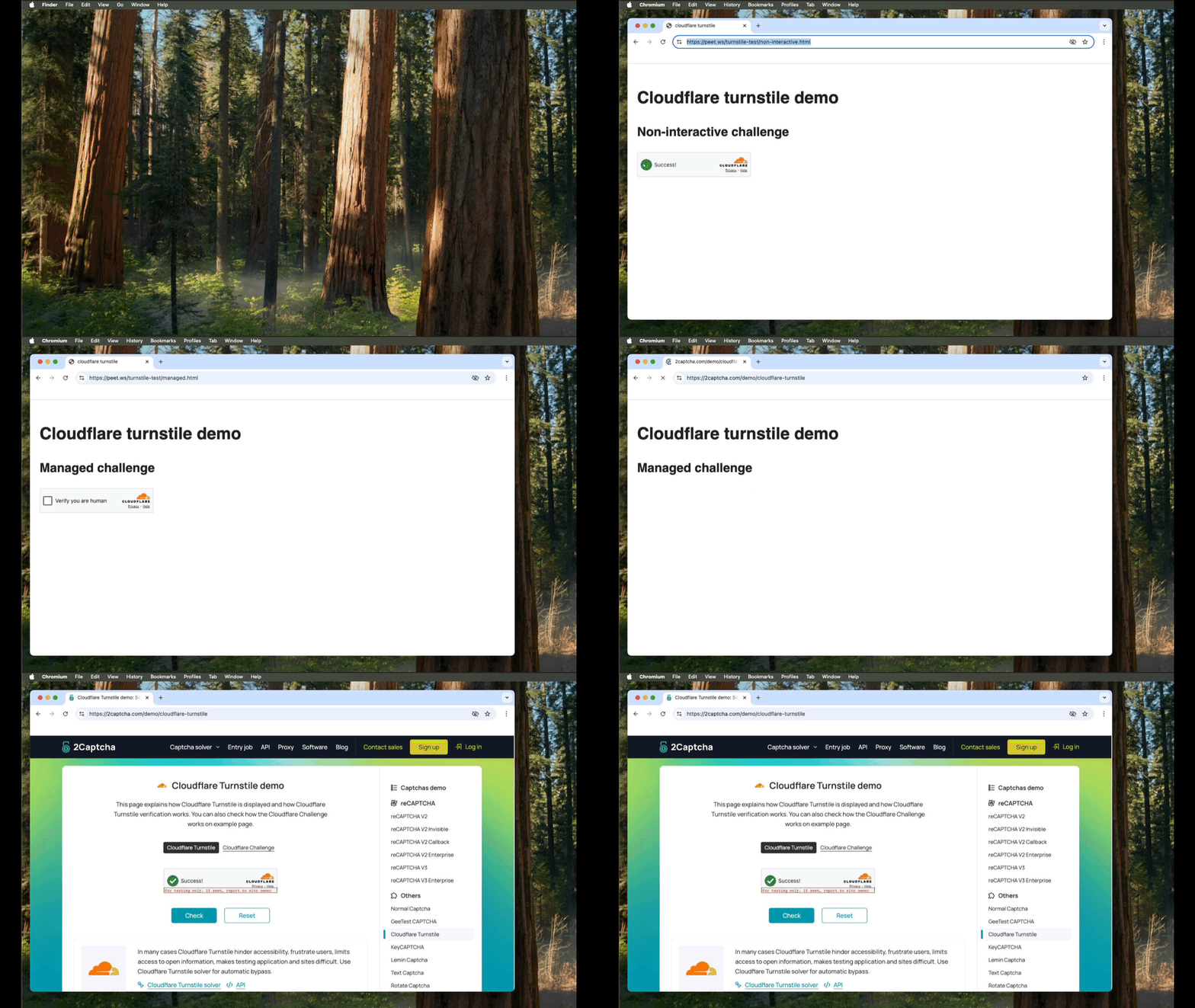
Cloudflare Turnstile — 3 live tests passing in headed mode (macOS)
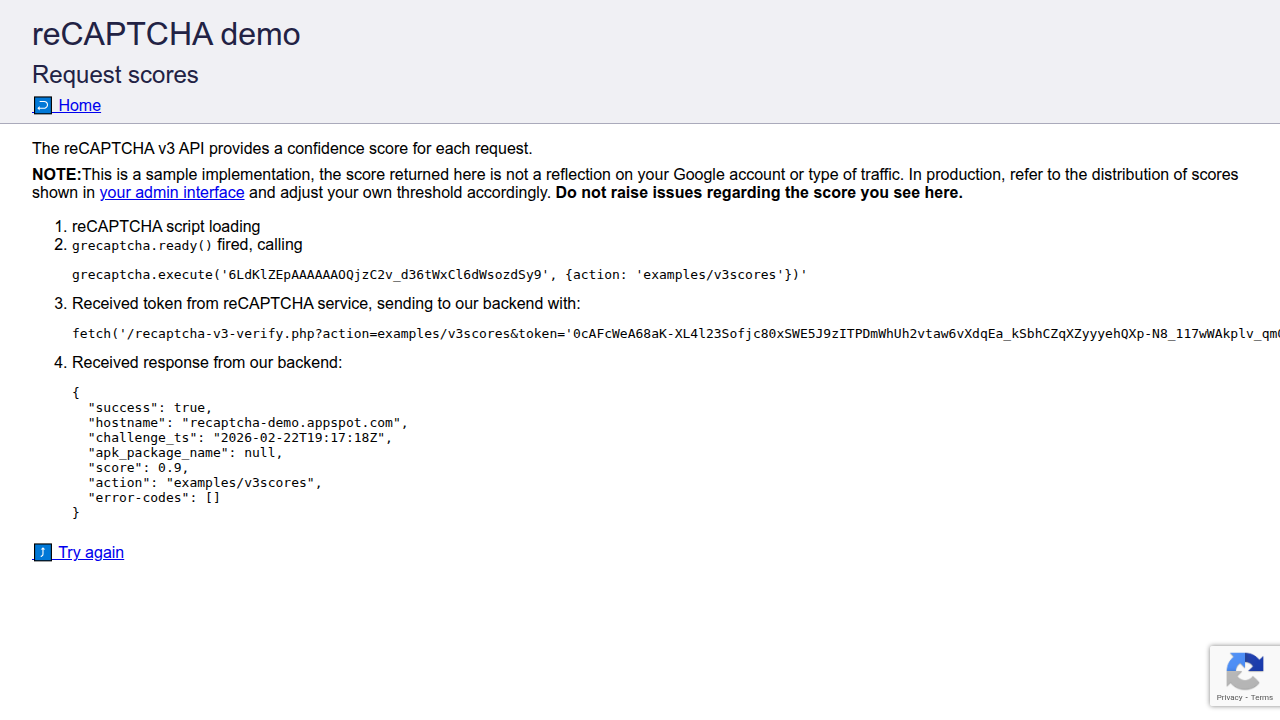
reCAPTCHA v3 score 0.9 — server-side verified (human-level)
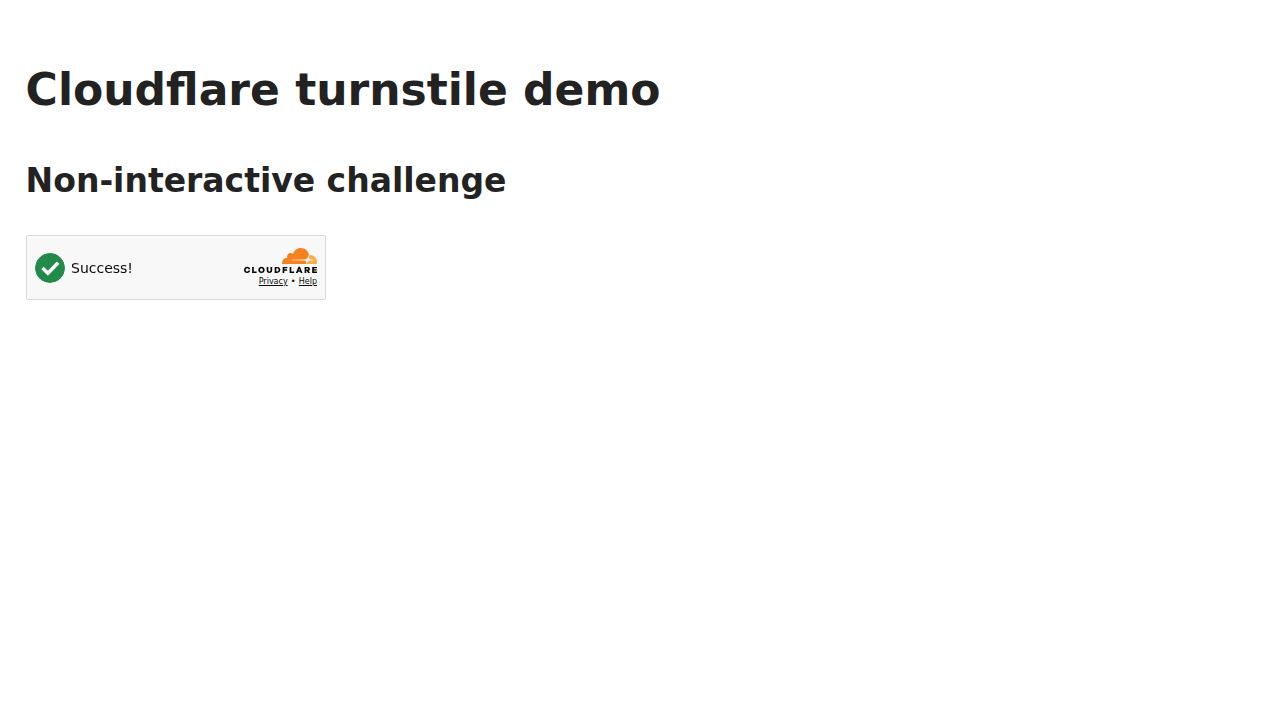
Cloudflare Turnstile non-interactive challenge — auto-resolved
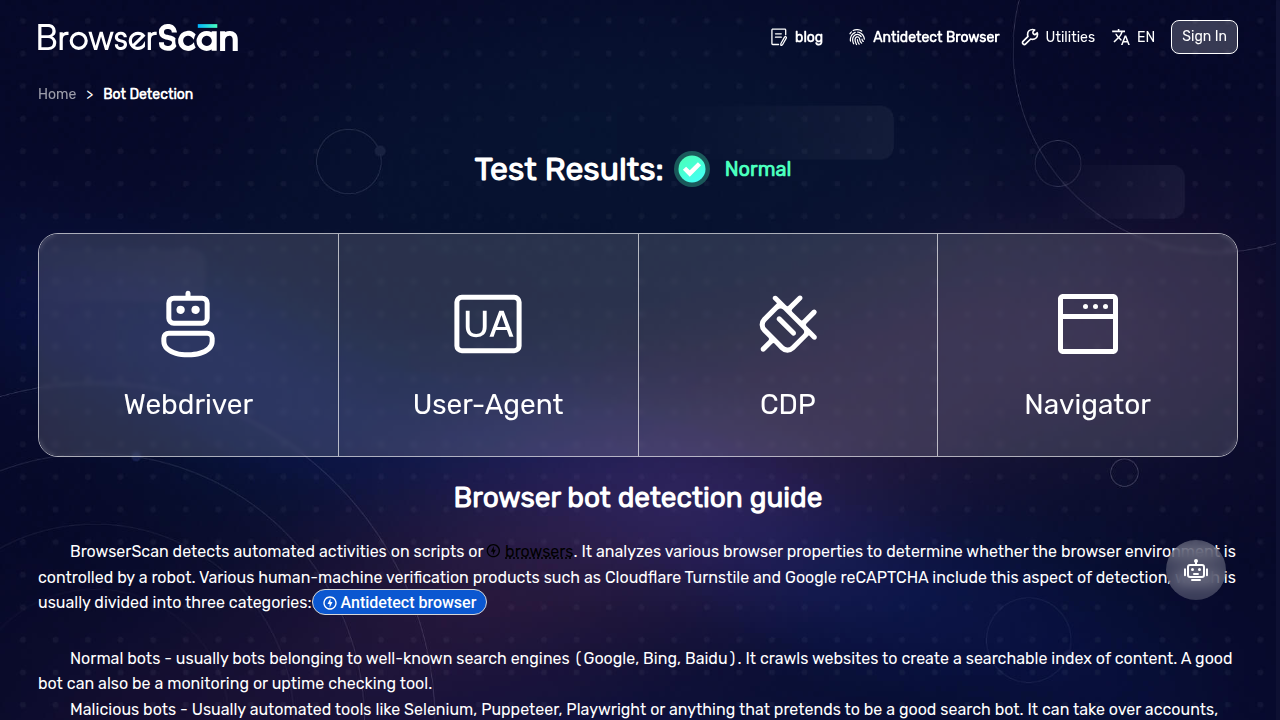
BrowserScan bot detection — NORMAL (4/4 checks passed)
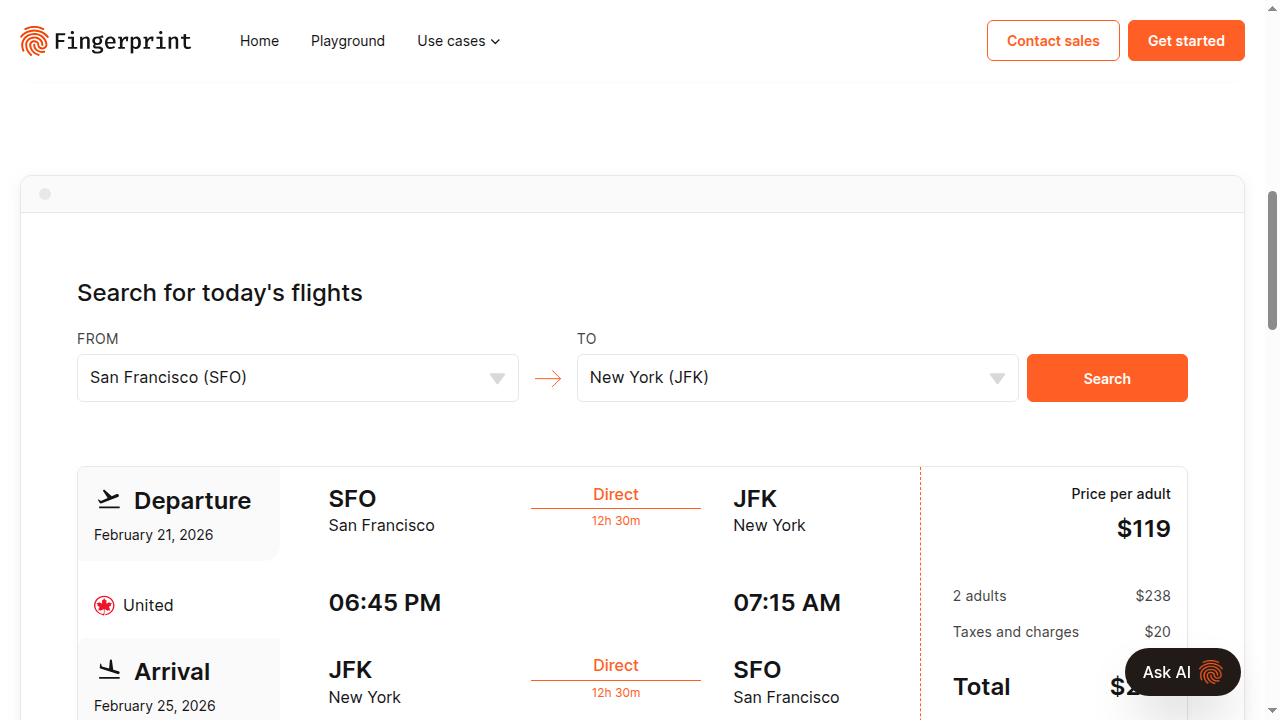
FingerprintJS web-scraping demo — data served, not blocked
How It Works
CloakBrowser is a thin wrapper (Python + JavaScript) around a custom-built Chromium binary:
- You install →
pip install cloakbrowserornpm install cloakbrowser - First launch → binary auto-downloads for your platform (Linux x64, macOS arm64/x64)
- Every launch → Playwright or Puppeteer starts with our binary + stealth args
- You write code → standard Playwright/Puppeteer API, nothing new to learn
The binary includes 16 source-level patches that modify:
- Canvas fingerprint generation
- WebGL renderer output
- Audio processing fingerprint
- Font enumeration results
- Hardware concurrency reporting
- Client rect measurements
- GPU vendor/renderer strings
- WebDriver flag
- Headless detection signals
- And more...
These are compiled into the Chromium binary — not injected via JavaScript, not set via flags.
API
launch()
from cloakbrowser import launch

# Basic — headless, default stealth config
browser = launch()

# Headed mode (see the browser window)
browser = launch(headless=False)

# With proxy
browser = launch(proxy="http://user:pass@proxy:8080")

# With extra Chrome args
browser = launch(args=["--disable-gpu", "--window-size=1920,1080"])

# With timezone and locale (sets both binary flags and Playwright context)
browser = launch(timezone="America/New_York", locale="en-US")

# Auto-detect timezone/locale from proxy IP (requires: pip install cloakbrowser[geoip])
browser = launch(proxy="http://proxy:8080", geoip=True)

# Without default stealth args (bring your own fingerprint flags)
browser = launch(stealth_args=False, args=["--fingerprint=12345"])
Returns a standard Playwright Browser object. All Playwright methods work: new_page(), new_context(), close(), etc.
launch_async()
import asyncio
from cloakbrowser import launch_async

async def main():
    browser = await launch_async()
    page = await browser.new_page()
    await page.goto("https://example.com")
    print(await page.title())
    await browser.close()

asyncio.run(main())
launch_context()
Convenience function that creates browser + context with common options:
from cloakbrowser import launch_context

context = launch_context(
    user_agent="Custom UA",
    viewport={"width": 1920, "height": 1080},
    locale="en-US",
    timezone_id="America/New_York",
)
page = context.new_page()
Auto Timezone/Locale from Proxy IP
When using a proxy, antibot systems check that your browser's timezone and locale match the proxy's geographic location. CloakBrowser can auto-detect these from the proxy IP using an offline GeoIP database:
pip install cloakbrowser[geoip] # installs geoip2 + downloads ~70 MB database on first use
# Timezone and locale auto-set from proxy's IP geolocation
browser = launch(proxy="http://proxy:8080", geoip=True)

# Works with launch_context too — sets both binary flags AND Playwright context
context = launch_context(proxy="http://proxy:8080", geoip=True)

# Explicit values always win over auto-detection
browser = launch(proxy="http://proxy:8080", geoip=True, timezone="Europe/London")
Note: For rotating residential proxies, the DNS-resolved IP may differ from the exit IP. Pass explicit
timezone/localein those cases.
Utility Functions
from cloakbrowser import binary_info, clear_cache, ensure_binary

# Check binary installation status
print(binary_info())
# {'version': '142.0.7444.175', 'platform': 'linux-x64', 'installed': True, ...}

# Force re-download
clear_cache()

# Pre-download binary (e.g., during Docker build)
ensure_binary()
JavaScript / Node.js API
CloakBrowser ships a TypeScript package with full type definitions. Choose Playwright or Puppeteer — same stealth binary underneath.
Playwright (default)
import { launch, launchContext } from 'cloakbrowser';

// Basic
const browser = await launch();

// With options
const browser = await launch({
  headless: false,
  proxy: 'http://user:pass@proxy:8080',
  args: ['--window-size=1920,1080'],
});

// Convenience: browser + context in one call
const context = await launchContext({
  userAgent: 'Custom UA',
  viewport: { width: 1920, height: 1080 },
  locale: 'en-US',
  timezoneId: 'America/New_York',
});
const page = await context.newPage();
Note: Each example above is standalone — not meant to run as one block.
Puppeteer
Note: The Playwright wrapper is recommended for sites with reCAPTCHA Enterprise. Puppeteer's CDP protocol leaks automation signals that reCAPTCHA Enterprise can detect, causing intermittent 403 errors. This is a known Puppeteer limitation, not specific to CloakBrowser. Use Playwright for best results.
import { launch } from 'cloakbrowser/puppeteer';

const browser = await launch({ headless: true });
const page = await browser.newPage();
await page.goto('https://example.com');
await browser.close();
Utility Functions (JS)
import { ensureBinary, clearCache, binaryInfo } from 'cloakbrowser';

// Pre-download binary (e.g., during Docker build)
await ensureBinary();

// Check installation status
console.log(binaryInfo());

// Force re-download
clearCache();
Configuration
| Env Variable | Default | Description |
|---|---|---|
CLOAKBROWSER_BINARY_PATH |
— | Skip download, use a local Chromium binary |
CLOAKBROWSER_CACHE_DIR |
~/.cloakbrowser |
Binary cache directory |
CLOAKBROWSER_DOWNLOAD_URL |
cloakbrowser.dev |
Custom download URL for binary |
CLOAKBROWSER_AUTO_UPDATE |
true |
Set to false to disable background update checks |
Fingerprint Management
Every launch automatically generates a unique fingerprint. A random seed (10000–99999) drives all seed-based patches — canvas, WebGL, audio, fonts, and client rects all produce consistent, correlated values derived from that single seed.
Tip: Use a fixed seed when revisiting the same site. A random seed makes every session look like a different device — which can be suspicious when hitting the same site repeatedly from the same IP. For reCAPTCHA v3 Enterprise and similar scoring systems, a fixed seed produces a consistent fingerprint across sessions, making you look like a returning visitor:
browser = launch(args=["--fingerprint=12345"])const browser = await launch({ args: ['--fingerprint=12345'] });
Default Fingerprint
Every launch() call sets these automatically. Defaults are platform-aware — macOS runs as a native Mac browser, Linux spoofs Windows:
| Flag | Linux Default | macOS Default | Controls |
|---|---|---|---|
--fingerprint |
Random (10000–99999) | Random (10000–99999) | Master seed for canvas, WebGL, audio, fonts, client rects |
--fingerprint-platform |
windows |
macos |
navigator.platform, User-Agent OS, GPU pool selection |
--fingerprint-hardware-concurrency |
8 |
(not set — uses real value) | navigator.hardwareConcurrency |
--fingerprint-gpu-vendor |
NVIDIA Corporation |
(not set — native Apple GPU) | WebGL UNMASKED_VENDOR_WEBGL |
--fingerprint-gpu-renderer |
NVIDIA GeForce RTX 3070 |
(not set — native Metal renderer) | WebGL UNMASKED_RENDERER_WEBGL |
Important:
--fingerprint-platformmust always be set. The binary defaults towindowsinternally when this flag is missing, which causes GPU/UA mismatches on non-Windows systems. The wrapper handles this automatically.
Additional Flags
Supported by the binary but not set by default — pass via args to customize:
| Flag | Controls |
|---|---|
--fingerprint-brand |
Browser brand: Chrome, Edge, Opera, Vivaldi |
--fingerprint-brand-version |
Brand version (UA + Client Hints) |
--fingerprint-platform-version |
Client Hints platform version |
--fingerprint-location |
Geolocation coordinates |
--timezone |
Timezone (e.g. America/New_York) |
Note: All stealth tests were verified with the default fingerprint config above. Changing these flags may affect detection results — test your configuration before using in production.
Examples
# Default — unique fingerprint every launch
browser = launch()

# Pin a seed for a persistent identity
browser = launch(args=["--fingerprint=42069"])

# Full control — disable defaults, set everything yourself
browser = launch(stealth_args=False, args=[
    "--fingerprint=42069",
    "--fingerprint-platform=windows",
    "--fingerprint-hardware-concurrency=8",
    "--fingerprint-gpu-vendor=NVIDIA Corporation",
    "--fingerprint-gpu-renderer=NVIDIA GeForce RTX 3070",
])

# Add timezone and location on top of defaults
browser = launch(args=[
    "--timezone=America/New_York",
    "--fingerprint-location=40.7128,-74.0060",
])

# Override GPU to look like a different machine
browser = launch(args=[
    "--fingerprint-gpu-vendor=Intel Inc.",
    "--fingerprint-gpu-renderer=Intel Iris OpenGL Engine",
])
// JavaScript — same flags
const browser = await launch({
  args: ['--fingerprint=42069', '--timezone=Europe/London'],
});
Use With Existing Playwright Code
If you have existing Playwright scripts, migration is one line:
- from playwright.sync_api import sync_playwright
- pw = sync_playwright().start()
- browser = pw.chromium.launch()
+ from cloakbrowser import launch
+ browser = launch()

page = browser.new_page()
page.goto("https://example.com")
# ... rest of your code works unchanged
Comparison
| Feature | Playwright | playwright-stealth | undetected-chromedriver | Camoufox | CloakBrowser |
|---|---|---|---|---|---|
| reCAPTCHA v3 score | 0.1 | 0.3-0.5 | 0.3-0.7 | 0.7-0.9 | 0.9 |
| Cloudflare Turnstile | Fail | Sometimes | Sometimes | Pass | Pass |
| Patch level | None | JS injection | Config patches | C++ (Firefox) | C++ (Chromium) |
| Survives Chrome updates | N/A | Breaks often | Breaks often | Yes | Yes |
| Maintained | Yes | Stale | Stale | Dead (2025) | Active |
| Browser engine | Chromium | Chromium | Chrome | Firefox | Chromium |
| Playwright API | Native | Native | No (Selenium) | No | Native |
Platforms
| Platform | Status |
|---|---|
| Linux x86_64 | ✅ Available |
| macOS arm64 (Apple Silicon) | ✅ Available |
| macOS x86_64 (Intel) | ✅ Available |
| Windows | Planned |
macOS (early access): macOS builds are new — tested but not yet battle-tested at scale like Linux. If you hit any issues, please open a GitHub issue.
macOS first launch: The binary is ad-hoc signed. On first run, macOS Gatekeeper will block it. Right-click the app → Open → click Open in the dialog. This is only needed once.
On Windows? You can still use CloakBrowser via Docker or with your own Chromium binary by setting CLOAKBROWSER_BINARY_PATH=/path/to/chrome.
Examples
Python — see examples/:
basic.py— Launch and load a pagerecaptcha_score.py— Check your reCAPTCHA v3 scorestealth_test.py— Run against all detection services
JavaScript — see js/examples/:
basic-playwright.ts— Playwright launch and loadbasic-puppeteer.ts— Puppeteer launch and loadstealth-test.ts— Full 6-site detection test suite
Roadmap
| Feature | Status |
|---|---|
| Linux x64 binary | ✅ Released |
| macOS arm64 (Apple Silicon) | ✅ Released |
| macOS x64 (Intel) | ✅ Released |
| Chromium 145 build | 🔜 In progress |
| JavaScript/Puppeteer + Playwright support | ✅ Released |
| Fingerprint rotation per session | ✅ Released |
| Built-in proxy rotation | 📋 Planned |
| Windows support | 📋 Planned |
⭐ Star this repo to get notified when Chromium 145 and Windows builds drop.
Docker
A ready-to-use Dockerfile is included. It installs system deps, the package, and pre-downloads the stealth binary during build:
docker build -t cloakbrowser .
docker run --rm cloakbrowser python examples/basic.py
The key steps in the Dockerfile:
- System deps — Chromium requires ~15 shared libraries (
libnss3,libgbm1, etc.) pip install .— installs CloakBrowser + Playwrightensure_binary()— downloads the stealth Chromium binary at build time (~200MB), so containers start instantly
To extend with your own script, just add a COPY + CMD:
FROM cloakbrowser
COPY your_script.py /app/
CMD ["python", "your_script.py"]
Note: If you run CloakBrowser inside a web server with uvloop (e.g., uvicorn[standard]), use --loop asyncio to avoid subprocess pipe hangs.
Headed Mode (for aggressive bot detection)
Some sites using advanced bot detection (e.g., DataDome, Cloudflare Turnstile) can detect headless mode even with our C++ patches. For these sites, run in headed mode with a virtual display:
# Install Xvfb (virtual framebuffer)
sudo apt install xvfb

# Start virtual display
Xvfb :99 -screen 0 1920x1080x24 &
export DISPLAY=:99
from cloakbrowser import launch

# Headed mode + residential proxy for maximum stealth
browser = launch(headless=False, proxy="http://your-residential-proxy:port")
page = browser.new_page()
page.goto("https://heavily-protected-site.com")  # passes DataDome, etc.
browser.close()
This runs a real headed browser rendered on a virtual display — no physical monitor needed. Combined with a residential proxy, this passes even the most aggressive detection services.
Tip: Datacenter IPs are often flagged by IP reputation databases regardless of browser fingerprint. For sites with strict bot detection, a residential proxy makes the difference.
Troubleshooting
Binary download fails / timeout Set a custom download URL or use a local binary:
export CLOAKBROWSER_BINARY_PATH=/path/to/your/chrome
"playwright install" vs CloakBrowser binary
You do NOT need playwright install chromium. CloakBrowser downloads its own binary. You only need Playwright's system deps:
playwright install-deps chromium
FAQ
Q: Is this legal? A: CloakBrowser is a browser. Using it is legal. What you do with it is your responsibility, just like with Chrome, Firefox, or any browser. We do not endorse violating website terms of service.
Q: How is this different from Camoufox? A: Camoufox patched Firefox. We patch Chromium. Chromium means native Playwright support, larger ecosystem, and TLS fingerprints that match real Chrome. Also, Camoufox is no longer maintained (since March 2025).
Q: Will detection sites eventually catch this? A: Possibly. Bot detection is an arms race. Source-level patches are harder to detect than config-level patches, but not impossible. We actively monitor and update when detection evolves.
Q: Can I use my own proxy?
A: Yes. Pass proxy="http://user:pass@host:port" to launch().
Q: Can I use this with Docker? A: Yes. A ready-to-use Dockerfile is included — see the Docker section above.
Links
- 🌐 Website — cloakbrowser.dev
- 🐛 Bug reports & feature requests — GitHub Issues
- 📦 PyPI — pypi.org/project/cloakbrowser
- 📦 npm — npmjs.com/package/cloakbrowser
- 📧 Contact — cloakhq@pm.me
License
MIT — see LICENSE.
Contributing
Issues and PRs welcome. If something isn't working, open an issue — we respond fast.
Release history Release notifications | RSS feed


Download files
Download the file for your platform. If you're not sure which to choose, learn more about installing packages.
Source Distribution
Built Distribution
Filter files by name, interpreter, ABI, and platform.
If you're not sure about the file name format, learn more about wheel file names.
Copy a direct link to the current filters
File details
Details for the file cloakbrowser-0.2.1.tar.gz.
File metadata
- Download URL: cloakbrowser-0.2.1.tar.gz
- Upload date:
- Size: 5.1 MB
- Tags: Source
- Uploaded using Trusted Publishing? No
- Uploaded via: twine/6.2.0 CPython/3.14.3
File hashes
| Algorithm | Hash digest | |
|---|---|---|
| SHA256 |
d072e03c915baf6c7ec0fd83ff00b6e0c0da7e13bd60698cedb803fcc23943d1
|
|
| MD5 |
2c2e8411aa925963d8d2e0e4147a6ef2
|
|
| BLAKE2b-256 |
0592dede0fee5a965e282b0160764e3cae911eb025ea4729d9e8167fc76d9f1e
|
File details
Details for the file cloakbrowser-0.2.1-py3-none-any.whl.
File metadata
- Download URL: cloakbrowser-0.2.1-py3-none-any.whl
- Upload date:
- Size: 23.2 kB
- Tags: Python 3
- Uploaded using Trusted Publishing? No
- Uploaded via: twine/6.2.0 CPython/3.14.3
File hashes
| Algorithm | Hash digest | |
|---|---|---|
| SHA256 |
155bddcf6bccfeb412efbcc5e8cc47ba74161ab5eaa448295e61e4855ae897fa
|
|
| MD5 |
f9c6f9360f94714a61c7e0ddb4eb59f7
|
|
| BLAKE2b-256 |
869289a10913866d977e530c4302b97374376bf6c0cb07a09ac1352a7ebd013e
|






