
Get started · Results · How it works · FAQ · Known limits
Names, emails, addresses and API keys in the files Claude reads are swapped for placeholders before the model sees them. When Claude writes a file, the real values go back in, on your machine. Runs on macOS, Windows and Linux.
Status: v0.1. Tested on macOS and a real Windows machine (Linux in CI). It works; expect rough edges.
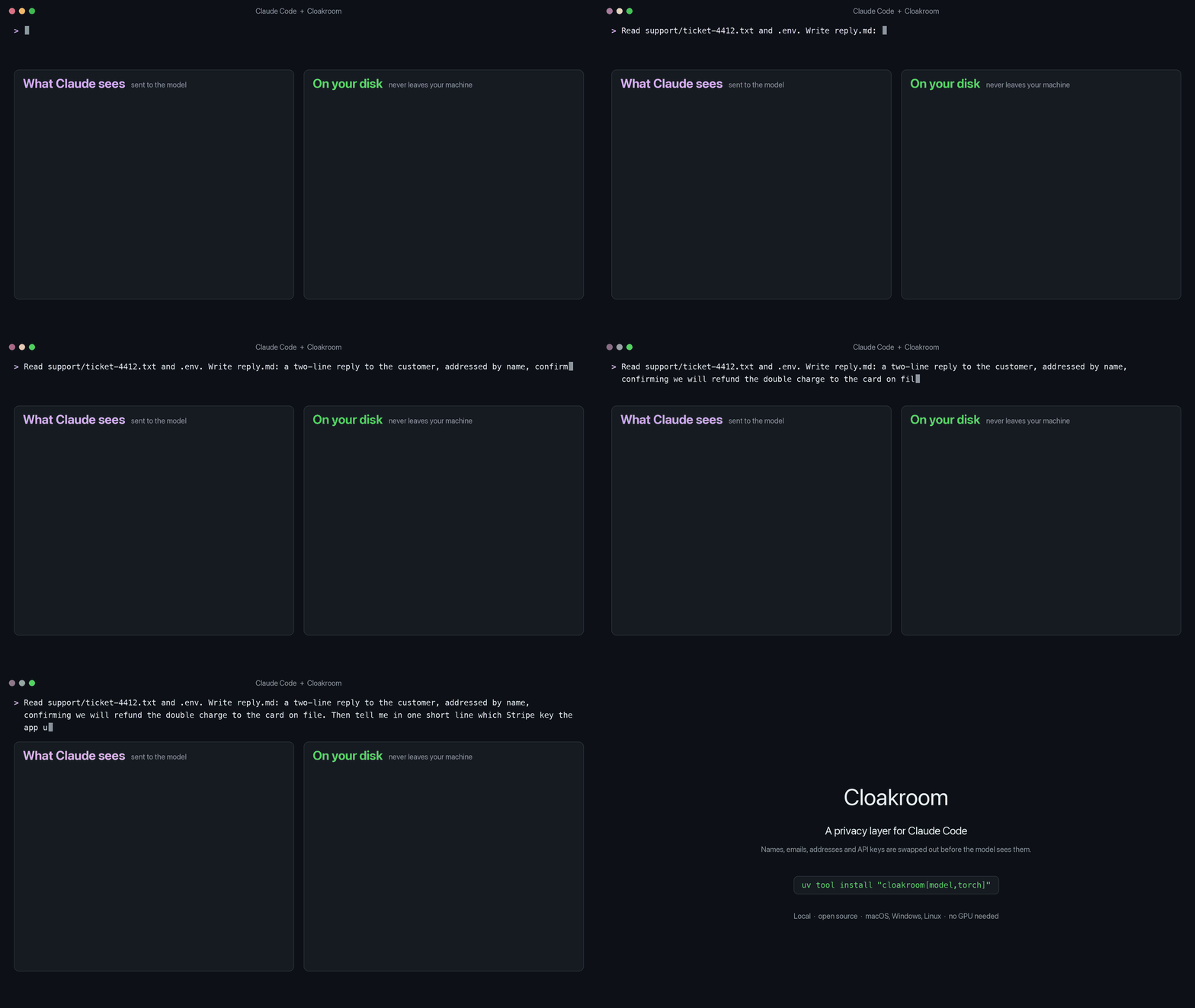
Claude sees
PII_PERSON_1. The reply it writes lands on your disk as "Hi Nadia Petrov".
Why
Claude Code reads whatever your task touches: .env files, logs, customer exports, support tickets. All of it
goes to the model. Secret scanners catch keys with a known shape, but a customer's name in a ticket or an address
in a log looks like ordinary text to a regex.
What's different
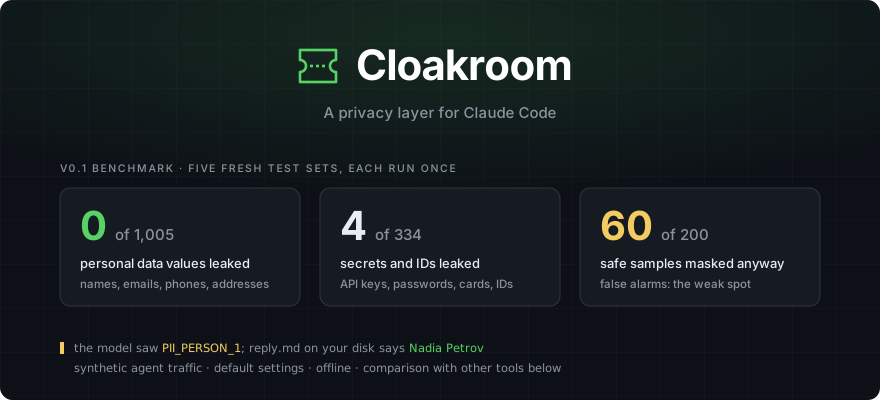
- Catches personal data, not just keys. A local detection model plus rules. Across five fresh test sets it leaked none of 1,005 planted names, emails, phone numbers, addresses and birth dates. The other tools we tested let 119 to 992 of them through.
- Claude keeps working. Placeholders stay the same for the whole session, and the real values are put back when Claude writes a file or runs a command locally.
- Runs on your machine. Detection, the encrypted vault and the restore are all local. The only network call is the one-time model download.
- Cross-platform. One install on all three, with the vault key in each system's own secure store:
- macOS: Keychain. On Apple Silicon the model runs on the built-in GPU, about 20 ms per check.
- Windows: Credential Manager, hooks that run in PowerShell, tested on a real Windows machine.
- Linux: Secret Service, covered by CI on every change.
- No GPU needed. On an Apple M-series CPU a check takes about 60 ms.
- Catches encoded dumps.
base64,xxdandodoutput is decoded and checked too. - Fails closed. If Cloakroom isn't running, tool calls are denied instead of slipping through, and every prompt carries a warning with the fix, so you're never locked out of Claude Code.
How it works
  Claude Code reads a file or runs a tool
        │   "Nadia Petrov called about…"    sk_live_51Hx9Q…
        ▼
  ┌────────────────────────────────────────────┐
  │ Cloakroom  (on your machine)               │
  │   rules + local model  ->  find the values │
  │   encrypted vault      ->  remember them   │
  └────────────────────────────────────────────┘
        │   "PII_PERSON_1 called about…"    PII_SECRET_1
        ▼
  the model works with placeholders only
        │   Write reply.md: "Hi PII_PERSON_1,"
        ▼
  Cloakroom puts the real value back, locally
        │
        ▼
  reply.md on your disk: "Hi Nadia Petrov,"
Details: docs-HOW-IT-WORKS.md.
Get started
# 1. Install (about 4 GB with the model; pipx works too)
uv tool install "cloakroom[model,torch]"

# 2. No GPU? Make the fast CPU model once (a few minutes)
cloakroom export-onnx

# 3. Check this machine: Python, the key store, the model and the service
cloakroom doctor
# 4. Add the plugin, inside Claude Code
/plugin marketplace add shanjeevrajendran/cloakroom
/plugin install cloakroom@cloakroom
Python 3.10+. Skip step 2 on an Apple Silicon Mac or an NVIDIA GPU.
Ways to run
- Full mode (default): rules plus the local model. Catches keys and personal data written as plain text.
- Rules mode (
CLOAKROOM_MODE=rules): no model, instant, installs with plainuv tool install cloakroom. Catches keys, card numbers and IDs, but misses most names and addresses. - Outside Claude Code:
cloakroom check FILEshows what would be masked,cloakroom explain FILEshows why,cloakroom mask FILEprints what Claude would see. - Dry run (
CLOAKROOM_DRY_RUN=1): lets everything through and logs what it would have done.
Exceptions, backends, CI and troubleshooting: the handbook.
Dashboard (preview, coming in v0.2)
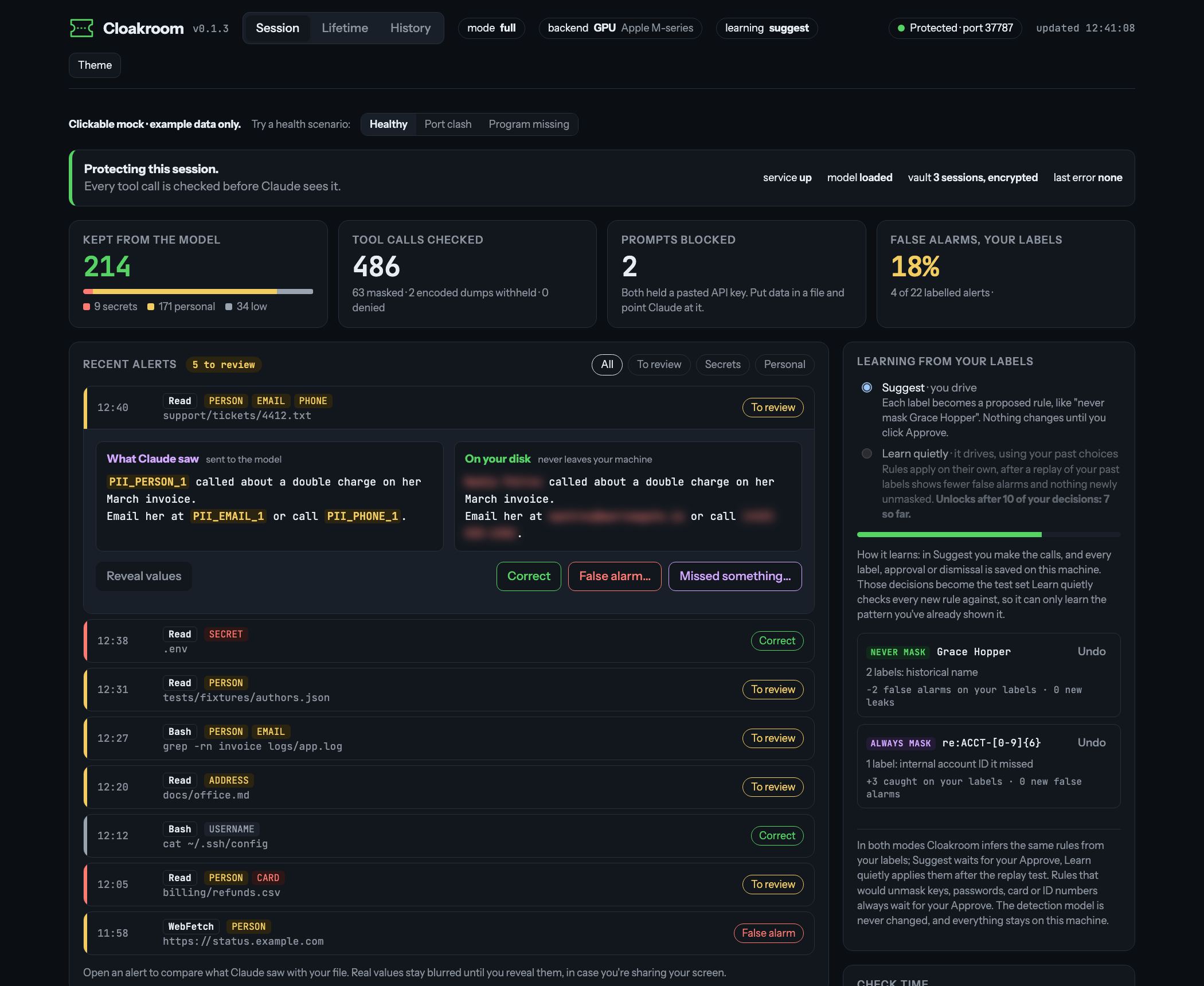
Design preview with example data. Not in the current release yet.
A local page served by Cloakroom itself, on your own machine only:
- Alerts colour-coded by severity. Open one to see what Claude saw next to your file, with real values blurred until you click reveal.
- Your labels: mark an alert correct, a false alarm, or point at something it missed.
- Learning from your labels: each label becomes a rule ("never mask Grace Hopper", "always mask ACCT-123456"). In Suggest you approve every rule; once you've made enough decisions, Learn quietly applies them itself, but only after replaying them against your past decisions and a built-in safety set. Rules that would unmask a key, password, card or ID number always wait for you. The detection model itself never changes.
- Health at a glance: mode, backend, port and the last error, with the fix spelled out.
Results
Cloakroom and four other Claude Code redaction tools, default settings, the same synthetic agent traffic, offline. Five fresh test sets, written by a different model and each run once before any tuning on it: 1,575 planted values to catch and 200 safe samples that should be left alone.
| Tool | Personal data (1,005) | Keys, passwords, cards, IDs (334) | False alarms (200 safe samples) |
|---|---|---|---|
| Cloakroom | 0 | 4 | 60 |
| sensitive-canary (blocks the call instead of masking) | 119 | 40 | 16 |
| maisecrets | 557 | 97 | 21 |
| claude-code-redact, PII on | 607 | 101 | 31 |
| redact-hook | 817-822 | 143-157 | 35-40 |
| claude-code-redact, secrets only | 992 | 179 | 2 |
Some of these tools only aim at secrets, so their personal-data column shows scope as much as quality. False alarms are Cloakroom's weak spot: it masked 60 of 200 safe samples, such as historical names, landmark addresses and documented test keys. A false alarm costs you a placeholder where Claude needed the real text; a miss sends the value to the model. Method and every run: bench/RESULTS.md. The maintainers of the compared tools were contacted before publishing.
FAQ
Does it send my data anywhere? No. It downloads the detection model once from Hugging Face (a pinned version). Everything else runs on 127.0.0.1.
How much slower is Claude? Each tool call is checked by a small local service: about 20 ms on an Apple GPU,
60 ms on an Apple M-series CPU, 400 ms on a 2-core cloud VM. cloakroom doctor prints yours.
Will it mask things it shouldn't? Sometimes, see above. Documented examples (Stripe test cards,
example.com, fictional 555 numbers) are left alone, and you can add your own exceptions to allow in
~/.cloakroom/config.json. cloakroom check FILE shows what would be masked.
What doesn't it protect? It stops accidental exposure; it isn't a sandbox. Out of scope: a prompt injection set on smuggling data out piece by piece, text you paste into a prompt on purpose (that gets blocked, not rewritten), and Claude Code's own local logs. Details: docs-LIMITS.md.
How do I remove it? See Uninstall.
More
- How it works: the detectors, the known-safe filter, the vault and the restore
- Setup details · Known limits · Benchmark
- Found a way around it? Please report it privately: SECURITY.md
Credits
Detection model: PII-Tracer. The one-string hook command that runs in both bash and PowerShell comes from maisecrets (Apache-2.0). Licensed Apache-2.0.
1 maintainer

Metadata
1 maintainer
Release files for cloakroom 0.1.4
For a detailed explanation of source distributions (sdists) and built distributions (wheels), please see the package formats documentation.
Source distribution (sdist)
| File | Size | Uploaded | |
|---|---|---|---|
| cloakroom-0.1.4.tar.gz | 53.7 kB | Details |
Built distribution (wheel)
| File | Interpreter | ABI | Platform | Reset |
|---|---|---|---|---|
| cloakroom-0.1.4-py3-none-any.whl | Python 3 | none | any | Details |
Total release size: 101.4 kB
Release files / cloakroom-0.1.4.tar.gz
| Download URL | cloakroom-0.1.4.tar.gz |
|---|---|
| Size | 53.7 kB |
| Tags | Source |
|
SHA-256 checksum How to use checksums |
79c9608d9555a577522122e0e409f5768583fe2ca403ec770c3d48ebce94a73d
|
|
BLAKE2b-256 checksum How to use checksums |
7c15a1529069191590e1fe2a098cbe186af911ea698ff7bddb86a4f509e45839
|
| Upload date | |
|
Uploaded using Trusted Publishing? What is trusted publishing? |
Yes |
| Uploaded via |
twine/7.0.0 CPython/3.13.14
|
Provenance
Provenance describes where a file came from. On PyPI, provenance is shared via attestations, which provide a verifiable record of the build or publishing details. View details, limitations and caveats.


PyPI Publish Attestation
PyPI verified that this artifact, at this checksum, originated from the publisher listed below.
Signed by GitHub Actions, verified by PyPI on Oct 11, 2026.
Transparency logRelease files / cloakroom-0.1.4-py3-none-any.whl
| Download URL | cloakroom-0.1.4-py3-none-any.whl |
|---|---|
| Size | 47.7 kB |
| Tags | Python 3 |
|
SHA-256 checksum How to use checksums |
d3539fb201ee36543821480867e9fb06e3218d0f3f300a89b73238e5abf3d997
|
|
BLAKE2b-256 checksum How to use checksums |
67c99d59f7dad7b8263f4b02c848a410c9bd3550390ea0e04755025187822826
|
| Upload date | |
|
Uploaded using Trusted Publishing? What is trusted publishing? |
Yes |
| Uploaded via |
twine/7.0.0 CPython/3.13.14
|
Provenance
Provenance describes where a file came from. On PyPI, provenance is shared via attestations, which provide a verifiable record of the build or publishing details. View details, limitations and caveats.
PyPI Publish Attestation
PyPI verified that this artifact, at this checksum, originated from the publisher listed below.
Signed by GitHub Actions, verified by PyPI on Oct 11, 2026.
Transparency log













