
cloakroom.sh · Install · How it works · Security · Commands · Releases



Cloakroom masks API keys, passwords and personal data on your machine before your AI coding agent sees them, and puts the real values back in the files and commands the agent writes. Works with Claude Code, Codex, Gemini CLI and Cursor. Free and open source.
The full guide, settings and FAQ live at cloakroom.sh. This README is the short version.
Install
Claude Code (Mac, Windows, Linux). Inside Claude Code, one line at a time, then restart it:
/plugin marketplace add shanjeevrajendran/cloakroom
/plugin install cloakroom@cloakroom
The plugin installs the cloakroom program on first start. Until it is ready, the agent's file reads and commands
wait instead of passing unchecked.
Codex, Gemini CLI, Cursor (Mac, Linux):
uv tool install "cloakroom[model,torch,ocr]"   # Python 3.10+
cloakroom install codex                         # or: gemini, cursor
Codex skips new hooks until you trust them once: start codex, type /hooks, trust each Cloakroom entry.
Check it: cloakroom doctor (every line should say ok).
Updates: Claude Code updates the plugin, and the plugin updates the program. Codex, Gemini CLI, Cursor, git
commits, or a cloakroom you installed yourself: run cloakroom update in a terminal.
Step-by-step guide, updates and uninstall: cloakroom.sh/install.
How it works
Cloakroom runs as hooks: checks the agent calls before and after each tool call. On the way in, pattern rules plus a
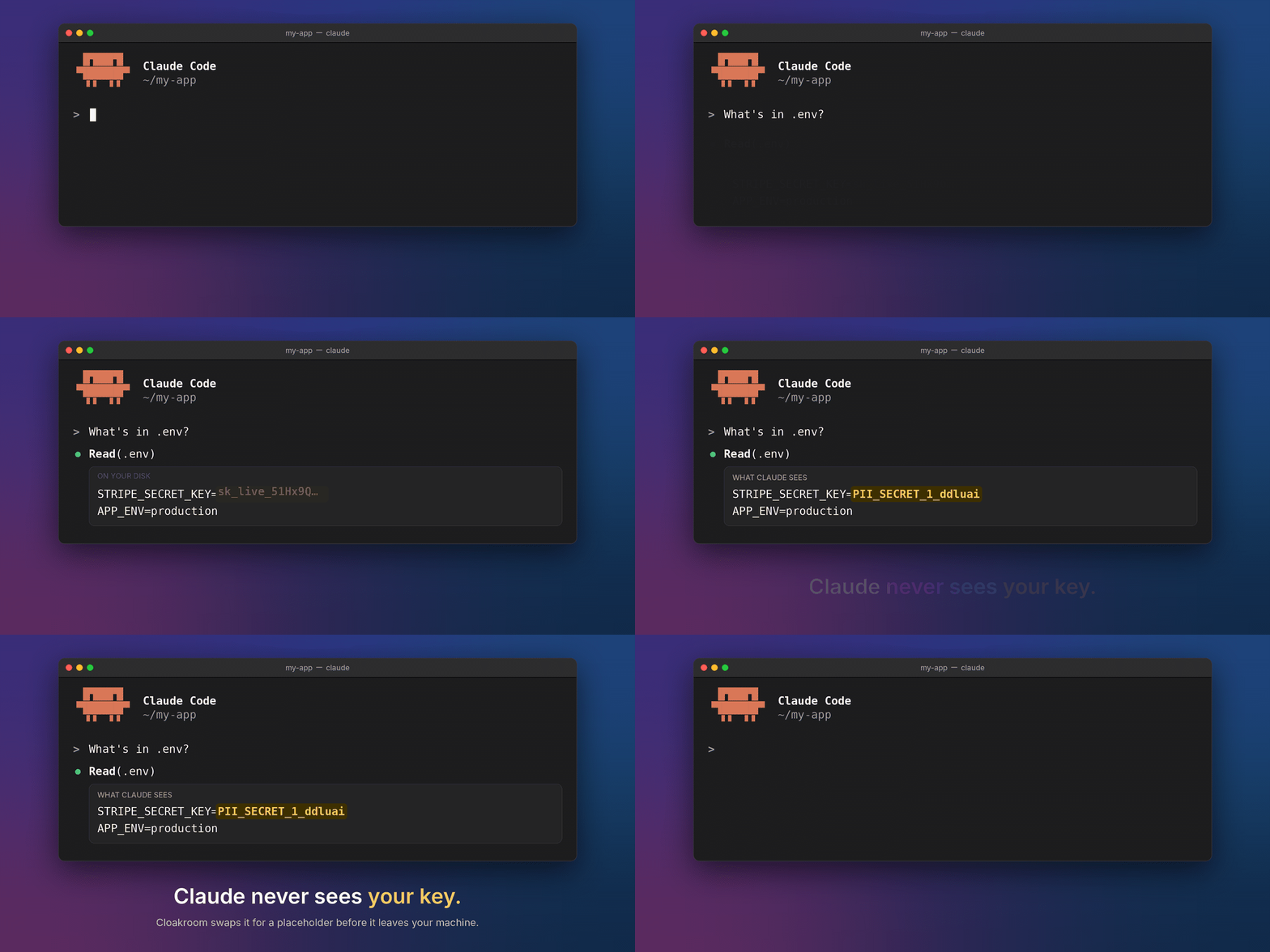
small local detection model find secrets and personal data, and each value is swapped for a placeholder such as
PII_SECRET_1 that stays the same for the session. The pairs live in an encrypted vault on your machine, its key in
the OS keystore (Keychain, Credential Manager, Secret Service). On a Mac there is no Keychain password prompt on
first run or after a Python update, and the agent can't read the key. On the way out, placeholders in writes and commands
get their real values back just before they run.
file or command output ──► Cloakroom (local) ──► model sees PII_PERSON_1, PII_SECRET_1
                                                         │
your disk gets the real value ◄── Cloakroom (local) ◄────┘ agent writes or runs with placeholders
Nothing leaves the machine except the one-time model download. If Cloakroom can't check something, it holds it instead of letting it through. More: cloakroom.sh/how-it-works · docs-HOW-IT-WORKS.md.
New in 1.4:
- Personal data in old chats, for every agent:
cloakroom exposure --personalalso finds personal data you typed in old Codex, Cursor and Gemini CLI chats, not only Claude Code (details). - No Keychain password prompt on a Mac: none on first run or after a Python update, and an agent can't read the vault key (details).
What works where
✓ masked · ⛔ stopped or held · ✗ not covered
| Claude Code | Codex (CLI, app) | Gemini CLI | Cursor (editor, agent) | |
|---|---|---|---|---|
| Prompts you type | ⛔ stopped, safe copy offered | ⛔ stopped, safe copy offered | ⛔ stopped, safe copy offered | ⛔ editor · ✗ command-line agent |
| File reads, command output, MCP results | ✓ | ✓ · ✗ long-running commands | ✓ | ✓ |
| Images and PDFs (local OCR) | ✓ | ✓ | ✓ · ⛔ PDFs held | ✓ |
| Real values put back in writes and commands | ✓ | ✓ | ✓ | ✓ shell · ⛔ placeholder writes refused |
| Keys kept out of git commits | ✓ | ✓ | ✓ | ✓ |
| Prompt injection: sending keys out, approving its own holds, switching Cloakroom off | ⛔ | ⛔ · ✗ Codex web search | ⛔ | ⛔ · ✗ Cursor web search |
| Systems | Mac, Linux, Windows | Mac, Linux | Mac, Linux | Mac, Linux |
Every gap, with the reason: docs-LIMITS.md.
Results
On held-out test sets Cloakroom let through 0 of 1,005 personal details (the other tools tested let through 119 to 992) and 0 of 77 keys and passwords in real vendor formats. The trade-off is false alarms: it masks more harmless text than secret-only scanners. Method and raw numbers: bench/RESULTS.md.
Recent releases
- 1.5.0: the model now reads long, dense output (a log, a CSV, a hex dump) to its end; before, a name near the end of each stretch could pass unmasked. Large files are checked much faster, and a check that would take longer than the agent waits ends with the output withheld.
- 1.4.0:
cloakroom exposure --personalalso finds personal data you typed in old Codex, Cursor and Gemini CLI chats (details). On a Mac there is no Keychain password prompt on first run or after a Python update, and an agent can't read the vault key (details). - 1.3.0: an agent can't approve its own held call or switch Cloakroom off, and a hook or MCP server it writes
into agent config is held until you type
cr: allow.
All releases: cloakroom.sh/releases · CHANGELOG.md.
What it isn't
- Not a sandbox. It stops accidental leaks and contains prompt injection; it doesn't prevent it. An agent runs as you, so the agent's own sandbox is the outer wall.
- Not everything has a hook. Cursor's Tab completion and the vendors' own server-side web search aren't seen.
- Typed prompts are stopped, not rewritten. Agents let a hook block a prompt but not reliably change it.
Commands you'll use
| Command | What it does |
|---|---|
cloakroom doctor |
Health check, versions, per-check timing |
cloakroom dashboard |
Alerts in the browser: when it masks something harmless (a false alarm), mark it once in the dashboard and a rule stops it next time. |
cloakroom check FILE · explain FILE · mask FILE |
Preview what would be masked, and why |
cloakroom exposure |
It lists the keys and passwords your coding agents saw, so you know what to rotate. Hints only, never the key. --personal also finds personal data you typed in old chats with Claude Code, Codex, Cursor or Gemini CLI. |
cloakroom scan |
Commands a repo's agent and editor config would run |
cloakroom give NAME |
When the agent needs a key (a Stripe key, a database password), don't paste it into a prompt. This asks for it in a hidden prompt and gives you a placeholder to paste. |
cloakroom proxy |
Local masking proxy for tools that let you set their API address |
cloakroom allow |
Lets one held command run once. Works only in your own terminal, never the agent's shell. |
cloakroom update |
Update the program and set the hooks up again |
All commands: cloakroom.sh/commands. Settings:
cloakroom.sh/settings. Rules only, no model: CLOAKROOM_MODE=rules.
Develop
git clone https://github.com/shanjeevrajendran/cloakroom && cd cloakroom
uv sync
uv run pytest -q tests      # rules mode, no model download
See CONTRIBUTING.md. Found a way around it? Report it privately: SECURITY.md. Changes: CHANGELOG.md.
Credits
Detection model: PII-Tracer. The one-string hook command that runs in both bash and PowerShell comes from maisecrets (Apache-2.0).
1 maintainer

Metadata
1 maintainer
Release files for cloakroom 1.5.0
For a detailed explanation of source distributions (sdists) and built distributions (wheels), please see the package formats documentation.
Source distribution (sdist)
| File | Size | Uploaded | Provenance | Actions |
|---|---|---|---|---|
| cloakroom-1.5.0.tar.gz | 331.8 kB | With provenance | Details for cloakroom-1.5.0.tar.gz |
Built distribution (wheel)
| File | Interpreter | ABI | Platform | Actions Reset |
|---|---|---|---|---|
| cloakroom-1.5.0-py3-none-any.whl | Python 3 | none | any | Details for cloakroom-1.5.0-py3-none-any.whl |
Total release size: 541.7 kB
Release files / cloakroom-1.5.0.tar.gz
| Download URL | cloakroom-1.5.0.tar.gz |
|---|---|
| Size | 331.8 kB |
| Tags | Source |
|
SHA-256 checksum How to use checksums |
7c3b94ac6902158eb333b3a4144b1ef809de5077556a36982dab4a7280be5658
|
|
BLAKE2b-256 checksum How to use checksums |
be27fcd87160f966314ae050dcb0ceed986e1d0ff3e7a1854d421d227ff525bf
|
| Upload date | |
|
Uploaded using Trusted Publishing? What is trusted publishing? |
Yes |
| Uploaded via |
twine/7.0.0 CPython/3.13.16
|
Provenance
Provenance describes where a file came from. On PyPI, provenance is shared via attestations, which provide a verifiable record of the build or publishing details. View details, limitations and caveats.


PyPI Publish Attestation
PyPI verified that this artifact, at this checksum, originated from the publisher listed below.
Signed by GitHub Actions, verified by PyPI on Nov 19, 2026.
Transparency logRelease files / cloakroom-1.5.0-py3-none-any.whl
| Download URL | cloakroom-1.5.0-py3-none-any.whl |
|---|---|
| Size | 209.9 kB |
| Tags | Python 3 |
|
SHA-256 checksum How to use checksums |
52138a98ec6149a622b542a57977a5e21cf5be1378c83784d32abd7d47db2e9e
|
|
BLAKE2b-256 checksum How to use checksums |
e8e90dd53556f5ef55073ffc8d7b2e90e4aa6d9bd2a96be98292a30d55160c17
|
| Upload date | |
|
Uploaded using Trusted Publishing? What is trusted publishing? |
Yes |
| Uploaded via |
twine/7.0.0 CPython/3.13.16
|
Provenance
Provenance describes where a file came from. On PyPI, provenance is shared via attestations, which provide a verifiable record of the build or publishing details. View details, limitations and caveats.
PyPI Publish Attestation
PyPI verified that this artifact, at this checksum, originated from the publisher listed below.
Signed by GitHub Actions, verified by PyPI on Nov 19, 2026.
Transparency logSecurity for cloakroom 1.5.0
Provenance
Provenance describes where a file came from. On PyPI, provenance is shared via attestations, which provide a verifiable record of the build or publishing details. View details, limitations and caveats.
Full provenance
Both files in this release have been uploaded with provenance metadata.
Attestation for cloakroom-1.5.0.tar.gz
PyPI Publish Attestation
PyPI verified that this artifact, at this checksum, originated from the publisher listed below.
Signed by GitHub Actions, verified by PyPI on Nov 19, 2026.
Transparency logA note on package security
PyPI is a repository for distributing packages, not a service for auditing them. While third-party security researchers and our staff do their best to detect and remove malicious packages, PyPI cannot guarantee the quality, security or suitability of any given package.
To learn more about protecting yourself from malicious actors, visit our package security documentation.














