
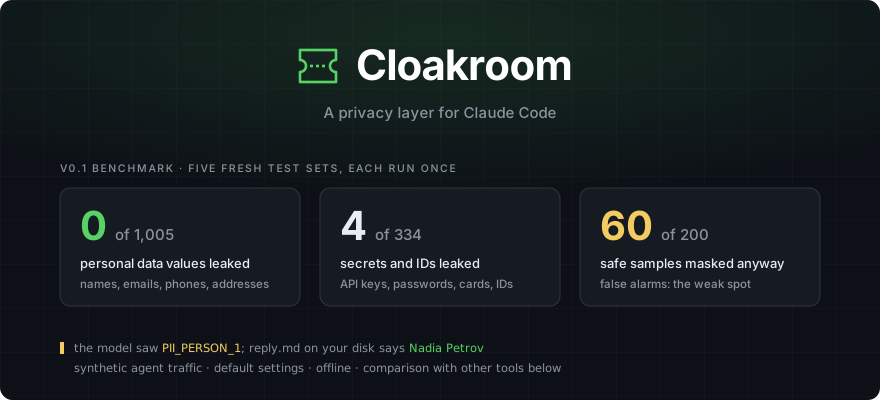




Names, emails, addresses and API keys in the files Claude reads are swapped for placeholders before the model sees them. When Claude writes a file, the real values go back in, on your machine. Runs on macOS, Windows and Linux.
Status: v0.2. The plugin installs itself, a local dashboard shows every alert, and Cloakroom learns from your corrections. Tested on macOS, Windows Server and Ubuntu, each from a clean install. It works; expect rough edges.
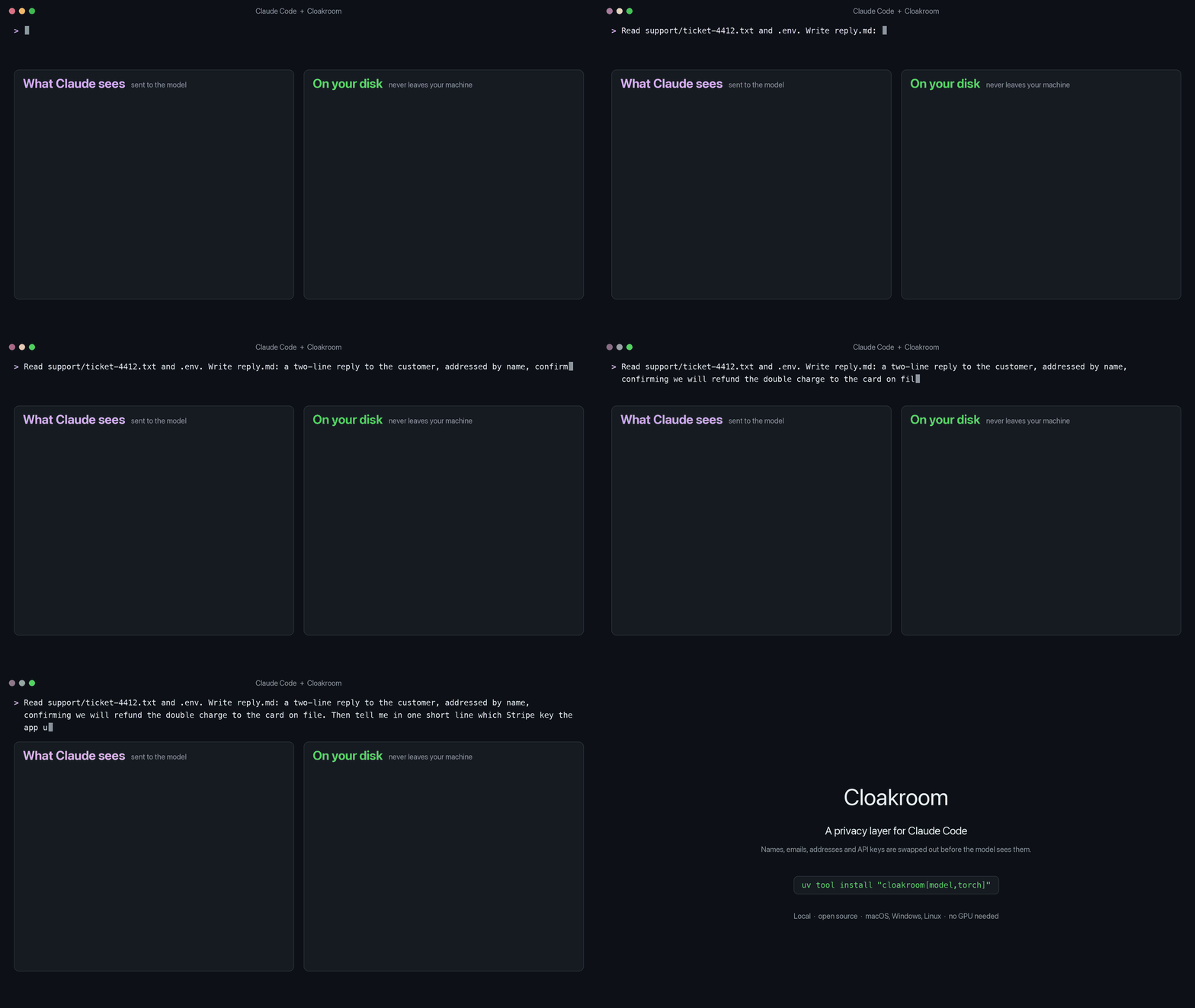
Claude sees
PII_PERSON_1. The reply it writes lands on your disk as "Hi Nadia Petrov".
Why
Claude Code reads whatever your task touches: .env files, logs, customer exports, support tickets. All of it
goes to the model. Secret scanners catch keys with a known shape, but a customer's name in a ticket or an address
in a log looks like ordinary text to a regex.
What's different
- Catches personal data, not just keys. A local detection model plus rules. On real court rulings (TAB) it finds 95% of the personal data; on our agent-traffic sets it leaks 1 of 1,005 planted names, emails, phone numbers and addresses, where the other tools we tested let 119 to 992 through.
- Claude keeps working. Placeholders stay the same for the whole session, and the real values are put back when Claude writes a file or runs a command locally.
- Runs on your machine. Detection, the encrypted vault and the restore are all local. The only network call is the one-time model download.
- Cross-platform. One install on all three, with the vault key in each system's own secure store:
- macOS: Keychain. On Apple Silicon the model runs on the built-in GPU, about 20 to 70 ms per check.
- Windows: Credential Manager; hooks run in PowerShell or Git Bash. Tested on Windows Server.
- Linux: Secret Service. Tested on Ubuntu 24.04, plus CI on every change.
- No GPU needed. A fast CPU version of the model is built on first start: about 60 ms per check on an Apple M-series CPU, about 300 ms on a 2-core cloud VM.
- Catches encoded dumps.
base64,xxdandodoutput is decoded and checked too. - Fails closed for tools. If Cloakroom can't check, tool calls are held back instead of slipping through; prompts are still checked by its rules and carry a warning with the fix, so you're never locked out.
How it works
  Claude Code reads a file or runs a tool
        │   "Nadia Petrov called about…"    sk_live_51Hx9Q…
        ▼
  ┌────────────────────────────────────────────┐
  │ Cloakroom  (on your machine)               │
  │   rules + local model  ->  find the values │
  │   encrypted vault      ->  remember them   │
  └────────────────────────────────────────────┘
        │   "PII_PERSON_1 called about…"    PII_SECRET_1
        ▼
  the model works with placeholders only
        │   Write reply.md: "Hi PII_PERSON_1,"
        ▼
  Cloakroom puts the real value back, locally
        │
        ▼
  reply.md on your disk: "Hi Nadia Petrov,"
Details: docs-HOW-IT-WORKS.md.
Get started
Inside Claude Code:
/plugin marketplace add shanjeevrajendran/cloakroom
/plugin install cloakroom@cloakroom
That's it. On the next start the plugin installs Cloakroom for you: rules-only protection within seconds (keys,
cards, IDs), then the detection model in the background (about 1 GB on a Mac, up to about 4 GB elsewhere; a few minutes), after which names and
addresses are covered too. It uses uv or pipx if you have one, otherwise a private
Python environment in ~/.cloakroom (Python 3.10+). On a machine without an Apple Silicon or NVIDIA GPU it also
builds the fast CPU model for you. Progress: ~/.cloakroom/bootstrap.log.
Then, in a terminal:
cloakroom doctor       # checks Python, the key store, the model and the service
cloakroom dashboard    # opens your alerts in the browser
Prefer to install by hand: uv tool install "cloakroom[model,torch]" (Python 3.10+), then add the plugin as above.
When Cloakroom blocks your prompt
Claude Code lets Cloakroom block a prompt but not rewrite it, so a prompt holding a key, an email, a phone, a card or an ID number is stopped. Names alone and plain dates go through. The block message says what it found, and how to get past it:
| Type | What happens |
|---|---|
cr! at the start of your prompt |
that one prompt is sent as it is |
cr: pause 10m |
prompts aren't blocked for 10 minutes (any number, up to 240); each shows the time left |
cr: resume |
checks are back on |
Files and command output stay masked the whole time. Only you can do this: Claude never sees these commands and can't change Cloakroom's settings. Usually better still: put the detail in a file and ask Claude to read it. It gets masked on the way in and the real values come back when Claude writes.
Ways to run
- Full mode (default): rules plus the local model. Catches keys and personal data written as plain text.
- Rules mode (
CLOAKROOM_MODE=rules): no model, instant, installs with plainuv tool install cloakroom. Catches keys, card numbers and IDs, but misses most names and addresses. - Outside Claude Code:
cloakroom check FILEshows what would be masked,cloakroom explain FILEshows why,cloakroom mask FILEprints what Claude would see. - Dry run (
CLOAKROOM_DRY_RUN=1): lets everything through and logs what it would have done. - Settings in
~/.cloakroom/config.json:"allow"for your own exceptions,"mask_all_dates": trueto mask every date (by default only birth dates and dates in someone's record),"mask_own_username": trueto mask your own login name in paths too.
Exceptions, backends, CI and troubleshooting: the handbook.
Dashboard
cloakroom dashboard opens a page served by Cloakroom itself on 127.0.0.1, signed in with a one-time link.
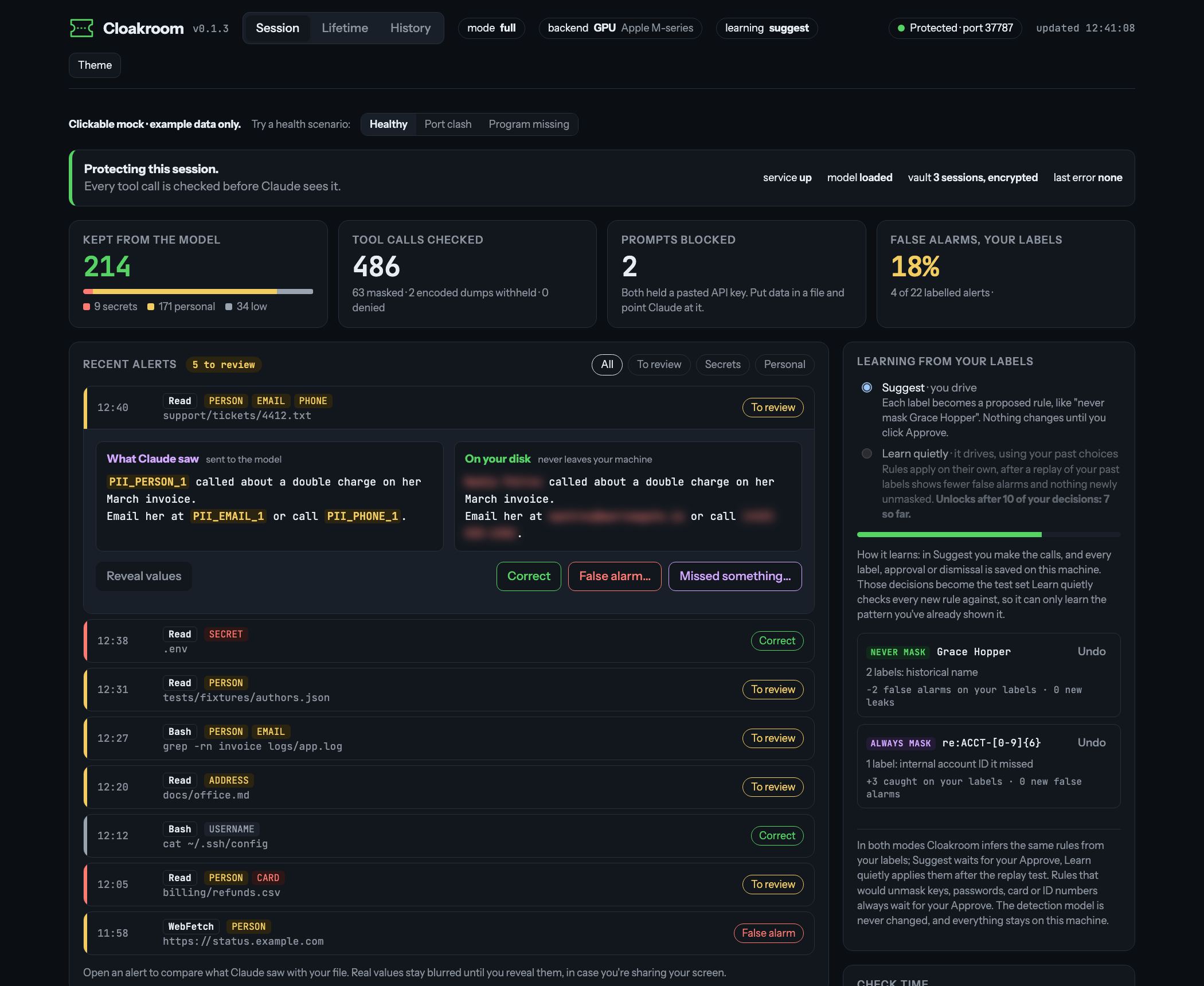
- Alerts: every masked, withheld or blocked call, with the kinds found and how long the check took. Open one to see its placeholders; the real values show only when you click Reveal.
- Your labels: mark an alert correct, a false alarm, or type what it missed.
- Rules from your labels: a false alarm suggests "never mask this", a miss suggests "always mask this" (a miss
with digits covers its shape, so
ACCT-482913also catchesACCT-100200). In Suggest you approve each one. After 10 decisions you can switch to Learn quietly: a rule then applies by itself, but only after a replay test shows it doesn't unmask anything you marked correct or a built-in set of sample secrets. Rules that would unmask a key, password, card or ID number always wait for you. Undo puts everything back. The detection model never changes. - Private by design: the activity log holds no values or text; labels and rules are encrypted like the vault.
Results
In one line: Cloakroom catches the most personal data and secrets of the Claude Code tools we tested; false alarms are its main open problem, and maisecrets is the most precise. Every number comes from a set run once before any tuning on it unless it says otherwise. Method and every run: bench/RESULTS.md. Each tool at its latest version on 2026-10-12, default settings, offline.
Real credentials from public repositories (Samsung CredData, 29,893 labelled lines, each checked alone without its file path, the way a prompt or a tool output arrives):
| Tool | All 29,893 lines: precision / recall / F1 | Without the crypto test-vector repo (23,667): P / R / F1 |
|---|---|---|
| Cloakroom | 0.66 / 0.65 / 0.66 | 0.66 / 0.73 / 0.69 |
| maisecrets | 0.90 / 0.61 / 0.73 | 0.83 / 0.48 / 0.61 |
| claude-code-redact | 0.81 / 0.31 / 0.45 | 0.77 / 0.36 / 0.49 |
| sensitive-canary (blocks the call instead of masking) | 0.59 / 0.27 / 0.37 | 0.52 / 0.30 / 0.38 |
| redact-hook (default / aggressive) | 0.81 / 0.54 precision, F1 0.31 / 0.35 | F1 0.41 / 0.48 |
One of CredData's repositories holds 3,427 of its 3,822 "Key" credentials: cipher test vectors (Key = 085a74…),
where maisecrets' keyword rule shines. Without that repository, Cloakroom has the best recall and F1; with it,
maisecrets does. Either way maisecrets is the most precise: Cloakroom masks far more harmless look-alikes, which is
what we're working on.
Keys in the formats vendors really issue (a new set written after Cloakroom 0.2.0: 15 key types, shapeless passwords, encoded emails; 77 values, 15 look-alikes):
| Tool | Leaked (77) | False alarms (15) |
|---|---|---|
| Cloakroom | 0 | 3 |
| maisecrets | 13 | 1 |
| sensitive-canary | 14 | 3 |
| redact-hook (default / aggressive) | 15 | 5 |
| claude-code-redact (PII on / secrets only) | 17 | 2 / 1 |
Synthetic agent traffic (five sets written by a different model: chat, logs, configs, CSVs, tickets; 1,575 planted values, 200 safe samples). These sets have been seen by now, so this is not an honest score for Cloakroom; its first runs (version 0.1) leaked 0 / 4 with 60 false alarms.
| Tool | Personal data (1,005) | Keys, passwords, cards, IDs (334) | False alarms (200) |
|---|---|---|---|
| Cloakroom | 1 | 2 | 23 |
| sensitive-canary (blocks the call instead of masking) | 119 | 40 | 16 |
maisecrets ("regions": ["us", "uk", "in"]; default 78 keys) |
550 | 67 | 6 |
| claude-code-redact, PII on | 607 | 101 | 31 |
| redact-hook | 817-822 | 143-157 | 35-40 |
| claude-code-redact, secrets only | 992 | 179 | 2 |
Some of these tools only aim at secrets, so their personal-data column shows scope as much as quality. maisecrets'
maintainers reproduced our numbers and pointed out where the older sets were unfair to them (keys in formats vendors
don't issue, and the regions setting); the key-format set and the setting above are the fix. The maintainers of
the compared tools were contacted before publishing. A false alarm costs you a placeholder where Claude needed the
real text; a miss sends the value to the model.
On public datasets we didn't write (v0.2, test split run once, details in bench/public/RESULTS.md):
| Dataset | Recall | Precision |
|---|---|---|
| TAB, real court rulings (ECHR) | 0.95 | 0.81 |
| Gretel, synthetic finance documents | 0.85 | 0.52 |
Gretel's lower precision is mostly number strings Cloakroom treats as account or reference numbers (over half of its false alarms), plus names and addresses Gretel leaves unlabelled.
FAQ
Does it send my data anywhere? No. It downloads the detection model once from Hugging Face (a pinned version). Everything else runs on 127.0.0.1.
How much slower is Claude? Each tool call is checked by a small local service: about 20 to 70 ms on Apple
Silicon (an M5 Max to an 8 GB M1 Air), 60 ms on an Apple M-series CPU, about 300 ms on a 2-core cloud VM. The first run
downloads the model once (about 1 GB). cloakroom doctor prints your numbers.
Will it mask things it shouldn't? Sometimes, see above. Documented examples (Stripe test cards,
example.com, fictional 555 numbers) are left alone, plain dates and job titles too. Mark a false alarm on the
dashboard and it suggests a rule; or add your own exceptions to allow in ~/.cloakroom/config.json.
cloakroom check FILE shows what would be masked.
What doesn't it protect? It stops accidental exposure; it isn't a sandbox. Out of scope: a prompt injection set on smuggling data out piece by piece, what you type into a prompt (a prompt can be blocked but not rewritten, and names alone go through), and Claude Code's own local logs. Details: docs-LIMITS.md.
How do I remove it? See Uninstall.
More
- How it works: the detectors, the known-safe filter, the vault and the restore
- Changelog · Setup details · Known limits · Benchmark
- Found a way around it? Please report it privately: SECURITY.md
Author
Made by Shanjeev Rajendran · GitHub · LinkedIn
Credits
Detection model: PII-Tracer. The one-string hook command that runs in both bash and PowerShell comes from maisecrets (Apache-2.0). Licensed Apache-2.0.
1 maintainer

Metadata
1 maintainer
Release files for cloakroom 0.2.3
For a detailed explanation of source distributions (sdists) and built distributions (wheels), please see the package formats documentation.
Source distribution (sdist)
| File | Size | Uploaded | |
|---|---|---|---|
| cloakroom-0.2.3.tar.gz | 93.3 kB | Details |
Built distribution (wheel)
| File | Interpreter | ABI | Platform | Reset |
|---|---|---|---|---|
| cloakroom-0.2.3-py3-none-any.whl | Python 3 | none | any | Details |
Total release size: 173.4 kB
Release files / cloakroom-0.2.3.tar.gz
| Download URL | cloakroom-0.2.3.tar.gz |
|---|---|
| Size | 93.3 kB |
| Tags | Source |
|
SHA-256 checksum How to use checksums |
7a157c9dbd70280a423af41609bdbdc0a62ae62c3a1043fa95683fcf9766c7fa
|
|
BLAKE2b-256 checksum How to use checksums |
aadef9004d013d313b37107705cfa73952c8a1d90dd51b786ea00174cf55f596
|
| Upload date | |
|
Uploaded using Trusted Publishing? What is trusted publishing? |
Yes |
| Uploaded via |
twine/7.0.0 CPython/3.13.14
|
Provenance
Provenance describes where a file came from. On PyPI, provenance is shared via attestations, which provide a verifiable record of the build or publishing details. View details, limitations and caveats.


PyPI Publish Attestation
PyPI verified that this artifact, at this checksum, originated from the publisher listed below.
Signed by GitHub Actions, verified by PyPI on Oct 13, 2026.
Transparency logRelease files / cloakroom-0.2.3-py3-none-any.whl
| Download URL | cloakroom-0.2.3-py3-none-any.whl |
|---|---|
| Size | 80.1 kB |
| Tags | Python 3 |
|
SHA-256 checksum How to use checksums |
5d46658bc692d21c5ac6f9d295ec0736f10fd80bbf765bf08cfa61e7e046fac1
|
|
BLAKE2b-256 checksum How to use checksums |
d8e6cc61b4c93bf73fa47dac4e17e82fc74f7d13e8aa7b3873094c540ce733fd
|
| Upload date | |
|
Uploaded using Trusted Publishing? What is trusted publishing? |
Yes |
| Uploaded via |
twine/7.0.0 CPython/3.13.14
|
Provenance
Provenance describes where a file came from. On PyPI, provenance is shared via attestations, which provide a verifiable record of the build or publishing details. View details, limitations and caveats.
PyPI Publish Attestation
PyPI verified that this artifact, at this checksum, originated from the publisher listed below.
Signed by GitHub Actions, verified by PyPI on Oct 13, 2026.
Transparency log













