
Cloakroom is free and open source. It masks API keys, passwords and personal data (names, emails, addresses and the like) on your machine before your AI coding agent sees them. Works with Claude Code, Codex CLI, Gemini CLI and Cursor's command-line agent.
▶ 40-second demo (Claude Code) · Get started · Blocked prompt? · Results · How it works · Extra protections · Dashboard · FAQ · Known limits



Cloakroom swaps your secrets and personal data for placeholders before Claude sees them, and puts the real values back in the files Claude writes.
On test data it hadn't seen before, Cloakroom let through 0 of 1,005 personal details (the other tools we tested let through 119 to 992) and 0 of 77 keys and passwords in the formats vendors really issue. Its weak spot is false alarms: it masks more harmless text than secret-only tools do. Results
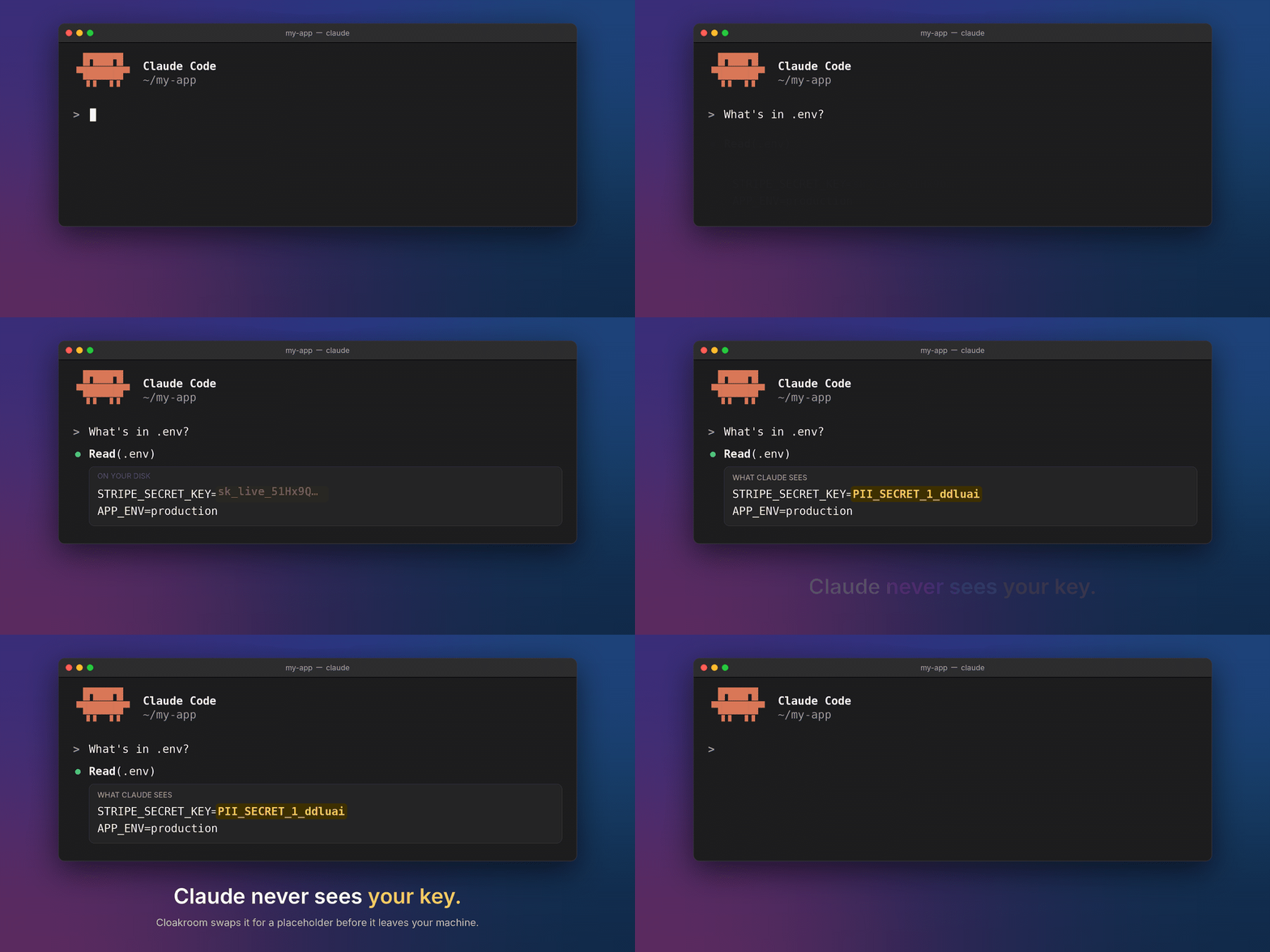
When Claude writes a file, Cloakroom puts the real value back in on your disk.
Install (inside Claude Code, one line at a time):
/plugin marketplace add shanjeevrajendran/cloakroom
/plugin install cloakroom@cloakroom
Or, from a terminal:
claude plugin marketplace add shanjeevrajendran/cloakroom
claude plugin install cloakroom@cloakroom
Then restart Claude Code. Details and other tools: Get started.
A placeholder is a label such as PII_PERSON_1 or PII_SECRET_1. The AI sees the label and works with it. The
real value stays on your machine.
Cloakroom catches personal data as well as keys. It masks the data and lets the AI carry on, instead of stopping the whole step. And it learns from your corrections.
It runs on your machine, sets itself up on first start, and works on Mac, Windows and Linux. Free and open source. It's new, so expect rough edges.
New in 1.1:
- Cursor's command-line agent: run
cloakroom install cursor(Cursor).
New in 1.0:
- See where your agent sends data, and limit it to sites you approve:
cloakroom report --destinationslists the hosts your agent's commands, web fetches and MCP calls went to, with the kinds of data they carried.cloakroom allow-host example.combuilds an approved-sites list; once you turn it on, a call to any other site is held. An email, phone number, name or your username in a web address or header is held too (details). - Point any tool at Cloakroom:
cloakroom proxyis a small server on your machine for tools that let you set their API address (Claude Code, Codex CLI, Gemini CLI). They send their requests to it, Cloakroom masks the text, and the request goes on to the AI company. Off until you start it (details).
New in 0.8:
- See which keys your agents saw:
cloakroom exposurelists the keys and passwords Claude Code, Codex CLI, Gemini CLI and Cursor's command-line agent saw, each as a hint (ghp_…LmPq), never the key, and ends with a "Rotate these" list. It lists only what Cloakroom detected (details). - A warning when a pull changes what your agent runs:
cloakroom scanlists every command a repo's agent and editor config would run and flags the npm worm's shape. Aftercloakroom install git-hook, each pull, checkout or merge that adds or changes such a command prints it. It warns, never blocks (details). - Hand the agent a key safely:
cloakroom give NAMEasks for the value in a hidden terminal prompt and gives you a placeholder to paste. When the agent writes that placeholder into a local file or command, the real value goes back in. The AI never sees it (details). - Stopped prompts leave no copy behind: a prompt Cloakroom stops is taken out of the session's saved Claude Code transcript, right after the stop and again at session end (details).
New in 0.7, it also protects two other AI coding agents that run in a terminal (Mac and Linux):
- OpenAI's Codex CLI: run
cloakroom install codex(Codex). - Google's Gemini CLI: run
cloakroom install gemini(Gemini CLI).
What works where
✓ Masked: the AI sees a placeholder, never the real value · ⛔ Stopped: Cloakroom blocks it and tells you how to send it safely · ✗ Not covered: Cloakroom can't see it
Why typed messages are stopped instead of masked: these agents let an add-on stop what you type, but not reliably change it. So Cloakroom stops a message holding a key or personal data before it's sent, and nothing reaches the AI.
MCP tools are add-ons that give the AI extra abilities, such as a browser or a database. "Block message" is explained under the table.
| Protection | Claude Code | Codex CLI | Gemini CLI | Cursor (command-line agent) |
|---|---|---|---|---|
| Prompts you type | ⛔ Stopped before sending (the AI never sees it); Cloakroom gives you a copy with placeholders to send instead | ⛔ Stopped before sending (the AI never sees it); Cloakroom gives you a copy with placeholders to send instead | ⛔ Stopped before sending (the AI never sees it); Cloakroom gives you a copy with placeholders to send instead; ✗ pictures in a prompt aren't checked | ✗ Not covered: Cursor's command-line agent doesn't run its prompt hook |
| File reads | ✓ | ✓ Masked when read through the shell (sent as a block message) | ✓ Masked (sent as a block message) | ✓ Masked (Cloakroom hands Cursor a masked copy of the file); ⛔ Cursor's Grep tool is refused when it would show file contents (a shell search is masked) |
| Command output | ✓ | ✓ Masked (sent as a block message); ✗ long-running commands | ✓ Masked (sent as a block message) | ✓ Masked (the command runs inside Cloakroom, which prints only masked output) |
| MCP tool output | ✓ | ✓ Masked (sent as a block message) | ✓ Masked (sent as a block message) | ✓ |
| Images and PDFs | ✓ | ✗ Not covered: pictures opened with view_image |
✓ Masked: the text in pictures is read on your machine; ⛔ PDFs held back | ✓ Masked when read as a file: the text in pictures is read on your machine, and PDFs by their text layer; ✗ pictures in a prompt |
| Real values put back in commands and edits | ✓ | ✓; ⛔ unknown commands are refused, not asked about | ✓ | ✓ in shell commands; ⛔ a Write or edit that carries a placeholder is refused (Cursor ignores the restored input) and the agent is told to write through the shell; ⛔ unknown commands are refused, not asked about |
| Real values kept out of web and MCP calls | ✓ | ✓; ✗ Codex's own web search (runs on OpenAI's servers) | ✓ | ✓; ✗ Cursor's own web search (no hook sees it) |
| Keys written into files git would commit | ✓ | ✓ | ✓ | ✓ |
The agent's git commit / git push check |
✓ | ✓ | ✓ | ✓ |
| Commands that send secrets or placeholders over the internet | ✓ | ⛔ Stopped: refused, not asked about | ✓ | ⛔ Stopped: refused, not asked about |
| Calls that move money | ✓ | ✓ | ✓ | ✓ (to let one through: run cloakroom allow in a terminal) |
| Check on commits you make yourself | ✓ | ✓ | ✓ | ✓ |
| Systems | Mac, Linux, Windows | Mac, Linux | Mac, Linux | Mac, Linux |
Cloakroom works through hooks: small checks the agent runs before and after each action, such as reading a file or running a command.
Cursor's editor reads the same hooks file, but Cloakroom hasn't been checked there yet: treat the editor as not covered until it is.
- Block message: Codex and Gemini CLI can't swap a tool's output for a masked copy. So Cloakroom blocks the original, and the AI reads the masked text in the block message instead.
- Codex ignores Cloakroom's hooks until you approve them once (type
/hooksinside Codex). - Gemini CLI lets an action through unchecked when a check runs past its time limit.
- Cursor's command-line agent can't swap a tool's output either, so Cloakroom changes the input: a read goes to a masked copy of the file and a command runs inside Cloakroom, which prints only masked output. A write that carries a placeholder is refused and the agent writes through the shell instead. Typed prompts aren't checked.
All three were tested live (Codex 0.164, Gemini CLI 0.65, Cursor's agent 2026.10.22). Everything else: Known limits.
Recent releases
- 1.1.0 (2026-10-31): Cloakroom also protects Cursor's command-line agent, on Mac and Linux: run
cloakroom install cursor.cloakroom allowlets a command Cloakroom held run once. See Cursor. - 1.0.0 (2026-10-30): the ledger of where your agent sends data (
cloakroom report --destinations), an opt-in approved-sites list (cloakroom allow-host), and a hold on a web address or header that carries your email, phone, name or username. See See where your agent sends data.cloakroom proxymasks the requests of any tool that lets you set its API address, on Mac, Linux and Windows. See Point any tool at Cloakroom. - 0.9.0 (2026-10-30):
cloakroom give NAMEhands the agent a key through a hidden prompt, so you never paste it into a chat; a prompt Cloakroom stops is taken out of the session's saved Claude Code transcript; a failed command is counted as not checked incloakroom report. See Hand the agent a key safely. - 0.8.1 (2026-10-30): a stopped prompt comes back with placeholders in place of your private values, ready to
send instead;
cloakroom updateupdates Cloakroom and redoes its setup for Codex, Gemini CLI and git commits;cloakroom doctorshows the version; a new Updates section. - 0.8.0 (2026-10-27):
cloakroom exposureshows which keys your agents saw, with a rotate list;cloakroom scanand a git-hook warning when a pull changes the commands a repo's agent config would run; three fixes found by a live agent test (Results).
Claude Code plugin updates arrive a few days after each PyPI release (PyPI is the Python package site), once the release has settled (how updates reach you). All changes: CHANGELOG.md.
Hand Claude the files you'd never paste into a chat:
- Bank statements (PDF, scan or CSV): "sort a year of spending by category." Claude sees amounts and merchants, not your name, address or account number.
- Support tickets: "draft replies to this week's tickets." Claude writes to a placeholder name (
PII_PERSON_1); the drafts saved on your disk have the real names. - Medical or HR records: names, birth dates, addresses and ID numbers are masked, so Claude can summarise or tidy a record without knowing whose it is.
.envfiles and logs: Claude fixes the config without ever seeing the password or API key.- Disguised copies: a key or email that a command hashed, hex-encoded or reversed is still masked (what's covered).
- Finance work: bank and card numbers are masked, calls that move money wait for your OK, and
cloakroom reportwith a log that shows any later edit is your audit trail (for finance teams). - Scans and photos of documents: read on your machine (no upload) and masked like any other file.
- Learns from you: when it masks something harmless (a false alarm), mark it once in the dashboard and a rule stops it next time.
Get started
You need Claude Code, installed and signed in. Then:
-
Open a terminal. Mac: press Cmd+Space, type "Terminal", press Enter. Windows: open Start, type "PowerShell", press Enter. Linux: press Ctrl+Alt+T. Type
claudeand press Enter. -
Add Cloakroom. Inside Claude Code, type these two lines, one at a time. If it asks where to install, pick the option for all your projects (user scope).
/plugin marketplace add shanjeevrajendran/cloakroom /plugin install cloakroom@cloakroom -
Restart Claude Code. Type
/exit, thenclaudeagain. Cloakroom now installs itself. Keys and card numbers are covered within seconds if uv or pipx (tools that install Python programs) is already installed, or in about a minute when Cloakroom has to download them first; names and addresses a few minutes later, once the detection model has downloaded (about 1 GB on a Mac, up to about 4 GB elsewhere). Until then, Claude's actions (reading files, running commands, using add-ons) wait. It also updates itself when the plugin updates (an install you made by hand is left alone). On a Mac, if it asks to use the "cloakroom" item in your Keychain, click Always Allow (it only lets Cloakroom read its own key). -
Check it. Open a new terminal window and run:
cloakroom doctor       # every line should say ok
cloakroom dashboard    # opens your alerts in the browser
What you need first:
- Windows, Mac and Linux: nothing. When neither uv nor pipx (tools that install Python programs) is there,
Cloakroom fetches uv (a fixed version, checked against its known SHA-256 fingerprint before it runs), and uv brings
its own Python. That needs
curlorwget, which macOS and most Linux systems have. If a Linux machine has neither, Cloakroom tells you the steps:sudo apt install curl(Ubuntu/Debian) orsudo dnf install curl(Fedora/RHEL), then restart Claude Code. - Intel Mac: only the pattern rules run, so keys, cards and ID numbers are caught but most names and addresses are not. The detection model for names and addresses needs PyTorch or ONNX Runtime, and neither is built for Intel Macs.
If something looks wrong:
cloakroomnot found: open a new terminal. The program lives in~/.local/bin(on Windows,%USERPROFILE%\.local\bin); the installer adds that folder to your shell profile (~/.zshenvfor zsh,~/.bashrcand~/.profileor~/.bash_profilefor bash) or, on Windows, to your user PATH.- Still setting up, or it failed: progress, and numbered steps when something needs you, are written to
~/.cloakroom/bootstrap.log. More in Setup.
Tested from clean installs on macOS, Windows and Ubuntu.
Prefer to install by hand: uv tool install "cloakroom[model,torch,ocr]" (Python 3.10+; the part in brackets adds
the detection model and OCR, which reads text out of pictures), then add the plugin as above.
Updates
-
Claude Code: Claude Code updates the Cloakroom plugin, and the plugin then updates the
cloakroomprogram the next time you start Claude Code. A plugin update comes out a few days after each new Cloakroom release. Claude Code only does this by itself if automatic updates are on for the place you added Cloakroom from (Claude Code calls it a marketplace). They're off unless you added Cloakroom from the plugin directory on claude.ai, where they're on. To switch them on:- In Claude Code, type
/pluginand press Enter. - Go to the Marketplaces tab and choose cloakroom.
- Choose Enable auto-update.
When an update arrives, Claude Code says "Run /reload-plugins": type that, or restart Claude Code. To update right away instead, run
claude plugin update cloakroom@cloakroomin a terminal. - In Claude Code, type
-
Codex, Gemini CLI, Cursor, git commits, or a
cloakroomyou installed yourself: runcloakroom updatein a terminal. It updates Cloakroom with the installer you used (uv, pipx or pip) and keeps the optional parts you had (the detection model and OCR, the reading of text in scans and photos). Then it sets up Cloakroom's checks again for Codex, Gemini CLI, Cursor and git commits in the current folder, only where they were set up before, so they match the new version. If Codex's checks changed, Codex asks you to approve them once more: startcodex, type/hooksand trust each Cloakroom entry. To see what it would do without changing anything:cloakroom update --check. It never changes the Claude Code plugin; Claude Code does that. -
Which version you have:
cloakroom doctorshows the version of the program and, if you use Claude Code, of the plugin, and says what to do when they differ.
How it works
When Claude reads a file or runs a command, Cloakroom checks the result on your machine first. Each real value it finds is swapped for a placeholder. The pair is kept in the vault, an encrypted file on your machine. When Claude writes a file or runs a command that holds a placeholder, Cloakroom puts the real value back just before it runs.
  Claude Code reads a file or runs a tool
        │   "Nadia Petrov called about…"    sk_live_51Hx9Q…
        ▼
  ┌────────────────────────────────────────────┐
  │ Cloakroom  (on your machine)               │
  │   rules + local model  ->  find the values │
  │   encrypted vault      ->  remember them   │
  └────────────────────────────────────────────┘
        │   "PII_PERSON_1 called about…"    PII_SECRET_1
        ▼
  the model works with placeholders only
        │   Write reply.md: "Hi PII_PERSON_1,"
        ▼
  Cloakroom puts the real value back, locally
        │
        ▼
  reply.md on your disk: "Hi Nadia Petrov,"
Details: docs-HOW-IT-WORKS.md.
Extra protections
Masking is the core. These come with it, on by default, and need nothing from you.
Real values don't leave your machine
- Commands that send data are held: a command that would send a secret Cloakroom has seen off your machine
(curl, wget, ssh, scp, rsync, nc, git push with credentials, a key typed straight into an
Authorizationheader) is held: it doesn't run until you say so. The message names what it found by placeholder only. If you meant it, typecr: allow, then ask Claude to run the same command again: it passes once. - One-line scripts count too:
python -c,node -e,ruby -e,perl -e,php -r,deno evalandbash -ccommands that can connect to the internet are treated like curl. - Encoded copies count: a secret Cloakroom has seen is also caught when a program rewrites it in a common way (base64-encoded, URL-encoded or JSON-escaped).
- Disguised copies count: that secret is also caught hashed, as hex or reversed (details).
- Web, MCP and subagent calls carry placeholders only: a web fetch, an MCP tool call or a prompt to a subagent (a helper AI that Claude starts) that holds a real value is stopped before it runs.
- Pictures and PDFs become masked text: PDFs, scans, photos and images returned by MCP tools are read on your machine and Claude gets masked text, never the file or the picture. Without OCR an image is held back, with a one-line reason.
Once Cloakroom has seen a key, password, card or account number, or an email, it also looks for copies a command changed on the way. Each copy gets its own placeholder, and the exact copy is put back in files Claude writes.
- Covered: MD5, SHA-1 and SHA-256 hashes of a key or an email; hex (
6b39...,0x...,6b 39 ...,\x6b...); a key or password of 12+ characters written backwards; pairs likeuser:passwordorDB_PASSWORD=...in hex or URL encoding; a card or account number's last 4 digits right after "ending in", "last 4" or****; an email's username on its own when it can't be an ordinary word (r.okafor77, notadmin). - Not covered: salted or keyed hashes (bcrypt, HMAC), other hashes, a name in different capitals, initials, a last 4 with no word pointing at it, and anything Cloakroom hasn't seen in plain form first.
Keys stay out of git
Git saves versions of your code, and those versions are often shared online.
- Files git would commit: when Claude writes a file, a key or password that would end up in a tracked file is
refused, and Claude is told to use
.envinstead. Ignored files and.envwork as before. - Commits and pushes: before Claude runs
git commitorgit push, Cloakroom reads what would be committed or pushed. A key or password there holds the command, naming the file and placeholder;cr: allowlets it run once. - Commits you make yourself:
cloakroom install git-hook(in a repo) also checks commits you make yourself, with the same rules and your own known secrets (your always-mask values), no agent needed. It addspre-commitandpre-pushhooks (wherecore.hooksPathpoints, if set) and never changes a hook another tool put there: it skips it and prints the one line to add to it. Skip the check once with git's own--no-verify; remove it withcloakroom uninstall git-hook. One repo at a time (no--global: git's template folder would only reach new clones). Mac, Linux and Windows (Git Bash, PowerShell or cmd: git runs the check, whichever window you commit from). - A trusted repo that changes under you: Claude Code, Codex, Gemini CLI and VS Code ask before trusting a new
folder, but not again when a folder you already trusted changes. A pull can add a hook that runs the next time you
open the agent there (the Tensorlake npm worm did this in October 2026). The same
cloakroom install git-hookaddspost-checkoutandpost-mergehooks: after a pull, checkout or merge, Cloakroom compares the commands in.claude/settings.json,.mcp.json,.codex/,.gemini/settings.jsonand.vscode/tasks.jsonbefore and after, and prints each new or changed one with its file and line. It only warns: nothing is blocked or edited.cloakroom scan [folder]lists every such command at any time and flags the worm's shape (an agent hook running a file in.vscode/and a folder-open task running a file in.claude/). - Agent config files: a real key written into
.mcp.json,.claude/settings.json,.cursor/mcp.jsonor a copy ofclaude_desktop_config.jsonin a repo is refused. Claude is told to point to a setting kept outside the file instead, such as${GITHUB_TOKEN}.
You stay in control, and can show it
- Claude can't turn Cloakroom off: its settings change only from the dashboard or when you type
cr: pauseorcr: resume. - A log you can check and export: each line of the activity log carries a fingerprint (hash) of the line
before it, so an edited or removed line shows up.
cloakroom report(or Export on the dashboard) gives counts per day and session, without values. - Placeholders can't be guessed: each one ends in a short tag only your machine can make
(
PII_SECRET_1_k7q2ab), and only placeholders issued in this session get their real value back. A file that namesPII_SECRET_1to fish for a key gets nothing; after three such tries in a session you see one line. - Files Claude wrote stay masked: when a real value is put back into a file, Cloakroom remembers where (never the value), so reading that file again later, even in a new session, shows the placeholder.
- Old transcripts can be cleaned:
cloakroom clean-historyfinds keys and passwords already sitting in old Claude Code transcripts (saved records of past chats) and your prompt history, and replaces them on your yes, with a backup you delete. - See which keys your agent saw:
cloakroom exposurelists the keys and passwords your coding agents saw, so you know what to rotate. It reads Cloakroom's own log (per session and agent: where the key was seen and what Cloakroom did) and scans old Claude Code, Codex CLI, Gemini CLI and Cursor's command-line agent transcripts for keys from before Cloakroom. It ends with a "Rotate these" checklist. It shows a hint (ghp_…LmPq), never the key, and only reads the transcripts. It lists only what Cloakroom detected: a key it missed has no line, so no line is not proof a key is safe.
- Bank numbers are masked: US routing numbers (a valid ABA check digit plus a word or field like "routing" or "ABA")
and bank account numbers (next to "account number", "acct", "checking account", "DDA", in a CSV column of that
name, a line of an ACH payment file, or beside a routing number in the same record) become
PII_BANK_1_k7q2ab. Digits with no such word stay as they are, so order numbers, phone numbers and ZIP+4 codes are left alone. - Calls that move money are held: a write to a payment, payout or transfer API (Stripe, Plaid, Dwolla, Wise,
Adyen, PayPal, Square, Increase, Modern Treasury, Column) from curl, PowerShell or a payment CLI, or an MCP tool
named for it (
send_money,create_payout,initiate_transfer), waits until you typecr: allow; then it runs once. Reads such as a balance check pass. Add your own hosts and tools in~/.cloakroom/config.jsonwith"money_hosts": ["payments.example.com/api/wires"]and"money_tools": ["disburse"]; turn the hold off with"money_hold": false. - The audit trail: every hold and every
cr: allowlands in the same activity log that shows later edits (above), socloakroom reportshows them per day and session.
Commands and limits
cloakroom report [--since 2026-10-01] [--format csv|json]: counts per day and session by data kind and action (masked, withheld: output not passed on, held, allowed once, denied), with paths reduced to their extension and top folder. It starts with what it covers and what it can't: a miss leaves no line, and other agents, machines without Cloakroom and prompts sent withcr!are not in it. A "Checks skipped" section counts the calls let through without a full check (too large, too slow, a git error, the model not ready), by check and reason; you're also told about each reason once per session when it happens.cloakroom report --verify: checks that no line of the log was changed (the hash chain) and prints the last line's fingerprint (the head hash). Keep that somewhere else: anyone who rewrites every later line can rebuild the chain. The log keeps"log_months"months (default 12).cloakroom clean-history [--dry-run]: the first run only counts, per project. Files changed in the last ten minutes (an open session) are skipped.cloakroom exposure [--since 2026-10-01] [--format text|json]: keys and passwords seen with Cloakroom and found in old agent transcripts, with a hint (a known prefix such assk-orghp_and, for values of 16 characters or more, the last 4) and a rotate checklist. It lists only what Cloakroom detected: a key it missed has no line.cloakroom scan [folder]: lists every command the agent and editor config in a folder would run (.claude/settings.json,.mcp.json,.codex/,.gemini/settings.json,.vscode/tasks.json), with its file and line, and flags the npm worm's shape. Read-only.- Pull, checkout and merge warning:
cloakroom install git-hookaddspost-checkoutandpost-mergehooks that print each new or changed command in those files. It warns, never blocks. Run it again in a repo that already has the hook to get the new ones. - Commit and push check: it reads the changes you staged for the commit (for
git push, the commits no remote has yet) within two seconds; a larger or slower one runs unchecked. Repos that commit sample keys need"allow_secret_paths".
Dashboard
Where you correct Cloakroom. Each false alarm you mark can become a rule, so it stops happening. The detection model itself never changes.
cloakroom dashboard opens a page that Cloakroom serves from your own machine only (127.0.0.1). You're signed in with
a one-time link.
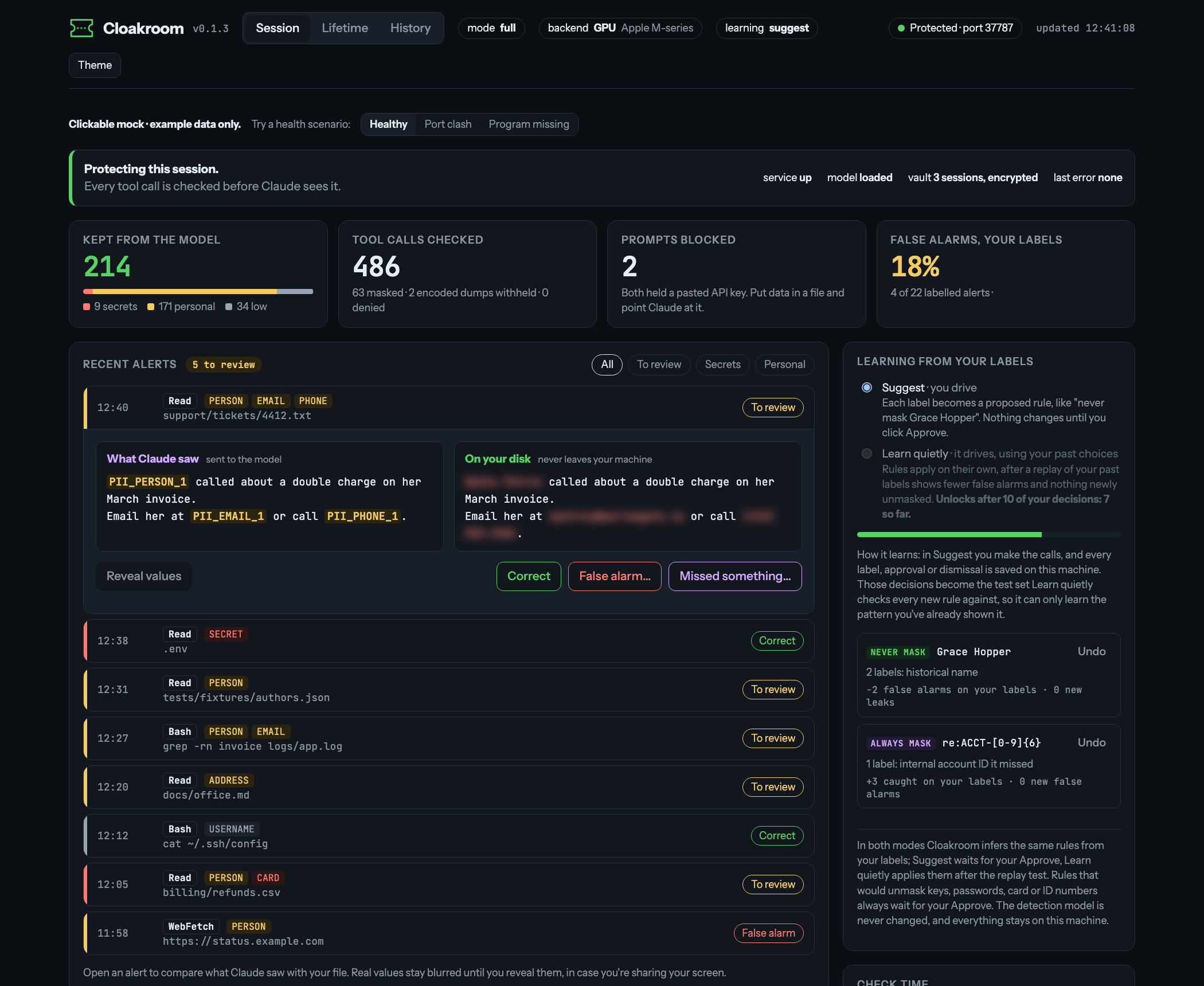
- Alerts: every masked, withheld or blocked call, with the kinds found and how long the check took. Open one to see its placeholders; the real values show only when you click Reveal.
- Your labels: mark an alert correct, a false alarm, or type what it missed.
- Rules from your labels: a false alarm suggests "never mask this", a miss suggests "always mask this". You approve each one, or later let rules apply by themselves once Cloakroom has tested them against your past labels; rules that would unmask a key, password, card or ID number always wait for you. Undo puts everything back. The detection model never changes. Details: the handbook.
- Private by design: the activity log holds no values or text; labels and rules are encrypted like the vault.
When Cloakroom blocks your prompt
Claude Code lets Cloakroom stop a prompt but not rewrite it. So a prompt holding a key, an email, a phone, a card or
an ID number is stopped before it's sent, and the AI never sees it. Names alone and plain dates go through. The
message says what it found and gives your prompt back with each private value swapped for a placeholder (like
PII_EMAIL_1_k7q2ab), ready to copy and send:
Cloakroom stopped this prompt: it holds private data (EMAIL x1, SECRET x1), so it wasn't sent. In the copy below
that data is replaced by placeholders, which Cloakroom turns back into the real values on this computer when Claude
uses them.
Send this instead:
Add PII_SECRET_1_dhqyhg to .env and mail PII_EMAIL_1_p2iq6z when it's done
Send it anyway: add cr! at the start. ...
Claude only ever sees the placeholders. When it writes one into a file or a local command, Cloakroom puts the real value back on your computer, so the file ends up with the real key. A very long prompt (over 10,000 characters) gets the advice below instead of a copy. Other ways past a stop:
| Type | What happens |
|---|---|
cr! at the start of your prompt |
that one prompt is sent as it is |
cr: pause 10m |
prompts aren't blocked for 10 minutes (any number, up to 240); each shows the time left |
cr: resume |
checks are back on |
Files and command output stay masked the whole time. Only you can do this: Claude never sees these commands and can't change Cloakroom's settings. For a long paste: put the detail in a file and ask Claude to read it. It gets masked on the way in and the real values come back when Claude writes.
Claude Code also saves every chat on your disk. A prompt Cloakroom stops is taken out of that saved copy for the
current session (right away, after the next reply and when the session ends), so the key you typed doesn't stay
behind. Codex, Gemini CLI and Cursor saved chats are not touched. To keep the text, set "scrub_transcript": false in
~/.cloakroom/config.json.
Hand the agent a key safely
When the agent needs a key (a Stripe key, a database password), don't paste it into a prompt. In a terminal, in your project folder:
cloakroom give STRIPE_KEY
You type the value hidden. Cloakroom keeps it on your machine and prints a placeholder; tell the agent STRIPE_KEY is PII_SECRET_1_k7q2ab. When the agent writes that placeholder into a local file or command, Cloakroom puts the real value back, and masks it again in anything the agent reads. The agent never sees the value. It works in Claude Code, Codex CLI, Gemini CLI and Cursor's command-line agent, for every session in that project.
| Command | What it does |
|---|---|
cloakroom give NAME |
store a value (hidden prompt), print its placeholder; give the same name again to replace the value |
cloakroom give --list |
names, hints (sk-…Q4z) and time left, never values |
cloakroom give --forget NAME |
remove one |
cloakroom give NAME --hours 2 |
keep it 2 hours instead of the 24 default |
If you type cr: give NAME into a prompt, Cloakroom stops it and tells you to use the terminal command.
See where your agent sends data
Cloakroom writes down where your agent sends data and can limit it to sites you approve. It sees the commands that
send data (curl, wget, ssh, scp, git push, network one-liners), WebFetch and WebSearch, and MCP calls to remote
servers. Each is logged with the host and the kinds of data it carried (EMAIL x2, never a value). Calls to localhost
aren't logged.
cloakroom report --destinations            # per host: calls, held, kinds carried (--since DATE, --format json)
cloakroom allow-host example.com           # approve a site; *.example.com approves its subdomains
cloakroom allow-host --list                # the list, and whether it is on
The approved-sites list is off until you add "egress": "allowlist" to ~/.cloakroom/config.json. Then a call to a host
that isn't on the list is held, whatever it carries, with the same message and cr: allow as any held command: type
cr: allow in the chat, then ask the agent to run the same call again. A call whose destination Cloakroom can't read
(aws s3 ls, npm publish) is held too. WebSearch counts as the host web-search, and an MCP server your config
doesn't name as mcp:NAME; approve those with cloakroom allow-host web-search or cloakroom allow-host mcp:NAME.
Always on, with or without the list: a command or web call whose address, query string or headers carry an email
address, a phone number, a name or your computer's username is held, and the message says which. The username comes
from the operating system, not from $USER. A placeholder in the address is fine.
| Command | What it does |
|---|---|
cloakroom report --destinations |
hosts, calls, holds and kinds carried; the dashboard shows the same as "Where data went" |
cloakroom allow-host HOST |
add a site to the approved-sites list (--remove takes it off, --list shows it) |
It doesn't see the agent's own calls to its model provider, or a tool that runs no Cloakroom check (Known limits).
Point any tool at Cloakroom
Some tools let you set the address they send their requests to. cloakroom proxy runs a small server on your own
machine (127.0.0.1 only, never reachable from the network); you point the tool at it, and every request body is
masked the way Cloakroom masks a file read, then sent on to the real address with the same headers. Replies come back
unchanged, as a stream. It works on Mac, Linux and Windows and is off until you start it.
cloakroom proxy                      # run it (Ctrl+C stops it); --background starts it detached
cloakroom proxy install claude       # Claude Code: sets ANTHROPIC_BASE_URL in ~/.claude/settings.json
cloakroom proxy install codex        # Codex CLI: sets openai_base_url in ~/.codex/config.toml (API-key sign-in only; a ChatGPT sign-in is refused)
cloakroom proxy install gemini       # Gemini CLI: sets GOOGLE_GEMINI_BASE_URL in ~/.gemini/.env (API-key sign-in)
cloakroom proxy install claude --print   # show the change, write nothing
cloakroom proxy uninstall claude     # put back what was there before
The text Cloakroom checks is every string in the JSON body (messages, system prompt, tool results, tool descriptions)
except names, ids, signatures and images. A value it masks gets a placeholder that your tools restore the same way as the
placeholders from file reads: when the agent writes it to a local file or a command, the real value goes in. The
placeholders are kept encrypted for 24 hours, like cloakroom give. A placeholder that a Cloakroom hook already put
in the text passes through as it is.
Each request is logged in the where-it-went ledger with the host and the kinds masked, never a value, so
cloakroom report --destinations shows the proxy's traffic next to the commands. With the approved-sites list on, a
request to an upstream that isn't on it is refused. A body Cloakroom can't read (not JSON, a compression it doesn't know,
over proxy_max_mb, 16 by default) is refused with a 503 and a plain reason, not sent, and shows as denied in
cloakroom report. If the check can't run, the request is refused too. cloakroom doctor shows whether the proxy runs and which tools point at it.
Setting in ~/.cloakroom/config.json |
What it does |
|---|---|
proxy_port |
the port; 0 (default) picks a free one the first time and keeps it |
proxy_max_mb |
bigger bodies are refused, not sent (default 16) |
proxy_upstreams |
more routes, for example {"/mistral": "https://api.mistral.ai"}; https only (a loopback address may use http) |
Cursor and Copilot are not covered: their requests go through the vendor's own servers, so there is no address on your machine to point them at (Known limits).
Why Cloakroom
Claude Code reads whatever your task touches: .env files, logs, customer exports, support tickets. All of it
goes to the model. Secret scanners catch keys with a known shape, but a customer's name in a ticket or an address
in a log looks like ordinary text to them.
- Catches personal data, not just keys. A small detection model on your machine, plus rules, finds names, emails, phone numbers and addresses that have no fixed shape. On fresh test sets it let through 0 of 1,005 of them; the other tools we tested let through 119 to 992 (Results).
- Claude keeps working. Placeholders stay the same for the whole session, and the real values are put back when Claude writes a file or runs a command locally.
- Runs on your machine. Detection, OCR, the encrypted vault (where the real values wait) and the put-back are all local. The only network call is the one-time model download (the OCR models ship inside the package).
- Mac, Windows and Linux. One install on all three, with the vault key in each system's own secure store: Keychain on macOS; Credential Manager on Windows (runs in PowerShell or Git Bash, tested on Windows Server); Secret Service on Linux (tested on Ubuntu 24.04, plus automatic tests on every change).
- No graphics card needed. Each file or command is checked in a fraction of a second on an ordinary laptop
(
cloakroom doctorprints your numbers). - Catches encoded output. If a command prints data in a scrambled but reversible form (
base64, hex dumps fromxxdorod), Cloakroom turns it back into text and checks it too. - If it can't check, it doesn't let things through. When Cloakroom isn't ready, Claude's file reads and commands wait instead of passing unchecked. Your prompts still get a quick rules check, with a warning, so you're never locked out.
Results
In short: in our tests Cloakroom let through fewer secrets and personal details than the other tools we tried, and masked more harmless text by mistake. The tables below are the detail.
- Good at: personal data (names, emails, phone numbers, addresses) and secrets in odd places. On fresh test sets it let through 0 of 1,005 personal details; the other Claude Code tools we tested let through 119 to 992. It masks, so Claude keeps working; one other tool blocks the whole step instead.
- Weaker at: False alarms. Cloakroom is tuned to mask rather than risk a leak, so it masks more harmless text than secret-only scanners; Claude still gets the job done with a placeholder. Label a false alarm in the dashboard and a rule stops it next time.
- What a false alarm costs: Claude sees a placeholder where it needed the real text. Nothing leaks.
A live agent run (bench/black-october/): the same Claude Code task on a repo of 11 dummy keys and passwords, once without Cloakroom and once with it, then two secret scanners on what each run left behind. Without Cloakroom the model saw all 11 (11 of 11); with it, none (0 of 11), and none reached the saved transcript or the commit. One machine, one model, one prompt: it shows the pieces work together, not a rate you should expect everywhere.
Unless it says otherwise, every number comes from a test set run once, before Cloakroom was adjusted for it. All tools at default
settings, offline, tested 12 to 14 October 2026 (Cloakroom's rows rerun 24 October for 0.6.2). maisecrets'
maintainers reproduced our numbers and pointed out where the older sets were unfair to them (keys in formats vendors
don't issue, and the regions setting); the key-format set and the setting below are the fix. The maintainers of
the compared tools were contacted before publishing. Method, versions and every run:
bench/RESULTS.md.
Made-up agent traffic (five sets written by a different model: chats, logs, config files, spreadsheets, support tickets): 1,339 key and personal values (the rest are in RESULTS.md) and 200 safe look-alikes. Fewer is better. These sets have been seen by now, so Cloakroom's second row is not an honest score; the first row is its run before any tuning on them.
| Tool | Personal data leaked (of 1,005) | Keys, passwords, cards, IDs leaked (of 334) | False alarms (of 200 safe samples) |
|---|---|---|---|
| Cloakroom, first run | 0 | 4 | 60 |
| Cloakroom today (has seen these sets, so not a fair score) | 1 | 2 | 20 |
| sensitive-canary (blocks the call instead of masking) | 119 | 40 | 16 |
maisecrets ("regions": ["us", "uk", "in"]) |
547 | 54 | 6 |
| claude-code-redact, PII on | 607 | 101 | 31 |
| redact-hook | 817-822 | 143-157 | 35-40 |
| claude-code-redact, secrets only | 992 | 179 | 2 |
Some of these tools only aim at secrets, so their personal-data column shows scope as much as quality. Cloakroom's one leak today: a date of birth in a dating-profile export.
Keys in the formats vendors really issue (a new set written after the first comparison: 15 key types, passwords with no fixed shape, encoded emails; 77 values, 15 look-alikes):
| Tool | Leaked (of 77) | False alarms (of 15) |
|---|---|---|
| Cloakroom | 0 | 2 |
| maisecrets | 3 | 1 |
| sensitive-canary | 14 | 3 |
| redact-hook (default / aggressive) | 15 | 5 |
| claude-code-redact (PII on / secrets only) | 17 | 2 / 1 |
Real passwords and keys from public code (Samsung CredData): 14,471 real secrets and 15,422 harmless look-alikes, each line checked alone, the way a tool output reaches Claude. One repository is almost all cipher test vectors (sample keys for testing encryption code), which maisecrets' keyword rule is built to catch: first number without it, in brackets the whole set.
| Tool | Real secrets caught (of every 100), higher is better | False alarms (of every 100 harmless look-alikes), lower is better |
|---|---|---|
| Cloakroom | 73 (65) | 19 (22) |
| maisecrets | 58 (68) | 7 (6) |
| claude-code-redact | 36 (31) | 8 (7) |
| sensitive-canary (blocks the call instead of masking) | 30 (27) | 21 (18) |
| redact-hook, default | 27 (19) | 5 (4) |
| redact-hook, aggressive | 36 (26) | 12 (20) |
Without the test-vector repository, Cloakroom catches the most; with it, maisecrets does, and maisecrets is the most precise either way (of what it masks, 86 to 91 in 100 are real secrets, against Cloakroom's 73 to 74). Cloakroom masks far more harmless look-alikes (3,457 against maisecrets' 997 on the whole set, down from 3,903 before 0.6.2): false alarms are Cloakroom's main open problem (precision, recall and F1 for every tool).
On public datasets we didn't write (run once; details in bench/public/RESULTS.md):
| Dataset | Personal details found (of every 100) | Masks that were not labelled personal data (of every 100) |
|---|---|---|
| TAB, real court rulings from the European Court of Human Rights | 95 | 19 |
| Gretel, made-up finance documents | 85 | 48 |
On Gretel, over half of those extra masks are number strings Cloakroom treats as account or reference numbers; the rest are mostly names and addresses Gretel leaves unlabelled.
Codex
Cloakroom also works with OpenAI's Codex CLI, on Mac and Linux (tested with Codex 0.164).
- Install the program by hand:
uv tool install "cloakroom[model,torch,ocr]". - Run
cloakroom install codex. It adds four hooks to~/.codex/hooks.jsonand leaves your own hooks alone. - Start Codex (
codex), type/hooks, open each of the four Cloakroom hooks and trust it. Until you do, Codex skips them, andcodex exec(Codex run without the chat screen) gives no warning, so nothing is masked.cloakroom doctorshows whether they're installed.
What works as in Claude Code: shell output and MCP results are masked before the model sees them, placeholders in shell commands and patches (Codex's file edits) get their real values back on your machine, real values are kept out of MCP calls, and a prompt holding a secret is stopped, with a copy to send instead. What's different:
- Codex can't swap a tool's output for a masked copy, so Cloakroom blocks the original and the AI reads the masked text in the block message.
- Codex hooks can't ask you. A command that would send placeholders off the machine, or one Cloakroom doesn't know, is stopped instead of asked about.
- Open gap: a command that runs longer than Codex waits (10 seconds by default), such as a dev server, a watch
or a slow build, hands its first output to the model while it is still running, and Codex runs no hook on that
output, so it is not masked. To close most of it, set
"codex_hold_long_running": truein~/.cloakroom/config.json(off by default for now): commands that obviously keep running (tail -f,watch,npm run devand other dev servers,docker logs -f,docker compose up,kubectl logs -f,journalctl -f,pingwithout-c,--watch...) are then held, with one line saying their output won't be masked;cr: allowlets one run once. A slow build or a command that only sometimes runs long isn't caught.
To remove it: cloakroom uninstall codex. More in
Known limits.
Gemini CLI
Cloakroom also works with Google's Gemini CLI, on Mac and Linux (built against Gemini CLI 0.65).
- Install the program by hand:
uv tool install "cloakroom[model,torch,ocr]". - Run
cloakroom install gemini. It writes one thing: a Gemini extension namedcloakroomin~/.gemini/extensions/cloakroom/(gemini-extension.jsonandhooks/hooks.json, four hooks that call thecloakroomprogram). Yoursettings.jsonand your own hooks and extensions aren't touched. Gemini runs the hooks from its next start, in every folder;gemini extensions listshows it,cloakroom doctortoo, and warns when the extension is disabled or Gemini's hooks are switched off.
What works as in Claude Code: the output of every tool (shell, file reads, MCP) is masked before the model sees it,
pictures are read by local OCR or held back, placeholders in shell commands, write_file and replace get their
real values back on your machine, real values are kept out of MCP calls and web tools, and a prompt holding a
secret is stopped, with a copy to send instead. What's different:
- Gemini can't swap a tool's output for a masked copy, so Cloakroom blocks the original and the AI reads the masked text in the block message.
- Prompts can only be stopped, not masked: a stopped prompt isn't sent, so the AI never sees it. Gemini could rewrite a prompt on its way to the AI, but it keeps the original in the conversation and sends that to Google on other calls no hook sees.
- Gemini lets an action through unchecked when a hook runs past its time limit. So Cloakroom never waits for its detection model to load: until it's ready, checks use the pattern rules only (keys, cards, ID numbers), and names and addresses may be missed.
To remove it: cloakroom uninstall gemini (deletes that folder, nothing else). More in
Known limits.
Cursor
Cloakroom also works with Cursor's command-line agent (agent), on Mac and Linux (checked against agent 2026.10.22).
- Install the program by hand:
uv tool install "cloakroom[model,torch,ocr]". - Run
cloakroom install cursor. It adds nine hooks to~/.cursor/hooks.jsonand leaves your own hooks alone. Cursor's command-line agent runs them from its next start;cloakroom doctorshows whether they're installed.
What works as in Claude Code: file contents, command output and MCP results are masked before the model sees them, placeholders in shell commands and file writes get their real values back on your machine, real values are kept out of MCP calls, and keys are kept out of files git would commit. What's different:
- Cursor can't swap a tool's output for a masked copy, so Cloakroom changes the input instead. A file read gets a masked copy of the file, and a command runs inside Cloakroom, which prints only masked output. The agent's transcript shows the command it wrote.
- Prompts aren't checked in the command-line agent: Cursor doesn't run its prompt hook there. Put such details in a file and ask the agent to read it: Cloakroom masks it on the way in.
- Cursor's Grep tool is refused when it would show file contents, which can't be masked; the agent searches with a shell command, whose output is masked.
- Commands Cloakroom would ask about are refused: a command with placeholders that could send data off the machine,
or one Cloakroom doesn't know, is stopped. To let a held command through once, run
cloakroom allowin a terminal. - Cursor's own web search isn't seen: it runs inside Cursor with no hook.
To remove it: cloakroom uninstall cursor. More in
Known limits.
In an editor
- Claude Code in VS Code or JetBrains: Cloakroom works as in the terminal. The VS Code extension runs Claude
Code with your plugins, and the JetBrains plugin runs
claudein the editor's built-in terminal. - Codex in VS Code (OpenAI's Codex extension): the extension's own Codex reads the same
~/.codex/hooks.json, so it loads Cloakroom's hooks. Trust them first in thecodexCLI (/hooks, step 3 above); the Codex limits above apply. - Gemini Code Assist in VS Code: Cloakroom does not protect you there. Its agent mode doesn't run the hooks that Gemini extensions bring. Use the Gemini CLI in a terminal instead (VS Code's own terminal is fine).
- Antigravity, and editors not listed here: not supported. Cloakroom installs nothing there.
More in Known limits.
Ways to run
- Full mode (default): rules plus the local model. Catches keys and personal data written as plain text.
- Rules mode (
CLOAKROOM_MODE=rules): pattern rules only, no detection model. Instant, and installs with plainuv tool install cloakroom. Catches keys, card numbers and IDs, but misses most names and addresses. - Outside Claude Code:
cloakroom check FILEshows what would be masked,cloakroom explain FILEshows why,cloakroom mask FILEprints what Claude would see. - Dry run (
CLOAKROOM_DRY_RUN=1): a test mode that lets everything through and only logs what it would have done. - Settings in
~/.cloakroom/config.json:"allow"for your own exceptions,"mask_all_dates": trueto mask every date (by default only birth dates and dates in someone's record),"mask_own_username": trueto mask your own login name in paths too,"allow_images": trueto let pictures through unchecked (with a warning),"allow_secret_paths": ["tests/fixtures/*"](file patterns, relative to the project folder) for files where sample keys may be written (or committed) even though git would commit them,"log_months"for how many months of the activity log to keep (default 12). - Report and log check:
cloakroom report, see Extra protections.
Exceptions, how the model runs (backends), automated builds (CI) and troubleshooting: the handbook.
FAQ
Does it send my data anywhere? No. It downloads the detection model once from Hugging Face (a fixed version); the OCR models come inside the package. Everything else runs on your own machine (127.0.0.1).
How much slower is Claude? Each action is checked by a small program running in the background on your
machine: about 20 to 70 ms (thousandths of a second) on Apple Silicon, where the model runs on the built-in graphics
chip (an M5 Max to an 8 GB M1 Air), 60 ms on an Apple M-series processor alone, about 300 ms on a small 2-core cloud
server. Without an Apple Silicon or NVIDIA graphics chip, a fast processor-only version of the model is built on
first start. The first run downloads the model once (about 1 GB). cloakroom doctor prints your numbers.
Will it mask things it shouldn't? Sometimes, see above. Documented examples (Stripe test cards, example.com,
fictional 555 numbers), plain dates and job titles are left alone. Mark a false alarm on the dashboard and it
suggests a rule, or add exceptions to allow in ~/.cloakroom/config.json. cloakroom check FILE previews masks.
What doesn't it protect? It stops accidental leaks, like a key in a file Claude happened to open. It isn't a
sandbox (a sealed-off space the AI can't get out of). Out of scope: a prompt injection (hidden text in a file that
steers Claude) set on smuggling data out piece by piece, what you type into a prompt (a prompt
with a key or personal data is stopped before it's sent but can't be rewritten, and names alone go through), and Claude Code's own local logs. Keys are kept
out of files git would commit when Claude writes them with Write or Edit, but a file a shell command writes some other
way (a script, cp, sed -i) is not checked yet, so a commit made from it can still carry a key. Details:
docs-LIMITS.md.
What about PDFs, scans and photos? Cloakroom pulls the text out on your machine and masks it like any file;
Claude gets the text, never the PDF or the picture. Scanned pages and photos (png, jpg) are read by OCR (reading
text from an image), running on your processor with its models inside the package: no download, no cloud, no account.
Screenshots and images returned by MCP tools (a browser or desktop tool, say) get the same treatment: the picture
is read by local OCR and Claude gets the masked text in its place. The trade-off: Claude reads the text, it doesn't
see the picture (layout, colours, charts and anything that isn't text are lost), and OCR can miss or misread small
or faint text. Without OCR (no cloakroom[ocr], or an Intel Mac) such an image is held back, and Claude is told why.
A scan it can't read in time, encrypted PDFs, figures in a notebook and other pictures are held back, and Claude is
told so; to show Claude a picture anyway, attach it to your own prompt. Page and time limits:
known limits.
How do I remove it? See Uninstall.
More
- Write-up: why I built it and how masking, reading pictures, putting values back and the dashboard fit together
- How it works: how values are found, what's left alone on purpose, where real values are kept and how they're put back
- Changelog · Setup details · Known limits · Benchmark
- Found a way around it? Please report it privately: SECURITY.md
Author
Made by Shanjeev Rajendran · GitHub · LinkedIn
Credits
Detection model: PII-Tracer. The one-string hook command that runs in both bash and PowerShell comes from maisecrets (Apache-2.0). Licensed Apache-2.0.
1 maintainer

Metadata
1 maintainer
Release files for cloakroom 1.1.0
For a detailed explanation of source distributions (sdists) and built distributions (wheels), please see the package formats documentation.
Source distribution (sdist)
| File | Size | Uploaded | Provenance | Actions |
|---|---|---|---|---|
| cloakroom-1.1.0.tar.gz | 334.7 kB | With provenance | Details for cloakroom-1.1.0.tar.gz |
Built distribution (wheel)
| File | Interpreter | ABI | Platform | Actions Reset |
|---|---|---|---|---|
| cloakroom-1.1.0-py3-none-any.whl | Python 3 | none | any | Details for cloakroom-1.1.0-py3-none-any.whl |
Total release size: 541.9 kB
Release files / cloakroom-1.1.0.tar.gz
| Download URL | cloakroom-1.1.0.tar.gz |
|---|---|
| Size | 334.7 kB |
| Tags | Source |
|
SHA-256 checksum How to use checksums |
d4fb5c58f0c8ba4d922f14ae7e506a0b3e63606ada9b309657ee7ffdeb0f6e96
|
|
BLAKE2b-256 checksum How to use checksums |
8db895977163cc1a97f2c002a763ddaebdcd12af39ae5a09ebce7e4bfd796cca
|
| Upload date | |
|
Uploaded using Trusted Publishing? What is trusted publishing? |
Yes |
| Uploaded via |
twine/7.0.0 CPython/3.13.16
|
Provenance
Provenance describes where a file came from. On PyPI, provenance is shared via attestations, which provide a verifiable record of the build or publishing details. View details, limitations and caveats.


PyPI Publish Attestation
PyPI verified that this artifact, at this checksum, originated from the publisher listed below.
Signed by GitHub Actions, verified by PyPI on Nov 1, 2026.
Transparency logRelease files / cloakroom-1.1.0-py3-none-any.whl
| Download URL | cloakroom-1.1.0-py3-none-any.whl |
|---|---|
| Size | 207.1 kB |
| Tags | Python 3 |
|
SHA-256 checksum How to use checksums |
70faadd2a102206d79725b4dd1509575d98061e5616ccf0672f6236418846774
|
|
BLAKE2b-256 checksum How to use checksums |
2f020231d30e098fe5ca6a33807dafc6f065448046c736cf9e4789caf3098a4f
|
| Upload date | |
|
Uploaded using Trusted Publishing? What is trusted publishing? |
Yes |
| Uploaded via |
twine/7.0.0 CPython/3.13.16
|
Provenance
Provenance describes where a file came from. On PyPI, provenance is shared via attestations, which provide a verifiable record of the build or publishing details. View details, limitations and caveats.
PyPI Publish Attestation
PyPI verified that this artifact, at this checksum, originated from the publisher listed below.
Signed by GitHub Actions, verified by PyPI on Nov 1, 2026.
Transparency logSecurity for cloakroom 1.1.0
Provenance
Provenance describes where a file came from. On PyPI, provenance is shared via attestations, which provide a verifiable record of the build or publishing details. View details, limitations and caveats.
Full provenance
Both files in this release have been uploaded with provenance metadata.
Attestation for cloakroom-1.1.0.tar.gz
PyPI Publish Attestation
PyPI verified that this artifact, at this checksum, originated from the publisher listed below.
Signed by GitHub Actions, verified by PyPI on Nov 1, 2026.
Transparency logA note on package security
PyPI is a repository for distributing packages, not a service for auditing them. While third-party security researchers and our staff do their best to detect and remove malicious packages, PyPI cannot guarantee the quality, security or suitability of any given package.
To learn more about protecting yourself from malicious actors, visit our package security documentation.














