
Your all-in-one for beautiful, lightweight, prod-ready CLIs
Verified details
These details have been verified by PyPIProject links
GitHub Statistics
Maintainers

Project description
🦄 clypi





Your all-in-one for beautiful, lightweight, prod-ready CLIs
Get started
uv add clypi # or `pip install clypi`
Examples
Check out the examples in ./examples! You can run them locally with uv run --all-extras -m examples.<example>. E.g.:
uv run --all-extras -m examples.cli

# Or:
pip install .[examples]
python -m examples.cli
Docs
Read the API docs for examples and a full API reference.
[!IMPORTANT] This project is still in development. Expect frequent and (some) breaking changes. For upcoming releases, you can follow the planned work section.
CLI
Read the docs
# examples/basic_cli.py
from clypi import Command, config

class Lint(Command):
    files: tuple[str, ...]
    verbose = config(...)  # Comes from MyCli but I want to use it too

    async def run(self):
        print(f"Linting {', '.join(self.files)} and {self.verbose=}")

class MyCli(Command):
    """
    my-cli is a very nifty demo CLI tool
    """
    subcommand: Lint | None = None
    verbose: bool = config(
        help="Whether to show extra logs",
        prompt="Do you want to see extra logs?",
        default=False,
        short="v",  # User can pass in --verbose or -v
    )

    async def run(self):
        print(f"Running the main command with {self.verbose}")

if __name__ == "__main__":
    cli: MyCli = MyCli.parse()
    cli.start()
uv run -m examples.basic_cli lin (Typo)
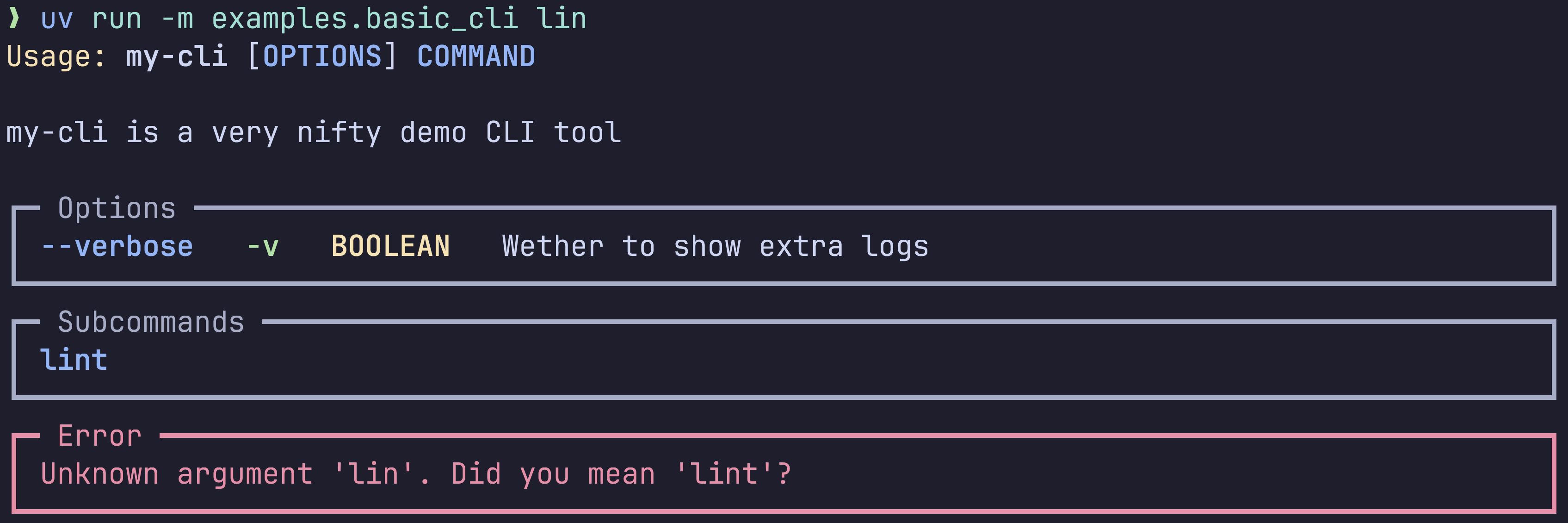
uv run -m examples.basic_cli -h (Main help page)
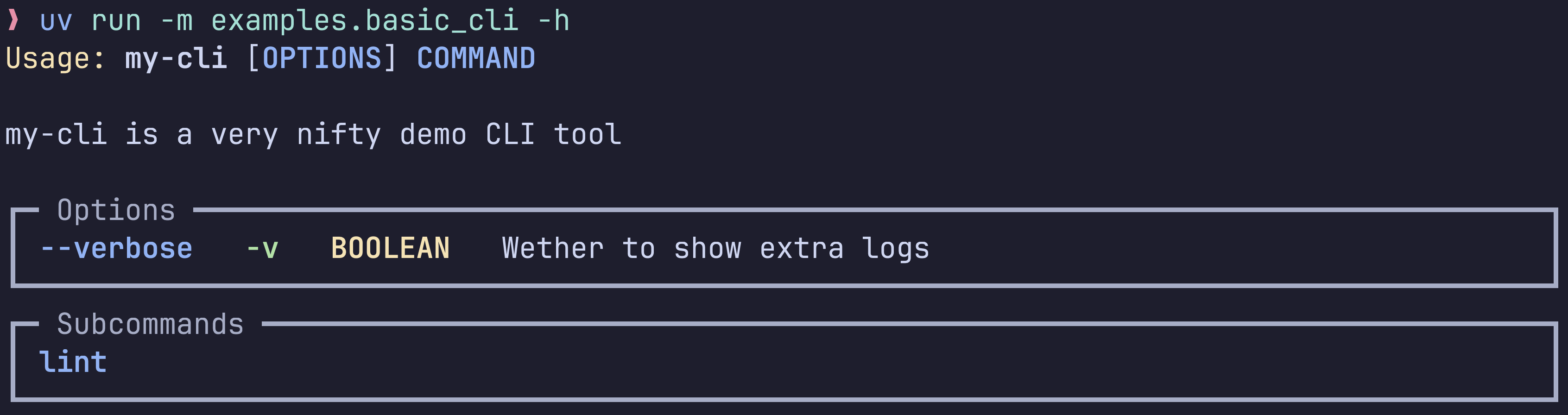
uv run -m examples.basic_cli lint -h (Subcommand help page)

uv run -m examples.basic_cli (Normal run)

uv run -m examples.basic_cli lint (Missing args error)
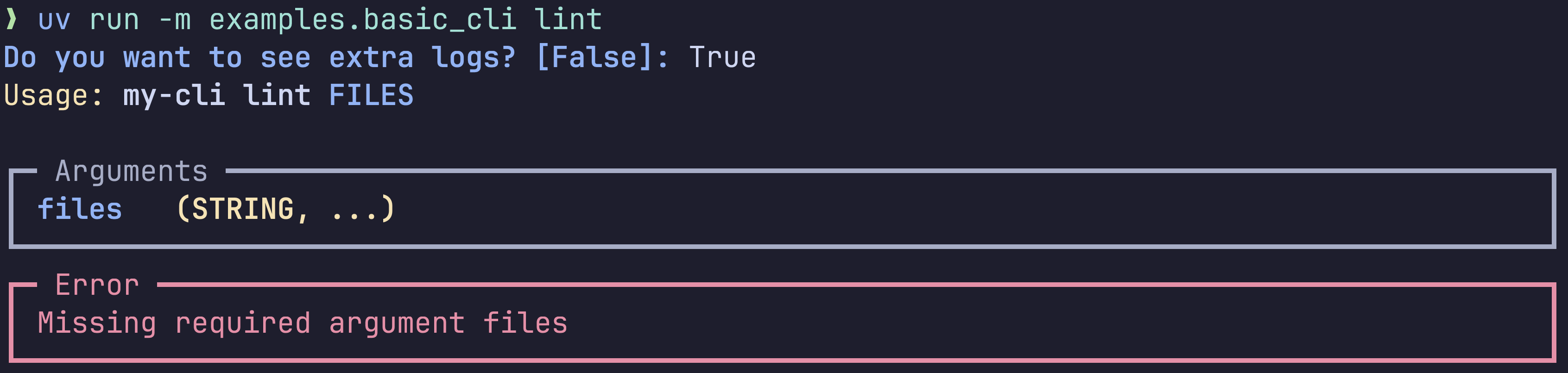
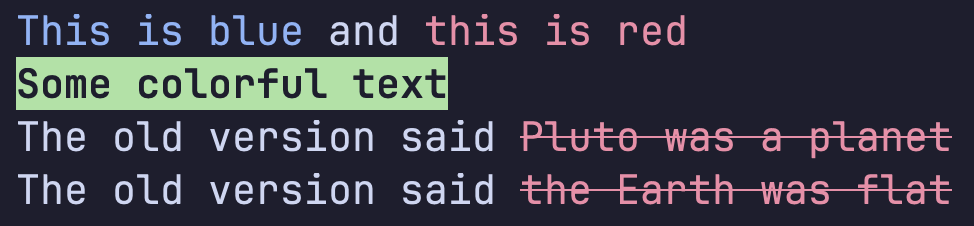
🌈 Colors
Read the docs
# demo.py
import clypi

# Style text
print(clypi.style("This is blue", fg="blue"), "and", clypi.style("this is red", fg="red"))

# Print with colors directly
clypi.print("Some colorful text", fg="green", reverse=True, bold=True, italic=True)

# Store a styler and reuse it
wrong = clypi.styler(fg="red", strikethrough=True)
print("The old version said", wrong("Pluto was a planet"))
print("The old version said", wrong("the Earth was flat"))
uv run -m examples.colors
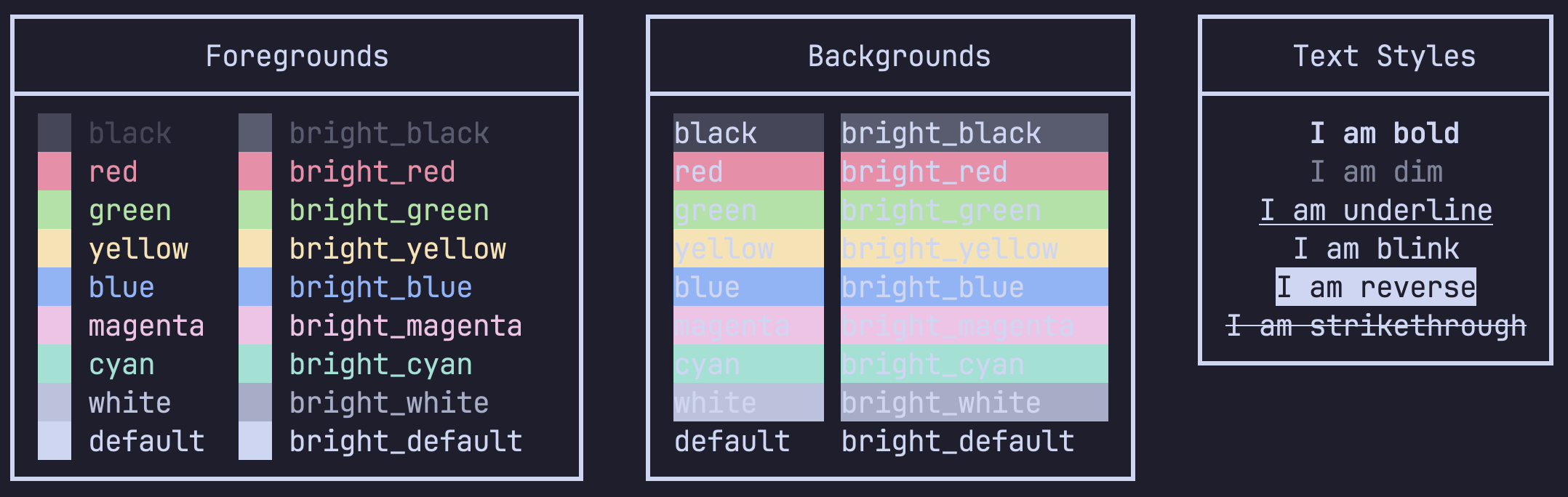
uv run demo.py
🌀 Spinners
Read the docs
# demo.py
import asyncio
from clypi import Spinner

async def main():
    async with Spinner("Downloading assets") as s:
        for i in range(1, 6):
            await asyncio.sleep(0.5)
            s.title = f"Downloading assets [{i}/5]"

asyncio.run(main())
uv run -m examples.spinner
uv run demo.py
❓ Prompting
Read the docs
First, you'll need to import the clypi module:
import clypi

answer = clypi.prompt("Are you going to use clypi?", default=True, parser=bool)
🔀 Async by default
clypi was built with an async-first mentality. Asynchronous code execution is incredibly
valuable for applications like CLIs where we want to update the UI as we take certain actions behind the scenes.
Most often, these actions can be made asynchronous since they involve things like file manipulation, network requests, subprocesses, etc.
🐍 Type-checking
This library is fully type-checked. This means that all types will be correctly inferred from the arguments you pass in.
In this example your editor will correctly infer the type:
hours = clypi.prompt(
    "How many hours are there in a year?",
    parser=lambda x: float(x) if x < 24 else timedelta(days=x),
)
reveal_type(hours)  # Type of "res" is "float | timedelta"
Why should I care?
Type checking will help you catch issues way earlier in the development cycle. It will also provide nice autocomplete features in your editor that will make you faster .
Integrations
Parsers (v6e, pydantic, etc.)
CLIPy can be integrated with many parsers. The default recommended parser is v6e, which is automatically used if installed in your local environment to parse types more accurately. If you wish you specify any parser (from v6e or elsewhere) manually, you can do so quite easily:
CLI
import v6e
from clypi import Command, config

class MyCli(Command):
    files: list[Path] = config(parser=v6e.path().exists().list())

    async def run(self):
        files = [f.as_posix() for f in self.files]
        print(f"Linting {', '.join(files)}")

if __name__ == "__main__":
    cli: MyCli = MyCli.parse()
    cli.start()
Prompting
import v6e

hours = clypi.prompt(
    "How many hours are there in a year?",
    parser=v6e.float().lte(24).union(v6e.timedelta()),
)
reveal_type(hours)  # Type of "res" is "float | timedelta"
Project details
Verified details
These details have been verified by PyPIProject links
GitHub Statistics
Maintainers
Release history Release notifications | RSS feed


Download files
Download the file for your platform. If you're not sure which to choose, learn more about installing packages.
Source Distribution
Built Distribution
Filter files by name, interpreter, ABI, and platform.
If you're not sure about the file name format, learn more about wheel file names.
Copy a direct link to the current filters
File details
Details for the file clypi-0.1.19.tar.gz.
File metadata
- Download URL: clypi-0.1.19.tar.gz
- Upload date:
- Size: 45.6 kB
- Tags: Source
- Uploaded using Trusted Publishing? Yes
- Uploaded via: twine/6.1.0 CPython/3.12.9
File hashes
| Algorithm | Hash digest | |
|---|---|---|
| SHA256 |
da8f3dca303a941954695c6ba52a2261016eef8ee1ee2dee0e92957663dd0035
|
|
| MD5 |
f1fc5435c6172fa5c313aab1394df102
|
|
| BLAKE2b-256 |
18b9bae3cc8bebe8670252be83374abc58b2cdfad190d474f1eed14a872f581f
|
Provenance
The following attestation bundles were made for clypi-0.1.19.tar.gz:
Publisher:
release.yml on danimelchor/clypi
-
Statement:
-
Statement type:
https://in-toto.io/Statement/v1 -
Predicate type:
https://docs.pypi.org/attestations/publish/v1 -
Subject name:
clypi-0.1.19.tar.gz -
Subject digest:
da8f3dca303a941954695c6ba52a2261016eef8ee1ee2dee0e92957663dd0035 - Sigstore transparency entry: 179467646
- Sigstore integration time:
-
Permalink:
danimelchor/clypi@db9d0003aaa6c6603991b958d1ad45687fa998e9 -
Branch / Tag:
refs/tags/0.1.19 - Owner: https://github.com/danimelchor
-
Access:
public
-
Token Issuer:
https://token.actions.githubusercontent.com -
Runner Environment:
github-hosted -
Publication workflow:
release.yml@db9d0003aaa6c6603991b958d1ad45687fa998e9 -
Trigger Event:
push
-
Statement type:
File details
Details for the file clypi-0.1.19-py3-none-any.whl.
File metadata
- Download URL: clypi-0.1.19-py3-none-any.whl
- Upload date:
- Size: 28.4 kB
- Tags: Python 3
- Uploaded using Trusted Publishing? Yes
- Uploaded via: twine/6.1.0 CPython/3.12.9
File hashes
| Algorithm | Hash digest | |
|---|---|---|
| SHA256 |
e5229f0f652d8b2a6b8c8b93ff178bb3a8d6f36600a84c8714fcae804478f01b
|
|
| MD5 |
08dab6af1007affc1fbce4c620fbe311
|
|
| BLAKE2b-256 |
b4380f11032c812eccbfe16b3b2ccaf1ef019de1d1829355e05507cfd1787f0e
|
Provenance
The following attestation bundles were made for clypi-0.1.19-py3-none-any.whl:
Publisher:
release.yml on danimelchor/clypi
-
Statement:
-
Statement type:
https://in-toto.io/Statement/v1 -
Predicate type:
https://docs.pypi.org/attestations/publish/v1 -
Subject name:
clypi-0.1.19-py3-none-any.whl -
Subject digest:
e5229f0f652d8b2a6b8c8b93ff178bb3a8d6f36600a84c8714fcae804478f01b - Sigstore transparency entry: 179467647
- Sigstore integration time:
-
Permalink:
danimelchor/clypi@db9d0003aaa6c6603991b958d1ad45687fa998e9 -
Branch / Tag:
refs/tags/0.1.19 - Owner: https://github.com/danimelchor
-
Access:
public
-
Token Issuer:
https://token.actions.githubusercontent.com -
Runner Environment:
github-hosted -
Publication workflow:
release.yml@db9d0003aaa6c6603991b958d1ad45687fa998e9 -
Trigger Event:
push
-
Statement type:






