
Your all-in-one for beautiful, lightweight, prod-ready CLIs
Verified details
These details have been verified by PyPIProject links
GitHub Statistics
Maintainers

Project description

Your all-in-one for beautiful, lightweight, prod-ready CLIs





📖 Docs
Read our docs to get started. You can also look at the API reference for examples and a full API reference. Otherwise, feel free to browse the source code in the GitHub repository.
What is clypi?
I've been working with Python-based CLIs for several years with many users and strict quality requirements and always run into the sames problems with the go-to packages. Therefore, I decided to embark on a journey to build a lightweight, intuitive, pretty, and production ready framework. Here are the key features:
- Type safe: making use of dataclass-like commands, you can easily specify the types you want for each argument and clypi automatically parses and validates them.
- Asynchronous: clypi is built to run asynchronously to provide the best performance possible when re-rendering.
- Easily testable: thanks to being type checked and to using it's own parser, clypi let's you test each individual step. From from parsing command-line arguments to running your commands in tests just like a user would.
- Composable: clypi lets you easily reuse arguments across subcommands without having to specify them again.
- Configurable: clypi lets you configure almost everything you'd like to configure. You can create your own themes, help pages, error messages, and more!
Define Arguments with Type Annotations
Just like you do with dataclasses, clypi CLI arguments can defined as class-level type annotations.
class MyCli(Command):
    name: str  # Automatically parsed as `--name <NAME>`.

    async def run(self):
        print(f"Hi {self.name}!")
Need more control?
Use our arg helper and built-in parsers to define defaults, parsers,
groups, and more!
class MyCli(Command):
    threads: int = arg(
        default=4,
        parser=cp.Int(min=1, max=10),  # Restrict to values 1-10
    )
Easily document your CLIs
Using docstrings automatically applies them to your CLI's --help page
class MyCli(Command):
    """A simple CLI"""
    threads: int = arg(
        default=4,
        help="The number of threads to run the tool with",
    )
Intuitive subcommands (groups of commands)
Just create and compose more clypi commands!
class Lint(Command):
    """Lint a set of files"""
    verbose: bool = arg(inherited=True)  # Inherits the argument def from `Cli`

class Run(Command):
    """Run a set of files"""

class Cli(Command):
    """A simple CLI to lint and run files"""
    subcommand: Lint | Run
    verbose: bool = arg(False, help="Whether to show more output")
Getting started
uv add clypi # or `pip install clypi`
🪐 Beautiful by default
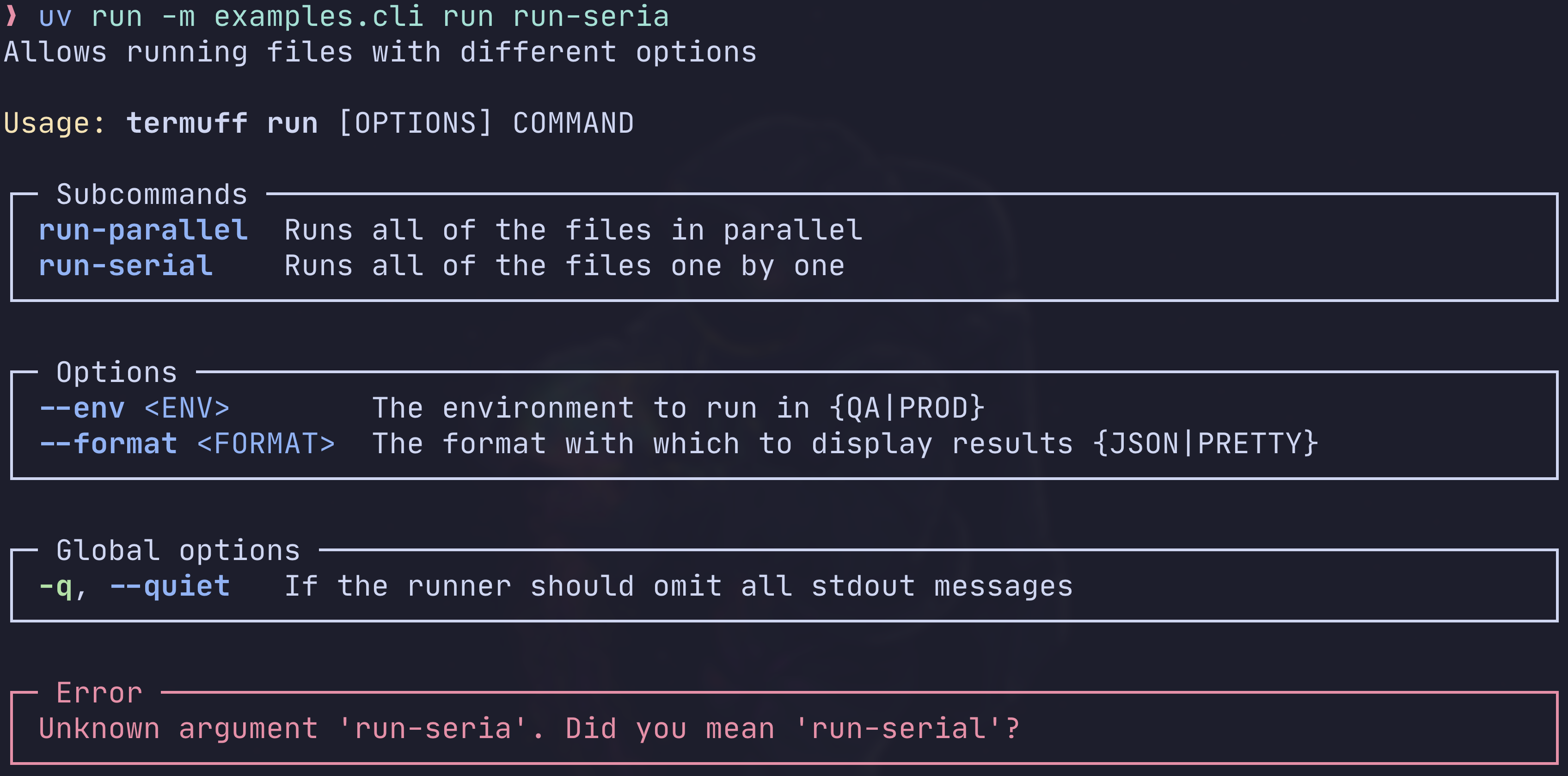
Clypi comes with pre-defined themes and modern features like suggestions on typos:
$ uv run -m examples.cli run run-seria
🛠️ Configurable
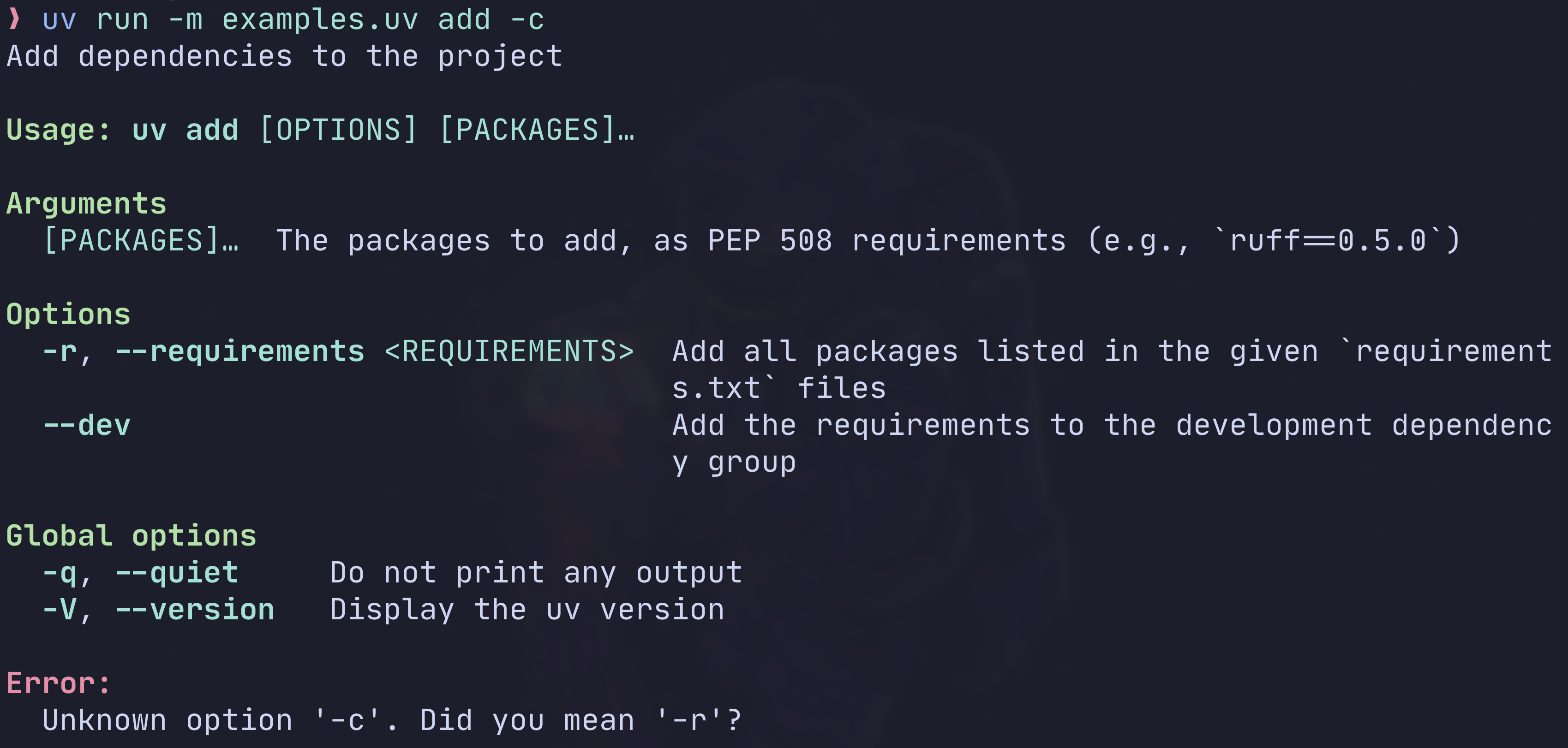
Clypi lets you configure the app globally. This means that all the styling will be easy, uniform across your entire app, and incredibly maintainable.
For example, this is how you'd achieve a UI like uv's CLI:
from clypi import ClypiConfig, ClypiFormatter, Styler, Theme, configure

configure(
    ClypiConfig(
        theme=Theme(
            usage=Styler(fg="green", bold=True),
            usage_command=Styler(fg="cyan", bold=True),
            usage_args=Styler(fg="cyan"),
            section_title=Styler(fg="green", bold=True),
            subcommand=Styler(fg="cyan", bold=True),
            long_option=Styler(fg="cyan", bold=True),
            short_option=Styler(fg="cyan", bold=True),
            positional=Styler(fg="cyan"),
            placeholder=Styler(fg="cyan"),
            prompts=Styler(fg="green", bold=True),
        ),
        help_formatter=ClypiFormatter(
            boxed=False,
            show_option_types=False,
        ),
    )
)
$ uv run -m examples.uv add -c
Read the docs and API reference.
🌈 Colors
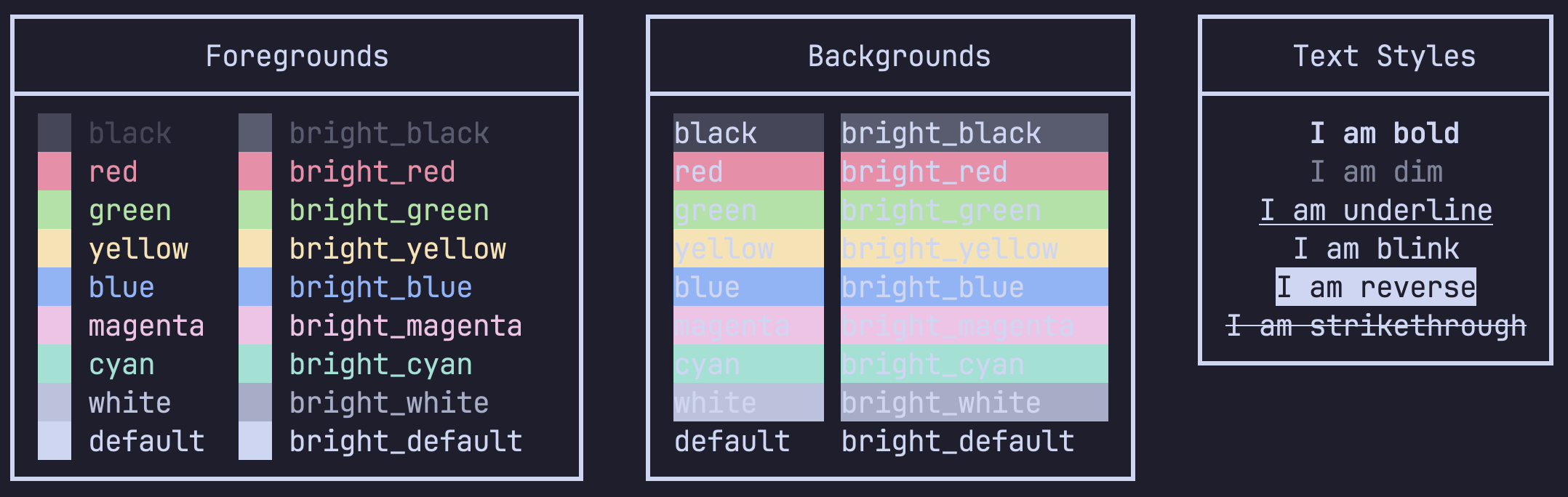
Clypi let's you easily print colorful formatted output full:
# demo.py
import clypi

# Print with colors directly
clypi.cprint("Some colorful text", fg="green", reverse=True, bold=True, italic=True)

# Style text
print(clypi.style("This is blue", fg="blue"), "and", clypi.style("this is red", fg="red"))

# Store a styler and reuse it
wrong = clypi.Styler(fg="red", strikethrough=True)
print("The old version said", wrong("Pluto was a planet"))
print("The old version said", wrong("the Earth was flat"))
$ uv run -m examples.colors
Read the docs
🌀 Spinners
You can easily use spinners to indicate progress on long-running tasks:
import asyncio
from clypi import spinner

@spinner("Doing work", capture=True)
async def do_some_work():
    await asyncio.sleep(2)

asyncio.run(do_some_work())
uv run -m examples.spinner
https://github.com/user-attachments/assets/2065b3dd-c73c-4e21-b698-8bf853e8e520
Read the docs
🔀 Async by default
clypi was built with an async-first mentality. Asynchronous code execution is incredibly
valuable for applications like CLIs where we want to update the UI as we take certain actions behind the scenes.
Most often, these actions can be made asynchronous since they involve things like file manipulation, network requests, subprocesses, etc.
🐍 Type-checking
This library is fully type-checked. This means that all types will be correctly inferred from the arguments you pass in.
In this example your editor will correctly infer the type:
hours = clypi.prompt(
    "How many hours are there in a year?",
    parser=lambda x: float(x) if isinstance(x, str) else timedelta(days=len(x)),
)
reveal_type(hours)  # Type of "res" is "float | timedelta"
Why should I care?
Type checking will help you catch issues way earlier in the development cycle. It will also provide nice autocomplete features in your editor that will make you faster .
📦 Comparison to other packages
[!NOTE] This section is my (danimelchor's) personal opinion I've gathered during my time working with Python CLIs. If you do not agree, please feel free to reach out and I'm open to discussing / trying out new tools.
Argparse is the builtin solution for CLIs, but, as expected, it's functionality is very restrictive. It is not very extensible, it's UI is not pretty and very hard to change, lacks type checking and type parsers, and does not offer any modern UI components that we all love.
Rich is too complex and threaded. The vast catalog of UI components they offer is amazing, but it is both easy to get wrong and break the UI, and too complicated/verbose to onboard coworkers to. It's prompting functionality is also quite limited and it does not offer command-line arguments parsing.
Click is too restrictive. It enforces you to use decorators, which is great for locality of behavior but not so much if you're trying to reuse arguments across your application. It is also painful to deal with the way arguments are injected into functions and very easy to miss one, misspell, or get the wrong type. Click is also fully untyped for the core CLI functionality and hard to test.
Typer seems great! I haven't personally tried it, but I have spent time looking through their docs and code. I think the overall experience is a step up from click's but, at the end of the day, it's built on top of it. Hence, many of the issues are the same: testing is hard, shared contexts are untyped, their built-in type parsing is quite limited, and it does not offer modern features like suggestions on typos. Using Annotated types is also very verbose inside function definitions.
Project details
Verified details
These details have been verified by PyPIProject links
GitHub Statistics
Maintainers
Release history Release notifications | RSS feed


Download files
Download the file for your platform. If you're not sure which to choose, learn more about installing packages.
Source Distribution
Built Distribution
Filter files by name, interpreter, ABI, and platform.
If you're not sure about the file name format, learn more about wheel file names.
Copy a direct link to the current filters
File details
Details for the file clypi-1.2.17.tar.gz.
File metadata
- Download URL: clypi-1.2.17.tar.gz
- Upload date:
- Size: 323.3 kB
- Tags: Source
- Uploaded using Trusted Publishing? Yes
- Uploaded via: twine/6.1.0 CPython/3.12.9
File hashes
| Algorithm | Hash digest | |
|---|---|---|
| SHA256 |
490ecd093098e8dcc5767c81a4757885a3c06bc8600cd5e53eaf51fbe2e18caa
|
|
| MD5 |
d24d1667ed22b2da59c2a17e678a4baf
|
|
| BLAKE2b-256 |
4d1ec9350fbc8319b60abe4c0d40d108e1bba0f50397d134be13223baafe171d
|
Provenance
The following attestation bundles were made for clypi-1.2.17.tar.gz:
Publisher:
release.yml on danimelchor/clypi
-
Statement:
-
Statement type:
https://in-toto.io/Statement/v1 -
Predicate type:
https://docs.pypi.org/attestations/publish/v1 -
Subject name:
clypi-1.2.17.tar.gz -
Subject digest:
490ecd093098e8dcc5767c81a4757885a3c06bc8600cd5e53eaf51fbe2e18caa - Sigstore transparency entry: 190006103
- Sigstore integration time:
-
Permalink:
danimelchor/clypi@fd9d93c4428038fe2244cc53295bfb65f0acbc9f -
Branch / Tag:
refs/tags/1.2.17 - Owner: https://github.com/danimelchor
-
Access:
public
-
Token Issuer:
https://token.actions.githubusercontent.com -
Runner Environment:
github-hosted -
Publication workflow:
release.yml@fd9d93c4428038fe2244cc53295bfb65f0acbc9f -
Trigger Event:
push
-
Statement type:
File details
Details for the file clypi-1.2.17-py3-none-any.whl.
File metadata
- Download URL: clypi-1.2.17-py3-none-any.whl
- Upload date:
- Size: 43.2 kB
- Tags: Python 3
- Uploaded using Trusted Publishing? Yes
- Uploaded via: twine/6.1.0 CPython/3.12.9
File hashes
| Algorithm | Hash digest | |
|---|---|---|
| SHA256 |
fc03aa2a76aa16061f7970879ea4a11644477b4ec5b366df500e1fef789b35eb
|
|
| MD5 |
f60bab2bef39f746f7bb6d09e37434f3
|
|
| BLAKE2b-256 |
f4b0bbc71fd834301df32aecfcc91e2ac2dda48d938f09fc6b0eb79c8b167a45
|
Provenance
The following attestation bundles were made for clypi-1.2.17-py3-none-any.whl:
Publisher:
release.yml on danimelchor/clypi
-
Statement:
-
Statement type:
https://in-toto.io/Statement/v1 -
Predicate type:
https://docs.pypi.org/attestations/publish/v1 -
Subject name:
clypi-1.2.17-py3-none-any.whl -
Subject digest:
fc03aa2a76aa16061f7970879ea4a11644477b4ec5b366df500e1fef789b35eb - Sigstore transparency entry: 190006104
- Sigstore integration time:
-
Permalink:
danimelchor/clypi@fd9d93c4428038fe2244cc53295bfb65f0acbc9f -
Branch / Tag:
refs/tags/1.2.17 - Owner: https://github.com/danimelchor
-
Access:
public
-
Token Issuer:
https://token.actions.githubusercontent.com -
Runner Environment:
github-hosted -
Publication workflow:
release.yml@fd9d93c4428038fe2244cc53295bfb65f0acbc9f -
Trigger Event:
push
-
Statement type:






