





CMasher: Scientific colormaps for making accessible, informative and cmashing plots
The CMasher package provides a collection of scientific colormaps and utility functions to be used by different Python packages and projects, mainly in combination with matplotlib, showcased in the online documentation (where I also describe how to use the colormaps in other languages and applications). The colormaps in CMasher are all designed to be perceptually uniform sequential using the viscm package; most of them are color-vision deficiency friendly; and they cover a wide range of different color combinations to accommodate for most applications. It offers several alternatives to commonly used colormaps, like chroma and rainforest for jet; sunburst for hot; neutral for binary; and fusion and redshift for coolwarm. If you cannot find your ideal colormap, then please open an issue, provide the colors and/or style you want, and I will try to create one to your liking! Let’s get rid of all bad colormaps in the world together!
If you use CMasher for your work, then please star the repo, such that I can keep track of how many users it has and more easily raise awareness of bad colormaps. Additionally, if you use CMasher as part of your workflow in a scientific publication, please consider citing the CMasher paper (BibTeX: cmr.get_bibtex).
Colormap overview
Below is an overview of all the colormaps that are currently in CMasher (made with the cmr.create_cmap_overview() function). For more information, see the online documentation.
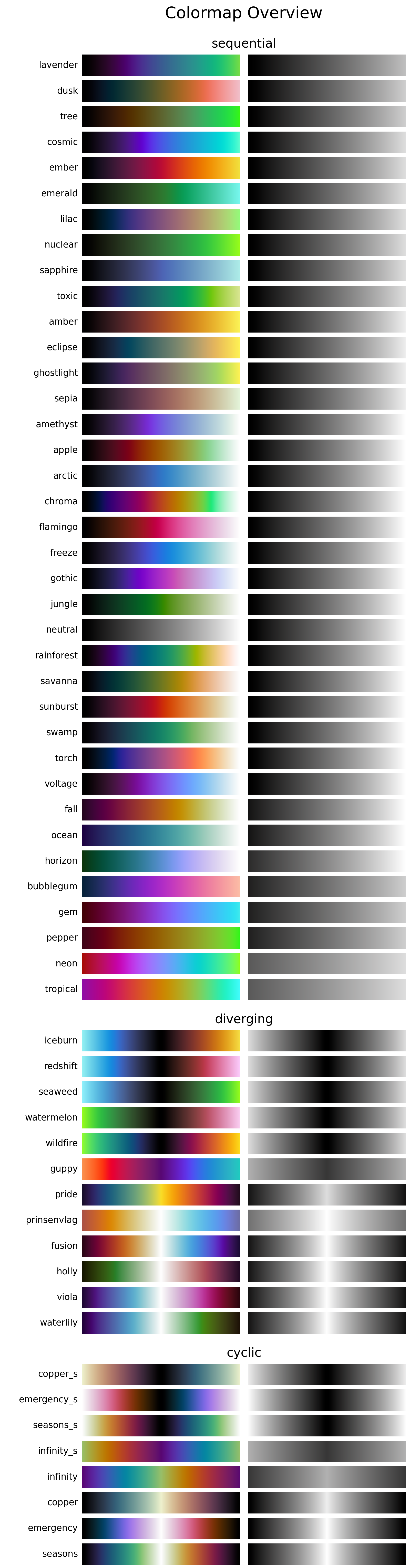
In the figure, one can see this wide range of color combinations that CMasher has to offer, as I wanted to make sure that CMasher has a colormap for everyone. Because of this, CMasher’s sequential colormaps range from single major color maps like amber; ember; flamingo; freeze; gothic; and jungle, to colormaps with high perceptual ranges like apple; chroma; torch; neon; and rainforest. The diverging colormaps in CMasher have a similar variety, but more importantly, several of them have a black center instead of a white center, like iceburn; redshift; watermelon; and wildfire. Black centered diverging colormaps are quite rare as most researchers are used to white centered ones, even though a black centered diverging colormap can be rather useful in certain cases, like plotting a radial velocity map (the further away from the common center, the higher the velocity in either direction, and thus the corresponding color should be brighter).
Installation & Use
How to install
CMasher can be easily installed directly from PyPI with:
$ pip install cmasher
or from conda-forge with:
$ conda install -c conda-forge cmasher  # If conda-forge is not set up as a channel
$ conda install cmasher                 # If conda-forge is set up as a channel
If required, one can also clone the repository and install CMasher manually:
$ git clone https://github.com/1313e/CMasher
$ cd CMasher
$ pip install .
CMasher can now be imported as a package with import cmasher as cmr.
Besides Python, CMasher’s colormaps can also be accessed in various other languages and applications. A list of all currently known languages and applications that support CMasher can be found in the online documentation here.
Example use
The colormaps shown above can be accessed by simply importing CMasher. This makes them available in the cmasher module, in addition to registering them in matplotlib’s cm module (with added 'cmr.' prefix to avoid name clashes). So, for example, if one were to use the rainforest colormap, this could be done with:
# Import CMasher to register colormaps
import cmasher as cmr

# Import packages for plotting
import matplotlib as mpl
import matplotlib.pyplot as plt
import numpy as np

# Access rainforest colormap through CMasher or MPL
cmap = cmr.rainforest                   # CMasher
cmap = mpl.colormaps['cmr.rainforest']  # MPL

# Generate some data to plot
x = np.random.rand(100)
y = np.random.rand(100)
z = x**2+y**2

# Make scatter plot of data with colormap
plt.scatter(x, y, c=z, cmap=cmap, s=300)
plt.show()
For other use-cases, including an overview of CMasher’s utility functions and how to use CMasher in other programming languages and applications, see the online documentation.


Release files for cmasher 1.9.4
For a detailed explanation of source distributions (sdists) and built distributions (wheels), please see the package formats documentation.
Source distribution (sdist)
| File | Size | Uploaded | |
|---|---|---|---|
| cmasher-1.9.4.tar.gz | 525.8 kB | Details |
Built distribution (wheel)
| File | Interpreter | ABI | Platform | Reset |
|---|---|---|---|---|
| cmasher-1.9.4-py3-none-any.whl | Python 3 | none | any | Details |
Total release size: 1.0 MB
Release files / cmasher-1.9.4.tar.gz
| Download URL | cmasher-1.9.4.tar.gz |
|---|---|
| Size | 525.8 kB |
| Tags | Source |
|
SHA-256 checksum How to use checksums |
e372f716205c83b5eb4d167e553a8f24527a8473c33df01b2f3aa20819eae22c
|
|
BLAKE2b-256 checksum How to use checksums |
ef47382f6fca1400993f3590fbd8a2e282879e7d7cb388c10086cd3dcbf59d2d
|
| Upload date | |
|
Uploaded using Trusted Publishing? What is trusted publishing? |
Yes |
| Uploaded via |
twine/7.0.0 CPython/3.13.14
|
Provenance
Provenance describes where a file came from. On PyPI, provenance is shared via attestations, which provide a verifiable record of the build or publishing details. View details, limitations and caveats.


PyPI Publish Attestation
PyPI verified that this artifact, at this checksum, originated from the publisher listed below.
Signed by GitHub Actions, verified by PyPI on Oct 9, 2026.
Transparency logRelease files / cmasher-1.9.4-py3-none-any.whl
| Download URL | cmasher-1.9.4-py3-none-any.whl |
|---|---|
| Size | 506.8 kB |
| Tags | Python 3 |
|
SHA-256 checksum How to use checksums |
787ed0193e3ff7c124d0d9f336e490501cbf027e88868bb50d170f06a16440e9
|
|
BLAKE2b-256 checksum How to use checksums |
0ddd6bb53b2d020696a673f8468bdac73c2ccb34db770c738b1cd45a87113f56
|
| Upload date | |
|
Uploaded using Trusted Publishing? What is trusted publishing? |
Yes |
| Uploaded via |
twine/7.0.0 CPython/3.13.14
|
Provenance
Provenance describes where a file came from. On PyPI, provenance is shared via attestations, which provide a verifiable record of the build or publishing details. View details, limitations and caveats.
PyPI Publish Attestation
PyPI verified that this artifact, at this checksum, originated from the publisher listed below.
Signed by GitHub Actions, verified by PyPI on Oct 9, 2026.
Transparency log













