
Terminal-first molecular dynamics viewer for GROMACS trajectories.
Verified details
These details have been verified by PyPIProject links
GitHub Statistics
Maintainers

Project description
cmd
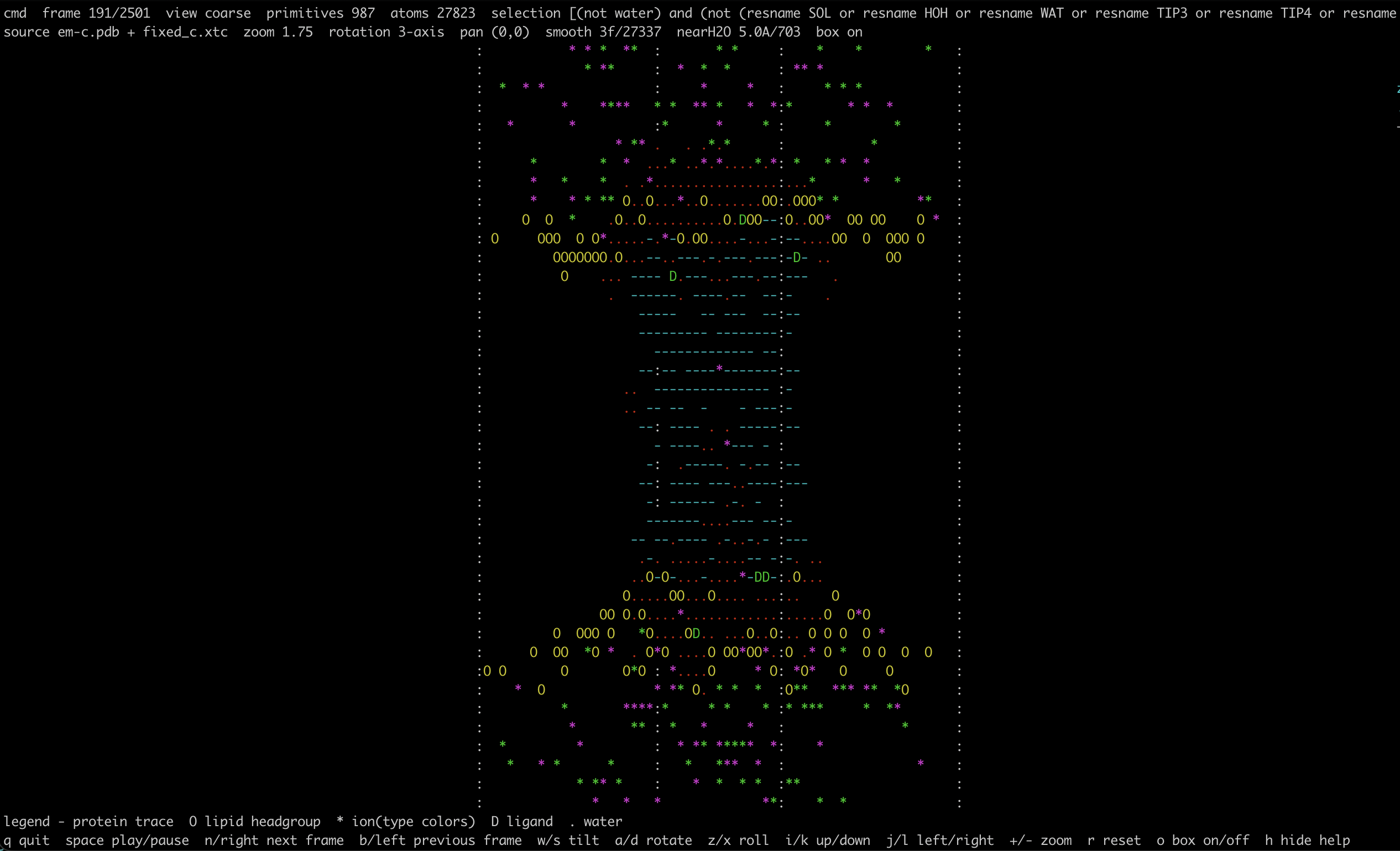
cmd is a terminal-first molecular dynamics viewer for quick trajectory checks
on local machines, remote shells, and HPC systems. It is designed for plain
terminal use: no GUI server, no OpenGL setup, and no heavy visualization stack.
The internal Python package is named cmd_viewer to avoid colliding with
Python's standard-library cmd module. The installed executable is cmd.
Features
.pdb/.grostructures with optional.xtc/.dcdtrajectories.- MDAnalysis-backed selections with VMD-like conveniences such as
atomnamenormalization and a built-inlipidskeyword. - Water hidden by default, with optional dynamic nearby-water overlays for hydrated pockets and pores.
- View modes for fast checks:
points,trace,coarse, andcartoon. - Camera rotation, zoom, panning, playback, XYZ axis overlay, and orthorhombic box overlay.
- Saved view files for reusing manually oriented viewpoints.
- Native animated GIF export for sharing trajectories or adding them to slides.
Install
From PyPI:
pip install cmd-viewer
With GIF export support:
pip install "cmd-viewer[export]"
For local development from this repository:
pip install -e .
pip install -e ".[export,dev]"
Quick Start
Open a trajectory:
cmd system.gro traj.xtc
cmd system.pdb trajectory.dcd
Protein-focused view:
cmd system.gro traj.xtc --selection protein --view-mode cartoon
Membrane overview:
cmd system.gro traj.xtc --selection "protein or lipids or element K or element CL" --view-mode coarse
Track individual ions by residue id color:
cmd system.gro traj.xtc --selection "resname K" --color-mode resid
cmd system.gro traj.xtc --selection "resname CL" --color-mode resid
Show nearby pore or pocket water:
cmd system.gro traj.xtc --selection protein --near-water 5
Use bundled test systems:
cmd test-trajs/traak/after90ns-k.pdb test-trajs/traak/traj_comp.xtc --selection protein --view-mode cartoon
cmd test-trajs/popc/em.gro test-trajs/popc/whole.xtc --view-mode coarse
cmd test-trajs/ga/reference-structure-2M-KCl.gro test-trajs/ga/04-pt7scaling-11pA.xtc --selection "resname K" --color-mode resid
Saved Views And GIFs
For systems that need a specific orientation, save the view once and reuse it.
- Open the system and choose a view:
cmd system.gro traj.xtc --view-mode coarse --save-view pore-view.json
-
Rotate, zoom, and pan interactively, then press
v. -
Reuse that view later:
cmd system.gro traj.xtc --view-mode coarse --view-file pore-view.json
- Export a GIF from the saved viewpoint:
cmd system.gro traj.xtc --view-mode coarse --view-file pore-view.json --save-gif pore.gif --gif-stride 5 --gif-fps 12
GIF export uses the same selections, view modes, smoothing, nearby-water overlays, color modes, and box state as the terminal viewer. GIFs are scene-only by default, so the exported frame does not include the header, legend, or controls.
Useful GIF options:
--gif-start FRAME: first 0-based frame to export.--gif-stop FRAME: stop before this 0-based frame.--gif-stride N: export everyNth frame.--gif-fps FPS: animation playback rate.--gif-width COLSand--gif-height ROWS: output size in terminal cells.--gif-scale PX: final raster scale. The default is2.--gif-hide-box: hide orthorhombic box boundaries.--gif-no-loop: write a non-looping GIF.--gif-show-ui: include the header, legend, and controls in the GIF.
Examples:
cmd system.gro traj.xtc --view-mode coarse --save-gif overview.gif
cmd system.gro traj.xtc --view-mode cartoon --selection protein --save-gif protein.gif --gif-fps 15 --gif-stride 2
cmd system.gro traj.xtc --selection "resname K" --color-mode resid --save-gif ions.gif --gif-width 90 --gif-height 35
cmd system.pdb trajectory.dcd --view-file openmm-view.json --save-gif openmm.gif --gif-width 120 --gif-height 45
Controls
q: quith: toggle helpf: toggle full-window molecular viewspace: play / pausenor right arrow: next framebor left arrow: previous framew/s: tilt cameraa/d: rotate cameraz/x: roll camerai/k: translate view up / downj/l: translate view left / right+/-: zoomr: reset camerao: toggle box overlayv: save the current view to--save-view
The current zoom limit is 32x. Translation is screen-space panning, which is
useful after zooming into a local region.
View Modes
points: atom-level point cloud for fast whole-system inspection.trace: residue-level backbone-like trace usingCA,BB,P,C4', or related trace atoms.coarse: protein as trace lines, lipid headgroups asO, ions as colored*, ligands asD, and water as..cartoon: a coarse protein-focused mode with simple secondary-structure heuristics. Helix-like segments use@/o, sheet-like segments use directional arrows, and loops use lighter line glyphs.
Examples:
cmd system.gro traj.xtc --view-mode points
cmd system.gro traj.xtc --view-mode trace --selection protein
cmd system.gro traj.xtc --view-mode coarse --selection "protein or lipids"
cmd system.gro traj.xtc --view-mode cartoon --selection protein
Selections
Selections are passed to MDAnalysis. Core selection terms such as resname,
name, resid, boolean operators, and ranges are available. cmd also
normalizes atomname to name and provides a lipids keyword that expands to
common lipid residue names.
Examples:
cmd system.gro traj.xtc --selection "protein"
cmd system.gro traj.xtc --selection "lipids"
cmd system.gro traj.xtc --selection "protein or lipids"
cmd system.gro traj.xtc --selection "resid 10:50 and atomname CA"
cmd system.gro traj.xtc --selection "resname POPC and name P"
cmd system.gro traj.xtc --selection "protein and around 6 resname LIG"
Smoothing
--smooth N applies centered trajectory smoothing over N frames. By default,
smoothing targets proteins and lipid residues only; ions are excluded because
their fast jumps usually make smoothing misleading.
cmd system.gro traj.xtc --view-mode coarse --smooth 5
cmd system.gro traj.xtc --view-mode cartoon --smooth 7 --smoothres "protein"
Dynamic Water Overlay
--near-water 5 shows water oxygens within 5 A of a target selection and
updates that subset every frame. The default target is protein; use
--near-water-target to override it.
cmd system.gro traj.xtc --selection protein --near-water 5
cmd system.gro traj.xtc --view-mode cartoon --selection protein --near-water 4
cmd system.gro traj.xtc --near-water 5 --near-water-target "protein or lipids"
Notes And Limits
- Box drawing currently supports orthorhombic unit cells only.
- Large systems are downsampled to a bounded number of displayed primitives so the viewer remains responsive over SSH and on shared systems.
- The renderer is intentionally terminal-first; it is meant for quick checks, not publication-quality molecular graphics.
Development And Releases
For the ongoing maintenance and release workflow, see
RELEASING.md.
The repository includes:
.github/workflows/package-checks.yml: builds the package, checks version consistency, runs tests, and validates distributions on pushes and pull requests..github/workflows/release.yml: builds and publishes to PyPI using Trusted Publishing when a GitHub release is published.
Roadmap
- improve playback performance for very large systems
- add residue / chain / segment centering shortcuts
- add small-selection ball-and-stick or stick-like modes
- package for conda-based HPC installation
Project details
Verified details
These details have been verified by PyPIProject links
GitHub Statistics
Maintainers


Download files
Download the file for your platform. If you're not sure which to choose, learn more about installing packages.
Source Distribution
Built Distribution
Filter files by name, interpreter, ABI, and platform.
If you're not sure about the file name format, learn more about wheel file names.
Copy a direct link to the current filters
File details
Details for the file cmd_viewer-0.2.0.tar.gz.
File metadata
- Download URL: cmd_viewer-0.2.0.tar.gz
- Upload date:
- Size: 29.3 kB
- Tags: Source
- Uploaded using Trusted Publishing? Yes
- Uploaded via: twine/6.1.0 CPython/3.13.12
File hashes
| Algorithm | Hash digest | |
|---|---|---|
| SHA256 |
6e0f0c9ebfcb480118753278976d1125512f7bf3d5d352769c57def01fa792e2
|
|
| MD5 |
1c988326471ac926eacc89592f377e36
|
|
| BLAKE2b-256 |
80ccf0579f5de68f58fa8aac9f2091a88c29e95c8bbeb333c531184328ef61a3
|
File details
Details for the file cmd_viewer-0.2.0-py3-none-any.whl.
File metadata
- Download URL: cmd_viewer-0.2.0-py3-none-any.whl
- Upload date:
- Size: 28.1 kB
- Tags: Python 3
- Uploaded using Trusted Publishing? Yes
- Uploaded via: twine/6.1.0 CPython/3.13.12
File hashes
| Algorithm | Hash digest | |
|---|---|---|
| SHA256 |
2c6985e3dc70800f0b8fc0cf8fc09a160b7d059fa703d3dfdcef43c8c5474b5b
|
|
| MD5 |
013ced20f1af12cedc6da25eab410c05
|
|
| BLAKE2b-256 |
e0fc53929b33bba61debb26ec2eacafcb329073cd450be28753c4039db765799
|






