
cmdbox: It is a command line application with a plugin mechanism.

Project description
cmdbox
- It is a command line application with a plugin mechanism.
- Documentation is here.
- With cmdbox, you can easily implement commands with complex options.
- The implemented commands can be called from the CLI / RESTAPI / Web screen.
- The implemented commands can be executed on a remote server via redis.
Install
- Install cmdbox with the following command.
pip install cmdbox
cmdbox -v
- Also install the docker version of the redis server.
docker run -p 6379:6379 --name redis -it ubuntu/redis:latest
Tutorial
- Open the
.sample/sample_projectfolder in the current directory with VSCode.
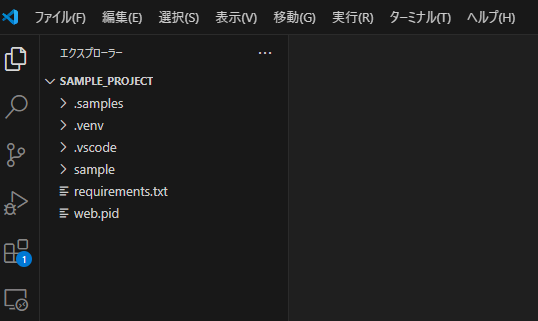
- Install dependent libraries.
python -m venv .venv
. .venv/bin/activate
pip install -r requirements.txt
- Run the project.
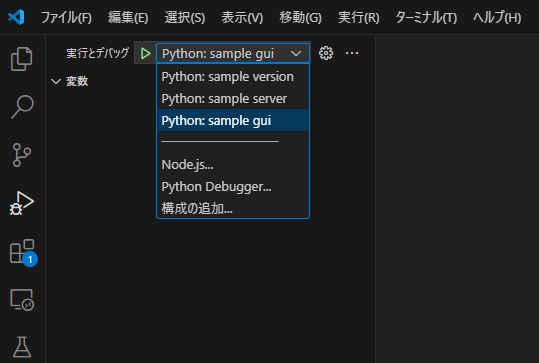
- The localhost web screen will open.
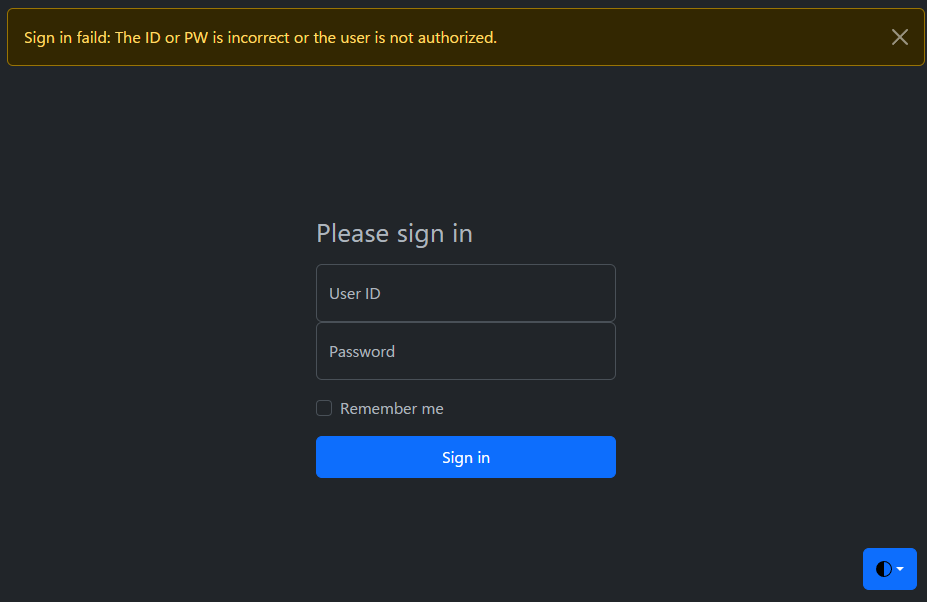
- Enter
user01 / user01for the initial ID and PW to sign in. - Using this web screen, you can easily execute the commands implemented in cmdbox.
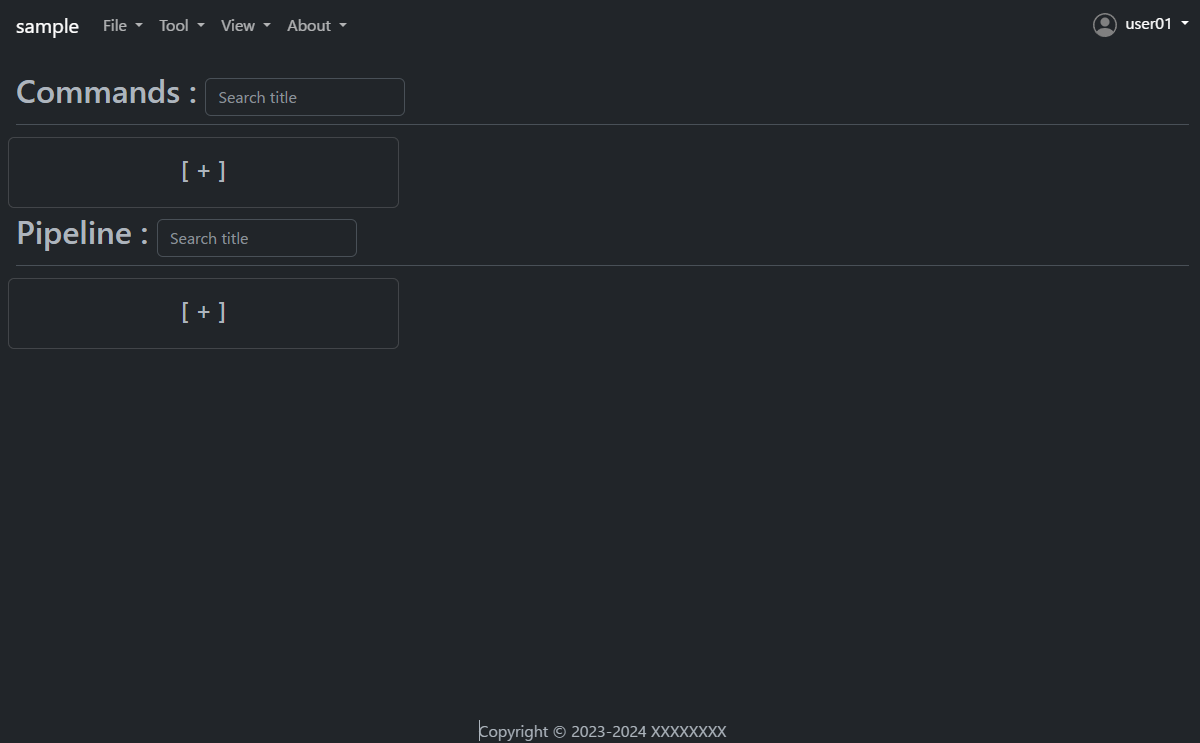
- Let's look at the command to get a list of files as an example.
- Press the plus button under Commands to open the Add dialog.
- Then enter the following.
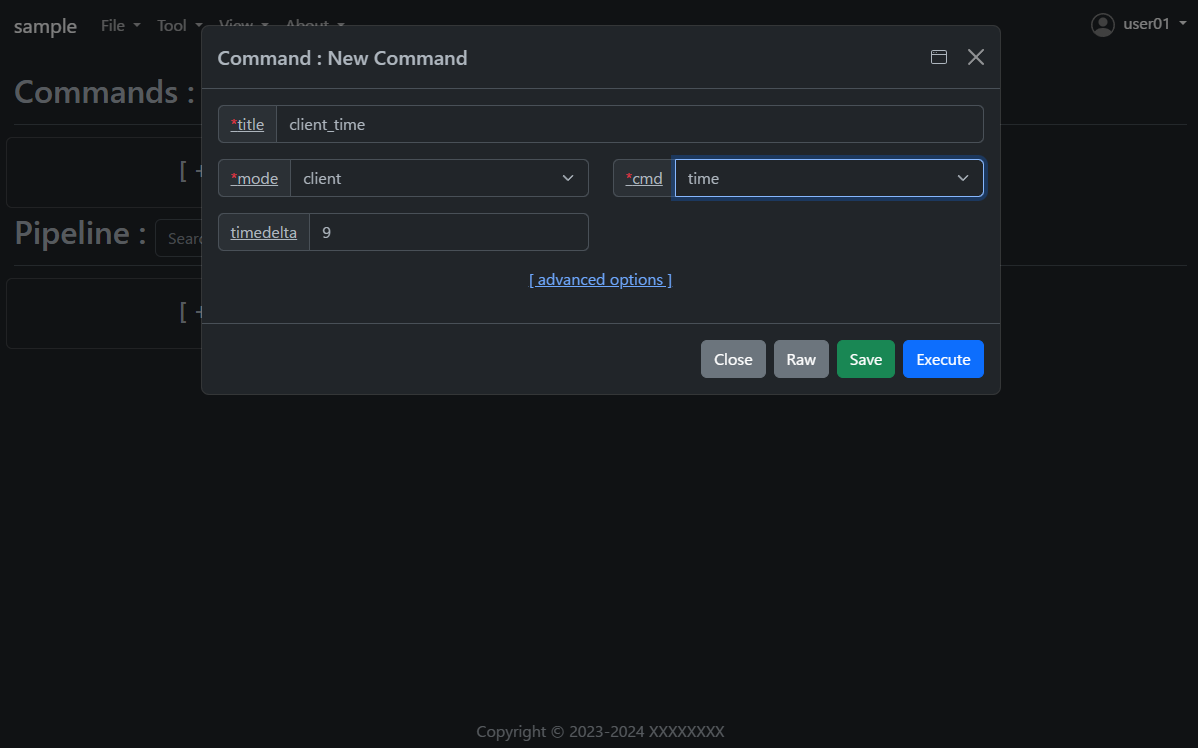
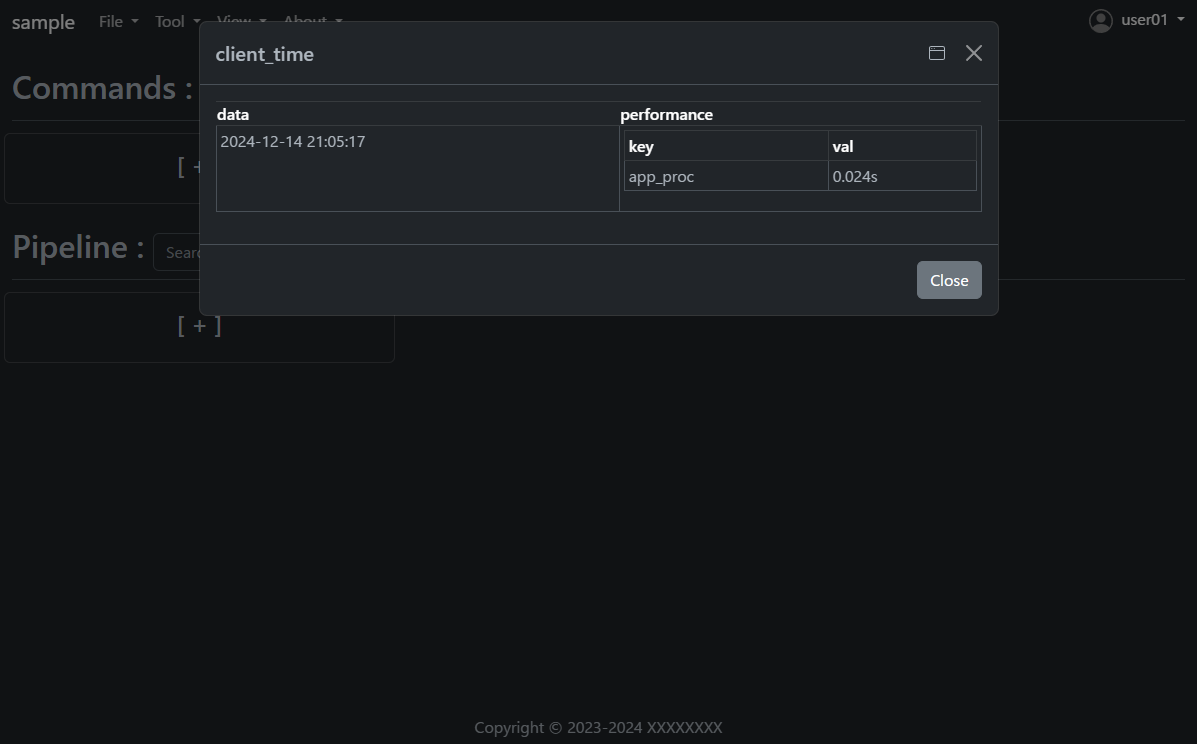
- Press the
Savebutton once and then press theExecutebutton. - The results of the command execution are displayed.
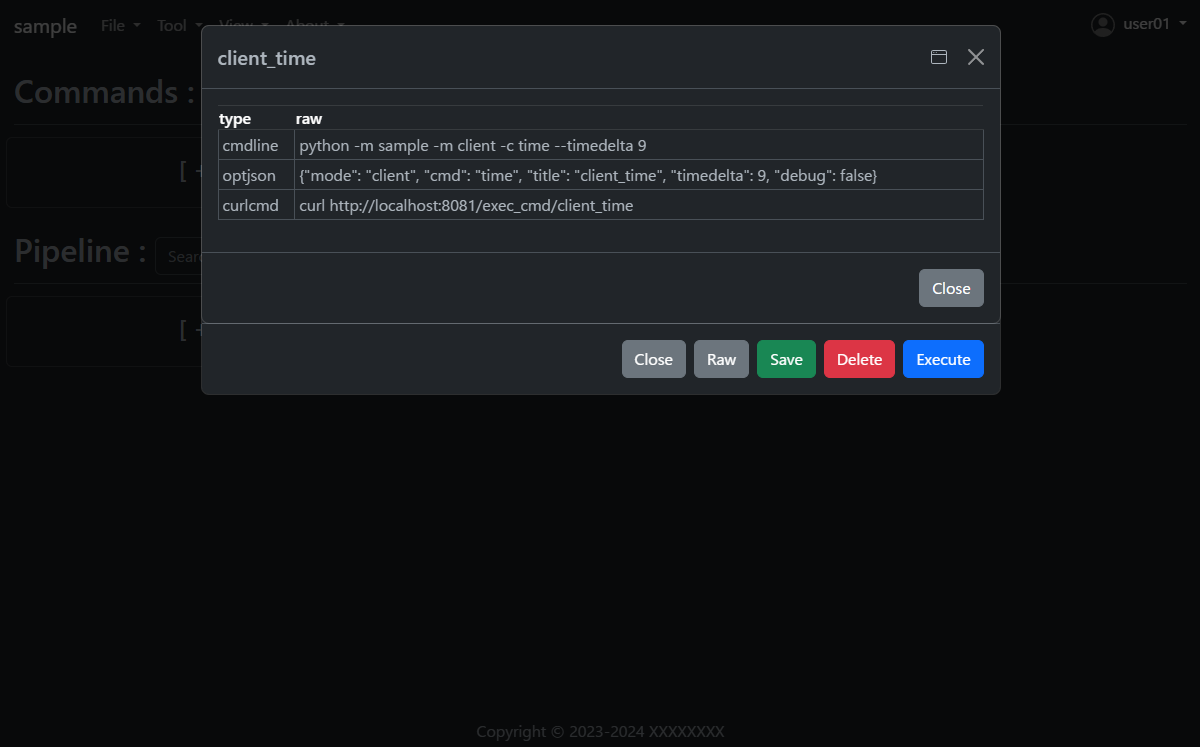
- Open the saved
client_timeand press theRawbutton. - You will see how to execute the same command on the command line; the RESTAPI URL is also displayed.
How to implement a new command using cmdbox
- Under the
sample/app/features/clifolder, you will find an implementation of theclient_timementioned earlier. - The implementation is as follows. (Slightly abbreviated display)
- Create the following code and save it in the
sample/app/features/clifolder.
from cmdbox.app import common, feature
from typing import Dict, Any, Tuple, Union, List
import argparse
import datetime
import logging


class ClientTime(feature.Feature):
    def get_mode(self) -> Union[str, List[str]]:
        return "client"

    def get_cmd(self):
        return 'time'

    def get_option(self):
        return dict(
            type="str", default=None, required=False, multi=False, hide=False, use_redis=self.USE_REDIS_FALSE,
            discription_ja="クライアント側の現在時刻を表示します。",
            discription_en="Displays the current time at the client side.",
            choice=[
                dict(opt="timedelta", type="int", default=9, required=False, multi=False, hide=False, choice=None,
                        discription_ja="時差の時間数を指定します。",
                        discription_en="Specify the number of hours of time difference."),
            ])

    def apprun(self, logger:logging.Logger, args:argparse.Namespace, tm:float, pf:List[Dict[str, float]]=[]) -> Tuple[int, Dict[str, Any], Any]:
        tz = datetime.timezone(datetime.timedelta(hours=args.timedelta))
        dt = datetime.datetime.now(tz)
        ret = dict(success=dict(data=dt.strftime('%Y-%m-%d %H:%M:%S')))
        common.print_format(ret, args.format, tm, args.output_json, args.output_json_append, pf=pf)
        if 'success' not in ret:
            return 1, ret, None
        return 0, ret, None
- Open the file
sample/extensions/features.yml. The file should look something like this. - This file specifies where new commands are to be read.
- For example, if you want to add a package to read, add a new
packageandprefixtofeatures.cli. - Note that
features.webcan be used to add a new web screen. - If you only want to call commands added in
features.clivia RESTAPI, no additional implementation is needed infeatures.web.
features:
  cli:
    - package: sample.app.features.cli
      prefix: sample_
  web:
    - package: sample.app.features.web
      prefix: sample_web_
args:
  cli:
    - rule:
        mode: web
      default:
      coercion:
        assets:
          - f"{Path(self.ver.__file__).parent / 'web' / 'assets'}"
        doc_root: f"{Path(self.ver.__file__).parent / 'web'}"
    - rule:
        mode: gui
      default:
      coercion:
        assets:
          - f"{Path(self.ver.__file__).parent / 'web' / 'assets'}"
        doc_root: f"{Path(self.ver.__file__).parent / 'web'}"
- The following files should also be known when using commands on the web screen or RESTAPI.
- Open the file
sample/extensions/user_list.yml. The file should look something like this. - This file manages the users and groups that are allowed Web access and their rules.
- The rule of the previous command is
allowfor users in theusergroup incmdrule.rules.
users:
  - uid: 1
    name: admin
    password: XXXXXXXX
    hash: plain
    groups: [admin]
  - uid: 101
    name: user01
    password: XXXXXXXX
    hash: md5
    groups: [user]
  - uid: 102
    name: user02
    password: XXXXXXXX
    hash: sha1
    groups: [readonly]
  - uid: 103
    name: user03
    password: XXXXXXXX
    hash: sha256
    groups: [editor]
groups:
  - gid: 1
    name: admin
  - gid: 101
    name: user
  - gid: 102
    name: readonly
    parent: user
  - gid: 103
    name: editor
    parent: user
cmdrule:
  policy: deny # allow, deny
  rules:
    - groups: [admin]
      rule: allow
    - groups: [user]
      mode: client
      cmds: [file_download, file_list, server_info, time]
      rule: allow
    - groups: [user]
      mode: server
      cmds: [list, time]
      rule: allow
    - groups: [editor]
      mode: client
      cmds: [file_copy, file_mkdir, file_move, file_remove, file_rmdir, file_upload]
      rule: allow
pathrule:
  policy: deny # allow, deny
  rules:
    - groups: [admin]
      paths: [/]
      rule: allow
    - groups: [user]
      paths: [/signin, /assets, /bbforce_cmd, /copyright, /dosignin, /dosignout,
              /exec_cmd, /exec_pipe, /filer, /gui, /get_server_opt, /usesignout, /versions_cmdbox, /versions_used, /versions_sample]
      rule: allow
    - groups: [readonly]
      paths: [/gui/del_cmd, /gui/del_pipe, /gui/save_cmd, /gui/save_pipe]
      rule: deny
    - groups: [editor]
      paths: [/gui/del_cmd, /gui/del_pipe, /gui/save_cmd, /gui/save_pipe]
      rule: allow
- See the documentation for references to each file.
- Documentation is here.
Lisence
This project is licensed under the MIT License, see the LICENSE file for details
Release history Release notifications | RSS feed


Download files
Download the file for your platform. If you're not sure which to choose, learn more about installing packages.
Source Distribution
cmdbox-0.2.3.2.tar.gz
(1.5 MB
view details)
Built Distribution
Filter files by name, interpreter, ABI, and platform.
If you're not sure about the file name format, learn more about wheel file names.
Copy a direct link to the current filters
File details
Details for the file cmdbox-0.2.3.2.tar.gz.
File metadata
- Download URL: cmdbox-0.2.3.2.tar.gz
- Upload date:
- Size: 1.5 MB
- Tags: Source
- Uploaded using Trusted Publishing? No
- Uploaded via: twine/5.1.1 CPython/3.11.8
File hashes
| Algorithm | Hash digest | |
|---|---|---|
| SHA256 |
690c7121ec23f5508f0d09dc5b2a4f99ec20942057bf649d471be4c5f7e17d79
|
|
| MD5 |
553ca814233b5e279cbc1c6cf5daa29e
|
|
| BLAKE2b-256 |
7c263fc251a710f3c79edbbf56d05c825a4e42403b76c6e0f35241a7dfb7548d
|
File details
Details for the file cmdbox-0.2.3.2-py3-none-any.whl.
File metadata
- Download URL: cmdbox-0.2.3.2-py3-none-any.whl
- Upload date:
- Size: 1.7 MB
- Tags: Python 3
- Uploaded using Trusted Publishing? No
- Uploaded via: twine/5.1.1 CPython/3.11.8
File hashes
| Algorithm | Hash digest | |
|---|---|---|
| SHA256 |
2e26052b7e35e2da682972129115f10528da08af0285de78b6c688f701b5285d
|
|
| MD5 |
8294c6695a0f7707eb185428d662db63
|
|
| BLAKE2b-256 |
eb7681a4706c55326cfd207440c8a66b00774afa369937bf22381eeec25c7389
|






