
cmdbox: It is a command line application with a plugin mechanism.

Project description
cmdbox (Command Development Application)
- It is a command development application with a plugin mechanism.
- Documentation is here.
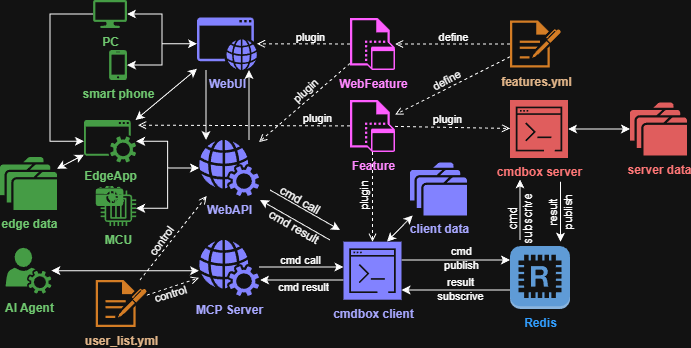
- With cmdbox, you can easily implement commands with complex options.
- The implemented commands can be called from the CLI / RESTAPI / Web / Edge screen.
- The implemented commands can be executed on a remote server via redis.
Install
- Install cmdbox with the following command.
pip install cmdbox
cmdbox -v
- Also install the docker version of the redis server.
docker run -p 6379:6379 --name redis -it ubuntu/redis:latest
Tutorial
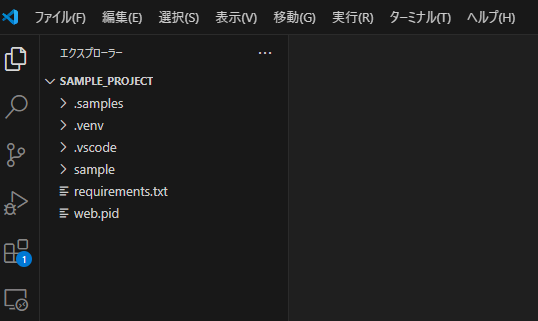
- Open the
.sample/sample_projectfolder in the current directory with VSCode.
- Install dependent libraries.
python -m venv .venv
. .venv/bin/activate
pip install -r requirements.txt
- Run the project.
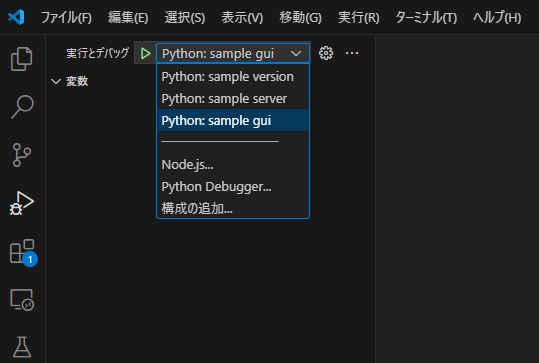
- The localhost web screen will open.
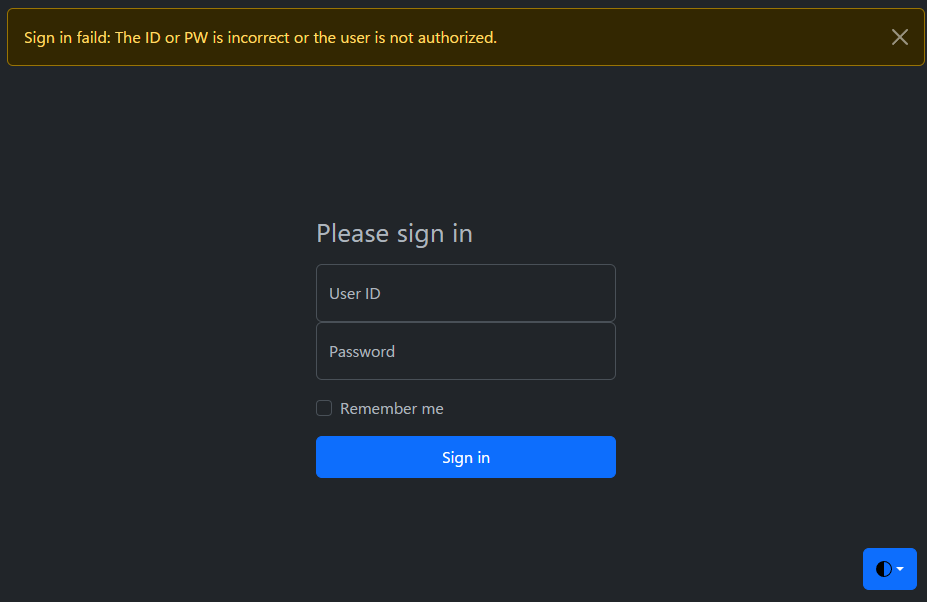
- Enter
user01 / user01for the initial ID and PW to sign in. - Using this web screen, you can easily execute the commands implemented in cmdbox.
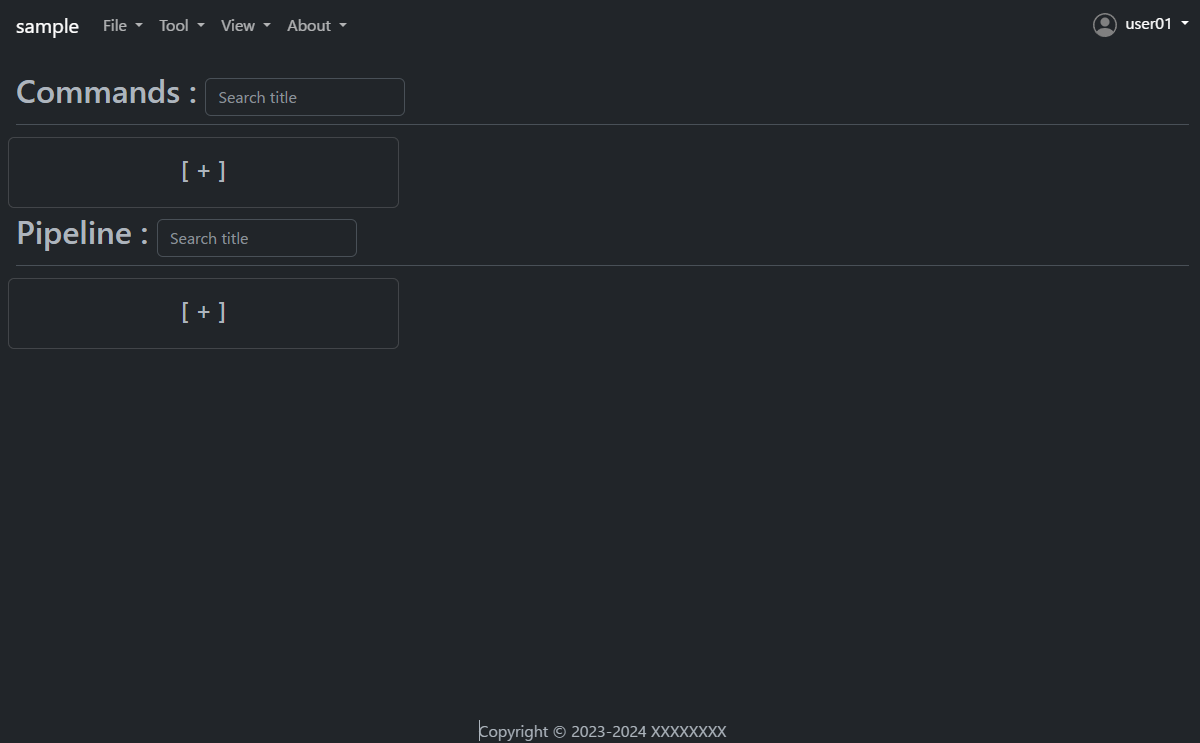
- Let's look at the command to get a list of files as an example.
- Press the plus button under Commands to open the Add dialog.
- Then enter the following.
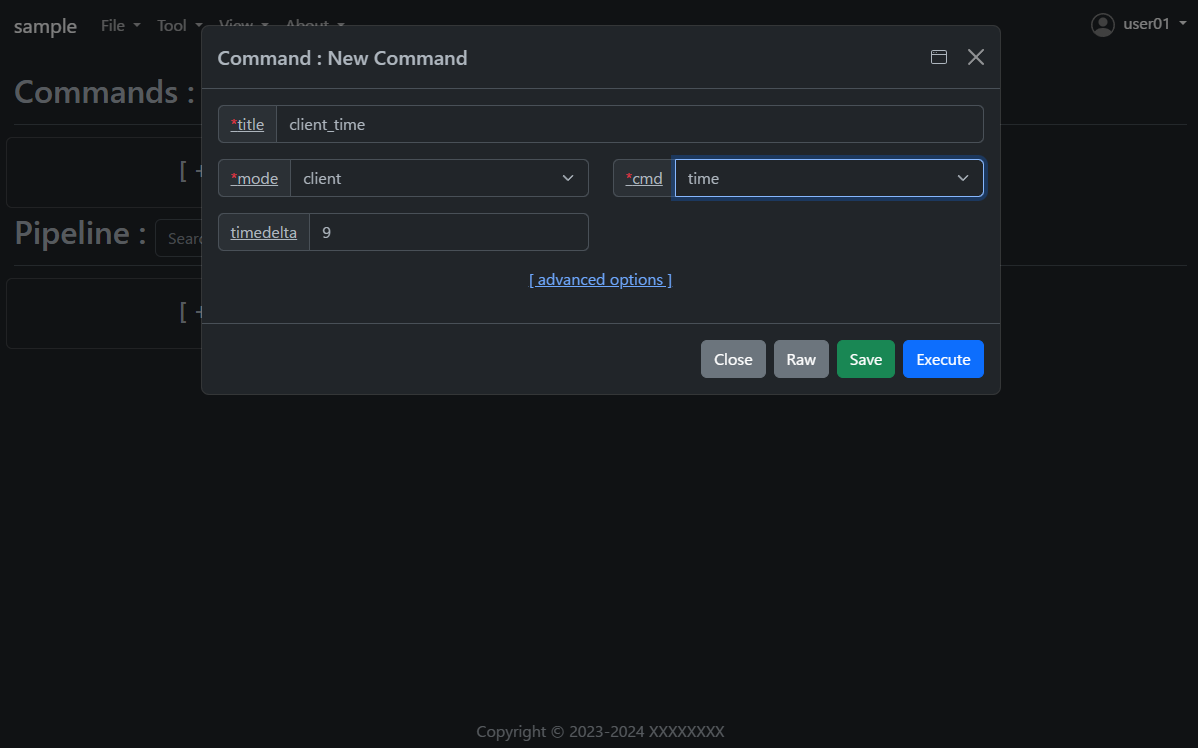
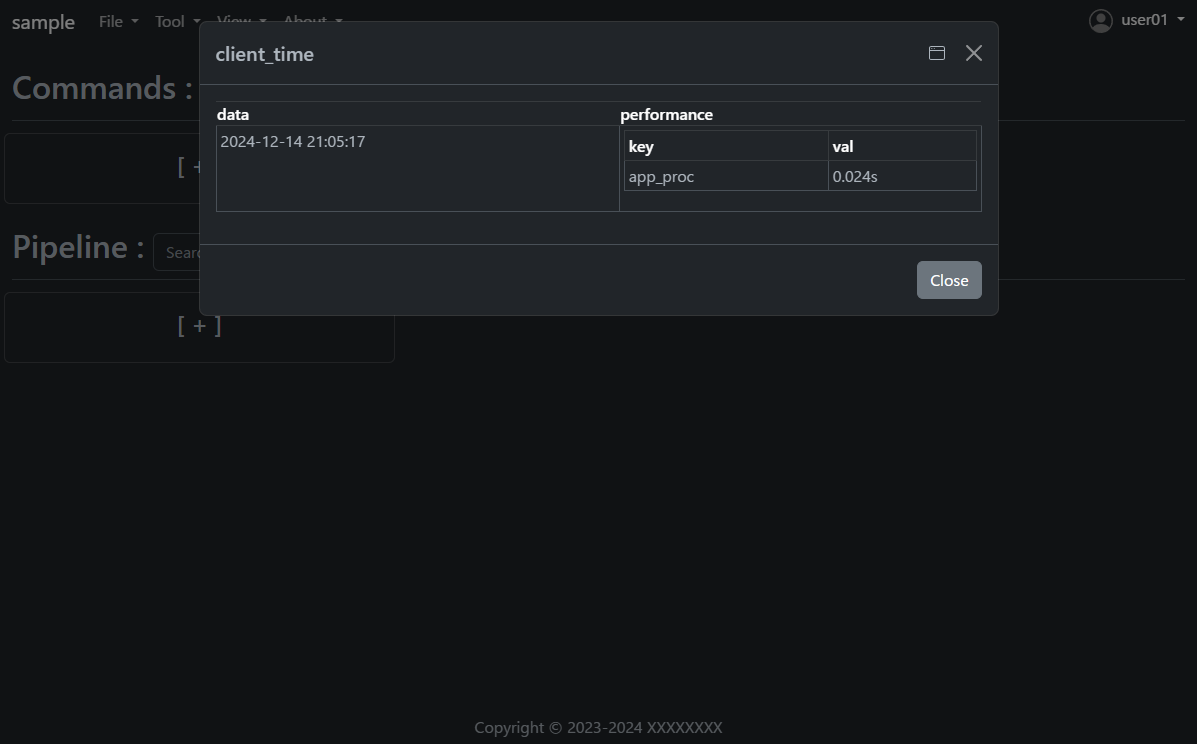
- Press the
Savebutton once and then press theExecutebutton. - The results of the command execution are displayed.
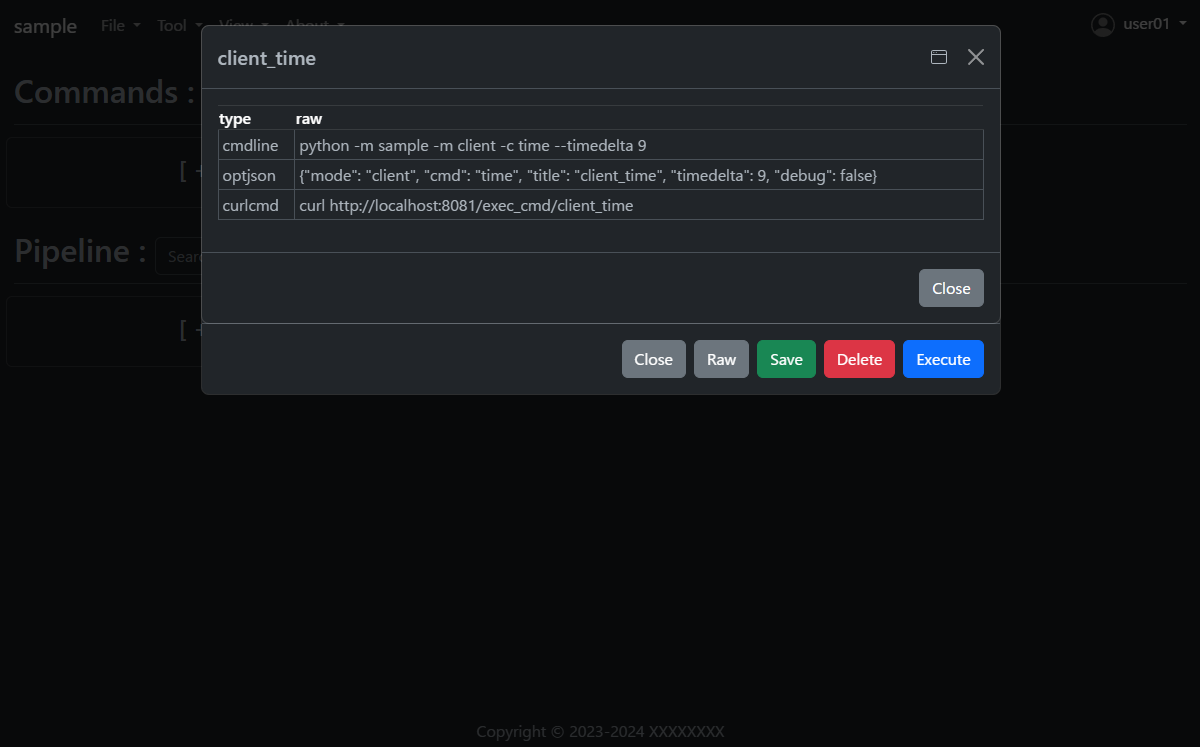
- Open the saved
client_timeand press theRawbutton. - You will see how to execute the same command on the command line; the RESTAPI URL is also displayed.
How to implement a new command using cmdbox
- Under the
sample/app/features/clifolder, you will find an implementation of thesample_client_timementioned earlier. - The implementation is as follows. (Slightly abbreviated display)
- Create the following code and save it in the
sample/app/features/clifolder.
from cmdbox.app import common, feature
from typing import Dict, Any, Tuple, Union, List
import argparse
import datetime
import logging


class ClientTime(feature.Feature):
    def get_mode(self) -> Union[str, List[str]]:
        return "client"

    def get_cmd(self):
        return 'time'

    def get_option(self):
        return dict(
            type=Options.T_STR, default=None, required=False, multi=False, hide=False, use_redis=self.USE_REDIS_FALSE,
            discription_ja="クライアント側の現在時刻を表示します。",
            discription_en="Displays the current time at the client side.",
            choice=[
                dict(opt="timedelta", type=Options.T_INT, default=9, required=False, multi=False, hide=False, choice=None,
                        discription_ja="時差の時間数を指定します。",
                        discription_en="Specify the number of hours of time difference."),
            ])

    def apprun(self, logger:logging.Logger, args:argparse.Namespace, tm:float, pf:List[Dict[str, float]]=[]) -> Tuple[int, Dict[str, Any], Any]:
        tz = datetime.timezone(datetime.timedelta(hours=args.timedelta))
        dt = datetime.datetime.now(tz)
        ret = dict(success=dict(data=dt.strftime('%Y-%m-%d %H:%M:%S')))
        common.print_format(ret, args.format, tm, args.output_json, args.output_json_append, pf=pf)
        if 'success' not in ret:
            return 1, ret, None
        return 0, ret, None

    def edgerun(self, opt, tool, logger, timeout, prevres = None):
        status, res = tool.exec_cmd(opt, logger, timeout, prevres)
        tool.notify(res)
        yield 1, res
- If you want to implement server-side processing, please refer to
sample_server_time.
from cmdbox.app import common, client, feature
from cmdbox.app.commons import redis_client
from cmdbox.app.options import Options
from pathlib import Path
from typing import Dict, Any, Tuple, Union, List
import argparse
import datetime
import logging


class ServerTime(feature.Feature):
    def get_mode(self) -> Union[str, List[str]]:
        return "server"

    def get_cmd(self):
        return 'time'

    def get_option(self):
        return dict(
            type=Options.T_STR, default=None, required=False, multi=False, hide=False, use_redis=self.USE_REDIS_FALSE,
            discription_ja="サーバー側の現在時刻を表示します。",
            discription_en="Displays the current time at the server side.",
            choice=[
                dict(opt="host", type=Options.T_STR, default=self.default_host, required=True, multi=False, hide=True, choice=None,
                        discription_ja="Redisサーバーのサービスホストを指定します。",
                        discription_en="Specify the service host of the Redis server."),
                dict(opt="port", type=Options.T_INT, default=self.default_port, required=True, multi=False, hide=True, choice=None,
                        discription_ja="Redisサーバーのサービスポートを指定します。",
                        discription_en="Specify the service port of the Redis server."),
                dict(opt="password", type=Options.T_STR, default=self.default_pass, required=True, multi=False, hide=True, choice=None,
                        discription_ja="Redisサーバーのアクセスパスワード(任意)を指定します。省略時は `password` を使用します。",
                        discription_en="Specify the access password of the Redis server (optional). If omitted, `password` is used."),
                dict(opt="svname", type=Options.T_STR, default="server", required=True, multi=False, hide=True, choice=None,
                        discription_ja="サーバーのサービス名を指定します。省略時は `server` を使用します。",
                        discription_en="Specify the service name of the inference server. If omitted, `server` is used."),
                dict(opt="timedelta", type=Options.T_INT, default=9, required=False, multi=False, hide=False, choice=None,
                        discription_ja="時差の時間数を指定します。",
                        discription_en="Specify the number of hours of time difference."),
                dict(opt="retry_count", type=Options.T_INT, default=3, required=False, multi=False, hide=True, choice=None,
                        discription_ja="Redisサーバーへの再接続回数を指定します。0以下を指定すると永遠に再接続を行います。",
                        discription_en="Specifies the number of reconnections to the Redis server.If less than 0 is specified, reconnection is forever."),
                dict(opt="retry_interval", type=Options.T_INT, default=5, required=False, multi=False, hide=True, choice=None,
                        discription_ja="Redisサーバーに再接続までの秒数を指定します。",
                        discription_en="Specifies the number of seconds before reconnecting to the Redis server."),
                dict(opt="timeout", type=Options.T_INT, default="15", required=False, multi=False, hide=True, choice=None,
                        discription_ja="サーバーの応答が返ってくるまでの最大待ち時間を指定。",
                        discription_en="Specify the maximum waiting time until the server responds."),
            ])

    def get_svcmd(self):
        return 'server_time'

    def apprun(self, logger:logging.Logger, args:argparse.Namespace, tm:float, pf:List[Dict[str, float]]=[]) -> Tuple[int, Dict[str, Any], Any]:
        cl = client.Client(logger, redis_host=args.host, redis_port=args.port, redis_password=args.password, svname=args.svname)
        ret = cl.redis_cli.send_cmd(self.get_svcmd(), [str(args.timedelta)],
                                    retry_count=args.retry_count, retry_interval=args.retry_interval, timeout=args.timeout)
        common.print_format(ret, args.format, tm, args.output_json, args.output_json_append, pf=pf)
        if 'success' not in ret:
            return 1, ret, None
        return 0, ret, None

    def is_cluster_redirect(self):
        return False

    def svrun(self, data_dir:Path, logger:logging.Logger, redis_cli:redis_client.RedisClient, msg:List[str],
              sessions:Dict[str, Dict[str, Any]]) -> int:
        td = 9 if msg[2] == None else int(msg[2])
        tz = datetime.timezone(datetime.timedelta(hours=td))
        dt = datetime.datetime.now(tz)
        ret = dict(success=dict(data=dt.strftime('%Y-%m-%d %H:%M:%S')))
        redis_cli.rpush(msg[1], ret)
        return self.RESP_SCCESS

    def edgerun(self, opt, tool, logger, timeout, prevres = None):
        status, res = tool.exec_cmd(opt, logger, timeout, prevres)
        tool.notify(res)
        yield 1, res
- Open the file
sample/extensions/features.yml. The file should look something like this. - This file specifies where new commands are to be read.
- For example, if you want to add a package to read, add a new
packageandprefixtofeatures.cli. - Note that
features.webcan be used to add a new web screen. - If you only want to call commands added in
features.clivia RESTAPI, no additional implementation is needed infeatures.web.
features:
  cli:                                  # Specify a list of package names in which the module implementing the command is located.
    - package: cmdbox.app.features.cli  # Package Name. Classes inheriting from cmdbox.app.feature.Feature.
      prefix: cmdbox_                   # Module name prefix. Modules that begin with this letter are eligible.
      exclude_modules: []               # Specify the module name to exclude from the list of modules to be loaded.
  web:                                  # Specify a list of package names with modules that implement web screens and RESTAPIs.
    - package: cmdbox.app.features.web  # Package Name. Classes inheriting from cmdbox.app.feature.WebFeature .
      prefix: cmdbox_web_               # Module name prefix. Modules that begin with this letter are eligible.
args:                                   # Specifies default or forced arguments for the specified command.
  cli:                                  # Specify rules to apply default values or force arguments.
    - rule:                             # Specify the rules for applying default values and forced arguments for each command line option.
                                        #   e.g. mode: web
      default:                          # Specify a default value for each item to be set when a rule is matched.
                                        #   e.g. doc_root: f"{Path(self.ver.__file__).parent / 'web'}"
      coercion:                         # Specify a coercion value for each item to be set when a rule is matched.
                                        #   e.g. doc_root: f"{Path(self.ver.__file__).parent / 'web'}"
aliases:                                # Specify the alias for the specified command.
  cli:                                  # Specify the alias for the command line.
    - source:                           # Specifies the command from which the alias originates.
        mode:                           # Specify the mode of the source command. The exact match "mode" is selected.
                                        #   e.g. client
        cmd:                            # Specify the source command to be aliased. The regex match "cmd" is selected.
                                        #   e.g. (.+)_(.+)
      target:                           # Specifies the command to be aliased to.
        mode:                           # Specify the mode of the target command. Create an alias for this “mode”.
                                        #   e.g. CLIENT
        cmd:                            # Specify the target command to be aliased. Create an alias for this “cmd”, referring to the regular expression group of source by "{n}".
                                        #   e.g. {2}_{1}
        move:                           # Specify whether to move the regular expression group of the source to the target.
                                        #   e.g. true
  web:                                  # Specify the alias for the RESTAPI.
    - source:                           # Specifies the RESTAPI from which the alias originates.
        path:                           # Specify the path of the source RESTAPI. The regex match "path" is selected.
                                        #   e.g. /exec_(.+)
      target:                           # Specifies the RESTAPI to be aliased to.
        path:                           # Specify the path of the target RESTAPI. Create an alias for this “path”, referring to the regular expression group of source by "{n}".
                                        #   e.g. /{1}_exec
        move:                           # Specify whether to move the regular expression group of the source to the target.
                                        #   e.g. true
- The following files should also be known when using commands on the web screen or RESTAPI.
- Open the file
sample/extensions/user_list.yml. The file should look something like this. - This file manages the users and groups that are allowed Web access and their rules.
- The rule of the previous command is
allowfor users in theusergroup incmdrule.rules.
users:                         # A list of users, each of which is a map that contains the following fields.
- uid: 1                       # An ID that identifies a user. No two users can have the same ID.
  name: admin                  # A name that identifies the user. No two users can have the same name.
  password: XXXXXXXXXXX        # The user's password. The value is hashed with the hash function specified in the next hash field.
  hash: plain                  # The hash function used to hash the password, which can be plain, md5, sha1, or sha256, or oauth2.
  groups: [admin]              # A list of groups to which the user belongs, as specified in the groups field.
  email: admin@aaa.bbb.jp      # The email address of the user, used when authenticating using the provider specified in the oauth2 field.
- uid: 101
  name: user01
  password: XXXXXXXXXXX
  hash: md5
  groups: [user]
  email: user01@aaa.bbb.jp
- uid: 102
  name: user02
  password: XXXXXXXXXXX
  hash: sha1
  groups: [readonly]
  email: user02@aaa.bbb.jp
- uid: 103
  name: user03
  password: XXXXXXXXXXX
  hash: sha256
  groups: [editor]
  email: user03@aaa.bbb.jp
groups:                        # A list of groups, each of which is a map that contains the following fields.
- gid: 1                       # An ID that identifies a group. No two groups can have the same ID.
  name: admin                  # A name that identifies the group. No two groups can have the same name.
- gid: 2
  name: guest
- gid: 101
  name: user
- gid: 102
  name: readonly
  parent: user                 # The parent group of the group. If the parent group is not specified, the group is a top-level group.
- gid: 103
  name: editor
  parent: user
cmdrule:                       # A list of command rules, Specify a rule that determines whether or not a command is executable when executed by a user in web mode.
  policy: deny                 # Specify the default policy for the rule. The value can be allow or deny.
  rules:                       # Specify rules to allow or deny execution of the command, depending on the group the user belongs to.
  - groups: [admin]
    rule: allow
  - groups: [user]             # Specify the groups to which the rule applies.
    mode: client               # Specify the "mode" as the condition for applying the rule.
    cmds: [file_download, file_list, server_info] # Specify the "cmd" to which the rule applies. Multiple items can be specified in a list.
    rule: allow                # Specifies whether or not the specified command is allowed for the specified group. The value can be allow or deny.
  - groups: [user]
    mode: server
    cmds: [list]
    rule: allow
  - groups: [user, guest]
    mode: web
    cmds: [genpass]
    rule: allow
  - groups: [editor]
    mode: client
    cmds: [file_copy, file_mkdir, file_move, file_remove, file_rmdir, file_upload]
    rule: allow
pathrule:                      # List of RESTAPI rules, rules that determine whether or not a RESTAPI can be executed when a user in web mode accesses it.
  policy: deny                 # Specify the default policy for the rule. The value can be allow or deny.
  rules:                       # Specify rules to allow or deny execution of the RESTAPI, depending on the group the user belongs to.
  - groups: [admin]            # Specify the groups to which the rule applies.
    paths: [/]                 # Specify the "path" to which the rule applies. Multiple items can be specified in a list.
    rule: allow                # Specifies whether or not the specified RESTAPI is allowed for the specified group. The value can be allow or deny.
  - groups: [guest]
    paths: [/signin, /assets, /copyright, /dosignin, /dosignout, /password/change,
            /gui, /get_server_opt, /usesignout, /versions_cmdbox, /versions_used]
    rule: allow
  - groups: [user]
    paths: [/signin, /assets, /bbforce_cmd, /copyright, /dosignin, /dosignout, /password/change,
            /exec_cmd, /exec_pipe, /filer, /gui, /get_server_opt, /usesignout, /versions_cmdbox, /versions_used]
    rule: allow
  - groups: [readonly]
    paths: [/gui/del_cmd, /gui/del_pipe, /gui/save_cmd, /gui/save_pipe]
    rule: deny
  - groups: [editor]
    paths: [/gui/del_cmd, /gui/del_pipe, /gui/save_cmd, /gui/save_pipe]
    rule: allow
password:                       # Password settings.
  policy:                       # Password policy settings.
    enabled: true               # Specify whether or not to enable password policy.
    not_same_before: true       # Specify whether or not to allow the same password as the previous one.
    min_length: 16              # Specify the minimum length of the password.
    max_length: 64              # Specify the maximum length of the password.
    min_lowercase: 1            # Specify the minimum number of lowercase letters in the password.
    min_uppercase: 1            # Specify the minimum number of uppercase letters in the password.
    min_digit: 1                # Specify the minimum number of digits in the password.
    min_symbol: 1               # Specify the minimum number of symbol characters in the password.
    not_contain_username: true  # Specify whether or not to include the username in the password.
  expiration:                   # Password expiration settings.
    enabled: true               # Specify whether or not to enable password expiration.
    period: 90                  # Specify the number of days after which the password will expire.
    notify: 7                   # Specify the number of days before the password expires that a notification will be sent.
  lockout:                      # Account lockout settings.
    enabled: true               # Specify whether or not to enable account lockout.
    threshold: 5                # Specify the number of failed login attempts before the account is locked.
    reset: 30                   # Specify the number of minutes after which the failed login count will be reset.
oauth2:                             # OAuth2 settings.
  providers:                        # This is a per-provider setting for OAuth2.
    google:                         # Google's OAuth2 configuration.
      enabled: false                # Specify whether to enable Google's OAuth2.
      client_id: XXXXXXXXXXX        # Specify Google's OAuth2 client ID.
      client_secret: XXXXXXXXXXX    # Specify Google's OAuth2 client secret.
      redirect_uri: https://localhost:8443/oauth2/google/callback # Specify Google's OAuth2 redirect URI.
      scope: ['email']              # Specify the scope you want to retrieve with Google's OAuth2. Usually, just reading the email is sufficient.
      signin_module:                # Specify the module name that implements the sign-in. see, cmdbox.app.signin.SignIn
      note:                         # Specify a description such as Google's OAuth2 reference site.
      - https://developers.google.com/identity/protocols/oauth2/web-server?hl=ja#httprest
    github:                         # OAuth2 settings for GitHub.
      enabled: false                # Specify whether to enable OAuth2 for GitHub.
      client_id: XXXXXXXXXXX        # Specify the OAuth2 client ID for GitHub.
      client_secret: XXXXXXXXXXX    # Specify the GitHub OAuth2 client secret.
      redirect_uri: https://localhost:8443/oauth2/github/callback # Specify the OAuth2 redirect URI for GitHub.
      scope: ['user:email']         # Specify the scope you want to get from GitHub's OAuth2. Usually, just reading the email is sufficient.
      signin_module:                # Specify the module name that implements the sign-in. see, cmdbox.app.signin.SignIn
      note:                         # Specify a description, such as a reference site for OAuth2 on GitHub.
      - https://docs.github.com/ja/apps/oauth-apps/building-oauth-apps/authorizing-oauth-apps#scopes
- See the documentation for references to each file.
- Documentation is here.
Lisence
This project is licensed under the MIT License, see the LICENSE file for details
Release history Release notifications | RSS feed


Download files
Download the file for your platform. If you're not sure which to choose, learn more about installing packages.
Source Distribution
cmdbox-0.5.1.tar.gz
(1.6 MB
view details)
Built Distribution
Filter files by name, interpreter, ABI, and platform.
If you're not sure about the file name format, learn more about wheel file names.
Copy a direct link to the current filters
File details
Details for the file cmdbox-0.5.1.tar.gz.
File metadata
- Download URL: cmdbox-0.5.1.tar.gz
- Upload date:
- Size: 1.6 MB
- Tags: Source
- Uploaded using Trusted Publishing? No
- Uploaded via: twine/6.0.1 CPython/3.8.10
File hashes
| Algorithm | Hash digest | |
|---|---|---|
| SHA256 |
b4858fc9408bfdf764247b8461387e03ea77adc27d3e103c4d449a87a6a68d37
|
|
| MD5 |
4ee3713c12d72861948788aba6c95f0d
|
|
| BLAKE2b-256 |
7d124a407ae0cafcc957811b12831f4b8fcdf5f44e0dd0600392ef5cab55b60b
|
File details
Details for the file cmdbox-0.5.1-py3-none-any.whl.
File metadata
- Download URL: cmdbox-0.5.1-py3-none-any.whl
- Upload date:
- Size: 1.8 MB
- Tags: Python 3
- Uploaded using Trusted Publishing? No
- Uploaded via: twine/6.0.1 CPython/3.8.10
File hashes
| Algorithm | Hash digest | |
|---|---|---|
| SHA256 |
2d17bc6320374a9307c222970b85c5359c07b064bec1d441b1cd7c59838dfda6
|
|
| MD5 |
98d2477fe6b1fcb461514b792e3bdd96
|
|
| BLAKE2b-256 |
5bd766100c3efb032c80bbb1e3a6463b07611ac1b6cd5479cbcd30dd846bad7e
|






