
apb modules for cocotb
Verified details
These details have been verified by PyPIProject links
GitHub Statistics
Maintainers

Project description
APB interface modules for Cocotb



GitHub repository: https://github.com/daxzio/cocotbext-apb
Introduction
APB simulation models for cocotb.
The APB protocol is cover in these documents APB Protocol Specification and APB Architecture Specification
Installation
Installation from pip (release version, stable):
$ pip install cocotbext-apb
Installation from git (latest development version, potentially unstable):
$ pip install https://github.com/daxzio/cocotbext-apb/archive/main.zip
Installation for active development:
$ git clone https://github.com/daxzio/cocotbext-apb
$ pip install -e cocotbext-apb
Documentation and usage examples
See the tests directory for complete testbenches using these modules.
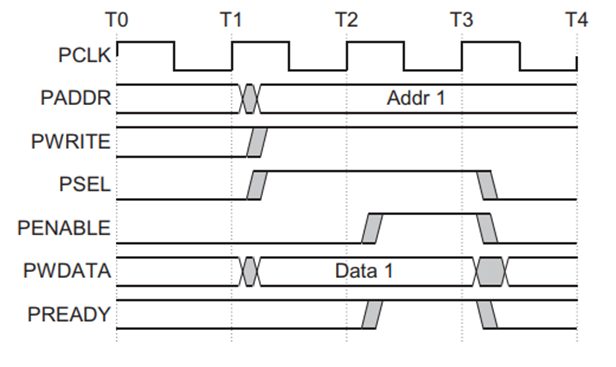
APB Write
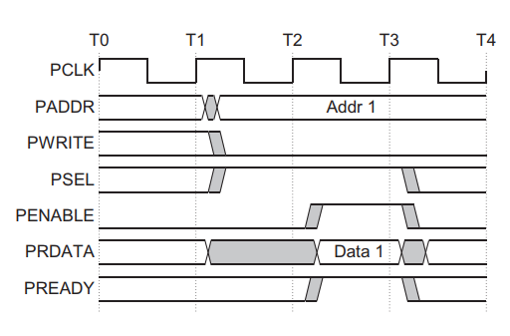
APB Read
APB Bus
The APBBus is used to map to a APB interface on the dut. Class methods from_entity and from_prefix are provided to facilitate signal default name matching.
Required:
- psel
- pwrite
- paddr
- pwdata
- pready
- prdata
Optional:
- pstrb
- pprot
- pslverr
APB Master
The ApbMaster class implement a APB driver and is capable of generating read and write operations against APB slaves.
The master automatically handles data wider than the bus width by splitting transactions into multiple sequential APB accesses at consecutive addresses. This allows seamless transfers of wide data values across narrower APB interfaces.
To use these modules, import the one you need and connect it to the DUT:
from cocotbext.apb import ApbMaster, ApbBus

bus = ApbBus.from_prefix(dut, "s_apb")
apb_driver = ApbMaster(bus, dut.clk)
The first argument to the constructor accepts an ApbBus object. These objects are containers for the interface signals and include class methods to automate connections.
Once the module is instantiated, read and write operations can be initiated in a couple of different ways.
ApbMasterconstructor parameters
- bus:
ApbBusobject containing APB interface signals - clock: clock signal
- timeout_max: Maximum clock cycles to wait for
preadysignal before timing out (optional, default1000). Set to-1to disable timeout. - reset: reset signal (optional)
- reset_active_level: reset active level (optional, default
True)
Additional optional arguments for ApbMaster
- seednum: For random testing a seed can be supplied, default
None, random seed.
Methods
enable_logging(): Enable debug loggingdisable_logging(): Disable debug loggingenable_backpressure(seednum=None): Enable random delays on the interfacedisable_backpressure(): Disable random delays on the interfacewait(): blocking wait until all outstanding operations completewrite(addr, data, strb=-1, prot=ApbProt.NONSECURE, error_expected=False, device=0, length=-1): write data (bytes or int), to addr, wait for result. If an slverr is experienced a critical warning will be issued by default, but will reduced this to an info warning iferror_expected=True. If data is wider than the bus width, it will automatically be split into multiple sequential APB write accesses at consecutive addresses. The optional length parameter can override the automatic length calculation, should be a multiple of the number of bytes in the wdata bus. The optional device parameter specifies the slave index to target.write_nowait(addr, data, strb=-1, prot=ApbProt.NONSECURE, error_expected=False, device=0, length=-1): write data (bytes or int), to addr, submit to queue. If an slverr is experienced a critical warning will be issued by default, but will reduced this to an info warning iferror_expected=True. If data is wider than the bus width, it will automatically be split into multiple sequential APB write accesses at consecutive addresses. The optional length parameter can override the automatic length calculation, should be a multiple of the number of bytes in the wdata bus. The optional device parameter specifies the slave index to target.read(addr, data=bytes(), prot=ApbProt.NONSECURE, error_expected=False, device=0, length=-1): read bytes, at addr, if data supplied check for match, wait for result. If an slverr is experienced a critical warning will be issued by default, but will reduced this to an info warning iferror_expected=True. If data is wider than the bus width, it will automatically be split into multiple sequential APB read accesses at consecutive addresses. The optional length parameter can override the automatic length calculation, should be a multiple of the number of bytes in the wdata bus. The optional device parameter specifies the slave index to target.read_nowait(addr, data=bytes(), prot=ApbProt.NONSECURE, error_expected=False, device=0, length=-1): read bytes, at addr, if data supplied check for match, submit to queue. If an slverr is experienced a critical warning will be issued by default, but will reduced this to an info warning iferror_expected=True. If data is wider than the bus width, it will automatically be split into multiple sequential APB read accesses at consecutive addresses. The optional length parameter can override the automatic length calculation, should be a multiple of the number of bytes in the wdata bus. The optional device parameter specifies the slave index to target.poll(addr, data=bytes(), device=0): poll address, at addr, until data at address matches data. The optional device parameter specifies the slave index to target.
Multi-Device Support
The ApbMaster supports multiple slave devices on the same bus instance. To use this feature:
-
Signal Connection:
pselmust be a vector (e.g.,[1:0]for 2 slaves).prdatamust be a concatenated vector of all slave read data outputs (e.g.,[63:0]for 2 slaves with 32-bit data width).
-
Access:
- Use the
deviceparameter inread,write,read_nowait, andwrite_nowaitmethods to specify the target slave index (integer). - The
ApbMasterwill assert the corresponding bit inpsel(1 << device) and slice theprdataappropriately.
- Use the
Example:
# Write to slave 0
await tb.intf.write(0x100, 0xDEADBEEF, device=0)

# Read from slave 1
val = await tb.intf.read(0x200, device=1)
APB slave
The ApbSlave classe implement an APB slaves and is capable of completing read and write operations from upstream APB masters. This modules can either be used to perform memory reads and writes on a MemoryInterface on behalf of the DUT, or they can be extended to implement customized functionality.
To use these modules, import the one you need and connect it to the DUT:
from cocotbext.apb import ApbBus, ApbSlave, MemoryRegion

apb_slave = ApbSlave(ApbBus.from_prefix(dut, "m_apb"), dut.clk, dut.rst)
region = MemoryRegion(2**apb_slave.read_if.address_width)
apb_slave.target = region
The first argument to the constructor accepts an ApbBus object. These objects are containers for the interface signals and include class methods to automate connections.
It is also possible to extend these modules; operation can be customized by overriding the internal _read() and _write() methods. See ApbRam for an example.
ApbSlave constructor parameters
- bus:
ApbBusobject containing APB interface signals - clock: clock signal
- reset: reset signal (optional)
- reset_active_level: reset active level (optional, default
True) - target: target region (optional, default
None)
ApbSlave editable attibutes
It is possible to set area of addressable memory to be treated a priviledged address space or instruction address space. If an APB master tries to access these regions, but has not set the correct prot value, NONSECURE for example, the ApbSlave will issue a slverr duting the pready phase of it response.
The ApbSlave has two attributes that can be edited by the user to allocate addresses and/or address ranges to the priviledged or instruction space.
- privileged_addrs
- instruction_addrs
Both attributes are arrays, and each element can be a single address, or a two element list, with a low address to a high address:
tb.ram.privileged_addrs =  [[0x1000, 0x1fff], 0x3000]
tb.ram.instruction_addrs = [[0x2000, 0x2fff], 0x4000]
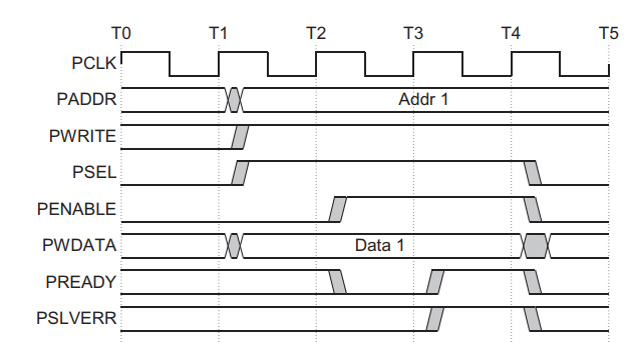
If there is a read or a write with an address in this space, and the prot from the master does not match, it will report the type of error, as a warning, and assert slverr. The access will also be unsuccessful, the write will not occur and a read will result in all zeros being returned.
APB RAM
The ApbRam class implements APB RAMs and is capable of completing read and write operations from upstream APB masters. These modules are extensions of the corresponding ApbSlave module. Internally, SparseMemory is used to support emulating very large memories.
To use these modules, import and connect it to the DUT:
from cocotbext.apb import ApbBus, ApbRam

apb_ram = ApbRam(ApbBus.from_prefix(dut, "m_apb"), dut.clk, dut.rst, size=2**32)
The first argument to the constructor accepts an ApbBus object. These objects are containers for the interface signals and include class methods to automate connections.
Once the module is instantiated, the memory contents can be accessed in a couple of different ways. First, the mmap object can be accessed directly via the mem attribute. Second, read(), write(), and various word-access wrappers are available. Hex dump helper methods are also provided for debugging. For example:
apb_ram.write(0x0000, b'test')
data = apb_ram.read(0x0000, 4)
apb_ram.hexdump(0x0000, 4, prefix="RAM")
Multi-port memories can be constructed by passing the mem object of the first instance to the other instances. For example, here is how to create a four-port RAM:
apb_ram_p1 = ApbRam(ApbBus.from_prefix(dut, "m00_apb"), dut.clk, dut.rst, size=2**32)
apb_ram_p2 = ApbRam(ApbBus.from_prefix(dut, "m01_apb"), dut.clk, dut.rst, mem=apb_ram_p1.mem)
apb_ram_p3 = ApbRam(ApbBus.from_prefix(dut, "m02_apb"), dut.clk, dut.rst, mem=apb_ram_p1.mem)
apb_ram_p4 = ApbRam(ApbBus.from_prefix(dut, "m03_apb"), dut.clk, dut.rst, mem=apb_ram_p1.mem)
ApbRam and ApbLiteRam constructor parameters
- bus:
ApbBusobject containing APB interface signals - clock: clock signal
- reset: reset signal (optional)
- reset_active_level: reset active level (optional, default
True) - size: memory size in bytes (optional, default
2**32) - mem:
mmaporSparseMemorybacking object to use (optional, overrides size)
Attributes:
- mem: directly access shared
mmaporSparseMemorybacking object
Methods
read(address, length): read length bytes, starting at addressread_words(address, count, byteorder='little', ws=2): read count ws-byte words, starting at addressread_dwords(address, count, byteorder='little'): read count 4-byte dwords, starting at addressread_qwords(address, count, byteorder='little'): read count 8-byte qwords, starting at addressread_byte(address): read single byte at addressread_word(address, byteorder='little', ws=2): read single ws-byte word at addressread_dword(address, byteorder='little'): read single 4-byte dword at addressread_qword(address, byteorder='little'): read single 8-byte qword at addresswrite(address, data): write data (bytes), starting at addresswrite_words(address, data, byteorder='little', ws=2): write data (ws-byte words), starting at addresswrite_dwords(address, data, byteorder='little'): write data (4-byte dwords), starting at addresswrite_qwords(address, data, byteorder='little'): write data (8-byte qwords), starting at addresswrite_byte(address, data): write single byte at addresswrite_word(address, data, byteorder='little', ws=2): write single ws-byte word at addresswrite_dword(address, data, byteorder='little'): write single 4-byte dword at addresswrite_qword(address, data, byteorder='little'): write single 8-byte qword at addresshexdump(address, length, prefix=''): print hex dump of length bytes starting from address, prefix lines with optional prefixhexdump_line(address, length, prefix=''): return hex dump (list of str) of length bytes starting from address, prefix lines with optional prefixhexdump_str(address, length, prefix=''): return hex dump (str) of length bytes starting from address, prefix lines with optional prefix
Project details
Verified details
These details have been verified by PyPIProject links
GitHub Statistics
Maintainers
Release history Release notifications | RSS feed


Download files
Download the file for your platform. If you're not sure which to choose, learn more about installing packages.
Source Distribution
File details
Details for the file cocotbext_apb-0.8.1.tar.gz.
File metadata
- Download URL: cocotbext_apb-0.8.1.tar.gz
- Upload date:
- Size: 22.5 kB
- Tags: Source
- Uploaded using Trusted Publishing? Yes
- Uploaded via: twine/6.1.0 CPython/3.13.7
File hashes
| Algorithm | Hash digest | |
|---|---|---|
| SHA256 |
8d6afb91a7b2de69bdf4c3b23975dd9981e9039d4c1f20f2d16d27241f4a0c23
|
|
| MD5 |
0a48868e8d83ebf8180ac3f2aa8adf35
|
|
| BLAKE2b-256 |
d15f85a5dc1ec90a6e283f32520da994afa1b75fa6b210e244db25ed6d0626c1
|
Provenance
The following attestation bundles were made for cocotbext_apb-0.8.1.tar.gz:
Publisher:
test_checkin.yml on daxzio/cocotbext-apb
-
Statement:
-
Statement type:
https://in-toto.io/Statement/v1 -
Predicate type:
https://docs.pypi.org/attestations/publish/v1 -
Subject name:
cocotbext_apb-0.8.1.tar.gz -
Subject digest:
8d6afb91a7b2de69bdf4c3b23975dd9981e9039d4c1f20f2d16d27241f4a0c23 - Sigstore transparency entry: 711605606
- Sigstore integration time:
-
Permalink:
daxzio/cocotbext-apb@4c525d124d8ca5d99cf979ecc4c8c8506f35414d -
Branch / Tag:
refs/tags/v0.8.1 - Owner: https://github.com/daxzio
-
Access:
public
-
Token Issuer:
https://token.actions.githubusercontent.com -
Runner Environment:
github-hosted -
Publication workflow:
test_checkin.yml@4c525d124d8ca5d99cf979ecc4c8c8506f35414d -
Trigger Event:
push
-
Statement type:






