




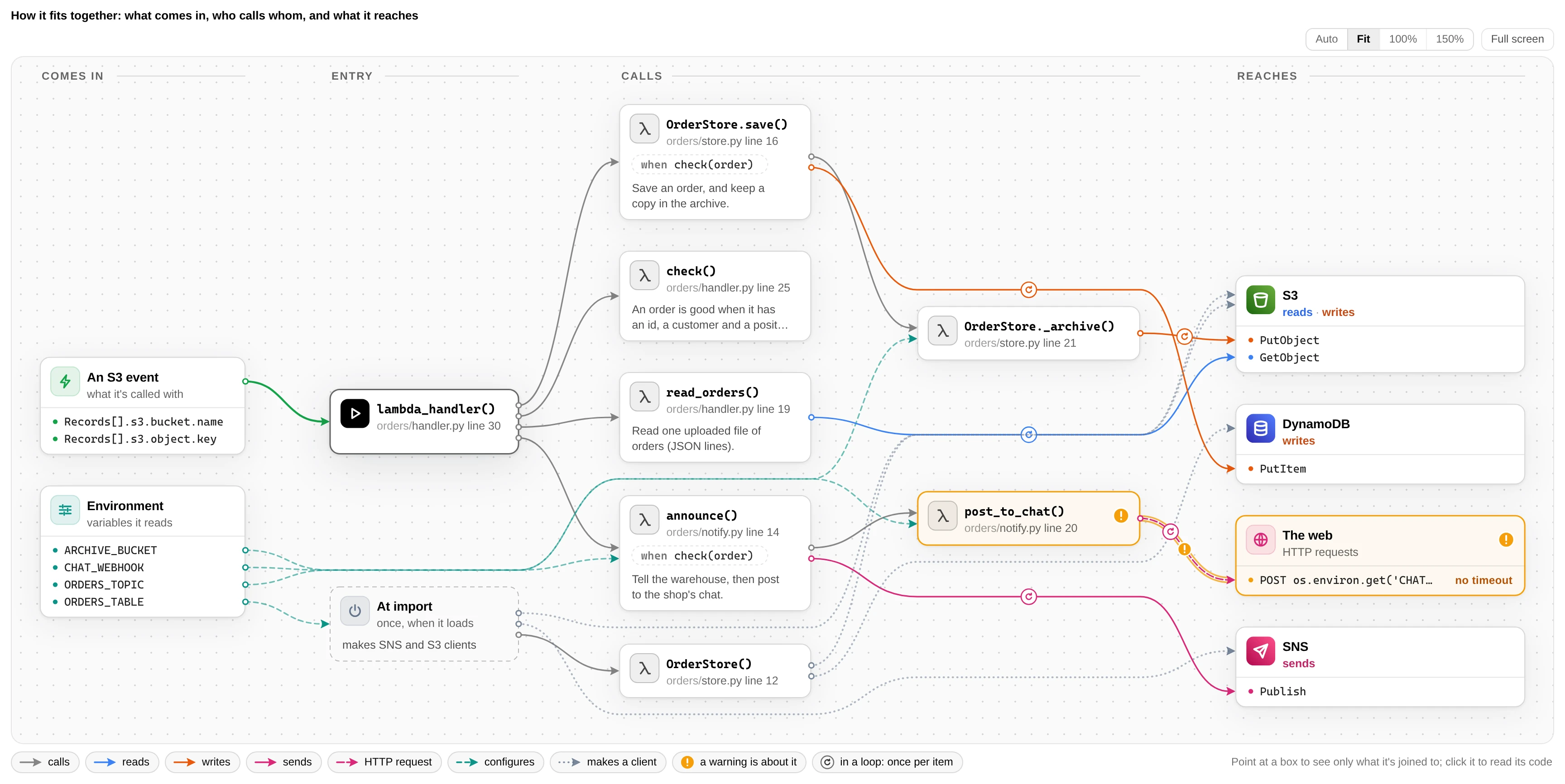
Point it at a repo. Get a page showing where the code starts, who calls whom, and what each path touches: AWS, HTTP, environment variables.
Install
pip install code-node-graph        # or: uv tool install code-node-graph
cd your/repo && code-node
What you get
| 🗺️ Graph | What comes in, who calls whom, what each path reaches. AWS calls coloured by kind (read, write, send, run); ↻ marks loops |
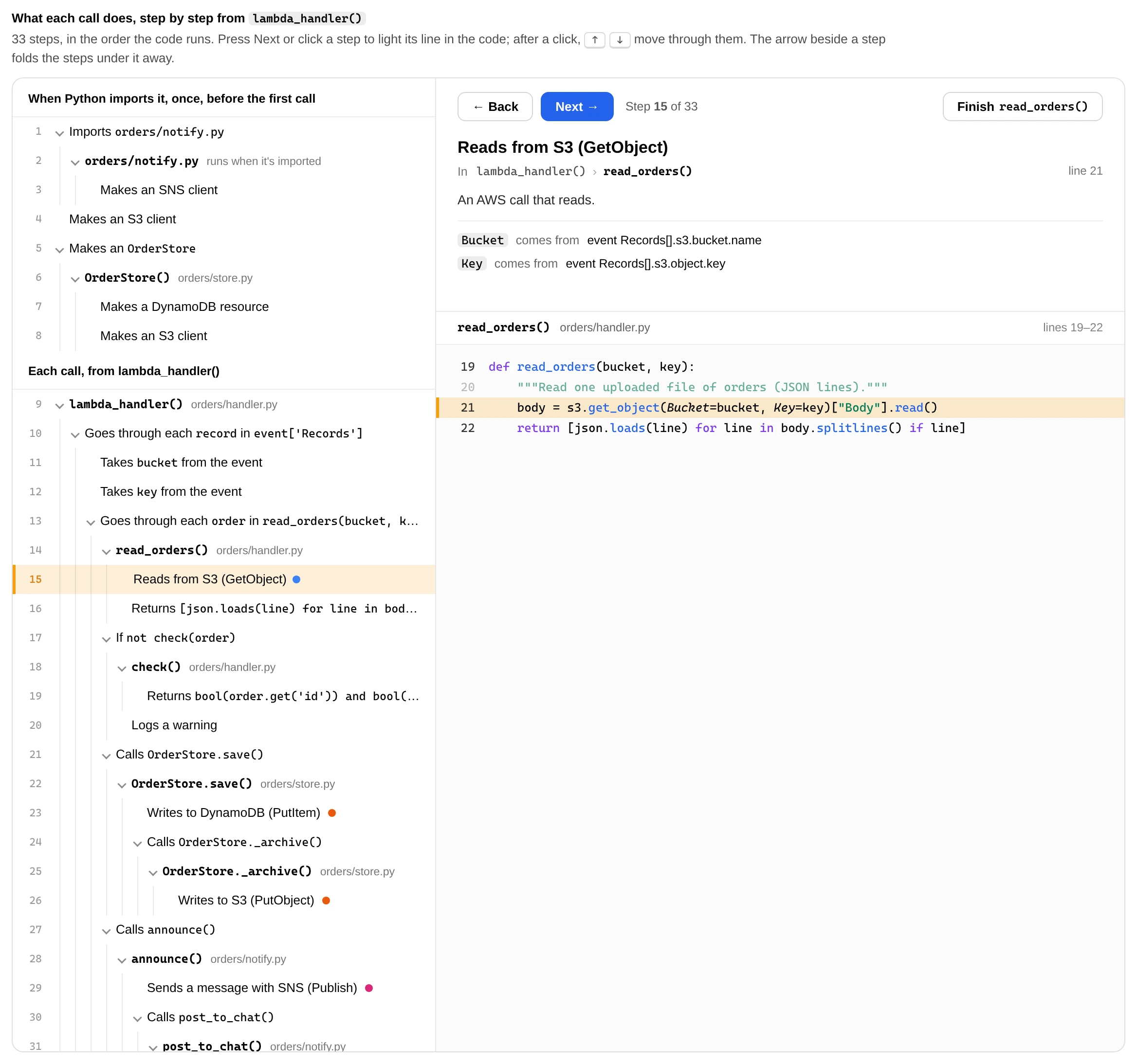
| 👣 Step by step | Walk the code in run order, like a debugger: Next, Skip call, Finish, arrow keys |
| 🔌 Plugins | boto3, Redis, SQL (sqlite3, psycopg, PyMySQL, asyncpg, SQLAlchemy), MongoDB, OpenAI, Anthropic |
| 📄 Deploy checks | Reads SAM template.yaml / serverless.yml: unset variables, IAM calls the role won't allow, timeouts that don't fit |
| 🚨 Findings | SQL or shell commands built from input, clients with no timeout, queries in loops |
| 🧜 Mermaid | Paste the graph into Markdown, a wiki or a PR |
| 🔁 Live | --serve redraws on every save |
Usage
code-node                              # find entry points and pick one
code-node -i                           # walk the folder (arrow keys, or type to search) and pick a file
code-node --list                       # just list them
code-node src/app/main.py:run          # start from a function
code-node src/app/store.py:Store.save  # ...or a method
code-node -e save                      # part of a name
code-node --serve                      # live page on localhost:8765
code-node --mermaid                    # print the graph as Mermaid
Entry points it finds
Console scripts in any pyproject.toml (monorepos too), functions named in SAM / Serverless files, Lambda handlers,
FastAPI / Flask routes, Django urls.py files, Typer commands, if __name__ == "__main__": blocks, and functions named
main. Test files are skipped. A web app's routes are read as called with the request, so SQL built from a query
string is flagged.
All options
| Option | What it does |
|---|---|
path |
Folder to read, or a file to start from (main.py, main.py:function) |
-e, --entry |
module.function, module.Class.method, file.py[:function], or part of a name |
-i, --interactive |
Pick the file in the terminal: arrow keys through the folders, or type to search every file |
-l, --list |
List entry points and stop |
--plugins |
List platforms, libraries and deploy files and stop |
--all |
Draw every function (default: 14 functions, 5 calls deep) |
--depth N, --functions N |
Your own limits |
--serve, --port N |
Serve on localhost, redraw on change |
--mermaid |
Print the graph as Mermaid |
-o, --out, --no-open |
Where to save (default ~/.cache/code-node/), and whether to open it |
--platform NAME, --lambda |
Run a platform's checks on any entry point |
--editor vscode|cursor|none |
Editor the line links open (default vscode, WSL-aware) |
--no-git |
Leave out what git says about each function (who changed it last, when, in which commit) |
From Python
from code_node import code_graph, map_code, read_project

project = read_project(".")
cmap = map_code(project.files, "pkg.cli.main", libraries=project.libraries())
print([call.label for call in cmap.aws])
print(code_graph(cmap).mermaid())
Plugins that mix
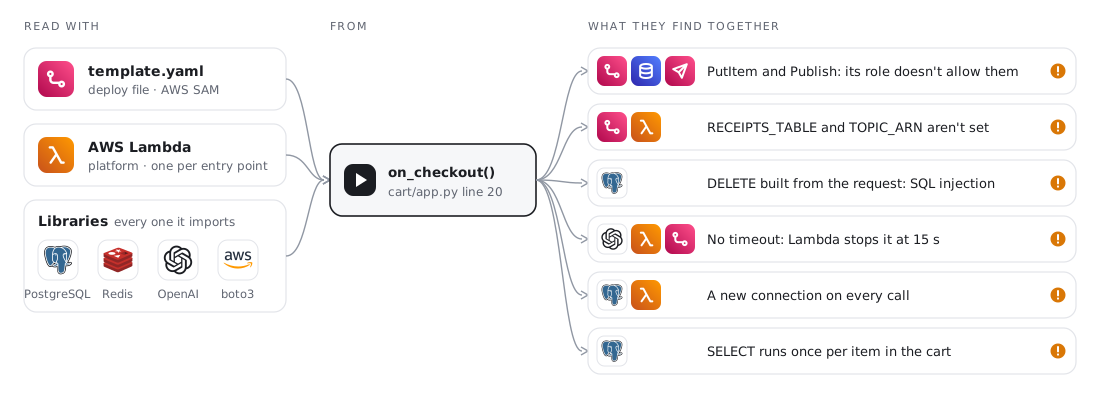
One platform, any number of libraries and deploy files, checked together. On
examples/cart-service:
Limits
It can't follow values from outside the code (a client a library hands back, a function picked from a registry at
run time), installed libraries' own code, or getattr with a computed name. A page can miss calls, but everything
it shows is in the code.
Develop
make install    # .venv with the dev tools (needs uv)
make check      # everything CI runs
make shots      # remake screenshots (needs Chrome)
python makefile.py <task> does the same on any OS.
Extracted from aws-analyzer's how_it_works(). Apache 2.0.
1 maintainer

Metadata
1 maintainer
Release files for code-node-graph 0.8.0
For a detailed explanation of source distributions (sdists) and built distributions (wheels), please see the package formats documentation.
Source distribution (sdist)
| File | Size | Uploaded | Provenance | |
|---|---|---|---|---|
| code_node_graph-0.8.0.tar.gz | 295.7 kB | With provenance | Details |
Built distribution (wheel)
| File | Interpreter | ABI | Platform | Reset |
|---|---|---|---|---|
| code_node_graph-0.8.0-py3-none-any.whl | Python 3 | none | any | Details |
Total release size: 642.1 kB
Release files / code_node_graph-0.8.0.tar.gz
| Download URL | code_node_graph-0.8.0.tar.gz |
|---|---|
| Size | 295.7 kB |
| Tags | Source |
|
SHA-256 checksum How to use checksums |
ca08791c17953082524969f254f555b0547ba85abf4f9b12c98771efb69ef7ea
|
|
BLAKE2b-256 checksum How to use checksums |
6821b843c97049ab44925b7c7e492e8cca0015f4f0d0251fdd175bcc3ed922d0
|
| Upload date | |
|
Uploaded using Trusted Publishing? What is trusted publishing? |
Yes |
| Uploaded via |
twine/7.0.0 CPython/3.13.14
|
Provenance
Provenance describes where a file came from. On PyPI, provenance is shared via attestations, which provide a verifiable record of the build or publishing details. View details, limitations and caveats.


PyPI Publish Attestation
PyPI verified that this artifact, at this checksum, originated from the publisher listed below.
Signed by GitHub Actions, verified by PyPI on Oct 21, 2026.
Transparency logRelease files / code_node_graph-0.8.0-py3-none-any.whl
| Download URL | code_node_graph-0.8.0-py3-none-any.whl |
|---|---|
| Size | 346.4 kB |
| Tags | Python 3 |
|
SHA-256 checksum How to use checksums |
81f467855abd7bc1f60496c5db048239272aad85909733a44d1b138b2f5750ec
|
|
BLAKE2b-256 checksum How to use checksums |
c484f6da490cf9718125f9dd67e345c3617562b10432573762175f34d7c4f1b1
|
| Upload date | |
|
Uploaded using Trusted Publishing? What is trusted publishing? |
Yes |
| Uploaded via |
twine/7.0.0 CPython/3.13.14
|
Provenance
Provenance describes where a file came from. On PyPI, provenance is shared via attestations, which provide a verifiable record of the build or publishing details. View details, limitations and caveats.
PyPI Publish Attestation
PyPI verified that this artifact, at this checksum, originated from the publisher listed below.
Signed by GitHub Actions, verified by PyPI on Oct 21, 2026.
Transparency logSecurity for code-node-graph 0.8.0
Provenance
Provenance describes where a file came from. On PyPI, provenance is shared via attestations, which provide a verifiable record of the build or publishing details. View details, limitations and caveats.
Full provenance
All 2 files in this release have been uploaded with provenance metadata.
Attestation for code_node_graph-0.8.0.tar.gz
PyPI Publish Attestation
PyPI verified that this artifact, at this checksum, originated from the publisher listed below.
Signed by GitHub Actions, verified by PyPI on Oct 21, 2026.
Transparency logA note on package security
PyPI is a repository for distributing packages, not a service for auditing them. While third-party security researchers and our staff do their best to detect and remove malicious packages, PyPI cannot guarantee the quality, security or suitability of any given package.














