
codedocent
Code visualization for non-programmers.
A docent is a guide who explains things to people who aren't experts. Codedocent does that for code.
The problem
You're staring at a codebase you didn't write — maybe thousands of files across dozens of directories — and you need to understand what it does. Reading every file isn't realistic. You need a way to visualize the code structure, get a high-level map of what's where, and drill into the parts that matter without losing context.
Codedocent parses the codebase into a navigable, visual block structure and explains each piece in plain English. It's an AI code analysis tool — use a cloud provider for speed or run locally through Ollama for full privacy. Point it at any codebase and get a structural overview you can explore interactively, understand quickly, and share as a static HTML file.
What's new in v1.0.0
Architecture Mode
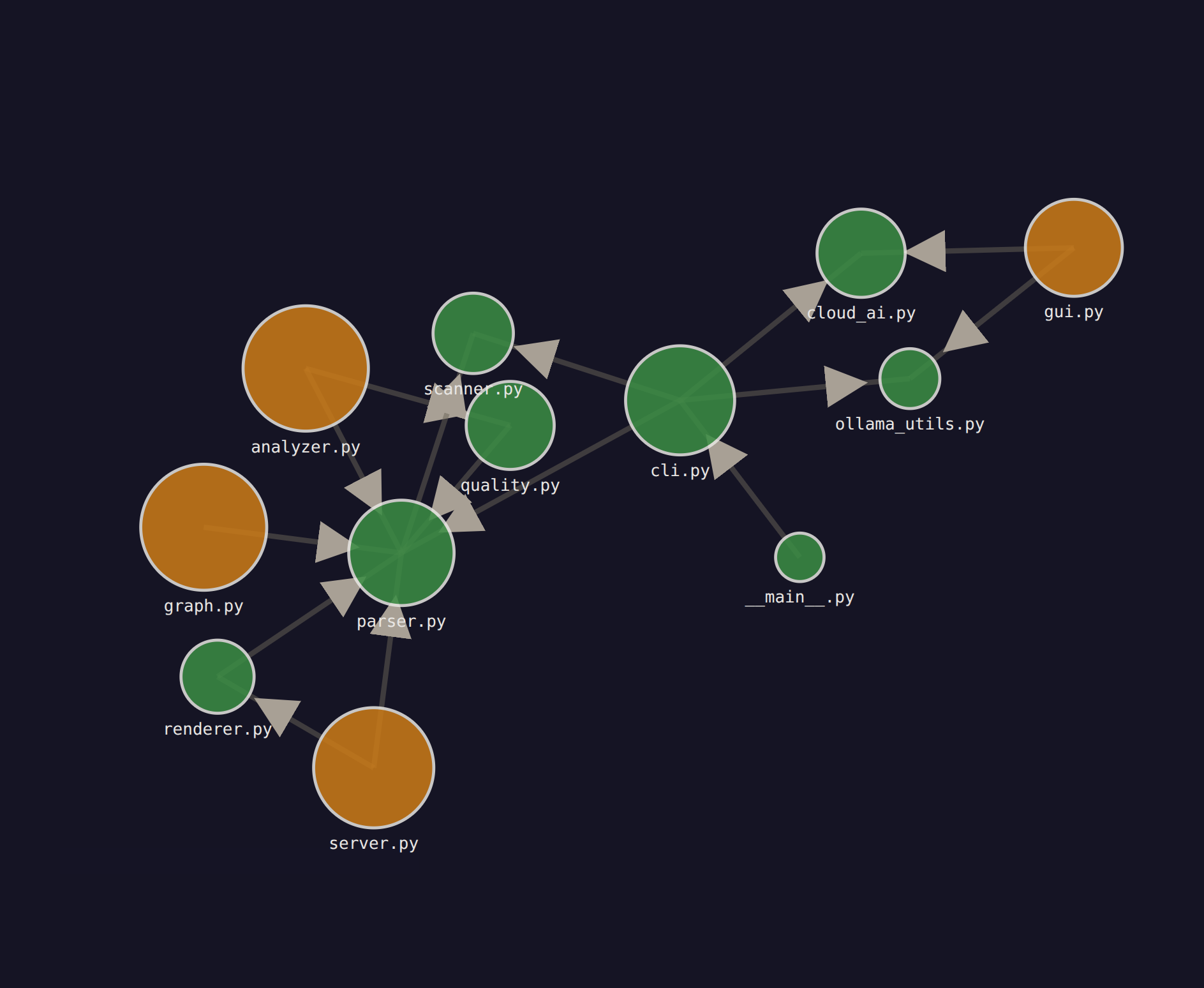
Visualize your codebase as a zoomable dependency graph. Three levels of detail:
- Level 0 — Modules: See all modules as nodes with dependency edges between them
- Level 1 — Files: Drill into a module to see its files and their internal + external dependencies
- Level 2 — Code: Click through to the existing CodeDocent file view (functions, classes, complexity)
Export MD button at each level generates structured context you can feed to AI tools.
codedocent /path/to/code --arch # jump straight to architecture view
Or choose option 4 in the setup wizard.
Enhanced AI Summaries
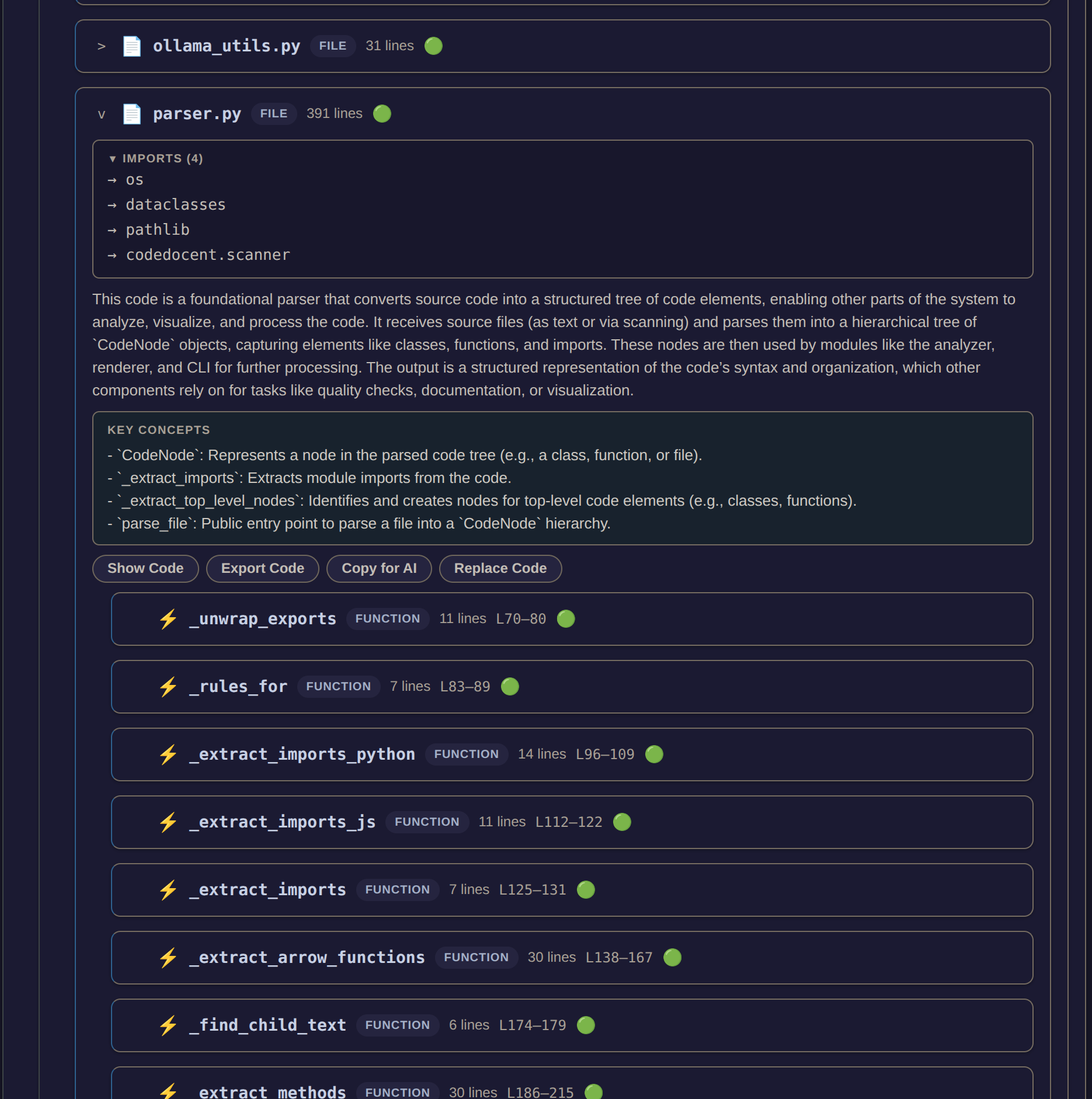
AI analysis now understands where each file sits in the system:
- Dependency context — the prompt tells the AI what this file imports and what imports it
- ROLE — what job does this code do? Foundation, orchestrator, utility, entry point?
- KEY CONCEPTS — main functions, classes, and data structures with one-line descriptions
- Better prompts — explains code in terms of data flow and system role, not just syntax
Who this is for
- Developers onboarding onto an unfamiliar codebase — get oriented in minutes instead of days
- Non-programmers (managers, designers, PMs) who need to understand what code does without reading it
- Solo developers inheriting legacy code — map out the structure before making changes
- Code reviewers who want a high-level overview before diving into details
- Security reviewers who need a structural map of an application
- Students learning to read and navigate real-world codebases
What you see
Nested, color-coded blocks representing directories, files, classes, and functions — the entire structure of a codebase laid out visually. Each block shows a plain English summary, key concepts, pseudocode, and quality warnings. Click any block to drill down; breadcrumbs navigate you back up. You can export code from any block or paste replacement code back into the source file.
In architecture mode, a D3.js force-directed graph shows modules and files as nodes with directed dependency edges. Click any node to drill deeper.
Install
pip install codedocent
Requires Python 3.10+. Cloud AI needs an API key set in an env var (e.g. OPENAI_API_KEY). Local AI needs Ollama running. --no-ai skips AI entirely.
Quick start
codedocent                         # setup wizard — walks you through everything
codedocent /path/to/code           # interactive mode (recommended)
codedocent /path/to/code --arch    # architecture mode — dependency graph
codedocent /path/to/code --full    # full analysis, static HTML output
codedocent --gui                   # graphical launcher
codedocent /path/to/code --cloud openai    # use OpenAI
codedocent /path/to/code --cloud groq      # use Groq
codedocent /path/to/code --cloud custom --endpoint https://my-llm/v1/chat/completions
GUI launcher
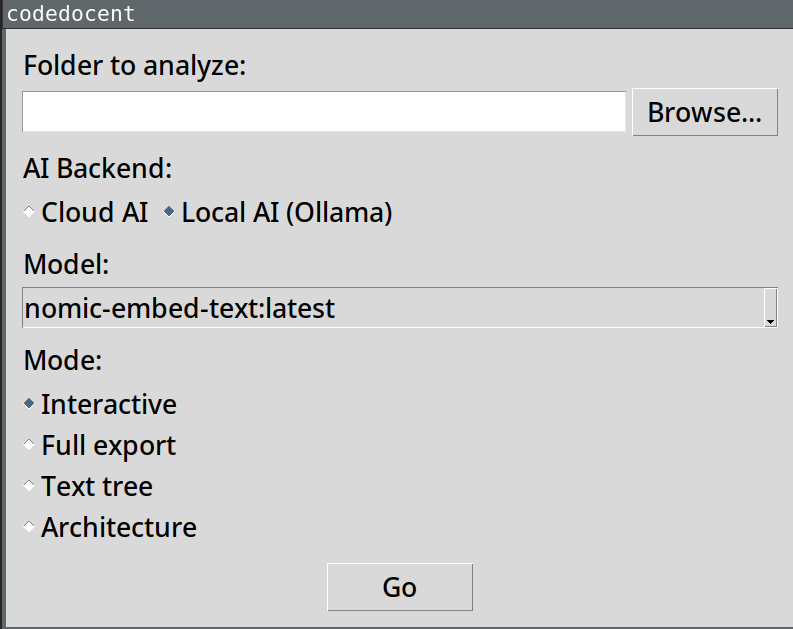
If you prefer clicking over typing, codedocent --gui opens a graphical launcher. Pick a folder, choose your AI backend (cloud or local Ollama), select a model, and choose a mode — Interactive, Full export, Text tree, or Architecture. Hit Go.
codedocent --gui
How it works
Parses code structure with tree-sitter, scores quality with static analysis, and sends individual blocks to a cloud AI provider or local Ollama model for plain English summaries and pseudocode. Interactive mode analyzes on click — typically 1-2 seconds per block. Full mode analyzes everything upfront into a self-contained HTML file you can share. Architecture mode builds a dependency graph from import statements and renders it as a zoomable D3 visualization.
AI options
- Cloud AI — send code to OpenAI, OpenRouter, Groq, or any OpenAI-compatible endpoint. Fast, no local setup. Your code is sent to that service. API keys are read from env vars (
OPENAI_API_KEY,OPENROUTER_API_KEY,GROQ_API_KEY,CODEDOCENT_API_KEYfor custom endpoints). - Local AI — Ollama on your machine. Code never leaves your laptop. No API keys, no accounts.
- No AI (
--no-ai) — structure and quality scores only.
The setup wizard (codedocent with no args) walks you through choosing.
Supported languages
Full AST parsing for Python and JavaScript/TypeScript (functions, classes, methods, imports). File-level detection for 23 extensions including C, C++, Rust, Go, Java, Ruby, PHP, Swift, Kotlin, Scala, HTML, CSS, and config formats.
License
MIT
1 maintainer

Download files
Download the file for your platform. If you're not sure which to choose, learn more about installing packages.
Source Distribution
Built Distribution
Filter files by name, interpreter, ABI, and platform.
If you're not sure about the file name format, learn more about wheel file names.
Copy a direct link to the current filters
File details
Details for the file codedocent-1.0.3.tar.gz.
File metadata
- Download URL: codedocent-1.0.3.tar.gz
- Upload date:
- Size: 74.5 kB
- Tags: Source
- Uploaded using Trusted Publishing? No
- Uploaded via:
twine/6.2.0 CPython/3.12.3
File hashes
| Algorithm | Hash digest | |
|---|---|---|
| SHA256 |
a309a9262a60b17feed75bdfe44cf8c6832d25d71df6050107b78835f933a041
|
|
| MD5 |
2140ff8ae623f949eae8ec5966588ea3
|
|
| BLAKE2b-256 |
79607dec3ee07e260c5b60a72883076245c27aca261503b415575b312967a156
|
File details
Details for the file codedocent-1.0.3-py3-none-any.whl.
File metadata
- Download URL: codedocent-1.0.3-py3-none-any.whl
- Upload date:
- Size: 60.0 kB
- Tags: Python 3
- Uploaded using Trusted Publishing? No
- Uploaded via:
twine/6.2.0 CPython/3.12.3
File hashes
| Algorithm | Hash digest | |
|---|---|---|
| SHA256 |
53e1438a8ad0ddbd0b606b1d44aee3f9228db86aa72b6751c0b49be9fd44f9aa
|
|
| MD5 |
f5b419cb6a2fbda773f8502b17415eca
|
|
| BLAKE2b-256 |
31e37f024ba968be8b5c9f0ceae198baeaf77258d2e7f70691352ac25eae7c62
|














