
Code visualization for non-programmers

Project description
codedocent
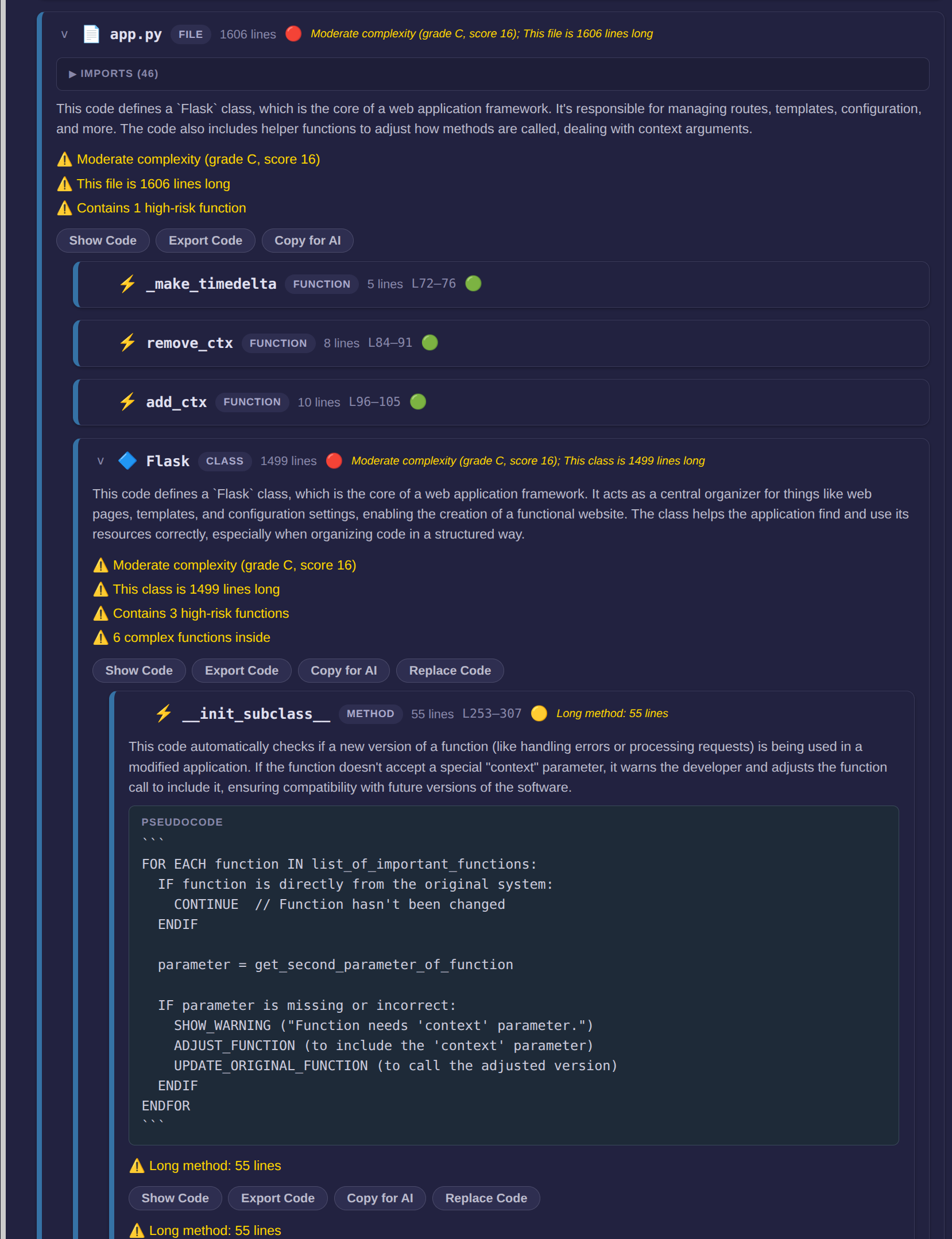
Code visualization for non-programmers.
A docent is a guide who explains things to people who aren't experts. Codedocent does that for code.
What you see
Nested, color-coded blocks representing directories, files, classes, and functions — the entire structure of a codebase laid out visually. Each block shows a plain English summary, a pseudocode translation, and quality warnings (green/yellow/red). Click any block to drill down; breadcrumbs navigate you back up. You can export code from any block or paste replacement code back into the source file. All AI runs locally through Ollama — nothing leaves your machine.
Install
pip install codedocent
Requires Python 3.10+ and Ollama running locally for AI features. Works without AI too (--no-ai).
Quick start
codedocent                         # setup wizard — walks you through everything
codedocent /path/to/code           # interactive mode (recommended)
codedocent /path/to/code --full    # full analysis, static HTML output
codedocent --gui                   # graphical launcher
How it works
Parses code structure with tree-sitter, scores quality with static analysis, and sends individual blocks to a local Ollama model for plain English summaries and pseudocode. Interactive mode analyzes on click — typically 1-2 seconds per block. Full mode analyzes everything upfront into a self-contained HTML file you can share.
Supported languages
Full AST parsing for Python and JavaScript/TypeScript (functions, classes, methods, imports). File-level detection for 23 extensions including C, C++, Rust, Go, Java, Ruby, PHP, Swift, Kotlin, Scala, HTML, CSS, and config formats.
License
MIT
Release history Release notifications | RSS feed


Download files
Download the file for your platform. If you're not sure which to choose, learn more about installing packages.
Source Distribution
Built Distribution
Filter files by name, interpreter, ABI, and platform.
If you're not sure about the file name format, learn more about wheel file names.
Copy a direct link to the current filters
File details
Details for the file codedocent-0.3.0.tar.gz.
File metadata
- Download URL: codedocent-0.3.0.tar.gz
- Upload date:
- Size: 46.7 kB
- Tags: Source
- Uploaded using Trusted Publishing? No
- Uploaded via: twine/6.2.0 CPython/3.12.3
File hashes
| Algorithm | Hash digest | |
|---|---|---|
| SHA256 |
b8f9891e90c9cacc188d5e34502cafe1578f336cbe6ac6319457125924b3992c
|
|
| MD5 |
e01cdf9e3f60dda792377e42f67a1f31
|
|
| BLAKE2b-256 |
14a1b398aae29143081259d7bad67aaa7eed220ca5ef3fb8dcca7dd84ab3b83d
|
File details
Details for the file codedocent-0.3.0-py3-none-any.whl.
File metadata
- Download URL: codedocent-0.3.0-py3-none-any.whl
- Upload date:
- Size: 39.7 kB
- Tags: Python 3
- Uploaded using Trusted Publishing? No
- Uploaded via: twine/6.2.0 CPython/3.12.3
File hashes
| Algorithm | Hash digest | |
|---|---|---|
| SHA256 |
f8b52629dac3756ad7e79e97c7e20ed6043337c9caa32d578de0a4094402b3ce
|
|
| MD5 |
da3da26d186c3cb84df8ed2c8f95f00b
|
|
| BLAKE2b-256 |
48eb7a21926033aed594a4058a6b3d34ac92dfb13d331044cb6ad505c2c39d3f
|






