
👾 Code Interpreter API




A LangChain implementation of the ChatGPT Code Interpreter. Using CodeBoxes as backend for sandboxed python code execution. CodeBox is the simplest cloud infrastructure for your LLM Apps. You can run everything local except the LLM using your own OpenAI API Key.
Features
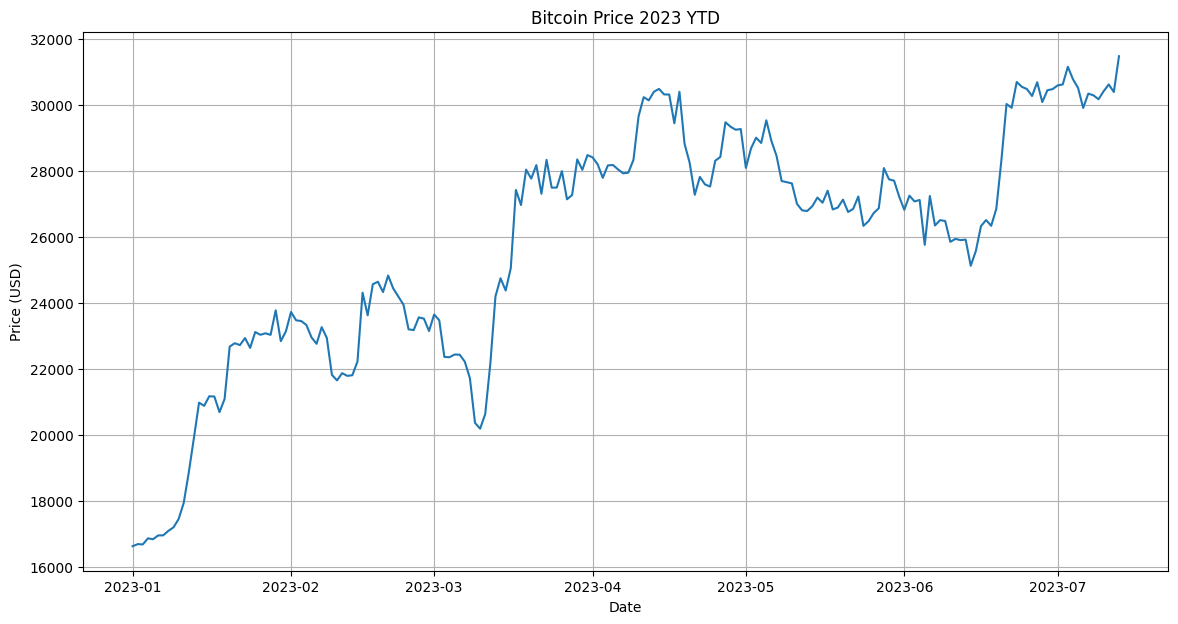
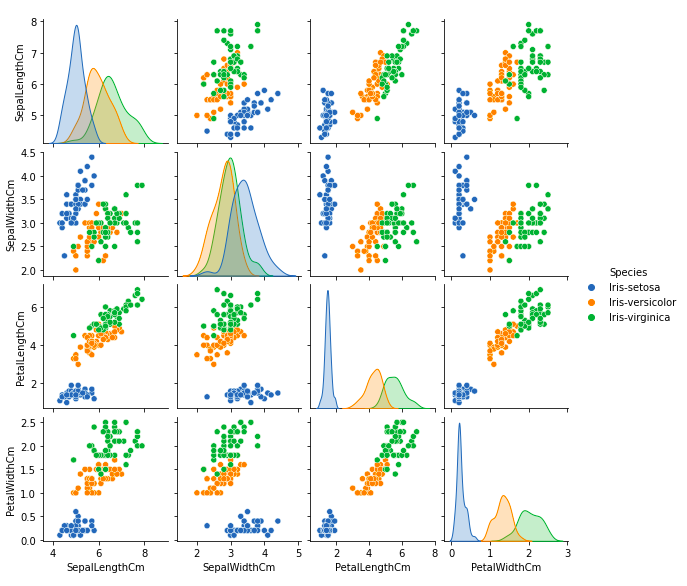
- Dataset Analysis, Stock Charting, Image Manipulation, ....
- Internet access and auto Python package installation
- Input
text + files-> Receivetext + files - Conversation Memory: respond based on previous inputs
- Run everything local except the OpenAI API (OpenOrca or others maybe soon)
- Use CodeBox API for easy scaling in production
Docs
Checkout the documentation for more information.
Installation
Get your OpenAI API Key here and install the package.
pip install "codeinterpreterapi[all]"
Everything for local experiments are installed with the all extra.
For deployments, you can use pip install codeinterpreterapi instead which does not install the additional dependencies.
Usage
To configure OpenAI and Azure OpenAI, ensure that you set the appropriate environment variables (or use a .env file):
For OpenAI, set the OPENAI_API_KEY environment variable:
export OPENAI_API_KEY=sk-**********
from codeinterpreterapi import CodeInterpreterSession, settings


# create a session and close it automatically
with CodeInterpreterSession() as session:
    # generate a response based on user input
    response = session.generate_response(
        "Plot the bitcoin chart of year 2023"
    )
    # output the response
    response.show()
Dataset Analysis
from codeinterpreterapi import CodeInterpreterSession, File

# this example uses async but normal sync like above works too
async def main():
    # context manager for auto start/stop of the session
    async with CodeInterpreterSession() as session:
        # define the user request
        user_request = "Analyze this dataset and plot something interesting about it."
        files = [
            # attach files to the request
            File.from_path("examples/assets/iris.csv"),
        ]

        # generate the response
        response = await session.generate_response(
            user_request, files=files
        )

        # output to the user
        print("AI: ", response.content)
        for file in response.files:
            # iterate over the files (display if image)
            file.show_image()


if __name__ == "__main__":
    import asyncio

    asyncio.run(main())
Production
In case you want to deploy to production, you can utilize the CodeBox API for seamless scalability.
Please contact me if you are interested in this, as it is still in the early stages of development.
Contributing
There are some remaining TODOs in the code. So, if you want to contribute, feel free to do so. You can also suggest new features. Code refactoring is also welcome. Just open an issue or pull request and I will review it.
Please also submit any bugs you find as an issue with a minimal code example or screenshot. This helps me a lot in improving the code.
Contact
You can contact me at contact@shroominic.com. But I prefer to use Twitter or Discord DMs.
Support this project
If you would like to help this project with a donation, you can click here. Thanks, this helps a lot! ❤️
1 maintainer

Metadata
1 maintainer
Release files for codeinterpreterapi 0.1.20
For a detailed explanation of source distributions (sdists) and built distributions (wheels), please see the package formats documentation.
Source distribution (sdist)
| File | Size | Uploaded | Provenance | Actions |
|---|---|---|---|---|
| codeinterpreterapi-0.1.20.tar.gz | 224.7 kB | Without provenance | Details for codeinterpreterapi-0.1.20.tar.gz |
Built distribution (wheel)
| File | Interpreter | ABI | Platform | Actions Reset |
|---|---|---|---|---|
| codeinterpreterapi-0.1.20-py3-none-any.whl | Python 3 | none | any | Details for codeinterpreterapi-0.1.20-py3-none-any.whl |
Total release size: 243.9 kB
Release files / codeinterpreterapi-0.1.20.tar.gz
| Download URL | codeinterpreterapi-0.1.20.tar.gz |
|---|---|
| Size | 224.7 kB |
| Tags | Source |
|
SHA-256 checksum How to use checksums |
8e5ebfbde218e82c4be8af94add0ed851d0eaa9f6deb71e973d89fc3af317d37
|
|
BLAKE2b-256 checksum How to use checksums |
763085b14ebfc782d88e049577fa38cf6064bf55afcea352ac921f02bb5a356b
|
| Upload date | |
|
Uploaded using Trusted Publishing? What is trusted publishing? |
No |
| Uploaded via |
twine/5.1.1 CPython/3.9.20
|
Release files / codeinterpreterapi-0.1.20-py3-none-any.whl
| Download URL | codeinterpreterapi-0.1.20-py3-none-any.whl |
|---|---|
| Size | 19.2 kB |
| Tags | Python 3 |
|
SHA-256 checksum How to use checksums |
cf6d81c4ce821ca47816b069ec8473accd8695d40197aa15b9f644c910c1e905
|
|
BLAKE2b-256 checksum How to use checksums |
794bd7f69fc48578627be15791447585176385f38ca86314ae27b1f3f31c6777
|
| Upload date | |
|
Uploaded using Trusted Publishing? What is trusted publishing? |
No |
| Uploaded via |
twine/5.1.1 CPython/3.9.20
|
Security for codeinterpreterapi 0.1.20
Provenance
Provenance describes where a file came from. On PyPI, provenance is shared via attestations, which provide a verifiable record of the build or publishing details. View details, limitations and caveats.
No provenance found
None of the files in this release were uploaded with provenance metadata.
A note on package security
PyPI is a repository for distributing packages, not a service for auditing them. While third-party security researchers and our staff do their best to detect and remove malicious packages, PyPI cannot guarantee the quality, security or suitability of any given package.
To learn more about protecting yourself from malicious actors, visit our package security documentation.














